Page 102 of 316
5-8
Using the detailed guidance
When the vehicle needs to change the driving direction or lanes, a zoomed-in map
automatically appears.0000
A
To display or hide the detailed guidance, press
or .
When the detailed guidance appears while driving, select and perform the\
desired function.
\225To check information on the zone for a turn, press Simple.
\225To check the types and locations of convenience facilities in a rest area, press
Rest Areas.
\225For information details about each zone such as intersections, interchanges, and rest
areas, press Details.
Page 110 of 316
5-16
3 Select a destination from the search result.
0000
A
To categorize the searched items, select a category.
0000
A
To sort the search results in a different order, press on the attribute to toggle between
options.
0000
A
The screen may differ depending on the vehicle model and specifications.
Option A
Option B (EV only)
4 Check the location of the destination and then press Set as Destination.
5 Select the desired route from the searched ones and press Start
Guidance.
0000
A
To change the type of nearby POIs on the map, press >
Nearby POIs >
POI
Display.
0000
A
To see nearby POIs during guidance on the map, press
>
Nearby POIs >
POI
Categories.
Page 112 of 316
5-18
2 On the map for a search, press Add Waypoint.
The selected waypoint is immediately added to the route.
3 After adding waypoints, press Calculate.
0000
A
To access the online user's manual on the Edit Route screen, press >
User's
Manual on Web (QR Code) and then scan the displayed QR code.
4 Select the updated route and then press Start Guidance.
Changing the order of waypoints
You can change the order of waypoints on the route.
1 On the Navigation Menu screen, press Edit Route.
2 To change the order of waypoints, select a waypoint and then press
or .
0000
A
To add another waypoint on the Edit Route screen, press Add waypoint.
0000
A
To see on the map, press
next to the name.
Page 113 of 316
5-19
3 After editing the route, press Calculate.
4 Select the updated route and then press Start Guidance.
Deleting a waypoint
You can delete a waypoint from the route.
1 On the Navigation Menu screen, press Edit Route.
2 Select a waypoint to delete from the route and then press .
3 To search the route again after removing the waypoint, press Calculate.
4 Select the updated route and then press Start Guidance.
Changing the route search criteria
You can change the route search criteria to resume routing.
1 On the Navigation Menu screen, press Route Options.
2 Select the desired route from the searched ones and press Route Avoid
Options.
Page 118 of 316
5-24
4 Press Places and enter a keyword for a search.
0000
A
You can also search for the place by using other methods. > See "Various ways to find
routes."
5 Check the location and information of the current position and then
press Done.
The place is registered as a favorite place.
Registering the current position as a favorite place
1 On the map screen, press >
Save.
2 If necessary, press Save after making changes.
The place is registered as a favorite place.
Page 120 of 316
5-26
Setting a registered favorite place as a destination
You can set any in the address book of the navigation system as a destination.
1 On the Navigation Menu screen, press Address Book.
2 Select the desired group.
3 Select the place to set as a destination.
4 Check the location of the destination and then press Set as Destination.
5 Select the desired route from the searched ones and press Start
Guidance.
Setting a frequently visited place as a destination
You can set your home, office, or other frequently visited places as a destination directly from
your favorites list once you add them.
At the bottom of the Navigation Menu screen, press a desired shortcut
button.
Route guidance immediately starts for the destination.
0000A When guidance to a destination is in progress, press Change Destination.
0000
A
Available icons and their arrangement may differ depending on the vehicle model and
specifications.
Page 121 of 316
5-27
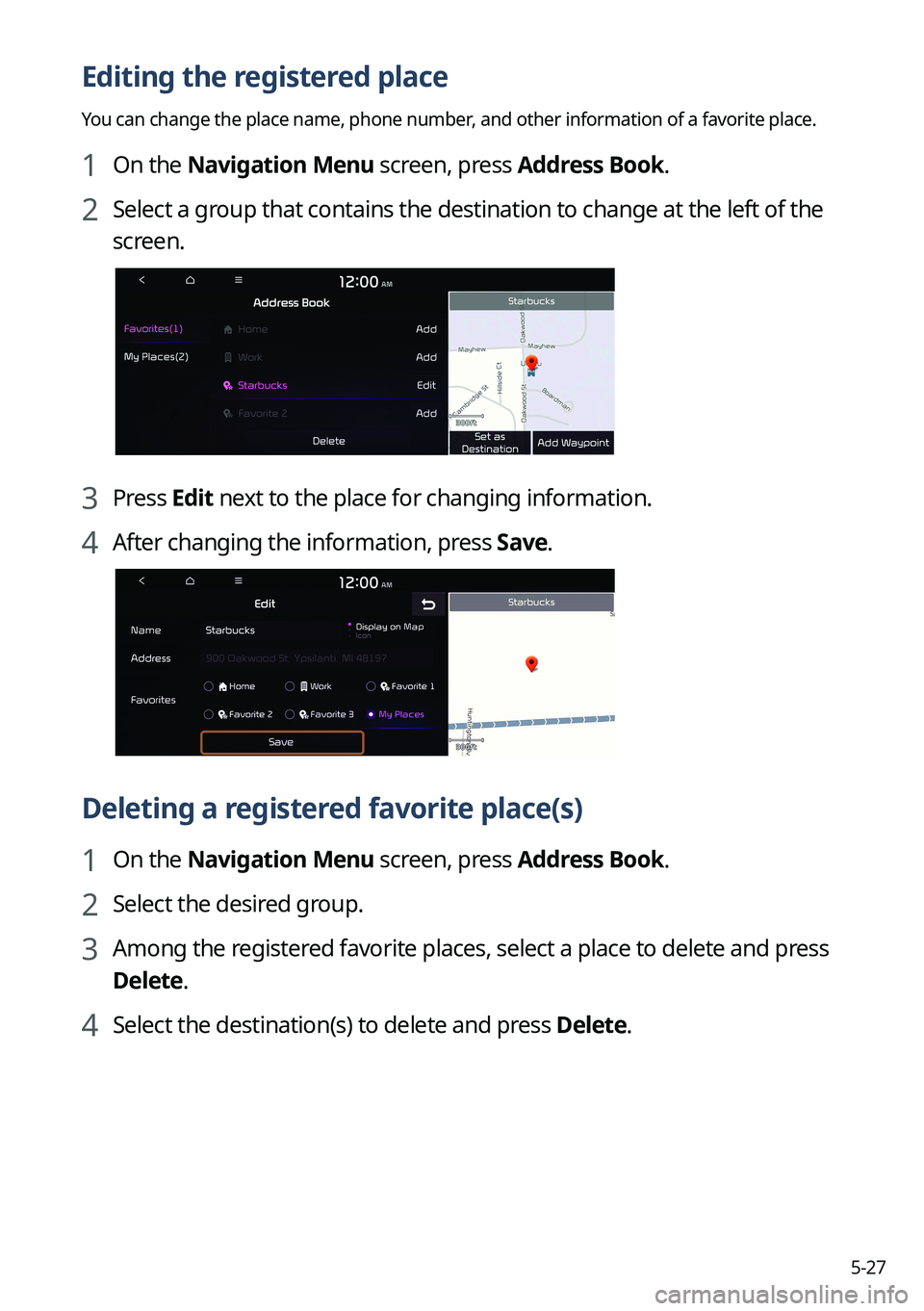
Editing the registered place
You can change the place name, phone number, and other information of a favorite place.
1 On the Navigation Menu screen, press Address Book.
2 Select a group that contains the destination to change at the left of the
screen.
3 Press Edit next to the place for changing information.
4 After changing the information, press Save.
Deleting a registered favorite place(s)
1 On the Navigation Menu screen, press Address Book.
2 Select the desired group.
3 Among the registered favorite places, select a place to delete and press
Delete.
4 Select the destination(s) to delete and press Delete.
Page 125 of 316

5-31
COPYING OR USE OF THE PRODUCT EXCEPT AS PERMITTED BY THIS EULA IS
UNAUTHORIZED AND IS COPYRIGHT INFRINGEMENT UNDER THE LAWS OF YOUR
COUNTRY. IF YOU COPY OR USE THE PRODUCT WITHOUT COMPANY'S PERMISSION,
EXCEPT AS PERMITTED BY THIS EULA, YOU ARE VIOLATING THE LAW AND LIABLE TO
COMPANY AND ITS LICENSORS FOR DAMAGES, AND YOU MAY BE SUBJECT TO CRIMINAL
PENALTIES.
THE PRODUCT MAY INCLUDE ENFORCEMENT TECHNOLOGY DESIGNED TO PREVENT (i)
UNAUTHORIZED COPYING OF THE PRODUCT ONTO PHYSICAL STORAGE MEDIA OR VIA
TRANSFER OVER THE INTERNET OR OTHER ELECTRONIC COMMUNICATION MEANS AND/OR
(ii) ILLEGAL USAGE OF THE PRODUCT OTHER THAN BY A SPECIFICALLY AHTORIZED DEVICE.
YOU AGREE THAT COMPANY MAY USE THESE MEASURES TO PROTECT COMPANY AND THE
LICENSORS AGAINST COPYRIGHT INFRINGEMENT.
Uploads. The Product may provide functionality through which you are able to upload
certain information about your use of the Product (collectively, "Uploads") to COMPANY's
servers or receive other services from COMPANY (collectively, the "Services"). If you use such
functionality, you authorize COMPANY to retain your Uploads on its servers. COMPANY will
have no obligation to provide any Services, may change the form and nature of any Services
at any time with or without notice to you, will have no liability whatso\
ever to you for any
failure of the Product or Services to transmit your Uploads to or from COMPANY's servers,
may cease providing any Services at any time with or without notice to you, and will \
have no
obligation to retain your Uploads (or any other materials you may provide to COMPANY) on
its servers or return your Uploads (or any other materials you may provide to COMPANY) to
you before deleting them from its servers.
Storage. The Product may provide functionality through which you are able to store
information (such as images) on the device on which you are using the Product. COMPANY
will have no liability whatsoever to you or any third party for any failure of the Product to
store any such information on such device.
Personal Information. By using the Product, you agree to the collection, retention and
processing of your personal data (including the location of your mobile d\
evice) by COMPANY
and to the storage and processing of such personal information on computers located
outside of the country in which you reside. Even though COMPANY has taken steps intended
to protect your personal information from being intercepted, accessed, used, or disclosed by
unauthorized persons, COMPANY cannot fully eliminate security risks associated with your
personal information and cannot guarantee that its systems will not be breached. See [*] for
additional information regarding COMPANY's use of your personal information.