2022 KIA RIO turn signal
[x] Cancel search: turn signalPage 16 of 528

Your vehicle at a glance
62
INSTRUMENT PANEL OVERVIEW
OSC011004N
1. Instrument cluster.............................4-51
2. Horn .................................................4-47
3. Driver’s front air bag .........................3-49
4. Light control/Turn signals .................4-93
5. Wiper/Washer ...................................4-99
6. Ignition switch .....................................5-7ENGINE START/STOP button ........5-10
7. Hazard warning flasher switch ................6-2
8. Infotainment system ................................ Refer to "Car Infotainment System Quick
Reference Guide".
9. Driving Assist button ........................5-84
10. Manual climate control system.....4-110 Automatic climate control system...4-122
11. USB port ......................................4-150
12. Intelligent Variable Transmission ....5-17
13. Parking brake lever ........................5-27
14. Passenger’s front air bag ...............3-49
15. Power outlet .................................4-144
16. Glove box .....................................4-140
17. Sport mode system ........................5-40
18. USB charger.................................4-145
19. Center console storage ................4-140
SC PE USA 2.qxp 8/23/2021 5:23 PM Page 6
Page 52 of 528

335
Safety features of your vehicle
How does the air bag system
operate
Air bags are activated (able toinflate if necessary) only when the
ignition switch is turned to the ON
or START position.
Air bags inflate instantly in the event of serious frontal or side col-
lision (if equipped with side air bag
or curtain air bag) in order to help
protect the occupants from serious
physical injury.
Generally, air bags are designed to
inflate based upon the severity of a
collision and its direction. These
two factors determine whether the
sensors produce an electronic
deployment/ inflation signal. Air bag deployment depends on a
number of complex factors includ-
ing vehicle speed, angles of impact
and the density and stiffness of the
vehicles or objects which your
vehicle hits in the collision. Though,
factors are not limited to those
mentioned above. Airbags deploy
depending on the severity and
angle of the impact.
Airbags do not deploy in every
impact situation.
The front air bags will completely inflate and deflate in an instant.
It is virtually impossible for you to
see the air bags inflate during an
accident. It is much more likely that
you will simply see the deflated air
bags hanging out of their storage
compartments after the collision. In addition to inflating in certain
side collisions, vehicles equipped
with a rollover sensor, side and
curtain air bags will inflate if the
sensing system detects a rollover.
When a rollover is detected, side and
curtain air bags will remain inflated
longer to help provide protection
from ejection, especially when used
in conjunction with the seat belts.
In order to help provide protection in a severe collision, the air bags
must inflate rapidly. The speed of
air bag inflation is a consequence
of the extremely short time in
which a collision occurs and the
need to get the air bag between
the occupant and the vehicle struc-
tures before the occupant impacts
those structures. This speed of
inflation reduces the risk of serious
or life-threatening injuries in a
severe collision and is thus a nec-
essary part of air bag design.
SC PE USA 3.QXP 8/23/2021 5:38 PM Page 35
Page 81 of 528
Instrument cluster . . . . . . . . . . . . . . . . . . . . . . . . . 4-51
• Instrument Cluster Control . . . . . . . . . . . . . . . . . . . . 4-52
• LCD Display Control . . . . . . . . . . . . . . . . . . . . . . . . . 4-52
• Gauges . . . . . . . . . . . . . . . . . . . . . . . . . . . . . . . . . . . . \
. 4-53
• Transmission Shift Indicator . . . . . . . . . . . . . . . . . . . 4-57
Trip computer . . . . . . . . . . . . . . . . . . . . . . . . . . . . . 4-58
• Trip information (Trip computer) . . . . . . . . . . . . . . . 4-58
• Service Mode (For type A cluster) . . . . . . . . . . . . . . . 4-63
LCD display (For Type B cluster) . . . . . . . . . . . . 4-64
• LCD Display Mode . . . . . . . . . . . . . . . . . . . . . . . . . . . 4-64
• Driving Assist mode. . . . . . . . . . . . . . . . . . . . . . . . . . . 4-65
• User Settings Mode (For type B cluster) . . . . . . . . . 4-66
• Warning messages (For type B cluster) . . . . . . . . . . 4-74
Warning and indicator lights . . . . . . . . . . . . . . . . 4-78
• Warning lights . . . . . . . . . . . . . . . . . . . . . . . . . . . . . . . 4-78
• Indicator Lights . . . . . . . . . . . . . . . . . . . . . . . . . . . . . . 4-86
Rear View Monitor (RVM) . . . . . . . . . . . . . . . . . . 4-90
• Rear View Monitor malfunction and limitations . . . 4-90
Lighting . . . . . . . . . . . . . . . . . . . . . . . . . . . . . . . . . . 4-92\
• Battery saver function. . . . . . . . . . . . . . . . . . . . . . . . . 4-92
• Headlight escort function . . . . . . . . . . . . . . . . . . . . . . 4-92
• Headlight welcome function . . . . . . . . . . . . . . . . . . . . 4-92
• Lighting control . . . . . . . . . . . . . . . . . . . . . . . . . . . . . . 4-93
• High beam operation. . . . . . . . . . . . . . . . . . . . . . . . . . 4-95
• High Beam Assist (HBA) . . . . . . . . . . . . . . . . . . . . . . 4-96• Turn signals and lane change signals . . . . . . . . . . . . 4-97
• Front fog light . . . . . . . . . . . . . . . . . . . . . . . . . . . . . . . 4-98
Wipers and washers . . . . . . . . . . . . . . . . . . . . . . . . 4-99
• Windshield wipers . . . . . . . . . . . . . . . . . . . . . . . . . . . 4-100
• Windshield washers (front) . . . . . . . . . . . . . . . . . . . 4-101
• Rear window wiper and washer switch (for 5 door) .
4-103
Interior light . . . . . . . . . . . . . . . . . . . . . . . . . . . . . 4-104
• Automatic turn off function . . . . . . . . . . . . . . . . . . . 4-104
• Map lamp . . . . . . . . . . . . . . . . . . . . . . . . . . . . . . . . . 4-104
• Room lamp . . . . . . . . . . . . . . . . . . . . . . . . . . . . . . . . . 4-105
• Trunk/Liftgate room lamp . . . . . . . . . . . . . . . . . . . . 4-107
• Glove box lamp . . . . . . . . . . . . . . . . . . . . . . . . . . . . . 4-107
• Vanity mirror lamp . . . . . . . . . . . . . . . . . . . . . . . . . . 4-108
Defroster . . . . . . . . . . . . . . . . . . . . . . . . . . . . . . . . 4-109
• Rear window defroster . . . . . . . . . . . . . . . . . . . . . . . 4-109
Manual climate control system . . . . . . . . . . . . . . 4-110
• Heating and air conditioning . . . . . . . . . . . . . . . . . . 4-111
• System operation . . . . . . . . . . . . . . . . . . . . . . . . . . . . 4-116
• Climate control air filter . . . . . . . . . . . . . . . . . . . . . . 4-118
• Checking the amount of air conditioner refrigerant
and compressor lubricant . . . . . . . . . . . . . . . . . . . . 4-119
• Air Conditioning refrigerant label . . . . . . . . . . . . . 4-120
• Activate upon Washer Fluid Use . . . . . . . . . . . . . . 4-121
4
SC PE USA 4.QXP 9/9/2021 6:01 PM Page 2
Page 89 of 528
Features of your vehicle
10
4
To deactivate the immobilizer
system:
Insert the ignition key into the key
cylinder and turn it to the ON position.
To activate the immobilizer sys-tem:
Turn the ignition key to the OFF posi-
tion. The immobilizer system acti-
vates automatically. Without a valid
ignition key for your vehicle, the
engine will not start.
Your Immobilizer password is a cus-
tomer unique password and should
be kept confidential. Do not leave this
number anywhere in your vehicle.
✽ ✽ NOTICE
Keep each key separately in order to
avoid a starting malfunction.
Do not put metal accessories near
the ignition switch.
Metal accessories may interrupt the
transponder signal and may prevent
the engine from being started.
If you need additional keys or lose
your keys, consult an authorized Kia
dealer. This device complies with Part 15
of the FCC rules.
Operation is subject to the following
two conditions:
1. This device may not cause harm-
ful interference, and
2. This device must accept any inter- ference received, including inter-
ference that may cause undesired
operation.
✽ ✽NOTICE
Changes or modifications not
expressly approved by the party
responsible for compliance could
void the user's authority to operate
the equipment.
CAUTION - Immobilizer
alterations
Do not change, alter or adjustthe immobilizer system becauseit could cause the immobilizersystem to malfunction.
CAUTION - Immobilizer
damage
Do not expose your immobilizersystem to moisture, static elec-tricity or rough handling. Thismay damage your immobilizer.
SC PE USA 4.QXP 9/9/2021 6:01 PM Page 10
Page 147 of 528
Features of your vehicle
68
4
ItemsExplanation
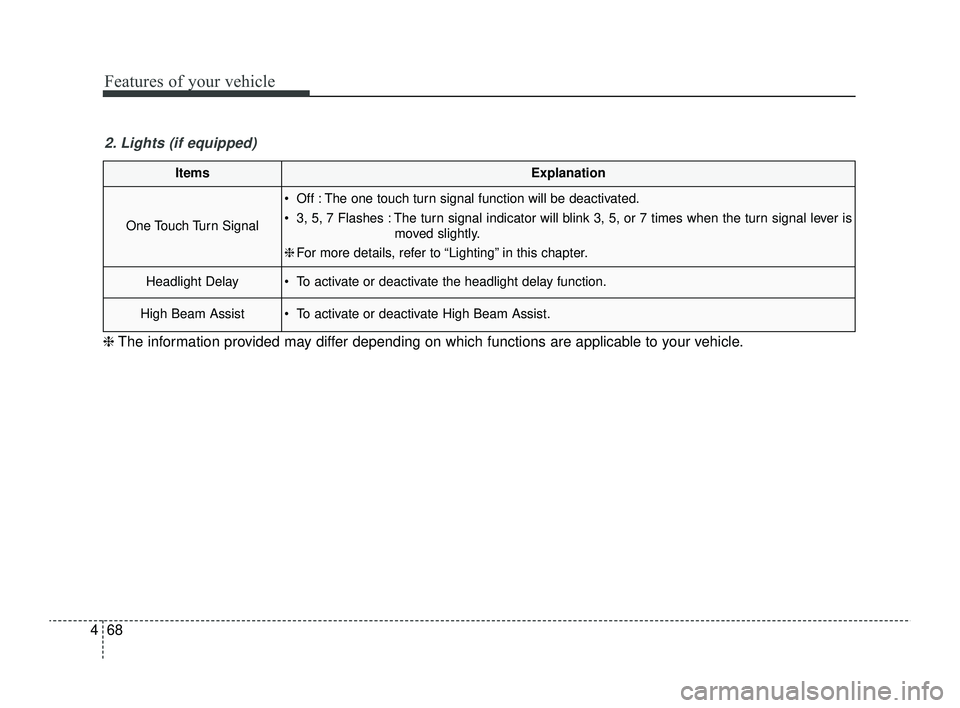
One Touch Turn Signal
Off : The one touch turn signal function will be deactivated.
3, 5, 7 Flashes : The turn signal indicator will blink 3, 5, or 7 times when the turn signal lever is
moved slightly.
❈ For more details, refer to “Lighting” in this chapter.
Headlight Delay To activate or deactivate the headlight delay function.
High Beam Assist To activate or deactivate High Beam Assist.
2. Lights (if equipped)
❈ The information provided may differ depending on which functions are applicable to your vehicle.
SC PE USA 4.QXP 9/9/2021 6:05 PM Page 68
Page 167 of 528
Features of your vehicle
88
4
This indicator light illuminates for 2
seconds and goes off:
When the vehicle can not detect a
smart key which is in the vehicle
while the ENGINE START/STOP
Button is ON.
In this situation, have your vehicle
inspected by an authorized Kia
dealer.
This indicator light blinks:
When the battery of the smart key is weak.
- In this situation, you can not startthe engine. However, you can
start the engine if you press the
ENGINE START/STOP Button
with the smart key. (For more
details, refer to the “Starting the
Engine” section in Chapter 5.).
When there is a malfunction with the immobilizer system.
In this situation, have your vehicle
inspected by an authorized Kia
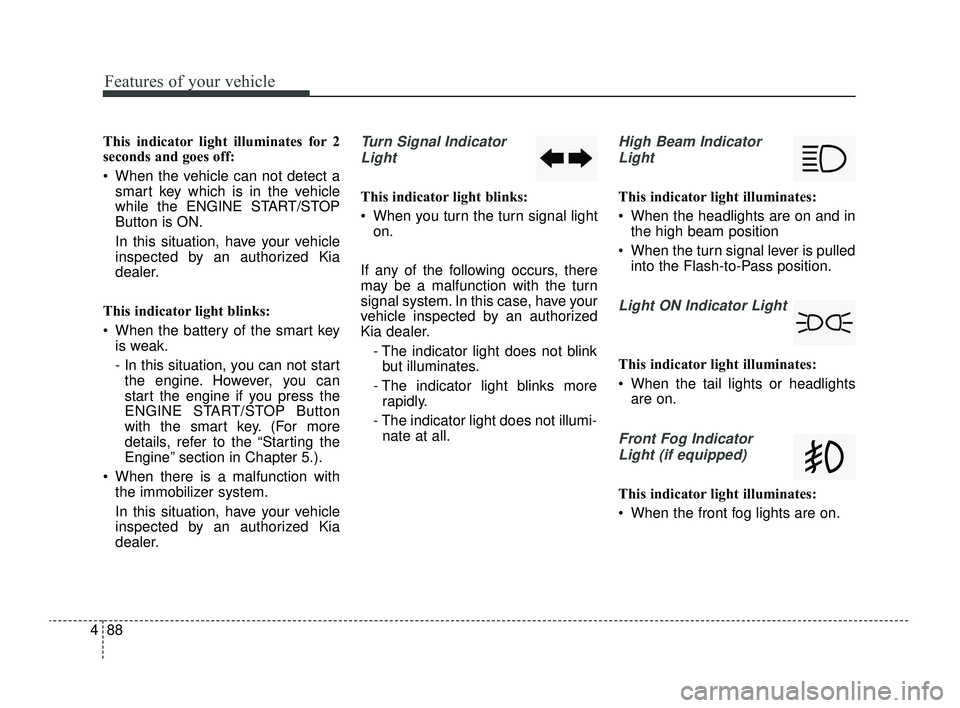
dealer.Turn Signal Indicator
Light
This indicator light blinks:
When you turn the turn signal light on.
If any of the following occurs, there
may be a malfunction with the turn
signal system. In this case, have your
vehicle inspected by an authorized
Kia dealer. - The indicator light does not blinkbut illuminates.
- The indicator light blinks more rapidly.
- The indicator light does not illumi- nate at all.
High Beam Indicator
Light
This indicator light illuminates:
When the headlights are on and in the high beam position
When the turn signal lever is pulled into the Flash-to-Pass position.
Light ON Indicator Light
This indicator light illuminates:
When the tail lights or headlightsare on.
Front Fog Indicator
Light (if equipped)
This indicator light illuminates:
When the front fog lights are on.
SC PE USA 4.QXP 9/9/2021 6:05 PM Page 88
Page 176 of 528
497
Features of your vehicle
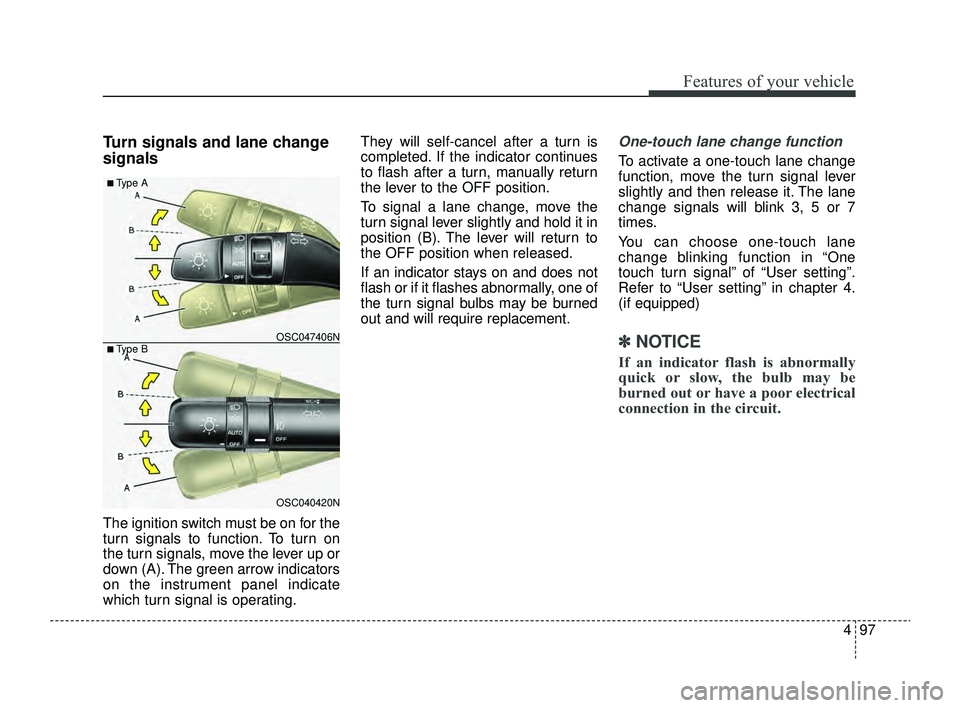
Turn signals and lane change
signals
The ignition switch must be on for the
turn signals to function. To turn on
the turn signals, move the lever up or
down (A). The green arrow indicators
on the instrument panel indicate
which turn signal is operating.They will self-cancel after a turn is
completed. If the indicator continues
to flash after a turn, manually return
the lever to the OFF position.
To signal a lane change, move the
turn signal lever slightly and hold it in
position (B). The lever will return to
the OFF position when released.
If an indicator stays on and does not
flash or if it flashes abnormally, one of
the turn signal bulbs may be burned
out and will require replacement.
One-touch lane change function
To activate a one-touch lane change
function, move the turn signal lever
slightly and then release it. The lane
change signals will blink 3, 5 or 7
times.
You can choose one-touch lane
change blinking function in “One
touch turn signal” of “User setting”.
Refer to “User setting” in chapter 4.
(if equipped)
✽ ✽
NOTICE
If an indicator flash is abnormally
quick or slow, the bulb may be
burned out or have a poor electrical
connection in the circuit.
OSC040420N
OSC047406N
■ Type A
■ Type B
SC PE USA 4.QXP 9/9/2021 6:05 PM Page 97
Page 292 of 528

Driving your vehicle
58
5
Lane Keeping Assist is designed to
help detect the lane markers while
driving over a certain speed. Lane
Keeping Assist will warn the driver if
the vehicle leaves the lane without
using the turn signal, or will automat-
ically assist the driver's steering to
help prevent the vehicle from depart-
ing the lane.Detecting sensor
The front view camera is used as a
detecting sensor to detect lane
markings.
Refer to the picture above for the
detailed location of the detecting
sensor.
LANE KEEPING ASSIST (LKA) (IF EQUIPPED)
OSC051301N
■ Front view cameraCAUTION
For more details on the precau-
tions of the front view camera,refer to "Forward Collision-Avoidance Assist (FCA) (ifequipped)" in chapter 5.
WARNING
Lane Keeping Assist is a sup-
plemental function and is not a
substitute for safe driving prac-
tices. It is the responsibility of
the driver to always pay atten-
tion and drive safely.
SC PE USA 5.QXP 9/9/2021 6:19 PM Page 58