2022 KIA RIO Chapter 7
[x] Cancel search: Chapter 7Page 212 of 528
4133
Features of your vehicle
The air conditioning system should
be serviced by an authorized Kia
dealer.
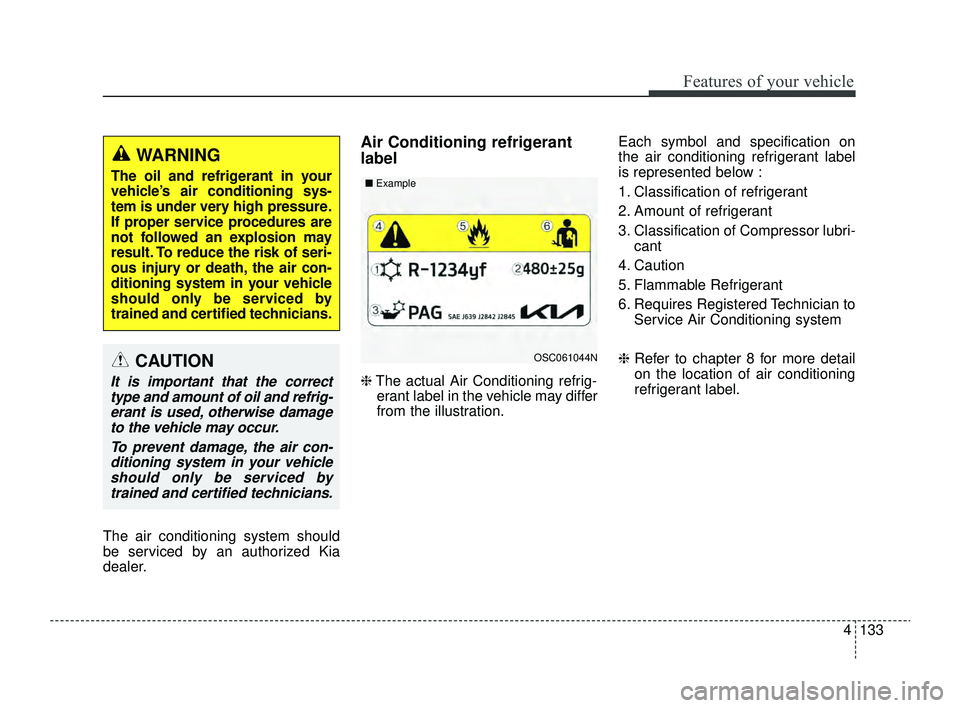
Air Conditioning refrigerant
label
❈The actual Air Conditioning refrig-
erant label in the vehicle may differ
from the illustration. Each symbol and specification on
the air conditioning refrigerant label
is represented below :
1. Classification of refrigerant
2. Amount of refrigerant
3. Classification of Compressor lubri-
cant
4. Caution
5. Flammable Refrigerant
6. Requires Registered Technician to Service Air Conditioning system
❈ Refer to chapter 8 for more detail
on the location of air conditioning
refrigerant label.
OSC061044N
■
ExampleCAUTION
It is important that the correct
type and amount of oil and refrig-erant is used, otherwise damageto the vehicle may occur.
To prevent damage, the air con-ditioning system in your vehicleshould only be serviced bytrained and certified technicians.
WARNING
The oil and refrigerant in your
vehicle’s air conditioning sys-
tem is under very high pressure.
If proper service procedures are
not followed an explosion may
result. To reduce the risk of seri-
ous injury or death, the air con-
ditioning system in your vehicle
should only be serviced by
trained and certified technicians.
SC PE USA 4.QXP 9/9/2021 6:08 PM Page 133
Page 239 of 528

55
Driving your vehicle
Before entering vehicle
• Be sure that all windows, outsidemirror(s), and outside lights are
clean.
Check the condition of the tires.
Check under the vehicle for any sign of leaks.
Be sure there are no obstacles behind you if you intend to back up.
Necessary inspections
Fluid levels, such as engine oil,
engine coolant, brake fluid, and
washer fluid should be checked on a
regular basis, with the exact interval
depending on the fluid. Further
details are provided in chapter 7,
“Maintenance”.
Before starting
Close and lock all doors.
Position the seat so that all con-trols are easily reached.
Buckle your seat belt.
Adjust the inside and outside rearview mirrors.
Be sure that all lights work.
Check all gauges.
Check the operation of warning lights when the ignition switch or
ENGINE START/STOP button is
turned to the ON position.
Release the parking brake and make sure the brake warning light
goes off.
For safe operation, be sure you are
familiar with your vehicle and its
equipment.
BEFORE DRIVING
WARNING- Distracted driving
Focus on the road while driving.
The driver's primary responsi-
bility is in the safe and legal
operation of the vehicle. Use of
any hand held devices, other
equipment or vehicle systems
that distract the driver should
not be used during vehicle
operation.
SC PE USA 5.QXP 9/9/2021 6:17 PM Page 5
Page 253 of 528
519
Driving your vehicle
R (Reverse)
Use this position to drive the vehicle
backward.
N (Neutral)
The wheels and transmission are not
engaged. The vehicle will roll freely
even on the slightest incline unless
the parking brake or service brakes
are applied.-Parking in N (Neutral) gear
Follow the steps below when parking
if you want the vehicle to move when
pushed.
1.After parking your vehicle, step on
the brake pedal and move the shift
lever to “P” with the ignition switch or
ENGINE START/STOP button in
“ON” or while the engine is running.
2.If the parking brake is applied unlock the parking brake.
3.While pressing the brake pedal, turn the ignition switch or ENGINE
START/STOP button “OFF”.
- For smart key equipped vehicles,the ignition switch or ENGINE
START/STOP button can be
moved to “OFF” only when the
shift lever is in “P”.
4.Change the gear shift lever to “N” (Neutral) while pressing the brake
pedal and pushing “SHIFT LOCK
RELEASE” button or inserting, a
tool (e.g. flathead screw-driver) into
the “SHIFT LOCK RELEASE”
access hole at the same time. Then,
the vehicle will move when external
force is applied.
CAUTION
Always come to a complete stopbefore shifting into or out of R(Reverse); you may damage thetransmission if you shift into Rwhile the vehicle is in motion,except as explained in “Rockingthe vehicle” in this chapter.
WARNING
Do not drive with the shift lever
in N (Neutral).
The engine brake may not work,
which may lead to an accident.
WARNING
With the exception of parking in neutral gear, always park
the vehicle in “P” (Park) for
safety and engage the parking
brake.
Before parking in “N” (Neutral) gear, first make sure the park-
ing ground is level and flat. Do
not park in “N” gear on any
slopes or gradients.
If parked and left in “N”, the
vehicle may move and cause
serious damage and injury.
SC PE USA 5.QXP 9/9/2021 6:17 PM Page 19
Page 292 of 528

Driving your vehicle
58
5
Lane Keeping Assist is designed to
help detect the lane markers while
driving over a certain speed. Lane
Keeping Assist will warn the driver if
the vehicle leaves the lane without
using the turn signal, or will automat-
ically assist the driver's steering to
help prevent the vehicle from depart-
ing the lane.Detecting sensor
The front view camera is used as a
detecting sensor to detect lane
markings.
Refer to the picture above for the
detailed location of the detecting
sensor.
LANE KEEPING ASSIST (LKA) (IF EQUIPPED)
OSC051301N
■ Front view cameraCAUTION
For more details on the precau-
tions of the front view camera,refer to "Forward Collision-Avoidance Assist (FCA) (ifequipped)" in chapter 5.
WARNING
Lane Keeping Assist is a sup-
plemental function and is not a
substitute for safe driving prac-
tices. It is the responsibility of
the driver to always pay atten-
tion and drive safely.
SC PE USA 5.QXP 9/9/2021 6:19 PM Page 58
Page 296 of 528
Driving your vehicle
62
5
✽ ✽
NOTICE
• For more details on setting the
functions, refer to "LCD Display
Mode" in chapter 4.
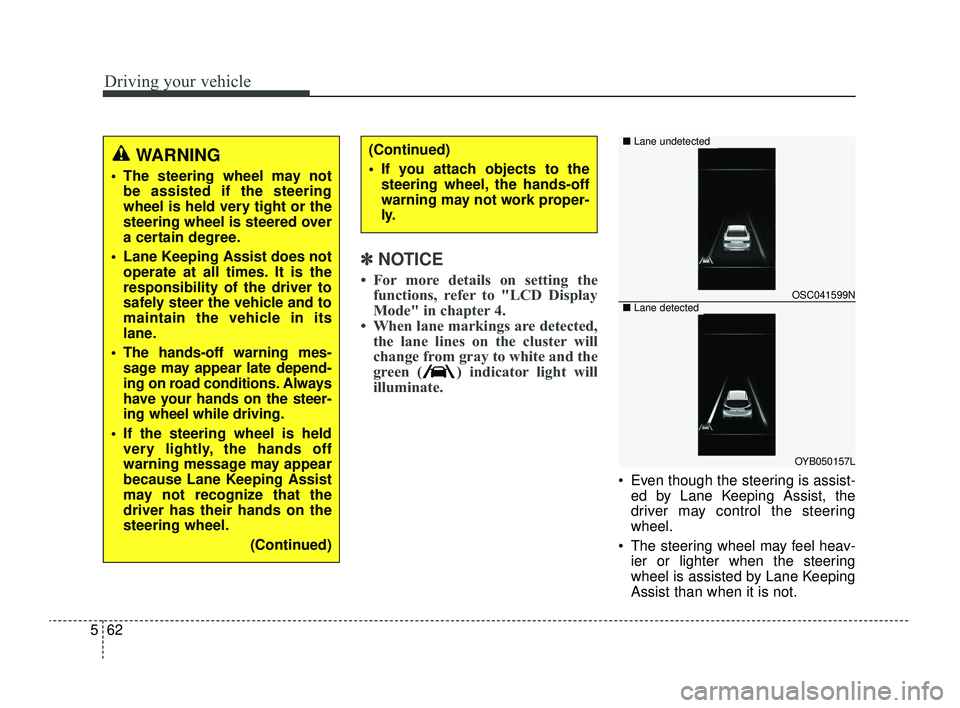
• When lane markings are detected, the lane lines on the cluster will
change from gray to white and the
green ( ) indicator light will
illuminate.
Even though the steering is assist-
ed by Lane Keeping Assist, the
driver may control the steering
wheel.
The steering wheel may feel heav- ier or lighter when the steering
wheel is assisted by Lane Keeping
Assist than when it is not.
WARNING
The steering wheel may notbe assisted if the steering
wheel is held very tight or the
steering wheel is steered over
a certain degree.
Lane Keeping Assist does not operate at all times. It is the
responsibility of the driver to
safely steer the vehicle and to
maintain the vehicle in its
lane.
The hands-off warning mes- sage may appear late depend-
ing on road conditions. Always
have your hands on the steer-
ing wheel while driving.
If the steering wheel is held very lightly, the hands off
warning message may appear
because Lane Keeping Assist
may not recognize that the
driver has their hands on the
steering wheel.
(Continued)
(Continued)
If you attach objects to thesteering wheel, the hands-off
warning may not work proper-
ly.
OSC041599N
OYB050157L
■ Lane undetected
■Lane detected
SC PE USA 5.QXP 9/9/2021 6:19 PM Page 62
Page 297 of 528
563
Driving your vehicle
Lane Keeping Assist malfunc-
tion and limitations
Lane Keeping Assist malfunction
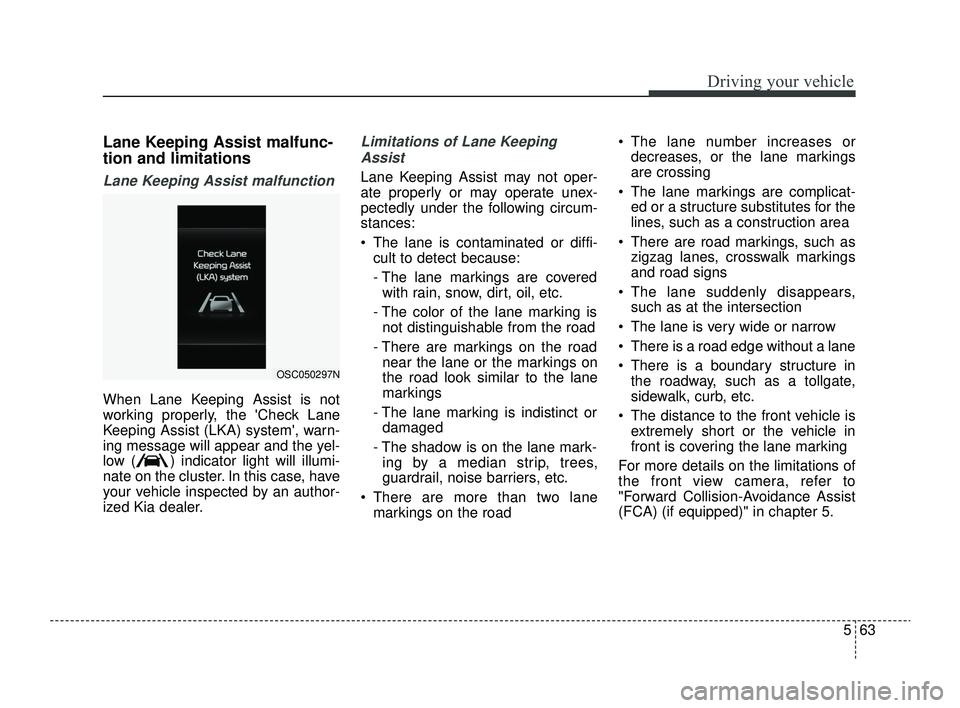
When Lane Keeping Assist is not
working properly, the 'Check Lane
Keeping Assist (LKA) system', warn-
ing message will appear and the yel-
low ( ) indicator light will illumi-
nate on the cluster. In this case, have
your vehicle inspected by an author-
ized Kia dealer.
Limitations of Lane KeepingAssist
Lane Keeping Assist may not oper-
ate properly or may operate unex-
pectedly under the following circum-
stances:
The lane is contaminated or diffi- cult to detect because:
- The lane markings are coveredwith rain, snow, dirt, oil, etc.
- The color of the lane marking is not distinguishable from the road
- There are markings on the road near the lane or the markings on
the road look similar to the lane
markings
- The lane marking is indistinct or damaged
- The shadow is on the lane mark- ing by a median strip, trees,
guardrail, noise barriers, etc.
There are more than two lane markings on the road The lane number increases or
decreases, or the lane markings
are crossing
The lane markings are complicat- ed or a structure substitutes for the
lines, such as a construction area
There are road markings, such as zigzag lanes, crosswalk markings
and road signs
The lane suddenly disappears, such as at the intersection
The lane is very wide or narrow
There is a road edge without a lane
There is a boundary structure in the roadway, such as a tollgate,
sidewalk, curb, etc.
The distance to the front vehicle is extremely short or the vehicle in
front is covering the lane marking
For more details on the limitations of
the front view camera, refer to
"Forward Collision-Avoidance Assist
(FCA) (if equipped)" in chapter 5.
OSC050297N
SC PE USA 5.QXP 9/9/2021 6:19 PM Page 63
Page 298 of 528
Driving your vehicle
64
5
WARNING
Take the following precautions
when using Lane Keeping
Assist:
The driver should hold the
responsibility to safely drive
and control the vehicle. Do not
solely rely on Lane Keeping
Assist or drive dangerously.
The operation of Lane Keeping Assist can be can-
celled or not work properly
depending on road conditions
and surroundings. Always be
cautious while driving.
Refer to "Limitations of Lane Keeping Assist" in chapter 5,
if the lane is not detected
properly.
When you are towing a trailer or another vehicle, we recom-
mend that Lane Keeping
Assist is turned off due to
safety reasons.
(Continued)
(Continued)
If the vehicle is driven at highspeed, the steering wheel will
not be controlled. The driver
must always follow the speed
limit when using Lane Keeping
Assist.
If any other function's warn- ing message is displayed or
audible warning is generated,
Lane Keeping Assist warning
message may not be dis-
played and audible warning
may not be generated.
You may not hear the warning sound of Lane Keeping Assist
if the surrounding is noisy.
If you attach objects to the steering wheel, steering may
not be assisted properly.
Lane Keeping Assist may not operate for 15 seconds after
the vehicle is started, or the
front view camera is initial-
ized.
Lane Keeping Assist will not operate when:
(Continued)(Continued)- The turn signal or hazardwarning flasher is turned on
- The vehicle is not driven in the center of the lane when
Lane Keeping Assist is
turned on or right after
changing a lane
- ESC (Electronic Stability Control) or VSM (Vehicle
Stability Management) is
activated
- The vehicle is driven on a sharp curve
- Vehicle speed is below 35 mph (55 km/h) or above 130
mph (210 km/h)
- The vehicle makes sharp lane changes
- The vehicle is suddenly stopped
SC PE USA 5.QXP 9/9/2021 6:19 PM Page 64
Page 310 of 528
Driving your vehicle
76
5
Driver Attention Warning set-
tings
Setting features
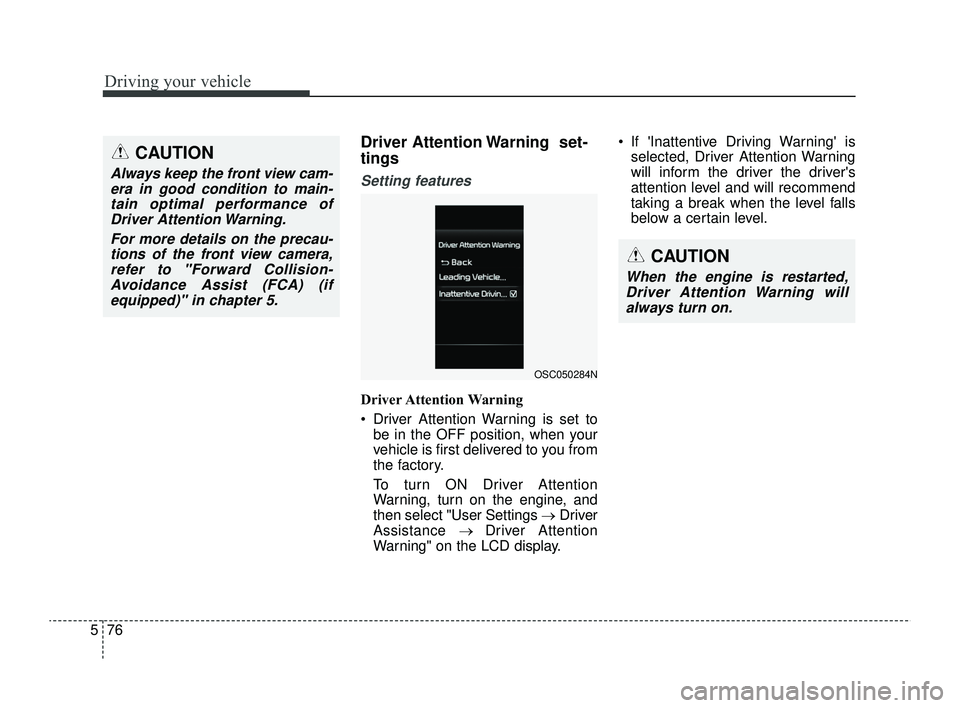
Driver Attention Warning
Driver Attention Warning is set to
be in the OFF position, when your
vehicle is first delivered to you from
the factory.
To turn ON Driver Attention
Warning, turn on the engine, and
then select "User Settings →Driver
Assistance → Driver Attention
Warning" on the LCD display. If 'Inattentive Driving Warning' is
selected, Driver Attention Warning
will inform the driver the driver's
attention level and will recommend
taking a break when the level falls
below a certain level.
CAUTION
Always keep the front view cam-era in good condition to main-tain optimal performance ofDriver Attention Warning.
For more details on the precau-tions of the front view camera,refer to "Forward Collision-Avoidance Assist (FCA) (ifequipped)" in chapter 5.
CAUTION
When the engine is restarted,Driver Attention Warning willalways turn on.
OSC050284N
SC PE USA 5.QXP 9/9/2021 6:20 PM Page 76