2022 KIA RIO lock
[x] Cancel search: lockPage 249 of 528
515
Driving your vehicle
✽ ✽
NOTICE
If the engine stalls while the vehicle
is in motion, do not attempt to move
the shift lever to the P (Park) posi-
tion. If the traffic and road condi-
tions permit, you may put the shift
lever in the N (Neutral) position
while the vehicle is still moving and
press the ENGINE START/STOP
button in an attempt to restart the
engine.
✽ ✽
NOTICE
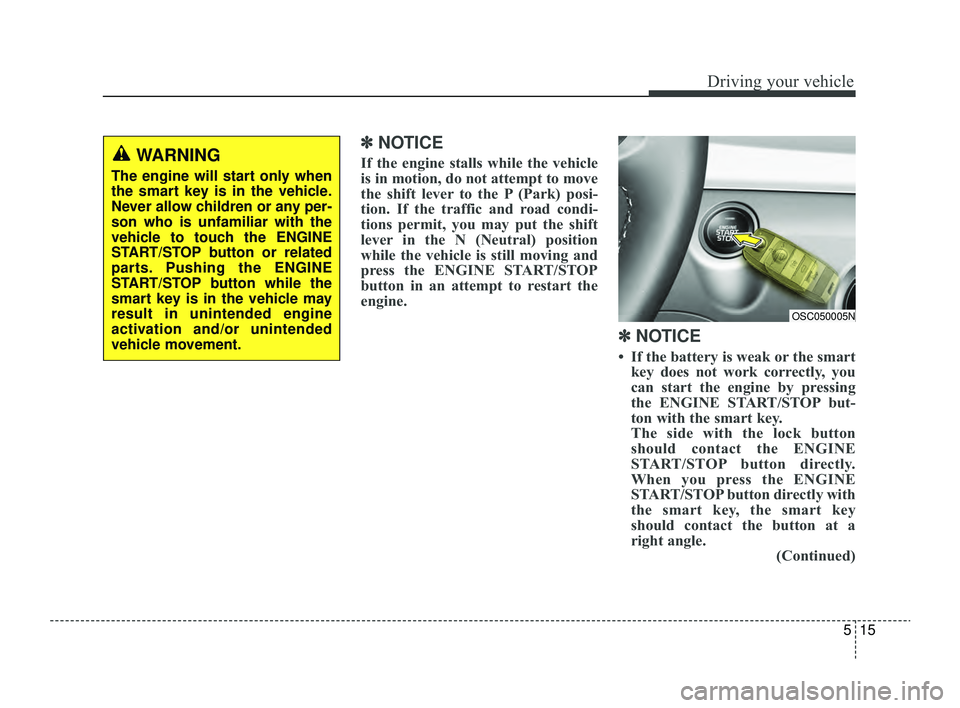
• If the battery is weak or the smart
key does not work correctly, you
can start the engine by pressing
the ENGINE START/STOP but-
ton with the smart key.
The side with the lock button
should contact the ENGINE
START/STOP button directly.
When you press the ENGINE
START/STOP button directly with
the smart key, the smart key
should contact the button at a
right angle. (Continued)
OSC050005N
WARNING
The engine will start only when
the smart key is in the vehicle.
Never allow children or any per-
son who is unfamiliar with the
vehicle to touch the ENGINE
START/STOP button or related
parts. Pushing the ENGINE
START/STOP button while the
smart key is in the vehicle may
result in unintended engine
activation and/or unintended
vehicle movement.
SC PE USA 5.QXP 9/9/2021 6:17 PM Page 15
Page 251 of 528
517
Driving your vehicle
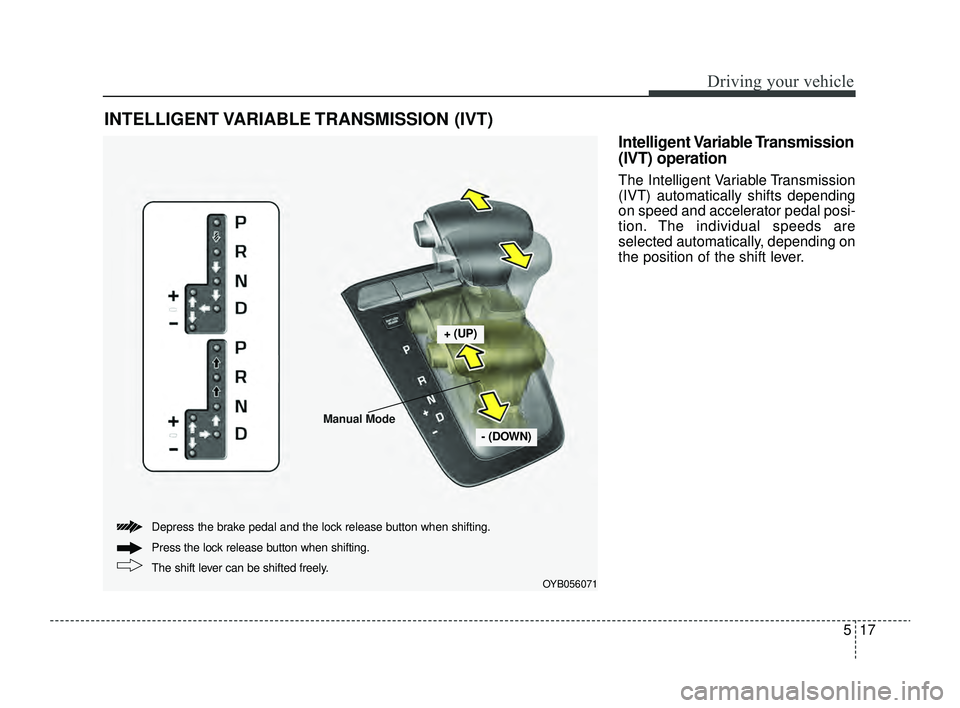
Intelligent Variable Transmission
(IVT) operation
The Intelligent Variable Transmission
(IVT) automatically shifts depending
on speed and accelerator pedal posi-
tion. The individual speeds are
selected automatically, depending on
the position of the shift lever.
INTELLIGENT VARIABLE TRANSMISSION (IVT)
OYB056071
+ (UP)
- (DOWN)
The shift lever can be shifted freely. Press the lock release button when shifting.
Depress the brake pedal and the lock release button when shifting.
Manual Mode
SC PE USA 5.QXP 9/9/2021 6:17 PM Page 17
Page 252 of 528
Driving your vehicle
18
5
CAUTION
The transmission may be dam-
aged if you shift into P (Park)while the vehicle is in motion.
For smooth operation, depress thebrake pedal when shifting from N(Neutral) to a forward or reverse gear.
Transmission ranges
The indicator in the instrument clus-
ter displays the shift lever position
when the ignition switch or ENGINE
START/STOP button is in the ON
position.P (Park)
Always come to a complete stop
before shifting into P (Park). This
position locks the transmission and
prevents the front wheels from rotat-
ing.
WARNING
- Intelligent Variable
Transmission (IVT)
Always check the surrounding areas near your vehicle for
people, especially children,
before shifting a car into D
(Drive) or R (Reverse).
Before leaving the driver’s seat, always make sure the
shift lever is in the P (Park)
position; then set the parking
brake fully and shut the engine
off. Unexpected and sudden
vehicle movement can occur if
these precautions are not fol-
lowed in the order identified.
Do not use the engine brake (shifting from a high gear to
lower gear) rapidly on slip-
pery roads.
The vehicle may slip, causing
an accident.
CAUTION
To avoid damage to your transmission, do not acceler-ate the engine in R (Reverse)or any forward gear positionwith the brakes on.
When stopped on an incline, do not hold the vehicle sta-tionary with engine power.Use the service brake or theparking brake.
Do not shift from N (Neutral) or P (Park) into D (Drive), or R(Reverse) when the engine isabove idle speed.
WARNING
Shifting into P (Park) while the vehicle is in motion will cause
the drive wheels to lock which
will cause you to lose control
of the vehicle.
Do not use the P (Park) posi- tion in place of the parking
brake. Always make sure the
shift lever is latched in the P
(Park) position and set the
parking brake fully.
Never leave a child unattend- ed in a vehicle.
SC PE USA 5.QXP 9/9/2021 6:17 PM Page 18
Page 253 of 528
519
Driving your vehicle
R (Reverse)
Use this position to drive the vehicle
backward.
N (Neutral)
The wheels and transmission are not
engaged. The vehicle will roll freely
even on the slightest incline unless
the parking brake or service brakes
are applied.-Parking in N (Neutral) gear
Follow the steps below when parking
if you want the vehicle to move when
pushed.
1.After parking your vehicle, step on
the brake pedal and move the shift
lever to “P” with the ignition switch or
ENGINE START/STOP button in
“ON” or while the engine is running.
2.If the parking brake is applied unlock the parking brake.
3.While pressing the brake pedal, turn the ignition switch or ENGINE
START/STOP button “OFF”.
- For smart key equipped vehicles,the ignition switch or ENGINE
START/STOP button can be
moved to “OFF” only when the
shift lever is in “P”.
4.Change the gear shift lever to “N” (Neutral) while pressing the brake
pedal and pushing “SHIFT LOCK
RELEASE” button or inserting, a
tool (e.g. flathead screw-driver) into
the “SHIFT LOCK RELEASE”
access hole at the same time. Then,
the vehicle will move when external
force is applied.
CAUTION
Always come to a complete stopbefore shifting into or out of R(Reverse); you may damage thetransmission if you shift into Rwhile the vehicle is in motion,except as explained in “Rockingthe vehicle” in this chapter.
WARNING
Do not drive with the shift lever
in N (Neutral).
The engine brake may not work,
which may lead to an accident.
WARNING
With the exception of parking in neutral gear, always park
the vehicle in “P” (Park) for
safety and engage the parking
brake.
Before parking in “N” (Neutral) gear, first make sure the park-
ing ground is level and flat. Do
not park in “N” gear on any
slopes or gradients.
If parked and left in “N”, the
vehicle may move and cause
serious damage and injury.
SC PE USA 5.QXP 9/9/2021 6:17 PM Page 19
Page 255 of 528
521
Driving your vehicle
✽ ✽NOTICE
• In Manual Mode, the driver must
execute upshifts in accordance
with road conditions, being care-
ful to keep the engine speed below
the red zone.
• In Manual Mode, only the 8 for- ward gears can be selected. To
reverse or park the vehicle, move
the shift lever to the R (Reverse)
or P (Park) position as required.
• In Manual Mode, downshifts are made automatically when the
vehicle slows down. When the
vehicle stops, 1st gear is automati-
cally selected.
• In Manual Mode, when the engine rpm approaches the red zone, shift
points are varied to upshift auto-
matically.
• To maintain the required levels of vehicle performance and safety,
the system may not execute cer-
tain gearshifts when the shift lever
is operated. (Continued)(Continued)
• When driving on a slippery road,
push the shift lever forward into
the +(up) position. This causes the
transmission to shift into the 2nd
gear which is better for smooth
driving on a slippery road. Push
the shift lever to the -(down) side
to shift back to the 1st gear.
• When Manual Mode is activated: - The engine rpm will tend toremain raised over a certain
length of time even after releas-
ing the accelerator
- Upshifts are delayed when accel- erating
• In Manual Mode, the fuel efficien- cy may decrease.
Shift lock system
For your safety, the Intelligent
Variable Transmission (IVT) has a
shift lock system which prevents
shifting the transmission from P
(Park) into R (Reverse) unless the
brake pedal is depressed.
To shift the transmission from P
(Park) into R (Reverse):
1. Depress and hold the brake pedal.
2. Start the engine or turn the ignition
switch or ENGINE START/STOP
button to the ON position.
3. Move the shift lever.
If the brake pedal is repeatedly
depressed and released with the shift
lever in the P (Park) position, a chat-
tering noise near the shift lever may
be heard. This is a normal condition.
WARNING
Always fully depress the brake
pedal before and while shifting
out of the P (Park) position into
another position to avoid inad-
vertent motion of the vehicle,
which could injure persons in
or around the vehicle.
SC PE USA 5.QXP 9/9/2021 6:18 PM Page 21
Page 256 of 528
Driving your vehicle
22
5
Shift-lock override
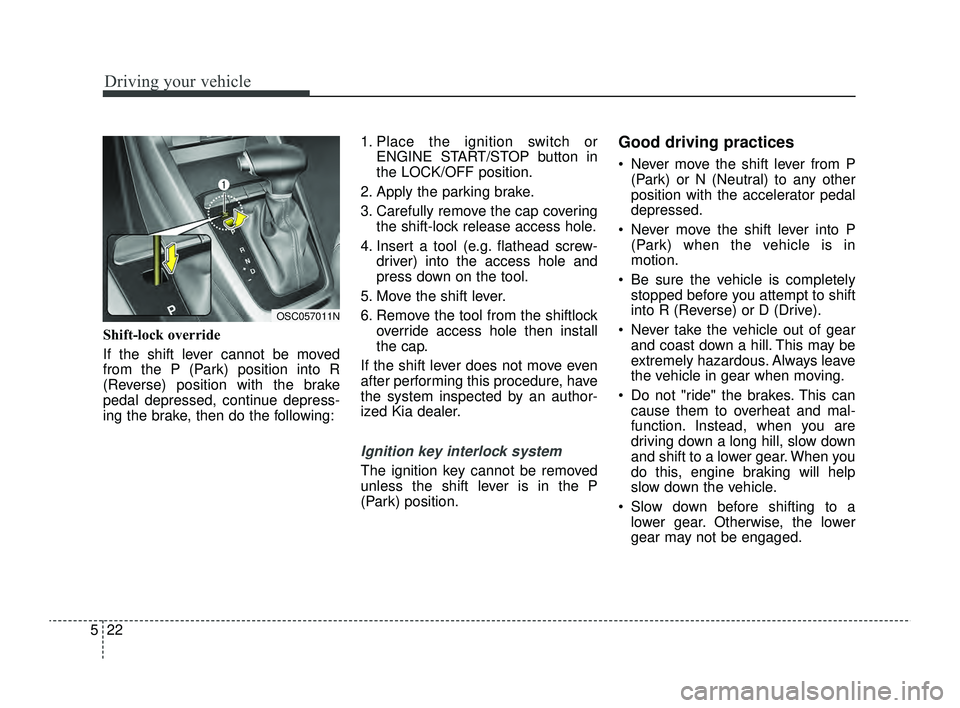
If the shift lever cannot be moved
from the P (Park) position into R
(Reverse) position with the brake
pedal depressed, continue depress-
ing the brake, then do the following: 1. Place the ignition switch or
ENGINE START/STOP button in
the LOCK/OFF position.
2. Apply the parking brake.
3. Carefully remove the cap covering the shift-lock release access hole.
4. Insert a tool (e.g. flathead screw- driver) into the access hole and
press down on the tool.
5. Move the shift lever.
6. Remove the tool from the shiftlock override access hole then install
the cap.
If the shift lever does not move even
after performing this procedure, have
the system inspected by an author-
ized Kia dealer.
Ignition key interlock system
The ignition key cannot be removed
unless the shift lever is in the P
(Park) position.
Good driving practices
Never move the shift lever from P (Park) or N (Neutral) to any other
position with the accelerator pedal
depressed.
Never move the shift lever into P (Park) when the vehicle is in
motion.
Be sure the vehicle is completely stopped before you attempt to shift
into R (Reverse) or D (Drive).
Never take the vehicle out of gear and coast down a hill. This may be
extremely hazardous. Always leave
the vehicle in gear when moving.
Do not "ride" the brakes. This can cause them to overheat and mal-
function. Instead, when you are
driving down a long hill, slow down
and shift to a lower gear. When you
do this, engine braking will help
slow down the vehicle.
Slow down before shifting to a lower gear. Otherwise, the lower
gear may not be engaged.
OSC057011N
SC PE USA 5.QXP 9/9/2021 6:18 PM Page 22
Page 264 of 528
Driving your vehicle
30
5
Anti-lock Brake System (ABS)
ABS (or ESC) will not prevent acci-
dents due to improper or dangerous
driving maneuvers. Even though
ABS (or ESC) helps improve vehicle
control during emergency braking,
always maintain a safe distance
between you and objects ahead.
Vehicle speeds should always be
reduced during extreme road condi-
tions.
The vehicle should be driven at
reduced speeds in the following cir-
cumstances:
When driving on rough, gravel or
snow-covered roads
When driving with tire chains installed
When driving on roads where the road surface is pitted or has differ-
ent surface heights.
Driving in these conditions increases
the stopping distance for your vehi-
cle. The ABS continuously senses the
speed of the wheels. If the wheels
are going to lock, the ABS system
repeatedly modulates the hydraulic
brake pressure to the wheels.
When you apply your brakes under
conditions which may lock the
wheels, you may hear a “tik-tik’’
sound from the brakes, or feel a cor-
responding sensation in the brake
pedal. This is normal and means
your ABS is active.
In order to obtain the maximum ben-
efit from your ABS in an emergency
situation, do not attempt to modulate
your brake pressure and do not try to
pump your brakes. Press your brake
pedal as hard as possible or as hard
as the situation allows the ABS to
control the force being delivered to
the brakes.
✽ ✽
NOTICE
A click sound may be heard in the
engine compartment when the vehi-
cle begins to move after the engine is
started. These conditions are normal
and indicate that the anti-lock brake
system is functioning properly.
Even with the anti-lock brake sys-
tem, your vehicle still requires suf-
ficient stopping distance. Always
maintain a safe distance from the
vehicle in front of you.
Always slow down when cornering. The anti-lock brake system cannot
prevent accidents resulting from
excessive speeds.
On loose or uneven road surfaces, operation of the anti-lock brake
system may result in a longer stop-
ping distance than for vehicles
equipped with a conventional
brake system.
SC PE USA 5.QXP 9/9/2021 6:18 PM Page 30
Page 266 of 528
Driving your vehicle
32
5
Electronic Stability Control (ESC) will
not prevent accidents. Excessive
speed in turns, abrupt maneuvers and
hydroplaning on wet surfaces can still
result in serious accidents. Only a
safe and attentive driver can prevent
accidents by avoiding maneuvers that
cause the vehicle to lose traction.
Even with ESC installed, always fol-
low all the normal precautions for driv-
ing - including driving at safe speeds
for the conditions.
The Electronic Stability Control
(ESC) system is an electronic sys-
tem designed to help the driver main-
tain vehicle control under adverse
conditions. It is not a substitute for
safe driving practices. Factors includ-
ing speed, road conditions and driv-
er steering input can all affect
whether ESC will be effective in pre-
venting a loss of control. It is still your
responsibility to drive and corner at
reasonable speeds and to leave a
sufficient margin of safety. When you apply your brakes under
conditions which may lock the
wheels, you may hear a “tik-tik’’
sound from the brakes, or feel a cor-
responding sensation in the brake
pedal. This is normal and means
your ESC is active.ESC operation
ESC ON condition
When the ignition is turnedON, ESC and ESC OFF
indicator lights illuminate
for approximately 3 sec-
onds, then ESC is turned
on.
Press the ESC OFF but- ton for at least half a sec-
ond after turning the igni-
tion ON to turn ESC off.
(ESC OFF indicator will
illuminate). To turn the
ESC on, press the ESC
OFF button (ESC OFF
indicator light will go off).
When starting the engine, you may hear a slight tick-
ing sound. This is the ESC
performing an automatic
system self-check and
does not indicate a prob-
lem.
WARNING
For maximum protection, always
wear your seat belt. No system,
no matter how advanced, can
compensate for all driver error
and/or driving conditions.
Always drive responsibly.
-
SC PE USA 5.QXP 9/9/2021 6:18 PM Page 32