2022 KIA NIRO PHEV audio
[x] Cancel search: audioPage 434 of 710

5111
Driving your vehicle
✽ ✽NOTICE
Driver Attention Warning utilizes
the front view camera sensor on the
front windshield for its operation.
To keep the front view camera
sensor in the best condition, you
should observe the followings:
- Do not disassemble camera tem-
porarily for tinted window or
attaching any types of coatings and
accessories. If you disassemble a
camera and assemble it again, take
your vehicle to an authorized Kia
dealer and have the function
checked.
- Do not locate any reflective objects (i.e. white paper, mirror)
over the dashboard. Any light
reflection may cause a mal-func-
tion of Driver Attention Warning. (Continued)(Continued)
- Pay extreme caution to keep the
front view camera out of water.
- Do not arbitrarily disassemble the camera assembly, nor apply any
impact on the camera assembly.
• Playing the vehicle audio system at high volume may offset Driver
Attention Warning warning
sounds.
For more information of front
view camera, refer to “Lane
Keeping Assist (LKA)”.CAUTION
Driver Attention Warning may
not properly operate with limit-ed alerting in the following situ-ations:
Driver Attention Warning will not operate for about 15 sec-onds when restarting theengine or initializing the frontview camera such as reboot-ing, etc.
The lane detection perform- ance is limited. (For moreinformation, refer to "LaneKeeping Assist (LKA)" in thischapter.)
The vehicle is violently driven or is abruptly turned for obsta-cle avoidance (e.g. construc-tion area, other vehicles, fallenobjects, bumpy road).
Intentionally frequent lane cut-in
(Continued)
Page 453 of 710

Driving your vehicle
130
5
Collision Warning
If there is a high risk of collision due
to sudden braking of the front vehicle
or lack of safety distance with the
vehicle ahead during Smart Cruise
Control driving, so that if the driver's
brake or steering wheel operation is
required, the Distance Step with the
vehicle ahead will blink on the cluster
and a Collision Warning will sound.
In this case, immediately reduce the
speed.
OJF058389L
CAUTION
Even if the warning message
does not appear and warningchime does not sound, alwayspay attention to driving condi-tions to prevent dangeroussituations from occurring.
Playing the vehicle audio sys- tem at high volume may causethe occupants to not hear thefunction warning sounds.
If the vehicle cannot keep the enough set distance, thewarning will sound and blinkon the cluster. If a warningsounds, check the nearby traf-fic condition and if necessary,control the speed by depress-ing the brake. Always payattention in case of danger,even if there are no warningsound.
WARNING
If the speed of the vehicle ahead is similar to or faster
than your vehicle, the function
may not warn you as you do
not maintain enough set dis-
tance. Always pay attention in
case of danger, even if there is
no warning sound.
If the speed of the vehicle ahead is too slow, the func-
tion may not warn you as you
do not maintain enough set
distance. Always pay atten-
tion in case of danger, even if
there is no warning sound.
If you set Smart Cruise Control speed and depress
the accelerator pedal, the
function may not warn you as
you do not maintain enough
set distance. Always pay
attention in case of danger,
even if there is no warning
sound.
Page 488 of 710

5165
Driving your vehicle
Warning message and func-
tion control
Rear Cross-Traffic CollisionWarning
If the vehicle detected by the sensors
approaches from the rear left/right
side of your vehicle, the warning
chime will sound, the warning light
on the outside rearview mirror will
blink and a message will appear on
the LCD display. If the rear view cam-
era function is in activation, a mes-
sage will also appear on the
‘Infortainment System’.
The warning will stop when:
- The vehicle moving at the rear left/right side of your vehicle is not
in the detection range.
- The vehicle is right behind your vehicle.
- The vehicle is not driving towards your vehicle.
- The vehicle’s approaching speed is decreased.CAUTION
When the operation condition of Rear Cross-Traffic CollisionWarning is met, the warningwill occur every time a vehicleapproaches the side or rear ofyour stopped (0 mph (0 km/h)vehicle speed) vehicle.
The function’s warning or brake may not operate properlyif the left or right of your vehi-cle's rear bumper is blocked bya vehicle or obstacle.
The driver should always use extreme caution while operat-ing the vehicle, whether or notthe warning light on the outerside view mirror illuminates orthere is a warning alarm.
Playing the vehicle audio sys- tem at high volume may pre-vent occupants from hearingthe function’s warning sounds.
If any other warning sound such as seat belt warningchime is already generated,Rear Cross-Traffic CollisionWarning warning may notsound.
ODEP050385N
ODEP050386N
■ Left
■ Right
Page 525 of 710

What to do in an emergency
66
The following items should be reset
after the battery has been discharged
or the battery has been disconnected.
Auto up/down window
Sunroof
Trip computer
Climate control system
Driver position Memory System
Audio
As explained above, if the vehicle
cannot be started after pressing the
“12V Batt Reset” switch (1) due to
over discharge, try to jump-start
(refer to Jump-starting).Charging method for 12V battery
(A) It is recommended to charge the12V battery by starting and run-
ning the vehicle (HEV Ready
Mode) for a minimum of 30 min-
utes if a 12V reset, or jump start
has been used.
(B) If you cannot start the vehicle :
After connecting the jumper cables at the recommended locations, you
should press “12V batt Reset”
switch (1) to charge the battery.
The voltage range of the charger should be 13.3~14V and its current
range should be less than 60A.
(13.8V is recommended).CAUTION
• The use of an improper charg- er with a voltage and currentrange higher than specifiedmay cause overheating anddamage to the 12V battery.
The use of an incorrect charg- er will lead to a power shut-offto save the 12V battery. Stopusing the incorrect chargeronce the power of the vehicleis shut off.
Page 605 of 710

Maintenance
42
7
When recharging the battery,
observe the following precautions:
The battery must be removed from
the vehicle and placed in an area
with good ventilation.
Do not allow cigarettes, sparks, or flame near the battery.
Watch the battery during charging, and stop or reduce the charging
rate if the battery cells begin
gassing (boiling) violently or if the
temperature of the electrolyte of
any cell exceeds 120°F (49°C).
Wear eye protection when check- ing the battery during charging.
Disconnect the battery charger in the following order.
1. Turn off the battery charger main switch.
2. Unhook the negative clamp from the negative battery terminal.
3. Unhook the positive clamp from the positive battery terminal. Before performing maintenance or
recharging the battery, turn off all
accessories and stop the engine.
The negative battery cable must be removed first and installed last
when the battery is disconnected.Reset items
The following items should be reset
after the battery has been dis-
charged or the battery has been dis-
connected.
Auto up/down window
Sunroof
Trip computer
Climate control system
Driver position memory system
Audio
Page 625 of 710

Maintenance
62
7
Fuse switch
Always set the fuse switch to the ON
position before using the vehicle.
If you move the switch to the OFF
position, some items such as audio
and digital clock must be reset and
transmitter (or smart key) may not
work properly. When the switch is
Off, the caution indicator will be dis-
played on the instrument cluster.
Always place the fuse switch in the
ON position while driving the vehicle.
If the switch is located in the “OFF”
position, a caution indicator will be
displayed in the cluster.
Engine compartment fuse
replacement
1. Turn the engine start/stop button
to the OFF position and all other
switches off.
2. Remove the fuse panel cover by pressing the tab and pulling the
cover up. When the blade type
fuse is disconnected, remove it by
using the clip designed for chang-
ing fuses located in the engine
compartment fuse box. Upon
removal, securely insert reserve
fuse of the same rating.
ODEP071018L
ODEP079021
CAUTION - Fuse Panel
Covers
Set all switches to ON beforedriving.
If the vehicle is going to be unused for over 1 month, setall switches to OFF to preventthe batteries from draining.
The contact points of the switches may wear out withexcessive use. Please refrainfrom excessive use of theswitches (except for long-termparking for over 1 month).
Page 630 of 710

767
Maintenance
Instrument panel (Driver’s side fuse panel) (Hybrid)
Fuse NameFuse ratingCircuit Protected
MODULE 510A
Electro Chromic Mirror, Audio/Video & Navigation Head Unit, Audio, Shift Lever Indicator, Air Conditioner
Control Module, Rear Seat Warmer Control Module, Front Air Ventilation Seat Control Module, Front Seat
Warmer Control Module, Head Lamp Leveling Device Actuator LH/RH, Crash Pad Switch, AMP (Amplifier),
Keyboard, OBD
MODULE 410AFront View Camera, Crash Pad Switch, Rear Corner Radar LH/RH, EPB, VESS
INTERIORLAMP10AFront Vanity Lamp LH/RH, Room Lamp, Overhead Console Lamp, Luggage Lamp, Mood Lamp, Wireless
Charger, Rain sensor, Driver warning switch
A/BAG15APassenger Occupant Detection Sensor, ACU
IG 125AEngine Room Junction Block (Fuse - DCT4, HPCU2, ACTIVE HYDRAULIC BOOSTER3, ECU3)
CLUSTER10AInstrument Cluster
MODULE 310ABCM (Body Control Module), DCT (Dual Clutch Transmission) Shift Lever, Stop Lamp Switch, Driver Door
Module, Passenger Door Module
MEMORY 27.5AActive Air Flap Unit, VESS
MODULE 810AActive Air Flap Unit, Electric Water Pump (Engine), Engine Room Junction Block (Battery C/Fan Relay),
BMS (Battery Management System) Control Module
A/BAG IND7.5AAir Conditioner Control Module, Instrument Cluster
START7.5A[With Smart Key/With Immobilizer] Inhibitor Switch
Page 631 of 710
Maintenance
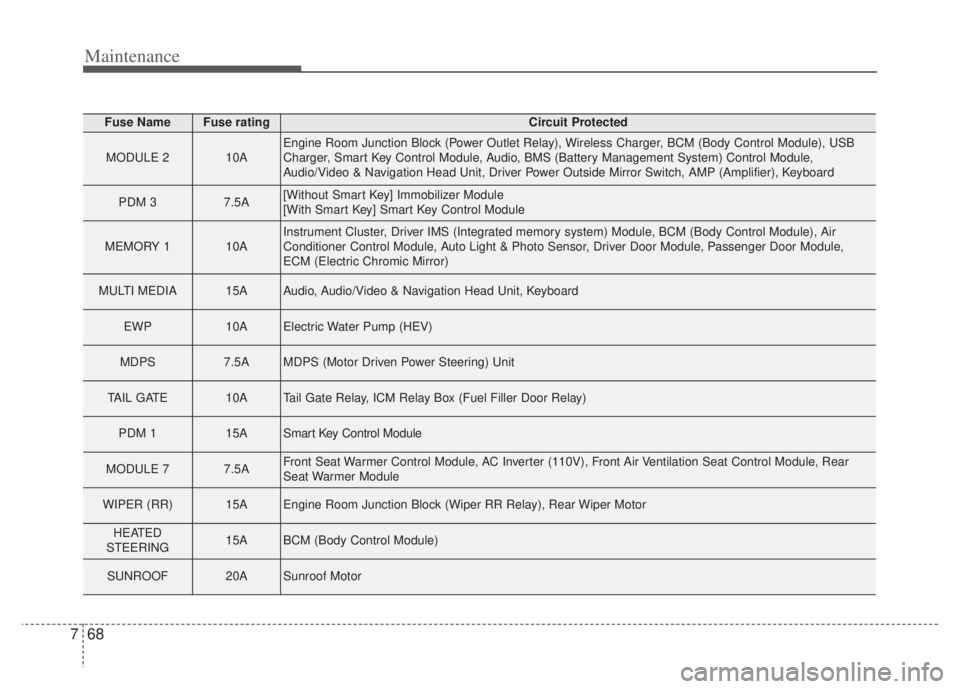
68
7
Fuse NameFuse ratingCircuit Protected
MODULE 210AEngine Room Junction Block (Power Outlet Relay), Wireless Charger, BCM (Body Control Module), USB
Charger, Smart Key Control Module, Audio, BMS (Battery Management System) Control Module,
Audio/Video & Navigation Head Unit, Driver Power Outside Mirror Switch, AMP (Amplifier), Keyboard
PDM 37.5A[Without Smart Key] Immobilizer Module
[With Smart Key] Smart Key Control Module
MEMORY 110AInstrument Cluster, Driver IMS (Integrated memory system) Module, BCM (Body Control Module), Air
Conditioner Control Module, Auto Light & Photo Sensor, Driver Door Module, Passenger Door Module,
ECM (Electric Chromic Mirror)
MULTI MEDIA15AAudio, Audio/Video & Navigation Head Unit, Keyboard
EWP10AElectric Water Pump (HEV)
MDPS7.5AMDPS (Motor Driven Power Steering) Unit
TAIL GATE10ATail Gate Relay, ICM Relay Box (Fuel Filler Door Relay)
PDM 115ASmart Key Control Module
MODULE 77.5AFront Seat Warmer Control Module, AC Inverter (110V), Front Air Ventilation Seat Control Module, Rear
Seat Warmer Module
WIPER (RR)15AEngine Room Junction Block (Wiper RR Relay), Rear Wiper Motor
HEATED
STEERING15ABCM (Body Control Module)
SUNROOF20ASunroof Motor