2022 KIA NIRO EV Driver
[x] Cancel search: DriverPage 51 of 62

Refer to the inside front cover for more information on QR codes .www .youtube .com/KiaFeatureVideos
Seat Warmers /Ventilated Seats Video
QR CODESeat Warmers / Ventilated Seats*†1 4 (Driver & Front Passenger)
Seat Warmers — Press top of the button once for high setting (3 amber LEDs lit), again for middle setting (2 amber LEDs lit), again for low setting (1 amber LED lit) . Press again to turn OFF .
Ventilated Seats — Press bottom of button once for high setting (3 blue LEDs lit), again for middle setting (2 blue LEDs lit), again for low setting (1 blue LED lit) . Press again to turn OFF .
Amber Color: WarmingBlue Color: Ventilating
N
P
PRELEASE
AUTO
HOLD
DRIVE
MODE
D
R
Refer to section 4 in the Owner ’s Manual for more information . REMINDERS:
•Use extreme caution when using the seat warmers to avoid burns . Refer to the Owner ’s Manual for more information
•You can also press and hold but tons to turn off the seat heater / ventilation
CENTER PANEL
CENTERPA N EL
•With the seat warmer switch in the ON position, the heating system in the seat turns OFF or ON automatically depending on the seat temperature
•System is OFF by default
QUICK TIPS
49†LEGAL DISCL AIMERS ON BACK INSIDE COVER | *IF EQUIPPEDALWAYS CHECK THE OWNER ’S MANUAL FOR COMPLETE OPER ATING INFORMATION AND SAFET Y WARNINGS .
Page 52 of 62

50†LEGAL DISCL AIMERS ON BACK INSIDE COVER | *IF EQUIPPEDNIRO EV FEATURES & FUNCTIONS GUIDE
Front Seat Headrest Adjustment†7
To raise headrest: Pull headrest up .
To lower headrest: Press lock A, then press the headrest down .
REMINDERS:
•
The headrest only moves up and down as described above . It does not adjust for ward or backward
•
Do not operate the vehicle with the headrests removed . Headrests can provide critical neck and head suppor t in an accident
SeatbackLumbarSeatSeat Cushion
Power Adjustable Driver’s Seat†1 2
Move/Press controls to adjust Seat forward/backward, Seat Cushion tilt up/down, Seatback forward/backward or Lumbar forward/backward .
REMINDER: Do not at tempt to adjust the seat while the vehicle is moving . This could result in loss of control of the vehicle .
Refer to section 3 in the Owner ’s Manual for more information .
A
SEATING
S E AT I N G
For easy adjustments, hold a headrest post with one hand while using the other hand to pull the headrest from underneath
QUICK TIP
AABC
ABC
Page 54 of 62

52†LEGAL DISCL AIMERS ON BACK INSIDE COVER | *IF EQUIPPEDNIRO EV FEATURES & FUNCTIONS GUIDE
Refer to section 4 in the Owner ’s Manual for more information .
OTHER KEY FEATURES
OTHER KEY F E AT U R E S
Hood Release Lever and Latch
Opening the Hood:
Pull the Hood Release Lever A to unlatch the Hood
In the front of the vehicle, lift the Hood slightly, pull the secondary Latch B inside of the Hood’s center to the left and lift the Hood
Closing the Hood: Lower the Hood about halfway and then press down to securely lock in place .
(Located on Driver side kick panel)(Latch located inside hood)
REMINDERS:
•
Sunvisor may not shield all direct light
•
Do not operate the vehicle if Sunvisor is impairing your visibilit y
•
Be aware of your seating position when adjusting or swinging Sunvisor around from the front or side windows
Sunvisor†1 7
Use the Sunvisor to shield direct light through the front or side windows . Slide the Sunvisor out and adjust as needed .
Refer to section 4 in the Owner ’s Manual for more information . A
B
Page 55 of 62

53†LEGAL DISCL AIMERS ON BACK INSIDE COVER | *IF EQUIPPEDALWAYS CHECK THE OWNER ’S MANUAL FOR COMPLETE OPER ATING INFORMATION AND SAFET Y WARNINGS .
Refer to the inside front cover for more information on QR codes .www .youtube .com/KiaFeatureVideos
Remote Start - Smart Key Video
Kia Smart & Folding Key Fobs Video
QR CODESmart Key†1 0
Smart Key Fob:
A Press to lock All Doors; Press twice within 2 seconds to sound the horn
B Press to unlock Driver ’s Door . Press twice in 4 seconds to unlock All Doors
C Press and hold for more than 1 second to unlock Liftgate . Then lift the liftgate handle to manually open Liftgate
REMINDER: The Liftgate unlocks when the Smar t Key fob is within close proximit y of the vehicle Liftgate .
D Press and hold more than 1 second for Panic Alarm . To turn off Alarm, press any button
E Press to release Mechanical Key (on reverse side of fob)
Driver’s Door Lock/Unlock button F:
•
Press button once to unlock Driver ’s Door
•Press again within 4 seconds to unlock All Doors
•Press again to lock All Doors
Mechanical Key G:
•Use to lock/unlock Driver ’s Door by turning once or all doors by turning twice
•
Use to enable/disable Child Safety Locks
•Use to unlatch rear center seatbelt lower anchor
Remote Start* H: Lock the doors by pressing the door lock button A within 32 feet distance from the vehicle . Within four (4) seconds of pressing the door lock button A, press and hold the Remote Start
button D for more than two (2) seconds to start the vehicle . To stop the Remote Start operation, press the button again . If driver does not enter vehicle within three minutes of starting the vehicle, the vehicle will automatically turn off .
REMINDERS:
•
Remote but ton configuration may var y depending on vehicle options
•
One/t wo but ton turn logic can be changed in User Set tings
•
When reinser ting the mechanical key, make sure it is pushed all the way in until there is a click sound .
Double-Turn Lock/Unlock All
•Turn counterclockwise once to unlock Driver ’s Door
•Turn counterclockwise again within 4 seconds to unlock All Doors
•Turn clockwise once to lock All Doors
Lock
Unlock
HOLDHOLD
HOLD
OTHER KEY FEATURES
OTHER KEY F E AT U R E S •If the Smar t Key bat ter y is weak or not working properly, hold the Smar t Key fob up to the POWER but ton (Lock but ton side closest) and press to start vehicle
•The Smar t Key ’s signal can be blocked by the normal operation of a cell phone or smar tphone . To help prevent this, store each device separately
QUICK TIPSG
Images are for illustrative purposes only and may not reflect actual feature or operation .
Refer to section 4 in the Owner ’s Manual for more information .
A
B
C
D
E
FG
H
Page 56 of 62

54*IF EQUIPPEDNIRO EV FEATURES & FUNCTIONS GUIDE
Refer to the inside front cover for more information on QR codes .www .youtube .com/KiaFeatureVideos
Sunroof Operation Video
QR CODE
The Sunroof and Sunshade operation is controlled through a multidirectional switch/lever, and the ignition needs to be in the ON position to operate the Sunroof/Sunshade .
Slide the Sunshade and Sunroof:
•
Auto Open: Slide lever E backward to the farthest position and release
•
Auto Close (Sunroof only): Slide the lever E forward to the farthest position and release
Slide the Sunroof (with Sunshade open):
• O p e n : Press the Sunroof lever E backward and press again forward/backward until you reach the desired detent position (manual slide feature)
• C l o s e : Press the Sunroof lever E forward and press again forward/backward until you reach the desired detent position (manual slide feature)
Tilt the Sunroof:
•Raise: Push lever E upward
•Lower: Push lever E forward
Map/Room Lamps
Automatic turn off function*
The interior lights automatically turn off approximately 30 seconds after the POWER button is turned OFF .
Map Lamp/Room Lamp Operation
•
Press lens A to turn the Driver ’s/Passenger ’s Map Lamps ON/OFF . This light produces a spot beam for convenient use as a map lamp or as a personal lamp for the driver or the front passenger .
•
Press button B to turn all the Map/Room Lamps ON/OFF
•
Press button C to turn the Map/Room Lamp ON, for 30 seconds, when a door is opened, unlocked from Smart Key or the ignition is turned OFF . When pressed and a door is opened, or doors are unlocked from the Smart Key, the Map and Room Lamps turn ON for approximately 30 seconds .
•Press button D to turn the Room Lamp ON/OFF
Sunroof Operation*
REMINDERS:
•Sunshade needs to remain OPEN while Sunroof is open and vehicle is moving
•When closing, be mindful of any objects or persons
Do not adjust the sunroof or sunshade while driving . This could result in loss of control of the vehicle .
(Type B*)
Refer to section 4 in the Owner ’s Manual for more information .
OTHER KEY FEATURES
OTHER KEY F E AT U R E S
•When doors are unlocked by the Smar t Key*, the lamp turns ON for approximately 30 seconds
•If your vehicle is equipped with the theft alarm system, the interior lights automatically turn off approximately 3 seconds after the system is in armed stage
•Using interior lights for an extended period of time may cause 12V bat ter y discharge
QUICK TIPS
•To stop the Sunroof at any position, push or pull the Sunroof control lever in any direction
•Adjusting the sunroof past the first stop position (normal), in the fully opened position, may cause wind buffeting noise
QUICK TIPS
AA
BC
D
E
Page 58 of 62
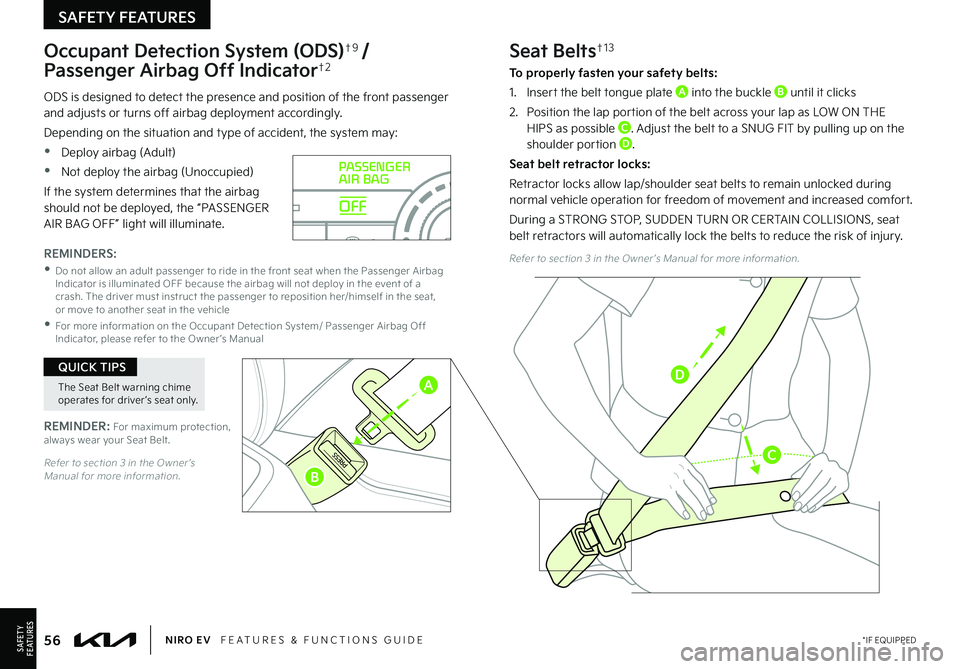
56*IF EQUIPPEDNIRO EV FEATURES & FUNCTIONS GUIDE
Occupant Detection System (ODS)†9 /
Passenger Airbag Off Indicator†2
ODS is designed to detect the presence and position of the front passenger and adjusts or turns off airbag deployment accordingly .
Depending on the situation and type of accident, the system may:
•Deploy airbag (Adult)
•Not deploy the airbag (Unoccupied)
If the system determines that the airbag should not be deployed, the “PASSENGER AIR BAG OFF” light will illuminate .
REMINDER: For maximum protection, always wear your Seat Belt .
REMINDERS:
•
Do not allow an adult passenger to ride in the front seat when the Passenger Airbag Indicator is illuminated OFF because the airbag will not deploy in the event of a crash . The driver must instruct the passenger to reposition her/himself in the seat, or move to another seat in the vehicle
•
For more information on the Occupant Detection System/ Passenger Airbag Off Indicator, please refer to the Owner ’s Manual
OFF
PASSENGER
AIR BAG
Seat Belts†1 3
To properly fasten your safety belts:
1 .
Insert the belt tongue plate A into the buckle B until it clicks
2 .
Position the lap portion of the belt across your lap as LOW ON THE HIPS as possible C . Adjust the belt to a SNUG FIT by pulling up on the shoulder portion D .
Seat belt retractor locks:
Retractor locks allow lap/shoulder seat belts to remain unlocked during normal vehicle operation for freedom of movement and increased comfort .
During a STRONG STOP, SUDDEN TURN OR CERTAIN COLLISIONS, seat belt retractors will automatically lock the belts to reduce the risk of injury .
Refer to section 3 in the Owner ’s Manual for more information .
Refer to section 3 in the Owner ’s Manual for more information .
SAFETYF E AT U R E S
SAFETY FEATURES
The Seat Belt warning chime operates for driver ’s seat only .
QUICK TIPS
A
B
C
D
Page 59 of 62

LEGAL DISCLAIMERS
Driving while distracted can result in a loss of vehicle control that may lead to an accident, severe personal injury and death. The driver’s primary responsibility is in the safe and legal operation of a vehicle. Handheld devices, other equipment or vehicle systems which take the driver’s eyes, attention and focus away from the safe operation of a vehicle or that are not permissible by law should never be used during operation of the vehicle.Safety Features: No system, no matter how advanced, can compensate for all driver error and/or driving conditions. Always drive safely.11. UVO link: Purchase/lease of certain 2022 and newer Kia vehicles with UVO link includes a complimentary 1-year subscription starting from new vehicle retail sale/lease date as recorded by the dealer. After your complimentary 1-year UVO link subscription expires, continued access to the full suite of UVO link services available on your Kia will require a paid subscription at the then-current subscription rate or your use of certain UVO link features may immediately terminate. Use of UVO is subject to agreement to the UVO Privacy Policy (available at owners.kia.com/us/en/privacy-policy.html) and Terms of Service (available at owners.kia.com/us/en/terms-of-service.html). Complimentary UVO link subscription is transferable to subsequent owner during the original UVO link service term. Only use UVO link when safe to do so. UVO Link may currently be unavailable for Model Year 2022 and newer vehicles sold or purchased in Massachusetts; please see the Kia Owners Portal for updates on availability. Kia Access with UVO link app is available from the Apple® App Store® or Google Play Store™. Kia America, Inc. reserves the right to change or discontinue UVO link at any time without prior notification or incurring any future obligation. Message and data rates may apply. Cellular and GPS coverage is required to use most features. UVO link features may vary by model, model year, and trim level. Features, specifications, and fees are subject to change. For more on details and limitations, visit www.kia.com or your authorized Kia dealer. Apple® and App Store® are registered trademarks of Apple Inc. Google™ and its logos are trademarks of Google LLC.
12. Airbags: For maximum protection, always wear your seat belt.13. Android Auto™, Apple CarPlay®, Bluetooth® Wireless Technology, Google Play™ Store, iPhone, SiriusXM®, Sportmatic®: Fair Use of Trademark – The commentary reference to trademarked material is for educational purposes only and not an endorsement by or of the holder of the mark. 14.
Driver Assist Features – Forward Collision-Avoidance Assist (FCA) / Forward Collision Warning (FCW), Blind-Spot Collision Warning (BCW), Rear Cross-Traffic Collision Warning (RCCW), Lane Keeping Assist (LKA), Lane Following Assist (LFA), Rear View Monitor, Reverse Parking Distance Warning (PDW)*, Smart Cruise Control (SCC) with Stop & Go, Navigation-based Smart Cruise Control (NSCC), Highway Driving Assist (HDA), Leading Vehicle Departure Alert (LVDA): When engaged, these features are not substitutes for safe driving, and may not detect all objects surrounding vehicle. Always drive safely and use caution. 15. Driver Attention Warning (DAW): When engaged, Driver Attention Warning is not a substitute for safe driving and may not detect all instances of driver fatigue or inattentive driving practices. Failure to pay attention to travel conditions and vehicle operation could result in loss of vehicle control. Always drive safely and use caution.16. Electronic Stability Control (ESC)/ Traction Control System (TCS)/Hill-Start Assist Control (HAC): No system, no matter how advanced, can compensate for all driver error and/or driving conditions. Always drive safely.17. Front Seat Headrest Adjustment: Never attempt to adjust headrests when vehicle is in motion.18. Navigation: Distracted driving can result in a loss of vehicle control. When operating a vehicle, never use a vehicle system that takes your focus away from safe vehicle operation. Navigation is for information purposes only, and Kia does not make any warranties about the accuracy of the information.19. Occupant Detection System (ODS): Kia vehicles use a number of different ODS types that vary by model. Children age 12 and under should always be seated in the REAR seats.10. Power Button with Smart Key: Always come to a complete stop before turning the power on or off. However, if you have an emergency while the vehicle is in motion and must turn the power off, you can turn the power off to the ACC position by pressing the Power button for more than 3 seconds or 3 times in succession. If the vehicle is still moving, you can restart the power by pressing the Power button with the shift lever in Neutral (N). With the power off, hydraulic power assist for steering and braking will be disabled and the vehicle will be more difficult to control.11.
Roadside Assist: 24-hour Enhanced Roadside Assistance is a service plan provided by Kia America, Inc. Certain limitations apply. Coverage details are available in the Kia Warranty and Consumer Information Manual. On certain audio systems, for access to Enhanced Roadside Assistance*, a connected mobile phone via Bluetooth® within the cellular service coverage area is required.
12.
Seat adjustments: Reclining the passenger seats can reduce the effectiveness of the safety restraint system and may lead to additional injury in an accident.13.
Seat belts: For maximum protection, always wear your seatbelt.14. Seat warmers: Use extreme caution when using the seat warmers to avoid burns. Refer to the Owner’s Manual for more information.15.
SiriusXM®: SiriusXM Satellite Radio, SiriusXM Traffic and SiriusXM Travel Link each require a subscription sold separately, or as a package, by SiriusXM Radio Inc. If you decide to continue your service at the end of your trial subscription, the plan you choose will automatically renew and bill at then-current rates until you call 1-866-635-2349 to cancel. See SiriusXM Customer Agreement for complete terms at www.siriusxm.com. Other fees and taxes will apply. All fees and programming are subject to change. Not all vehicles or devices are capable of receiving all services offered by SiriusXM. Data displays and individual product availability vary by vehicle hardware. Current information and features may not be available in all locations, or on all receivers. Weather Forecast, Current Conditions may not be available in all locations. Images above are for representative purposes only and are not real products. For actual features and images of real products, consult the vehicle manufacturer. SiriusXM is not responsible for any errors or inaccuracies in the data services or their use in the vehicle. Travel Link Stocks displays current price and daily delta of around 7,000 actively reported securities traded on the NYSE®, NASDAQ® and AMEX®. The service is delayed approximately 20 minutes. SiriusXM satellite service is available only to those at least 18 years of age in the 48 contiguous USA, DC, and Puerto Rico (with coverage limitations). SiriusXM Internet Radio service is available throughout our satellite service area and in AK and HI. © 2021 SiriusXM Radio Inc. Sirius, XM and all related marks and logos are trademarks of SiriusXM Radio Inc.16.
Steering-wheel-mounted controls: Driving while distracted is dangerous and should be avoided. Remain attentive to driving and be cautious when using steering-wheel-mounted controls while driving.17.
Sunvisors: Sunvisor may not shield all direct light. Do not operate the vehicle if sunvisor is impairing your visibility.18.
Tilt/Telescoping Steering Wheel: Never attempt to adjust steering wheel position when vehicle is in motion.19.
Tire Pressure Monitoring System (TPMS): Even with Tire Pressure Monitoring System, check tire pressure on a regular basis.20. Liftgate: Driving with the liftgate open may be unlawful and can draw dangerous exhaust fumes into your vehicle; if you choose to do so, keep air vents and all windows open for improved ventilation.
Page 61 of 62

OFF
LO
HI
Climate Control System* – page 46
Demo Defrost and Defog Windshield
EV Mode Displays* on the audio head unit – page 16
Instrument Cluster / EV Displays – pages 03-05
Windshield/Rear Wipers & Washers – page 36 Windshield: Move lever Up/Down to change Wiper modes. Rotate lever to adjust Intermit tent Wipe Speed.
WindshieldMIST: Single wipeOFF: Wipe offINT: Intermit tent wipeLO: Slow wipeHI: Fast wipe
220200
20
20 12 0
1 40
40
10 0
60
80
180
40 160
60 140
80 120
100
E
Fmi
RANGE
68
°c
CRUISE 60
mi/h
EPSECO
MPHelectric
LV .3
R ND
L H
2518 mi
DRIVERPASSENGER PASSENGER
AIR BAG
OFF
AUTO
AC EV
HEATCLIMATE
OFF
ONLY
Type A shown
Anytown
3:00
PM
Electric vehicle
97
%
Energy information
Charging limit
DC charger 100% AC charger 100%
Charge management ECO drivingEV settings
Next departure : On : On
Jul 9 (Mon) 3:30 PM
0.4 lb
3.9 mi Anytown Solar
CO2
Pull to spray and wipe.
Type B shown
Owner ’s Name:
VIN:
Mileage:
Dealership Name:
Sales Consultant:
Date:
BEFORE DELIVERY Test and confirm “Good Battery” using a Kia battery tester and affix Results Label Verify all tire pressures are to spec (see driver ’s door label) LF
LR
RF
RR
Verify proper operation of Remote Keyless Entry and Smart Key lock/unlock Ensure floor mats are snapped into place (if applicable) Verify vehicle is clean (interior and exterior), in good condition and free of chips and scratches Ensure all key documents are in the vehicle (Owner ’s Manual, Warranty and Consumer Information booklet, Tire Warranty booklet and Features & Functions Guide and any Audio System User ’s Manual)KEY FEATURE WALKTHROUGH
NIRO EV
DELIVERY CHECKLIST
*IF EQUIPPED