2022 KIA FORTE driver
[x] Cancel search: driverPage 9 of 316
7
Turning the system on or off
Turning on the system
1 Turn on the vehicle.
2 When a safety warning message appears, read it and press Confirm.
0000
A
To change the display language, press Language.
Turning off the system
To turn off the system while driving, press and hold the Power button on
the panel.
The screen and sound will be turned off.
0000
A
To use the system again, press the Power button.
0000
A
When a specified period of time elapses after turning off the vehicle, the system
automatically shuts down. When you open the driver's door, the system immediately
shuts down.
\335Warning
\225Driving while distracted can result in a loss of vehicle control that may lead to an accident,
severe bodily injury, or death. The driver's primary responsibility is the safe and legal
operation of the vehicle, and the use of any vehicle systems, including the \
touch screen
and steering wheel controls, which take the driver's eyes, attention, and focus away from
the safe operation of the vehicle, or which are not permissible by law, should never be
used during the operation of the vehicle.
\225Some functions may not be active while driving to ensure safety. Those functions run only
when the vehicle is stationary. In order to use them, first stop the vehicle.
\225When the screen is not displayed, the volume is muted, or other system failures occur,
immediately stop using the system. When you use the faulty system contin\
uously, it may
cause fire, electric shock, or fatal system failure.
\334\334Caution
\225The system can be turned on even when the ignition switch is in "ACC" or "ON." However,
when you use the system without turning on the vehicle for a long time, \
it may cause
battery discharge. To use the system for a long time, be sure to turn on the vehicle.
\225When you use the system with the vehicle turned off, the battery warning message
appears. The warning message disappears as soon as you turn on the vehic\
le.
Page 11 of 316

9
Disclaimers
000EDriving while distracted is dangerous and should be avoided. Drivers should remain
attentive to driving and always exercise caution when using the steering-wheelmounted
controls while driving.
000EDriving while distracted can result in a loss of vehicle control that may lead to an accident,
severe personal injury and death. The driver's primary responsibility is in the safe and
legal operation of a vehicle, and use of any handheld devices, other equipment or vehicle
systems which take the driver's eyes, attention and focus away from the safe operation of
a vehicle or that are not permissible by law should never be used during operation of the
vehicle.
000ESiriusXM®: SiriusXM Satellite Radio, SiriusXM Traffic and SiriusXM Travel Link each require
a subscription sold separately, or as a package, by SiriusXM Radio Inc. If you decide
to continue your service at the end of your trial subscription, the plan\
you choose will
automatically renew and bill at then-current rates until you call 1-866-635-2349 to cancel.
See SiriusXM Customer Agreement for complete terms at www.siriusxm.com. Other fees
and taxes will apply. All fees and programming are subject to change. Not all vehicles
or devices are capable of receiving all services offered by SiriusXM. Data displays and
individual product availability vary by vehicle hardware. Current information and features
may not be available in all locations, or on all receivers. Weather Forecast, Current
Conditions may not be available in all locations. Images above are for representative
purposes only and are not real products. For actual features and images of real
products, consult the vehicle manufacturer. SiriusXM is not responsible for any errors
or inaccuracies in the data services or their use in the vehicle. Travel Link Stocks displays
current price and daily delta of around 7,000 actively reported securities traded on the
NYSE
®, NASDAQ® and AMEX®. The service is delayed approximately 20 minutes. SiriusXM
satellite service is available only to those at least 18 years of age in\
the 48 contiguous
USA, DC, and Puerto Rico (with coverage limitations). SiriusXM Internet Radio service is
available throughout our satellite service area and in AK and HI. ©2020 SiriusXM Radio
Inc.
000E Android Auto: Vehicle user interface is a product of Google and its terms and privacy
statements apply. Requires the Android Auto app on Google Play and an Android
compatible smartphone running Android™ 5.0 Lollipop or higher. Data plan rates apply.
000ENavigation: Distracted driving can result in a loss of vehicle control. When operating
a vehicle, never use a vehicle system that takes your focus away from safe vehicle
operation. Navigation is for information purposes only, and Kia does not make any
warranties about the accuracy of the information.
Page 28 of 316

1-6
Turning the system on or off
The following explains how to turn on or off the system. Before using the system, be sure to
read the user's manual for safe and convenient manipulation.
Turning on the system
1 Turn on the vehicle.
2 When a safety warning message appears, read it and press Confirm.
0000
A
To change the display language, press Language.
0000AThe screen may differ depending on the vehicle model and specifications.
0000
A
To set the user profile, note the following.
> See "Using the First Run Setup."
Turning off the system
To turn off the system while driving, press and hold the Power button on
the panel.
The screen and sound will be turned off.
0000
A
To use the system again, press the Power button.
0000
A
When a specified period of time elapses after turning off the vehicle, the system
automatically shuts down. When you open the driver's door, the system immediately
shuts down.
Page 29 of 316
1-7
\335Warning
\225Driving while distracted can result in a loss of vehicle control that may lead to an accident,
severe bodily injury, or death. The driver's primary responsibility is the safe and legal
operation of the vehicle, and the use of any vehicle systems, including the \
touch screen
and steering wheel controls, which take the driver's eyes, attention, and focus away from
the safe operation of the vehicle, or which are not permissible by law, should never be
used during the operation of the vehicle.
\225Some functions may not be active while driving to ensure safety. Those functions run only
when the vehicle is stationary. In order to use them, first stop the vehicle.
\225When the screen is not displayed, the volume is muted, or other system failures occur,
immediately stop using the system. When you use the faulty system contin\
uously, it may
cause fire, electric shock, or fatal system failure.
\334\334Caution
\225The system can be turned on even when the ignition switch is in "ACC" or "ON." However,
when you use the system without turning on the vehicle for a long time, \
it may cause
battery discharge. To use the system for a long time, be sure to turn on the vehicle.
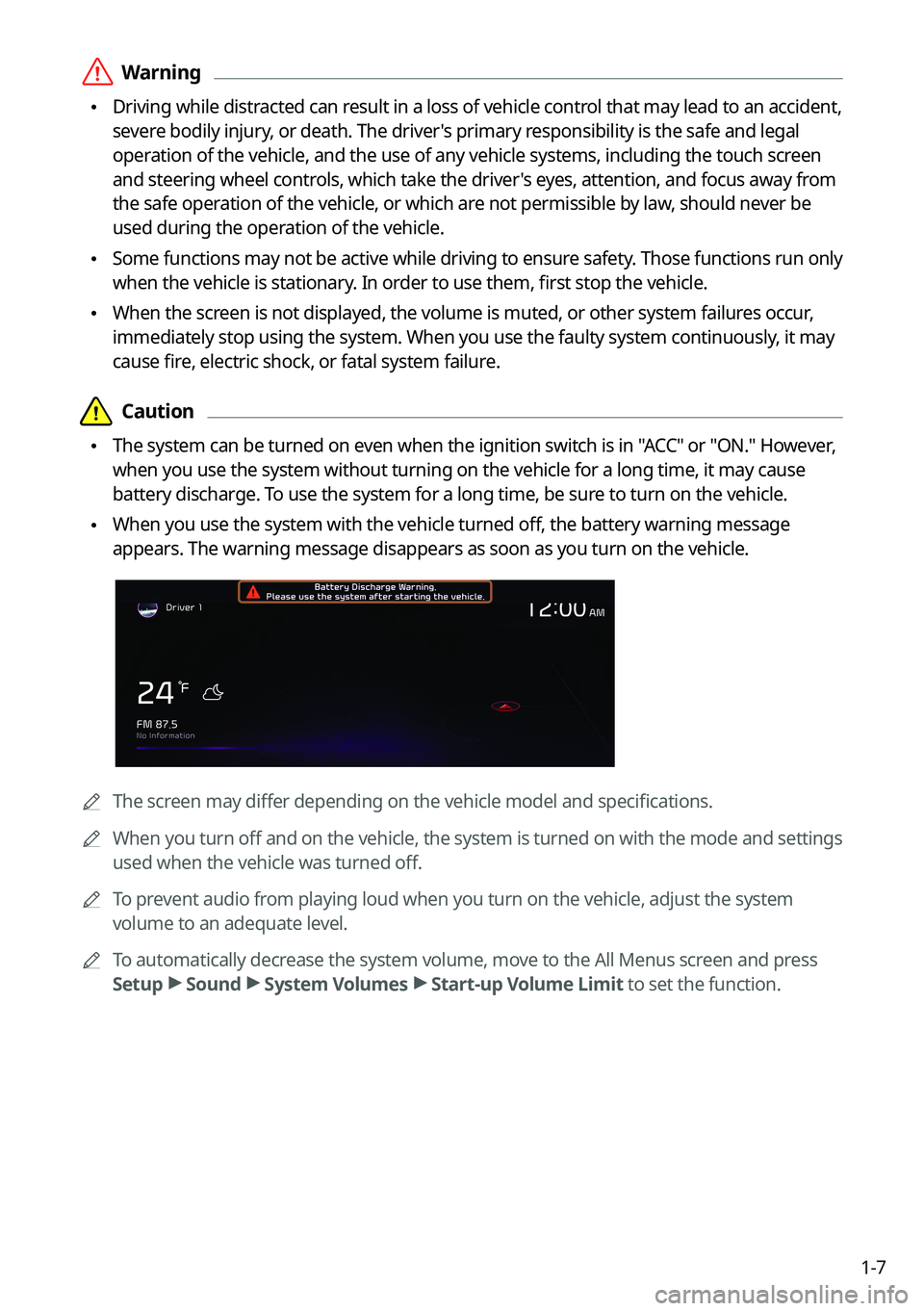
\225When you use the system with the vehicle turned off, the battery warning message
appears. The warning message disappears as soon as you turn on the vehic\
le.
0000A
The screen may differ depending on the vehicle model and specifications.
0000
A
When you turn off and on the vehicle, the system is turned on with the mode and settings
used when the vehicle was turned off.
0000
A
To prevent audio from playing loud when you turn on the vehicle, adjust the system
volume to an adequate level.
0000
A
To automatically decrease the system volume, move to the All Menus screen and press
Setup >
Sound >
System Volumes >
Start-up Volume Limit to set the function.
Page 40 of 316

2-2
Using the First Run Setup
You can configure the system settings for each driver when multiple people are using the
vehicle.
In First Run Setup, you can configure the values to display on the screen such as user name,
language, and map display method.
1 When a safety warning message appears, read it, select the driver
image, and then press Confirm.
0000AWhen you log in as guest, you cannot configure the profile settings. To set a different
profile, select another user.
0000
A
You can register up to 2 users.
2 When the First Run Setup screen appears, press Start.
0000
A
To use the default settings without changing the environment, press Skip.
3 Set the language to display on the screen and then press Next.
Page 41 of 316

2-3
4 Set the keyboard type for text entry and then press Next.
5 To set the driver's name, press Rename.
The name change screen appears.0000
A
To proceed with First Run Setup without changing the driver's name, press Next.
6 Set the map display method and then press Next.
\2252D Heading Up: The map is rotated depending on the driving direction.
\2252D North Up: Displays the map with the north fixed at the top.
\2253D Bird View: The map is rotated depending on the driving direction and it is
displayed in three dimensions.
Page 49 of 316

2-11
Viewing the rear top/wide view screen (if equipped)
You can check the rear view through the rear top/wide view screen.
1 On the rear view screen, press .
2 Press the icon to get a view in the desired direction.
0000
A
The guide lines appear on the rear top view.
000DDisplays the space required to open the trunk (tailgate). After a parking, check
whether the space is sufficient to open the trunk (tailgate) and there is no obstacle.
000DDisplays the extension line from the center of the vehicle. According to the steering
direction, the moving direction of the center is displayed on the screen.
Icon
Description
Displays the zoom-in rear top view and top view.
Displays the rear wide view (default).
Setting the rear view screen environment (if equipped)
1 On the rear view screen, press .
2 Select and then change the settings.
\225To select the information to display on the screen, press Display Contents (Rear View
Parking Guidance).
\225To adjust the brightness and contrast of the rear view screen, press Display Settings.
\225To set the information to display on the rear view screen and adjust or reset the
brightness and contrast of the image, on the All Menus screen, press Setup >
Vehicle
> Driver Assistance >
Parking Safety >
Camera Settings.
Page 51 of 316

2-13
Viewing the surround view while reversing
1 Press the "R" (Reverse) button shifter (or move the shift lever to "R" in a
previous vehicle model) with the vehicle turned on.
The system displays the rear view of the vehicle.0000
A
The surround view monitor function is not available when you change the shift
position to "P" (Park).
0000
A
When you press the [
] button with the shift position in "P" (Park), you can see the
rear view (if equipped).
2 Press the icon to get a view in the desired direction.
Icon Description
Displays the zoom-in rear top view and top view.
Displays the rear wide view and top view (default).
Displays the rear blind spot view and top view.
Displays the surround view settings.
Configuring the surround view monitor settings
1 On the surround view screen, press .
2 Select and then change the settings.
\225
To select the information to appear on the video, press Display Contents. (e.g. Top
View Parking Guidance, Rear View Parking Guidance, Parking Distance Warning) (if
equipped).
\225To select the default view for top view monitoring, press Top View Default Mode.
\225To select the default view for using the surround view monitor function while driving,
press
Front View Default Mode.
\225To set the information to display on the Surround View screen and adjust or reset the
brightness and contrast of the image, on the All Menus screen, press Setup >
Vehicle
> Driver Assistance >
Parking Safety >
Camera Settings (if equipped).