Page 269 of 380
9-31
Horn Feedback (if equipped)
You can set to generate guiding beep when all doors are locked.
Remote Power Doors & Liftgate (if equipped)
Easily open the doors by pressing the unlock button on the smart key for more than 3
seconds.
2 Press Unlock (if equipped)
You can set to unlock all doors by pressing the door unlock button twice.
A
When you press the door unlock button once, only the driver's seat door is unlocked.
Smart Sliding Door (if equipped)
Set the sliding door to automatically open when you move close to the sliding door carrying
your smart key.
Power Trunk or Power Liftgate (if equipped)
Open or close the trunk (liftgate) automatically using the power trunk (liftgate) button.
A
The displayed name may differ depending on the vehicle model and specifications.
Power Trunk Opening Speed or Power Liftgate Opening Speed
(if equipped)
Set the opening speed for the power trunk (liftgate).
A
The displayed name may differ depending on the vehicle model and specifications.
Power Trunk Opening Height or Power Liftgate Opening Height
(if equipped)
Set the opening height for the power trunk (liftgate).
A
The displayed name may differ depending on the vehicle model and specifications.
Smart Trunk or Smart Liftgate (if equipped)
Opens the trunk (liftgate) automatically when approaching the trunk (liftgate) with the smart
key.
A
The displayed name may differ depending on the vehicle model and specifications.
Liftgate Auto Close (if equipped)
Set the liftgate to automatically close when you move away from the back of the liftgate while
carrying the smart key.
Remote Window Control (if equipped)
Turns on the remote window control function.
Page 271 of 380
9-33
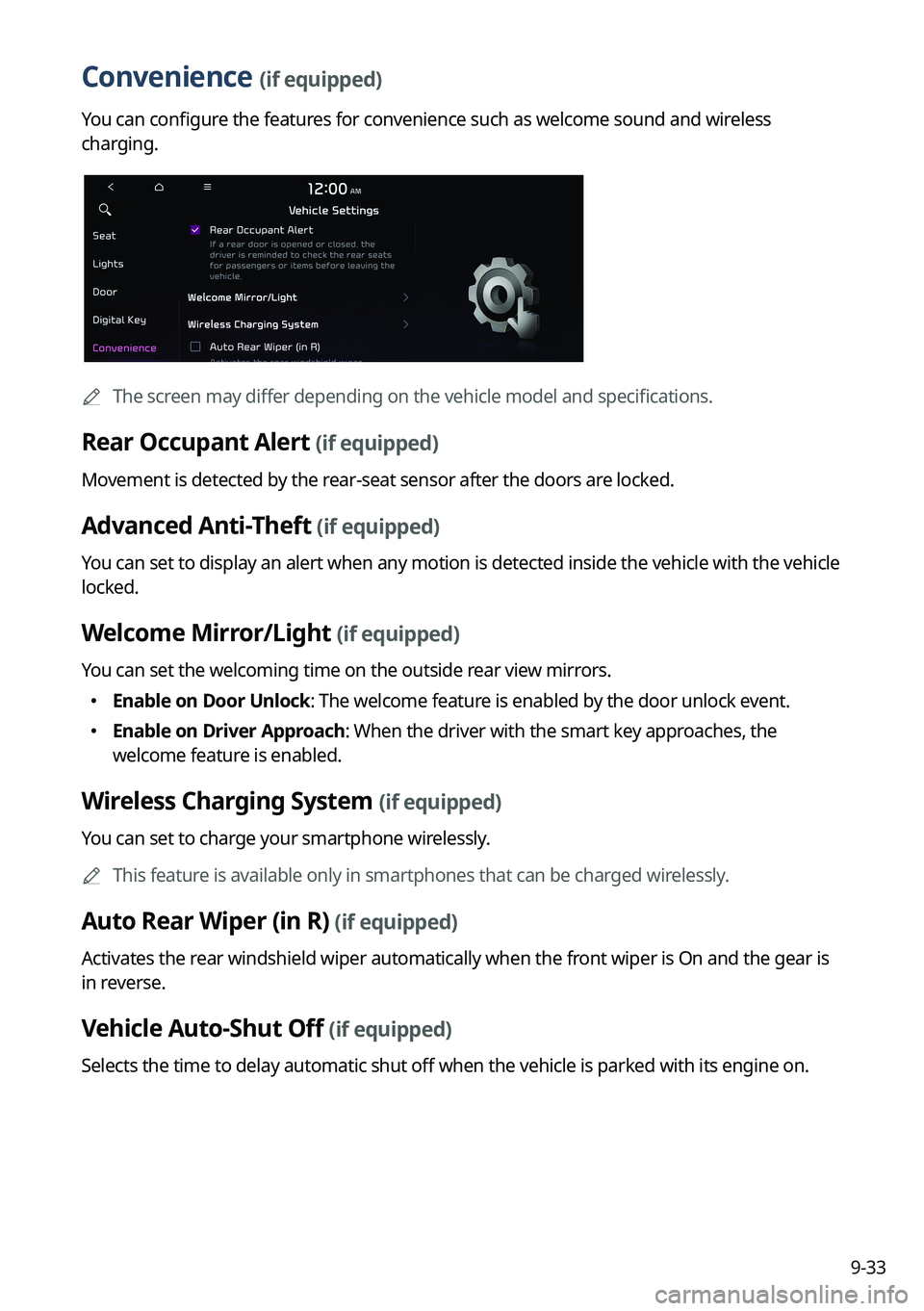
Convenience (if equipped)
You can configure the features for convenience such as welcome sound and wireless
charging.
A
The screen may differ depending on the vehicle model and specifications.
Rear Occupant Alert (if equipped)
Movement is detected by the rear-seat sensor after the doors are locked.
Advanced Anti-Theft (if equipped)
You can set to display an alert when any motion is detected inside the vehicle with the vehicle
locked.
Welcome Mirror/Light (if equipped)
You can set the welcoming time on the outside rear view mirrors.
�Enable on Door Unlock: The welcome feature is enabled by the door unlock event.
�Enable on Driver Approach: When the driver with the smart key approaches, the
welcome feature is enabled.
Wireless Charging System (if equipped)
You can set to charge your smartphone wirelessly.
A
This feature is available only in smartphones that can be charged wirelessly.
Auto Rear Wiper (in R) (if equipped)
Activates the rear windshield wiper automatically when the front wiper is On and the gear is
in reverse.
Vehicle Auto-Shut Off (if equipped)
Selects the time to delay automatic shut off when the vehicle is parked with its engine on.
Page 272 of 380
9-34
Configuring the device connections settings
(Type1)
You can manage Bluetooth devices or configure their operation settings. You can also
activate the phone projection so that you can control the smartphone Apps on the system
screen after connecting the smartphone to the system.
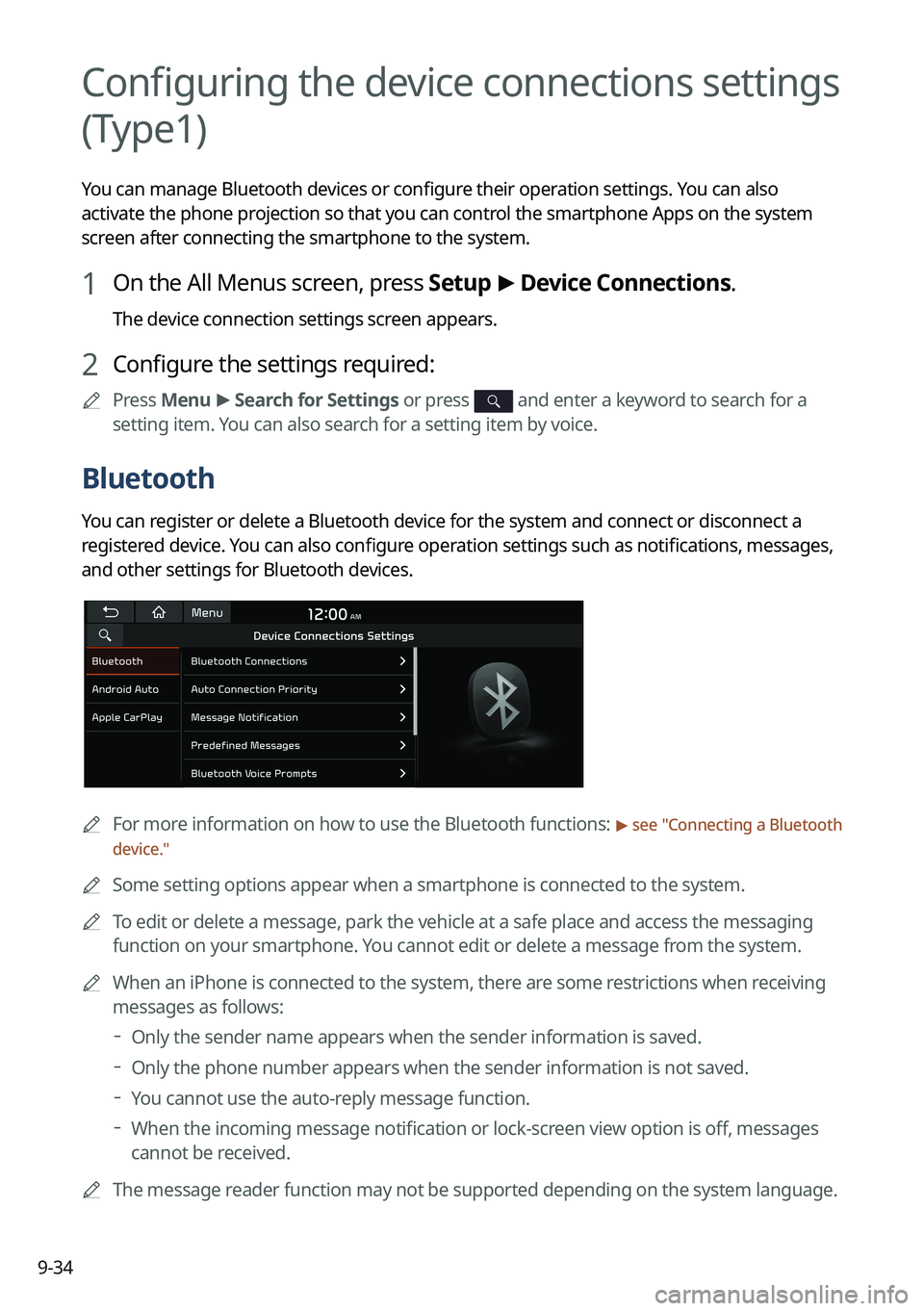
1 On the All Menus screen, press Setup >
Device Connections.
The device connection settings screen appears.
2 Configure the settings required:
A
Press Menu >
Search for Settings or press and enter a keyword to search for a
setting item. You can also search for a setting item by voice.
Bluetooth
You can register or delete a Bluetooth device for the system and connect or disconnect a
registered device. You can also configure operation settings such as notifications, messages,
and other settings for Bluetooth devices.
A
For more information on how to use the Bluetooth functions: > see "Connecting a Bluetooth
device."
A
Some setting options appear when a smartphone is connected to the system.
A
To edit or delete a message, park the vehicle at a safe place and access the messaging
function on your smartphone. You cannot edit or delete a message from the system.
A
When an iPhone is connected to the system, there are some restrictions when receiving
messages as follows:
Only the sender name appears when the sender information is saved.
Only the phone number appears when the sender information is not saved.
You cannot use the auto-reply message function.
When the incoming message notification or lock-screen view option is off, messages
cannot be received.
A
The message reader function may not be supported depending on the system language.
Page 273 of 380
9-35
Bluetooth Connections
You can register or delete a Bluetooth device from the system and connect or disconnect a
registered device.
A
You can add one Bluetooth hands-free kit or up to two Bluetooth audio devices.
Auto Connection Priority
Set the priority order for automatic Bluetooth connection to the system when it turns on.
A
On the device list, press
on the right and drag the item to reposition.
Message Notification
Set to receive message notifications.
A
This option may not be available in some phone models.
Predefined Messages
Edit message templates for quick replies.
A
This option may not be available in some phone models.
Bluetooth Voice Prompts
Set whether to hear voice prompts for events related to Bluetooth connections.
Privacy Mode
Enable or disable Privacy Mode. Hide data including contacts and call history from showing
up on the system screen to protect privacy.
Bluetooth System Info
You can see and edit the Bluetooth information of the system.
Reset
You can delete all registered Bluetooth devices and initialize Bluetooth settings. All data for
Bluetooth devices are also deleted.
Page 274 of 380
9-36
Android Auto
You can activate the Android Auto function to pair your Android smartphone with the system.
Apple CarPlay
You can activate the Apple CarPlay function to pair your iPhone with the system.
Configuring the device connections settings
(Type2)
You can manage Bluetooth devices or configure their operation settings. You can also
activate the phone projection so that you can control the smartphone Apps on the system
screen after connecting the smartphone to the system.
1 On the All Menus screen, press Setup >
Device Connections.
The device connection settings screen appears.
2 Configure the settings required:
A
Press >
Search for Settings or press and enter a keyword to search for a
setting item. You can also search for a setting item by voice.
Page 276 of 380
9-38
Predefined Messages
Edit message templates for quick replies.
AThis option may not be available in some phone models.
Bluetooth Voice Prompts
Set whether to hear voice prompts for events related to Bluetooth connections.
Privacy Mode
Enable or disable Privacy Mode. Hide data including contacts and call history from showing
up on the system screen to protect privacy.
Page 279 of 380
9-41
Predefined Messages
Edit message templates for quick replies.
A
This option may not be available in some phone models.
Bluetooth Voice Prompts
Set whether to hear voice prompts for events related to Bluetooth connections.
Privacy Mode
Enable or disable Privacy Mode. Hide data including contacts and call history from showing
up on the system screen to protect privacy.
Bluetooth System Info
You can see and edit the Bluetooth information of the system.
Configuring the advanced system settings
(Type1)
(if equipped)
You can configure the settings for notification and button actions.
1 On the All Menus screen, press Setup >
Advanced.
The advanced settings screen appears.
2 Configure the settings required:
Page 280 of 380
9-42
Return to Map: Set Time
You can set the system to automatically display the map screen after a specified period of
time when switched to the Radio/Media mode screen while using the navigation.
A
This function works while driving once a destination has been set.
A
This feature is not available on the phone projection screen.
TUNE Knob Function
You can change the Search knob's function on the map.
Changes Stations, Tracks, etc., in the Audio System
You can search music or adjust the radio frequency by using the Search knob on the map.
Zooms In/Out on the Map
You can zoom in or out the map by using the Search knob on the map.


