2022 INFINITI QX50 automatic transmission
[x] Cancel search: automatic transmissionPage 109 of 540

CVT (AT) Malfunction Service now
This warning appears when there is a prob-
lem with the CVT system. If this warning
comes on, have the system checked. It is rec-
ommended that you visit an INFINITI retailer
for this service.
CVT (AT) hot Power reduced
This transmission has a high fluid temperature
protection mode. If the fluid temperature be-
comes too high (for example, climbing steep
grades in high temperatures with heavy loads,
such as when towing a trailer), engine power
and, under some conditions, vehicle speed will be
decreased automatically to reduce the chance of
transmission damage. Vehicle speed can be con-
trolled with the accelerator pedal, but the engine
and vehicle speed may be reduced.
WARNING
When the high fluid temperature protec-
tion mode operation occurs, vehicle speed
may be gradually reduced. The reduced
speed may be lower than other traffic,
which could increase the chance of a colli-
sion. Be especially careful when driving. If
necessary, pull to the side of the road at a
safe place and allow the transmission to
return to normal operation; or have it re-
paired if necessary.
Engine hot Power reduced
This engine has a high fluid temperature pro-
tection mode. If the fluid temperature be-
comes too high (for example, climbing steep
grades in high temperatures with heavy
loads, such as when towing a trailer), engine
power and, under some conditions, vehicle
speed will be decreased automatically to re-
duce the chance of engine damage. Vehicle
speed can be controlled with the accelerator
pedal, but the engine and vehicle speed may
be reduced.
WARNING
When the high fluid temperature protec-
tion mode operation occurs, vehicle speed
may be gradually reduced. The reduced
speed may be lower than other traffic,
which could increase the chance of a colli-
sion. Be especially careful when driving. If
necessary, pull to the side of the road at a
safe place and allow the engine to return to
normal operation; or have it repaired if
necessary.
Engine Malfunction: Power Reduced
Service now
This warning appears when the engine is not
operating under normal conditions. If this
warning comes on, have the system checked.
It is recommended that you visit an INFINITI
retailer for this service.
Engine Malfunction Service now
This warning appears when there is a prob-
lem with the engine. If this warning comes on,
have the system checked. It is recommended
that you visit an INFINITI retailer for this
service.
Engine Stalled: Stop safely
This message appears 30 seconds before the
vehicle is shut down due to an above normal
operating exhaust temperature. The Mal-
function Indicator Light (MIL) and malfunc-
tion warning (red) will illuminate. Have the
system checked. It is recommended that you
visit an INFINITI retailer immediately for this
service.
Service CVT (AT) Power reduced
This transmission has a high fluid tempera-
ture protection mode. If the fluid temperature
becomes too high (for example, climbing
steep grades in high temperatures with heavy
loads, such as when towing a trailer), engine
Instruments and controls2-25
Page 110 of 540

power and, under some conditions, vehicle
speed will be decreased automatically to re-
duce the chance of transmission damage.
Vehicle speed can be controlled with the ac-
celerator pedal, but the engine and vehicle
speed may be reduced.
WARNING
When the high fluid temperature protec-
tion mode operation occurs, vehicle speed
may be gradually reduced. The reduced
speed may be lower than other traffic,
which could increase the chance of a colli-
sion. Be especially careful when driving. If
necessary, pull to the side of the road at a
safe place and allow the transmission to
return to normal operation; or have it re-
paired if necessary.
Blind Spot Warning (BSW)
indicator
This indicator appears when the BSW system
is engaged.
For additional information, see “Blind Spot
Warning (BSW)” (P. 5-43) and “Blind Spot
Intervention® (BSI)” (P. 5-52).
Cruise control indicator
This indicator shows the cruise control sys-
tem status.
When cruise control is activated, a green
circle will appear to indicate it is set. The
vehicle information display will also display
the speed the cruise control was set at. If you
accelerate past the set speed, the speed will
blink until you either cancel cruise control or
go back to the set speed. If cruise control is on
and canceled, the speed will be displayed to
show the speed the vehicle will return to if the
resume button is activated.
Currently Not Available
This message appears when the VDC system
is turned off. The following systems (if so
equipped) will be turned off automatically:
BSI system, LDP system and the ProPILOT
Assist system.
For additional information, see “Vehicle Dy-
namic Control (VDC)” (P. 5-140), “Blind Spot
Intervention® (BSI)” (P. 5-52), “Lane Depar-
ture Prevention (LDP)” (P. 5-38) and/or “Pro-
PILOT Assist” (P. 5-71).
Lane Departure Prevention
(LDP) ON / Blind Spot
Intervention® (BSI) ON /
ProPILOT Assist status
indicator
This indicator shows when the LDP/BSI/
ProPILOT system is engaged.
For additional information, see Lane Depar-
ture Prevention (LDP) (P. 5-38), Blind Spot
Intervention® (BSI) (P. 5-52), ProPILOT As-
sist (P. 5-71).
Forward Driving Aids temporarily
disabled Front Sensor blocked See
Owner’s Manual
This message appears when the front radar
sensor may be obstructed due to:
• mud, dirt, snow, ice, etc.
• inclement weather (rain, fog, snow, etc.)
All forward driving aids are temporarily dis-
abled until the system detects that the front
radar sensor is no longer obstructed.
For additional information, see:
• Forward Emergency Braking (FEB) with Pedestrian Detection (P. 5-108)
• Predictive Forward Collision Warning (PFCW) (P. 5-118)
• ProPILOT Assist (P. 5-71)
2-26Instruments and controls
Page 167 of 540

LOCKING WITH INSIDE LOCK
KNOB
To lock the door without the key, move the
inside lock to the lock position
O1, then close
the door.
To unlock the door without the key, move the
inside lock knob to the unlock position
O2.
LOCKING WITH POWER DOOR
LOCK SWITCH
To lock all the doors without a key, push the
door lock switch (driver's or front passenger's
side) to the lock position
O1. When locking
the door this way, be certain not to leave the
key inside the vehicle.
To unlock all the doors without a key, push
the door lock switch (driver's or front passen-
ger's side) to the unlock position
O2.
Lockout protection
When any door is open and the power door
lock switch is moved to the lock position, all
doors will lock. If the Intelligent Key is left in
the vehicle after all the doors are closed, all
doors will unlock automatically and a chime
will sound.
These functions help to prevent the Intelli-
gent Key from being accidentally locked in-
side the vehicle.
AUTOMATIC DOOR LOCKS
• All doors lock automatically when the ve- hicle speed reaches 15 mph (24 km/h).
• All doors unlock automatically when the transmission is placed in the P (Park) posi-
tion or when the ignition switch is placed in
the OFF position depending on the option
selected in the “Comfort & Convenience”
options of the “Settings” menu.
NOTE:The Auto unlock features can be changed
using “Comfort & Convenience” options in
the “Settings” menu of the lower touch-
screen display. For additional information,
refer to the separate INFINITI InTouch™
Owner’s Manual.
LPD2714
Inside lock
SPA2727
Pre-driving checks and adjustments3-5
Page 180 of 540

LOG-IN FUNCTION
After setting up the user information, the
system will automatically recognize the user
upon turning on the vehicle.
There will be a personalized welcome greet-
ing and screen prompt to log in.
This feature allows four drivers to use their
own registration, drive mode, driving posi-
tion, air conditioner, and auto settings and
memorizes these custom settings.
The log-in user can be changed on the wel-
come greeting screen or the User List screen.
For additional information, refer to the sepa-
rate INFINITI InTouch™ Owner’s Manual.
The log-in function is linked to the following
features:
• Meter
• Audio
• Navigation system display
• Navigation settings
• Air conditioner
• Memory seat (if so equipped)
• Engine/transmission
• Steering
• Suspension (if so equipped)
• Active trace control system• Driver assistance except for the Forward
Emergency Braking (FEB) with Pedestrian
Detection system (if so equipped)
• Body Control Module (BCM)
The
button will be on the INFINITI
Intelligent Key if the vehicle has Remote En-
gine Start. This feature allows the engine to
start from outside the vehicle.
The following features may be affected
when the Remote Engine Start feature is
used:
• Vehicles with an automatic climate control system may default to either a heating or
cooling mode depending on outside and
cabin temperatures. For additional infor-
mation, see “Remote Engine Start with In-
telligent Climate Control” in the (P. 4-36).
LPD2995
REMOTE ENGINE START (if so
equipped)
3-18Pre-driving checks and adjustments
Page 248 of 540

5 Starting and driving
Precautions when starting and driving............5-4
Exhaust gas (carbon monoxide) ................5-4
Three-way catalyst ...........................5-4
Tire Pressure Monitoring System (TPMS) ......5-5
On-pavement and off-road driving
precautions ...................................5-8
Avoiding collision and rollover .................5-9
Off-road recovery ............................5-9
Rapid air pressure loss ........................5-9
Drinking alcohol/drugs and driving ...........5-10
Driving safety precautions ...................5-10
Intelligent All-Wheel Drive (AWD) driving
safety precautions (if so equipped) ............5-12
Push-button ignition switch ....................5-13
Operating range ............................ 5-14
Push-button ignition switch positions ........5-14
Emergency engine shut off ...................5-15
INFINITI Intelligent Key battery
discharge .................................... 5-15
INFINITI Vehicle Immobilizer System .........5-16
Before starting the engine ......................5-16
Starting the engine ............................. 5-16
Remote Engine Start (if so equipped) .........5-17
Driving the vehicle ............................. 5-18
Continuously Variable Transmission
(CVT) ....................................... 5-18Electronic parking brake
........................ 5-23
Automatic operation ........................ 5-23
Manual operation ........................... 5-24
When towing a trailer ....................... 5-25
Automatic brake hold .......................... 5-25
How to activate/deactivate the
automatic brake hold function ...............5-26
How to use the automatic brake hold
function .................................... 5-27
INFINITI Drive Mode Selector ..................5-28
Standard mode ............................. 5-29
Sport mode ................................. 5-29
Personal mode .............................. 5-29
ECO mode ................................. 5-30
Traffic Sign Recognition (TSR) (if so equipped) . . 5-30 System operation ........................... 5-31
Turning the Traffic Sign Recognition
(TSR) system on and off .....................5-32
System temporarily unavailable ..............5-32
System
malfunction ......................... 5-32
System maintenance ........................ 5-33
Lane Departure Warning (LDW) ................5-33
LDW system operation ......................5-34
How to enable/disable the LDW system .....5-35
LDW system limitations .....................5-35
System temporarily unavailable ..............5-36
Page 266 of 540

CONTINUOUSLY VARIABLE
TRANSMISSION (CVT)
WARNING
• Do not depress the accelerator pedal
while shifting from P (Park) or N (Neu-
tral) to R (Reverse), D (Drive), or M
(Manual shift mode). Always depress the
brake pedal until shifting is completed.
Failure to do so could cause you to lose
control and have an accident.
• Cold engine idle speed is high, so use
caution when shifting into a forward or
reverse gear before the engine has
warmed up.
• Do not downshift abruptly on slippery
roads. This may cause a loss of control.
• Never shift to either the P (Park) or R
(Reverse) position while the vehicle is
moving forward and P (Park) or D (Drive)
position while the vehicle is reversing.
This could cause an accident or damage
the transmission.
• Except in an emergency, do not shift to
the N (Neutral) position while driving.
Coasting with the transmission in the N
(Neutral) position may cause serious
damage to the transmission.
CAUTION
• To avoid possible damage to your ve-
hicle, when stopping the vehicle on an
uphill grade, do not hold the vehicle by
depressing the accelerator pedal. The
foot brake should be used for this
purpose.
• Do not hang items on the shift lever. This
may cause an accident due to a sudden
start.
The CVT in your vehicle is electronically con-
trolled to produce maximum power and
smooth operation.
The recommended operating procedures for
this transmission are shown on the following
pages. Follow these procedures for maxi-
mum vehicle performance and driving
enjoyment.
Engine power may be automatically reduced
to protect the CVT if the engine speed in-
creases quickly when driving on slippery
roads or while being tested on some
dynamometers.Starting the vehicle
1. After starting the engine, fully depress the foot brake pedal before moving the shift
position out of the P (Park) position.
This Continuously Variable Transmission
is designed so that the foot brake pedal
must be depressed before shifting from P
(Park) to any driving position while the
ignition switch is in the ON position.
The shift position cannot be shifted out of
the P (Park) position and into any of the
other positions if the ignition switch is
placed in the OFF position.
2. Keep the foot brake pedal depressed and move the shift lever to a driving position.
3. Release the parking brake and foot brake pedal and then gradually start the vehicle
in motion.
WARNING
• Do not depress the accelerator pedal
while shifting from P (Park) or N (Neu-
tral) to R (Reverse), D (Drive), or M
(Manual shift mode). Always depress the
brake pedal until shifting is completed.
Failure to do so could cause you to lose
control and have an accident.
DRIVING THE VEHICLE
5-18Starting and driving
Page 268 of 540

•The following operations are not allowed
because excessive force would be ap-
plied to the transmission and this may
result in damage to the vehicle:
– Moving the shift lever to the R (Re-
verse) position when driving forward.
– Moving the shift lever to the D (Drive)
position when reversing.
If these operations are attempted, a chime
sounds and the vehicle shifts to the N (Neu-
tral) position.
P (Park)
CAUTION
• To prevent transmission damage, use the
P (Park) position only when the vehicle is
completely stopped.
• Do not slide the shift lever while pressing
the Park button. This may damage the
shift control system.
Use this position when the vehicle is parked
or starting the engine. Always make sure that
the vehicle is completely stopped before
pressing the Park button
O1to engage the P
(Park) position. For maximum safety, the
brake pedal must be depressed before en-
gaging the P (Park) position. Use this position
together with the parking brake. When park- ing on a hill, first depress the brake pedal,
apply the parking brake and then engage the
P (Park) position. The parking lock should not
be used as a brake when parking. In order to
secure the vehicle, always apply the elec-
tronic parking brake in addition to the parking
lock.
In the event of a malfunction of the vehicle’s
electronics, the transmission may lock in the
P (Park) position. Have the vehicle’s electron-
ics checked immediately. It is recommended
that you visit an INFINITI retailer for this
service.
The P (Park) position is automatically en-
gaged if:
• You switch off the ignition switch.
• You unfasten the driver’s seat belt and
open the driver’s door when the vehicle is
stationary or driving at a very low speed
and the transmission is in the D (Drive) po-
sition or R (Reverse) position.
R (Reverse)
CAUTION
To prevent transmission damage, use the R
(Reverse) position only when the vehicle is
completely stopped. Use the R (Reverse) position to back up. Make
sure the vehicle is completely stopped before
selecting the R (Reverse) position.
The brake
pedal must be depressed and the shift lever
button pressed to move the shift lever from
the home position to R (Reverse).
If the vehicle is placed in the R (Reverse)
position while forwarding, the chime will
sound and the vehicle will switch into the N
(Neutral) position.
N (Neutral)
Neither forward nor reverse gear is engaged.
The engine can be started in this position. You
may shift to N (Neutral) and restart a stalled
engine while the vehicle is moving. You can
select this position by holding the shift lever
at this position for 0.5 seconds.
D (Drive)
Use this position for all normal forward driv-
ing. The CVT changes gears automatically. All
forward gears are available. If the vehicle is
placed in the D (Drive) position while revers-
ing, the chime will sound and the vehicle will
switch into the N (Neutral) position.
5-20Starting and driving
Page 269 of 540
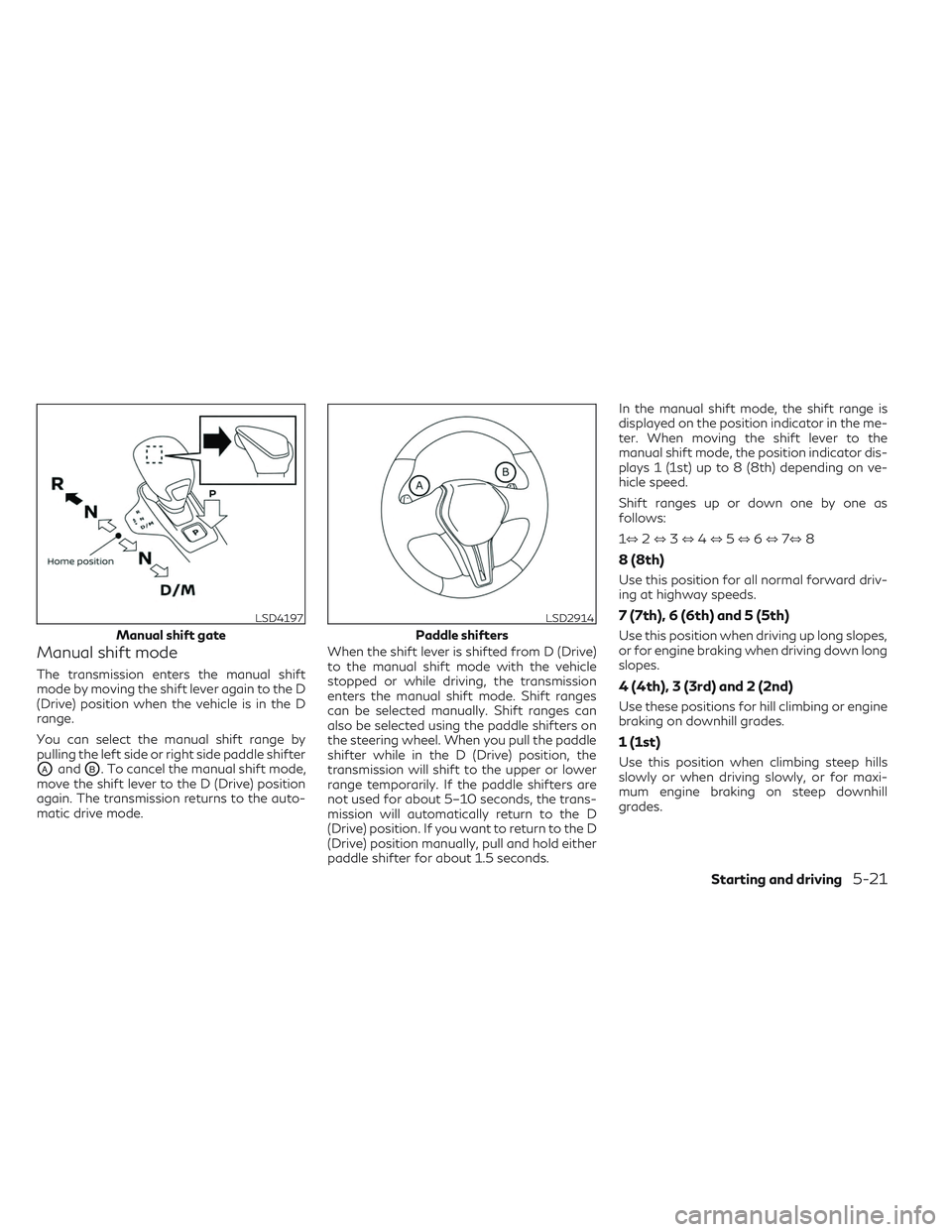
Manual shift mode
The transmission enters the manual shift
mode by moving the shift lever again to the D
(Drive) position when the vehicle is in the D
range.
You can select the manual shift range by
pulling the left side or right side paddle shifter
OAandOB. To cancel the manual shift mode,
move the shift lever to the D (Drive) position
again. The transmission returns to the auto-
matic drive mode. When the shift lever is shifted from D (Drive)
to the manual shift mode with the vehicle
stopped or while driving, the transmission
enters the manual shift mode. Shift ranges
can be selected manually. Shift ranges can
also be selected using the paddle shifters on
the steering wheel. When you pull the paddle
shifter while in the D (Drive) position, the
transmission will shift to the upper or lower
range temporarily. If the paddle shifters are
not used for about 5–10 seconds, the trans-
mission will automatically return to the D
(Drive) position. If you want to return to the D
(Drive) position manually, pull and hold either
paddle shifter for about 1.5 seconds.In the manual shift mode, the shift range is
displayed on the position indicator in the me-
ter. When moving the shift lever to the
manual shift mode, the position indicator dis-
plays 1 (1st) up to 8 (8th) depending on ve-
hicle speed.
Shift ranges up or down one by one as
follows:
1⇔
2⇔ 3⇔ 4⇔ 5⇔ 6⇔ 7⇔ 8
8 (8th)
Use this position for all normal forward driv-
ing at highway speeds.
7 (7th), 6 (6th) and 5 (5th)
Use this position when driving up long slopes,
or for engine braking when driving down long
slopes.
4 (4th), 3 (3rd) and 2 (2nd)
Use these positions for hill climbing or engine
braking on downhill grades.
1 (1st)
Use this position when climbing steep hills
slowly or when driving slowly, or for maxi-
mum engine braking on steep downhill
grades.
LSD4197
Manual shift gate
LSD2914
Paddle shifters
Starting and driving5-21