2022 HYUNDAI VELOSTER climate
[x] Cancel search: climatePage 16 of 446
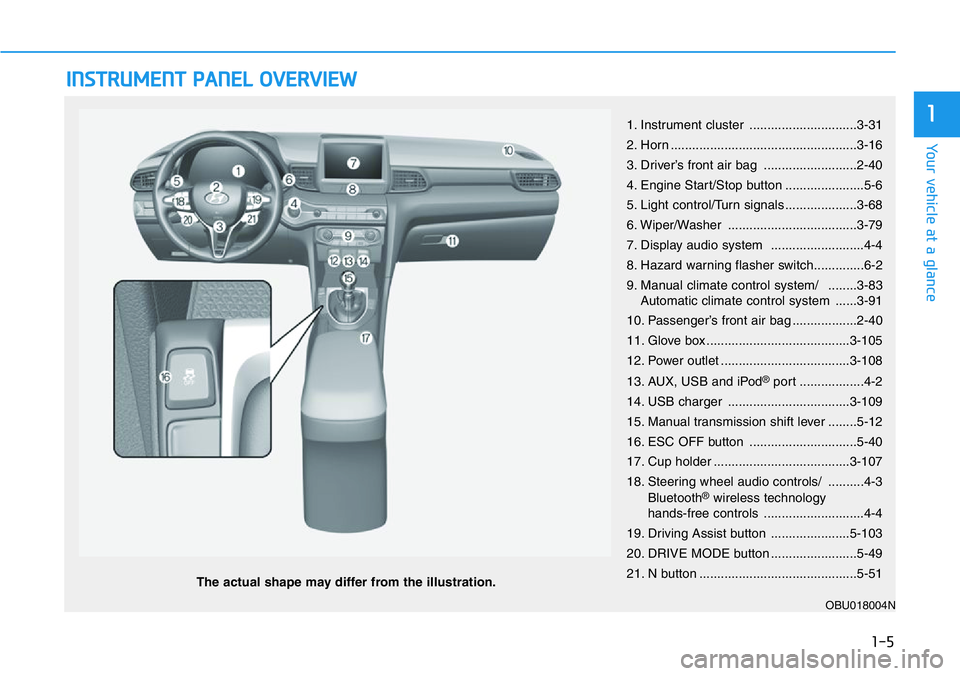
INSTRUMENT PANEL OVERVIEW
The actual shape may differ from the illustration.
1-5
Your vehicle at a glance
11. Instrument cluster ..............................3-31
2. Horn ....................................................3-16
3. Driver’s front air bag ..........................2-40
4. Engine Start/Stop button ......................5-6
5. Light control/Turn signals ....................3-68
6. Wiper/Washer ....................................3-79
7. Display audio system ..........................4-4
8. Hazard warning flasher switch..............6-2
9. Manual climate control system/ ........3-83
Automatic climate control system ......3-91
10. Passenger’s front air bag ..................2-40
11. Glove box ........................................3-105
12. Power outlet ....................................3-108
13. AUX, USB and iPod
®port ..................4-2
14. USB charger ..................................3-109
15. Manual transmission shift lever ........5-12
16. ESC OFF button ..............................5-40
17. Cup holder ......................................3-107
18. Steering wheel audio controls/ ..........4-3
Bluetooth
®wireless technology
hands-free controls ............................4-4
19. Driving Assist button ......................5-103
20. DRIVE MODE button ........................5-49
21. N button ............................................5-51
OBU018004N
Page 80 of 446
Manual Climate Control System.........................3-83
Heating and Air Conditioning .......................................3-84
System Operation............................................................3-87
System Maintenance ......................................................3-89
Automatic Climate Control System ....................3-91
Automatic Temperature Control Mode ......................3-92
Manual Temperature Control Mode ...........................3-93
System Operation............................................................3-97
System Maintenance ......................................................3-99
Windshield Defrosting and Defogging ............3-101
Rear Window Defroster ..............................................3-103
Climate Control Additional Features ...............3-104
Automatic Ventilation ...................................................3-104
Storage Compartment .......................................3-105
Center Console Storage ..............................................3-105
Glove Box ........................................................................3-105
Sunglass Holder.............................................................3-106
Interior Features ................................................3-107
Cup Holder ......................................................................3-107
Sunvisor ...........................................................................3-108
Power Outlet ..................................................................3-108
USB charger ...................................................................3-109
Clock .................................................................................3-110
Clothes Hanger ..............................................................3-110
Floor Mat Anchor(s).....................................................3-111
Cargo Area Cover..........................................................3-112
3
Page 88 of 446
3-10
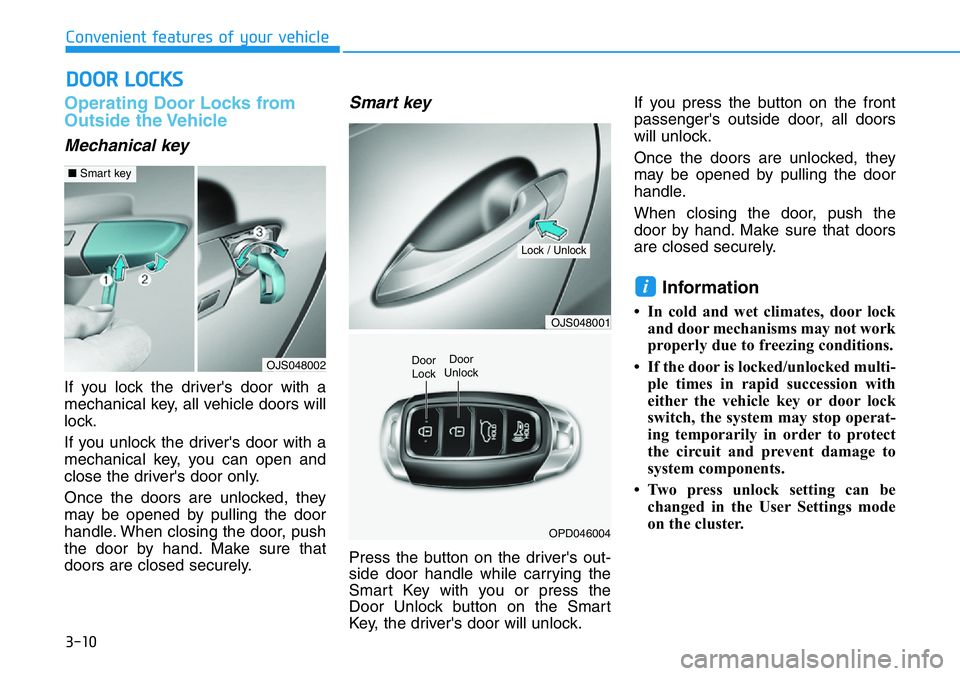
Operating Door Locks from
Outside the Vehicle
Mechanical key
If you lock the driver's door with a
mechanical key, all vehicle doors will
lock.
If you unlock the driver's door with a
mechanical key, you can open and
close the driver's door only.
Once the doors are unlocked, they
may be opened by pulling the door
handle. When closing the door, push
the door by hand. Make sure that
doors are closed securely.
Smart key
Press the button on the driver's out-
side door handle while carrying the
Smart Key with you or press the
Door Unlock button on the Smart
Key, the driver's door will unlock.If you press the button on the front
passenger's outside door, all doors
will unlock.
Once the doors are unlocked, they
may be opened by pulling the door
handle.
When closing the door, push the
door by hand. Make sure that doors
are closed securely.
Information
• In cold and wet climates, door lock
and door mechanisms may not work
properly due to freezing conditions.
• If the door is locked/unlocked multi-
ple times in rapid succession with
either the vehicle key or door lock
switch, the system may stop operat-
ing temporarily in order to protect
the circuit and prevent damage to
system components.
• Two press unlock setting can be
changed in the User Settings mode
on the cluster.
i
DOOR LOCKS
Convenient features of your vehicle
OJS048002
■Smart key
OJS048001
OPD046004
Door
Unlock
Lock / Unlock
Door
Lock
Page 100 of 446
3-22
Convenient features of your vehicle
Power Windows
The ignition switch must be in the ON
position to be able to raise or lower
the windows. Each door has a Power
Window switch to control that door's
window. The driver has a Power
Window Lock switch which can block
the operation of rear passenger win-
dows. The power windows will oper-
ate for approximately 30 seconds
after the ignition switch is placed in
the ACC or LOCK/OFF position.
However, if the front doors are
opened, the Power Windows will not
operate even within the 30 second
period.
Information
• In cold and wet climates, power win-
dows may not work properly due to
freezing conditions.
• While driving with the rear win-
dows down, your vehicle may
demonstrate a wind buffeting or
pulsation noise. This noise is normal
and can be reduced or eliminated by
taking the following actions. If the
noise occurs with one or both of the
rear windows down, partially lower
both front windows approximately
one inch.
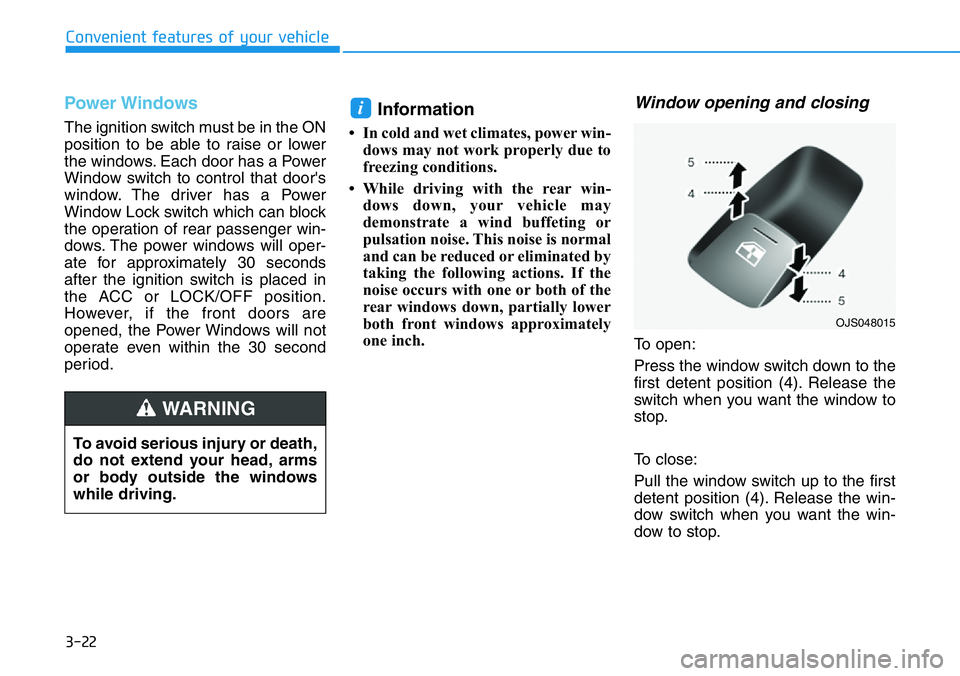
Window opening and closing
To open:
Press the window switch down to the
first detent position (4). Release the
switch when you want the window to
stop.
To close:
Pull the window switch up to the first
detent position (4). Release the win-
dow switch when you want the win-
dow to stop.
i
To avoid serious injury or death,
do not extend your head, arms
or body outside the windows
while driving.
WARNING
OJS048015
Page 105 of 446
3-27
Convenient features of your vehicle
3
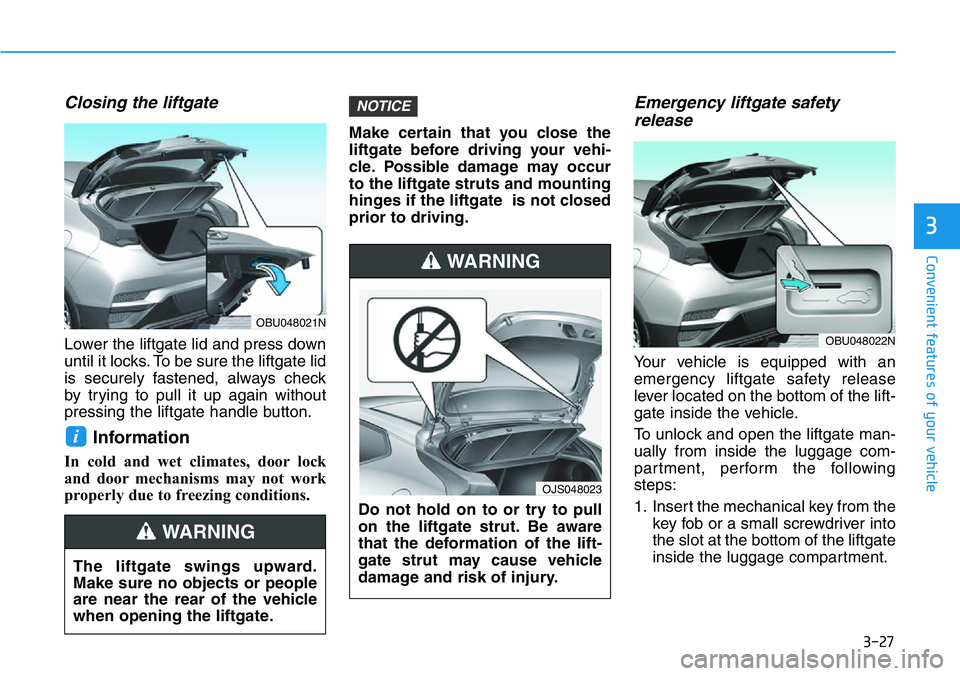
Closing the liftgate
Lower the liftgate lid and press down
until it locks. To be sure the liftgate lid
is securely fastened, always check
by trying to pull it up again without
pressing the liftgate handle button.
Information
In cold and wet climates, door lock
and door mechanisms may not work
properly due to freezing conditions.Make certain that you close the
liftgate before driving your vehi-
cle. Possible damage may occur
to the liftgate struts and mounting
hinges if the liftgate is not closed
prior to driving.
Emergency liftgate safety
release
Your vehicle is equipped with an
emergency liftgate safety release
lever located on the bottom of the lift-
gate inside the vehicle.
To unlock and open the liftgate man-
ually from inside the luggage com-
partment, perform the following
steps:
1. Insert the mechanical key from the
key fob or a small screwdriver into
the slot at the bottom of the liftgate
inside the luggage compartment.
NOTICE
i
The liftgate swings upward.
Make sure no objects or people
are near the rear of the vehicle
when opening the liftgate.
WARNING
Do not hold on to or try to pull
on the liftgate strut. Be aware
that the deformation of the lift-
gate strut may cause vehicle
damage and risk of injury.
WARNING
OJS048023
OBU048021N
OBU048022N
Page 113 of 446
3-35
Convenient features of your vehicle
3
Avoid driving with an extremely
low fuel level. Running out of fuel
could cause the engine to misfire
damaging the catalytic converter.
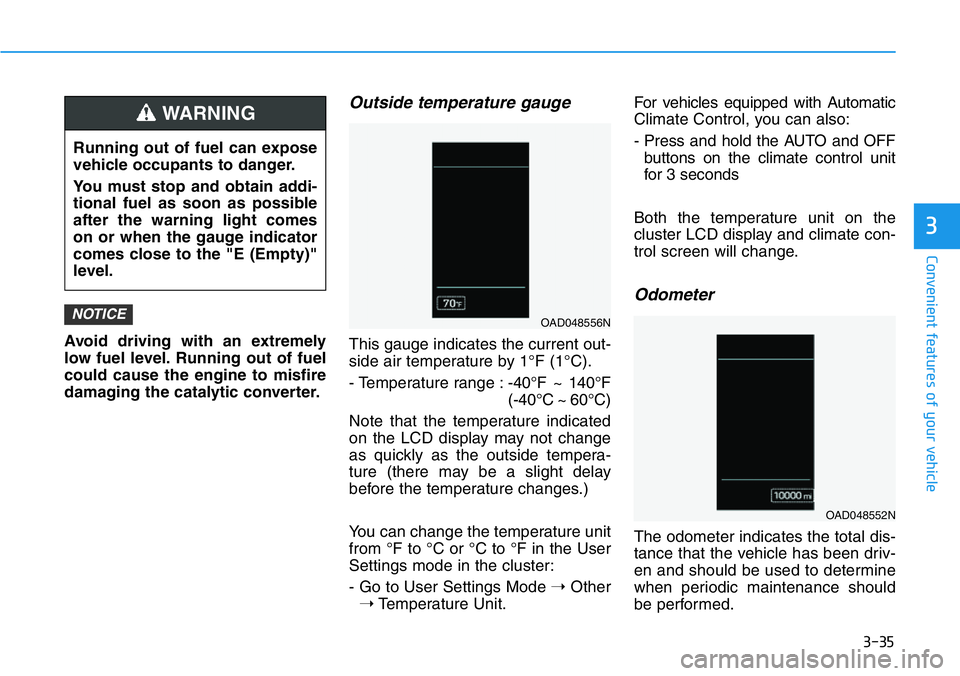
Outside temperature gauge
This gauge indicates the current out-
side air temperature by 1°F (1°C).
- Temperature range :-40°F ~ 140°F
(-40°C ~ 60°C)
Note that the temperature indicated
on the LCD display may not change
as quickly as the outside tempera-
ture (there may be a slight delay
before the temperature changes.)
You can change the temperature unit
from °F to °C or °C to °F in the User
Settings mode in the cluster:
- Go to User Settings Mode ➝Other
➝Temperature Unit.For vehicles equipped with Automatic
Climate Control, you can also:
- Press and hold the AUTO and OFF
buttons on the climate control unit
for 3 seconds
Both the temperature unit on the
cluster LCD display and climate con-
trol screen will change.
Odometer
The odometer indicates the total dis-
tance that the vehicle has been driv-
en and should be used to determine
when periodic maintenance should
be performed.
NOTICEOAD048556N
OAD048552N
Running out of fuel can expose
vehicle occupants to danger.
You must stop and obtain addi-
tional fuel as soon as possible
after the warning light comes
on or when the gauge indicator
comes close to the "E (Empty)"
level.
WARNING
Page 161 of 446
3-83
Convenient features of your vehicle
3
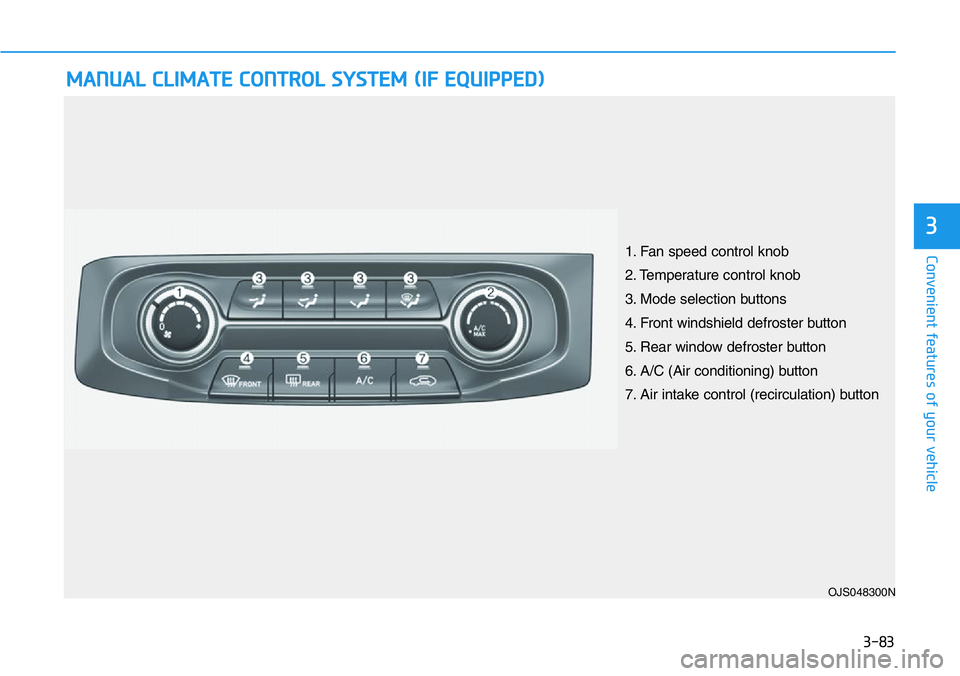
MANUAL CLIMATE CONTROL SYSTEM (IF EQUIPPED)
OJS048300N
1. Fan speed control knob
2. Temperature control knob
3. Mode selection buttons
4. Front windshield defroster button
5. Rear window defroster button
6. A/C (Air conditioning) button
7. Air intake control (recirculation) button
Page 165 of 446
3-87
Convenient features of your vehicle
3
Fan speed control (1)
Turn the knob to the right to increase
the fan speed and airflow. Turn the
knob to the left to decrease fan
speed and airflow.
Setting the fan speed control knob to
the "0" position turns off the fan.
Operating the fan speed when the
ignition switch is in the ON posi-
tion could cause the battery to
discharge. Operate the fan speed
when the engine is running.
Air conditioning (6)
Push the A/C button to turn the sys-
tem on (indicator light will illuminate)
and off.
System Operation
Cooling / Ventilation
1. Select the Face Level mode.
2. Set the air intake control to fresh
mode.
3. Set the temperature control to the
desired position.
4. Set the fan speed control to the
desired speed.
Heating
1. Select the Floor Level mode.
2. Set the air intake control to fresh
mode.
3. Set the temperature control to the
desired position.
4. Set the fan speed control to the
desired speed.
5. If desired, turn the air conditioning
ON with the temperature control
knob set to heat in order to dehu-
midify the air before it enters into
the cabin.
If the windshield fogs up, select the
Floor & Defrost mode or press
the Front Defrost mode.
NOTICE
•Continued use of the climate
control system operation in
Recirculation mode for a pro-
longed period of time may
cause drowsiness to the
occupants in the cabin. This
may lead to loss of vehicle
control which may lead to an
accident.
•Continued use of the climate
control system operation in
Recirculation mode with the
A/C OFF may allow humidity
to increase inside the cabin.
This may cause condensation
to accumulate on the wind-
shield and obscure visibility.
•Do not sleep in your vehicle or
remain parked in your vehicle
with the windows up and
either the heater or the air
conditioning ON for pro-
longed periods of time. Doing
so may increase the levels of
carbon dioxide in the cabin
which may lead to serious
injury or death.
WARNING