2022 HYUNDAI VELOSTER reset
[x] Cancel search: resetPage 251 of 446
5-57
Driving your vehicle
5
• Warm up the tires before using
launch control for the best
result.
• Launch Control is intended for
use at a closed race track with
dry road surface and not intend-
ed for use on public roads. It will
not compensate for driver's who
are inexperienced or lack famil-
iarity with the race track.
• Do not use Launch Control in
poor road condition (ex. wet,
sand, snow). Control over vehi-
cle may be lost with poor road
condition and driver inatten-
tions. Do not endanger other
road users by using Launch
Control.
• Do not use Launch Control dur-
ing break-in period of the vehi-
cle.
• Constant use of Launch Control
can put enormous stress on the
vehicle resulting in premature
wear of related components.
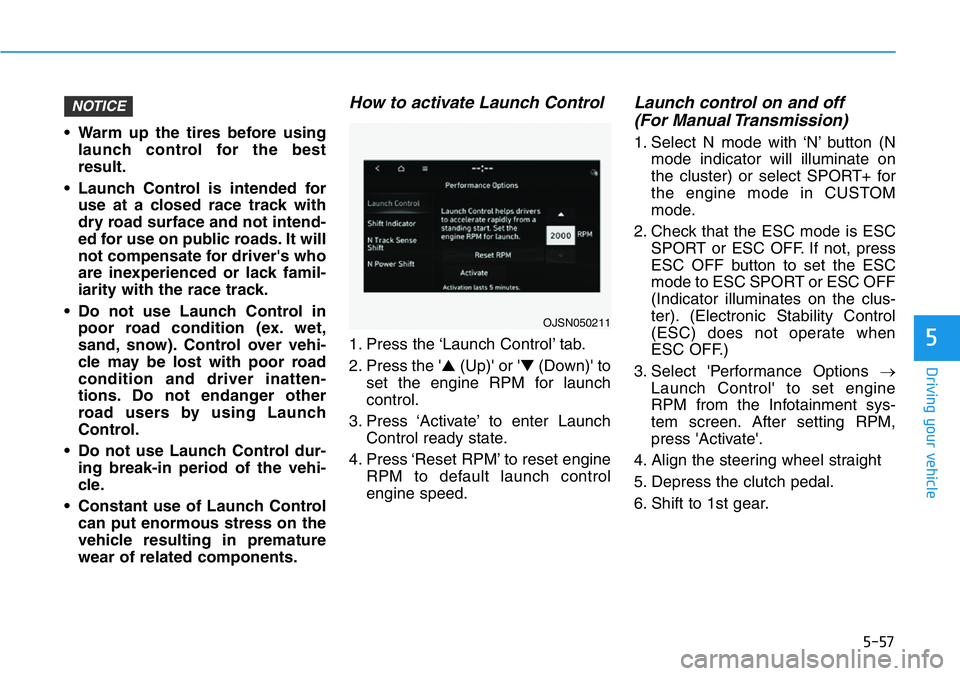
How to activate Launch Control
1. Press the ‘Launch Control’ tab.
2. Press the '▲(Up)' or '▼(Down)' to
set the engine RPM for launch
control.
3. Press ‘Activate’ to enter Launch
Control ready state.
4. Press ‘Reset RPM’ to reset engine
RPM to default launch control
engine speed.
Launch control on and off
(For Manual Transmission)
1. Select N mode with ‘N’ button (N
mode indicator will illuminate on
the cluster) or select SPORT+ for
the engine mode in CUSTOM
mode.
2. Check that the ESC mode is ESC
SPORT or ESC OFF. If not, press
ESC OFF button to set the ESC
mode to ESC SPORT or ESC OFF
(Indicator illuminates on the clus-
ter). (Electronic Stability Control
(ESC) does not operate when
ESC OFF.)
3. Select 'Performance Options →
Launch Control' to set engine
RPM from the Infotainment sys-
tem screen. After setting RPM,
press 'Activate'.
4. Align the steering wheel straight
5. Depress the clutch pedal.
6. Shift to 1st gear.
NOTICE
OJSN050211
Page 254 of 446
5-60
Driving your vehicle
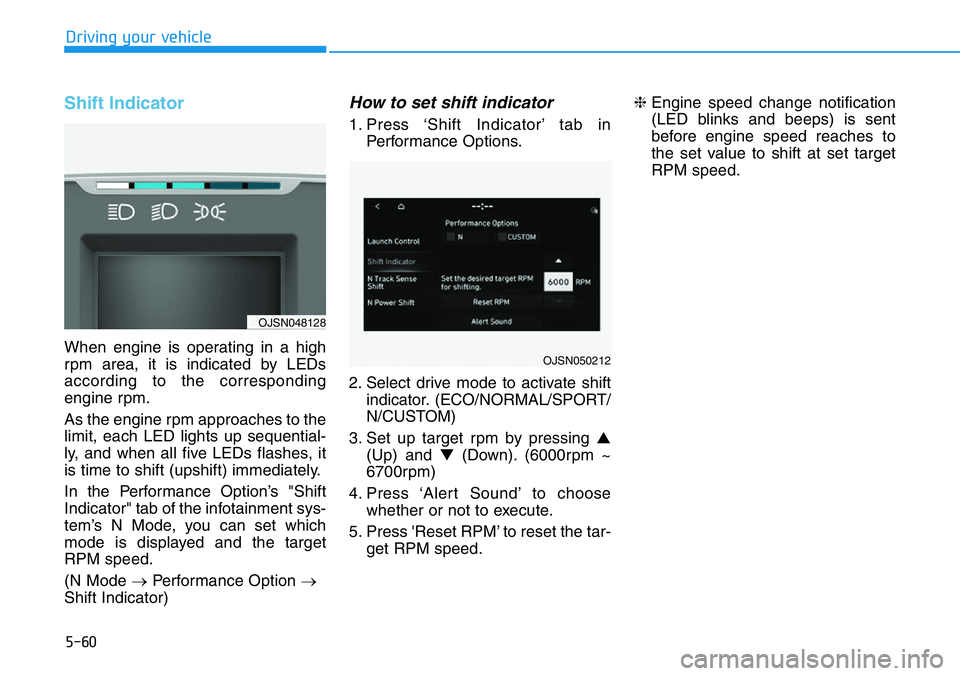
Shift Indicator
When engine is operating in a high
rpm area, it is indicated by LEDs
according to the corresponding
engine rpm.
As the engine rpm approaches to the
limit, each LED lights up sequential-
ly, and when all five LEDs flashes, it
is time to shift (upshift) immediately.
In the Performance Option’s "Shift
Indicator" tab of the infotainment sys-
tem’s N Mode, you can set which
mode is displayed and the target
RPM speed.
(N Mode →Performance Option →
Shift Indicator)
How to set shift indicator
1. Press ‘Shift Indicator’ tab in
Performance Options.
2. Select drive mode to activate shift
indicator. (ECO/NORMAL/SPORT/
N/CUSTOM)
3. Set up target rpm by pressing ▲
(Up) and ▼(Down). (6000rpm ~
6700rpm)
4. Press ‘Alert Sound’ to choose
whether or not to execute.
5. Press 'Reset RPM’ to reset the tar-
get RPM speed.❈Engine speed change notification
(LED blinks and beeps) is sent
before engine speed reaches to
the set value to shift at set target
RPM speed.
OJSN050212
OJSN048128
Page 291 of 446
5-97
Driving your vehicle
5
Taking a break
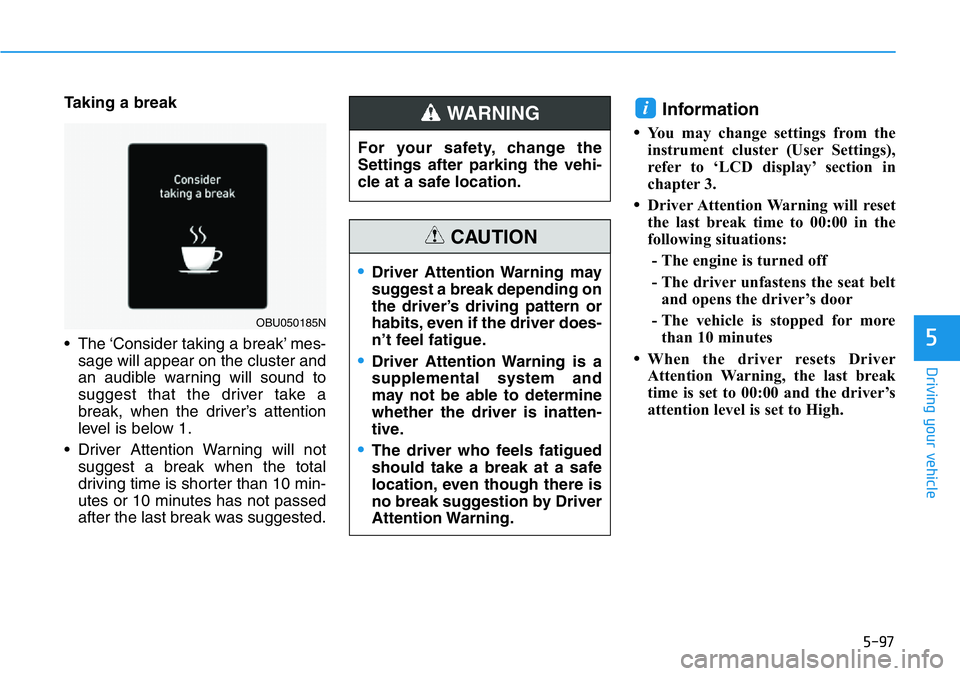
• The ‘Consider taking a break’ mes-
sage will appear on the cluster and
an audible warning will sound to
suggest that the driver take a
break, when the driver’s attention
level is below 1.
• Driver Attention Warning will not
suggest a break when the total
driving time is shorter than 10 min-
utes or 10 minutes has not passed
after the last break was suggested.Information
•You may change settings from the
instrument cluster (User Settings),
refer to ‘LCD display’ section in
chapter 3.
•Driver Attention Warning will reset
the last break time to 00:00 in the
following situations:
- The engine is turned off
- The driver unfastens the seat belt
and opens the driver’s door
- The vehicle is stopped for more
than 10 minutes
•When the driver resets Driver
Attention Warning, the last break
time is set to 00:00 and the driver’s
attention level is set to High.
i
OBU050185N
For your safety, change the
Settings after parking the vehi-
cle at a safe location.
WARNING
•Driver Attention Warning may
suggest a break depending on
the driver’s driving pattern or
habits, even if the driver does-
n’t feel fatigue.
•Driver Attention Warning is a
supplemental system and
may not be able to determine
whether the driver is inatten-
tive.
•The driver who feels fatigued
should take a break at a safe
location, even though there is
no break suggestion by Driver
Attention Warning.
CAUTION
Page 299 of 446
5-105
Driving your vehicle
5
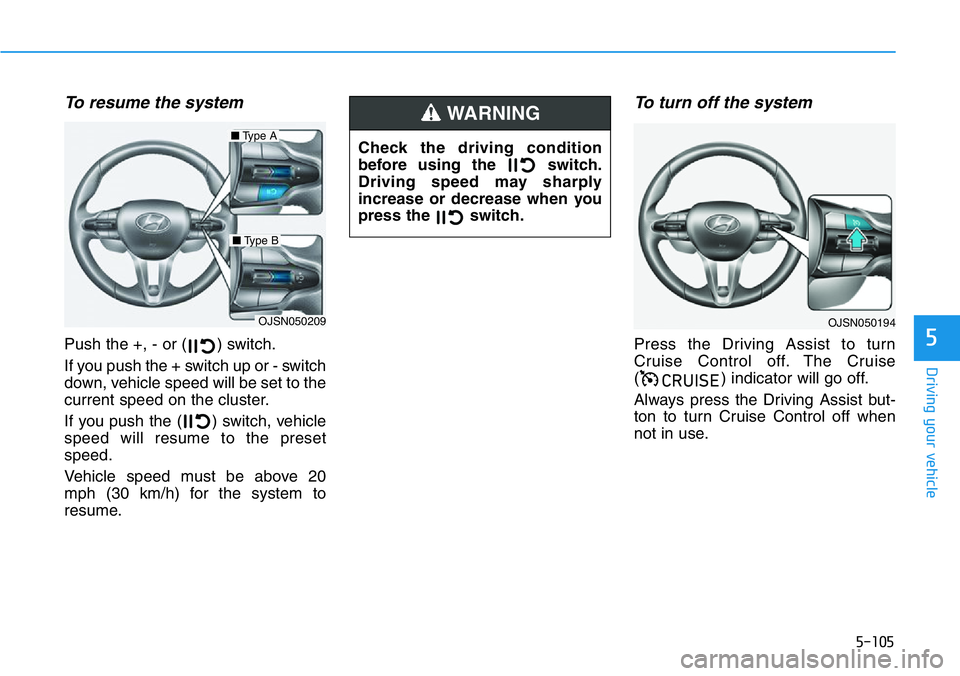
To resume the system
Push the +, - or ( ) switch.
If you push the + switch up or - switch
down, vehicle speed will be set to the
current speed on the cluster.
If you push the ( ) switch, vehicle
speed will resume to the preset
speed.
Vehicle speed must be above 20
mph (30 km/h) for the system to
resume.
To turn off the system
Press the Driving Assist to turn
Cruise Control off. The Cruise
( ) indicator will go off.
Always press the Driving Assist but-
ton to turn Cruise Control off when
not in use.
&58,6(
OJSN050209
■Type A
■Type B
OJSN050194
Check the driving condition
before using the switch.
Driving speed may sharply
increase or decrease when you
press the switch.
WARNING
Page 353 of 446
7
Maintenance
7
Maintenance
Engine Compartment .............................................7-3
Maintenance Services ...........................................7-4
Owner's Responsibility .....................................................7-4
Owner Maintenance Precautions..................................7-4
Owner Maintenance ..............................................7-5
Owner Maintenance Schedule .......................................7-6
Scheduled Maintenance Services........................7-7
Normal Maintenance Schedule ......................................7-8
Maintenance Under Severe Usage Conditions ........7-11
Explanation of Scheduled Maintenance
Items ......................................................................7-13
Engine Oil ..............................................................7-16
Checking the Engine Oil Level .....................................7-16
Checking the Engine Oil and Filter .............................7-17
Engine Coolant .....................................................7-18
Checking the Engine Coolant Level ............................7-18
Changing Engine Coolant ..............................................7-21
Brake/Clutch Fluid ...............................................7-22
Checking the brake/clutch Fluid Level ......................7-22
Washer Fluid .........................................................7-23
Checking the Washer Fluid Level................................7-23
Parking Brake .......................................................7-23
Checking the Parking Brake .........................................7-23
Air Cleaner ............................................................7-24
Filter Replacement ..........................................................7-24
Climate Control Air Filter ....................................7-25
Filter Inspection ...............................................................7-25
Wiper Blades.........................................................7-26
Blade Inspection ..............................................................7-26
Blade Replacement .........................................................7-26
Battery...................................................................7-29
For Best Battery Service ..............................................7-30
Battery Recharging ........................................................7-30
Reset Features.................................................................7-31
Tires and Wheels .................................................7-32
Tire Care ............................................................................7-33
Recommended Cold Tire Inflation Pressures ...........7-33
Check Tire Inflation Pressure ......................................7-34
Tire Rotation.....................................................................7-35
Wheel Alignment and Tire Balance ............................7-36
Tire Replacement ............................................................7-36
Wheel Replacement ........................................................7-37
Tire Traction .....................................................................7-37
Tire Maintenance ............................................................7-37
Tire Sidewall Labeling ....................................................7-37
7
Page 383 of 446

7-31
7
Maintenance
By jump starting
After a jump start from a good bat-
tery, drive the vehicle for 20-30 min-
utes before it is shutoff. The vehicle
may not restart if you shut it off
before the battery had a chance to
adequately recharge. See "Jump
Starting" in chapter 6 for more details
on jump starting procedures.
Information
An inappropriately disposed
battery can be harmful to
the environment and human
health. Dispose of the bat-
tery according to your local
law(s) or regulations.
Reset Features
The following items may need to be
reset after the battery has been dis-
charged or the battery has been dis-
connected. See chapter 3 or 4 for:
• Power Windows
• Trip Computer
• Climate Control System
• Clock
• Audio System
i
•Watch the battery during
charging, and stop or reduce
the charging rate if the battery
cells begin boiling violently.
•The negative battery cable
must be removed first and
installed last when the battery
is disconnected. Disconnect
the battery charger in the fol-
lowing order:
(1) Turn off the battery charg-
er main switch.
(2) Unhook the negative
clamp from the negative
battery terminal.
(3) Unhook the positive clamp
from the positive battery
terminal.
•
Always use a genuine
HYUNDAI approved battery
when you replace the battery.
Page 388 of 446
7-36
Maintenance
Wheel Alignment and Tire
Balance
The wheels on your vehicle were
aligned and balanced carefully at the
factory to give you the longest tire life
and best overall performance.
In most cases, you will not need to
have your wheels aligned again.
However, if you notice unusual tire
wear or your vehicle pulling one way
or the other, the alignment may need
to be reset.
If you notice your vehicle vibrating
when driving on a smooth road, your
wheels may need to be rebalanced.
Improper wheel weights can dam-
age your vehicle's aluminum
wheels. Use only approved wheel
weights.
Tire Replacement
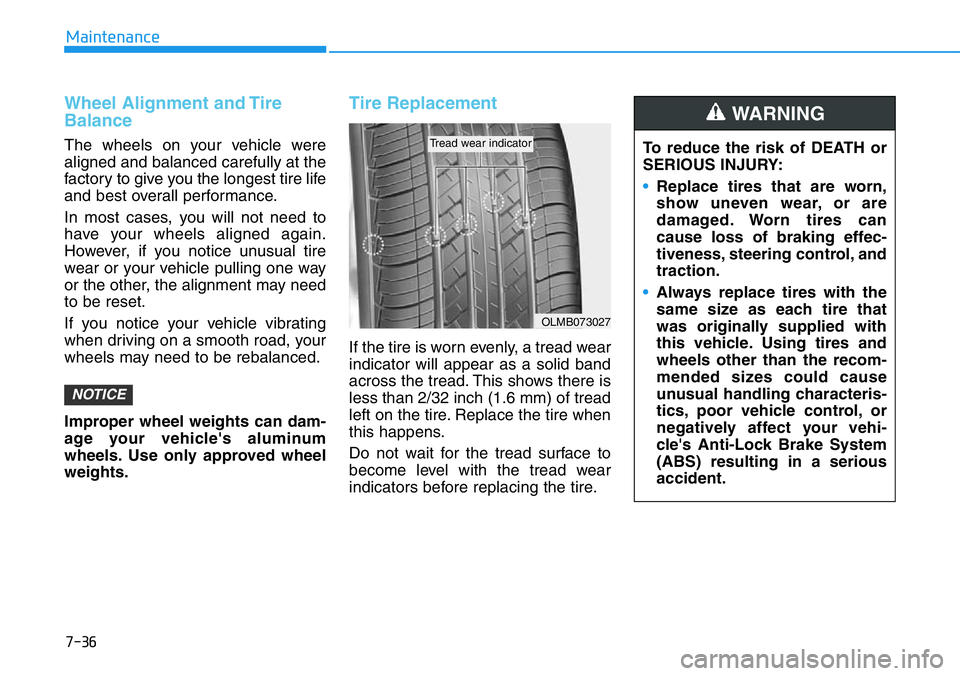
If the tire is worn evenly, a tread wear
indicator will appear as a solid band
across the tread. This shows there is
less than 2/32 inch (1.6 mm) of tread
left on the tire. Replace the tire when
this happens.
Do not wait for the tread surface to
become level with the tread wear
indicators before replacing the tire.
NOTICE
OLMB073027
Tread wear indicatorTo reduce the risk of DEATH or
SERIOUS INJURY:
•Replace tires that are worn,
show uneven wear, or are
damaged. Worn tires can
cause loss of braking effec-
tiveness, steering control, and
traction.
•Always replace tires with the
same size as each tire that
was originally supplied with
this vehicle. Using tires and
wheels other than the recom-
mended sizes could cause
unusual handling characteris-
tics, poor vehicle control, or
negatively affect your vehi-
cle's Anti-Lock Brake System
(ABS) resulting in a serious
accident.
WARNING
Page 401 of 446

7-49
7
Maintenance
Fuse switch
Always, place the fuse switch to the
ON position.
If you move the switch to the OFF
position, some items such as the
audio system and digital clock must
be reset and the smart key may not
work properly.
Information
If the fuse switch is OFF, the above
message will appear.
• Always place the fuse switch in
the ON position while driving the
vehicle.
• Do not move the fuse switch
repeatedly. The fuse switch may
be damaged.
Engine Compartment Panel
Fuse Replacement
1. Turn the engine off.
2. Turn all other switches OFF.
NOTICE
i
OJSN078023OOS047142L
OJSN078077
OJSN078078
■Blade type fuse
■Cartridge type fuse