2022 HYUNDAI VELOSTER N shift lever
[x] Cancel search: shift leverPage 16 of 446

INSTRUMENT PANEL OVERVIEW
The actual shape may differ from the illustration.
1-5
Your vehicle at a glance
11. Instrument cluster ..............................3-31
2. Horn ....................................................3-16
3. Driver’s front air bag ..........................2-40
4. Engine Start/Stop button ......................5-6
5. Light control/Turn signals ....................3-68
6. Wiper/Washer ....................................3-79
7. Display audio system ..........................4-4
8. Hazard warning flasher switch..............6-2
9. Manual climate control system/ ........3-83
Automatic climate control system ......3-91
10. Passenger’s front air bag ..................2-40
11. Glove box ........................................3-105
12. Power outlet ....................................3-108
13. AUX, USB and iPod
®port ..................4-2
14. USB charger ..................................3-109
15. Manual transmission shift lever ........5-12
16. ESC OFF button ..............................5-40
17. Cup holder ......................................3-107
18. Steering wheel audio controls/ ..........4-3
Bluetooth
®wireless technology
hands-free controls ............................4-4
19. Driving Assist button ......................5-103
20. DRIVE MODE button ........................5-49
21. N button ............................................5-51
OBU018004N
Page 27 of 446
2-10
Safety system of your vehicle
Head Restraints
The vehicle's front and rear seats
have head restraints. The head
restraints provide comfort for passen-
gers, but more importantly they are
designed to help protect passengers
from whiplash and other neck and
spinal injuries during an accident,
especially in a rear impact collision. Make sure the vehicle is off, the
shift lever is in N (Neutral), and
the parking brake is securely
applied whenever loading or
unloading cargo. Failure to take
these steps may allow the vehi-
cle to move if the shift lever is
inadvertently moved to another
position.WARNING
•Be careful when loading
cargo through the rear pas-
senger seats to prevent dam-
age to the vehicle interior.
•When cargo is loaded through
the rear passenger seats,
ensure the cargo is properly
secured to prevent it from
moving while driving.
•Unsecured cargo in the pas-
senger compartment can
cause damage to the vehicle
or injury to it's occupants.
CAUTION
To reduce the risk of serious
injury or death in an accident,
take the following precautions
when adjusting your head
restraints:
•Always properly adjust the
head restraints for all passen-
gers BEFORE starting the
vehicle.
•NEVER let anyone ride in a
seat with the head restraints
removed or reversed.
•
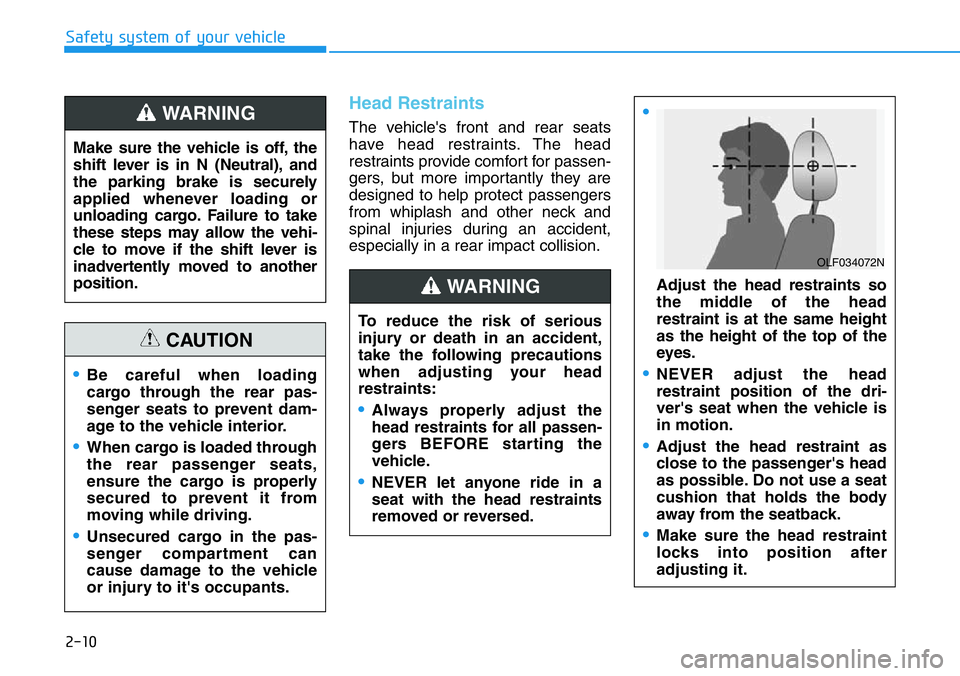
Adjust the head restraints so
the middle of the head
restraint is at the same height
as the height of the top of the
eyes.
•NEVER adjust the head
restraint position of the dri-
ver's seat when the vehicle is
in motion.
•Adjust the head restraint as
close to the passenger's head
as possible. Do not use a seat
cushion that holds the body
away from the seatback.
•Make sure the head restraint
locks into position after
adjusting it.
WARNING
OLF034072N
Page 90 of 446
3-12
Convenient features of your vehicle
• For Push Button Start Vehicles
(Smart Key)
If the smart key is in the vehicle
and any door is open, the doors
will not lock even though the lock
button (2) is pressed.
Opening a door when something
is approaching may cause dam-
age or injury. Be careful when
opening doors and watch for
vehicles, motorcycles, bicycles
or pedestrians approaching the
vehicle in the path of the door.
CAUTION
Do not leave children or animals
unattended in your vehicle. An
enclosed vehicle can become
extremely hot, causing death or
serious injury to unattended
children or animals who cannot
escape the vehicle. Children
might operate features of the
vehicle that could injure them,
or they could encounter other
harm, possibly from someone
gaining entry to the vehicle.
WARNING
Always secure your vehicle.
Leaving your vehicle unlocked
increases the potential risk to
you or others from someone
hiding in your vehicle.
To secure your vehicle, while
depressing the brake, move the
shift lever to the the 1st gear
when the vehicle is parked on a
uphill and to R (Reverse) on a
downhill, engage the parking
brake, and place the ignition
switch in the LOCK/OFF posi-
tion, close all windows, lock all
doors, and always take the key
with you.
WARNING
•The doors should always be
fully closed and locked while
the vehicle is in motion. If the
doors are unlocked, the risk of
being thrown from the vehicle
in a crash is increased.
•Do not pull the inner door
handle of the driver's or pas-
senger's door while the vehi-
cle is moving.
WARNING
Page 108 of 446
3-30
Convenient features of your vehicle
Information
Make sure to refuel your vehicle
according to the "Fuel Requirements"
suggested in the Introduction chapter.
• Do not spill fuel on the exterior
surfaces of the vehicle. Any type
of fuel spilled on painted sur-
faces may damage the paint.
• If the fuel filler cap requires
replacement, use only a genuine
HYUNDAI cap or the equivalent
specified for your vehicle. An
incorrect fuel filler cap can
result in a serious malfunction
of the fuel system or emission
control system.
NOTICE
i•If a fire breaks out during refu-
eling, leave the vicinity of the
vehicle, and immediately con-
tact the manager of the gas
station and then contact the
local fire department. Follow
any safety instructions they
provide.
•If pressurized fuel sprays out,
it can cover your clothes or
skin and thus subject you to
the risk of fire and burns.
Always remove the fuel cap
carefully and slowly. If the cap
is venting fuel or if you hear a
hissing sound, wait until the
condition stops before com-
pletely removing the cap.
•Always check that the fuel cap
is installed securely to pre-
vent fuel spillage in the event
of an accident.
Once refueling has begun,
contact between your bare
hand and the vehicle should
be maintained until the filling
is complete.
•Use only approved portable
plastic fuel containers designed
to carry and store gasoline.
•When refueling, always move
the shift lever to the 1st gear
when the vehicle is parked on
a uphill and to R (Reverse) on
a downhill, set the parking
brake, and place the ignition
switch to the LOCK/OFF posi-
tion. Sparks produced by
electrical components related
to the engine can ignite fuel
vapors causing a fire.
•Do not use matches or a
lighter and do not smoke or
leave a lit cigarette in your
vehicle while at a gas station,
especially during refueling.
•Do not over-fill or top-off your
vehicle tank, which can cause
gasoline spillage.
Page 114 of 446
3-36
Convenient features of your vehicle
Range
• The range is the estimated dis-
tance the vehicle can be driven
with the remaining fuel.
• If the estimated distance is below
1 mi. (1 km), the trip computer will
display "----" as range.
Information
• If the vehicle is not on level ground
or the battery power has been inter-
rupted, the range function may not
operate correctly.
• The range may differ from the actu-
al driving distance as it is only an
estimate of the available driving
range for the vehicle and driving
conditions.
• The trip computer may not register
additional fuel if less than 1.6 gallon
(6 liters) of fuel are added to the
vehicle.
• The range may vary significantly
based on driving conditions, driving
habits, and condition of the vehicle.
Transmission shift indicator
Manual transmission shift
indicator
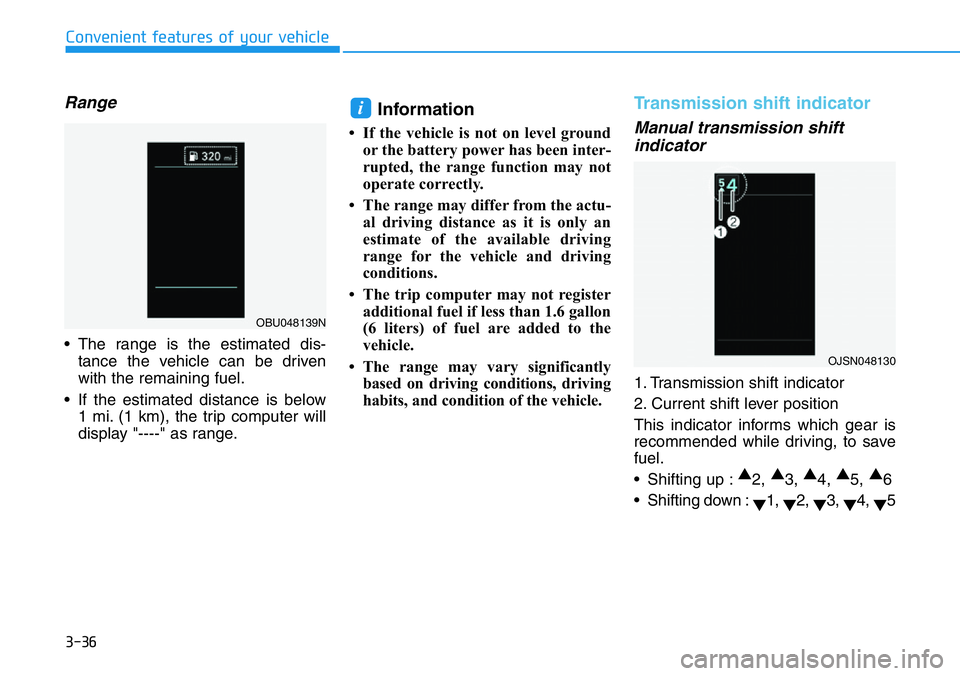
1. Transmission shift indicator
2. Current shift lever position
This indicator informs which gear is
recommended while driving, to save
fuel.
• Shifting up :▲
2, ▲
3, ▲
4, ▲
5, ▲
6
• Shifting down :
▼1,
▼2,
▼3,
▼4,
▼5
i
OJSN048130
OBU048139N
Page 115 of 446
3-37
Convenient features of your vehicle
3
For example
: Indicates that shifting up to the
3rd gear is recommended (cur-
rently the shift lever is in the
2nd or 1st gear).
: Indicates that shifting down to
the 3rd gear is recommended
(currently the shift lever is in the
4th, 5th, or 6th gear).
This indicator is displayed when driv-
ing in NORMAL/ECO mode.Shift lights
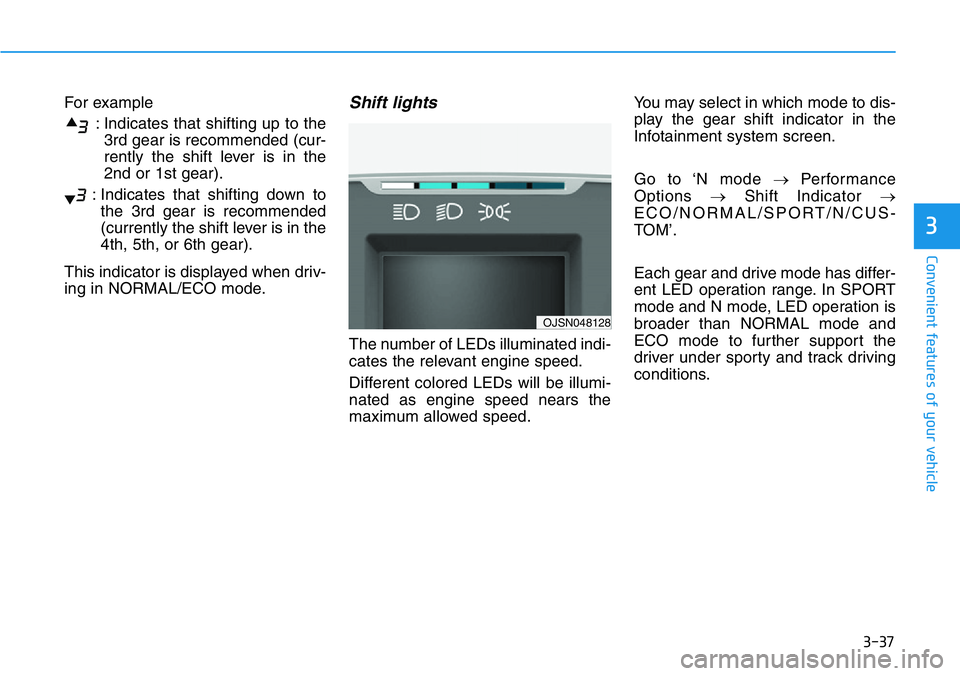
The number of LEDs illuminated indi-
cates the relevant engine speed.
Different colored LEDs will be illumi-
nated as engine speed nears the
maximum allowed speed.You may select in which mode to dis-
play the gear shift indicator in the
Infotainment system screen.
Go to ‘N mode →Performance
Options →Shift Indicator →
ECO/NORMAL/SPORT/N/CUS-
TOM’.
Each gear and drive mode has differ-
ent LED operation range. In SPORT
mode and N mode, LED operation is
broader than NORMAL mode and
ECO mode to further support the
driver under sporty and track driving
conditions.
OJSN048128
Page 160 of 446
3-82
Convenient features of your vehicle
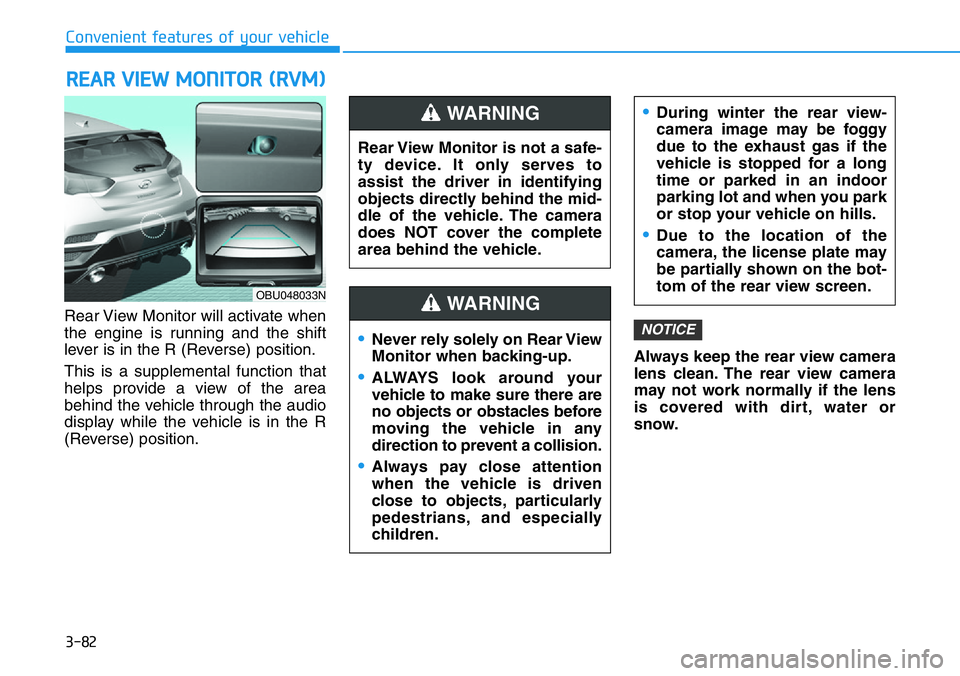
Rear View Monitor will activate when
the engine is running and the shift
lever is in the R (Reverse) position.
This is a supplemental function that
helps provide a view of the area
behind the vehicle through the audio
display while the vehicle is in the R
(Reverse) position.Always keep the rear view camera
lens clean. The rear view camera
may not work normally if the lens
is covered with dirt, water or
snow.
NOTICE
REAR VIEW MONITOR (RVM)
Rear View Monitor is not a safe-
ty device. It only serves to
assist the driver in identifying
objects directly behind the mid-
dle of the vehicle. The camera
does NOT cover the complete
area behind the vehicle.
WARNING
Page 200 of 446
5-6
Driving your vehicle
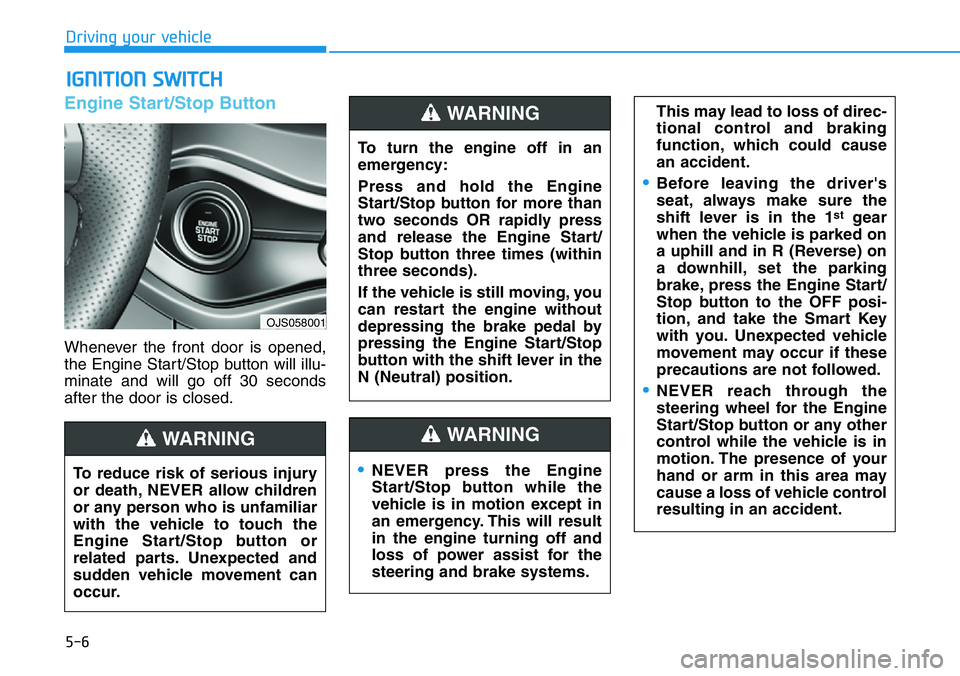
Engine Start/Stop Button
Whenever the front door is opened,
the Engine Start/Stop button will illu-
minate and will go off 30 seconds
after the door is closed.
IGNITION SWITCH
OJS058001
To turn the engine off in an
emergency:
Press and hold the Engine
Start/Stop button for more than
two seconds OR rapidly press
and release the Engine Start/
Stop button three times (within
three seconds).
If the vehicle is still moving, you
can restart the engine without
depressing the brake pedal by
pressing the Engine Start/Stop
button with the shift lever in the
N (Neutral) position.
WARNING
To reduce risk of serious injury
or death, NEVER allow children
or any person who is unfamiliar
with the vehicle to touch the
Engine Start/Stop button or
related parts. Unexpected and
sudden vehicle movement can
occur.
WARNING
•NEVER press the Engine
Start/Stop button while the
vehicle is in motion except in
an emergency. This will result
in the engine turning off and
loss of power assist for the
steering and brake systems.
WARNING
This may lead to loss of direc-
tional control and braking
function, which could cause
an accident.
•Before leaving the driver's
seat, always make sure the
shift lever is in the 1
stgear
when the vehicle is parked on
a uphill and in R (Reverse) on
a downhill, set the parking
brake, press the Engine Start/
Stop button to the OFF posi-
tion, and take the Smart Key
with you. Unexpected vehicle
movement may occur if these
precautions are not followed.
•NEVER reach through the
steering wheel for the Engine
Start/Stop button or any other
control while the vehicle is in
motion. The presence of your
hand or arm in this area may
cause a loss of vehicle control
resulting in an accident.