2022 HYUNDAI VELOSTER N camera
[x] Cancel search: cameraPage 14 of 446
1-3
Your vehicle at a glance
1
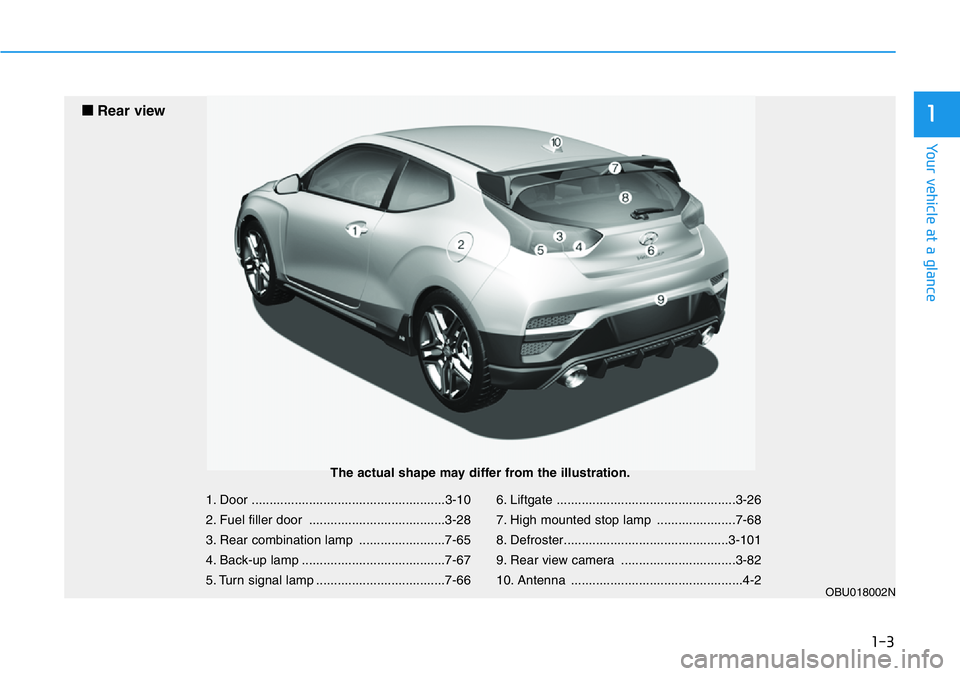
1. Door ......................................................3-10
2. Fuel filler door ......................................3-28
3. Rear combination lamp ........................7-65
4. Back-up lamp ........................................7-67
5. Turn signal lamp ....................................7-666. Liftgate ..................................................3-26
7. High mounted stop lamp ......................7-68
8. Defroster..............................................3-101
9. Rear view camera ................................3-82
10. Antenna ................................................4-2
OBU018002N
■ Rear view
The actual shape may differ from the illustration.
Page 127 of 446

3-49
Convenient features of your vehicle
3
Key not detected
This warning message is displayed if
the smart key is not detected when you
press the Engine Start/Stop button.
Press START button again
This message is displayed if you
were unable to start the vehicle when
the Engine Start/Stop button was
pressed.
If this occurs, attempt to start the
engine by pressing the Engine Start/
Stop button again.
If the warning message appears
each time you press the Engine
Start/Stop button, have your vehicle
inspected by an authorized
HYUNDAI dealer.
Battery discharging due to
external electrical devices
This message is displayed if the bat-
tery voltage is weak due to any non-
factory electrical accessories (ex.
dashboard camera) while parking.
Be careful that the battery is not dis-
charged.
If the warning message appears
after removing the non-factory elec-
trical accessories, we recommend
that you have the vehicle inspected
by an authorized HYUNDAI dealer.
Press START button with key
This warning message is displayed if
you press the Engine Start/Stop but-
ton while the warning message "Key
not detected" is displayed.
At this time, the immobilizer indicator
light blinks.
Check BRAKE SWITCH fuse
This warning message is displayed if
the brake switch fuse is disconnected.
You need to replace the fuse with a
new one before starting the engine.
If that is not possible, you can start
the engine by pressing the Engine
Start/Stop button for 10 seconds in
the ACC position.
Page 153 of 446

3-75
Convenient features of your vehicle
High Beam Assist will automatically
adjust the headlamp range (switches
between high beam and low beam)
depending on the brightness of
detected vehicles and certain road
conditions.
Detecting sensor
[1] : Front view camera
The front view camera is used as a
detecting sensor to detect ambient
light and brightness while driving.
Refer to the picture above for the
detailed location of the detecting
sensor.Always keep the front view cam-
era in good condition to maintain
optimal performance of High
Beam Assist.
For more details on the precau-
tions of the front view camera,
refer to “Forward Collision-
Avoidance Assist (FCA)” section
in chapter 5.
NOTICE
HIGH BEAM ASSIST (HBA) (IF EQUIPPED)
3
OIK047090
OBU050218N
Page 155 of 446
3-77
Convenient features of your vehicle
3
System malfunction and limi-
tations
System malfunction
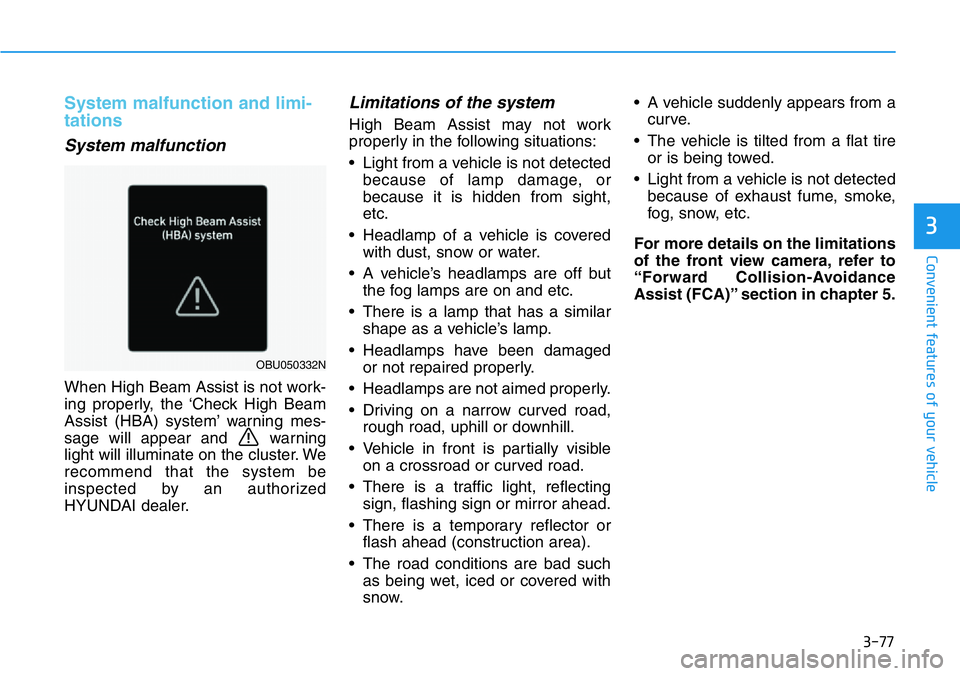
When High Beam Assist is not work-
ing properly, the ‘Check High Beam
Assist (HBA) system’ warning mes-
sage will appear and warning
light will illuminate on the cluster. We
recommend that the system be
inspected by an authorized
HYUNDAI dealer.
Limitations of the system
High Beam Assist may not work
properly in the following situations:
• Light from a vehicle is not detected
because of lamp damage, or
because it is hidden from sight,
etc.
• Headlamp of a vehicle is covered
with dust, snow or water.
• A vehicle’s headlamps are off but
the fog lamps are on and etc.
• There is a lamp that has a similar
shape as a vehicle’s lamp.
• Headlamps have been damaged
or not repaired properly.
• Headlamps are not aimed properly.
• Driving on a narrow curved road,
rough road, uphill or downhill.
• Vehicle in front is partially visible
on a crossroad or curved road.
• There is a traffic light, reflecting
sign, flashing sign or mirror ahead.
• There is a temporary reflector or
flash ahead (construction area).
• The road conditions are bad such
as being wet, iced or covered with
snow.• A vehicle suddenly appears from a
curve.
• The vehicle is tilted from a flat tire
or is being towed.
• Light from a vehicle is not detected
because of exhaust fume, smoke,
fog, snow, etc.
For more details on the limitations
of the front view camera, refer to
“Forward Collision-Avoidance
Assist (FCA)” section in chapter 5.
OBU050332N
Page 160 of 446
3-82
Convenient features of your vehicle
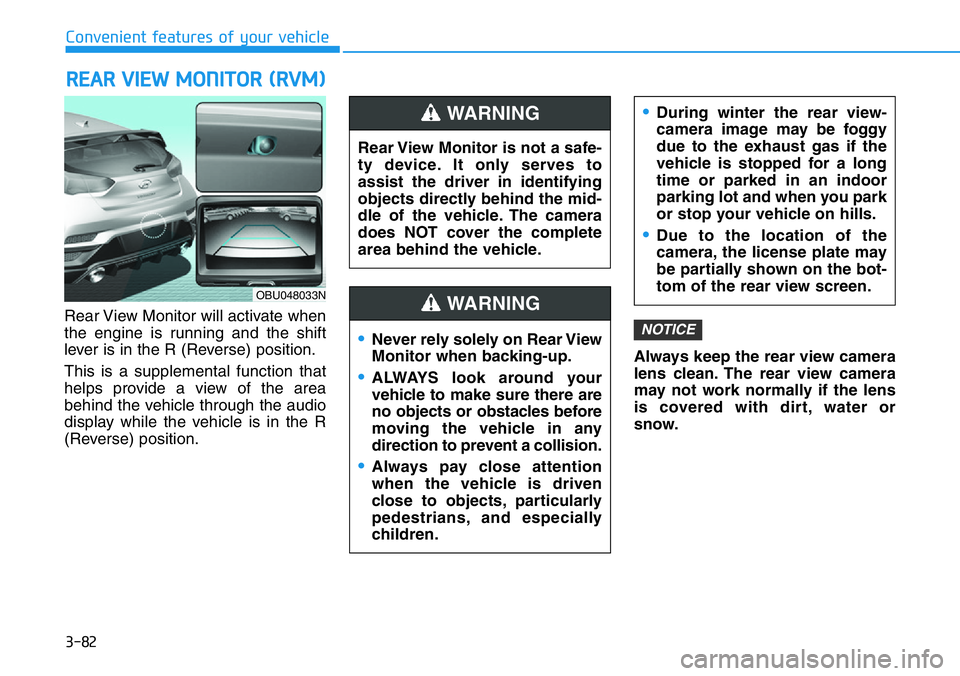
Rear View Monitor will activate when
the engine is running and the shift
lever is in the R (Reverse) position.
This is a supplemental function that
helps provide a view of the area
behind the vehicle through the audio
display while the vehicle is in the R
(Reverse) position.Always keep the rear view camera
lens clean. The rear view camera
may not work normally if the lens
is covered with dirt, water or
snow.
NOTICE
REAR VIEW MONITOR (RVM)
Rear View Monitor is not a safe-
ty device. It only serves to
assist the driver in identifying
objects directly behind the mid-
dle of the vehicle. The camera
does NOT cover the complete
area behind the vehicle.
WARNING
Page 195 of 446
Driving your vehicle
5
Before driving .......................................................5-4
Before Entering the Vehicle ...........................................5-4
Before Starting ..................................................................5-4
Engine Start/Stop Button................................................5-6
Ignition switch .......................................................5-6
Manual transmission ..........................................5-12
Manual Transmission Operation .................................5-12
Good Driving Practices .................................................5-14
Rev matching....................................................................5-15
Dual clutch transmission ...................................5-19
Dual clutch transmission operation ...........................5-19
DCT warning messages..................................................5-21
Parking ...............................................................................5-29
Good driving practices ..................................................5-29
Braking system ...................................................5-31
Power Brakes ...................................................................5-31
High Performance Brake...............................................5-32
Disc Brakes Wear Indicator ..........................................5-32
Parking Brake .................................................................5-33
Anti-lock Brake System (ABS) ....................................5-34
Electronic Stability Control (ESC)................................5-36
Vehicle Stability Management (VSM).........................5-42
Hill-Start Assist Control (HAC) ....................................5-44
Good Braking Practices ................................................5-44
Electronic control suspension (ECS).................5-46
Electronic limited slip differential ....................5-47
Warning messages ..........................................................5-48
Drive Mode Integrated Control System ............5-49
DRIVE MODE button .......................................................5-49
N button.............................................................................5-51
NGS (N Grin Shift) .........................................................5-52
Vehicle characteristic .....................................................5-54
Performance option.............................................5-56
Performance option settings .......................................5-56
Launch Control.................................................................5-56
Shift Indicator ..................................................................5-60
N Track Sense Shift
(For Dual Clutch Transmission) ..................................5-61
N Power Shift (For Dual Clutch Transmission) ........5-62
Declaration of conformity ..................................5-63
Forward Collision-Avoidance Assist (FCA)
(Front view camera only) ...................................5-64
System settings ...............................................................5-65
System operation ............................................................5-67
System malfunction and limitations ...........................5-70
Lane Keeping Assist (LKA) .................................5-77
System settings ..............................................................5-77
System operation ............................................................5-79
System malfunction and limitations ...........................5-81
Page 258 of 446

5-64
Driving your vehicle
Basic function
Forward Collision-Avoidance Assist
is designed to help detect and moni-
tor the vehicle ahead or help detect a
pedestrian in the roadway and warn
the driver that a collision is imminent
with a warning message and an
audible warning, and if necessary,
apply emergency braking.
Detecting sensor
[1] : Front view camera
Refer to the picture above for the
detailed location of the detecting
sensor.
FORWARD COLLISION-AVOIDANCE ASSIST (FCA) (FRONT VIEW CAMERA ONLY)
(IF EQUIPPED)
OTM070237OBU050218N
Take the following precautions
to maintain optimal perform-
ance of the detecting sensor:
•Never disassemble the detect-
ing sensor or sensor assem-
bly, or apply any impact on it.
•If the detecting sensors have
been replaced or repaired, we
recommend that you have
your vehicle inspected by an
authorized HYUNDAI dealer.
•Never install any accessories
or stickers on the front wind-
shield, or tint the front wind-
shield.
•Pay extreme caution to keep
the front view camera dry.
•Never place any reflective
objects (i.e. white paper, mir-
ror) over the dashboard. Any
light reflection may prevent
the system from functioning
properly.
CAUTION
Page 264 of 446

5-70
Driving your vehicle
System malfunction and limi-
tations
System malfunction
When Forward Collision-Avoidance
Assist is not working properly, the
‘Check Emergency Braking’ system
warning message will appear, and
the and warning lights will
illuminate on the cluster. We recom-
mend that the system be inspected
by an authorized HYUNDAI dealer.
System disabled
When the front windshield where the
front view camera is located or the
sensor is covered with foreign mate-
rial, such as snow or rain, it can
reduce the detecting performance
and temporarily limit or disable
Forward Collision-Avoidance Assist.
If this occurs the ‘Forward Collision
Avoidance Assist (FCA) system dis-
abled. Camera obscured.’ warning
message, and the and warn-
ing lights will illuminate on the clus-
ter.The system will operate normally
when snow, rain or foreign matter is
removed.
If the system does not operate nor-
mally after it is removed, we recom-
mend that the system be inspected
by an authorized HYUNDAI dealer.
•Even though the warning
message or warning light
does not appear on the clus-
ter, Forward Collision-
Avoidance Assist may not
properly operate.
•Forward Collision-Avoidance
Assist may not properly oper-
ate in an area (e.g. open ter-
rain), where any substance
are not detected after turning
ON the engine.
WARNING
OBU050336N
OBU050168N