Page 251 of 446
5-57
Driving your vehicle
5
• Warm up the tires before using
launch control for the best
result.
• Launch Control is intended for
use at a closed race track with
dry road surface and not intend-
ed for use on public roads. It will
not compensate for driver's who
are inexperienced or lack famil-
iarity with the race track.
• Do not use Launch Control in
poor road condition (ex. wet,
sand, snow). Control over vehi-
cle may be lost with poor road
condition and driver inatten-
tions. Do not endanger other
road users by using Launch
Control.
• Do not use Launch Control dur-
ing break-in period of the vehi-
cle.
• Constant use of Launch Control
can put enormous stress on the
vehicle resulting in premature
wear of related components.
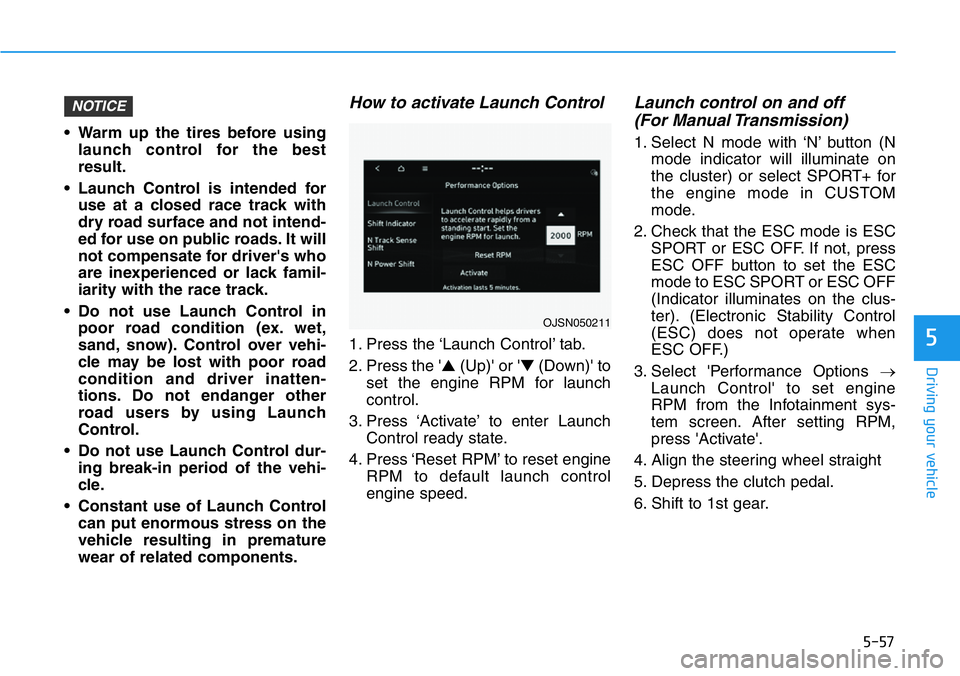
How to activate Launch Control
1. Press the ‘Launch Control’ tab.
2. Press the '▲(Up)' or '▼(Down)' to
set the engine RPM for launch
control.
3. Press ‘Activate’ to enter Launch
Control ready state.
4. Press ‘Reset RPM’ to reset engine
RPM to default launch control
engine speed.
Launch control on and off
(For Manual Transmission)
1. Select N mode with ‘N’ button (N
mode indicator will illuminate on
the cluster) or select SPORT+ for
the engine mode in CUSTOM
mode.
2. Check that the ESC mode is ESC
SPORT or ESC OFF. If not, press
ESC OFF button to set the ESC
mode to ESC SPORT or ESC OFF
(Indicator illuminates on the clus-
ter). (Electronic Stability Control
(ESC) does not operate when
ESC OFF.)
3. Select 'Performance Options →
Launch Control' to set engine
RPM from the Infotainment sys-
tem screen. After setting RPM,
press 'Activate'.
4. Align the steering wheel straight
5. Depress the clutch pedal.
6. Shift to 1st gear.
NOTICE
OJSN050211
Page 252 of 446
5-58
Driving your vehicle
7. While depressing the clutch pedal
with your left foot, quickly and fully
depress the accelerator pedal with
your right foot. Launch control will
be in the ready state. The mes-
sage 'Launch Control Ready' will
appear on the cluster. If neces-
sary, adjust engine rpm with the
cruise control switch (+/-).
8. A smooth, quick release of the
clutch pedal within 8 seconds,
while maintaining full depression
of the accelerator pedal will initiate
launching of the vehicle. The mes-
sage 'Launch Control Active' will
appear on the cluster.
9. Control will deactivate when the
accelerator pedal is released.
Launch control on and off
(For Dual Clutch Transmission)
1. Select N mode with 'N' button (N
mode indicator will illuminate on
the cluster) or select SPORT+ for
the engine mode in CUSTOM
mode.
2. Check that the ESC mode is ESC
SPORT or ESC OFF. If not, press
ESC OFF button to set the ESC
mode to ESC SPORT or ESC OFF
(Indicator illuminates on the clus-
ter). (Electronic Stability Control
(ESC) does not operate when
ESC OFF.)
3. Shift the gear to D (Drive) or M
(Manual shift mode). (When
Manual shift mode is selected,
driver must shift manually.)
4. Select 'Performance Options →
Launch Control' to set engine
RPM from the Infotainment sys-
tem screen. After setting RPM,
press 'Activate’.
5. Align the steering wheel straight
6. Depress the brake pedal to the
maximum with your left foot.7. While depressing the brake pedal
with your left foot, quickly and fully
depress the accelerator pedal with
your right foot. Launch control will
be in the ready state. The mes-
sage 'Launch Control Ready' will
appear on the cluster. If neces-
sary, adjust engine rpm with the
cruise control switch (+/-).
8. A smooth, quick release of the
brake pedal within 8 seconds,
while maintaining full depression
of the accelerator pedal will initiate
launching of the vehicle. The mes-
sage 'Launch Control Active' will
appear on the cluster.
9. Launch Control will deactivate
when the accelerator pedal is
released.
Page 254 of 446
5-60
Driving your vehicle
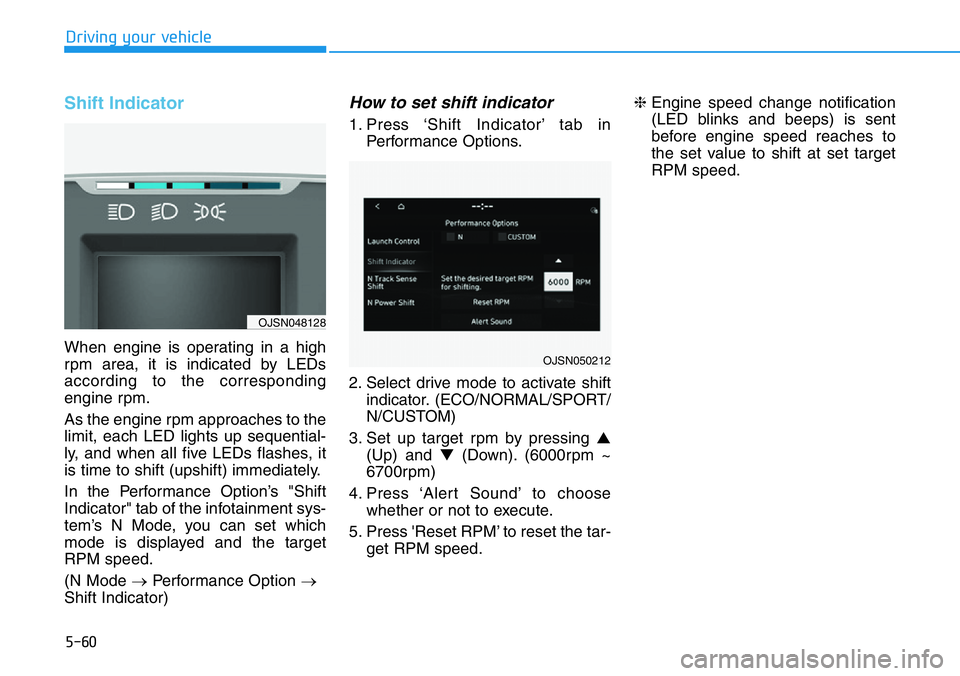
Shift Indicator
When engine is operating in a high
rpm area, it is indicated by LEDs
according to the corresponding
engine rpm.
As the engine rpm approaches to the
limit, each LED lights up sequential-
ly, and when all five LEDs flashes, it
is time to shift (upshift) immediately.
In the Performance Option’s "Shift
Indicator" tab of the infotainment sys-
tem’s N Mode, you can set which
mode is displayed and the target
RPM speed.
(N Mode →Performance Option →
Shift Indicator)
How to set shift indicator
1. Press ‘Shift Indicator’ tab in
Performance Options.
2. Select drive mode to activate shift
indicator. (ECO/NORMAL/SPORT/
N/CUSTOM)
3. Set up target rpm by pressing ▲
(Up) and ▼(Down). (6000rpm ~
6700rpm)
4. Press ‘Alert Sound’ to choose
whether or not to execute.
5. Press 'Reset RPM’ to reset the tar-
get RPM speed.❈Engine speed change notification
(LED blinks and beeps) is sent
before engine speed reaches to
the set value to shift at set target
RPM speed.
OJSN050212
OJSN048128
Page 255 of 446
5-61
Driving your vehicle
5
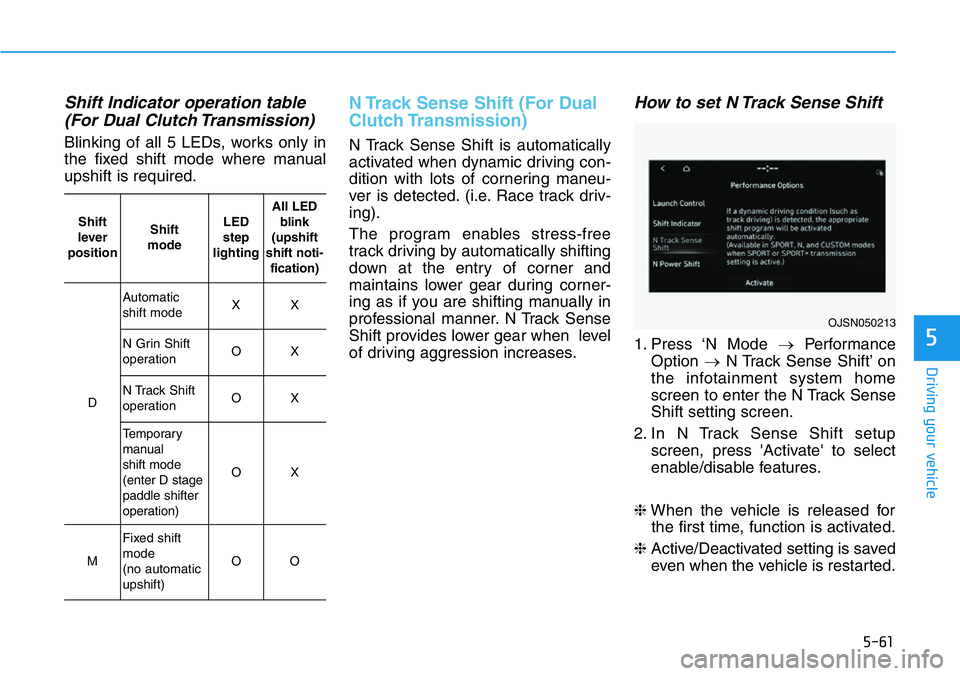
Shift Indicator operation table
(For Dual Clutch Transmission)
Blinking of all 5 LEDs, works only in
the fixed shift mode where manual
upshift is required.
N Track Sense Shift (For Dual
Clutch Transmission)
N Track Sense Shift is automatically
activated when dynamic driving con-
dition with lots of cornering maneu-
ver is detected. (i.e. Race track driv-
ing).
The program enables stress-free
track driving by automatically shifting
down at the entry of corner and
maintains lower gear during corner-
ing as if you are shifting manually in
professional manner. N Track Sense
Shift provides lower gear when level
of driving aggression increases.
How to set N Track Sense Shift
1. Press ‘N Mode →Performance
Option →N Track Sense Shift’ on
the infotainment system home
screen to enter the N Track Sense
Shift setting screen.
2. In N Track Sense Shift setup
screen, press 'Activate' to select
enable/disable features.
❈When the vehicle is released for
the first time, function is activated.
❈Active/Deactivated setting is saved
even when the vehicle is restarted.
OJSN050213
Shift
lever
positionShift
modeLED
step
lightingAll LED
blink
(upshift
shift noti-
fication)
D
Automatic
shift modeXX
N Grin Shift
operationOX
N Track Shift
operationOX
Temporary
manual
shift mode
(enter D stage
paddle shifter
operation)
OX
M
Fixed shift
mode
(no automatic
upshift)
OO
Page 309 of 446
5-115
Driving your vehicle
5
Collision Warning
• To warn the driver of an approach-
ing vehicle from the rear left/right
side of your vehicle, the side view
mirror will blink and a warning will
appear on the cluster. At the same
time, an audible warning will
sound. If the Rear View Monitor is
operating, a warning will also
appear on the infotainment system
screen.• The system will operate when all
the following conditions are satis-
fied:
- The gear is shifted to R (Reverse)
- Vehicle speed is below 5 mph (8
km/h)
- The approaching vehicle is within
approximately 82 ft. (25 m) from
the left and right side of your vehi-
cle
- The speed of the vehicle
approaching from the left and
right is above 3 mph (5 km/h)
Information
If the operating conditions are satis-
fied, there will be a warning whenever
the vehicle approaches from the left or
right side even though your vehicle
speed is 0 mph (0 km/h).
i
Take the following precautions
when using Rear Cross-Traffic
Safety system:
•For your safety, change the
Settings after parking the
vehicle at a safe location.
•If any other system’s warning
message is displayed or audi-
ble warning is generated,
Rear Cross-Traffic Safety sys-
tem’s warning message may
not be displayed and audible
warning may not be generat-
ed.
•You may not hear the warning
sound of Rear Cross-Traffic
Safety system if the surround-
ing is noisy.
•Rear Cross-Traffic Safety sys-
tem may warn the driver late
or may not warn the driver
depending on the road and
driving conditions.
WARNING