2022 HYUNDAI SONATA auto stop
[x] Cancel search: auto stopPage 18 of 546
2-5
02
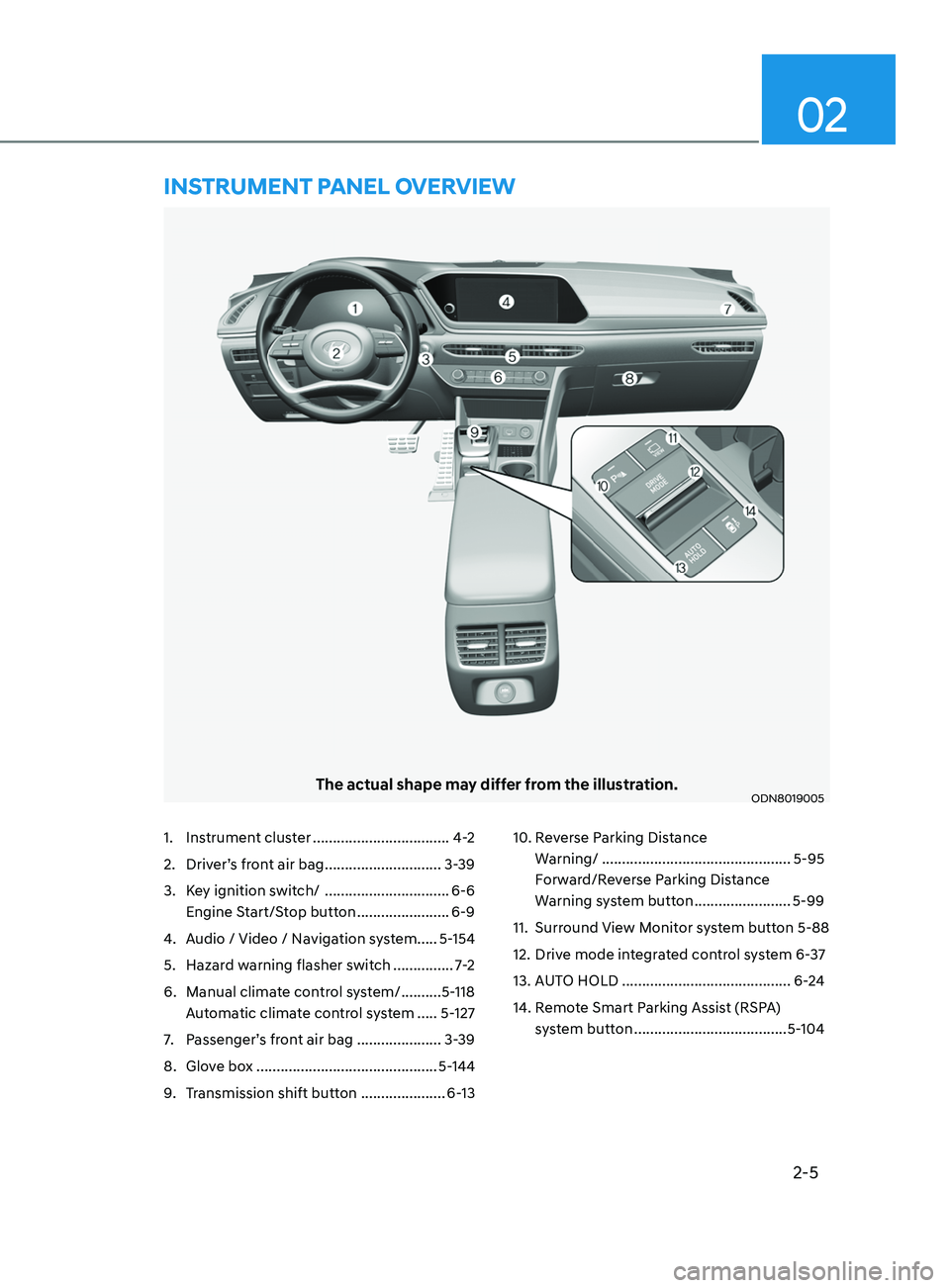
The actual shape may differ from the illustration.ODN8019005
1. Instrument cluster ..................................4-2
2.
Driv
er’s front air bag .............................3-39
3.
K
ey ignition switch/ ...............................6-6
Engine Start/Stop button
.......................6-9
4.
A
udio / Video / Navigation system..... 5-154
5.
Hazar
d warning flasher switch ...............7-2
6.
Manual clima
te control system/ ..........5-118
Automatic climate control system
.....5-127
7.
P
assenger’s front air bag ..................... 3-39
8.
Glo
ve box ............................................. 5-144
9.
T
ransmission shift button .....................6-1310.
R everse Parking Distance
Warning/ ...............................................5-95
Forward/Reverse Parking Distance
Warning system button
........................5-99
11.
Surr
ound View Monitor system button 5-88
12.
Driv
e mode integrated control system 6-37
13.
A
UTO HOLD ..........................................6-24
14.
R
emote Smart Parking Assist (RSPA)
system button
......................................5-104
instrumEnt PanEl ov E rvi E w
Page 49 of 546
03
3-21
Seat Belt Restraint System
WARNING
Improperly positioned seat belts may
increase the risk of serious injury
in an accident. Take the following
precautions when adjusting the seat
belt:
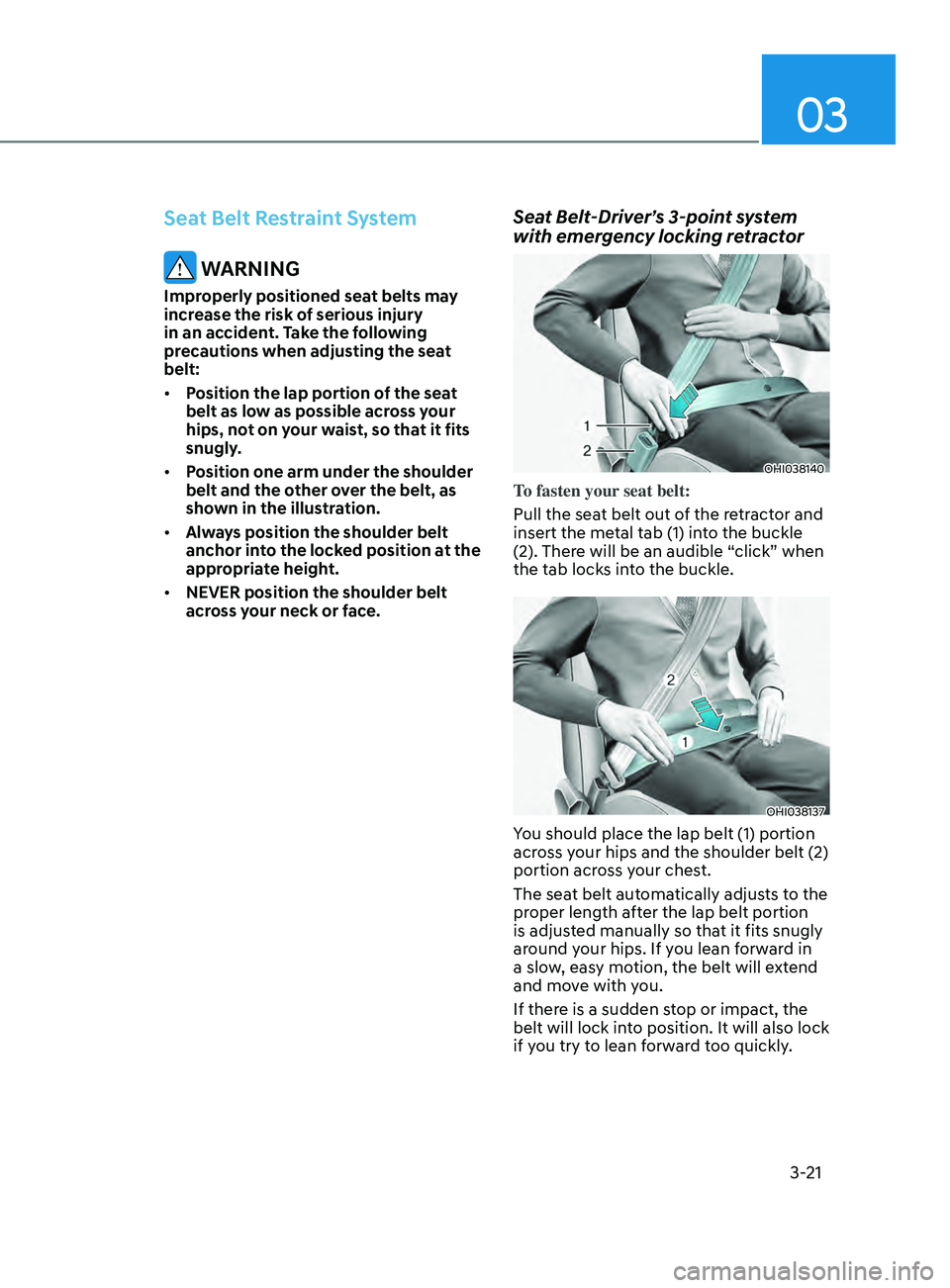
• Position the lap portion of the seat
belt as low as possible across your
hips, not on your waist, so that it fits
snugly.
• Position one arm under the shoulder
belt and the other over the belt, as
shown in the illustration.
• Always position the shoulder belt
anchor into the locked position at the
appropriate height.
• NEVER position the shoulder belt
across your neck or face.
Seat Belt-Driver’s 3-point system
with emergency locking retractor
OHI038140
To fasten your seat belt:
Pull the seat belt out of the retractor and
insert the metal tab (1) into the buckle
(2). There will be an audible “click” when
the tab locks into the buckle.
OHI038137
You should place the lap belt (1) portion
across your hips and the shoulder belt (2)
portion across your chest.
The seat belt automatically adjusts to the
proper length after the lap belt portion
is adjusted manually so that it fits snugly
around your hips. If you lean forward in
a slow, easy motion, the belt will extend
and move with you.
If there is a sudden stop or impact, the
belt will lock into position. It will also lock
if you try to lean forward too quickly.
Page 51 of 546
03
3-23
To fasten your seat belt:
Pull the seat belt out of the retractor
and insert the metal tab into the buckle.
There will be an audible “click” when
the tab locks into the buckle. When
not securing a child restraint, the seat
belt operates in the same way as the
driver’s seat belt (Emergency Locking
Retractor Type). It automatically adjusts
to the proper length only after the lap
belt portion of the seat belt is adjusted
manually so that it fits snugly across your
hips.
When the seat belt is fully extended from
the retractor to allow the installation of
a child restraint system, the seat belt
operation changes to allow the belt to
retract, but not to extend (Automatic
Locking Retractor Type). Refer to the
“Using a Child Restraint System” section
in this chapter.
NOTICE
Although the seat belt retractor
provides the same level of protection
for seated passengers in either
emergency or automatic locking
modes, the emergency locking mode
allows seated passengers to move
freely in their seat while keeping
some tension on the belt. During a
collision or sudden stop, the retractor
automatically locks the belt to help
restrain your body.
To deactivate the automatic locking
mode, unbuckle the seat belt and allow
the belt to fully retract.
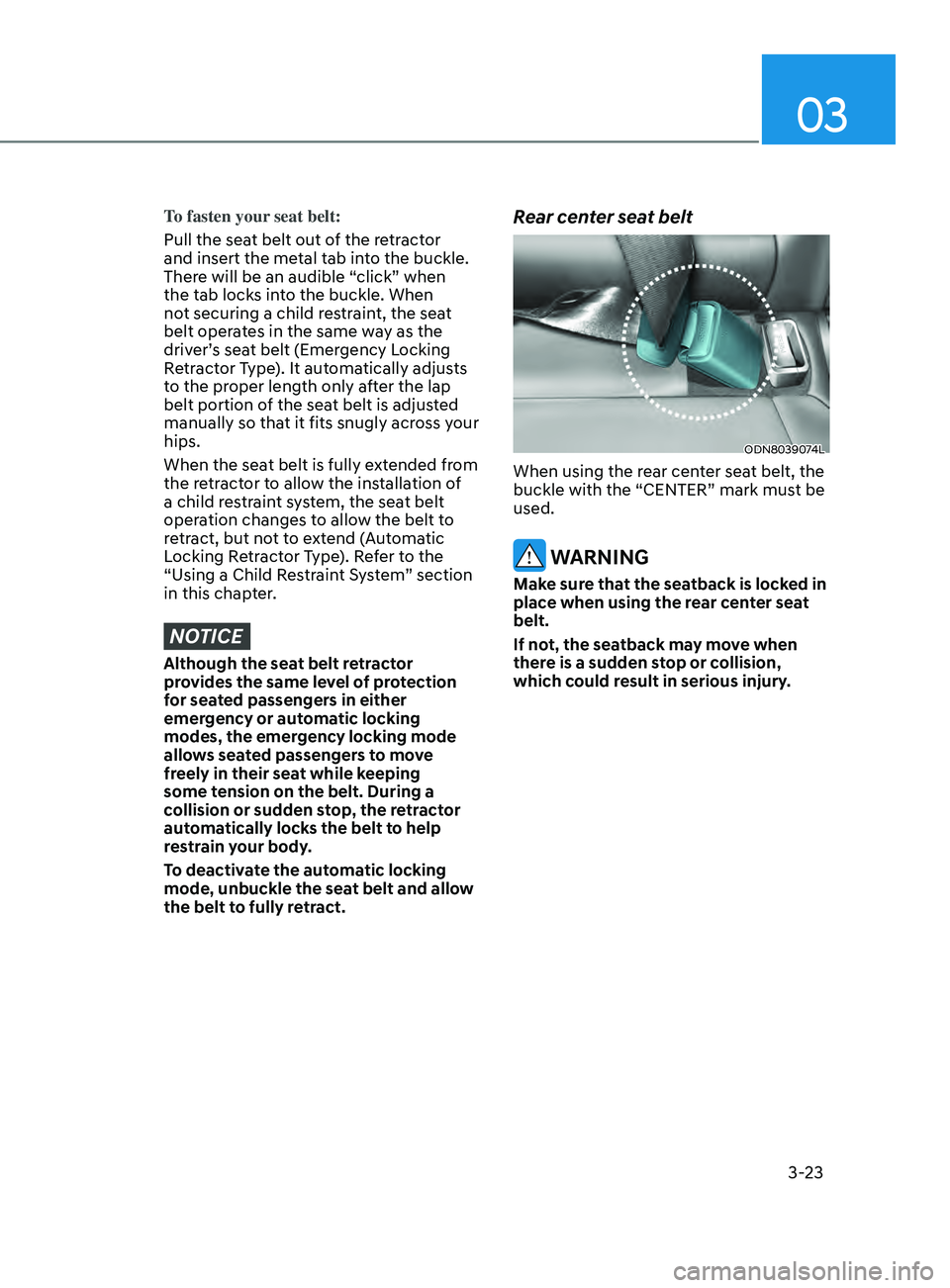
Rear center seat belt
ODN8039074L
When using the rear center seat belt, the
buckle with the “CENTER” mark must be
used.
WARNING
Make sure that the seatback is locked in
place when using the rear center seat
belt.
If not, the seatback may move when
there is a sudden stop or collision,
which could result in serious injury.
Page 64 of 546
3-36
Information
Position the release button so that it is easy
to access in case of an emergency.
OLF034076
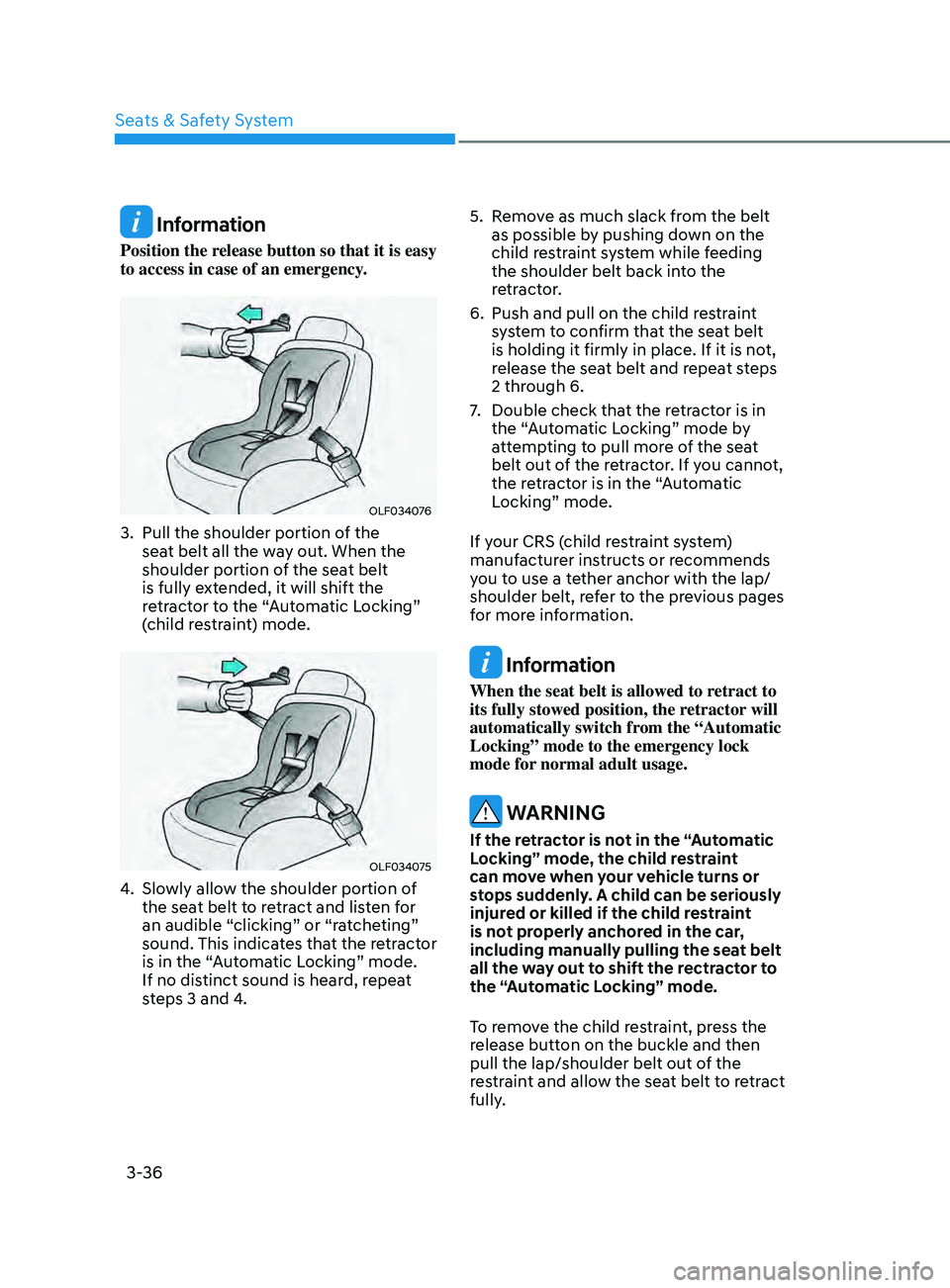
3. Pull the shoulder portion of the
seat belt all the way out. When the
shoulder portion of the seat belt
is fully extended, it will shift the
retractor to the “Automatic Locking”
(child restraint) mode.
OLF034075
4. Slowly allow the shoulder portion of the seat belt to retract and listen for
an audible “clicking” or “ratcheting”
sound. This indicates that the retractor
is in the “Automatic Locking” mode.
If no distinct sound is heard, repeat
steps 3 and 4. 5.
R
emove as much slack from the belt
as possible by pushing down on the
child restraint system while feeding
the shoulder belt back into the
retractor.
6.
Push and pull on the child r
estraint
system to confirm that the seat belt
is holding it firmly in place. If it is not,
release the seat belt and repeat steps
2 through 6.
7.
Double check tha
t the retractor is in
the “Automatic Locking” mode by
attempting to pull more of the seat
belt out of the retractor. If you cannot,
the retractor is in the “Automatic
Locking” mode.
If your CRS (child restraint system)
manufacturer instructs or recommends
you to use a tether anchor with the lap/
shoulder belt, refer to the previous pages
for more information.
Information
When the seat belt is allowed to retract to
its fully stowed position, the retractor will
automatically switch from the “Automatic
Locking” mode to the emergency lock
mode for normal adult usage.
WARNING
If the retractor is not in the “Automatic
Locking” mode, the child restraint
can move when your vehicle turns or
stops suddenly. A child can be seriously
injured or killed if the child restraint
is not properly anchored in the car,
including manually pulling the seat belt
all the way out to shift the rectractor to
the “Automatic Locking” mode.
To remove the child restraint, press the
release button on the buckle and then
pull the lap/shoulder belt out of the
restraint and allow the seat belt to retract
fully.
Seats & Safety System
Page 90 of 546
04
4-5
WARNING
Running out of fuel can expose vehicle
occupants to danger.
You must stop and obtain additional
fuel as soon as possible after the
warning light comes on or when the
gauge indicator comes close to the "E
(Empty)" level.
NOTICE
Avoid driving with an extremely low
fuel level. Running out of fuel could
cause the engine to misfire and damage
the catalytic converter.
Outside temperature gauge
OTMA048112
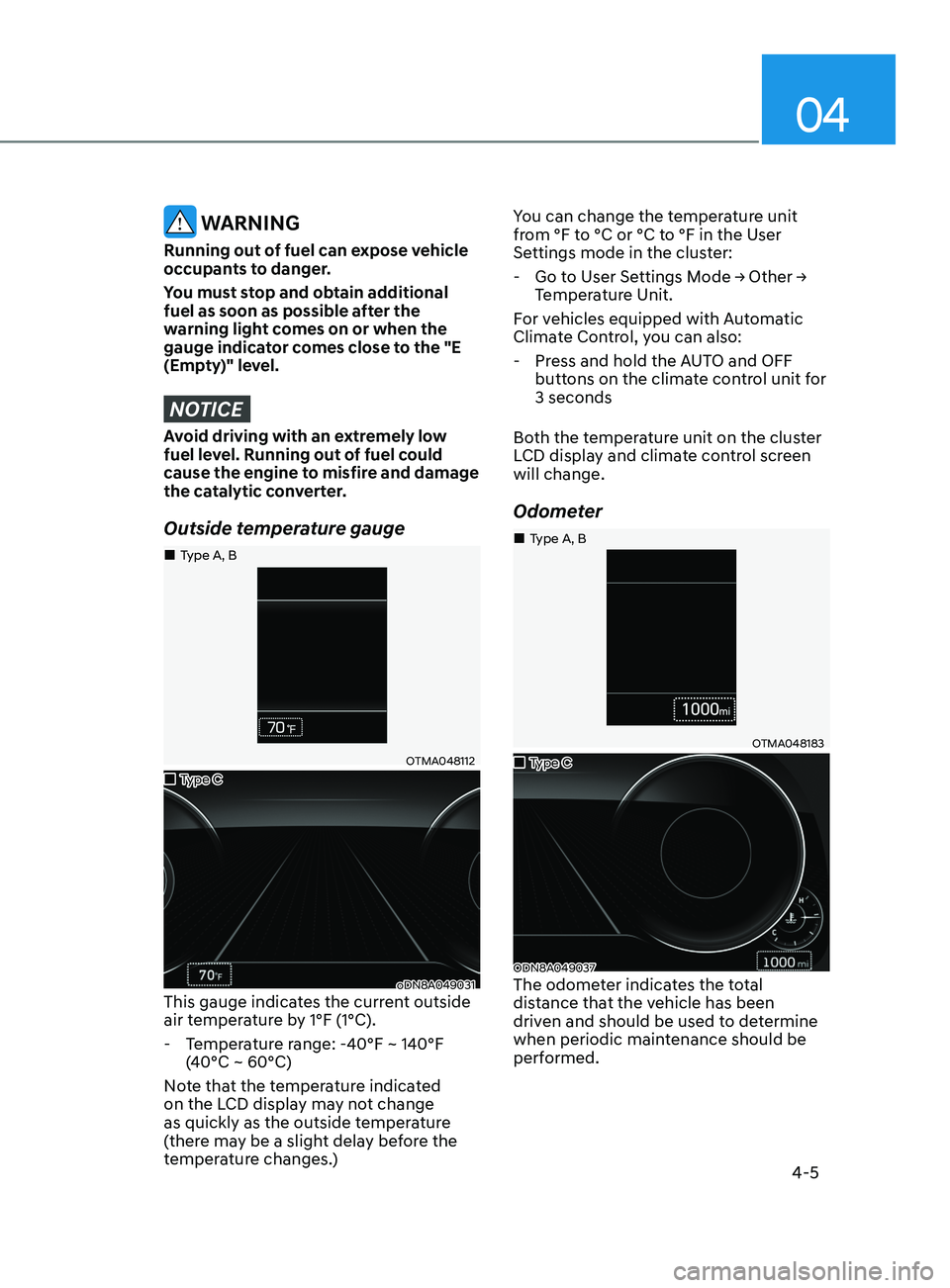
oDN8A049031This gauge indicates the current outside
air temperature by 1°F (1°C).
- T
emperature range: -40°F ~ 140°F
(40°C ~ 60°C)
Note that the temperature indicated
on the LCD display may not change
as quickly as the outside temperature
(there may be a slight delay before the
temperature changes.) You can change the temperature unit
from °F to °C or °C to °F in the User
Settings mode in the cluster:
-
Go
to User Settings Mode → Other →
T
emperature Unit.
For vehicles equipped with Automatic
Climate Control, you can also:
- Pr
ess and hold the AUTO and OFF
buttons on the climate control unit for
3 seconds
Both the temperature unit on the cluster
LCD display and climate control screen
will change.
Odometer
OTMA048183
ODN8A049037The odometer indicates the total
distance that the vehicle has been
driven and should be used to determine
when periodic maintenance should be
performed.
„„Type C
„
„Type A, B
„
„Type C
„
„Type A, B
Page 95 of 546
![HYUNDAI SONATA 2022 Owners Manual Instrument Cluster
4-10
AUTO HOLD Indicator Light
(if equipped)
This indicator light illuminates:
• [White] When you activate the auto
hold system by pressing the AUTO
HOLD button.
• [Green] W](/manual-img/35/56194/w960_56194-94.png "HYUNDAI SONATA 2022 Owners Manual Instrument Cluster
4-10
AUTO HOLD Indicator Light
(if equipped)
This indicator light illuminates:
• [White] When you activate the auto
hold system by pressing the AUTO
HOLD button.
• [Green] W")
Instrument Cluster
4-10
AUTO HOLD Indicator Light
(if equipped)
This indicator light illuminates:
• [White] When you activate the auto
hold system by pressing the AUTO
HOLD button.
• [Green] When you stop the vehicle
completely by depressing the brake
pedal with the auto hold system
activated.
• [Yellow] When there is a malfunction
with the auto hold system.
In this case, have the vehicle
inspected by an authorized HYUNDAI
dealer.
For more information, refer to “Auto
Hold” in chapter 6.
Electric Power Steering (EPS)
Warning Light
This warning light illuminates:
• When you place the ignition switch to
the ON position.
-The
Electric Power Steering Warning
light illuminates for about 3 seconds
and then goes off.
• Whenever there is a malfunction with
the EPS.
If this occurs, have the vehicle
inspected by an authorized HYUNDAI
dealer.
Malfunction Indicator Lamp
(MIL)
This warning light illuminates:
• When you place the ignition switch to
the ON position.
- The malfunction indica
tor light
illuminates for about 3 seconds and
then goes off.
• Whenever there is a malfunction with
either the emission control system or
the engine or the vehicle powertrain.
If this occurs, have the vehicle
inspected by an authorized HYUNDAI
dealer.
NOTICE
Driving with the Malfunction Indicator
Lamp (MIL) on may cause damage to
the emission control system which
could affect drivability and/or fuel
economy.
NOTICE
If the Malfunction Indicator Lamp
(MIL) illuminates, potential catalytic
converter damage is possible which
could result in loss of engine power.
In this case, have the vehicle inspected
by an authorized HYUNDAI dealer as
soon as possible.
Page 99 of 546
Instrument Cluster
4-14
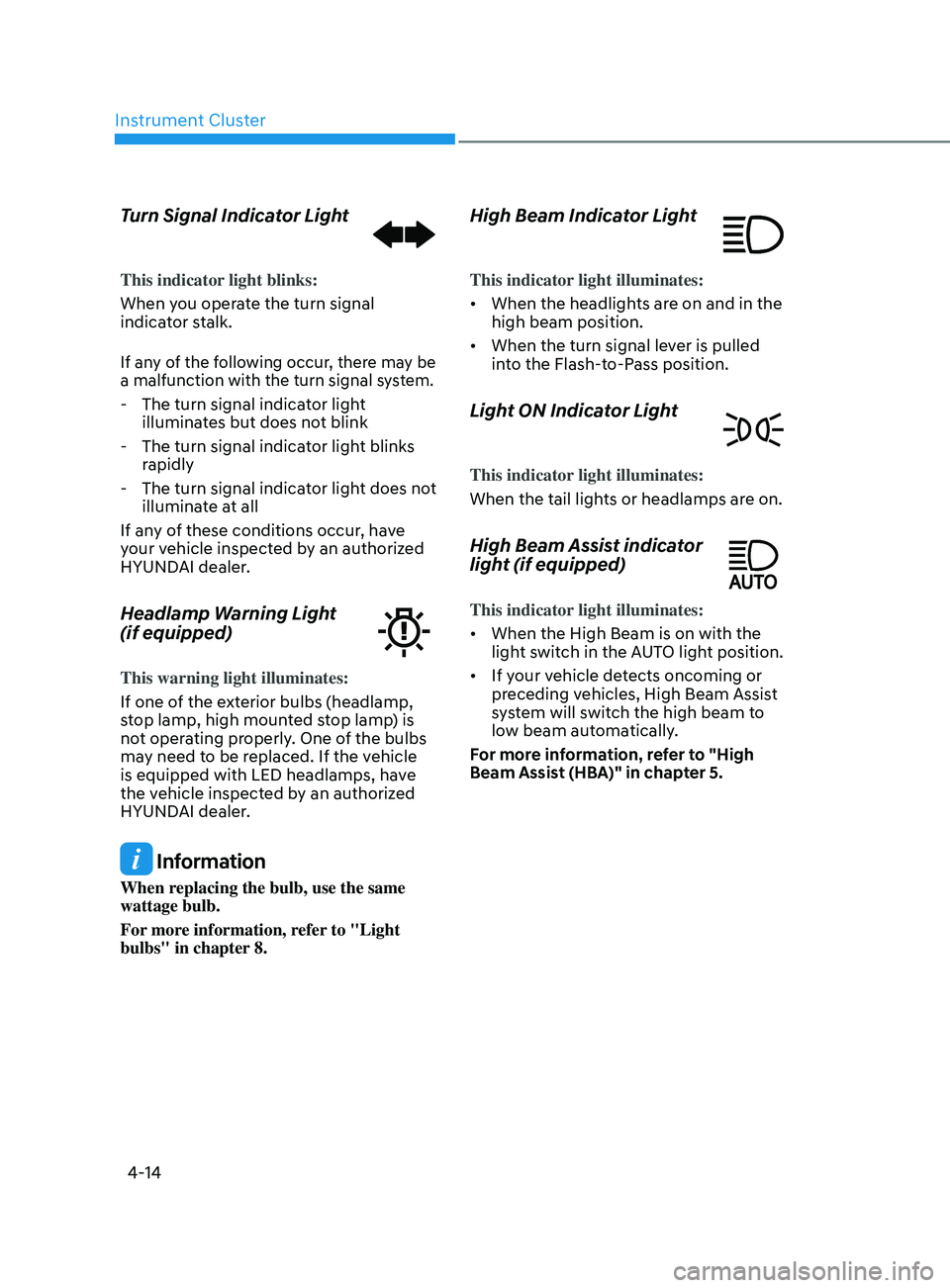
Turn Signal Indicator Light
This indicator light blinks:
When you operate the turn signal
indicator stalk.
If any of the following occur, there may be
a malfunction with the turn signal system.
- The turn signal indicator light
illuminates but does not blink
- The turn signal indica
tor light blinks
rapidly
- The turn signal indica
tor light does not
illuminate at all
If any of these conditions occur, have
your vehicle inspected by an authorized
HYUNDAI dealer.
Headlamp Warning Light
(if equipped)
This warning light illuminates:
If one of the exterior bulbs (headlamp,
stop lamp, high mounted stop lamp) is
not operating properly. One of the bulbs
may need to be replaced. If the vehicle
is equipped with LED headlamps, have
the vehicle inspected by an authorized
HYUNDAI dealer.
Information
When replacing the bulb, use the same
wattage bulb.
For more information, refer to "Light
bulbs" in chapter 8.
High Beam Indicator Light
This indicator light illuminates:
• When the headlights are on and in the
high beam position.
• When the turn signal lever is pulled
into the Flash-to-Pass position.
Light ON Indicator Light
This indicator light illuminates:
When the tail lights or headlamps are on.
High Beam Assist indicator
light (if equipped)
This indicator light illuminates:
• When the High Beam is on with the
light switch in the AUTO light position.
• If your vehicle detects oncoming or
preceding vehicles, High Beam Assist
system will switch the high beam to
low beam automatically.
For more information, refer to "High
Beam Assist (HBA)" in chapter 5.
Page 112 of 546
04
4-27
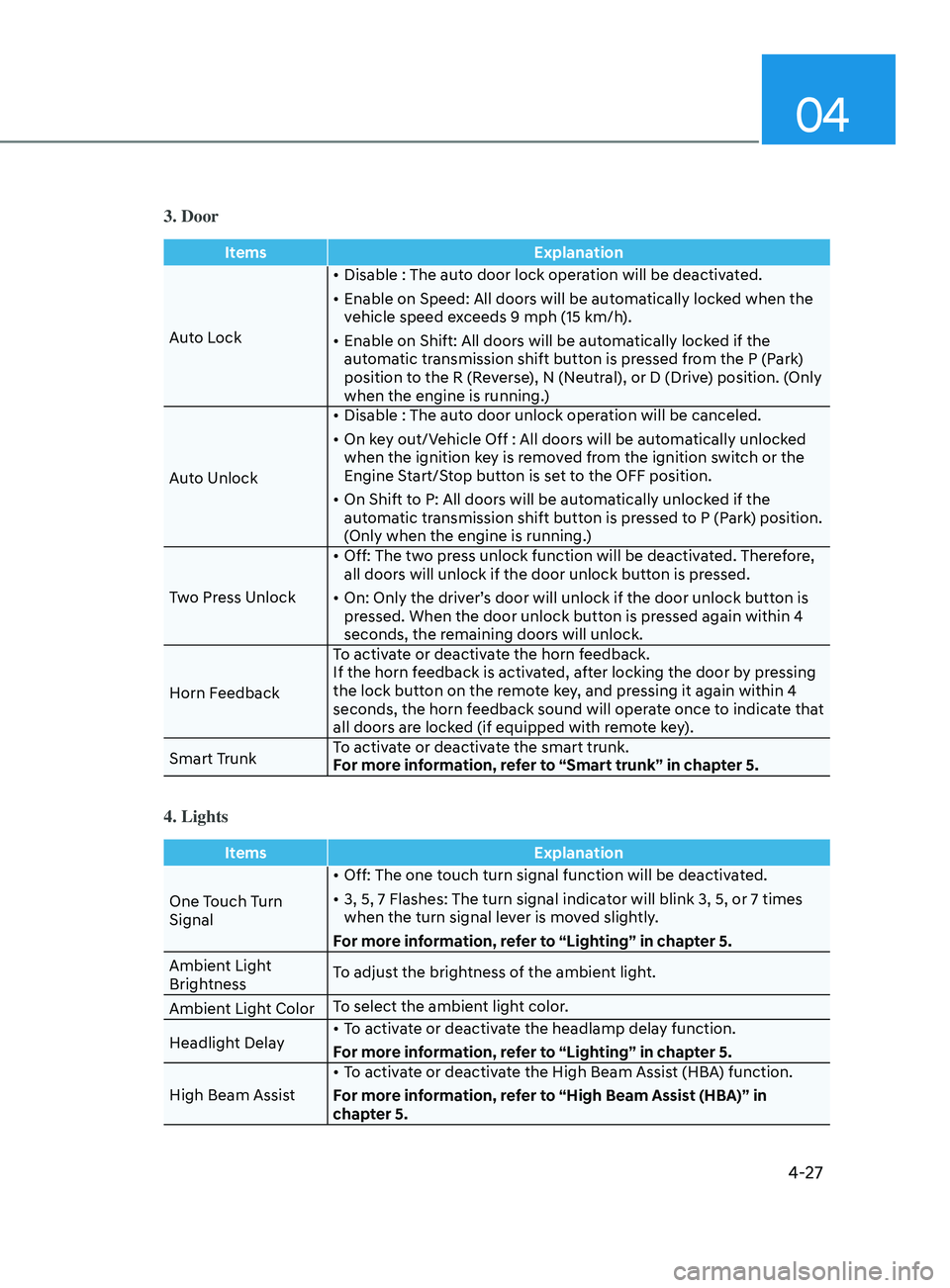
3. Door
ItemsExplanation
Auto Lock •
Disable : The auto door lock operation will be deactivated.
•
E
nable on Speed: All doors will be automatically locked when the
vehicle speed exceeds 9 mph (15 km/h).
•
E
nable on Shift: All doors will be automatically locked if the
automatic transmission shift button is pressed from the P (Park)
position to the R (Reverse), N (Neutral), or D (Drive) position. (Only
when the engine is running.)
Auto Unlock •
Disable : The aut
o door unlock operation will be canceled.
•
On k
ey out/Vehicle Off : All doors will be automatically unlocked
when the ignition key is removed from the ignition switch or the
Engine Start/Stop button is set to the OFF position.
•
On Shift t
o P: All doors will be automatically unlocked if the
automatic transmission shift button is pressed to P (Park) position.
(Only when the engine is running.)
Two Press Unlock •
Off: The tw
o press unlock function will be deactivated. Therefore,
all doors will unlock if the door unlock button is pressed.
•
On: Only the driv
er’s door will unlock if the door unlock button is
pressed. When the door unlock button is pressed again within 4
seconds, the remaining doors will unlock.
Horn Feedback To activate or deactivate the horn feedback.
If the horn feedback is activated, after locking the door by pressing
the lock button on the remote key, and pressing it again within 4
seconds, the horn feedback sound will operate once to indicate that
all doors are locked (if equipped with remote key).
Smart Trunk To activate or deactivate the smart trunk.
For more information, refer to “Smart trunk” in chapter 5.
4. Lights
Items
Explanation
One Touch Turn
Signal •
Off: The one touch turn signal function will be deactivated.
•
3, 5, 7 Flashes: The turn signal indica
tor will blink 3, 5, or 7 times
when the turn signal lever is moved slightly.
For more information, refer to “Lighting” in chapter 5.
Ambient Light
Brightness To adjust the brightness of the ambient light.
Ambient Light Color To select the ambient light color.
Headlight Delay •
To activate or deactivate the headlamp delay function.
For more information, refer to “Lighting” in chapter 5.
High Beam Assist •
To activate or deactivate the High Beam Assist (HBA) function.
For more information, refer to “High Beam Assist (HBA)” in
chapter 5.