2022 HYUNDAI SONATA steering
[x] Cancel search: steeringPage 172 of 546
Convenient Features5-42
steering Wheel
Electric Power Steering (EPS)
The system assists you with steering the
vehicle. If the vehicle is turned off or
if the power steering system becomes
inoperative, you may still steer the
vehicle, but it will require increased
steering effort.
Also, the steering effort becomes heavier
as the vehicle’s speed increases and
becomes lighter as the vehicle’s speed
decreases for better control of the
steering wheel.
Should you notice any change in the
effort required to steer during normal
vehicle operation, have the system
checked by an authorized HYUNDAI
dealer.
CAUTION
• If the Electric Power Steering System
does not operate normally, the
warning light (
) will illuminate
on the instrument cluster. You may
steer the vehicle, but it will require
increased steering efforts. Take your
vehicle to an authorized HYUNDAI
dealer and have the system checked
as soon as possible.
• When an abnormality is detected
in the electric power steering
system, to prevent a an accident, the
steering assist function may become
inoperative. At this time, the warning
light turns on or blinks on the cluster.
The steering wheel may become
difficult to control or operate. Have
your vehicle checked immediately,
after moving the vehicle to a safe
area.
Information
The following symptoms may occur during
normal vehicle operation:
• The steering effort may be high
immediately after placing the ignition
switch in the ON position.
This happens as the system performs
the EPS system diagnostics. When the
diagnostics are completed, the steering
wheel effort will return to its normal
condition.
• When the battery voltage is low, you
might have to put more steering effort.
However, it is a temporary condition so
that it will return to normal condition
after charging the battery.
• A click noise may be heard from the
EPS relay after the ignition switch is in
the ON or LOCK/OFF position.
• Motor noise may be heard when the
vehicle is at a stop or at a low driving
speed.
• When you operate the steering wheel
in low temperatures, abnormal noise
may occur. If the temperature rises, the
noise will disappear. This is a normal
condition.
• When an error is detected from the
EPS, the steering effort assist function
may become inoperative in order to
prevent fatal accidents. Instrument
cluster warning lights may be on or the
steering effort may be high. If these
symptoms occur, drive the vehicle to
a safe area as soon as it is safe to do
so. Have the system checked by an
authorized HYUNDAI dealer as soon
as possible.
Page 173 of 546
05
5-43
Tilt Steering / Telescope Steering
When adjusting the steering wheel to a
comfortable position, adjust the steering
wheel so that it points toward your chest,
not toward your face. Make sure you can
see the instrument cluster warning lights
and gauges. After locking the lever, push
the steering wheel both up and down to
be certain it is locked in position. Always
adjust the position of the steering wheel
before driving.
WARNING
NEVER adjust the steering wheel while
driving. This may cause loss of vehicle
control resulting in an accident.
ODN8059021
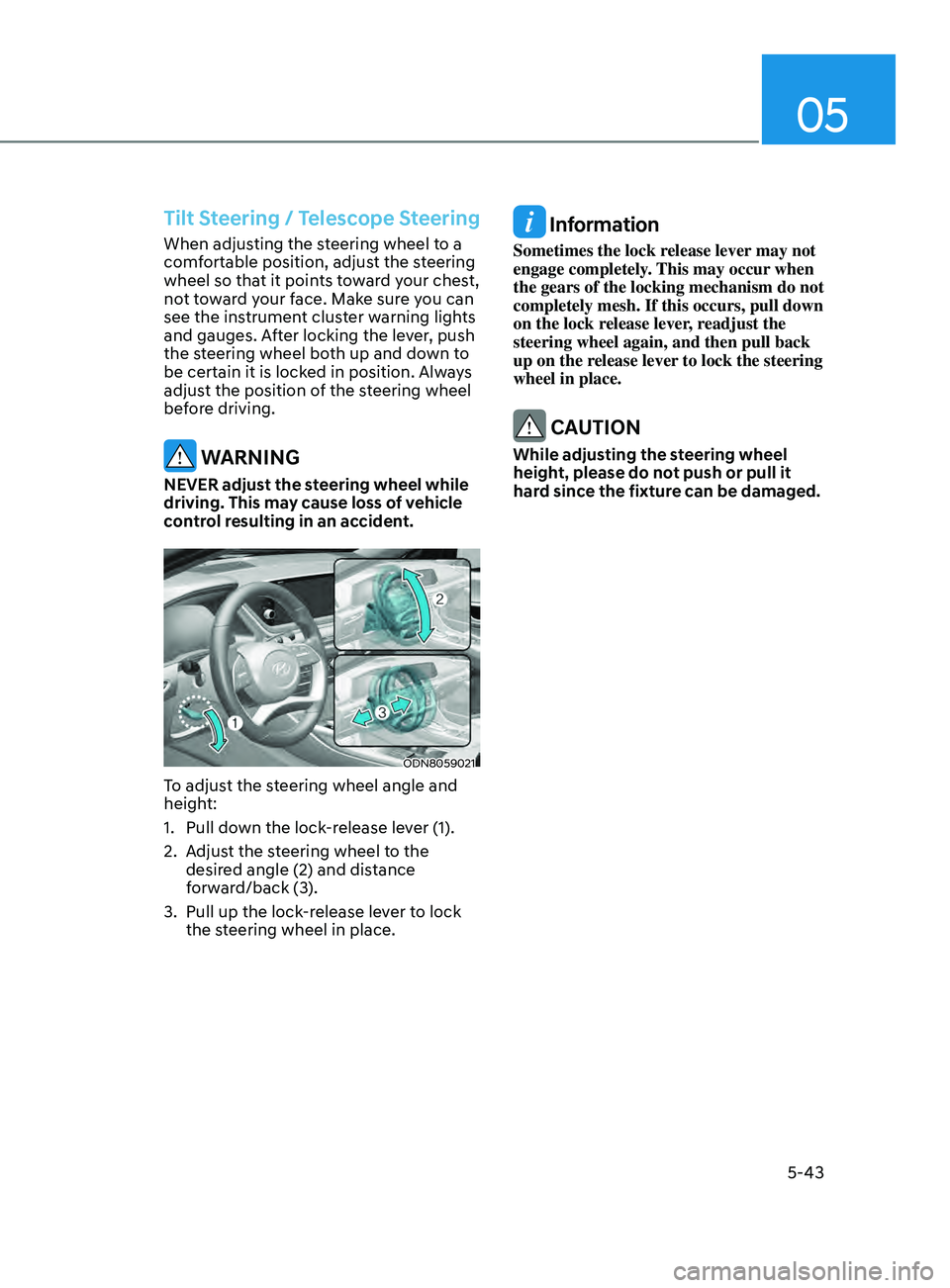
To adjust the steering wheel angle and
height:
1.
Pull do
wn the lock-release lever (1).
2.
A
djust the steering wheel to the
desired angle (2) and distance
forward/back (3).
3.
Pull up the lock
-release lever to lock
the steering wheel in place.
Information
Sometimes the lock release lever may not
engage completely. This may occur when
the gears of the locking mechanism do not
completely mesh. If this occurs, pull down
on the lock release lever, readjust the
steering wheel again, and then pull back
up on the release lever to lock the steering
wheel in place.
CAUTION
While adjusting the steering wheel
height, please do not push or pull it
hard since the fixture can be damaged.
Page 174 of 546
Convenient Features
5-44
Heated Steering Wheel
(if equipped)
„„Type A
ODN8059103
„„Type B
ODN8059104
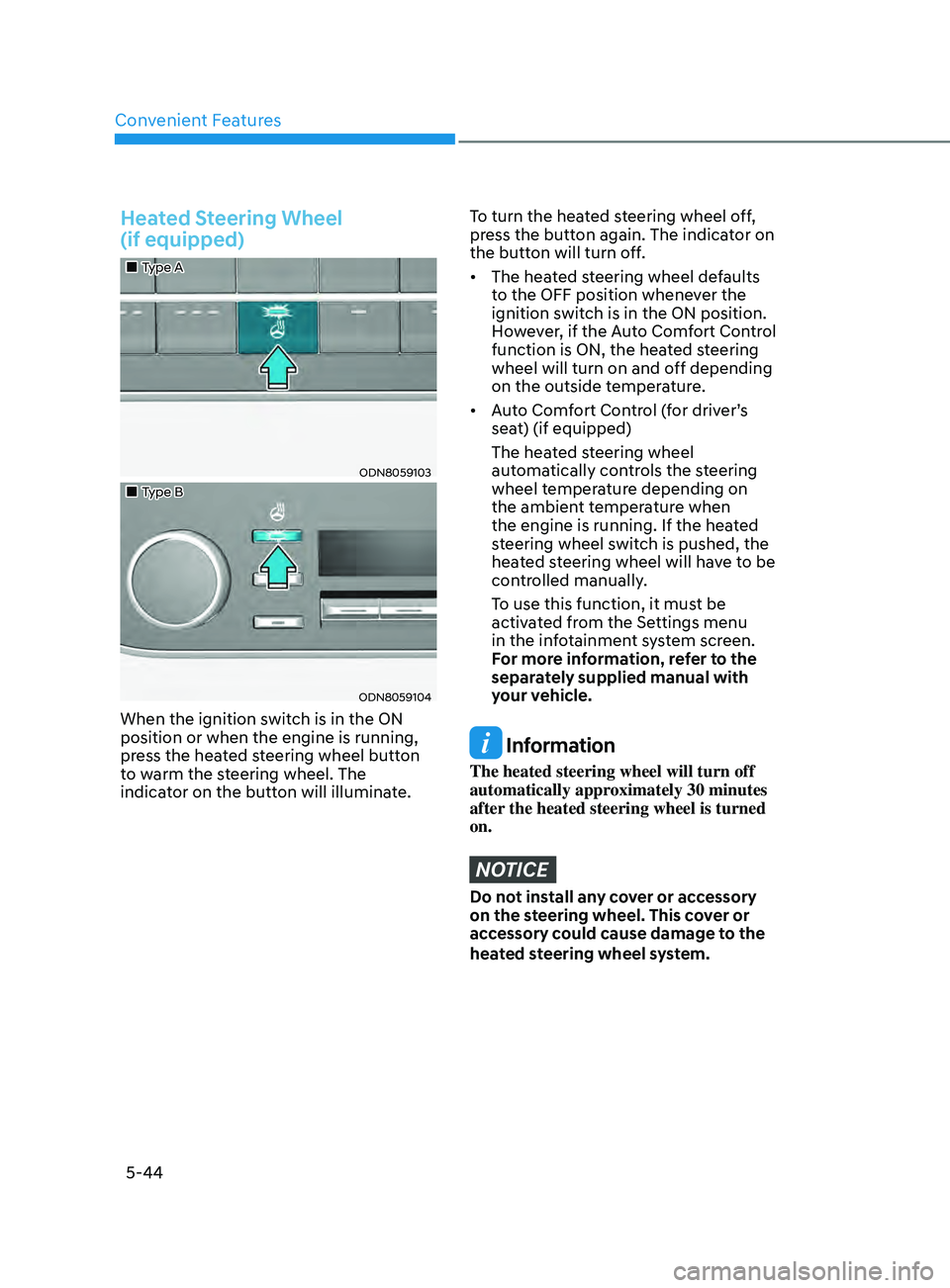
When the ignition switch is in the ON
position or when the engine is running,
press the heated steering wheel button
to warm the steering wheel. The
indicator on the button will illuminate.
To turn the heated steering wheel off,
press the button again. The indicator on
the button will turn off.
• The heated steering wheel defaults
t
o the OFF position whenever the
ignition switch is in the ON position.
However, if the Auto Comfort Control
function is ON, the heated steering
wheel will turn on and off depending
on the outside temperature.
• Auto
Comfort Control (for driver’s
sea
t) (if equipped)
The hea
ted steering wheel
automatically controls the steering
wheel temperature depending on
the ambient temperature when
the engine is running. If the heated
steering wheel switch is pushed, the
heated steering wheel will have to be
controlled manually.
T
o use this function, it must be
activated from the Settings menu
in the infotainment system screen.
F
or more information, refer to the
separately supplied manual with
your vehicle.
Information
The heated steering wheel will turn off
automatically approximately 30 minutes
after the heated steering wheel is turned
on.
NOTICE
Do not install any cover or accessory
on the steering wheel. This cover or
accessory could cause damage to the
heated steering wheel system.
Page 175 of 546
05
5-45
Horn
ODN8059022
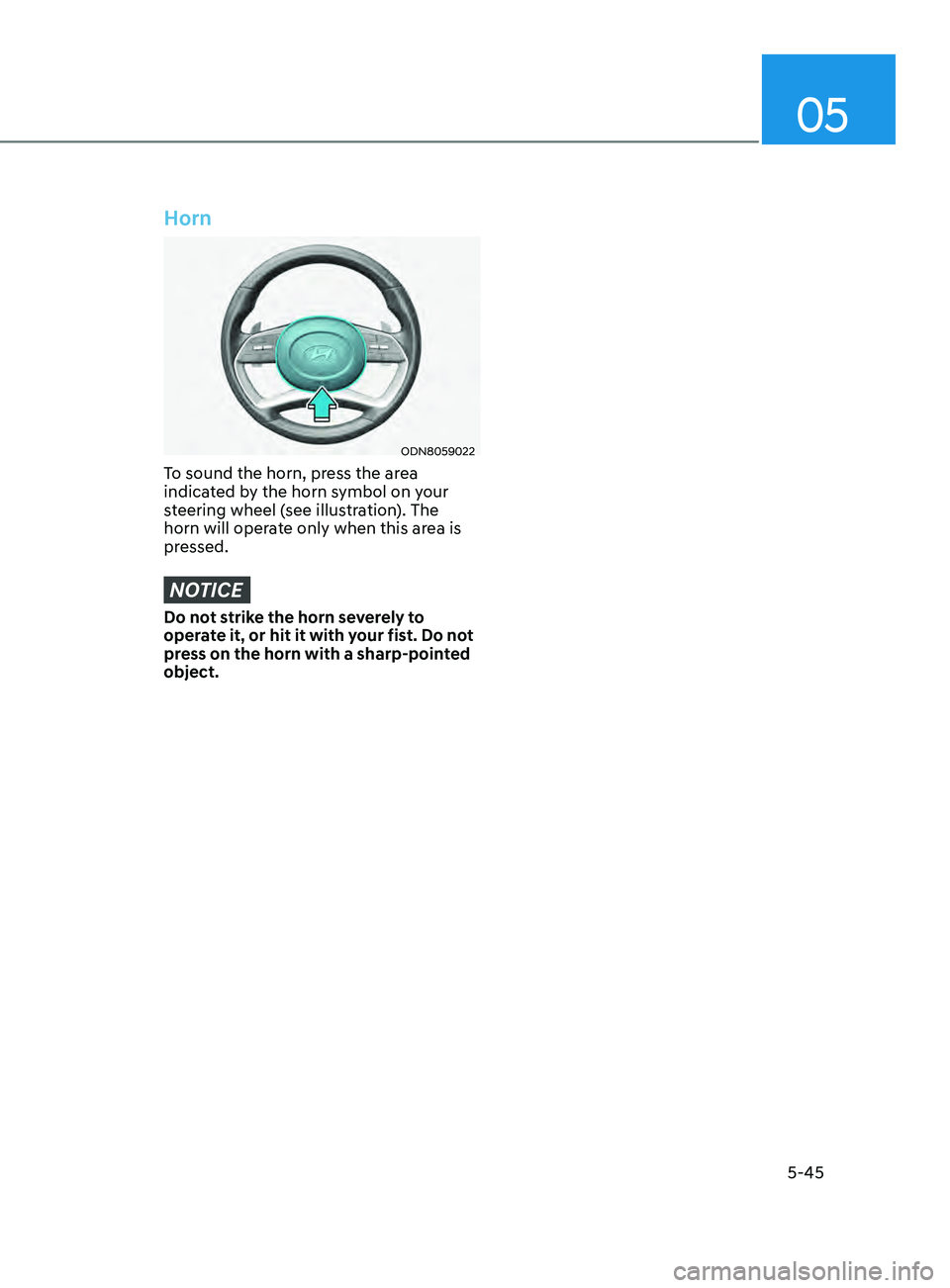
To sound the horn, press the area
indicated by the horn symbol on your
steering wheel (see illustration). The
horn will operate only when this area is
pressed.
NOTICE
Do not strike the horn severely to
operate it, or hit it with your fist. Do not
press on the horn with a sharp-pointed
object.
Page 209 of 546
05
5-79
Turn signals and lane change signals
ODN8A059207
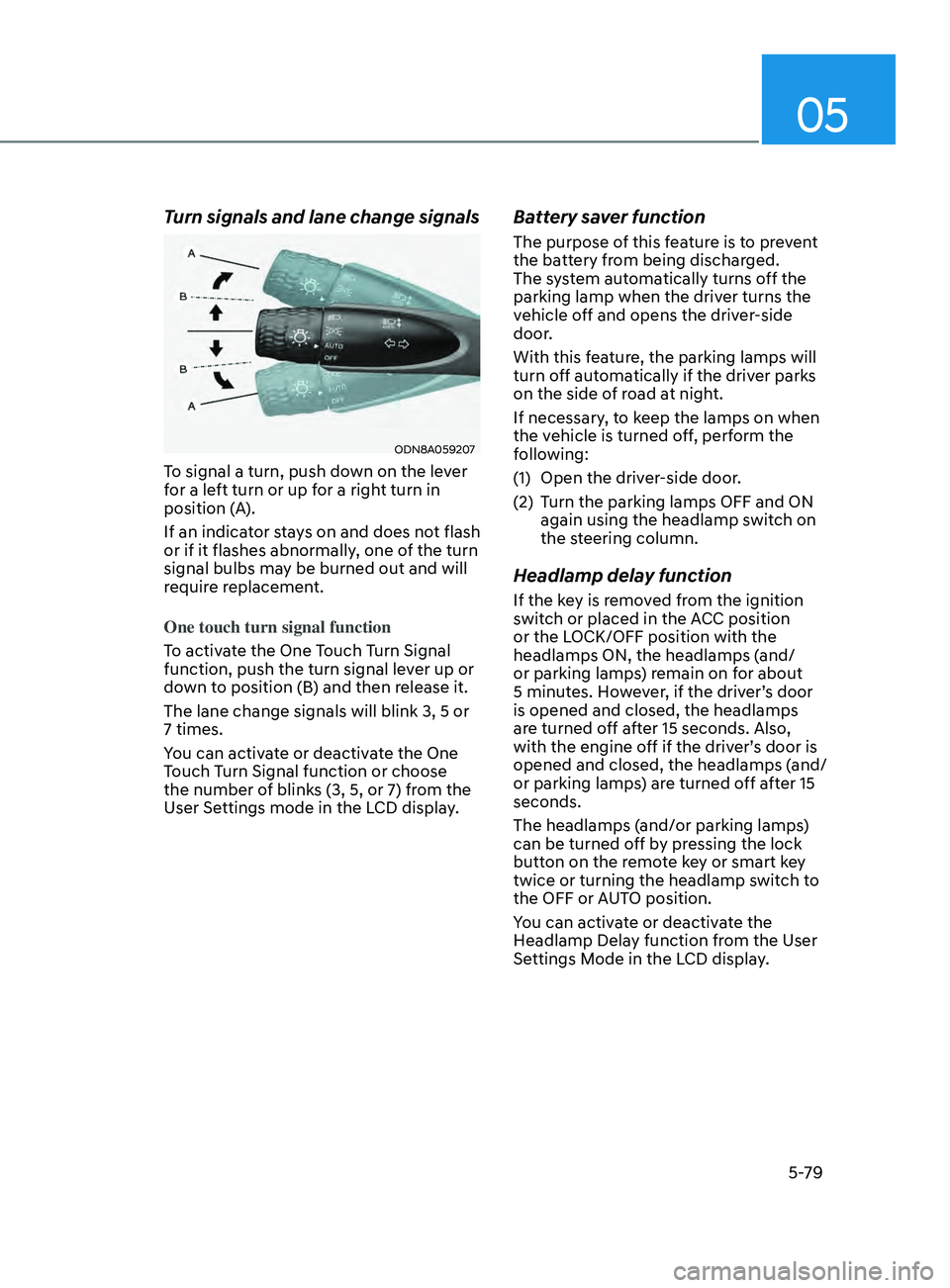
To signal a turn, push down on the lever
for a left turn or up for a right turn in
position (A).
If an indicator stays on and does not flash
or if it flashes abnormally, one of the turn
signal bulbs may be burned out and will
require replacement.
One touch turn signal function
To activate the One Touch Turn Signal
function, push the turn signal lever up or
down to position (B) and then release it.
The lane change signals will blink 3, 5 or
7 times.
You can activate or deactivate the One
Touch Turn Signal function or choose
the number of blinks (3, 5, or 7) from the
User Settings mode in the LCD display.
Battery saver function
The purpose of this feature is to prevent
the battery from being discharged.
The system automatically turns off the
parking lamp when the driver turns the
vehicle off and opens the driver-side
door.
With this feature, the parking lamps will
turn off automatically if the driver parks
on the side of road at night.
If necessary, to keep the lamps on when
the vehicle is turned off, perform the
following:
(1)
Open the driv
er-side door.
(2)
T
urn the parking lamps OFF and ON
again using the headlamp switch on
the steering column.
Headlamp delay function
If the key is removed from the ignition
switch or placed in the ACC position
or the LOCK/OFF position with the
headlamps ON, the headlamps (and/
or parking lamps) remain on for about
5 minutes. However, if the driver’s door
is opened and closed, the headlamps
are turned off after 15 seconds. Also,
with the engine off if the driver’s door is
opened and closed, the headlamps (and/
or parking lamps) are turned off after 15
seconds.
The headlamps (and/or parking lamps)
can be turned off by pressing the lock
button on the remote key or smart key
twice or turning the headlamp switch to
the OFF or AUTO position.
You can activate or deactivate the
Headlamp Delay function from the User
Settings Mode in the LCD display.
Page 220 of 546
Convenient Features
5-90
Operating conditions
Reverse Parking Collision-Avoidance
Assist system enters the ready status,
when ‘Active Assist’ or ‘Warning Only’ is
selected in the AVN system screen and
the following conditions are satisfied:
• The trunk is closed
• The shift lever is in R (Reverse)
• Vehicle speed is below 6 mph (10
km/h)
• System components such as the rear
view camera and the rear ultrasonic
sensors are in normal conditions
The driver needs to select ‘Active Assist’
on the LCD display or infotainment
system display for collision-avoidance
assist.
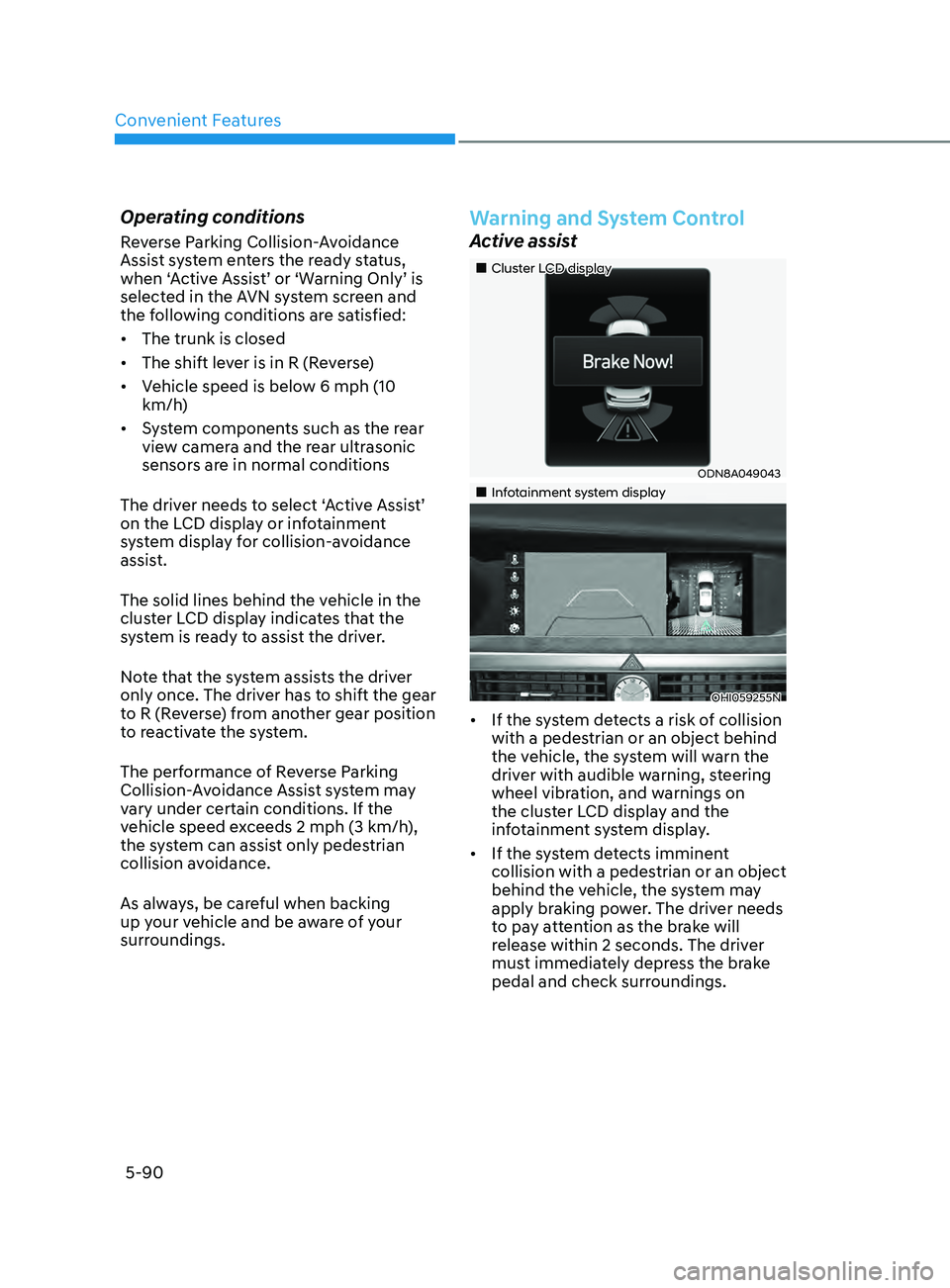
The solid lines behind the vehicle in the
cluster LCD display indicates that the
system is ready to assist the driver.
Note that the system assists the driver
only once. The driver has to shift the gear
to R (Reverse) from another gear position
to reactivate the system.
The performance of Reverse Parking
Collision-Avoidance Assist system may
vary under certain conditions. If the
vehicle speed exceeds 2 mph (3 km/h),
the system can assist only pedestrian
collision avoidance.
As always, be careful when backing
up your vehicle and be aware of your
surroundings.
Warning and System Control
Active assist
„„Cluster LCD display
ODN8A049043
„„Infotainment system display
OHI059255N
• If the system detects a risk of collision
with a pedestrian or an object behind
the vehicle, the system will warn the
driver with audible warning, steering
wheel vibration, and warnings on
the cluster LCD display and the
infotainment system display.
• If the system detects imminent
collision with a pedestrian or an object
behind the vehicle, the system may
apply braking power. The driver needs
to pay attention as the brake will
release within 2 seconds. The driver
must immediately depress the brake
pedal and check surroundings.
Page 234 of 546
Convenient Features5-104
remoT e S m A rT pA r K in G ASS i ST ( rS pA) ( if eQU ippe D)
Remote Smart Parking Assist system
helps drivers recognize surrounding
objects by using sensors to detect
parking spaces control the steering
wheel, shift the gear and adjust vehicle
speed automatically.
Remote moving forward and backward
function provides assistance for forward
and backward movement as well as
taking the vehicle out of the parking
space with driver outside the vehicle.
The driver should check the distance
between the parking space and the
objects in direct and be careful to
operate.
Due to the surrounding environment and
array or shape of the parked vehicles, the
vehicle may not be parked or exit at the
exact spot you have wished.
ÃRSP
A stands for Remote Smart
Parking Assist.
Remote Smart Parking
Assist system button
Parking Distance Warning system button
Function
Remote Moving Forward/
Backward Available
Deactivate Remote Smart Parking
Assist system and park/exit your vehicle
manually if it is necessary. While using
Remote Smart Parking Assist system,
Parking Distance Warning system
activates as well. Remote Smart Parking
Assist system will be cancelled if Parking
Distance Warning system is cancelled by
pressing the button to the OFF position.
For operation of Parking Distance
Warning system, refer to the relevant
description in this manual.
WARNING
•
Remote Smart Parking Assist system
may not operate normally if the
vehicle needs wheel alignment
adjustment. Have the vehicle
checked by an authorized HYUNDAI
dealer.
• If you use a different tire or
wheel size rather than the size
recommended by the HYUNDAI
dealer, Remote Smart Parking Assist
system may not work properly.
Always use the same size tire and
wheel.
• Do not use Remote Smart Parking
Assist system when under the
influence of alcohol or drugs.
• Remote Smart Parking Assist system
may not operate properly depending
on the surrounding environment and
other conditions.
• Remote Smart Parking Assist system
may not recognize the object too
close to the vehicle.
• When operating Remote Smart
Parking Assist system, be careful
of the objects such as flower pots
or parking blocks located above
or below the sensor position. Such
object may damage the vehicle or
other objects.
• Remote Smart Parking Assist system
should only be considered as a
supplementary function. The driver
must check the front and rear view
for objects. The operational function
of the system can be affected by
many factors and conditions of the
surroundings, so the responsibility
rests always with the driver.
• Do not let children or other person to
use the smart key.
Page 237 of 546
05
5-107
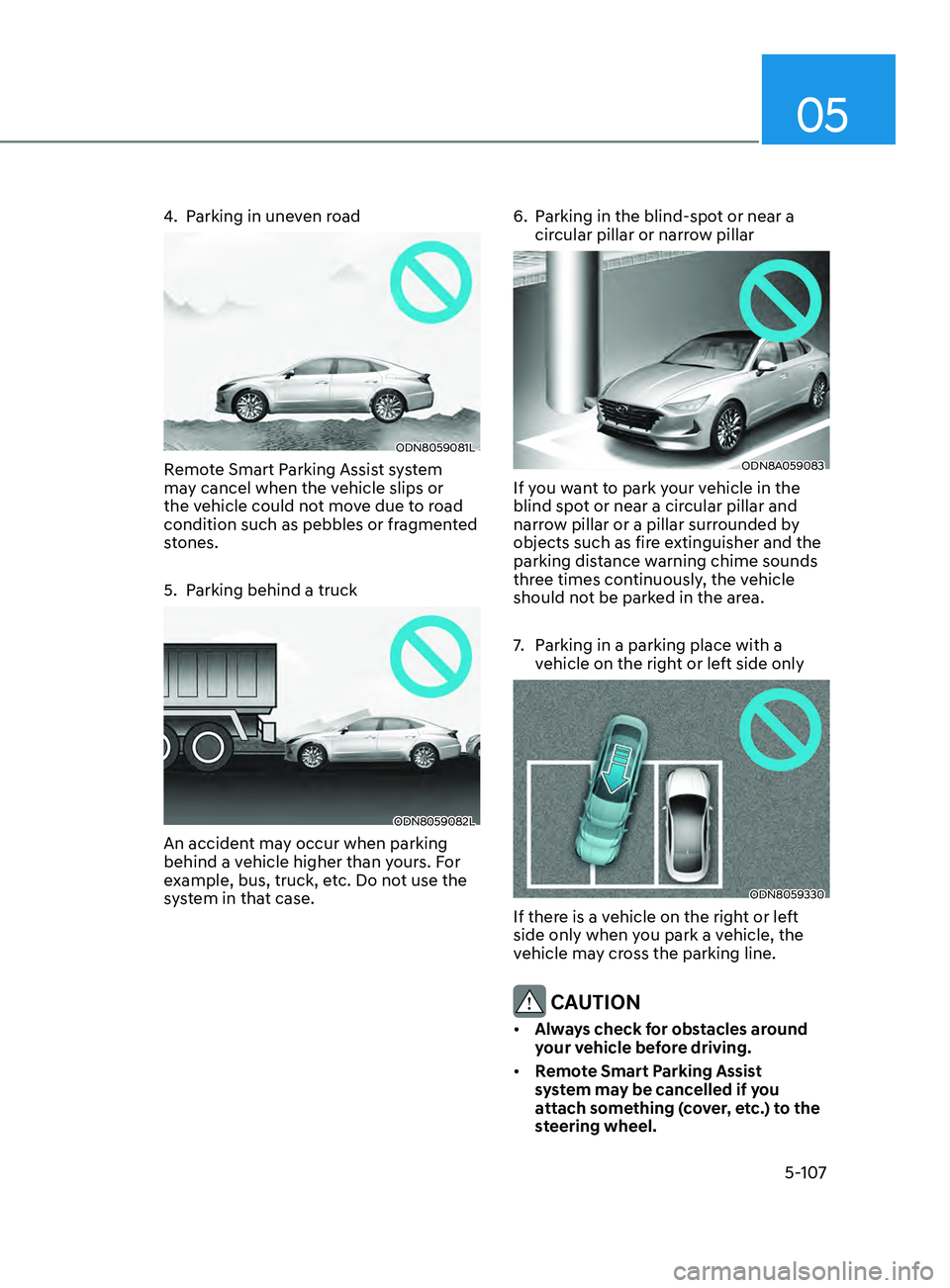
4. Parking in uneven road
ODN8059081L
Remote Smart Parking Assist system
may cancel when the vehicle slips or
the vehicle could not move due to road
condition such as pebbles or fragmented
stones.
5.
P
arking behind a truck
ODN8059082L
An accident may occur when parking
behind a vehicle higher than yours. For
example, bus, truck, etc. Do not use the
system in that case. 6.
P
arking in the blind-spot or near a
circular pillar or narrow pillar
ODN8A059083
If you want to park your vehicle in the
blind spot or near a circular pillar and
narrow pillar or a pillar surrounded by
objects such as fire extinguisher and the
parking distance warning chime sounds
three times continuously, the vehicle
should not be parked in the area.
7.
P
arking in a parking place with a
vehicle on the right or left side only
ODN8059330
If there is a vehicle on the right or left
side only when you park a vehicle, the
vehicle may cross the parking line.
CAUTION
• Always check for obstacles around
your vehicle before driving.
• Remote Smart Parking Assist
system may be cancelled if you
attach something (cover, etc.) to the
steering wheel.