Page 262 of 663

3-166
Convenience features
Reverse Parking Distance Warning
will help warn the driver if an obsta-
cle is detected within a certain dis-
tance when the vehicle is moving in
reverse at low speeds.
Detecting sensor
[B] : Rear ultrasonic Sensor
Refer to the picture above for the
detailed location of the detecting
sensors.
Reverse Parking Distance
Warning settings
Warning Volume
With the engine on, select 'Driver
Assistance →
Warning Volume' from
the Settings menu to change the
Warning Volume to 'High', 'Medium',
'Low' or 'Off' for Reverse Parking
Distance Warning.
However, even if 'Off' is selected,
Forward Collision-Avoidance Assist's
Warning Volume will not turn off but
the volume will sound as 'Low'.
If you change the warning volume,
the Warning Volume of other Driver
Assistance systems may change.
Reverse Parking Distance
Warning operation
Operating button
Parking Distance Warning Off but-
ton
Press the Parking Distance Warning Off ( ) button to turn off
Reverse Parking Distance
Warning. Press the button again to
turn on the function.
When Reverse Parking Distance Warning is off (button indicator
light on), if you shift the gear to R
(Reverse), the function will auto-
matically turn on.
R RE EV V E ER R S SE E P P A A R RK K I IN N G G D D I IS S T T A A N N C CE E W W A AR RN N I IN N G G ( ( P P D D W W ) ) ( ( I IF F E E Q Q U UI IP P P PE ED D ) )
OLX2048053L
OLX2048096ONX4E070090
Page 267 of 663

3-171
Convenience features
3
Parking Distance Warning AutoOn
To use Parking Distance Warning
Auto On function, select ‘Driver
Assistance →Parking Safety →
Parking Distance Warning Auto On’
from the cluster or infotainment sys-
tem Settings menu.
Forward/Reverse Parking
Distance Warning operation
Operating button
Parking Safety button
Press the Parking Safety ( ) button to turn on Forward/Reverse
Parking Distance Warning. Press
the button again to turn off the
function.
When Forward/Reverse Parking Distance Warning is off (button
indicator light off), if you shift the
gear to R (Reverse),
Forward/Reverse Parking Distance
Warning will automatically turn on. When Forward/Reverse Parking
Distance Warning turns on, the
button indicator light will turn on. If
vehicle speed is above 12 mph (20
km/h), Forward/Reverse Parking
Distance Warning will turn off (but-
ton indicator light off).
❈ If equipped with Reverse
Parking Collision-Avoidance
Assist or Remote Smart Parking
Assist, Forward/Reverse
Parking Distance Warning will
turn off (button indicator light off)
when vehicle speed is above 18
mph (30 km/h).
OLX2048096
Page 268 of 663
3-172
Convenience features
Forward Parking DistanceWarning
Forward Parking Distance Warning
will operate when one of the condi-
tion is satisfied.
- The gear is shifted from R(Reverse) to D (Drive) with
Reverse Parking Distance
Warning on
- The gear is in D (Drive) and the Parking Safety button indicator
light is on
- ‘Parking Distance Warning Auto On’ is selected from the Settings
menu and the gear is in D (Drive)
Forward Parking Distance Warning detects a person, animal or object
in front when the vehicle’s forward
speed is below 6 mph (10 km/h).
Forward Parking Distance Warning does not operate when the vehi-
cle's forward speed is above 6 mph
(10 km/h) even when the Parking
Safety button indicator is on.
Forward Parking Distance Warning
will operate again when the vehi-
cle's forward speed decreases
below 6 mph (10 km/h) while the
Parking Safety button indicator is
on. When ‘Parking Distance Warning
Auto On’ is selected, the Parking
Safety button indicator light stays
on.
When ‘Parking Distance Warning Auto On’ is deselected, and the
vehicle’s forward speed is above
12 mph (20 km/h), the Parking
Safety button indicator will turn off.
Although you drive below 6 mph
(10 km/h), Forward Parking
Distance Warning will not turn on.
❈ If equipped with Reverse
Parking Collision-Avoidance
Assist or Remote Smart Parking
Assist, Forward/Reverse
Parking Distance Warning will
turn off when vehicle speed is
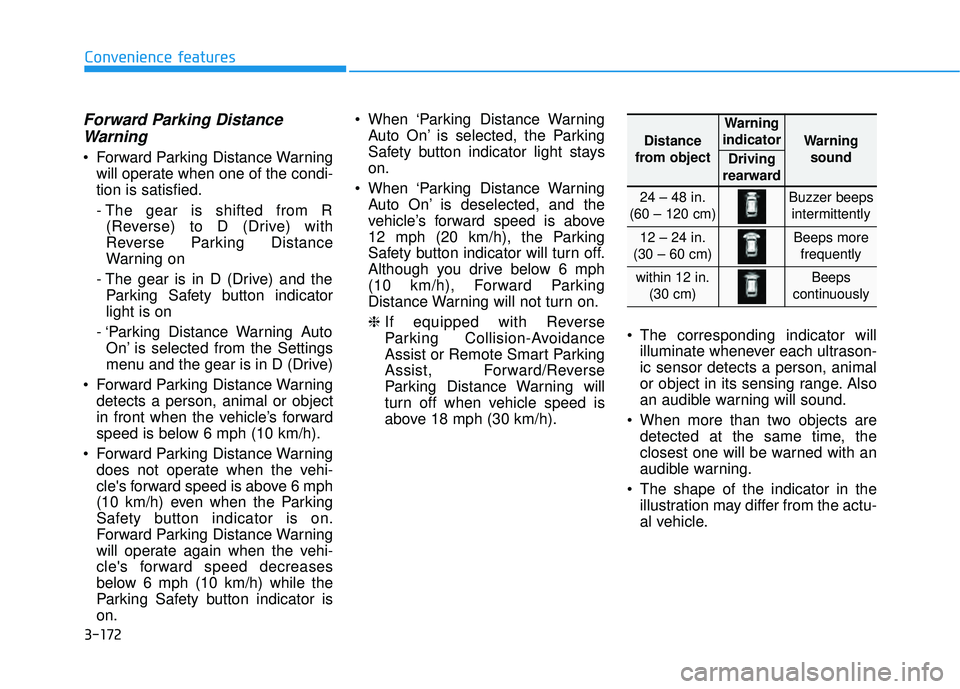
above 18 mph (30 km/h). The corresponding indicator will
illuminate whenever each ultrason-
ic sensor detects a person, animal
or object in its sensing range. Also
an audible warning will sound.
When more than two objects are detected at the same time, the
closest one will be warned with an
audible warning.
The shape of the indicator in the illustration may differ from the actu-
al vehicle.
Distance
from object
Warning
indicator
Warning sound
Driving
rearward
24 – 48 in.
(60 – 120 cm)Buzzer beeps intermittently
12 – 24 in.
(30 – 60 cm)Beeps more frequently
within 12 in. (30 cm)Beeps
continuously
Page 284 of 663

3-188
Convenience Features
Fan speed control (1)
Turn the knob to the right to increase
the fan speed and airflow. Turn the
knob to the left to decrease fan
speed and airflow.
Setting the fan speed control knob to
the "0" position turns off the fan.
Operating the fan speed when the
ignition switch is in the ON posi-
tion could cause the battery to
discharge. Operate the fan speed
when the engine is running.
Air conditioning (3)
Push the A/C button to turn the sys-
tem on (indicator light will illuminate)
and off.
Rear climate control button
If you press the rear climate control
button, rear passengers can control
the rear climate system.
NOTICE
Continued use of the climate
control system operation in
Recirculation mode for a pro-
longed period of time may
cause drowsiness to the
occupants in the cabin. This
may lead to loss of vehicle
control which may lead to an
accident.
Continued use of the climate
control system operation in
Recirculation mode with the
A/C OFF may allow humidity
to increase inside the cabin.
This may cause condensation
to accumulate on the wind-
shield and obscure visibility.
Do not sleep in your vehicle or
remain parked in your vehicle
with the windows up and
either the heater or the air
conditioning ON for pro-
longed periods of time. Doing
so may increase the levels of
carbon dioxide in the cabin
which may lead to serious
injury or death.
WARNING
OLX2048327L
Page 313 of 663

3-217
Convenience Features
3
S ST T O O R RA A G G E E C C O O M M P PA A R RT TM M E EN N T T
To avoid possible theft, do not
leave valuables in the storage
compartments.
Center Console Storage
To open :
Grab and hold the latch (1) on the
arm rest then lift the lid.
Glove Box
To open:
Pull the lever (1).
NOTICE
Never store cigarette lighters,
propane cylinders, or other
flammable/explosive materials
in the vehicle. These items may
catch fire and/or explode if the
vehicle is exposed to hot tem-
peratures for extended periods.
WARNING
ALWAYS keep the storage com-
partment covers closed secure-
ly while driving. Items inside
your vehicle are moving as fast
as the vehicle. If you have to
stop or turn quickly, or if there
is a crash, the items may fly out
of the compartment and may
cause an injury if they strike the
driver or a passenger.
WARNING
ALWAYS close the glove box
door after use.
An open glove box door can
cause serious injury to the pas-
senger in an accident, even if the
passenger is wearing a seat belt.
WARNING
OLX2049073LOLX2048075L
Page 316 of 663

3-220
Convenience Features
Rear (2ndrow, 8 passengers
vehicle)
Pull the armrest down to use the cup
holders. Keep your drinks sealed while
driving to prevent spilling your
drink. If liquid spills, it may get
into the vehicle's electrical/elec-
tronic system and damage elec-
trical/electronic parts.
When cleaning spilled liquids do not use hot air to blow out or dry
the cup holder. This may dam-
age the interior.
NOTICE
Keep cans or bottles out of
direct sun light and do not put
them in a hot vehicle. It may
explode.
WARNING
Do not place uncovered or
unsecured cups, bottles,
cans, etc., in the cup holder
containing hot liquid while the
vehicle is in motion. Injuries
may result in the event of a
sudden stop or collision.
Only use soft cups in the cup
holders. Hard objects can
injure you in an accident.
Avoid abrupt starting and
braking when the cup holder
is in use to prevent spilling
your drink. If hot liquid spills,
you could be burned. Such a
burn to the driver could cause
loss of vehicle control result-
ing in an accident.
WARNING
OLX2048097
Page 326 of 663

3-230
Convenience Features
Luggage Net Holder
(if equipped)
To keep items from shifting in the lug-
gage compartment, you can use the
4 holders located in the luggage
board to attach the luggage net.
Make sure the luggage net is secure-
ly attached to the holders in the lug-
gage board.
Cargo Security Screen
(if equipped)
Use the cargo security screen to
cover items stored in the cargo area.
To use the cargo security screen
1. Pull the cargo security screentowards the rear of the vehicle by
the handle (1).
2. Insert the guide pin (2) into the guide (3).
Information
Pull out the cargo security screen with
the handle in the center to prevent the
guide pin from falling out of the guide.
i
OLX2048403L
OLX2048402LAvoid eye injury. DO NOT over-
stretch the luggage net. ALWAYS
keep your face and body out of
the luggage net's recoil path. DO
NOT use the luggage net when
the strap has visible signs of
wear or damage.
Use the luggage net to keep only
light items from shifting in the
luggage compartment.
WARNING
3
Page 339 of 663

5-5
Driving your vehicle
5
Before Entering the Vehicle
• Be sure all windows, outside mir-ror(s), and outside lights are clean
and unobstructed.
Remove frost, snow, or ice.
Visually check the tires for uneven wear and damage.
Check under the vehicle for any sign of leaks.
Be sure there are no obstacles behind you if you intend to back up.
Before Starting
Make sure the hood, the liftgate,and the doors are securely closed
and locked.
Adjust the position of the seat and steering wheel.
Adjust the inside and outside rearview mirrors.
Verify all the lights work.
Fasten your seatbelt. Check that all passengers have fastened their
seatbelts.
Check the gauges and indicators in the instrument panel and the mes-
sages on the instrument display
when the ignition switch is in the
ON position.
Check that any items you are car- rying are stored properly or fas-
tened down securely.
CALIFORNIA PROPOSITION 65
WARNING
Engine exhaust and a wide vari-
ety of automobile components
including components found in
the interior furnishings in a
vehicle, contain or emit harmful
chemicals known to the State of
California to cause cancer and
birth defects and reproductive
harm. In addition, certain fluids
contained in vehicles and cer-
tain products of components
contain or emit chemicals
known to the State of California
to cause cancer and birth
defects or other reproductive
harm.
For more information go to
https://www.p65warnings.ca.go
v/passenger-vehicleWARNING
B B
E EF FO O R RE E D D R RI IV V I IN N G G