Page 556 of 584
09
9-59
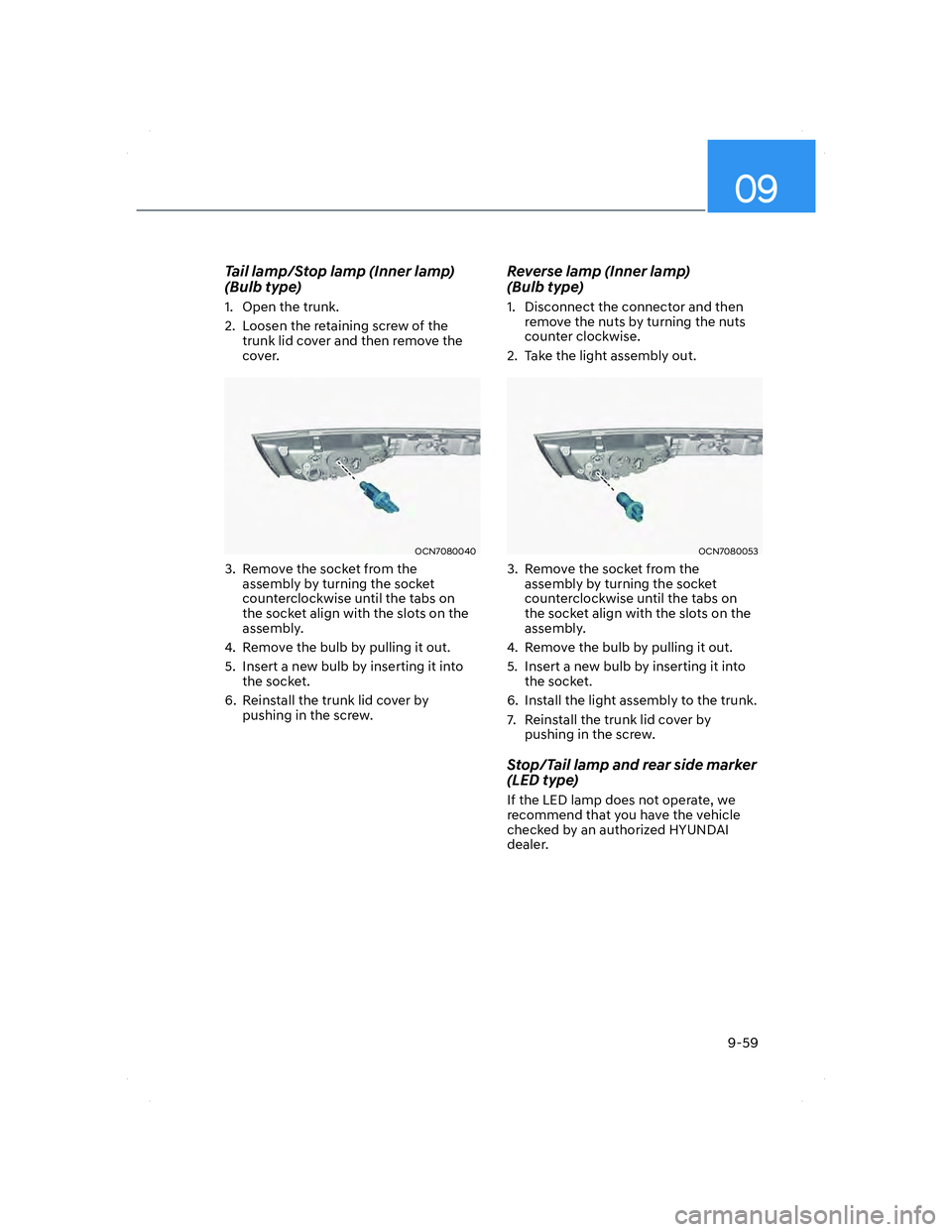
Tail lamp/Stop lamp (Inner lamp)
(Bulb type)
1. Open the trunk.
2. Loosen the retaining screw of the
trunk lid cover and then remove the
cover.
OCN7080040OCN7080040
3. Remove the socket from the
assembly by turning the socket
counterclockwise until the tabs on
the socket align with the slots on the
assembly.
4. Remove the bulb by pulling it out.
5. Insert a new bulb by inserting it into
the socket.
6. Reinstall the trunk lid cover by
pushing in the screw.
Reverse lamp (Inner lamp)
(Bulb type)
1. Disconnect the connector and then
remove the nuts by turning the nuts
counter clockwise.
2. Take the light assembly out.
OCN7080053OCN7080053
3. Remove the socket from the
assembly by turning the socket
counterclockwise until the tabs on
the socket align with the slots on the
assembly.
4. Remove the bulb by pulling it out.
5. Insert a new bulb by inserting it into
the socket.
6. Install the light assembly to the trunk.
7. Reinstall the trunk lid cover by
pushing in the screw.
Stop/Tail lamp and rear side marker
(LED type)
If the LED lamp does not operate, we
recommend that you have the vehicle
checked by an authorized HYUNDAI
dealer.
CN7 HMA 9.indd 9-592020-12-03 9:42:36
Page 557 of 584
Maintenance
9-60
High mounted stop lamp
replacement
OCN7080032OCN7080032
OAD075042OAD075042[A] : High mounted stop lamp
1. Open the trunk.
2. Remove the socket by turning it
counterclockwise until the tabs on the
socket align with the slots.
3. Remove the bulb from the socket
by pressing it in and rotating it
counterclockwise until the tabs on the
bulb align with the slots in the socket.
Pull the bulb out of the socket.
4. Insert a new bulb by inserting it into
the socket and rotating it until it locks
into place.
5. Install the socket in the assembly by
aligning the tabs on the socket with
the slots in the assembly.
Push the socket into the assembly and
turn the socket clockwise.
License Plate Light Bulb
Replacement
OCN7080035OCN7080035
1. Using a flat-blade screwdriver gently
pry the lens cover from the lamp
housing.
2. Remove the bulb by pulling it straight
out.
3. Install a new bulb.
4. Reinstall in the reverse order.
CN7 HMA 9.indd 9-602020-12-03 9:42:36
Page 578 of 584

I
I-7
Important Safety Precautions................................................................................. 3-2
Air Bag Hazards ................................................................................................. 3-2
Always Wear Your Seat Belt .............................................................................. 3-2
Control Your Speed ............................................................................................ 3-2
Driver Distraction............................................................................................... 3-2
Keep Your Vehicle in Safe Condition................................................................. 3-2
Restrain All Children.......................................................................................... 3-2
In Case of an Emergency While Driving ............................................................... 8-2
If the Engine Stalls at a Crossroad or Crossing.................................................. 8-2
If the Engine Stalls While Driving ..................................................................... 8-2
If you Have a Flat Tire While Driving ............................................................... 8-3
Infotainment System .......................................................................................... 5-117
Antenna .......................................................................................................... 5-118
Bluetooth
® Wireless Technology hands-free .................................................. 5-120
How vehicle radio works................................................................................ 5-121
Infotainment system ....................................................................................... 5-120
Steering wheel audio control .......................................................................... 5-119
USB Port ........................................................................................................ 5-117
Voice recognition............................................................................................ 5-120
Instrument Cluster ................................................................................................. 4-4
Gauges and Meters ............................................................................................. 4-5
Instrument Cluster Control ................................................................................. 4-5
LCD Display Messages .................................................................................... 4-19
Transmission shift indicator ............................................................................... 4-9
Warning and Indicator Lights ........................................................................... 4-10
Instrument Panel Overview ................................................................................... 2-7
Intelligent variable transmission.......................................................................... 6-16
Good driving practices ..................................................................................... 6-22
Intelligent variable transmission operation ...................................................... 6-16
Parking ............................................................................................................. 6-21
Interior Features................................................................................................. 5-111
Clock .............................................................................................................. 5-116
Clothes Hanger ............................................................................................... 5-116
Cup Holder ..................................................................................................... 5-111
Power Outlet................................................................................................... 5-112
Sunvisor.......................................................................................................... 5-112
USB Charger .................................................................................................. 5-113
Wireless Cellular Phone Charging System..................................................... 5-114
Page:
< prev 1-8 9-16 17-24
![HYUNDAI ELANTRA 2022 Owners Manual Maintenance
9-60
High mounted stop lamp
replacement
OCN7080032OCN7080032
OAD075042OAD075042[A] : High mounted stop lamp
1. Open the trunk.
2. Remove the socket by turning it
counterclockwise unti](/manual-img/35/41167/w960_41167-556.png "HYUNDAI ELANTRA 2022 Owners Manual Maintenance
9-60
High mounted stop lamp
replacement
OCN7080032OCN7080032
OAD075042OAD075042[A] : High mounted stop lamp
1. Open the trunk.
2. Remove the socket by turning it
counterclockwise unti")