2022 HYUNDAI ELANTRA HYBRID automatic transmission
[x] Cancel search: automatic transmissionPage 131 of 529
04
4-33
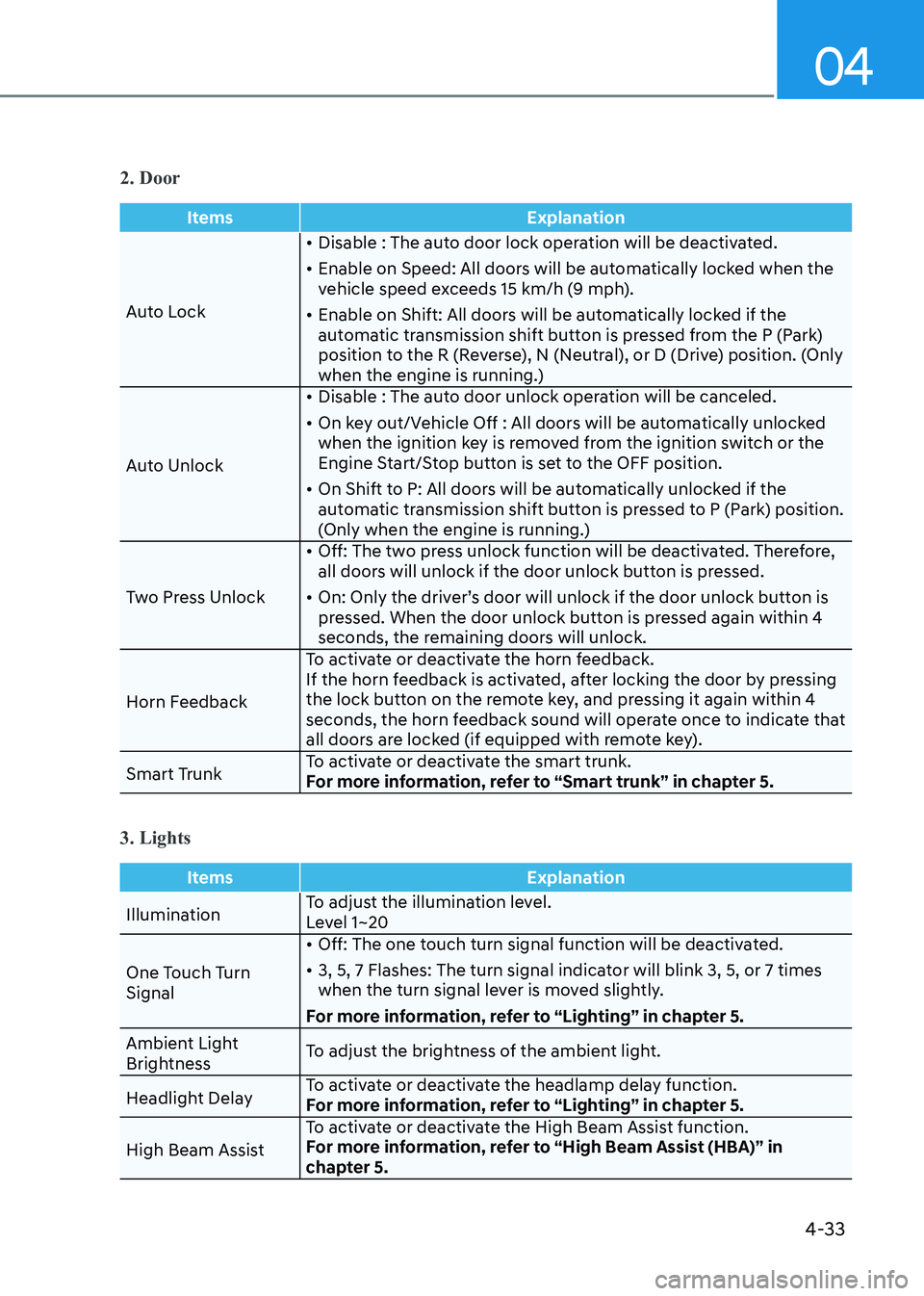
2. Door
ItemsExplanation
Auto Lock•
Disable : The auto door lock operation will be deactivated.
• Enable on Speed: All doors will be automatically locked when the
vehicle speed exceeds 15 km/h (9 mph).
• Enable on Shift: All doors will be automatically locked if the
automatic transmission shift button is pressed from the P (Park)
position to the R (Reverse), N (Neutral), or D (Drive) position. (Only
when the engine is running.)
Auto Unlock •
Disable : The auto door unlock operation will be canceled.
• On key out/Vehicle Off : All doors will be automatically unlocked
when the ignition key is removed from the ignition switch or the
Engine Start/Stop button is set to the OFF position.
• On Shift to P: All doors will be automatically unlocked if the
automatic transmission shift button is pressed to P (Park) position.
(Only when the engine is running.)
Two Press Unlock •
Off: The two press unlock function will be deactivated. Therefore,
all doors will unlock if the door unlock button is pressed.
• On: Only the driver’s door will unlock if the door unlock button is
pressed. When the door unlock button is pressed again within 4
seconds, the remaining doors will unlock.
Horn Feedback To activate or deactivate the horn feedback.
If the horn feedback is activated, after locking the door by pressing
the lock button on the remote key, and pressing it again within 4
seconds, the horn feedback sound will operate once to indicate that
all doors are locked (if equipped with remote key).
Smart Trunk To activate or deactivate the smart trunk.
For more information, refer to “Smart trunk” in chapter 5.
3. Lights
Items
Explanation
IlluminationTo adjust the illumination level.
Level 1~20
One Touch Turn Signal •
Off: The one touch turn signal function will be deactivated.
• 3, 5, 7 Flashes: The turn signal indicator will blink 3, 5, or 7 times
when the turn signal lever is moved slightly.
For more information, refer to “Lighting” in chapter 5.
Ambient Light
Brightness To adjust the brightness of the ambient light.
Headlight Delay To activate or deactivate the headlamp delay function.
For more information, refer to “Lighting” in chapter 5.
High Beam Assist To activate or deactivate the High Beam Assist function.
For more information, refer to “High Beam Assist (HBA)” in
chapter 5.
Page 142 of 529
Instrument Cluster
4-44
Warning message group
When the warning message light
appears, check the detailed information
in warning message group.
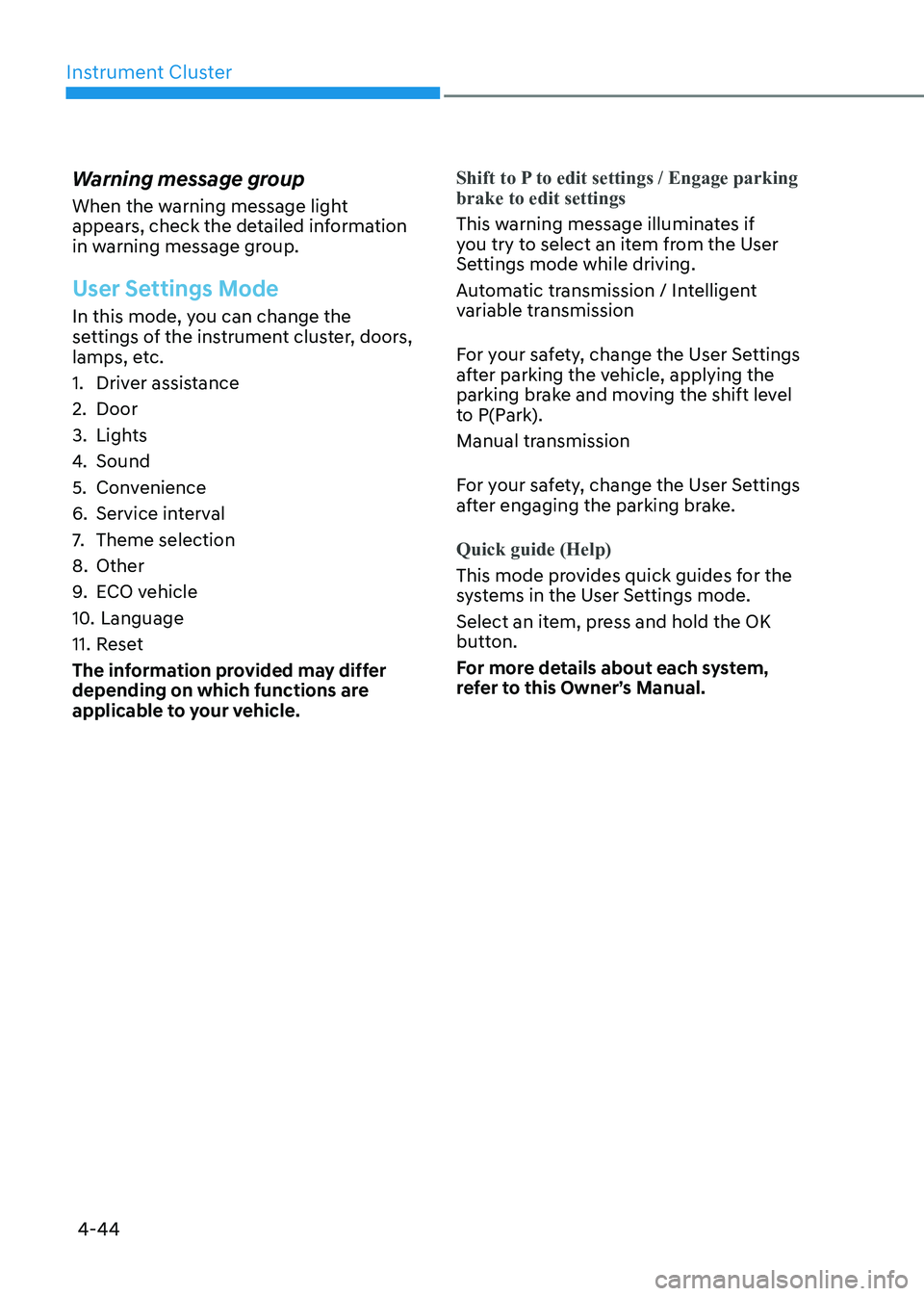
User Settings Mode
In this mode, you can change the
settings of the instrument cluster, doors,
lamps, etc.
1. Driver assistance
2. Door
3. Lights
4.
Sound
5. Convenience
6. Service interval
7. Theme selection
8. Other
9. ECO vehicle
10. Language
11. Reset
The information provided may differ
depending on which functions are
applicable to your vehicle.
Shift to P to edit settings / Engage parking brake to edit settings
This warning message illuminates if
you try to select an item from the User
Settings mode while driving.
Automatic transmission / Intelligent
variable transmission
For your safety, change the User Settings
after parking the vehicle, applying the
parking brake and moving the shift level
to P(Park).
Manual transmission
For your safety, change the User Settings
after engaging the parking brake.
Quick guide (Help)
This mode provides quick guides for the
systems in the User Settings mode.
Select an item, press and hold the OK
button.
For more details about each system,
refer to this Owner’s Manual.
Page 144 of 529
Instrument Cluster
4-46
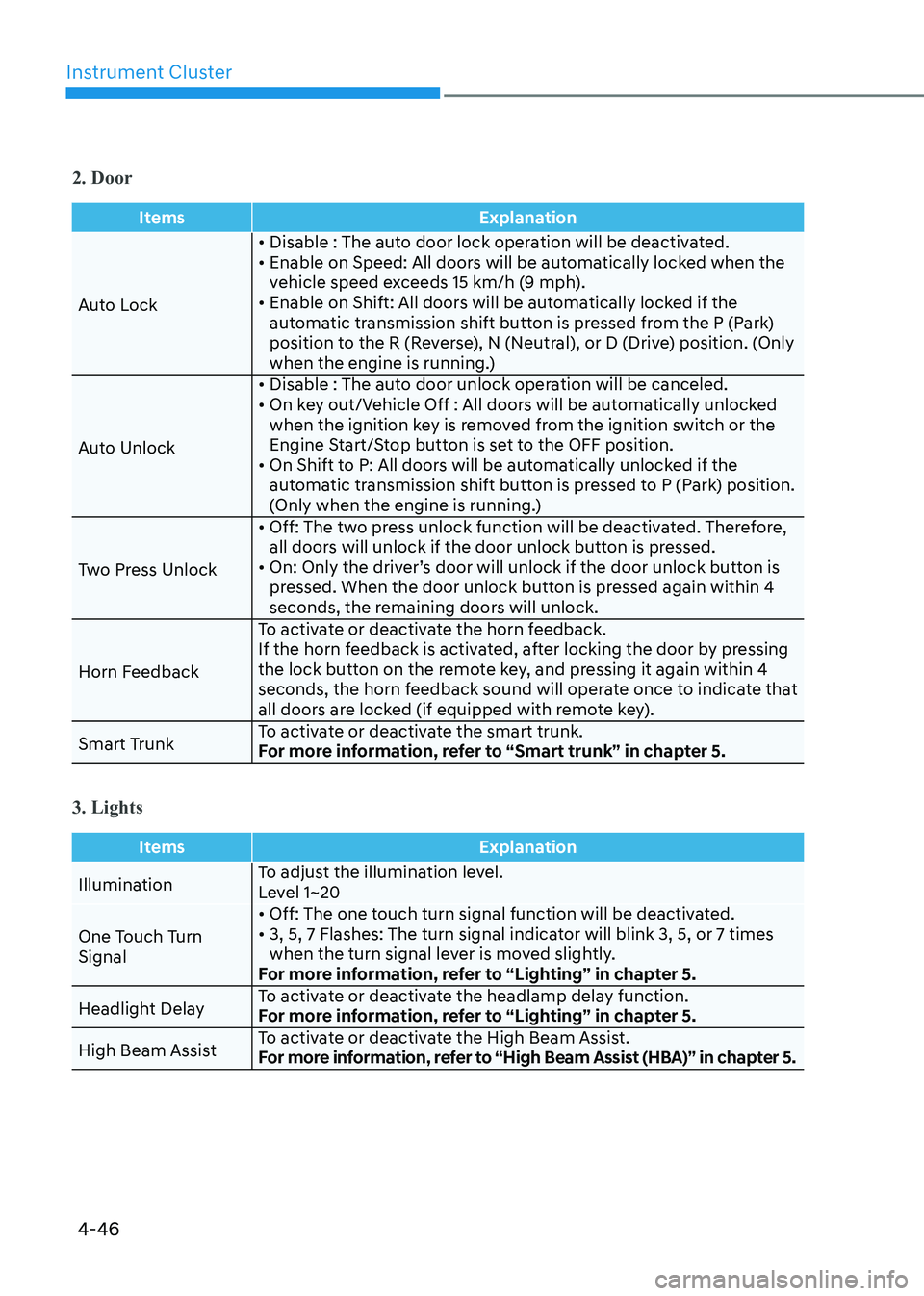
2. Door
ItemsExplanation
Auto Lock• Disable : The auto door lock operation will be deactivated.
• Enable on Speed: All doors will be automatically locked when the
vehicle speed exceeds 15 km/h (9 mph).
• Enable on Shift: All doors will be automatically locked if the
automatic transmission shift button is pressed from the P (Park)
position to the R (Reverse), N (Neutral), or D (Drive) position. (Only
when the engine is running.)
Auto Unlock • Disable : The auto door unlock operation will be canceled.
• On key out/Vehicle Off : All doors will be automatically unlocked
when the ignition key is removed from the ignition switch or the
Engine Start/Stop button is set to the OFF position.
• On Shift to P: All doors will be automatically unlocked if the automatic transmission shift button is pressed to P (Park) position.
(Only when the engine is running.)
Two Press Unlock • Off: The two press unlock function will be deactivated. Therefore,
all doors will unlock if the door unlock button is pressed.
• On: Only the driver’s door will unlock if the door unlock button is pressed. When the door unlock button is pressed again within 4
seconds, the remaining doors will unlock.
Horn Feedback To activate or deactivate the horn feedback.
If the horn feedback is activated, after locking the door by pressing
the lock button on the remote key, and pressing it again within 4
seconds, the horn feedback sound will operate once to indicate that
all doors are locked (if equipped with remote key).
Smart Trunk To activate or deactivate the smart trunk.
For more information, refer to “Smart trunk” in chapter 5.
3. Lights
Items
Explanation
IlluminationTo adjust the illumination level.
Level 1~20
One Touch Turn Signal • Off: The one touch turn signal function will be deactivated.
• 3, 5, 7 Flashes: The turn signal indicator will blink 3, 5, or 7 times
when the turn signal lever is moved slightly.
For more information, refer to “Lighting” in chapter 5.
Headlight Delay To activate or deactivate the headlamp delay function.
For more information, refer to “Lighting” in chapter 5.
High Beam Assist To activate or deactivate the High Beam Assist.
For more information, refer to “High Beam Assist (HBA)” in chapter 5.
Page 258 of 529
![HYUNDAI ELANTRA HYBRID 2022 Owners Manual 06
6-13
OCN7060006
[A] : Shift button, [B] : Shift lever
Depress the brake pedal and press the shift button while moving the shift lever.
Press the shift button while moving the shift lever.
The shif](/manual-img/35/56241/w960_56241-257.png "HYUNDAI ELANTRA HYBRID 2022 Owners Manual 06
6-13
OCN7060006
[A] : Shift button, [B] : Shift lever
Depress the brake pedal and press the shift button while moving the shift lever.
Press the shift button while moving the shift lever.
The shif")
06
6-13
OCN7060006
[A] : Shift button, [B] : Shift lever
Depress the brake pedal and press the shift button while moving the shift lever.
Press the shift button while moving the shift lever.
The shift lever can freely operate.
Dual clutch transmission operation
The dual clutch transmission has 6 forward speeds and one reverse speed.
The individual speeds are selected automatically in the D (Drive) position.
Dual clutch transmission (if equippeD)
Page 259 of 529
Driving your vehicle
6-14
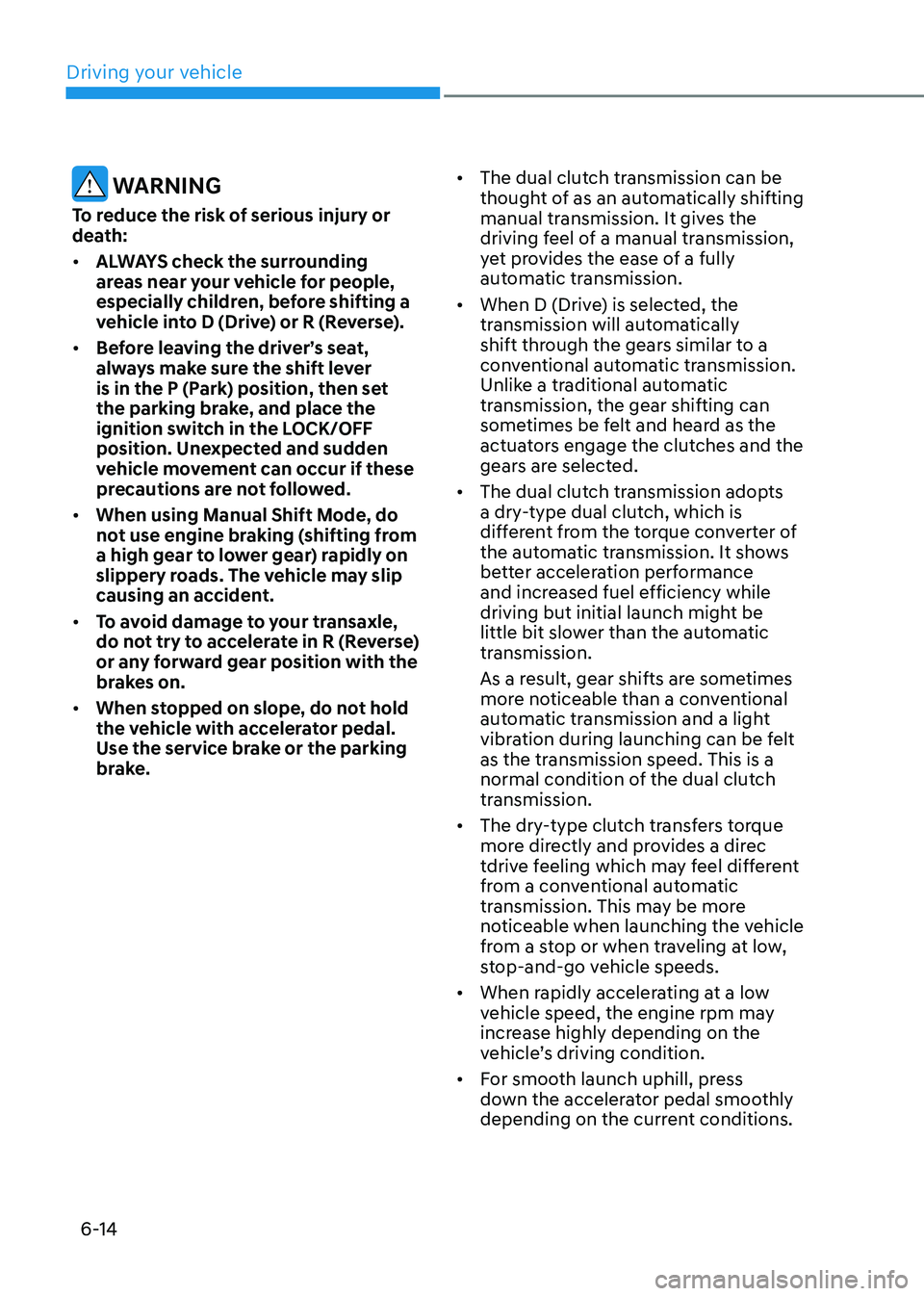
WARNING
To reduce the risk of serious injury or
death: • ALWAYS check the surrounding
areas near your vehicle for people,
especially children, before shifting a
vehicle into D (Drive) or R (Reverse).
• Before leaving the driver’s seat,
always make sure the shift lever
is in the P (Park) position, then set
the parking brake, and place the
ignition switch in the LOCK/OFF
position. Unexpected and sudden
vehicle movement can occur if these
precautions are not followed.
• When using Manual Shift Mode, do
not use engine braking (shifting from
a high gear to lower gear) rapidly on
slippery roads. The vehicle may slip
causing an accident.
• To avoid damage to your transaxle,
do not try to accelerate in R (Reverse)
or any forward gear position with the
brakes on.
• When stopped on slope, do not hold
the vehicle with accelerator pedal.
Use the service brake or the parking
brake. •
The dual clutch transmission can be
thought of as an automatically shifting
manual transmission. It gives the
driving feel of a manual transmission,
yet provides the ease of a fully
automatic transmission.
• When D (Drive) is selected, the
transmission will automatically
shift through the gears similar to a
conventional automatic transmission.
Unlike a traditional automatic
transmission, the gear shifting can
sometimes be felt and heard as the
actuators engage the clutches and the
gears are selected.
• The dual clutch transmission adopts
a dry-type dual clutch, which is
different from the torque converter of
the automatic transmission. It shows
better acceleration performance
and increased fuel efficiency while
driving but initial launch might be
little bit slower than the automatic
transmission.
As a result, gear shifts are sometimes
more noticeable than a conventional
automatic transmission and a light
vibration during launching can be felt
as the transmission speed. This is a
normal condition of the dual clutch
transmission.
• The dry-type clutch transfers torque
more directly and provides a direc
tdrive feeling which may feel different
from a conventional automatic
transmission. This may be more
noticeable when launching the vehicle
from a stop or when traveling at low,
stop-and-go vehicle speeds.
• When rapidly accelerating at a low
vehicle speed, the engine rpm may
increase highly depending on the
vehicle’s driving condition.
• For smooth launch uphill, press
down the accelerator pedal smoothly
depending on the current conditions.
Page 263 of 529
Driving your vehicle
6-18
R (Reverse)
Use this position to drive the vehicle
backward.
NOTICE
Always come to a complete stop before
shifting into or out of R (Reverse); you
may damage the transaxle if you shift
into R (Reverse) while the vehicle is in
motion.
N (Neutral)
The wheels and transaxle are not engaged.
Use N (Neutral) if you need to restart a
stalled engine, or if it is necessary to stop
with the engine ON. Shift into P (Park)
if you need to leave your vehicle for any
reason.
Always depress the brake pedal when
you are shifting from N (Neutral) to
another gear.
D (Drive)
This is the normal driving position. The
transmission will automatically shift
through a 6-gear sequence, providing
the best fuel economy and power.
For extra power when passing another
vehicle or driving uphill, depress the
accelerator fully. The transmission will
automatically downshift to the next
lower gear (or gears, as appropriate).
The DRIVE MODE switch, located on the
shift lever console, allows the driver to
switch from NORMAL mode to SPORT mode (if equipped)
For more information, refer to "Drive
Mode Integrated Control System" later
in this chapter.
WARNING
• Do not shift into gear unless your
foot is firmly on the brake pedal.
Shifting into gear when the engine
is running at high speed can cause
the vehicle to move very rapidly. You
may lose control of the vehicle and
cause accidents.
• Do not drive with the shift lever in N
(Neutral). The engine brake will not
work and may lead to an accident.
NOTICE
Always make sure the vehicle is
stationary, at a complete stop, before
selecting D (Drive).
Page 264 of 529
06
6-19
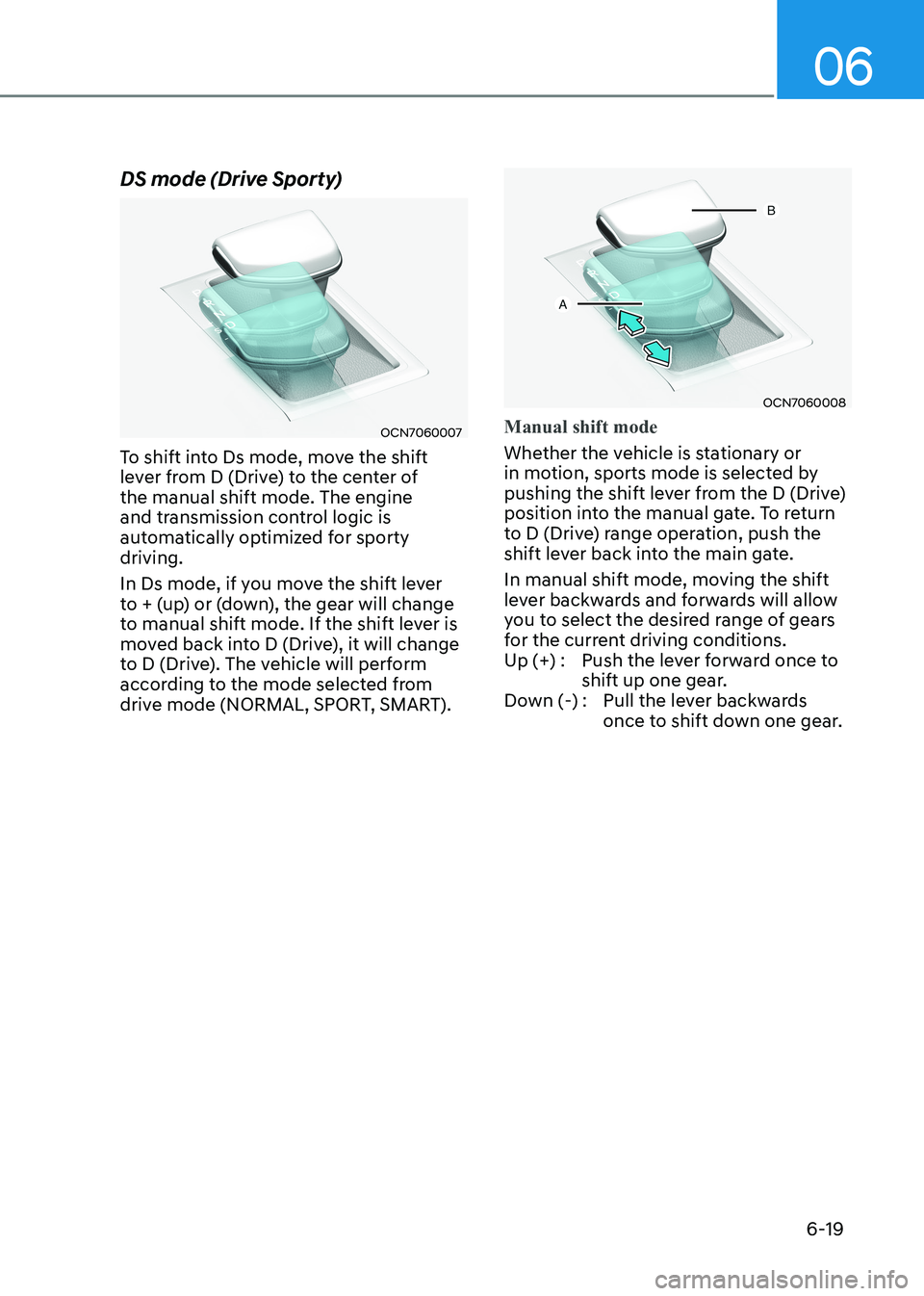
DS mode (Drive Sporty)
OCN7060007
To shift into Ds mode, move the shift
lever from D (Drive) to the center of the manual shift mode. The engine
and transmission control logic is
automatically optimized for sporty driving.
In Ds mode, if you move the shift lever
to + (up) or (down), the gear will change
to manual shift mode. If the shift lever is
moved back into D (Drive), it will change
to D (Drive). The vehicle will perform
according to the mode selected from
drive mode (NORMAL, SPORT, SMART).
OCN7060008
Manual shift mode
Whether the vehicle is stationary or
in motion, sports mode is selected by
pushing the shift lever from the D (Drive)
position into the manual gate. To return
to D (Drive) range operation, push the
shift lever back into the main gate.
In manual shift mode, moving the shift
lever backwards and forwards will allow
you to select the desired range of gears
for the current driving conditions.
Up (+) : Push the lever forward once to shift up one gear.
Down (-) : Pull the lever backwards once to shift down one gear.
Page 265 of 529
Driving your vehicle
6-20
Information
• Only the six forward gears can be
selected. To reverse or park the vehicle,
move the shift lever to the R (Reverse)
or P (Park) position as required.
• Downshifts are made automatically
when the vehicle slows down. When the
vehicle stops, 1st gear is automatically selected.
• When the engine rpm approaches the
red zone the transmission will upshift
automatically.
• If the driver presses the lever to + (Up)
or - (Down) position, the transmission
may not make the requested gear
change if the next gear is outside of the
allowable engine rpm range. The driver must execute upshifts in accordance
with road conditions, taking care to
keep the engine rpms below the red zone. Shift-lock system
For your safety, the dual clutch
transmission has a shift-lock system
which prevents shifting the transmission
from P (Park) into R (Reverse) unless the
brake pedal is depressed.
To shift the transmission from P (Park)
into R (Reverse):
1. Depress and hold the brake pedal.
2. Start the engine or place the ignition
switch in the ON position.
3. Move the shift lever.