2022 HONDA PILOT audio off
[x] Cancel search: audio offPage 7 of 737

Contents
Child Safety P. 62Exhaust Gas Hazard P. 78Safety Labels P. 79
Opening and Closing the Tailgate P. 153 Security System P. 163 Opening and Closing the Windows P. 166
Operating the Switches Around the Steering Wheel P. 171 Adjusting the Mirrors P. 192
Climate Control System P. 231
Audio System Basic Operation P. 247, 265 Audio Error Messages P. 344
Blu-ray/DVD Rear Entertainment System* P. 374 Customized Features P. 422, 429
CabinTalkTM * P. 502
Off-Highway Driving Guidelines P. 520 When Driving P. 522 Honda Sensing ® P. 559 Braking P. 604
Refueling P. 621 Fuel Economy and CO
2 Emissions P. 624
Maintenance Under the Hood P. 635 Replacing Light Bulbs P. 647
Checking and Maintaining Tires P. 656 Batt ery P. 665 Remote Transmitter Care P. 667
Climate Control System Maintenance P. 670 Cleaning P. 672
Engine Does Not Start P. 689 If the Battery Is Dead P. 692
Fuses P. 701 Emergency Towing P. 706
Refueling P. 708 If You Cannot Open the Tailgate P. 709
Devices that Emit Radio Waves P. 715 Reporting Safety Defects P. 716
Authorized Manuals P. 722 Customer Service Information P. 723
Quick Reference GuideP. 6
Safe DrivingP. 33
Instrument PanelP. 81
ControlsP. 135
FeaturesP. 239
DrivingP. 503
MaintenanceP. 625
Handling the UnexpectedP. 679
InformationP. 711
IndexP. 725
22 PILOT-31TG76600.book 5 ページ 2021年6月11日 金曜日 午後4時40分
Page 8 of 737

6
Quick Reference Guide
Quick Reference Guide
Visual Index
❚Gauges (P110)
❚Driver Information
Interface
(P111)
❚System Indicators (P82)
❚ECON Button (P543)
❚Audio System (P247, 265)
❚Navigation System*
() See the Navigation System Manual
❚ (Vehicle Stability AssistTM (VSA ®)
System OFF) Button
(P547)
❚Collision Mitigation Braking SystemTM
(CMBSTM) OFF Button (P565)
❚Heated Windshield Button* (P187)
❚Road Departure Mitigation (RDM)
Button
(P598)
❚Parking Sensor System Button* (P611)
❚Blu-ray/DVD Rear Entertainment System*
(P374)
❚Steering Wheel Adjustments (P191)
❚ENGINE START/STOP Button (P171)
❚Front Seat Heater Buttons* (P225)
❚Front Seat Heaters and Seat
Ventilator Buttons* (P226)
❚Climate Control System (P231)
❚Audio/Information Screen (P248, 266)
❚Hazard Warning Button
❚Rear Defogger/Heated Door Mirror*
Button
(P186)
22 PILOT-31TG76600.book 6 ページ 2021年6月11日 金曜日 午後4時40分
Page 17 of 737
15
Quick Reference Guide
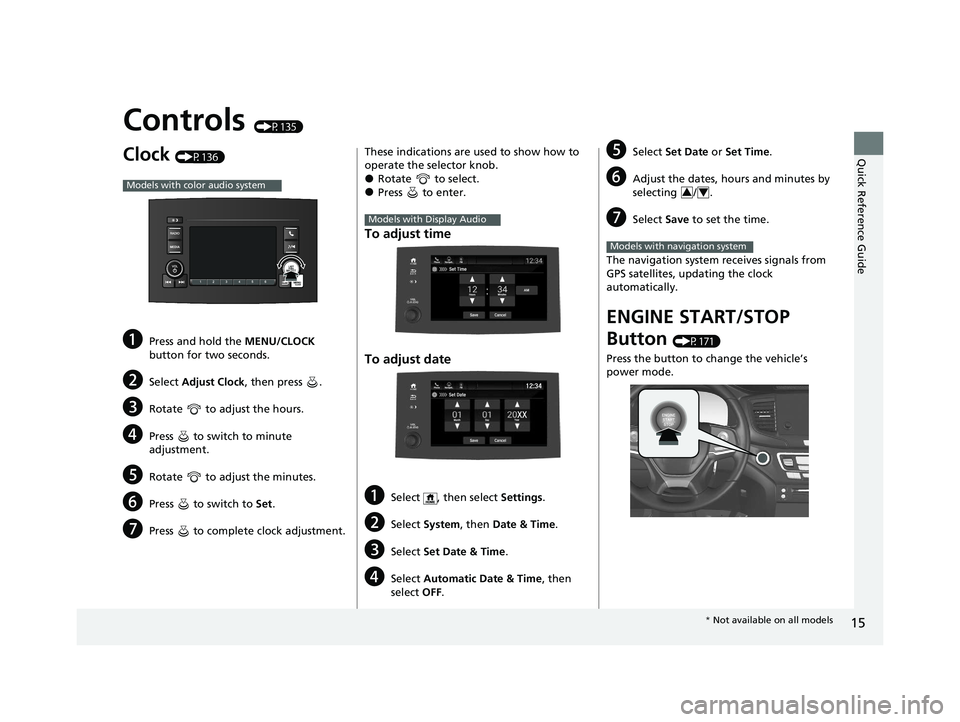
Controls (P135)
Clock (P136)
aPress and hold the MENU/CLOCK
button for two seconds.
bSelect Adjust Clock , then press .
cRotate to adjust the hours.
dPress to switch to minute
adjustment.
eRotate to adjust the minutes.
fPress to switch to Set.
gPress to complete clock adjustment.
Models with color audio system
These indications are used to show how to
operate the selector knob.
●Rotate to select.●Press to enter.
To adjust time
To adjust date
aSelect , then select Settings .
bSelect System , then Date & Time .
cSelect Set Date & Time .
dSelect Automatic Date & Time , then
select OFF.
Models with Display Audio
eSelect Set Date or Set Time.
fAdjust the dates, hours and minutes by
selecting / .
gSelect Save to set the time.
The navigation system receives signals from
GPS satellites, updating the clock
automatically.
ENGINE START/STOP
Button
(P171)
Press the button to change the vehicle’s
power mode.
34
Models with navigation system
* Not available on all models
22 PILOT-31TG76600.book 15 ページ 2021年6月11日 金曜日 午後4時40分
Page 99 of 737

97
uuIndicators uDriver Information Interface Wa rning and Information Messages
Continued
Instrument Panel
Driver Information Interface Warning and Information Messages
The following messages appear only on the driver information interface. Press the (home) button, select Warnings, then press the
ENTER button to see the message again wi th the system message indicator on.
MessageConditionExplanation
•Appears if any door or the tailgate is not completely
closed.•Goes off when all doors and the tailgate are closed.
•Appears when the hood is opened.•Close the hood.
•Appears when the engine oil pressure is low.•Appears while driving - Immediately stop in a safe
place.
2 If the Low Oil Pressure Warning Appears P. 697
•Appears when the washer fluid is low*.•Refill the washer fluid.
2 Refilling Window Washer Fluid P. 646
•Appears while you are customizing the settings and
the transmission is in other than
(P.
2 Vehicle Customization P. 125
Models with color audio system
* Not available on all models
22 PILOT-31TG76600.book 97 ページ 2021年6月11日 金曜日 午後4時40分
Page 139 of 737

Continued137
uuClock uAdjusting the Clock
Controls
■Using the Setti ngs menu on the audio/
information screen
1. Select , then select Settings.
2. Select System.
3. Select Date & Time .
4. Select Set Date & Time .
5. Select Automatic Date & Time , then
select OFF.
To adjust time:
6. Select Set Time.
7. Selecting / .
u AM/PM icon can be switched to each
other either by selecting / , or by
directly touching the icon.
u When you customize the clock display to
24 hour clock, AM/PM icon is not
displayed.
2 Customized Features P. 429
8.Select Save to set the time.
1Using the Settings menu on the audio/information screen
You can also adjust the clock by touching the clock
displayed on the upper right corner of the display or
the Clock icon on the home screen.
1. Touch the clock on the display.
The clock screen of the select face-type appears.
2. Select Settings .
3. Select Date & Time Settings .
4. Select Set Date & Time .
5. Select Automatic Date & Time , then select OFF.
6. Select Set Date or Set Time.
7. Adjusting the dates, hours and minutes by selecting / .
8. Select Save to set the time.
You can customize the clock display to show the 12
hour clock or 24 hour clock.
2 Customized Features P. 429
Models with Display Audio
34
Models with Display Audio
34
34
22 PILOT-31TG76600.book 137 ページ 2021年6月11日 金曜日 午後4時40分
Page 146 of 737

uuLocking and Unlocking the Doors uLocking/Unlocking the Doors from the Outside
144
Controls
■Locking the doors and tailg ate (Walk away auto lock®)
When you walk away from the vehicle with all
doors and tailgate closed while carrying the
keyless remote, the doors will automatically
lock.
The auto lock function activates when all
doors and tailgate are closed, and the keyless
remote is within about 5 feet (1.5 m) radius of
the outside door handle or tailgate outer
handle.
Exit vehicle while carrying keyless remote and
close door(s) and tailgate.
1. While within about 5 feet (1.5 m) radius of
the vehicle.
u The beeper sounds; the auto lock
function will be activated.
2. Carry the keyless remote beyond about 5
feet (1.5 m) from the vehicle and remain
outside this range fo r 2 or more seconds.
u Some exterior lights flash; the beeper
sounds; all doors and tailgate will then
lock.1Locking the doors and tailg ate (Walk away auto lock®)
The auto lock function is set to OFF as the factory
default setting. The auto lo ck function can be set to
ON using the audio/information screen.
Turning ON auto lock function using the audio/
information screen, shall only activate the function in
remote transmitter that was used to unlock the
driver's door. 2 Customized Features P. 429
After the auto lock function has been activated, when
you stay within the locking/unlocking operation range,
the indicator on the keyless remote will continue to flash
until the doors are locked.
When you stay beside the vehicle within the
operation range, the doors wi ll automatically lock
approximately 30 seconds after the auto lock
function activating beeper sounds.
When you open a door after the auto lock function
activating beeper sounds, the auto lock function will
be delayed until all doors and tailgate are closed.
Under the following circumstances, the auto-lock
function will not activate:
•The remote is inside the vehicle.
u The buzzer will not sound.
•The remote is taken out of its operational range
before all the doors are closed.
u The buzzer will sound.
The activation range of
the auto lock function is
about 5 feet (1.5 m)
22 PILOT-31TG76600.book 144 ページ 2021年6月11日 金曜日 午後4時40分
Page 149 of 737

Continued147
uuLocking and Unlocking the Doors uLocking/Unlocking the Doors from the Outside
Controls
■Locking the doors and tailgate
Press the lock button.
Once: u Some exterior lights flash, all the doors
and tailgate lock, and the security system
sets.
Twice (within five se conds after the first
push): u The beeper sounds and verifies the
security system is set.
■Unlocking the doors and tailgate
Press the unlock button.
Once:
u Some exterior lights flash twice, and the
driver’s door unlocks.
Twice: u The remaining doors and tailgate unlock.
■Using the Remote Transmitter1Using the Remote Transmitter
If you do not open a door within 30 seconds of
unlocking the vehicle with the remote transmitter,
the doors will automatically relock.
You can change the relock timer setting.
2 Vehicle Customization P. 125
2 Customized Features P. 429
You can lock or unlock doors using the remote
transmitter only when the power mode is in VEHICLE
OFF.
The remote transmitter us es low-power signals, so
the operating range may vary depending on the
surroundings.
The remote will not lock th e vehicle when a door is
open.
If the distance at which the remote transmitter works
varies, the batter y is probably low.
If the LED does not come on when you press a
button, the battery is dead.
2 Replacing the Remote Battery P. 667
You can customize the door unlock mode setting. 2 Vehicle Customization P. 125
2 Customized Features P. 429
Models with color audio system
Models with Display Audio
Models with color audio system
Models with Display Audio
LED
Unlock
Button Lock
Button
LED
Unlock
Button Lock
Button
22 PILOT-31TG76600.book 147 ページ 2021年6月11日 金曜日 午後4時40分
Page 152 of 737

uuLocking and Unlocking the Doors uLocking/Unlocking the Doors from the Inside
150
Controls
Pull the front door inner handle.
u The door unlocks and opens in one
motion.
Unlocking and opening the driver’s door from the inner handle unlocks all the other
doors.
To avoid all the doors to be unlocked, use the lock tab on the driver’s door to unlock,
then lock again before opening the door. u This setting works for one time only. If you do not want all the doors to be
unlocked all the time, customize the Auto Door Unlock setting to OFF using
the driver information interface
* or audio/information screen*.
2 Vehicle Customization P. 125
2 Customized Features P. 429
■Unlocking Using the Front Door Inner Handle1Unlocking Using the Front Door Inner Handle
The front door inne r handles are designed to allow
front seat occupants to ope n the door in one motion.
However this feature requires that front seat
occupants never pull a front door inner handle while
the vehicle is in motion.
Children should always ride in a rear seat where
childproof door locks are provided. 2 Childproof Door Locks P. 151
Inner Handle
Models with color audio system
Models with Display Audio
* Not available on all models
22 PILOT-31TG76600.book 150 ページ 2021年6月11日 金曜日 午後4時40分