Page 505 of 737

503
Driving
This chapter discusses driving and refueling.
Before Driving................................... 504
Towing a Trailer ................................ 510
Off-Highway Driving Guidelines ..... 520
When Driving Starting the Engine .......................... 522
Automatic Transmission ................... 529
Shifting ............................................ 530
Auto Idle Stop .................................. 538
ECON Mode .................................... 543
Intelligent Trac tion Management
*.... 544Vehicle Stability AssistTM (VSA®), aka Electronic
Stability Control (ESC), System ..............546
Agile Handling Assist ....................... 548
Blind spot information System*........ 549
LaneWatchTM*.................................. 552 Intelligent Variable To
rque Management (i-
VTM4
TM) AWD System*.................. 554
Tire Pressure Monitoring System (TPMS) with Tire Fill Assist .......................... 555
Tire Pressure Monitoring System (TPMS) -
Required Federal Explanation ......... 557
Honda Sensing ®................................ 559
Collision Mitigati on Braking System
TM
(CMBSTM) ....................................... 562
Adaptive Cruise Control (ACC)......... 574
Lane Keeping Assist System (LKAS) .. 587
Road Departure Mitigation (RDM)
System ....................................... 596
Front Sensor Camera ....................... 601
Radar Sensor.................................... 603 Braking
Brake System ................................... 604
Anti-lock Brake System (ABS) ........... 606
Brake Assist System ......................... 607
Parking Your Vehicle
When Stopped ................................ 608
Parking Sensor System
*................... 610
Cross Traffic Monitor*..................... 615
Multi-View Rear Camera .................. 619
Refueling Fuel Information .............................. 621
How to Refuel ................................. 622
Fuel Economy and CO
2 Emissions
Improving Fuel Economy and Reducing CO
2 Emissions ................................ 624
* Not available on all models
22 PILOT-31TG76600.book 503 ページ 2021年6月11日 金曜日 午後4時40分
Page 561 of 737
559Continued
Driving
Honda Sensing®
Honda Sensing® is a driver support system which employs the use of two distinctly
different kinds of sensors: a radar sensor located behind the emblem and a front
sensor camera mounted to the interior side of the windshield, behind the rearview
mirror.
Honda Sensing ® has following functions.
■The functions which do not requir e switch operations to activate
• Collision Mitigation Braking SystemTM (CMBS)TM 2 P. 562
• Road Departure Mitigation (RDM) System 2 P. 596
■The functions wh ich require switch operations to activate
• Adaptive Cruise Control (ACC)
2 P. 574
• Lane Keeping Assist System (LKAS) 2 P. 587
22 PILOT-31TG76600.book 559 ページ 2021年6月11日 金曜日 午後4時40分
Page 562 of 737
560
uuHonda Sensing ®u
Driving
■MAIN Button
Press to activate standby mode for ACC and
LKAS. Or press to cancel these systems.
■LKAS Button
Press to activate or cancel the LKAS.
■RES/+/−/SET Button
Press RES/+ to resume the ACC or increase
the vehicle speed.
Press −/SET to set the ACC or decrease the
vehicle speed.
■Interval Button
Press the (interval) button to change the
ACC following-interval.
■CANCEL Button
Press to cancel ACC.
■Operation Switches for the ACC/LKAS
MAIN button
Interval
ButtonCANCEL
Button
LKAS Button
RES/+ Button
−/SET Button
22 PILOT-31TG76600.book 560 ページ 2021年6月11日 金曜日 午後4時40分
Page 563 of 737
561
uuHonda Sensing ®u
Driving
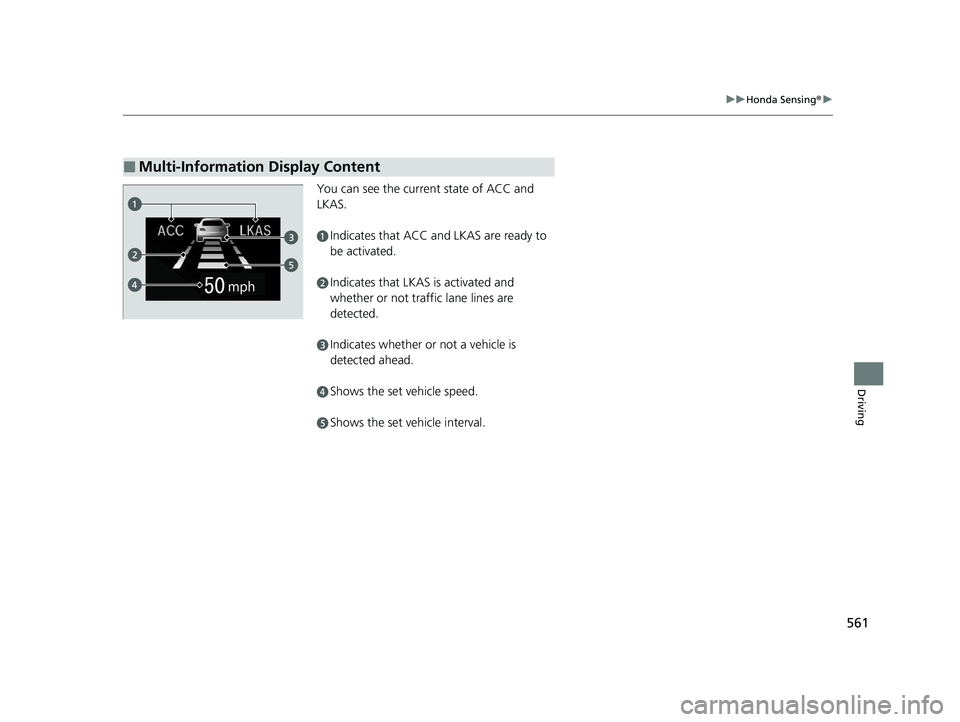
You can see the current state of ACC and
LKAS.
aIndicates that ACC and LKAS are ready to
be activated.
bIndicates that LKAS is activated and
whether or not traffic lane lines are
detected.
cIndicates whether or not a vehicle is
detected ahead.
dShows the set vehicle speed.
eShows the set vehicle interval.
■Multi-Information Display Content
22 PILOT-31TG76600.book 561 ページ 2021年6月11日 金曜日 午後4時40分
Page 578 of 737

uuHonda Sensing ®u Adaptive Cruise Control (ACC)
576
Driving
Take your foot off the pedal and press the –/SET button when you reach the desired
speed. The moment you release the –/SET button, the set speed is fixed, and ACC
begins.
When ACC starts operating, the vehicle icon,
distance bars and set speed appear on the
driver information interface.
■To Set the Vehicle Speed1Adaptive Cruise Control (ACC)
ACC may not work properly under certain conditions.
2 ACC Conditions and Limitations P. 579
When not using ACC: Turn off adaptive cruise by
pressing the MAIN button. This also will turn off the
Lane Keeping Assist System (LKAS).
When the MAIN button is pressed, ACC and Lane
Keeping Assist System (LKAS) are both turned on or
off.
You can switch the displayed set speed
measurements on the driver information interface
between mph and km/h.
2 Units P. 120
Do not use ACC under the following conditions:
•On roads with heavy traf fic or while driving in
continuous stop and go traffic.
•On roads with sharp turns.•On roads with steep downhill sections, as the set
vehicle speed can be exceeded by coasting. In such
cases, ACC will not apply the brakes to maintain
the set speed.
•On roads with toll collection facilities or other
objects between lanes of traffic, or in parking
areas, or faci lities with driv e through access.
On when
adaptive cruise
control begins
Press and release–/SET
Button
Set Vehicle
Interval
Set Vehicle
Speed
22 PILOT-31TG76600.book 576 ページ 2021年6月11日 金曜日 午後4時40分
Page 589 of 737

587
uuHonda Sensing ®u Lane Keeping Assist System (LKAS)
Continued
Driving
Lane Keeping Assist System (LKAS)
Provides steering input to help keep the vehicle in the middle of a detected lane and
provides tactile and visual al erts if the vehicle is detected drifting out of its lane.1Lane Keeping Assist System (LKAS)
Important Safety Reminders
The LKAS is for your convenience only. It is not an
autonomous driving system and always requires
driver attention and control. The system does not
work if you take your hands off the steering wheel or
fail to steer the vehicle. 2 Driver Information Interface Warning and
Information Messages P. 97
The LKAS is convenient when it is used on
expressways or freeways.
Do not place objects on the instrument panel.
Objects may reflect on th e windshield and prevent
correct detection of the traffic lanes.
The LKAS only alerts you when lane drift is detected
without a turn signal in use. The LKAS may not detect
all lane markings or lane departures; accuracy will
vary based on weather, speed, and lane marker
condition. It is always your responsibility to safely
operate the vehicle an d avoid collisions.
The LKAS may not work properly or may work
improperly under the certain conditions: 2 LKAS Conditions and Limitations P. 593
The LKAS may not function as designed while driving
in frequent stop and go traf fic, or on roads with
sharp curves.
You can read about handling information for the
camera equipped with this system. 2 Front Sensor Camera P. 601
When you operate the turn signals to chan ge lanes, the system is suspended, and
resumes after the signals are off.
If you make a lane change without operat ing the turn signals, the LKAS alerts
activate, and torque is applied to the steering.
■Front sensor camera
Monitors the lane
lines
■Tactile and visual alerts
Rapid vibrations on the steering wheel
and a warning display alert you that the
vehicle is drifting out of a detected
lane.
■Steering input assist
The system applies torque to the steering to keep the vehicle between the left and
right lane lines. The applied torque becomes stronger as the vehicle gets closer to
either of the lane lines.
22 PILOT-31TG76600.book 587 ページ 2021年6月11日 金曜日 午後4時40分
Page 590 of 737
uuHonda Sensing ®u Lane Keeping Assist System (LKAS)
588
Driving
Provides assistance to keep the vehicle in the center of the lane. When the vehicle
nears a white or yellow line, steering force of the electric power steering will become
stronger.
When the vehicle enters the warning area, the LKAS alerts you with slight steering
wheel vibration as well as warning display.
■Lane Keep Support Function1 Lane Keeping Assist System (LKAS)
When it fails to detect lanes, the system will
temporarily be canceled. When a lane is detected, the
system will recover automatically.
■Lane Departure Warning Function
Warning Area
Warning Area
22 PILOT-31TG76600.book 588 ページ 2021年6月11日 金曜日 午後4時40分
Page 591 of 737

Continued589
uuHonda Sensing ®u Lane Keeping Assist System (LKAS)
Driving
The system can be used when th e following conditions are met.
• The lane in which you are driving has detectable lane markers on both sides, and
your vehicle is in the center of the lane.
• The vehicle is travelling between about 45 and 90 mph (72 and 145 km/h).
• You are driving on a straight or slightly curved road.
• The turn signals are off.
• The brake pedal is not depressed.
• The wipers are not in continuous operation.
■How to activate the system
1.Press the MAIN button.
u The LKAS is on in the driver information
interface.
The system is ready to use.
2. Press the LKAS button.
u Lane outlines appear on the driver
information interface.
The system is activated.
■When the System can be Used1Lane Keeping Assist System (LKAS)
If the vehicle drifts toward ei ther left or right lane line
due to the system applying torque, turn off the LKAS
and have your vehicle checked by a dealer.
MAIN Button
LKAS Button
22 PILOT-31TG76600.book 589 ページ 2021年6月11日 金曜日 午後4時40分