Page 324 of 737
uuAudio System Basic Operation uPlaying My Honda Music
322
Features
1. Connect a USB device into the USB port.
2 USB Ports P. 241
2.Select More.
3. Select Import Files to My Honda Music .
u The File Manager screen is displayed.
4. Transfer an audio file to your audio system.
2 How to Transfer a File P. 286
■How to delete an audio file
1. Select More.
2. Select Delete Files from My Honda Music .
u The File Manager screen is displayed.
3. Delete an audio file.
2 How to Delete a File P. 289
■How to Transfer an Audio File1How to Transfer an Audio File
If there is no audio file in your audio system, the
system will automatically proceed to step 3 after
connecting a USB device.
Use the recommended USB flash drives.
2 General Information on the Audio System
P. 349
22 PILOT-31TG76600.book 322 ページ 2021年6月11日 金曜日 午後4時40分
Page 325 of 737
Continued323
uuAudio System Basic Operation uPlaying My Honda Music
Features
1. Select Browse .
2. Select the items on that menu.
■How to Select a File from the Music Search List1Playing My Honda Music
WMA files protected by di gital rights management
(DRM) cannot be played.
The audio system displays The selected file cannot
be played on this system , then skips to the next
file.
22 PILOT-31TG76600.book 323 ページ 2021年6月11日 金曜日 午後4時40分
Page 326 of 737
uuAudio System Basic Operation uPlaying My Honda Music
324
Features
You can select repeat and random modes when playing a file.
■Random/Repeat
Select or .
■To turn off a play mode
Select the mode you want to turn off.
■How to Select a Play Mode1 How to Select a Play Mode
Play Mode Menu Items
Random/Repeat
Random in Category : Plays all files in the
current category in random order.
Random All Tracks : Plays all files in random order.
Repeat Track: Repeats the current file.
22 PILOT-31TG76600.book 324 ページ 2021年6月11日 金曜日 午後4時40分
Page 327 of 737

325
uuAudio System Basic Operation uPlaying Bluetooth ® Audio
Continued
Features
Playing Bluetooth ® Audio
Your audio system allows you to listen to music from your Bluetooth-compatible
phone.
This function is available when the phone is paired and connected to the vehicle’s
Bluetooth ® HandsFreeLink ® (HFL) system.
2Phone Setup P. 481
*1: Depending on the
Bluetooth® device you connect, this function may not be displayed.
1 Playing Bluetooth ® Audio
Not all Bluetooth -enabled phones with streaming
audio capabilities are compatible with the system.
For a list of compatible phones:
•U.S.: Visit automobiles.honda.com/handsfreelink/ ,
or call 1-888-528-7876.
•Canada: For more info rmation on smartphone
compatibility, call 1-855-490-7351.
It may be illegal to perform some data device
functions while driving.
Only one phone can be used with HFL at a time.
When there are more than two paired phones in the
vehicle, the first paired phone the system finds is
automatically connected.
If more than one phone is paired to the HFL system,
there may be a delay before the system begins to
play.
In some cases, the name of the artist, album, or track
may not appear correctly.
Some functions may not be available on some
devices.
If a phone is currently conne cted via Apple CarPlay or
Android Auto, Bluetooth® Audio from that phone
will be unavailable. Howe ver, you can have a second
previously paired phone stream Bluetooth® Audio by
selecting from the Bluetooth® device list.
2 Phone Setup P. 481Audio/Information
Screen
(Back) Icon
Select to go b
ack to
the previous display.
VOL/ AUDIO
(Volume/Power)
Knob
Push to turn the
audio system on
and off.
Turn to adjust
the volume.
Repeat Icon*1
Select to repeat the current
file. Random Icon
*1
Select to play all files in
the current category in
random order.
Play/Pause Icon
Bluetooth Indicator
Appears when your
phone is connected
to HFL.
Track Icons
Select or to change tracks.
22 PILOT-31TG76600.book 325 ページ 2021年6月11日 金曜日 午後4時40分
Page 328 of 737
uuAudio System Basic Operation uPlaying Bluetooth ® Audio
326
Features
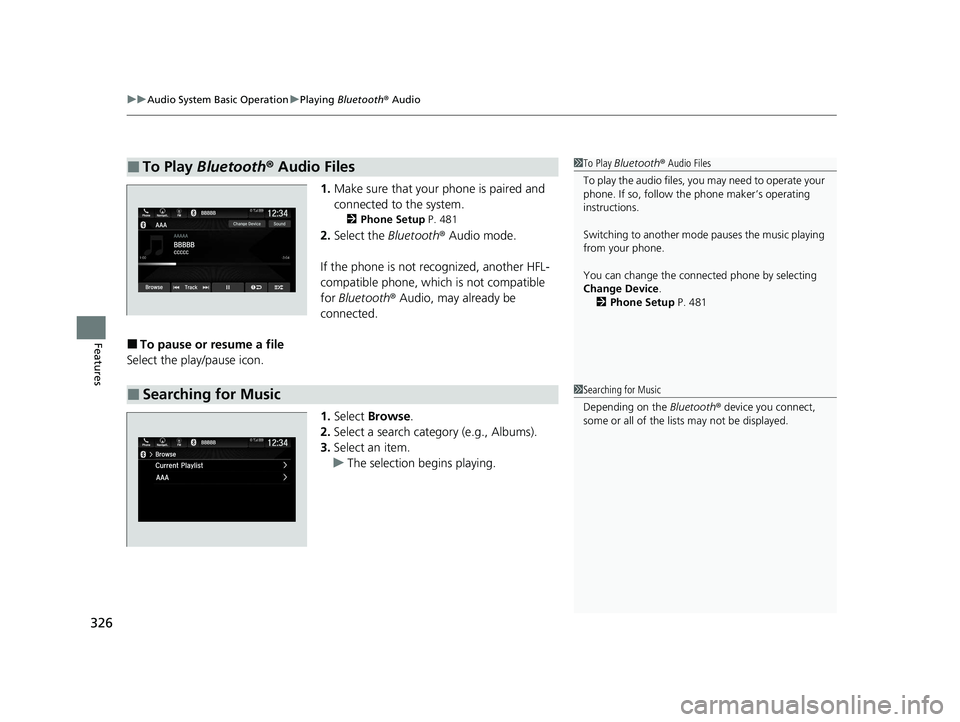
1. Make sure that your phone is paired and
connected to the system.
2 Phone Setup P. 481
2.Select the Bluetooth® Audio mode.
If the phone is not recognized, another HFL-
compatible phone, which is not compatible
for Bluetooth ® Audio, may already be
connected.
■To pause or resume a file
Select the play/pause icon.
1.Select Browse .
2. Select a search category (e.g., Albums).
3. Select an item.
u The selection begins playing.
■To Play Bluetooth ® Audio Files1 To Play Bluetooth ® Audio Files
To play the audio files, y ou may need to operate your
phone. If so, follow the phone maker’s operating
instructions.
Switching to another mode pauses the music playing
from your phone.
You can change the connected phone by selecting
Change Device .
2 Phone Setup P. 481
■Searching for Music1Searching for Music
Depending on the Bluetooth® device you connect,
some or all of the list s may not be displayed.
22 PILOT-31TG76600.book 326 ページ 2021年6月11日 金曜日 午後4時40分
Page 329 of 737

327
uuAudio System Basic Operation uPlaying Social Playlist
Continued
Features
Playing Social Playlist
The Honda CabinControlTM smartphone app allows users to share audio files from
their devices to Social Playlist.
Unfortunately, the driver cannot select th e audio files from the audio/information
screen. The driver can play in order of their choice only if they individually select each
song in the queue. The driver canno t rearrange the order of the playlist.
2Wi-Fi Connection P. 334
1Playing Social Playlist
For more information, check the Honda
CabinControl smartphone app instruction manual.
(Back) Icon
Select to go back to
the previous display.
Track Icons
Select or to change files.
VOL/ AUDIO
(Volume/Power)
Knob
Push to turn the
audio system on
and off.
Turn to adjust
the volume.
Audio/Information
Screen
Play/Pause Icon Repeat Icon
Select
to repeat the
current
file. Random Icon
Select to play all files in
random order. Remove Icon
Select to remove
the file from the
playlist.
22 PILOT-31TG76600.book 327 ページ 2021年6月11日 金曜日 午後4時40分
Page 330 of 737
328
uuAudio System Basic Operation uPlaying Social Playlist
Features
1. Select .
2. Select Social Playlist .
3. Select Queue .
To play a file on the playlist:
u Select the file.
To remove a file from the playlist: u Select on the file.
To clear the playlist: u Select Clear, and then select Request
Songs to reload a playlist.
To check the c onnected device:
u Select Device List .
■How to Edit the Playlist
22 PILOT-31TG76600.book 328 ページ 2021年6月11日 金曜日 午後4時40分
Page 331 of 737

329
uuAudio System Basic Operation uHondaLink ®
Continued
Features
HondaLink ®
HondaLink® connects you to the latest info rmation from Honda. You can connect
your phone wirelessly through Wi-Fi or Bluetooth®.
2Wi-Fi Connection P. 334
2 Phone Setup P. 481
Use the following procedure to connect to HondaLink ® service.
■To enable the HondaLink® service
You need to allow the consent of the location service to enable the HondaLink ®
service.
Disable: Does not allow this consent.
Enable Once : Allows only one time. (Shows
again next time.)
Always Enable: Allows anytime. (Never
show again.)
■To Connect to HondaLink ® Service
1 HondaLink ®
The HondaLink® connect app is compatible with most
iPhone and Android phones.
Some cell phone carriers charge for tethering and
smartphone data use. Check your phone’s data
subscription package.
When Apple CarPlay or Andr oid Auto is connected to
the audio system, HondaLink® can be accessed even
without a Wi-Fi connection.
22 PILOT-31TG76600.book 329 ページ 2021年6月11日 金曜日 午後4時40分


