2022 HONDA INSIGHT warning light
[x] Cancel search: warning lightPage 542 of 609
541Continued
Handling the Unexpected
If a Tire Goes Flat
Changing a Flat Tire
If a tire goes flat while driving, grasp the steering wheel firmly, and brake gradually
to reduce speed. Then, stop in a safe plac e. Replace the flat tire with a compact
spare tire. Go to a dealer as soon as possib le to have the full-size tire repaired or
replaced.
1. Park the vehicle on firm, level, non-slip pery surface and apply the parking brake.
2. Put the transmission into
(P.
3. Turn on the hazard warning lights an d set the power mode to VEHICLE OFF.
Models with optional spare tire
1Changing a Flat Tire
Follow compact spare precautions:
Periodically check the tire pressure of the compact
spare. It should be set to the specified pressure.
Specified Pressure: 60 psi (420 kPa, 4.2 kgf/cm
2)
When driving with the compact spare tire, keep the
vehicle speed under 50 mph (80 km/h). Replace with
a full-size tire as soon as possible.
The compact spare tire and wheel in your vehicle are
specifically for this model. Do not use them with
another vehicle. Do not us e another type of compact
spare tire or wheel with your vehicle.
Do not mount tire chains on a compact spare tire.
If a chain-mounted front tire goes flat, remove one of
the full-size rear tires and replace it with the compact
spare tire. Remove the flat front tire and replace it
with the full-size tire that was removed from the rear.
Mount the tire chains on the front tire.
NOTICE
Do not use the jack if it doesn
Page 548 of 609
547
uuIf a Tire Goes Flat uTemporarily Repairing a Flat Tire
Continued
Handling the Unexpected
Temporarily Repairing a Flat Tire
If the tire has a large cut or is otherwise severely damaged, you will need to have the
vehicle towed. If the tire only has a small puncture, from a nail for instance, you can
use the temporary tire repair kit so that you can drive to the nearest service station
for a more permanent repair.
If a tire goes flat while driving, grasp the steering wheel firmly, and brake gradually
to reduce speed. Then, stop in a safe place.
1. Park the vehicle on a firm, level, and n on-slippery surface, and apply the parking
brake.
2. Put the transmission into
(P.
3. Turn on the hazard warning lights an d set the power mode to VEHICLE OFF
(LOCK).
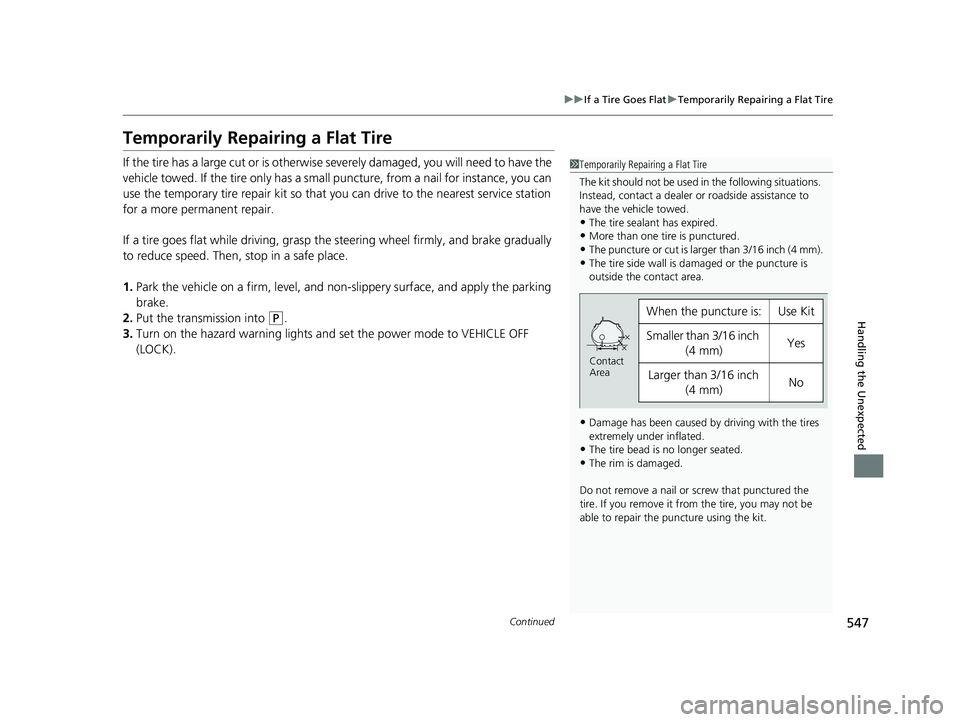
1 Temporarily Repairing a Flat Tire
The kit should not be used in the following situations.
Instead, contact a dealer or roadside assistance to
have the vehicle towed.
•The tire sealant has expired.
•More than one tire is punctured.
•The puncture or cut is larger than 3/16 inch (4 mm).•The tire side wall is da maged or the puncture is
outside the contact area.
•Damage has been caused by driving with the tires
extremely under inflated.
•The tire bead is no longer seated.
•The rim is damaged.
Do not remove a nail or screw that punctured the
tire. If you remove it from the tire, you may not be
able to repair the puncture using the kit.
When the puncture is:Use Kit
Smaller than 3/16 inch (4 mm)Yes
Larger than 3/16 inch (4 mm)No
Contact
Area
22 INSIGHT HMIN-31TXM6300.book 547 ページ 2021年2月24日 水曜日 午後3時45分
Page 562 of 609

561
Handling the Unexpected
Power System Won’t Start
Checking the Procedure
When the READY indicator does not come on and the Ready To Drive message
does not appear on the driver informatio n interface, check the following items and
take appropriate action.
ChecklistConditionWhat to Do
Check if the related
indicator or driver
information interface
messages come on.The Temperature Is Too Cold For Vehicle To Operate message
appears.2 Driver Information Interface Warning
and Information Messages P. 113
The To Start, Hold Remote Near Start Button message appears.
u Make sure the keyless remote is in its operating range.
2 POWER Button Operating Range P. 181
2If the Keyless Remote Battery is Weak
P. 562
The POWER SYSTEM indicator comes on.Have your vehicle checked by a dealer.
The transmission system indicator blinks and Transmission
System Problem. Apply Parking Brake When Parked. See
Your Dealer. message appears.2If the Transmission System Indicator
Blinks along with the Warning Message
P. 576
Check the brightness
of the interior lights. The interior lights are dim or do not come on at all. Have the 12-volt battery checked by a
dealer.
The interior lights come on normally. Check all fuses, or have your vehicle checked
by a dealer.
2 Inspecting and Changing Fuses P. 582
Check the
transmission.The transmission is not in (P.Put the transmission into (P.
Check the
immobilizer system
indicator. When the immobilizer system indicator is blinking, the power
system cannot be turned on.
2
Immobilizer System Indicator P. 96
1Checking the Procedure
If you must start the vehi cle immediately, use an
assisting vehicle or booster battery to jump start it.
2 If the 12-Volt Battery Is Dead P. 564
22 INSIGHT HMIN-31TXM6300.book 561 ページ 2021年2月24日 水曜日 午後3時45分
Page 565 of 609

564
Handling the Unexpected
If the 12-Volt Battery Is Dead
Jump Starting Procedure
Turn off the power to electric devices, such as audio and lights. Turn off the power
system, then open the hood.1.Push the tabs to open the jump start box
cover.
2. Connect the first jump er cable to your
vehicle’s jump start box + terminal as
shown. Do not connect this jumper cable to
any other part.
3. Connect the other end of the first jumper
cable to the booster battery + terminal.
u Use a 12-volt booster battery only.
u When using an automotive battery
charger to boost your 12-volt battery,
select a lower charging voltage than
15-volt. Check the charger manual for
the proper setting.
4. Connect the second jumper cable to the
booster battery - terminal.1If the 12-Volt Battery Is Dead
Securely attach the jumper cables clips so that they
do not come off when the e ngine vibrates. Be careful
not to tangle the jumper cables or allow the cable
ends to touch each other while attaching or
detaching the jumper cables.
You cannot use the terminal to jump start another
vehicle or to charge the 12-volt battery.
3WARNING
A 12-volt battery can explode if you do not
follow the correct procedure, seriously
injuring anyone nearby.
Keep all sparks, open flames, and smoking
materials away from the 12-volt battery.
Tab
Booster
Battery
Jump Start Box + Terminal
22 INSIGHT HMIN-31TXM6300.book 564 ページ 2021年2月24日 水曜日 午後3時45分
Page 568 of 609

567Continued
Handling the Unexpected
Overheating
How to Handle Overheating
Overheating symptoms are as follows:
•Engine Temperature Too Hot. Do No t Drive. Allow Engine To Cool.
message appears on the driv er information interface.
• Steam or spray comes out of the engine compartment.
■First thing to do
1. Immediately park the vehicle in a safe place.
2. Turn off all accessories and turn on the hazard warning lights.
u No steam or spray present: Keep the power system on and open the hood.
u Steam or spray is present: Turn off the power system and wait until it
subsides. Then, open the hood.
1 How to Handle Overheating
3WARNING
Steam and spray from an overheated
engine can seri ously scald you.
Do not open the hood if steam is coming
out.
22 INSIGHT HMIN-31TXM6300.book 567 ページ 2021年2月24日 水曜日 午後3時45分
Page 570 of 609
569
Handling the Unexpected
Indicator, Coming On/Blinking
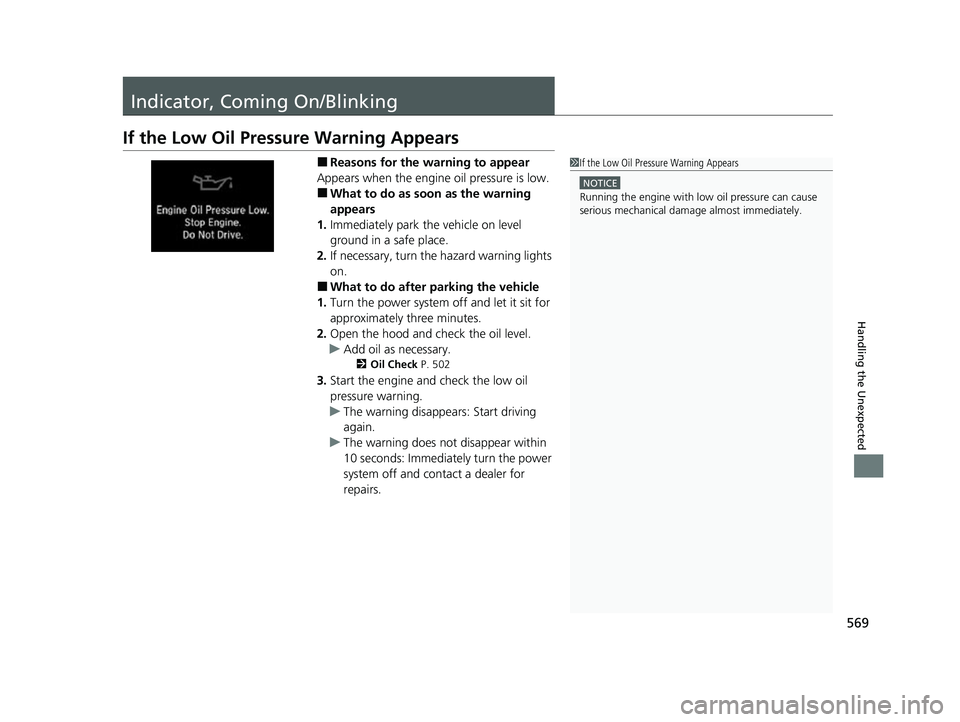
If the Low Oil Pressure Warning Appears
■Reasons for the warning to appear
Appears when the engine oil pressure is low.
■What to do as soon as the warning
appears
1. Immediately park the vehicle on level
ground in a safe place.
2. If necessary, turn the hazard warning lights
on.
■What to do after parking the vehicle
1. Turn the power system off and let it sit for
approximately three minutes.
2. Open the hood and ch eck the oil level.
u Add oil as necessary.
2 Oil Check P. 502
3.Start the engine and check the low oil
pressure warning.
u The warning disappears: Start driving
again.
u The warning does not disappear within
10 seconds: Immediately turn the power
system off and contact a dealer for
repairs.
1If the Low Oil Pressure Warning Appears
NOTICE
Running the engine with low oil pressure can cause
serious mechanical damage almost immediatelyM
22 INSIGHT HMIN-31TXM6300.book 569 ページ 2021年2月24日 水曜日 午後3時45分
Page 602 of 609

601
Index
D
Daytime Running Lights.......................... 188
Dead Battery ............................................ 564
Deceleration Paddle Selector .................. 398
Defaulting All the Settings ...................... 345
Defrosting the Windshield and Windows ................................................. 219
Devices that Emit Radio Waves ............... 591
Dimming Headlights .............................................. 185
Rearview Mirror ...................................... 197
Dipstick (Engine Oil) ................................ 502
Directional Signals (Turn Signal) ............. 184
Door Mirrors ............................................. 198
Doors ........................................................ 157
Auto Door Locking.................................. 170
Auto Door Unlocking .............................. 170
Door and Trunk Open Message................. 43
Keys........................................................ 157
Locking/Unlocking the Doors from the Inside .................................................... 167
Locking/Unlocking the Doors from the
Outside ................................................. 160
Lockout Prevention System ..................... 166
DOT Tire Quality Grading ........................ 522
Driver Attention Monitor ........................ 145
Driver Information Interface ................... 132
Switching the Display .............................. 132
Warning and Information Messages ........ 104
Driving ...................................................... 375
Braking ................................................... 468 Shifting Gear ........................................... 391
Transmission ............................................ 390
Turning on the Power .............................. 382
Driving Support Information ................... 148
Dust and Pollen Filter ............................... 531
E
Eco Assist® System ...................................... 18
Eco Drive Display/Drive Cycle Score/
Lifetime Points ........................................ 151
ECON Mode .............................................. 401
Indicator .................................................... 97
Elapsed Time ............................................. 139
Electric Power Steering (EPS) System Indicator ............................................ 92, 574
Electronic Stability Control (ESC) ............. 403
Emergency ................................................ 583
Emergency Power System Off .................. 563
Emergency Trunk Opener ........................ 173
Emissions Testing (Readiness Codes) ....... 593
Engine ....................................................... 590
Coolant ................................................... 506
If the 12-Volt Battery Is Dead ................... 564
Oil ........................................................... 501
Starting ................................................... 382
Engine Oil ................................................. 501
Adding .................................................... 503
Checking ................................................. 502
Displaying Oil Life .................................... 494
Low Oil Pressure Warning ........................ 569 Recommended Engine Oil ....................... 501
EPS (Electric Power Steering) System ...... 574
EV Button .................................................... 14
Exhaust Gas Hazard (Carbon Monoxide) .. 79
Exterior Care (Cleaning) ........................... 534
Exterior Mirrors ........................................ 198F
Features.................................................... 223
Filters Dust and Pollen ....................................... 531
Oil ........................................................... 504
Flat Tire ..................................................... 541
Floor Mats ................................................. 533
Fluids
Brake ...................................................... 510
Engine Coolant ....................................... 506
Inverter Coolant ...................................... 508
Windshield Washer ................................. 511
FM/AM Radio ............................................ 258
Fog Lights ................................................. 188
Indicator.................................................... 95
Folding Down the Rear Seats .................. 202
Foot Brake ................................................ 472
Front Airbags (SRS) ..................................... 54
Front Seat Heaters .................................... 215
Front Seats Adjusting ................................................ 199
Front Sensor Camera ................................ 465
22 INSIGHT HMIN-31TXM6300.book 601 ページ 2021年2月24日 水曜日 午後3時45分
Page 603 of 609

602
Index
Fuel...................................................... 31, 485
Economy ................................................. 488
Gauge ..................................................... 129
Instant Fuel Economy ............................... 137
Low Fuel Indicator ..................................... 91
Range ...................................................... 137
Recommendation .................................... 485
Refueling ................................................. 485
Fuel Economy and CO
2 Emissions ............ 488
Fuel Fill Cap ......................................... 31, 486
Fuel Fill Door ....................................... 31, 486
Unable to Unlock ..................................... 584
Fuses .......................................................... 577
Inspecting and Changing ......................... 582
Locations ......................................... 577, 581
G
Gasoline (Fuel) Economy ................................................. 488
Gauge ..................................................... 129
Information ............................................. 485
Instant Fuel Economy ............................... 137
Low Fuel Indicator ..................................... 91
Refueling ................................................. 485
Gauges ....................................................... 129
Glass (care) ........................................ 532, 535
Glove Box .................................................. 209
H
Handling the Unexpected ........................ 539
HandsFreeLink ® (HFL) ............................... 349
Automatic Import of Cellular Phonebook
and Call History ..................................... 358
Automatic Transferring............................ 357
Displaying Messages................................ 368
Favorite Contacts .................................... 359
HFL Buttons............................................. 349
HFL Menus .............................................. 352
HFL Status Display ................................... 351
In Case of Emergency ...................... 285, 372
Limitations for Manual Operation ............ 351
Making a Call .......................................... 361
Options During a Call .............................. 364
Phone Setup............................................ 354
Receiving a Call ....................................... 364
Receiving a Text Message ........................ 366
Ringtone ................................................. 357
Selecting a Phone .................................... 367
To Set Up a Text Message Options .......... 365
Hazard Warning Button .............................. 6
HD Radio
TM................................................ 261
Head Restraints ........................................ 204
Headlights ................................................. 185
Auto High-Beam System.......................... 189
Automatic Operation............................... 186
Dimming ......................................... 185, 188
Operating................................................ 185
Heaters (Seat) ........................................... 215
HFL (HandsFreeLink ®)............................... 349 High Beam Indicator
.................................. 95
High Voltage Battery ............................... 414
High Voltage Battery Charge Level Gauge ..................................................... 130
Hill Start Assist System ............................. 387
HomeLink ® Universal Transceiver ........... 346
Honda App License Agreement .............. 306
Honda Sensing ®................................ 32, 415
HondaLink ®............................................ 281
Hybrid Vehicle SPORT HYBRID i-MMD (intelligent
Multi-Mode Drive) ................................... 11
I
Identification Numbers Engine and Transmission ......................... 590
Vehicle Identification............................... 590
Illumination Control Dial ......................................................... 195
Immobilizer System .................................. 174
Indicator ................................................... 96
Indicators .................................................... 82
12-Volt Battery Charging System ...... 89, 570
Adaptive Cruise Control (ACC) with Low Speed Follow (Amber) ............................. 98
Adaptive Cruise Control (ACC) with
Low Speed Follow (Green)............... 99, 429
Anti-lock Brake System (ABS) .................... 92
Auto High-Beam ....................................... 95
Automatic Brake Hold ....................... 85, 473
22 INSIGHT HMIN-31TXM6300.book 602 ページ 2021年2月24日 水曜日 午後3時45分