Page 109 of 609
108
uuIndicators uDriver Information Interface Wa rning and Information Messages
Instrument Panel
MessageConditionExplanation
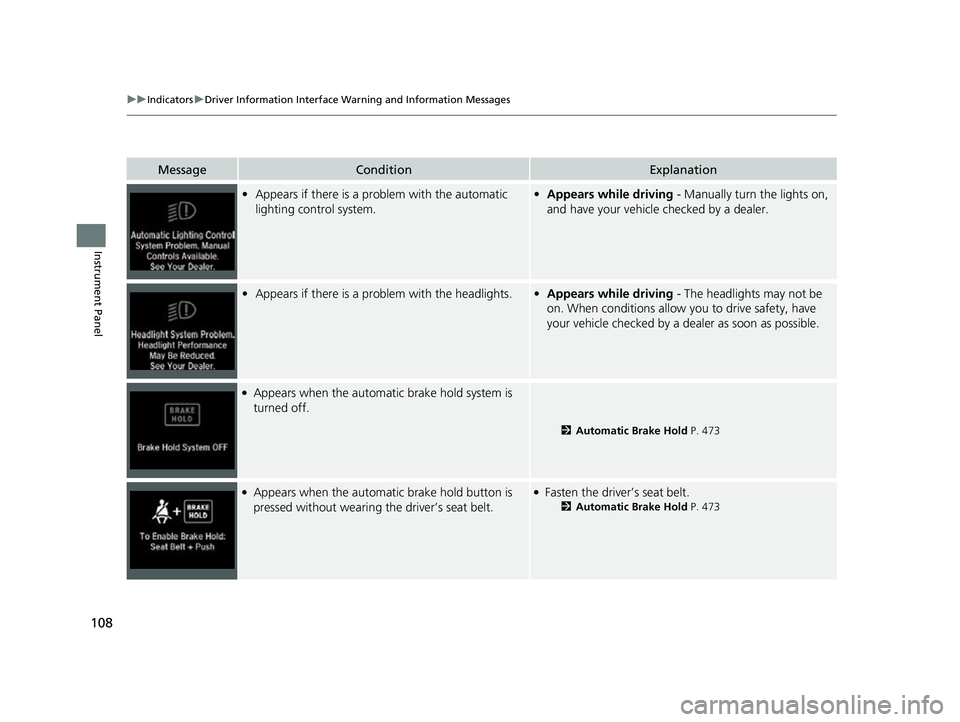
•Appears if there is a problem with the automatic
lighting control system.•Appears while driving - Manually turn the lights on,
and have your vehicle checked by a dealer.
• Appears if there is a problem with the headlights.•Appears while driving - The headlights may not be
on. When conditions allow you to drive safety, have
your vehicle checked by a de aler as soon as possible.
●Appears when the automatic brake hold system is
turned off.
2 Automatic Brake Hold P. 473
●Appears when the automa tic brake hold button is
pressed without wearing the driver’s seat belt.●Fasten the driver’s seat belt.
2 Automatic Brake Hold P. 473
22 INSIGHT HMIN-31TXM6300.book 108 ページ 2021年2月24日 水曜日 午後3時45分
Page 110 of 609
109
uuIndicators uDriver Information Interface Wa rning and Information Messages
Continued
Instrument Panel
MessageConditionExplanation
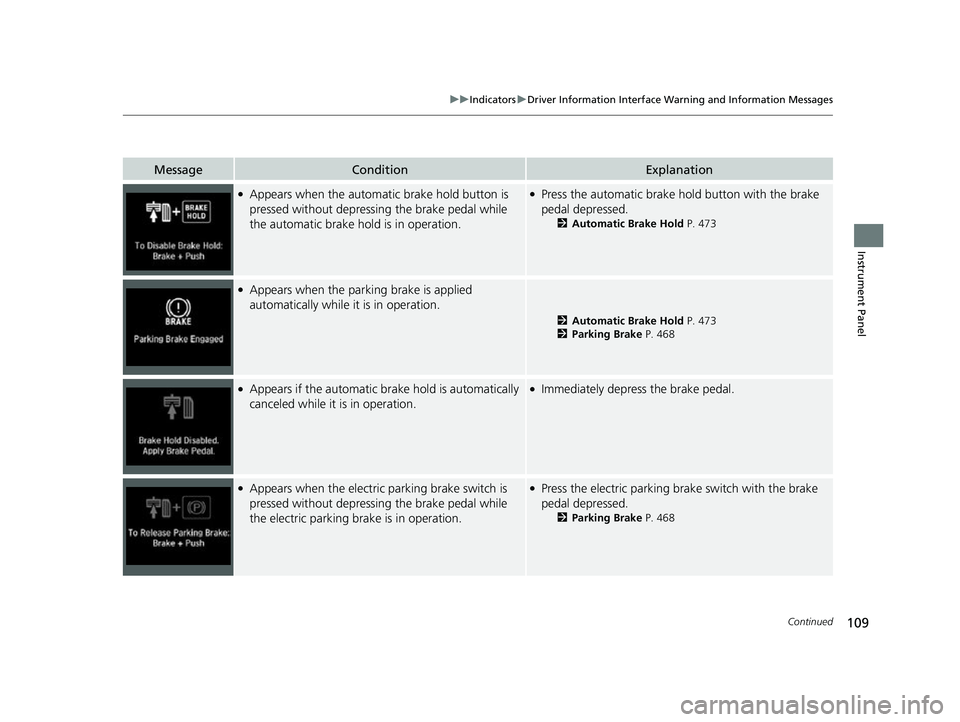
●Appears when the automatic brake hold button is
pressed without depressing the brake pedal while
the automatic brake hold is in operation.●Press the automatic brake hold button with the brake
pedal depressed.
2 Automatic Brake Hold P. 473
●Appears when the parking brake is applied
automatically while it is in operation.
2Automatic Brake Hold P. 473
2 Parking Brake P. 468
●Appears if the automatic br ake hold is automatically
canceled while it is in operation.●Immediately depress the brake pedal.
●Appears when the electric parking brake switch is
pressed without depressing the brake pedal while
the electric parking brake is in operation.●Press the electric parking brake switch with the brake
pedal depressed.
2 Parking Brake P. 468
22 INSIGHT HMIN-31TXM6300.book 109 ページ 2021年2月24日 水曜日 午後3時45分
Page 117 of 609

116
uuIndicators uDriver Information Interface Wa rning and Information Messages
Instrument Panel
MessageConditionExplanation
•Appears when you try to ch ange the shift position
without releasing your foot off the accelerator pedal.• Release your foot off the accelerator pedal, then select
a shift button.
•Appears when the (P button is pressed while the
vehicle is moving.
• Appears if you put the transmission into
(R while
the vehicle is moving forward, or into
(D while the
vehicle is reversing.
• Make sure that the vehicl e comes to a stop before
operating the select button.
• Appears when you set the power mode to ON
without fastening the driver’s seat belt.
• Appears when you change the shift position after
(P has been automatically selected with the driver’s
door open, the driver’s se at belt unfastened, then
the brake pedal is released.
• Fasten the seat belt properly before you start to drive.
2 Shift Operation P. 393
•Appears when you try to ch ange the shift position
without depressing the brake pedal.• Depress the brake pedal, then select a shift button.
22 INSIGHT HMIN-31TXM6300.book 116 ページ 2021年2月24日 水曜日 午後3時45分
Page 118 of 609

117
uuIndicators uDriver Information Interface Wa rning and Information Messages
Continued
Instrument Panel
MessageConditionExplanation
•Appears when you set the power mode to OFF while
driving.•Immediately stop in a safe place, set the parking brake,
then restart the power system. If the message
disappears, continue driving.
• Appears if the vehicle is st opped and the driver’s seat
belt is unfastened, as there is a possibility that the
vehicle may roll.• When the power system is ON or when you are parking
or exiting the vehicle, put the transmission into
(P
before releasing the brake pedal.
2 Shift Operation P. 393
•Appears if you depress the accelerator pedal when
the transmission is in
(N.
•Release the accelerator pedal. After that, depress the
brake pedal and change the transmission position.
●Appears if the shift position is repeatedly changed
between
(P and another position.
●Wait awhile, then chan ge the shift position.
●Appears if the 12V battery is not charged enough to
make it possible to change shift positions.●Keep the power system on and wait awhile.●The battery may be nearing the end of its life.
Have it checked by a dealer.
22 INSIGHT HMIN-31TXM6300.book 117 ページ 2021年2月24日 水曜日 午後3時45分
Page 120 of 609
119
uuIndicators uDriver Information Interface Wa rning and Information Messages
Continued
Instrument Panel
MessageConditionExplanation
•Appears if there is a prob lem with the auto high-
beam.• Manually operate the headlight switch.
• If you are driving with th e high-beam headlights when
this happens, the headlights are changed to low beams.
●Appears when ACC with Lo w Speed Follow has been
automatically canceled.●You can resume the set speed after the condition that
caused ACC with Low Speed Fo llow to cancel improves.
Press the RES/+ button.
2 Adaptive Cruise Control (ACC) with Low Speed
Follow P. 428
●Flashes when the system senses a likely collision with
a vehicle in front of you.●Take the appropriate means to prevent a collision (apply
the brakes, change lanes, etc.)
2Collision Mitigation Braking SystemTM (CMBSTM)
P. 418
2 Adaptive Cruise Control (ACC) with Low Speed
Follow P. 428
22 INSIGHT HMIN-31TXM6300.book 119 ページ 2021年2月24日 水曜日 午後3時45分
Page 121 of 609
120
uuIndicators uDriver Information Interface Wa rning and Information Messages
Instrument Panel
MessageConditionExplanation
●Appears when ACC with Low Speed Follow is
canceled due to excessive high vehicle speed.●Reduce the speed, then reset ACC with Low Speed
Follow.
2Adaptive Cruise Control (ACC) with Low Speed
Follow P. 428
●Appears when the speed of the vehicle is too high for
you to set ACC with Low Speed Follow.●Reduce the speed, then set ACC with Low Speed
Follow.
2Adaptive Cruise Control (ACC) with Low Speed
Follow P. 428
●Appears if ACC with Low Sp eed Follow is canceled
while your vehicle is automatically stopped by ACC
with Low Speed Follow.●Immediately depress the brake pedal.
●Appears when pressing the RES/+ or SET/ − button
while the vehicle is movi ng and the brake pedal is
depressed.●ACC with Low Speed Follow cannot be set.
2 Adaptive Cruise Control (ACC) with Low Speed
Follow P. 428
22 INSIGHT HMIN-31TXM6300.book 120 ページ 2021年2月24日 水曜日 午後3時45分
Page 122 of 609
121
uuIndicators uDriver Information Interface Wa rning and Information Messages
Continued
Instrument Panel
MessageConditionExplanation
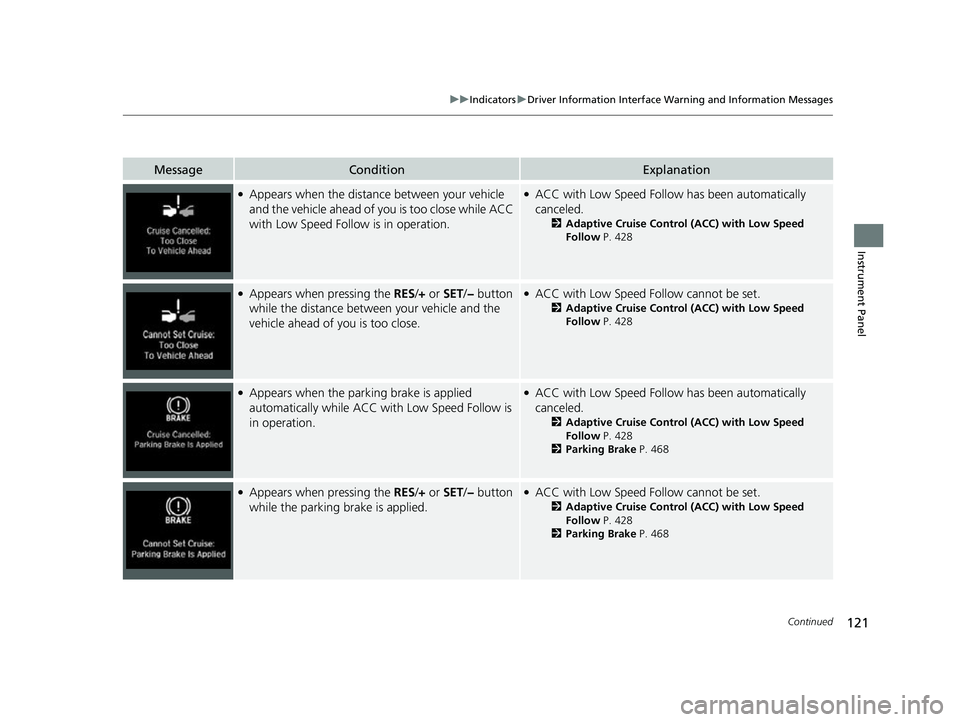
●Appears when the distance between your vehicle
and the vehicle ahead of you is too close while ACC
with Low Speed Follow is in operation.●ACC with Low Speed Follow has been automatically
canceled.
2 Adaptive Cruise Control (ACC) with Low Speed
Follow P. 428
●Appears when pressing the RES/+ or SET/ − button
while the distance between your vehicle and the
vehicle ahead of you is too close.●ACC with Low Speed Follow cannot be set.
2 Adaptive Cruise Control (ACC) with Low Speed
Follow P. 428
●Appears when the park ing brake is applied
automatically while ACC with Low Speed Follow is
in operation.●ACC with Low Speed Follow has been automatically
canceled.
2 Adaptive Cruise Control (ACC) with Low Speed
Follow P. 428
2 Parking Brake P. 468
●Appears when pressing the RES/+ or SET/ − button
while the parking brake is applied.●ACC with Low Speed Follow cannot be set.
2 Adaptive Cruise Control (ACC) with Low Speed
Follow P. 428
2 Parking Brake P. 468
22 INSIGHT HMIN-31TXM6300.book 121 ページ 2021年2月24日 水曜日 午後3時45分
Page 128 of 609
127
uuIndicators uDriver Information Interface Wa rning and Information Messages
Continued
Instrument Panel
MessageConditionExplanation
●Blinks when you fail to steer the vehicle. The beeper
sounds simultaneously.●Operate the steering wheel to resume the LKAS.
●Appears when the LKAS is in operation, or the LKAS
button is pressed, but there is a problem with a
system related to the LKAS. The LKAS cancels
automatically. The beeper sounds simultaneously.●If any other system indicators come on, such as the
VSA®, ABS and brake system, take appropriate action.
2Indicators P. 82
●Appears if the ECON mode or SPORT mode cannot
be changed due to certain situations, such as a
system error or adverse driving conditions.
2ECON Mode P. 401
2 SPORT Mode P. 397
22 INSIGHT HMIN-31TXM6300.book 127 ページ 2021年2月24日 水曜日 午後3時45分