Page 315 of 692
Continued313
uuAudio System Basic Operation uPlaying an iPod
Features
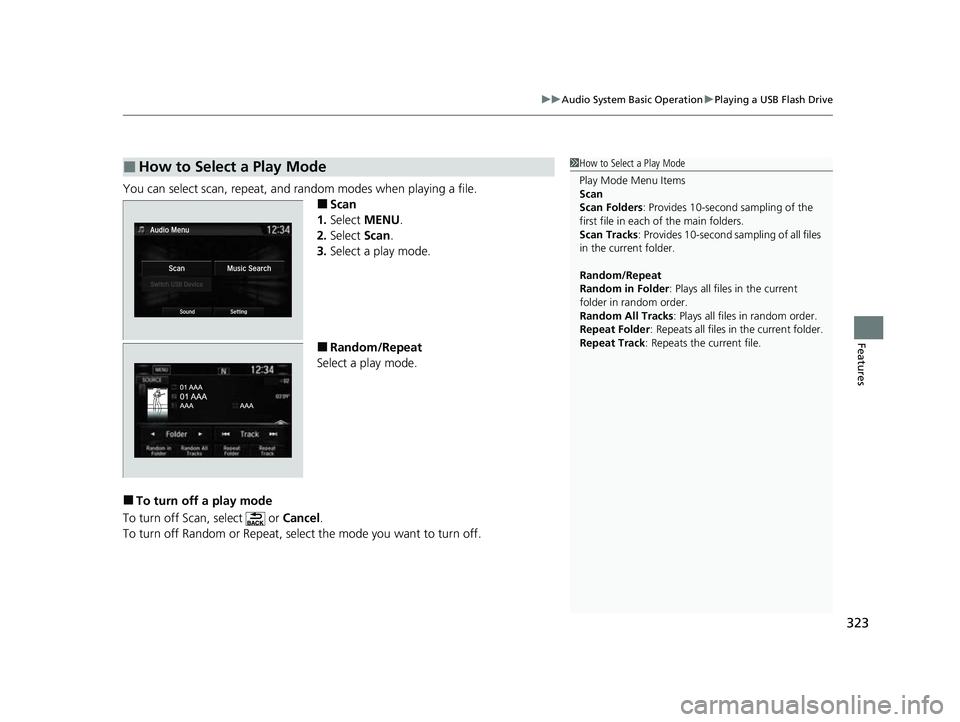
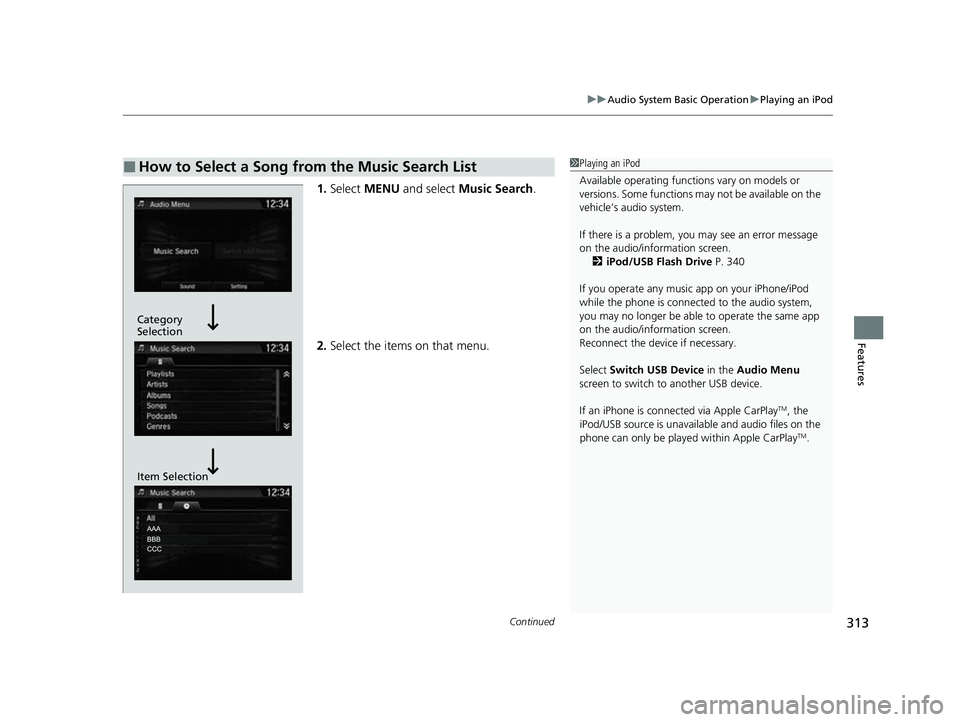
1. Select MENU and select Music Search .
2. Select the items on that menu.
■How to Select a Song from the Music Search List1Playing an iPod
Available operating functi ons vary on models or
versions. Some functions ma y not be available on the
vehicle’s audio system.
If there is a problem, you may see an error message
on the audio/information screen. 2 iPod/USB Flash Drive P. 340
If you operate any musi c app on your iPhone/iPod
while the phone is connected to the audio system,
you may no longer be able to operate the same app
on the audio/information screen.
Reconnect the devi ce if necessary.
Select Switch USB Device in the Audio Menu
screen to switch to another USB device.
If an iPhone is connect ed via Apple CarPlay
TM, the
iPod/USB source is unavailab le and audio files on the
phone can only be played within Apple CarPlay
TM.
Category
Selection
Item Selection
22 CR-V HEV ELP-31TPG6200.book 313 ページ 2021年6月30日 水曜日 午前11時6分
Page 318 of 692
uuAudio System Basic Operation uSong By VoiceTM (SBV)
316
Features
■Searching for mu sic using SBV
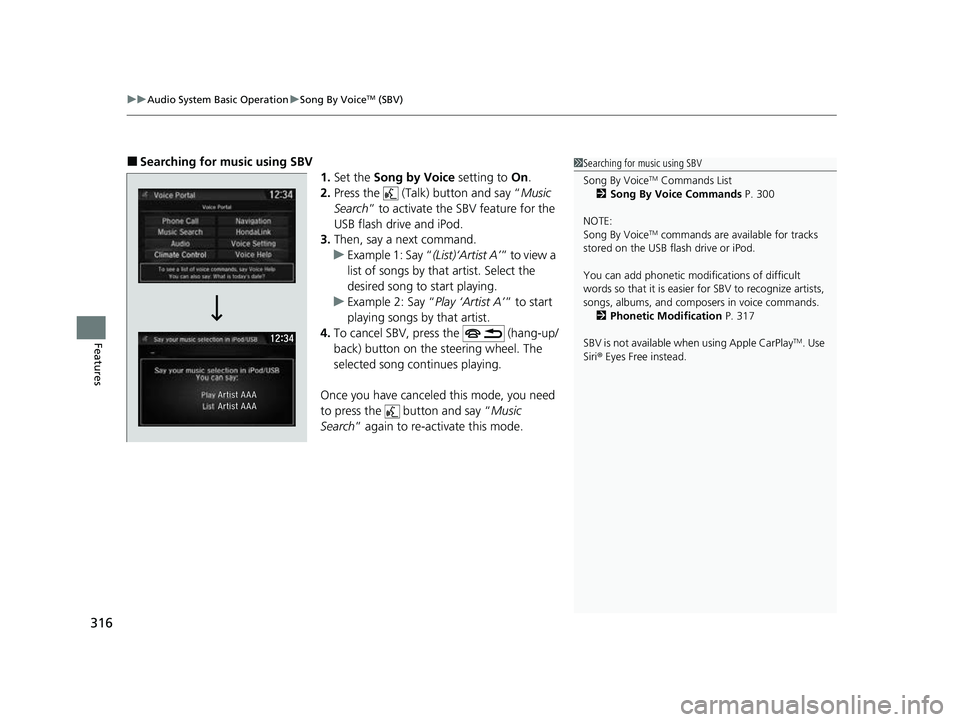
1.Set the Song by Voice setting to On.
2. Press the (Talk) button and say “ Music
Search ” to activate the SBV feature for the
USB flash drive and iPod.
3. Then, say a next command.
u Example 1: Say “ (List)‘Artist A’” to view a
list of songs by that artist. Select the
desired song to start playing.
u Example 2: Say “ Play ‘Artist A’” to start
playing songs by that artist.
4. To cancel SBV, pr ess the (hang-up/
back) button on the steering wheel. The
selected song continues playing.
Once you have canceled this mode, you need
to press the button and say “ Music
Search ” again to re-activate this mode.1Searching for music using SBV
Song By Voice
TM Commands List
2 Song By Voice Commands P. 300
NOTE:
Song By Voice
TM commands are available for tracks
stored on the USB flash drive or iPod.
You can add phonetic modi fications of difficult
words so that it is easier for SBV to recognize artists,
songs, albums, and composers in voice commands. 2 Phonetic Modification P. 317
SBV is not available wh en using Apple CarPlay
TM. Use
Siri ® Eyes Free instead.
22 CR-V HEV ELP-31TPG6200.book 316 ページ 2021年6月30日 水曜日 午前11時6分
Page 323 of 692
321
uuAudio System Basic Operation uPlaying a USB Flash Drive
Continued
Features
Playing a USB Flash Drive
Your audio system reads and plays sound files on a USB flash drive in either MP3,
WMA, AAC*1 or WAV format.
Connect your USB flash drive to the USB port, then select the USB mode.
2 USB Port(s) P. 245
*1:Only AAC format files recorded with iTunes are playable on this unit.
*2:Some or all of the lists may not be displayed.
VOL/ AUDIO (Volume/Power Audio)
Knob
Press to turn the audio system on and
off.
Turn to adjust the volume.
(Back) Icon
Select to go back to the previous
display.
Track Icons
Select or to change files.
Select and hold to move rapidly within
a track.
Open/Close Icon*2
Displays/hides the detailed
information.
(Audio) Icon
Select to display the audio screen.
Folder Icons
Select to skip to the next folder, and to skip to the beginning of the previous folder.
Audio/Information Screen
22 CR-V HEV ELP-31TPG6200.book 321 ページ 2021年6月30日 水曜日 午前11時6分
Page 325 of 692
323
uuAudio System Basic Operation uPlaying a USB Flash Drive
Features
You can select scan, repeat, and random modes when playing a file.
■Scan
1. Select MENU .
2. Select Scan.
3. Select a play mode.
■Random/Repeat
Select a play mode.
■To turn off a play mode
To turn off Scan, select or Cancel.
To turn off Random or Repeat, select the mode you want to turn off.
■How to Select a Play Mode1 How to Select a Play Mode
Play Mode Menu Items
Scan
Scan Folders : Provides 10-second sampling of the
first file in each of the main folders.
Scan Tracks: Provides 10-second sa mpling of all files
in the current folder.
Random/Repeat
Random in Folder : Plays all files in the current
folder in random order.
Random All Tracks : Plays all files in random order.
Repeat Folder : Repeats all files in the current folder.
Repeat Track: Repeats the current file.
22 CR-V HEV ELP-31TPG6200.book 323 ページ 2021年6月30日 水曜日 午前11時6分
Page 327 of 692
325
uuAudio System Basic Operation uPlaying Bluetooth ® Audio
Features
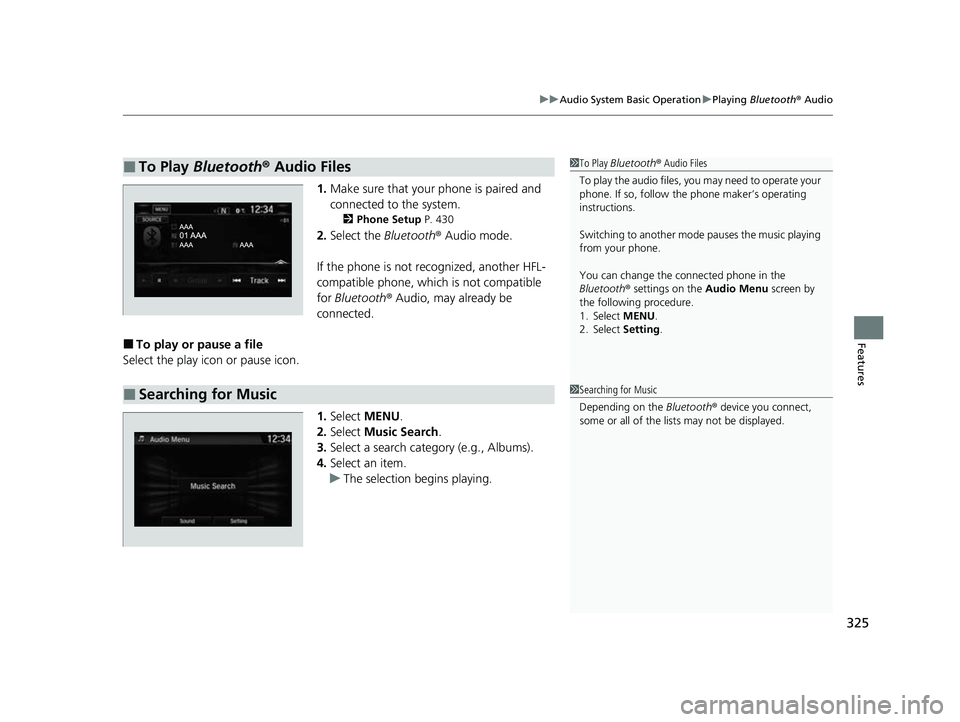
1. Make sure that your phone is paired and
connected to the system.
2 Phone Setup P. 430
2.Select the Bluetooth® Audio mode.
If the phone is not recognized, another HFL-
compatible phone, which is not compatible
for Bluetooth ® Audio, may already be
connected.
■To play or pause a file
Select the play icon or pause icon.
1.Select MENU .
2. Select Music Search.
3. Select a search catego ry (e.g., Albums).
4. Select an item.
u The selection begins playing.
■To Play Bluetooth® Audio Files1To Play Bluetooth ® Audio Files
To play the audio files, y ou may need to operate your
phone. If so, follow the phone maker’s operating
instructions.
Switching to another mode pauses the music playing
from your phone.
You can change the connected phone in the
Bluetooth ® settings on the Audio Menu screen by
the following procedure.
1. Select MENU .
2. Select Setting .
■Searching for Music1Searching for Music
Depending on the Bluetooth® device you connect,
some or all of the list s may not be displayed.
22 CR-V HEV ELP-31TPG6200.book 325 ページ 2021年6月30日 水曜日 午前11時6分
Page 342 of 692

340
Features
Audio Error Messages
iPod/USB Flash Drive
If an error occurs while playing an iPod or USB flash drive, you may see the following
error messages. If you cannot clear the error message, contact a dealer.
*1:Models with color audio system
*2:Models with Display Audio
Error MessageSolution
USB Error*1, *2Appears when there is a problem with th e audio system. Check if the device is
compatible with the audio system.
A charging error ha s occurred with the
connected USB device. When safe please
check the compatibility of the device and
USB cable and try again.
*2
Appears when an incompatible device is connected. Disconnect the device. Then turn
the audio system off, and turn it on again. Do not reconnect the device that caused the
error.
Unsupported Ver*1
Unsupported Version*2Appears when an unsupported iPod is connected. If it appears when a supported iPod
is connected, update the iPod software to the newer version.
Connect Retry*1, *2Appears when the system does not acknowledge the iPod. Reconnect the iPod.
Unplayable File*1, *2Appears when the files in the USB flash driv e are copyright protected or an unsupported
format. This error message appears for about three seconds, then plays the next song.
No Song*1
No Data*2
Appears when the iPod is empty.
Appears when the USB flash drive is empty or there are no MP3, WMA, AAC, or WAV
files in the USB flash drive.
Check that compatible files are stored on the device.
Unsupported*1, *2Appears when an unsupported device is conn ected. If it appears when a supported
device is connected, reconnect the device.
iPod
USB flash drive
iPod and USB flash drive
22 CR-V HEV ELP-31TPG6200.book 340 ページ 2021年6月30日 水曜日 午前11時6分
Page 344 of 692
342
uuAudio Error Messages uPandora ®
Features
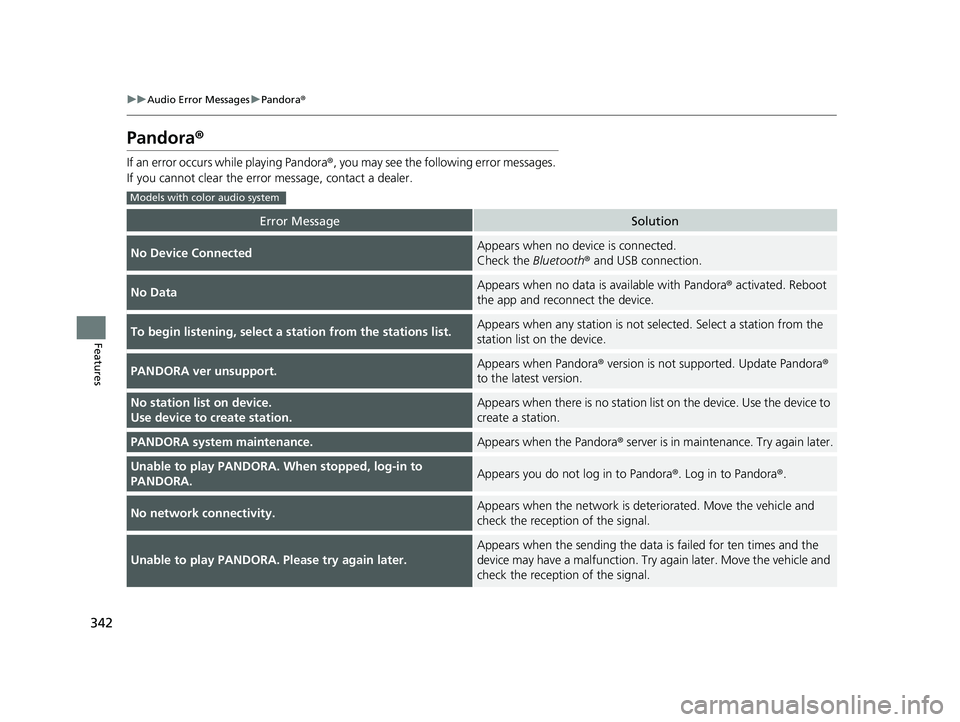
Pandora ®
If an error occurs while playing Pandora®, you may see the following error messages.
If you cannot clear the error message, contact a dealer.
Error MessageSolution
No Device ConnectedAppears when no device is connected.
Check the Bluetooth® and USB connection.
No DataAppears when no data is available with Pandora ® activated. Reboot
the app and reconnect the device.
To begin listening, select a st ation from the stations list.Appears when any station is not selected. Select a station from the
station list on the device.
PANDORA ver unsupport.Appears when Pandora® version is not supported. Update Pandora ®
to the latest version.
No station list on device.
Use device to create station.Appears when there is no station list on the device. Use the device to
create a station.
PANDORA system maintenance.Appears when the Pandora ® server is in maintenance. Try again later.
Unable to play PANDORA. When stopped, log-in to
PANDORA.Appears you do not log in to Pandora ®. Log in to Pandora®.
No network connectivity.Appears when the network is deteriorated. Move the vehicle and
check the reception of the signal.
Unable to play PANDORA. Please try again later.
Appears when the sending the data is failed for ten times and the
device may have a malfunction. Try again later. Move the vehicle and
check the reception of the signal.
Models with color audio system
22 CR-V HEV ELP-31TPG6200.book 342 ページ 2021年6月30日 水曜日 午前11時6分
Page 345 of 692

343
uuAudio Error Messages uPandora ®
Continued
Features
Error MessageSolution
Unable to play PANDORA. Music licensing restricts play in
this area.Appears when the vehicle is in the re stricted area to listen the music.
Move the vehicle and check th e reception of the signal.
Please check owners manual
Appears when an incompatible device is connected. In order to have
any problems on a connected device, there is a possibility that the
audio system cannot be recognized the device. Contact a dealer.
Error MessageSolution
To begin listening, select a st ation from the Stations list.Appears when there is no station list on the device. Use the device
to create a station.
Unable to rate track. Please try again.Appears when you try to skip a song or select Like/Dislike over the
predetermined number of times in an hour.
Unable to play PANDORA. Please try again later.Appears when the commanded opera tion fails. Try again later.
No DataAppears when no data is available with Pandora ® activated. Reboot
the app and reconnect the device.
PANDORA App version is not supported.Appears when Pandora ® version is not supported. Update Pandora ®
to the latest version.
PANDORA system maintenance.Appears when the Pandora ® server is in maintenance. Try again
later.
Models with Display Audio
22 CR-V HEV ELP-31TPG6200.book 343 ページ 2021年6月30日 水曜日 午前11時6分