2022 HONDA CRV ECO mode
[x] Cancel search: ECO modePage 205 of 692
203
uuOperating the Switches Around the Steering Wheel uDriving Position Memory System*
Continued
Controls
Driving Position Memory System*
You can store two driver’s seat positions (except for power lumbar) with the driving
position memory system.
When you unlock and open the driver’s door with a remote transmitter or the
keyless access system, the seat adjusts automatically to one of the two preset
positions.
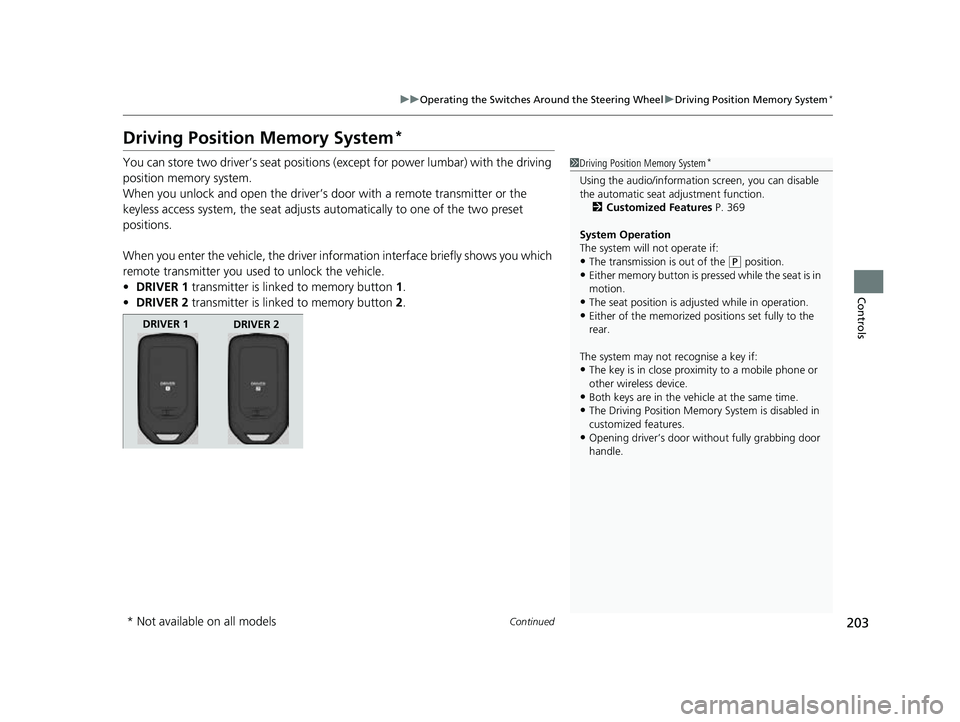
When you enter the vehicle, the driver in formation interface briefly shows you which
remote transmitter you used to unlock the vehicle.
• DRIVER 1 transmitter is linked to memory button 1.
• DRIVER 2 transmitter is linked to memory button 2.1 Driving Position Memory System*
Using the audio/informati on screen, you can disable
the automatic seat adjustment function.
2 Customized Features P. 369
System Operation
The system will not operate if:
•The transmission is out of the ( P position.•Either memory button is pressed while the seat is in
motion.
•The seat position is adju sted while in operation.•Either of the memorized pos itions set fully to the
rear.
The system may not recognise a key if:
•The key is in close proximity to a mobile phone or
other wireless device.
•Both keys are in the vehicle at the same time.
•The Driving Position Memory System is disabled in
customized features.
•Opening driver’s door wi thout fully grabbing door
handle.
DRIVER 1 DRIVER 2
* Not available on all models
22 CR-V HEV ELP-31TPG6200.book 203 ページ 2021年6月30日 水曜日 午前11時6分
Page 206 of 692
uuOperating the Switches Around the Steering Wheel uDriving Position Memory System*
204
Controls
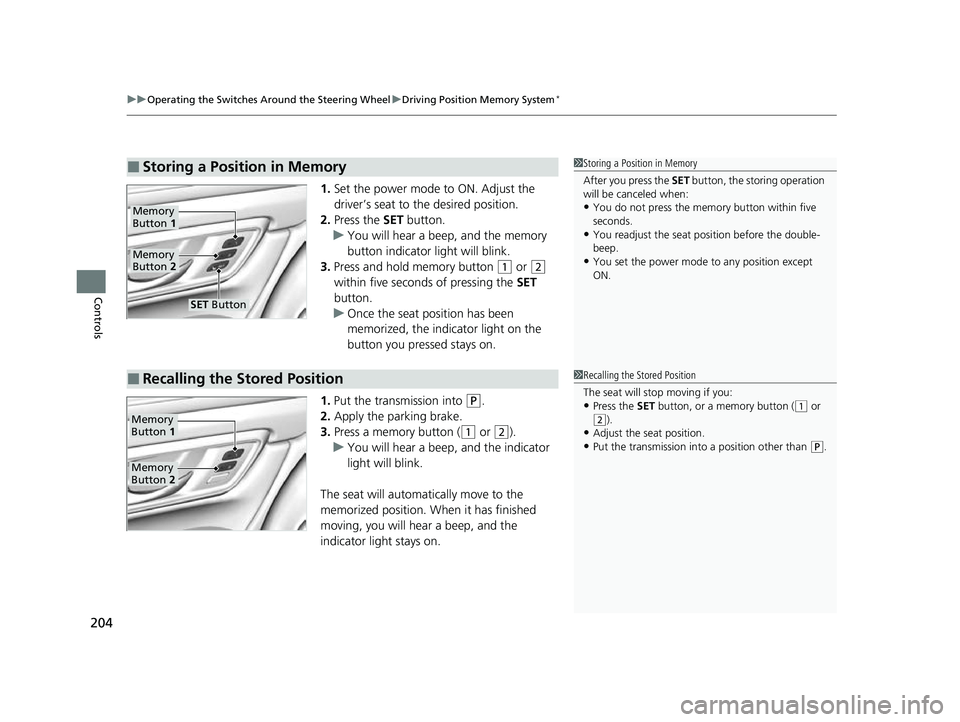
1. Set the power mode to ON. Adjust the
driver’s seat to the desired position.
2. Press the SET button.
u You will hear a beep, and the memory
button indicator light will blink.
3. Press and hold memory button
(1 or (2
within five seconds of pressing the SET
button.
u Once the seat position has been
memorized, the indicator light on the
button you pressed stays on.
1. Put the transmission into
(P.
2. Apply the parking brake.
3. Press a memory button (
(1 or (2).
u You will hear a beep, and the indicator
light will blink.
The seat will automatically move to the
memorized position. When it has finished
moving, you will hear a beep, and the
indicator light stays on.
■Storing a Position in Memory1 Storing a Position in Memory
After you press the SET button, the storing operation
will be canceled when:
•You do not press the memory button within five
seconds.
•You readjust the seat position before the double-
beep.
•You set the power mode to any position except
ON.
Memory
Button 1
Memory
Button 2
SET Button
■Recalling the Stored Position1Recalling the Stored Position
The seat will st op moving if you:
•Press the SET button, or a memory button ((1 or
(2).•Adjust the seat position.
•Put the transmission into a position other than ( P.
Memory
Button 1
Memory
Button 2
22 CR-V HEV ELP-31TPG6200.book 204 ページ 2021年6月30日 水曜日 午前11時6分
Page 210 of 692

208
Controls
Seats
Front Seats
Adjust the driver’s seat as far back as possible
while allowing you to maintain full control of
the vehicle. You should be able to sit upright,
well back in the seat and be able to
adequately press the pedals without leaning
forward, and grip the steering wheel
comfortably. The passenger’s seat should be
adjusted in a similar manner, so that it is as far
back from the front airbag in the dashboard
as possible.
■Adjusting the front power seat*
1Seats
Always make seat adjustments before driving.
1Front Seats
The National Highway Traffic Safety Administration
recommends that driver’s allow at least 10 inches (25
cm) between the center of the steering wheel and
the chest.
3WARNING
Sitting too close to a front airbag can result
in serious injury or death if the front
airbags inflate.
Always sit as far back from the front
airbags as possible while maintaining
control of the vehicle.
Move back.
Allow sufficient
space.
■Adjusting the Seat Positions
Horizontal Position
Adjustment
Height Adjustment
(Driver’s seat only)
Seat-back
Angle
Adjustment
* Not available on all models
22 CR-V HEV ELP-31TPG6200.book 208 ページ 2021年6月30日 水曜日 午前11時6分
Page 220 of 692

218
Controls
Interior Convenience Items
Interior Lights
■ON
The interior lights come on regardless of
whether the doors are open or closed.
■Door activated
The interior lights come on in the following
situations:
• When any doors are opened.
• You unlock the driver’s door.
• When the power mode is set to VEHICLE
OFF.
■OFF
The interior lights remain off regardless of
whether the doors are open or closed.
■Interior Light Switches1 Interior Light Switches
In the door activated position, the interior lights fade
out and go off about 30 seconds after the doors are
closed.
The lights go off after about 30 seconds in the
following situations:
•When you unlock the driver’s door but do not open
it.
•When you set the power mode to VEHICLE OFF but
do not open a door.
You can change the interi or lights dimming time.
2 Customized Features P. 140
2 Customized Features P. 369
The interior lights go off im mediately in the following
situations:
•When you lock the driver’s door.
•When you close the driver’s door in ACCESSORY
mode.
•When you set the power mode to ON.
To avoid draining the 12-vo lt battery, do not leave
the interior light on for an extended length of time
when the power system is off.
If you leave any of the doors open in VEHICLE OFF
mode, the interior light s go off after about 15
minutes.
Models with color audio system
Models with Display Audio
All models
Models with moonroof
Front
Models without moonroof
Door Activated Position
Front
Rear
Door Activated Position
Off
On
Door Activated Position
Off
On
Off
22 CR-V HEV ELP-31TPG6200.book 218 ページ 2021年6月30日 水曜日 午前11時6分
Page 234 of 692
uuInterior Convenience Items uOther Interior Convenience Items
232
Controls
■FCC statement
RF Exposure Notice:
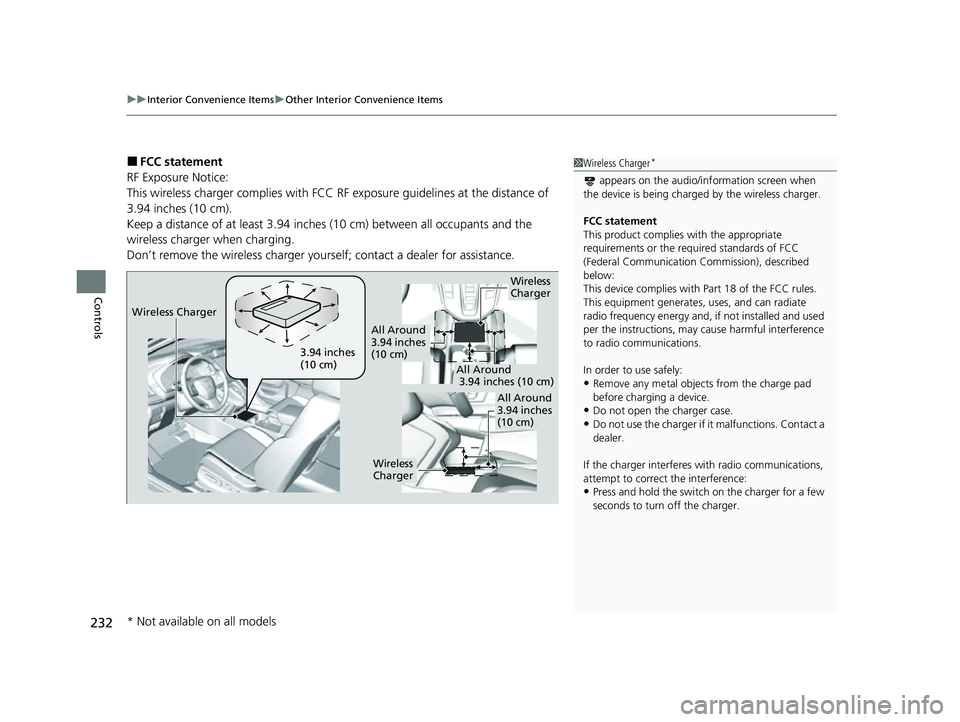
This wireless charger complies with FCC RF exposure guidelines at the distance of
3.94 inches (10 cm).
Keep a distance of at least 3.94 inches (10 cm) between all occupants and the
wireless charger when charging.
Don’t remove the wireless charger yourse lf; contact a dealer for assistance.1Wireless Charger*
appears on the audio/information screen when
the device is being charge d by the wireless charger.
FCC statement
This product complies with the appropriate
requirements or the requ ired standards of FCC
(Federal Communication Commission), described
below:
This device complies with Part 18 of the FCC rules.
This equipment generates, uses, and can radiate
radio frequency energy and, if not installed and used
per the instructions, may cause harmful interference
to radio communications.
In order to use safely:
•Remove any metal objects from the charge pad
before charging a device.
•Do not open the charger case.
•Do not use the charger if it malfunctions. Contact a
dealer.
If the charger interferes with radio communications,
attempt to correct the interference:
•Press and hold the switch on the charger for a few
seconds to turn off the charger.
Wireless
Charger
3.94 inches
(10 cm)
All Around
3.94 inches
(10 cm)
All Around
3.94 inches (10 cm)
All Around
3.94 inches
(10 cm)
Wireless
Charger
Wireless Charger
* Not available on all models
22 CR-V HEV ELP-31TPG6200.book 232 ページ 2021年6月30日 水曜日 午前11時6分
Page 239 of 692

Continued237
uuClimate Control System uUsing Automatic Climate Control
Controls
Use the system when the power system is on.
1. Press the AUTO button.
2. Adjust the interior temperature us ing the temperature control dial.
2. Adjust the interior temperature using the dr iver’s side or passenger’s side control
dial.
3. Press the (ON/OFF) button to cancel.1Using Automatic Climate Control
Press the CLIMATE button to display A/C, MODE, and
fan control information on th e audio/information screen
to operate manually. Select icon to turn
On or Off A/C,
change the vent mode, or change the fan speed.
If any buttons are presse d while using the climate
control system in auto, the function of the button
that was pressed will take priority.
The AUTO indicator will go off, but functions
unrelated to the button that were pressed will be
controlled automatically.
To prevent cold air from bl owing in from outside, the
fan may not start i mmediately when the AUTO
button is pressed.
If the interior is very warm, you can cool it down
more rapidly by partial ly opening the windows,
turning the system on auto, and setting the
temperature to low. Change the fresh mode to
recirculation mode until the temperature cools down.
When you set the temperat ure to the lower or upper
limit, Lo or Hi is displayed.
Pressing the button switches the climate
control system between on and off. When turned on,
the system returns to your last selection.
While ECON mode is active, the climate control
system may have reduced cooling performance.
Models with SYNC button
All models
Models without SYNC button
Models with SYNC button
All models
22 CR-V HEV ELP-31TPG6200.book 237 ページ 2021年6月30日 水曜日 午前11時6分
Page 247 of 692

245
uuAudio System uUSB Port(s)
Continued
Features
USB Port(s)
Install the USB connector or the USB flash drive to the USB port.
■On the front of the center console
The USB port (1.0A) is for playing audio files
on a USB flash drive, connecting a cellular
phone, and charging devices.
The USB port (1.5A) is for charging devices,
playing audio files and connecting compatible
phones with Apple CarPlay
TM or Android
AutoTM.
u To prevent any potenti al issues, be sure
to use an Apple MFi Certified Lightning
Connector for Apple CarPlay
TM, and for
Android AutoTM, the USB cables should
be certified by USB-IF to be compliant
with USB 2.0 Standard.
*1: Models with color audio system
*2: Models with Display Audio
1 USB Port(s)
•Do not leave the iPod or USB flash drive in the
vehicle. Direct sunlight and high temperatures may
damage it.
•We recommend that you us e a USB cable if you are
attaching a USB flash drive to the USB port.
•Do not connect the iPod or USB flash drive using a
hub.
•Do not use a device such as a card reader or hard
disk drive, as the device or your files may be
damaged.
•We recommend backing up yo ur data before using
the device in your vehicle.
•Displayed messages may vary depending on the
device model and software version.
If the audio system does not recognize the iPod, try
reconnecting it a few times or reboot the device. To
reboot, follow the manufac turer’s instructions
provided with the iPod or visit www.apple.com/ipod.
The USB port can supply up to 1.5A/2.5A of power. It
does not output 1.5A/2.5A unless the device
requests.
For amperage details, read the operating manual of
the device that ne eds to be charged.
Under certain condi tions, a device connected to the
port may generate noise to the radio station you are
listening to.
On the front of the center console
*1
*2
USB Port (1.0A)
USB Port (1.5A)*
* Not available on all models
22 CR-V HEV ELP-31TPG6200.book 245 ページ 2021年6月30日 水曜日 午前11時6分
Page 249 of 692

247
uuAudio System uAudio System Theft Protection
Features
Audio System Theft Protection
The audio system is disabled when it is disconnected from the power source, such as
when the battery is disconnected or goes dead. In certain conditions, the system
may display a code entry screen. If this occurs, reactivate the audio system.
■Reactivating the audio system
1. Set the power mode to ON.
2. Turn on the audio system.
3. Press and hold the audio system powe r button for more than two seconds.
u The audio system is reac tivated when the audio co ntrol unit establishes a
connection with the vehicl e control unit. If the control unit fails to recognize
the audio unit, you must go to a dealer and have the audio unit checked.
22 CR-V HEV ELP-31TPG6200.book 247 ページ 2021年6月30日 水曜日 午前11時6分