Page 433 of 692
Continued431
uuBluetooth ® HandsFreeLink ®u HFL Menus
Features
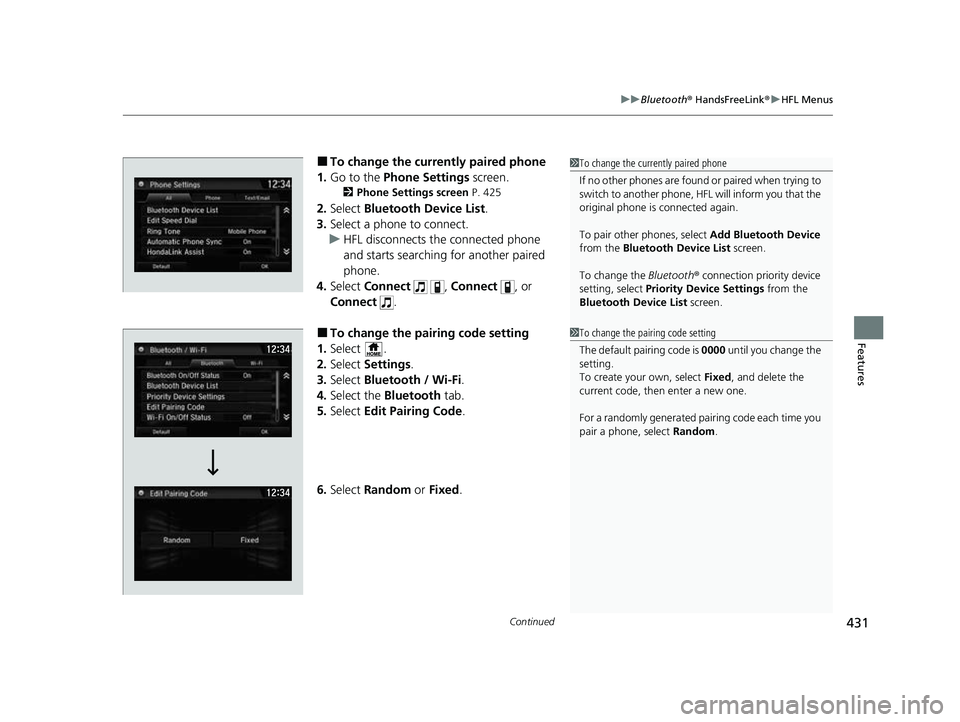
■To change the currently paired phone
1. Go to the Phone Settings screen.
2Phone Settings screen P. 425
2.Select Bluetooth Device List .
3. Select a phone to connect.
u HFL disconnects the connected phone
and starts searching for another paired
phone.
4. Select Connect , Connect , or
Connect .
■To change the pairing code setting
1. Select .
2. Select Settings .
3. Select Bluetooth / Wi-Fi .
4. Select the Bluetooth tab.
5. Select Edit Pairing Code .
6. Select Random or Fixed .
1To change the currently paired phone
If no other phones are found or paired when trying to
switch to another phone, HFL will inform you that the
original phone is connected again.
To pair other phones, select Add Bluetooth Device
from the Bluetooth Device List screen.
To change the Bluetooth ® connection priority device
setting, select Priority Device Settings from the
Bluetooth Device List screen.
1To change the pairing code setting
The default pairing code is 0000 until you change the
setting.
To create your own, select Fixed, and delete the
current code, then enter a new one.
For a randomly generated pair ing code each time you
pair a phone, select Random.
22 CR-V HEV ELP-31TPG6200.book 431 ページ 2021年6月30日 水曜日 午前11時6分
Page 456 of 692
uuBluetooth ® HandsFreeLink ®u HFL Menus
454
Features
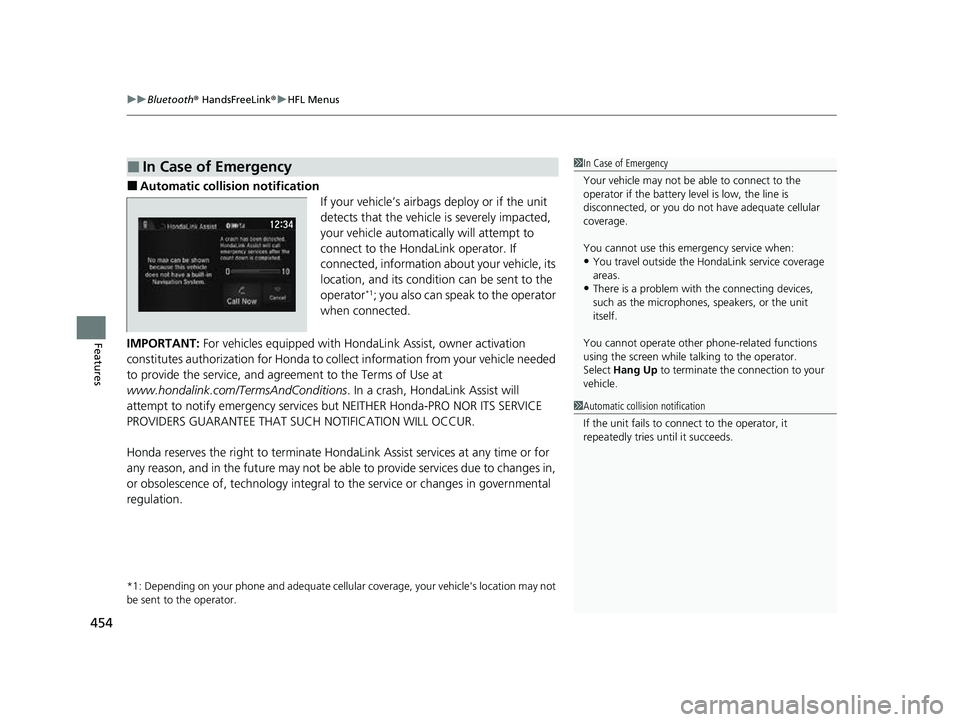
■Automatic collision notification
If your vehicle’s airbags deploy or if the unit
detects that the vehicle is severely impacted,
your vehicle automatically will attempt to
connect to the HondaLink operator. If
connected, information about your vehicle, its
location, and its condition can be sent to the
operator
*1; you also can speak to the operator
when connected.
IMPORTANT: For vehicles equipped with Hond aLink Assist, owner activation
constitutes authorization for Honda to co llect information from your vehicle needed
to provide the service, and agr eement to the Terms of Use at
www.hondalink.com/TermsAndConditions . In a crash, HondaLink Assist will
attempt to notify emergency services but NEITHER Honda-PRO NOR ITS SERVICE
PROVIDERS GUARANTEE THAT S UCH NOTIFICATION WILL OCCUR.
Honda reserves the right to terminate HondaLink Assist services at any time or for
any reason, and in the future may not be ab le to provide services due to changes in,
or obsolescence of, technology integral to the service or changes in governmental
regulation.
*1: Depending on your phone and adequate cellular coverage, y our vehicle's location may not
be sent to the operator.
■In Case of Emergency1 In Case of Emergency
Your vehicle may not be able to connect to the
operator if the battery level is low, the line is
disconnected, or you do not have adequate cellular
coverage.
You cannot use this emergency service when:
•You travel outside the HondaLink service coverage
areas.
•There is a problem with the connecting devices,
such as the microphones, speakers, or the unit
itself.
You cannot operate othe r phone-related functions
using the screen while talking to the operator.
Select Hang Up to terminate the connection to your
vehicle.
1 Automatic collision notification
If the unit fails to connect to the operator, it
repeatedly tries until it succeeds.
22 CR-V HEV ELP-31TPG6200.book 454 ページ 2021年6月30日 水曜日 午前11時6分
Page 486 of 692
484
uuWhen Driving uDeceleration Paddle Selector
Driving
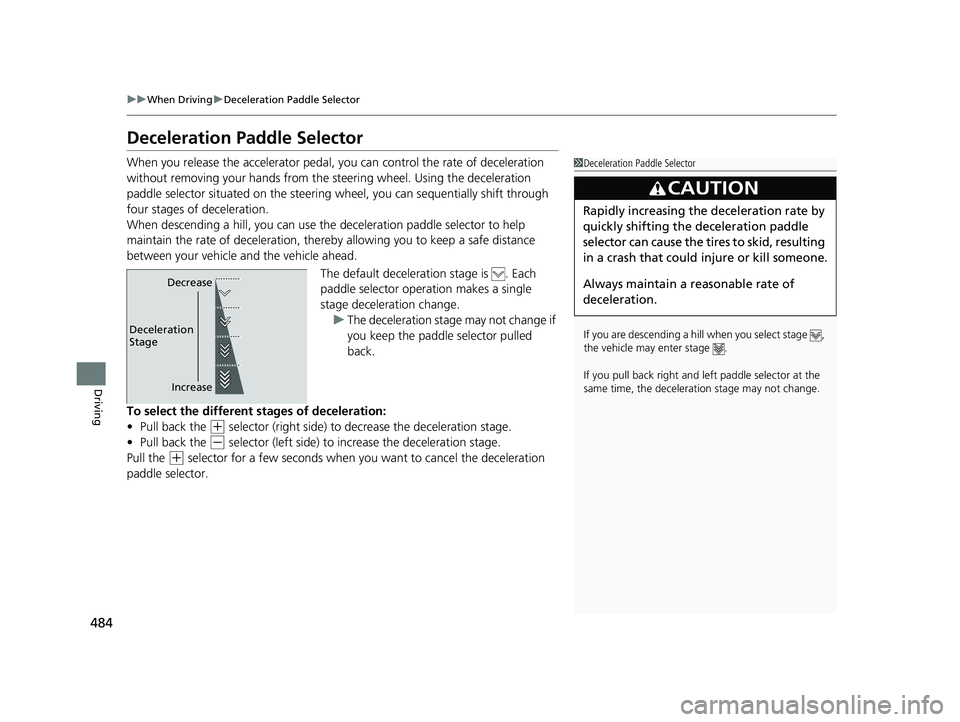
Deceleration Paddle Selector
When you release the accelerator pedal, yo u can control the rate of deceleration
without removing your hands from the steering wheel. Using the deceleration
paddle selector situated on the steering wheel, you can sequentially shift through
four stages of deceleration.
When descending a hill, you can use the deceleration paddle selector to help
maintain the rate of deceleration, thereb y allowing you to keep a safe distance
between your vehicle and the vehicle ahead.
The default deceleration stage is . Each
paddle selector operation makes a single
stage deceleration change. u The deceleration stage may not change if
you keep the paddle selector pulled
back.
To select the different stages of deceleration:
• Pull back the
(+ selector (right side) to decrease the deceleration stage.
• Pull back the
(- selector (left side) to increase the deceleration stage.
Pull the
(+ selector for a few seconds when you want to cancel the deceleration
paddle selector.
1 Deceleration Paddle Selector
If you are descending a hill when you select stage ,
the vehicle may enter stage .
If you pull back right and le ft paddle selector at the
same time, the decelerati on stage may not change.
3CAUTION
Rapidly increasing the deceleration rate by
quickly shifting the deceleration paddle
selector can cause the tires to skid, resulting
in a crash that could injure or kill someone.
Always maintain a reasonable rate of
deceleration.
Increase
Deceleration
Stage Decrease
22 CR-V HEV ELP-31TPG6200.book 484 ページ 2021年6月30日 水曜日 午前11時6分
Page 496 of 692

uuWhen Driving uTire Pressure Monitoring System (TPMS)
494
Driving
You must start TPMS calibration every time you:
• Adjust the pressure in one or more tires.
• Rotate the tires.
• Replace one or more tires.
Before calibrating the TPMS:
• Set the cold tire pressu re in all four tires.
2Checking Tires P. 606
Make sure:
•The vehicle is at a complete stop.
• Change the shift position to
(P.
• The power mode is in ON.
■TPMS Calibration
1Tire Pressure Monitoring System (TPMS)
The indicators for the Adaptive Cruise Control (ACC)
with Low Speed Follow, Road Departure Mitigation
(RDM), Vehicle Stability Assist
TM (VSA ®) system,
Vehicle Stability AssistTM (VSA ®) OFF, low tire
pressure/TPMS, Collision Mitigation Braking SystemTM
(CMBSTM), and Parking Brake and Brake System
(Amber) may come on along with a message in the
Driver Information Interf ace after reconnecting the
12V-battery. Drive a short distance at more than 12
mph (20 km/h). The indicator should go off. If it does
not, have your vehicle checked by a dealer.
1TPMS Calibration
The calibration process requires approximately 30
minutes of cumulative driv ing at speeds between 30-
65 mph (48-105 km/h).
During this period, if the ignition is turned on and the
vehicle is not moved within 45 seconds, you may
notice the low tire pressure/TPMS indicator comes on
briefly. This is normal and indicates that the
calibration process is not yet complete.
If the tire chains are installed, remove them before
calibrating the TPMS.
If the low tire pressure/TPMS indicator comes on even
when the properly inflated specified regular tires are
installed, have your vehi cle checked by a dealer.
We recommend that the tires be replaced with the
same brand, model, and size as the originals. Ask a
dealer for details.
22 CR-V HEV ELP-31TPG6200.book 494 ページ 2021年6月30日 水曜日 午前11時6分
Page 502 of 692

uuWhen Driving uBlind spot information System*
500
Driving
■When the system detects a vehicle1Blind spot information System*
The blind spot information system alert indicator may
not come on under the following conditions:
•A vehicle does not stay in the alert zone for more
than two seconds.
•A vehicle is parked in a side lane.
•The speed difference betw een your vehicle and the
vehicle you are passing is greater than 6 mph (10
km/h).
•An object not detected by the radar sensors
approaches or passes your vehicle.
•A vehicle running in the adjacent lane is a
motorcycle or other small vehicle.
You can change the setting for the blind spot
information system. 2 Customized Features P. 369
■Comes on when:●A vehicle enters the alert zone from behind
to overtake you with a speed difference of
no more than 31 mph (50 km/h) from your
vehicle.
●You pass a vehicle with a speed difference
of no more than 12 mph (20 km/h).
■Blinks and the beeper sounds when:
You move the turn signal lever in the direction
of the detected vehicle. The beeper sounds
three times. Comes On
Blinks
Blind spot information
System Alert Indicator:
Located on the outside rearview mirror on
both sides.
* Not available on all models
22 CR-V HEV ELP-31TPG6200.book 500 ページ 2021年6月30日 水曜日 午前11時6分
Page 530 of 692
528
uuHonda Sensing ®u Adaptive Cruise Control (ACC) with Low Speed Follow
Driving
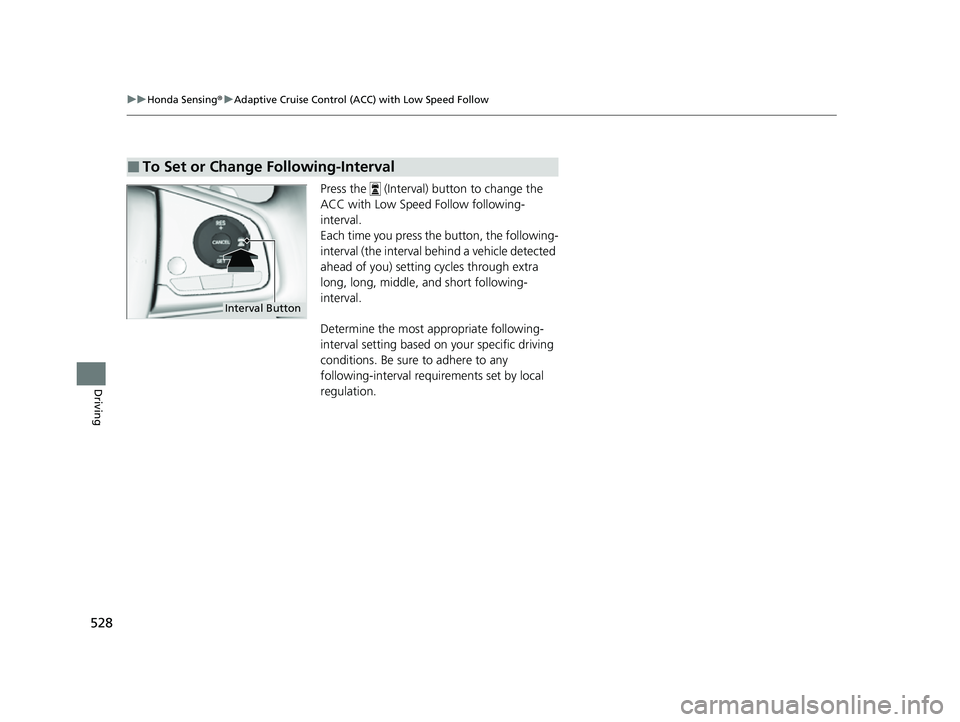
Press the (Interval) button to change the
ACC with Low Speed Follow following-
interval.
Each time you press the button, the following-
interval (the interval behind a vehicle detected
ahead of you) setting cycles through extra
long, long, middle, and short following-
interval.
Determine the most appropriate following-
interval setting based on your specific driving
conditions. Be sure to adhere to any
following-interval requ irements set by local
regulation.
■To Set or Change Following-Interval
Interval Button
22 CR-V HEV ELP-31TPG6200.book 528 ページ 2021年6月30日 水曜日 午前11時6分
Page 539 of 692
Continued537
uuHonda Sensing ®u Lane Keeping Assist System (LKAS)
Driving
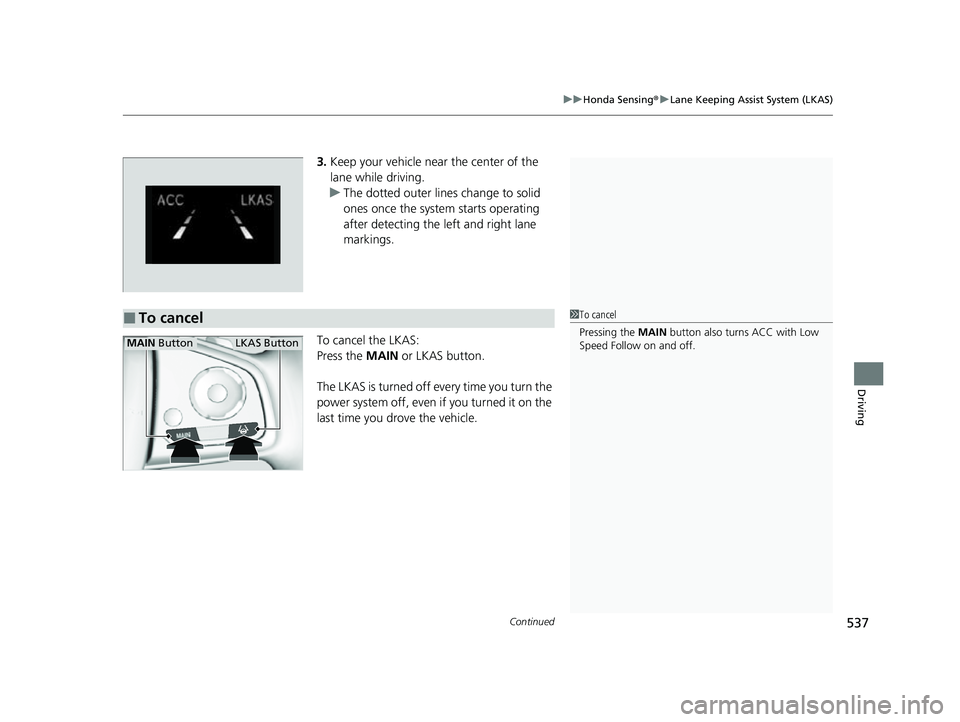
3. Keep your vehicle near the center of the
lane while driving.
u The dotted outer lines change to solid
ones once the system starts operating
after detecting the left and right lane
markings.
To cancel the LKAS:
Press the MAIN or LKAS button.
The LKAS is turned off every time you turn the
power system off, even if you turned it on the
last time you drove the vehicle.
■To cancel1 To cancel
Pressing the MAIN button also turns ACC with Low
Speed Follow on and off.
MAIN ButtonLKAS Button
22 CR-V HEV ELP-31TPG6200.book 537 ページ 2021年6月30日 水曜日 午前11時6分
Page 573 of 692

571
uuMulti-View Rear Camera uAbout Your Multi-View Rear Camera
Driving
You can view three different camera angles on the rearview display.
Press the selector knob to switch the angle.
Touch the appropriate icon to switch the angle.
: Wide view mode
: Normal view mode
: Top down view mode
• If you were last using Wide view mode or Normal view mode, the same view
mode will be activated the next ti me you put the transmission into
(R.
• If you were using Top down view mode before you turned off the power system,
Wide view mode will be activated the ne xt time you set the power mode to ON
and put the trans mission into
(R.
• If you were using Top down view mode and 10 seconds elapsed after you took
the transmission out of
(R, Wide view mode will be activated the next time you
put the transmission into
(R.
1 About Your Multi-View Rear Camera
You can change the Camera Guideline On or Off
settings. 2 Customized Features P. 362
Camera Guideline
On: Guidelines appear when you put the
transmission into
( R.
Off: Guidelines do not appear.
Models with color audio systemModels with color audio system
Models with Display Audio
All models
22 CR-V HEV ELP-31TPG6200.book 571 ページ 2021年6月30日 水曜日 午前11時6分