Page 393 of 692
391
uuCustomized Features u
Continued
Features
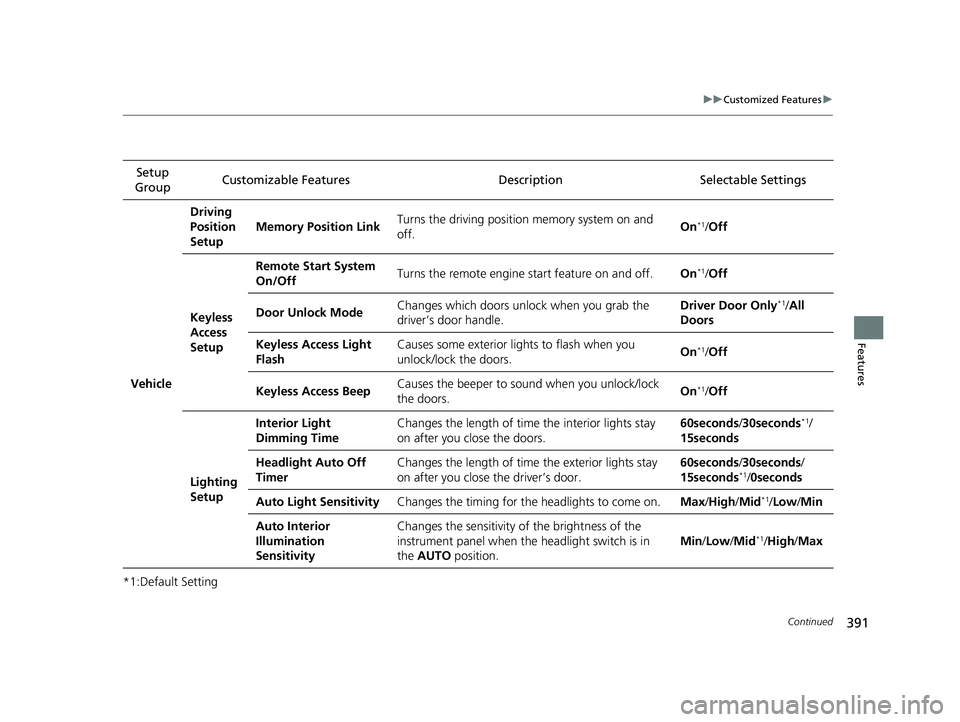
*1:Default SettingSetup
Group Customizable Features Descri
ption Selectable Settings
Vehicle
Driving
Position
Setup
Memory Position LinkTurns the driving position memory system on and
off.On*1/ Off
Keyless
Access
Setup
Remote Start System
On/OffTurns the remote engine start feature on and off.On*1/Off
Door Unlock ModeChanges which doors unlock when you grab the
driver’s door handle.Driver Door Only*1/ All
Doors
Keyless Access Light
FlashCauses some exterior li ghts to flash when you
unlock/lock the doors.On*1/ Off
Keyless Access BeepCauses the beeper to sound when you unlock/lock
the doors.On*1/Off
Lighting
Setup
Interior Light
Dimming TimeChanges the length of time the interior lights stay
on after you close the doors.60seconds /30seconds*1/
15seconds
Headlight Auto Off
TimerChanges the length of time the exterior lights stay
on after you close the driver’s door.60seconds /30seconds/
15seconds*1/ 0seconds
Auto Light SensitivityChanges the timing for th e headlights to come on.Max/High /Mid*1/Low/ Min
Auto Interior
Illumination
SensitivityChanges the sensitivity of the brightness of the
instrument panel when the headlight switch is in
the AUTO position.
Min/Low/Mid*1/High /Max
22 CR-V HEV ELP-31TPG6200.book 391 ページ 2021年6月30日 水曜日 午前11時6分
Page 394 of 692
392
uuCustomized Features u
Features
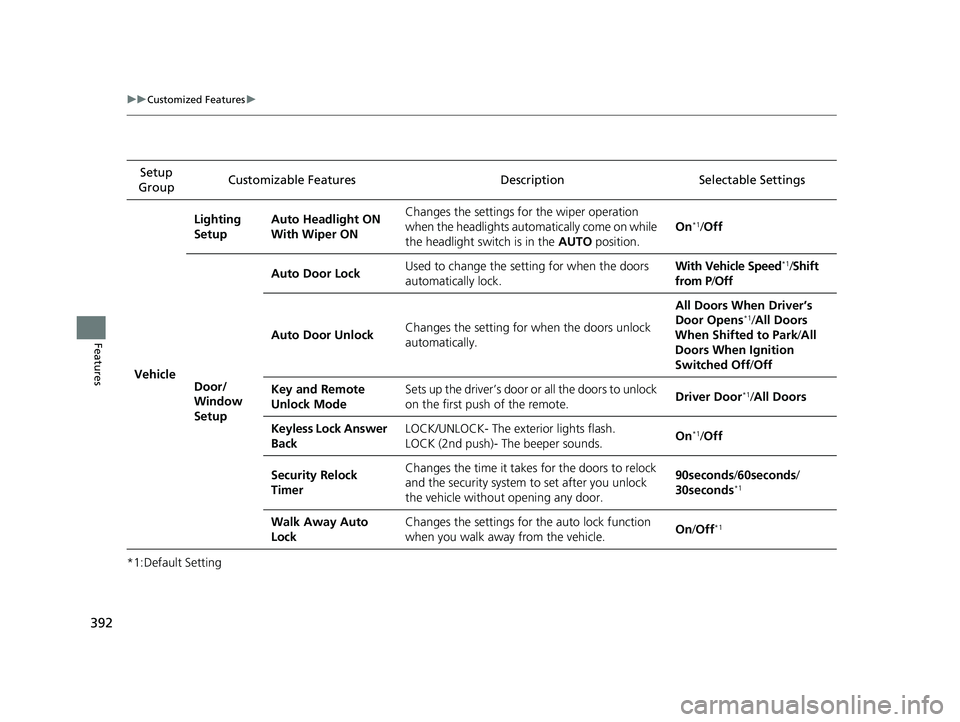
*1:Default SettingSetup
Group Customizable Features Desc
ription Selectable Settings
Vehicle
Lighting
SetupAuto Headlight ON
With Wiper ONChanges the settings for the wiper operation
when the headlights auto matically come on while
the headlight switch is in the AUTO position.
On*1/Off
Door/
Window
Setup
Auto Door LockUsed to change the setting for when the doors
automatically lock.With Vehicle Speed*1/Shift
from P /Off
Auto Door UnlockChanges the setting for when the doors unlock
automatically.
All Doors When Driver’s
Door Opens*1/ All Doors
When Shifted to Park /All
Doors When Ignition
Switched Off /Off
Key and Remote
Unlock ModeSets up the driver’s door or all the doors to unlock
on the first push of the remote.Driver Door*1/All Doors
Keyless Lock Answer
BackLOCK/UNLOCK- The exterior lights flash.
LOCK (2nd push)- The beeper sounds.On*1/Off
Security Relock
TimerChanges the time it takes for the doors to relock
and the security system to set after you unlock
the vehicle without opening any door.90seconds /60seconds /
30seconds*1
Walk Away Auto
LockChanges the settings for the auto lock function
when you walk away from the vehicle.On /Off*1
22 CR-V HEV ELP-31TPG6200.book 392 ページ 2021年6月30日 水曜日 午前11時6分
Page 462 of 692

460
Driving
Before Driving
Driving Preparation
Check the following items before you start driving.
• Make sure there are no obstructions on the windows, door mirrors, exterior
lights, or other parts of the vehicle.
u Remove any frost, snow, or ice.
u Remove any snow on the roof, as this can slip down and obstruct your field of
vision while driving. If frozen solid , remove ice once it has softened.
u When removing ice from around the wheels, be sure not to damage the wheel
or wheel components.
• Make sure the hood is securely closed.
u If the hood opens while driving, your front view will be blocked.
• Make sure the tires are in good condition.
u Check air pressures, and check for damage and excessive wear.
2Checking and Maintaining Tires P. 606
•Make sure there are no people or ob jects behind or around the vehicle.
u There are blind spots from the inside.
■Exterior Checks1Exterior Checks
NOTICE
When doors are frozen s hut, use warm water around
the door edges to melt any ice. Do not try to force
them open, as this can damage the rubber trim
around the doors. When done, wipe dry to avoid
further freezing.
Do not pour warm water into the key cylinder.
You will be unable to insert the key if the water
freezes in the hole.
Heat from the engine and exhaust can ignite
flammable material s left under the hood, causing a
fire. If you've parked y our vehicle for an extended
period, inspect and remove any debris that may have
collected, such as dried grass and leaves that have
fallen or have been carried in for use as a nest by a
small animal. Also, check under the hood for leftover
flammable materials after you or someone else has
performed maintenance on your vehicle.
22 CR-V HEV ELP-31TPG6200.book 460 ページ 2021年6月30日 水曜日 午前11時6分
Page 471 of 692

469Continued
Driving
When Driving
Turning on the Power
1.Make sure the parkin g brake is applied.
u The parking brake and brake system
indicator (red) comes on for 15 seconds
when you pull up the electric parking
brake switch.
2. Depress the brake pedal.1Turning on the Power
Keep your foot firmly on the brake pedal when
starting the power system.
The engine is harder to st art in cold weather and in
thinner air found at altit udes above 8,000 feet (2,400
meters).
When turning on the power system in cold weather,
turn off all electrical accessories such as the lights,
climate control system, and rear defogger in order to
reduce 12V-battery drain.
If the exhaust system sounds abnormal or you can
smell exhaust gas inside the vehicle, have your vehicle
checked by a dealer. There may be a problem with
the engine or exhaust system.
The immobilizer system pr otects your vehicle from
theft. If an improperly c oded device is used, the
power system does not activate.
2 Immobilizer System P. 178
When you set the power mode to ON, you may feel
as if the brake pedal is sinking down. This is normal.
Electric Parking Brake Switch
Brake Pedal
22 CR-V HEV ELP-31TPG6200.book 469 ページ 2021年6月30日 水曜日 午前11時6分
Page 473 of 692

Continued471
uuWhen Driving uTurning on the Power
Driving
You can remotely turn the power system on using the keyless remote.
■To turn the power system on
The power system is on for up to 10 minutes without you starting the vehicle.
To extend the time for another 10 minutes during the first 10 minutes, press the
button, then press and hold the button.
u Some exterior lights flash six times if a 10-minute extension request was
transmitted successfully.
■Remote Engine Start1 Remote Engine Start
The remote engine start may violate local laws.
Before using the remote e ngine start, check your
local laws.
If there are buildings an d obstacles between your
vehicle and the remote, th e range will be reduced.
This distance may vary by external electrical
interference.
3WARNING
Carbon monoxide ga s is toxic and can
rapidly accumulate in closed or even partly
enclosed areas.
Breathing it can cause unconsciousness and
even kill you.
Never use the remote engine starter with
the vehicle parked in a garage or other
areas with limited ventilation.
Press the button, th en press and hold
the button.
Some exterior lights flash once.
Go within the range,
and try again.
LED: Blinks when any button is pressed.
Some exterior lights flash six
times if the power system
starts successfully. Exterior lights will not flash
if the power system does
not start.
22 CR-V HEV ELP-31TPG6200.book 471 ページ 2021年6月30日 水曜日 午前11時6分
Page 474 of 692
uuWhen Driving uTurning on the Power
472
Driving
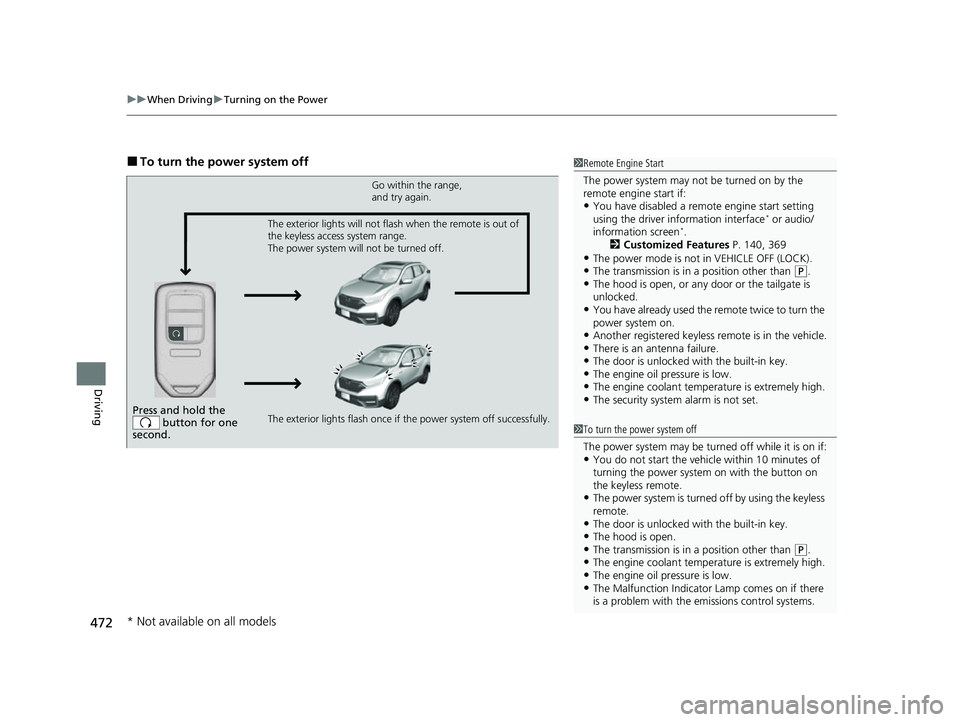
■To turn the power system off1Remote Engine Start
The power system may not be turned on by the
remote engine start if:
•You have disabled a remo te engine start setting
using the driver information interface* or audio/
information screen*.
2 Customized Features P. 140, 369
•The power mode is not in VEHICLE OFF (LOCK).•The transmission is in a position other than (P.•The hood is open, or any door or the tailgate is
unlocked.
•You have already used the remote twice to turn the
power system on.
•Another registered keyless remote is in the vehicle.•There is an antenna failure.•The door is unlocked with the built-in key.•The engine oil pressure is low.•The engine coolant temper ature is extremely high.•The security system alarm is not set.Press and hold the
button for one
second.
Go within the range,
and try again.
The exterior lights flash once if the power system off successfully. The exterior lights will not flash when the remote is out of
the keyless access system range.
The power system will not be turned off.
1 To turn the power system off
The power system may be turned off while it is on if:
•You do not start the vehicl e within 10 minutes of
turning the power system on with the button on
the keyless remote.
•The power system is turned off by using the keyless
remote.
•The door is unlocked with the built-in key.•The hood is open.•The transmission is in a position other than ( P.•The engine coolant temper ature is extremely high.•The engine oil pressure is low.•The Malfunction Indicator Lamp comes on if there
is a problem with the emissions control systems.
* Not available on all models
22 CR-V HEV ELP-31TPG6200.book 472 ページ 2021年6月30日 水曜日 午前11時6分
Page 513 of 692

511
uuHonda Sensing ®u Collision Mitigation Braking SystemTM (CMBSTM)
Continued
Driving
The system may automatically shut off and the CMBSTM indicator will come on under
certain conditions. Some examples of these conditions are listed below. Other
conditions may reduce some of the CMBS
TM functions.
2 Front Sensor Camera P. 548
2 Radar Sensor P. 550
■Environmental conditions
• Driving in bad weather (rain, fog, snow, etc.).
• Sudden changes between light and dark, such as an entrance or exit of a tunnel.
• There is little contrast between objects and the background.
• Driving into low sunlight (e.g., at dawn or dusk).
• Strong light is reflec ted onto the roadway.
• Driving in the shadows of trees, buildings, etc.
• Roadway objects or structures are misinterpreted as vehicles and pedestrians.
• Reflections on the interior of the front windshield.
• Driving at night or in a dark place such as a tunnel (due to low-light conditions,
pedestrians or other vehicles may not be detected).
■Roadway conditions
• Driving on a snowy or wet roadway (obs cured lane marking, vehicle tracks,
reflected lights, road spray, high contrast).
• Driving on curvy, winding, or undulating roads.
• The road is hilly or the vehicle is approaching the crest of a hill.
■CMBSTM Conditions and Limitations
22 CR-V HEV ELP-31TPG6200.book 511 ページ 2021年6月30日 水曜日 午前11時6分
Page 514 of 692
512
uuHonda Sensing ®u Collision Mitigation Braking SystemTM (CMBSTM)
Driving
■Vehicle conditions
• Headlight lenses are dirty or the headlights are not properly adjusted.
• The outside of the windshie ld is blocked by dirt, mud, leaves, wet snow, etc.
• The inside of the windshield is fogged.
• An abnormal tire or wheel condition (incorre ct sizes, varied sizes or construction,
improperly inflated, etc.).
• When tire chains are installed.
• The vehicle is tilted due to a heav y load or suspension modifications.
• The camera temperature gets too high.
• Driving with the parking brake applied.
• When the radar sensor in the front grille gets dirty.
• Driving at night or in a dark place (e .g., a tunnel) with the headlights off.
22 CR-V HEV ELP-31TPG6200.book 512 ページ 2021年6月30日 水曜日 午前11時6分
