Page 99 of 692
97
uuIndicators u
Continued
Instrument Panel
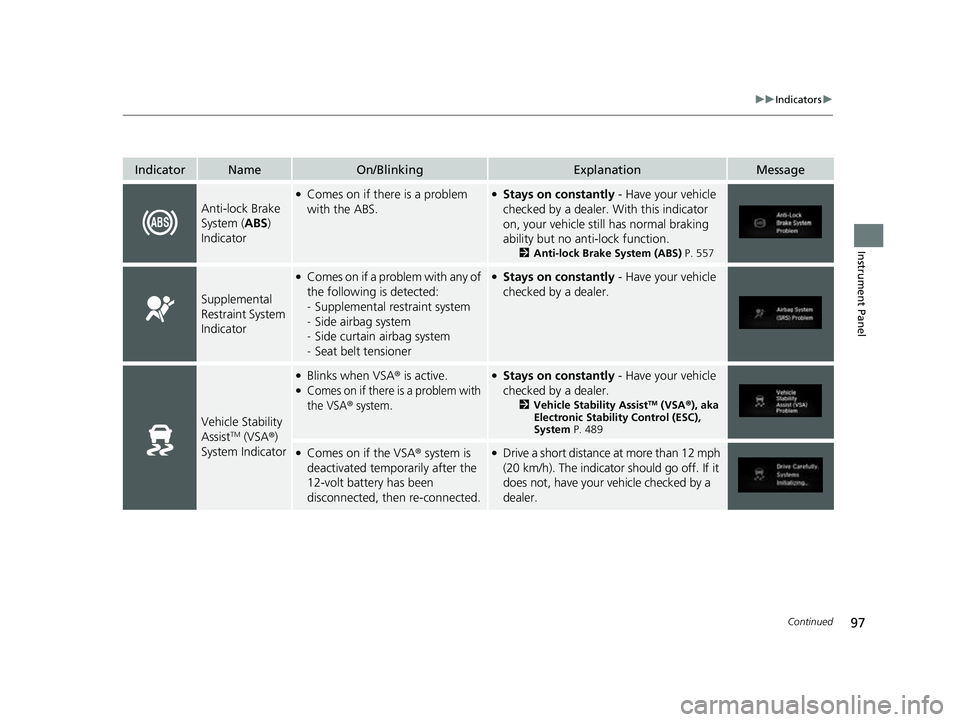
IndicatorNameOn/BlinkingExplanationMessage
Anti-lock Brake
System (ABS)
Indicator
●Comes on if there is a problem
with the ABS.●Stays on constantly - Have your vehicle
checked by a dealer. With this indicator
on, your vehicle still has normal braking
ability but no anti-lock function.
2 Anti-lock Brake System (ABS) P. 557
Supplemental
Restraint System
Indicator
●Comes on if a problem with any of
the following is detected:
-Supplemental restraint system
- Side airbag system
- Side curtain airbag system
- Seat belt tensioner●Stays on constantly - Have your vehicle
checked by a dealer.
Vehicle Stability
AssistTM (VSA ®)
System Indicator
●Blinks when VSA ® is active.●Comes on if there is a problem with
the VSA
® system.
●Stays on constantly - Have your vehicle
checked by a dealer.
2Vehicle Stability AssistTM (VSA ®), aka
Electronic Stability Control (ESC),
System P. 489
●Comes on if the VSA ® system is
deactivated temporarily after the
12-volt battery has been
disconnected, then re-connected.●Drive a short distance at more than 12 mph
(20 km/h). The indicator should go off. If it
does not, have your vehicle checked by a
dealer.
22 CR-V HEV ELP-31TPG6200.book 97 ページ 2021年6月30日 水曜日 午前11時6分
Page 106 of 692

104
uuIndicators u
Instrument Panel
IndicatorNameOn/BlinkingExplanationMessage
Road Departure
Mitigation
(RDM) Indicator
●Comes on when the RDM system
shuts itself off.●Stays on - The area around the camera is
blocked by dirt, mud, etc. Stop your
vehicle in a safe place and wipe the debris
off with a soft cloth.
●Have your vehicle checked by a dealer if
the indicator and message come back on
after you cleaned the area around the
camera.
2 Front Sensor Camera P. 548
●Indicator may come on temporarily when
passing through an enclosed space, such
as a tunnel.
●The area around the radar sensor is
blocked by dirt, mud, etc. Stop your
vehicle in a safe place and wipe the debris
off with a soft cloth. Indicator may take
some time to go off after the radar sensor
is cleaned.
●Have your vehicle checked by a dealer if
the indicator does not go off even after
you cleaned the radar sensor.
2 Radar Sensor P. 550
●Indicator may come on
temporarily when the Maximum
Load Limit is exceeded.●Make sure the total load is within the
Maximum Load Limit.
2Maximum Load Limit P. 463●Stays on constantly - Have your vehicle
checked by a dealer.
—
22 CR-V HEV ELP-31TPG6200.book 104 ページ 2021年6月30日 水曜日 午前11時6分
Page 109 of 692

107
uuIndicators u
Continued
Instrument Panel
IndicatorNameOn/BlinkingExplanationMessage
Collision
Mitigation
Braking
System
TM
(CMBSTM)
Indicator
●Comes on when you deactivate
the CMBSTM. A driver information
interface message appears for five
seconds.
●Comes on if there is a problem
with the CMBSTM.
●Stays on constantly without the
CMBSTM off - Have your vehicle checked
by a dealer.
2 Collision Mitigation Braking
SystemTM (CMBSTM) P. 506
●Comes on if the CMBSTM is
deactivated temporarily after the
12-volt battery has been
disconnected, then re-connected.●Drive a short distance at more than 12 mph
(20 km/h). The indicator should go off. If it
does not, have your vehicle checked by a
dealer.
●Comes on when the CMBSTM
shuts itself off.●Stays on - The area around the camera is
blocked by dirt, mud, etc. Stop your
vehicle in a safe place, and wipe it off with
a soft cloth.
2 Front Sensor Camera P. 548●Have your vehicle checked by a dealer if
the indicator does not go off even after
you cleaned the camera.
22 CR-V HEV ELP-31TPG6200.book 107 ページ 2021年6月30日 水曜日 午前11時6分
Page 110 of 692
108
uuIndicators u
Instrument Panel
IndicatorNameOn/BlinkingExplanationMessage
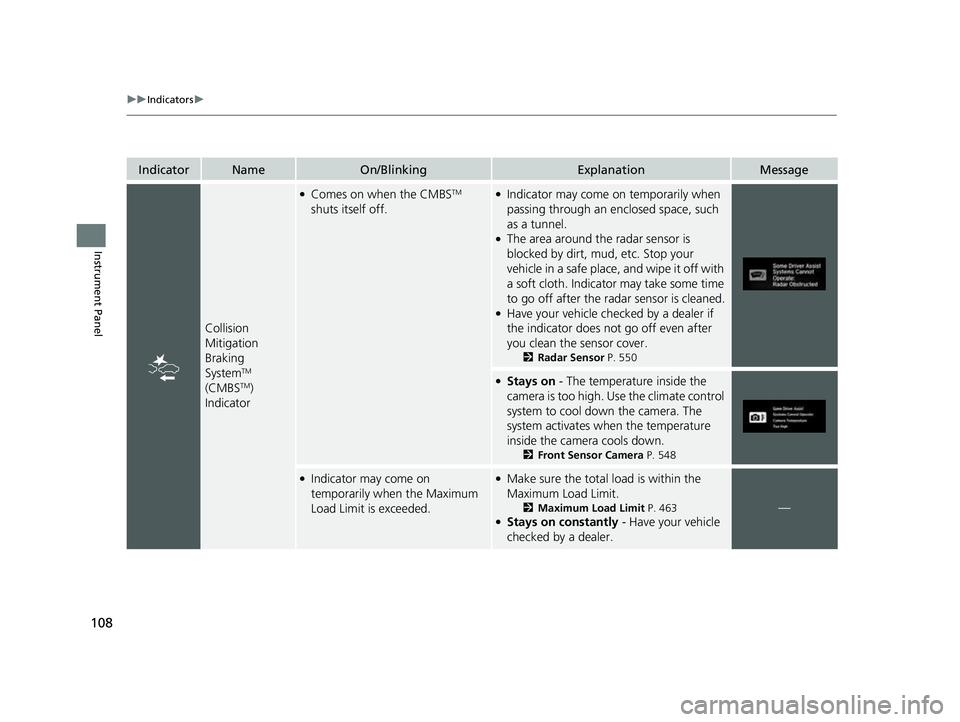
Collision
Mitigation
Braking
System
TM
(CMBSTM)
Indicator
●Comes on when the CMBSTM
shuts itself off.●Indicator may come on temporarily when
passing through an enclosed space, such
as a tunnel.
●The area around the radar sensor is
blocked by dirt, mud, etc. Stop your
vehicle in a safe place, and wipe it off with
a soft cloth. Indicator may take some time
to go off after the radar sensor is cleaned.
●Have your vehicle checked by a dealer if
the indicator does not go off even after
you clean the sensor cover.
2 Radar Sensor P. 550
●Stays on - The temperature inside the
camera is too high. Use the climate control
system to cool down the camera. The
system activates when the temperature
inside the camera cools down.
2 Front Sensor Camera P. 548
●Indicator may come on
temporarily when the Maximum
Load Limit is exceeded.●Make sure the total load is within the
Maximum Load Limit.
2Maximum Load Limit P. 463●Stays on constantly - Have your vehicle
checked by a dealer.
—
22 CR-V HEV ELP-31TPG6200.book 108 ページ 2021年6月30日 水曜日 午前11時6分
Page 120 of 692

118
uuIndicators uDriver Information Interface Wa rning and Information Messages
Instrument Panel
MessageConditionExplanation
●Appears if there is a problem with the automatic
lighting control system.●Appears while driving - Manually turn the lights
on, and have your vehicl e checked by a dealer.
●Appears if there is a problem with the headlights.●Appears while driving - The headlights may not be
on.
When conditions allow you to drive safely, have your
vehicle checked by a dealer as soon as possible.
●Appears when you unlock and open the driver’s door
while the power system is on by remote engine start.
2 Remote Engine Start P. 471
●Appears if the vehicle is being driven in a manner
consistent with drowsy or inattentive driving.
2Driver Attention Monitor P. 135
●Appears when ACC with Lo w Speed Follow has been
automatically canceled.●You can resume the set speed after the condition
that caused ACC with Low Speed Follow to cancel
improves. Press the RES/+ button.
2Adaptive Cruise Control (ACC) with Low Speed
Follow P. 517
22 CR-V HEV ELP-31TPG6200.book 118 ページ 2021年6月30日 水曜日 午前11時6分
Page 126 of 692

124
uuIndicators uDriver Information Interface Wa rning and Information Messages
Instrument Panel
MessageConditionExplanation
●Appears if the temperature inside the front sensor
camera is too high and some driver assist systems
cannot be activated.●Use the climate control system to cool down the
camera.
●Disappears - The camera has been cooled down
and the systems are activated normally.
2 Front Sensor Camera P. 548
2 Honda Sensing ® P. 503
●Appears if the area around the front sensor camera is
blocked by dirt, mud, etc. and be prevented from
detecting a vehicle in front.
●May appear when driving in bad weather (rain, snow,
fog, etc.)
●When the front window gets dirty, stop your vehicle
in a safe place, and wipe it off with a soft cloth.
●Have your vehicle checked by a dealer if the message
does not disappear even a fter you cleaned the area
around the camera.
2 Front Sensor Camera P. 548
2 Honda Sensing ® P. 503
●Appears if there is a proble m with the auto high-beam.●Manually operate the headlight switch.●If you are driving with the high beam headlights
when this happens, the headlights are changed to
low beams.
22 CR-V HEV ELP-31TPG6200.book 124 ページ 2021年6月30日 水曜日 午前11時6分
Page 144 of 692
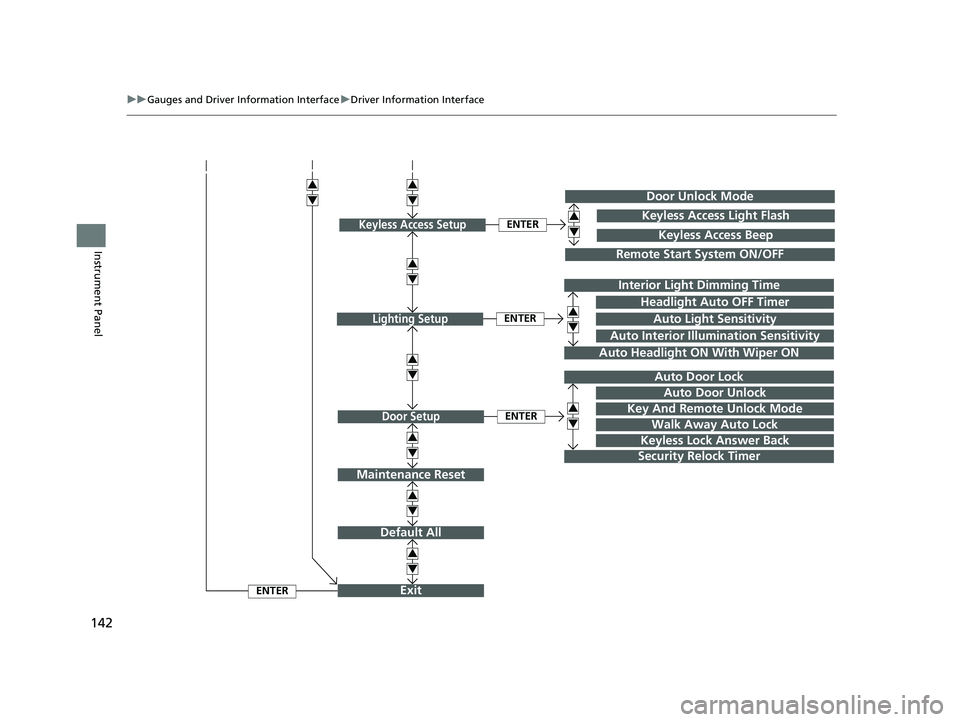
142
uuGauges and Driver Information Interface uDriver Information Interface
Instrument Panel
Exit
Default All
Auto Door Lock
Walk Away Auto Lock
Security Relock Timer
Headlight Auto OFF Timer
Auto Headlight ON With Wiper ON
ENTER
ENTER
Lighting Setup
Door Setup
ENTER
Auto Interior Illumination Sensitivity
Door Unlock Mode
Remote Start System ON/OFF
ENTERKeyless Access SetupKeyless Access Light Flash
Keyless Access Beep
3
4
3
4
3
4
3
4
3
4
3
4
3
4Interior Light Dimming Time
Auto Light Sensitivity
Key And Remote Unlock Mode
Keyless Lock Answer Back
Auto Door Unlock
Maintenance Reset
3
4
3
4
3
4
22 CR-V HEV ELP-31TPG6200.book 142 ページ 2021年6月30日 水曜日 午前11時6分
Page 147 of 692
145
uuGauges and Driver Information Interface uDriver Information Interface
Continued
Instrument Panel
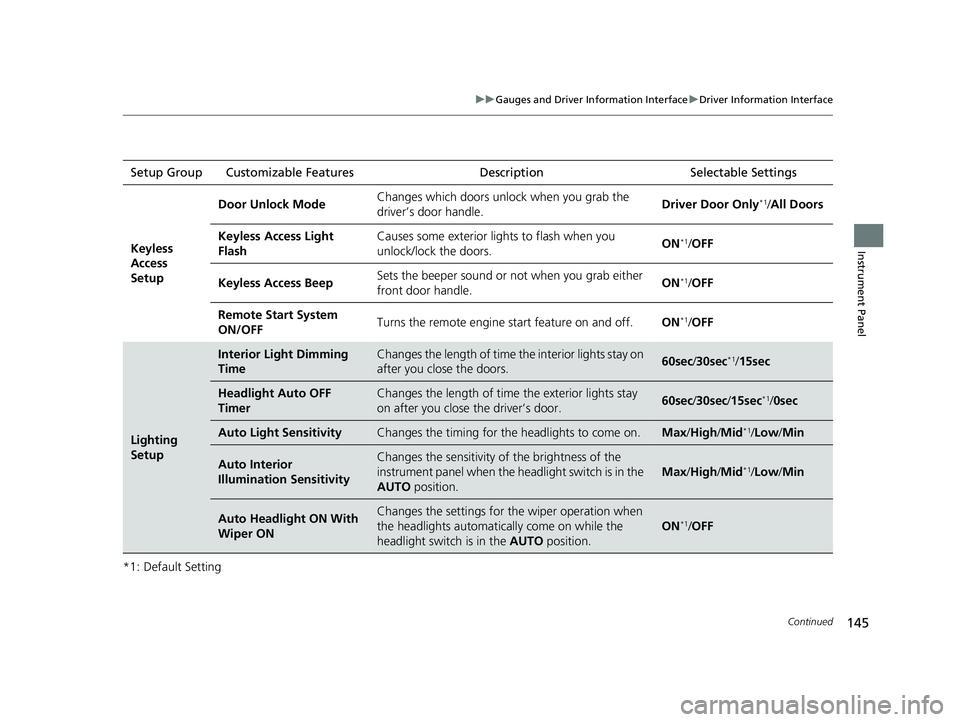
*1: Default SettingSetup Group Customizable Features
Description Selectable Settings
Keyless
Access
Setup
Door Unlock ModeChanges which doors unlock when you grab the
driver’s door handle.Driver Door Only*1/All Doors
Keyless Access Light
FlashCauses some exterior li ghts to flash when you
unlock/lock the doors.ON*1/ OFF
Keyless Access BeepSets the beeper sound or not when you grab either
front door handle.ON*1/OFF
Remote Start System
ON/OFFTurns the remote engine start feature on and off.ON*1/OFF
Lighting
Setup
Interior Light Dimming
TimeChanges the length of time the interior lights stay on
after you close the doors.60sec /30sec*1/15sec
Headlight Auto OFF
TimerChanges the length of time the exterior lights stay
on after you close the driver’s door.60sec /30sec /15sec*1/ 0sec
Auto Light SensitivityChanges the timing for th e headlights to come on.Max/High /Mid*1/Low /Min
Auto Interior
Illumination SensitivityChanges the sensitivity of the brightness of the
instrument panel when the headlight switch is in the
AUTO position.
Max/High /Mid*1/Low /Min
Auto Headlight ON With
Wiper ONChanges the settings for th e wiper operation when
the headlights automatica lly come on while the
headlight switch is in the AUTO position.
ON*1/OFF
22 CR-V HEV ELP-31TPG6200.book 145 ページ 2021年6月30日 水曜日 午前11時6分