Page 498 of 692
496
uuWhen Driving uTire Pressure Monitoring System (TPMS)
Driving
You can calibrate the system from the
customized feature on the audio/information
screen.
1. Set the power mode to ON.
2. Select .
3. Select Settings .
4. Select Vehicle .
5. Select TPMS Calibration .
6. Select Cancel or Calibrate .
u When the calibration is complete, the
display returns to the customization
menu screen.
• If the Unable to initialize TPMS. message
appears, repeat step 6.
• The calibration pr ocess finishes
automatically.
Models with Display Audio
22 CR-V HEV ELP-31TPG6200.book 496 ページ 2021年6月30日 水曜日 午前11時6分
Page 500 of 692
498
uuWhen Driving uTire Pressure Monitoring System (TPMS) - Required Federal Explanation
Driving
Please note that the TPMS is not a substitute for proper tire
maintenance, and it is the driver ’s responsibility to maintain
correct tire pressure, even if un der-inflation has not reached the
level to trigger illumina tion of the TPMS low ti re pressure telltale.
Your vehicle has also been eq uipped with a TPMS malfunction
indicator to indicate when the sy stem is not operating properly.
The TPMS malfunction indicator is combined with the low tire
pressure telltale. When the system detects a malfunction, the
telltale will flash fo r approximately one minute and then remain
continuously illuminated. This sequence will continue upon
subsequent vehicle start-ups as long as the malfunction exists.
When the malfunction indicator is illuminated, the system may
not be able to detect or signal low tire pressure as intended.
TPMS malfunctions may occur for a variety of reasons, including
the installation of replacement or alternate tires or wheels on the
vehicle that prevent the TPMS from functioning properly.
Always check the TPMS malfunction telltale after replacing one or
more tires or wheels on your vehicle to ensure that the
replacement or alternate tires and wheels allow the TPMS to
continue to function properly.
22 CR-V HEV ELP-31TPG6200.book 498 ページ 2021年6月30日 水曜日 午前11時6分
Page 501 of 692

499
uuWhen Driving uBlind spot information System*
Continued
Driving
Blind spot information System*
Is designed to detect vehicles in specified alert zones adjacent to your vehicle,
particularly in harder to see areas commonly known as “blind spots.”
When the system detects vehicles approaching from behind in adjacent lanes, the
appropriate indicator comes on for a few se conds, providing assistance when you
change lanes.
■How the system works
1 Blind spot information System*
Important Safety Reminder
Like all assistance systems, blind spot information
system has limitations. Over reliance on blind spot
information system may result in a collision.
The system is for your convenience only. Even if an
object is within the alert zone, the following
situations may occur.
•The blind spot informatio n system alert indicator
may not come on due to obstruction (splashes,
etc.) even without the Blind Spot Info Not
Available driver information interface appearing.
•The blind spot information system alert indicator
may come on even with the message appearing.
3WARNING
Failure to visually confirm that it is safe to
change lanes before doing so may result in
a crash and serious injury or death.
Do not rely only on the blind spot
information system wh en changing lanes.
Always look in your mi rrors, to either side
of your vehicle, and behind you for other
vehicles before changing lanes.
Alert zone range
A: Approx. 1.6 ft. (0.5 m)
B: Approx. 10 ft. (3 m)
C: Approx. 10 ft. (3 m) Radar Sensors:
underneath the
rear bumper
corners
Alert ZoneA
B
C
●The transmission is in (D.●Your vehicle speed is
between 20 mph (32 km/h)
and 100 mph (160 km/h)
* Not available on all models
22 CR-V HEV ELP-31TPG6200.book 499 ページ 2021年6月30日 水曜日 午前11時6分
Page 502 of 692

uuWhen Driving uBlind spot information System*
500
Driving
■When the system detects a vehicle1Blind spot information System*
The blind spot information system alert indicator may
not come on under the following conditions:
•A vehicle does not stay in the alert zone for more
than two seconds.
•A vehicle is parked in a side lane.
•The speed difference betw een your vehicle and the
vehicle you are passing is greater than 6 mph (10
km/h).
•An object not detected by the radar sensors
approaches or passes your vehicle.
•A vehicle running in the adjacent lane is a
motorcycle or other small vehicle.
You can change the setting for the blind spot
information system. 2 Customized Features P. 369
■Comes on when:●A vehicle enters the alert zone from behind
to overtake you with a speed difference of
no more than 31 mph (50 km/h) from your
vehicle.
●You pass a vehicle with a speed difference
of no more than 12 mph (20 km/h).
■Blinks and the beeper sounds when:
You move the turn signal lever in the direction
of the detected vehicle. The beeper sounds
three times. Comes On
Blinks
Blind spot information
System Alert Indicator:
Located on the outside rearview mirror on
both sides.
* Not available on all models
22 CR-V HEV ELP-31TPG6200.book 500 ページ 2021年6月30日 水曜日 午前11時6分
Page 508 of 692
506
uuHonda Sensing ®u Collision Mitigation Braking SystemTM (CMBSTM)
Driving
Collision Mitigati on Braking SystemTM (CMBSTM)
The system can assist you when it determine s there is a possibility of your vehicle
colliding with a vehicle or a pedestrian de tected in front of your vehicle. The CMBSTM
is designed to alert you when the potential for a collision is determined, as well as to
reduce your vehicle speed to help minimize collision severity when a collision is
deemed unavoidable.
1 Collision Mitigation Braking SystemTM (CMBSTM)
Important Safety Reminder
The CMBS
TM is designed to reduce the severity of an
unavoidable collision. It does not prevent collisions
nor stop the vehicle automati cally. It is still your
responsibility to operate th e brake pedal and steering
wheel appropriately acco rding to the driving
conditions.
The CMBS
TM may not activate or may not detect a
vehicle in front of y our vehicle under certain
conditions:
2 CMBS
TM Conditions and Limitations P. 511
For directions on the prop er handling of the radar
sensor, refer to the following page. 2 Radar Sensor P. 550
You can read about handling information for the
camera equipped with this system. 2 Front Sensor Camera P. 548
22 CR-V HEV ELP-31TPG6200.book 506 ページ 2021年6月30日 水曜日 午前11時6分
Page 509 of 692

Continued507
uuHonda Sensing ®u Collision Mitigation Braking SystemTM (CMBSTM)
Driving
■How the system works
The system starts monitoring the roadway ah ead when your vehicle speed is about
3 mph (5 km/h) or above and will search for a vehicle in front of you. The radar sensor is
in the front grille.
The CMBS
TM activates when:●The speed difference between your vehicle and a vehicle or pedestrian detected in
front of you becomes about 3 mph (5 km/h) and over with a chance of a collision.
●Your vehicle speed is about 62 mph (100 km/h) or less and the system
determines there is a chance of a collision with:
- Vehicles detected in front of you that are stationary, oncoming, or traveling in
your same direction.
- A pedestrian who is detected in front of you.
●Your vehicle speed is above 62 mph (100 km/h), and the system determines
there is a chance of a collision with a vehicle detected in front of you traveling
in your same direction. The camera is
located behind the
rearview mirror.
When to use
1
How the system works
When the CMBS
TM activates, it may automatically
apply the brake. It will be canceled when your vehicle
stops or a potential coll ision is not determined.
22 CR-V HEV ELP-31TPG6200.book 507 ページ 2021年6月30日 水曜日 午前11時6分
Page 510 of 692
uuHonda Sensing ®u Collision Mitigation Braking SystemTM (CMBSTM)
508
Driving
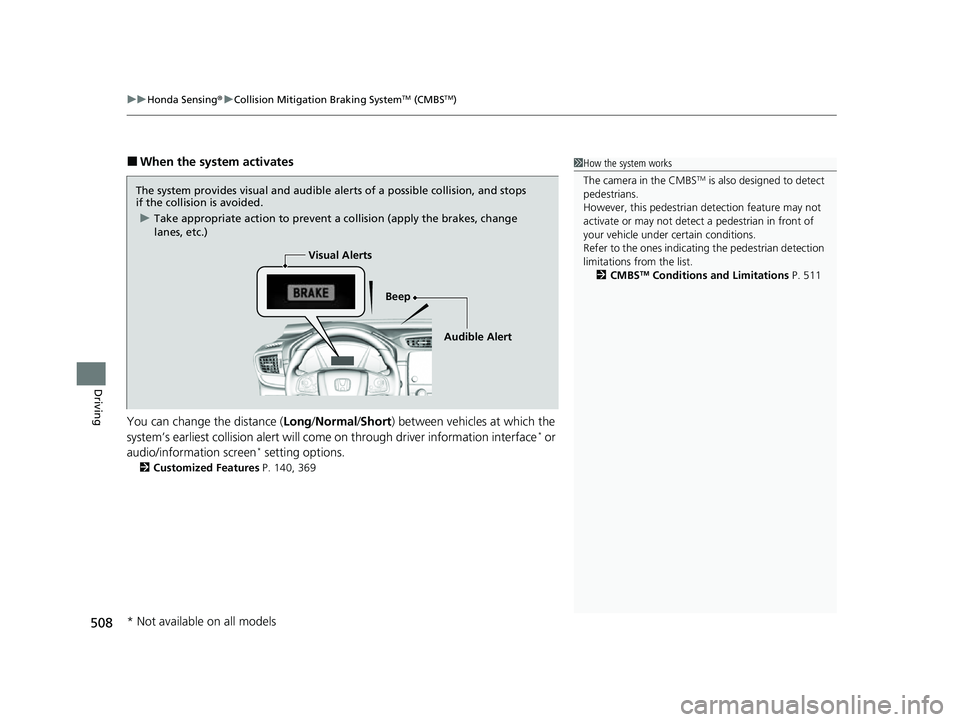
■When the system activates
You can change the distance ( Long/Normal /Short ) between vehicles at which the
system’s earliest collision alert will co me on through driver information interface
* or
audio/information screen* setting options.
2 Customized Features P. 140, 369
1How the system works
The camera in the CMBS
TM is also designed to detect
pedestrians.
However, this pedestrian detection feature may not
activate or may not detect a pedestrian in front of
your vehicle under certain conditions.
Refer to the ones indicating the pedestrian detection
limitations from the list. 2 CMBS
TM Conditions and Limitations P. 511
The system provides visual and audible alerts of a possible collision, and stops
if the collision is avoided.
u Take appropriate action to prevent a collision (apply the brakes, change
lanes, etc.)
Beep
Visual Alerts
Audible Alert
* Not available on all models
22 CR-V HEV ELP-31TPG6200.book 508 ページ 2021年6月30日 水曜日 午前11時6分
Page 511 of 692

509
uuHonda Sensing ®u Collision Mitigation Braking SystemTM (CMBSTM)
Continued
Driving
The system has three alert stages for a possible collis ion. However, depending on circumstances, the CMBSTM may not go through all of
the stages before initiating the last stage.
■Collision Alert Stages
Distance between vehiclesCMBSTM
The sensors detect a vehicleAudible & Visual WARNINGSBraking
Stage oneThere is a risk of a collision with
the vehicle ahead of you.
When in Long, visual and
audible alerts come on at a
longer distance from a vehicle
ahead than in Normal setting,
and in Short, at a shorter
distance than in Normal.
—
Stage
twoThe risk of a collision has
increased, time to respond is
reduced.
Visual and audible alerts.
Lightly applied
Stage three The CMBSTM determines that a
collision is unavoidable.Forcefully applied
Your Vehicle Vehicle
Ahead
NORMAL
SHORT
LONG
Your
Vehicle Vehicle
Ahead
Your
Vehicle
Vehicle
Ahead
22 CR-V HEV ELP-31TPG6200.book 509 ページ 2021年6月30日 水曜日 午前11時6分
