2022 FORD MAVERICK child
[x] Cancel search: childPage 105 of 533
Pull up the window switch and hold within
a few seconds of the window reaching the
bounce-back position. The window travels
up with no bounce-back protection. The
window stops if you release the switch
before the window fully closes.
LOCKING THE REAR WINDOW
CONTROLS
Press the control to lock or
unlock the rear window controls.
It illuminates when you lock the
rear window controls.
OPENING AND CLOSING THE
SLIDING WINDOWS (IF EQUIPPED) WARNING:
When closing the
power windows, verify they are free of
obstruction and make sure that children
and pets are not in the proximity of the
window openings. WARNING:
Do not leave children
unattended in your vehicle and do not
let them play with the power windows.
Failure to follow this instruction could
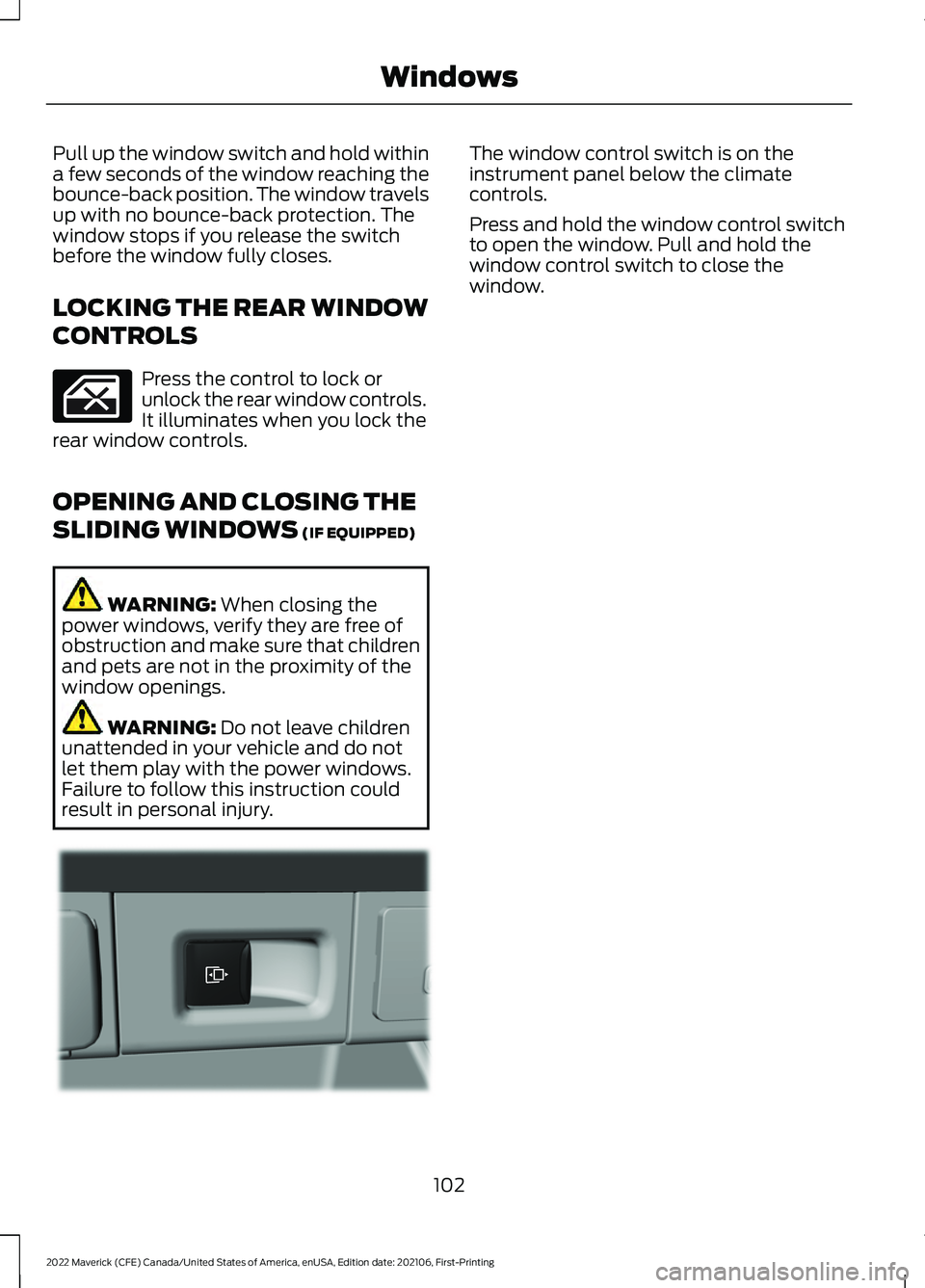
result in personal injury. The window control switch is on the
instrument panel below the climate
controls.
Press and hold the window control switch
to open the window. Pull and hold the
window control switch to close the
window.
102
2022 Maverick (CFE) Canada/United States of America, enUSA, Edition date: 202106, First-Printing Windows E354505
Page 109 of 533
OPENING AND CLOSING THE
SUN SHADE
WARNING: Do not leave children
unattended in your vehicle and do not
let them play with the sun shades.
Failure to follow this instruction could
result in personal injury.
Opening and Closing the Sun
Shade
The sliding shade can be manually opened
or closed when the moonroof is closed.
Pull the shade toward the front of the
vehicle to close it.
OPENING AND CLOSING THE
MOONROOF WARNING:
Do not leave children
unattended in your vehicle and do not
let them play with the moonroof. Failure
to follow this instruction could result in
personal injury. WARNING:
When closing the
moonroof, verify that it is free of
obstruction and make sure that children
and pets are not in the proximity of the
roof opening.
Note: With the panoramic moonroof panel
fully open and vehicle speed increasing to
approximately
50 mph (80 km/h), the
moonroof opening panel automatically
closes approximately 8 in (20 cm) to reduce
excessive wind noise at higher speeds. This
feature only functions one time per key
cycle, so you can open the glass further if
desired. The moonroof controls are located on the
overhead console and have a one-touch
open and close feature. To stop its
movement during one-touch operation,
press the control a second time.
Opening the Moonroof Press and release the switch to
activate the one-touch open
feature. To stop movement,
press the switch a second time.
Closing the Moonroof Press and release the switch to
activate the one-touch close
feature, from either the open or
vent positions. To stop movement, press
the switch a second time.
VENTING THE MOONROOF WARNING:
Do not leave children
unattended in your vehicle and do not
let them play with the moonroof. Failure
to follow this instruction could result in
personal injury. WARNING:
When closing the
moonroof, verify that it is free of
obstruction and make sure that children
and pets are not in the proximity of the
roof opening.
The moonroof controls are on the
overhead console. With the moonroof in the closed
position, press and release the
switch to vent the moonroof. To
close the moonroof from the vent position,
press and release the switch again.
106
2022 Maverick (CFE) Canada/United States of America, enUSA, Edition date: 202106, First-Printing Moonroof
(If Equipped)E340663 E340636 E340636
Page 148 of 533
WHAT IS THE REAR
OCCUPANT ALERT SYSTEM
The rear occupant alert system monitors
vehicle conditions and notifies you to check
for rear seat occupants when you switch
the ignition off.
HOW DOES THE REAR
OCCUPANT ALERT SYSTEM
WORK
The system monitors when rear doors have
been opened and closed to indicate the
potential presence of an occupant in the
rear seat.
A message displays in the information and
entertainment display screen and an
audible warning sounds when you switch
the ignition off after any of the following
conditions have been met:
•
A rear door is opened or closed while
the ignition is on.
• You switch the ignition on within 15
minutes of a rear door opening and
closing.
• You switch the ignition on within 15
minutes of the alert having displayed
or sounded.
REAR OCCUPANT ALERT
SYSTEM PRECAUTIONS WARNING: On hot days, the
temperature inside the vehicle can rise
very quickly. Exposure of people or
animals to these high temperatures for
even a short time can cause death or
serious heat related injuries, including
brain damage. Small children are
particularly at risk. WARNING:
Do not leave children
or pets unattended in your vehicle.
Failure to follow this instruction could
result in personal injury or death.
REAR OCCUPANT ALERT
SYSTEM LIMITATIONS
The system does not detect the presence
of objects or passengers in the rear seat.
It monitors when rear doors are opened
and closed.
Note: It is possible to receive an alert when
there is no rear seat occupant, but alert
conditions are met.
Note: It is possible to receive no alert when
there is an occupant in the rear seat, if alert
conditions are not met. For example, if a rear
seat occupant does not enter the vehicle
through a rear door.
Note: The audible warning does not sound
when the front door is opened before you
switch the ignition off.
SWITCHING REAR OCCUPANT
ALERT SYSTEM ON AND OFF
1. Press
Settings on the touchscreen.
2. Press
Vehicle.
3. Switch
Rear Occupant Alert on or off.
Note: The default setting is on.
Note: Performing a master reset causes the
system to switch on again.
Semiannual Reminder
(If Equipped)
When you switch the system off, a
message appears every six months as a
reminder that the system is off. You can
switch the system back on or leave it off.
145
2022 Maverick (CFE) Canada/United States of America, enUSA, Edition date: 202106, First-Printing Rear Occupant Alert System - Vehicles With: SYNC 3
Page 283 of 533
1. Exit the vehicle immediately.
2. Advise emergency assistance that an
electric or hybrid-electric vehicle is
involved.
3. As with any vehicle fire, do not inhale smoke, vapors or gas from the vehicle,
as they may be hazardous.
Post-Incident
1. Do not store a severely damaged vehicle with a lithium-ion battery inside
a structure or within 49 ft (15 m) of any
structure or vehicle.
2. Make sure that passenger and luggage
compartments remain ventilated.
3. Call emergency assistance if you observe leaking fluids, sparks, smoke
or flames, or hear gurgling or bubbling
from the high-voltage battery.
SWITCHING THE HAZARD
FLASHERS ON AND OFF The hazard flasher button is on
the instrument panel. Press the
button to switch the hazard
flashers on if your vehicle is creating a
safety hazard for other road users.
When you switch the hazard flashers on,
all front and rear direction indicators flash.
Note: The hazard flashers operate when
the ignition is in any position, or if the key is
not in the ignition. The battery loses charge
and could have insufficient power to restart
your vehicle.
Press the button again to switch them off. JUMP STARTING THE VEHICLE
JUMP STARTING PRECAUTIONS WARNING: Batteries normally
produce explosive gases which can
cause personal injury. Therefore, do not
allow flames, sparks or lighted
substances to come near the battery.
When working near the battery, always
shield your face and protect your eyes.
Always provide correct ventilation. WARNING:
Keep batteries out of
reach of children. Batteries contain
sulfuric acid. Avoid contact with skin,
eyes or clothing. Shield your eyes when
working near the battery to protect
against possible splashing of acid
solution. In case of acid contact with skin
or eyes, flush immediately with water for
a minimum of 15 minutes and get prompt
medical attention. If acid is swallowed,
call a physician immediately. WARNING:
Use only adequately
sized cables with insulated clamps. WARNING:
Make sure that the
cables are clear of any moving parts and
fuel delivery system parts. WARNING: Connect batteries with
only the same nominal voltage. WARNING: If the engine is running
while the hood is open, stay clear of
moving engine components. Failure to
follow this warning could result in serious
personal injury or death.
Do not attempt to push-start an automatic
transmission vehicle. This could cause
transmission damage.
280
2022 Maverick (CFE) Canada/United States of America, enUSA, Edition date: 202106, First-Printing Crash and Breakdown Information
Page 313 of 533
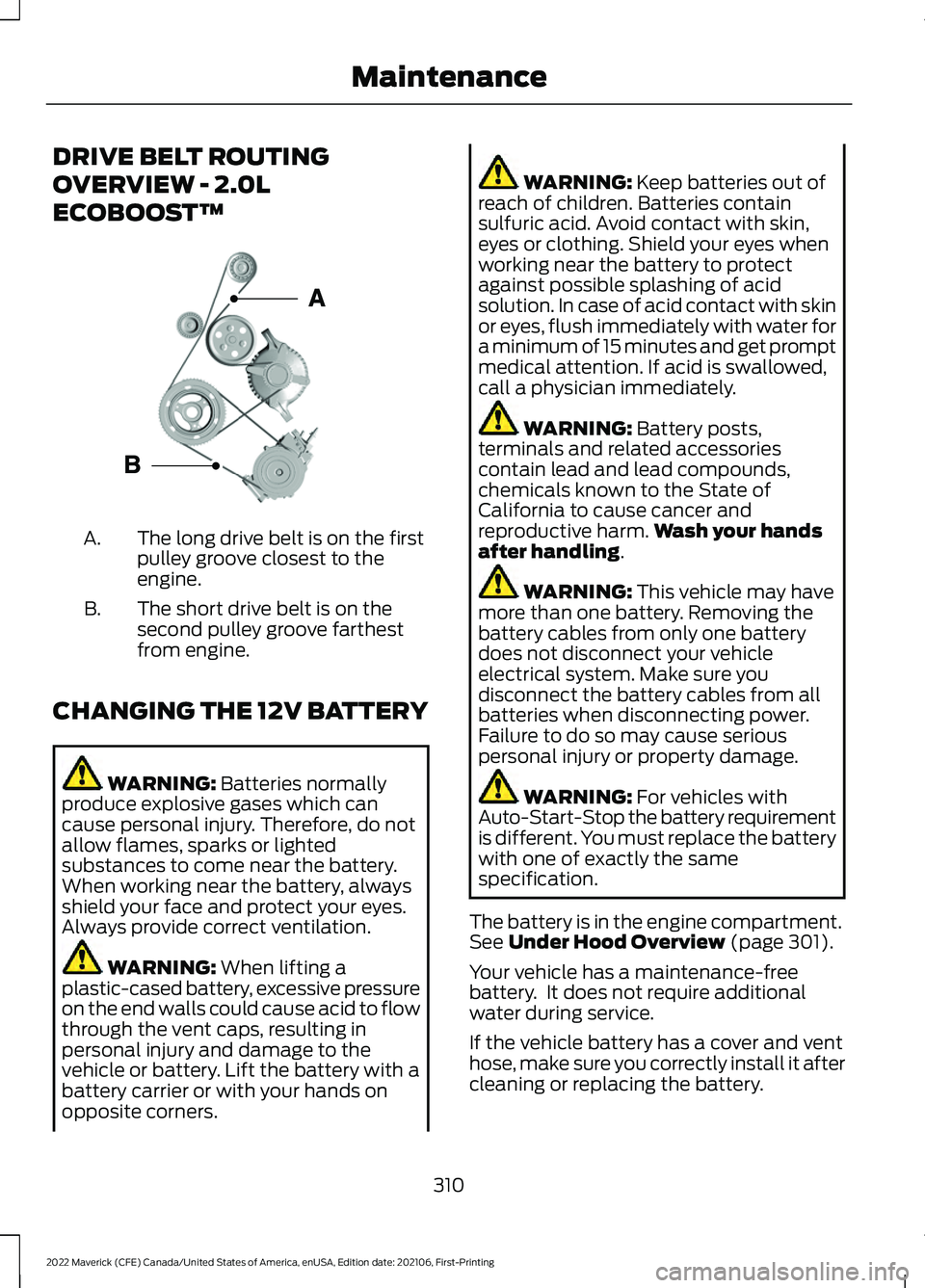
DRIVE BELT ROUTING
OVERVIEW - 2.0L
ECOBOOST™
The long drive belt is on the first
pulley groove closest to the
engine.
A.
The short drive belt is on the
second pulley groove farthest
from engine.
B.
CHANGING THE 12V BATTERY WARNING: Batteries normally
produce explosive gases which can
cause personal injury. Therefore, do not
allow flames, sparks or lighted
substances to come near the battery.
When working near the battery, always
shield your face and protect your eyes.
Always provide correct ventilation. WARNING:
When lifting a
plastic-cased battery, excessive pressure
on the end walls could cause acid to flow
through the vent caps, resulting in
personal injury and damage to the
vehicle or battery. Lift the battery with a
battery carrier or with your hands on
opposite corners. WARNING:
Keep batteries out of
reach of children. Batteries contain
sulfuric acid. Avoid contact with skin,
eyes or clothing. Shield your eyes when
working near the battery to protect
against possible splashing of acid
solution. In case of acid contact with skin
or eyes, flush immediately with water for
a minimum of 15 minutes and get prompt
medical attention. If acid is swallowed,
call a physician immediately. WARNING:
Battery posts,
terminals and related accessories
contain lead and lead compounds,
chemicals known to the State of
California to cause cancer and
reproductive harm. Wash your hands
after handling
. WARNING:
This vehicle may have
more than one battery. Removing the
battery cables from only one battery
does not disconnect your vehicle
electrical system. Make sure you
disconnect the battery cables from all
batteries when disconnecting power.
Failure to do so may cause serious
personal injury or property damage. WARNING:
For vehicles with
Auto-Start-Stop the battery requirement
is different. You must replace the battery
with one of exactly the same
specification.
The battery is in the engine compartment.
See
Under Hood Overview (page 301).
Your vehicle has a maintenance-free
battery. It does not require additional
water during service.
If the vehicle battery has a cover and vent
hose, make sure you correctly install it after
cleaning or replacing the battery.
310
2022 Maverick (CFE) Canada/United States of America, enUSA, Edition date: 202106, First-Printing Maintenance E161383
Page 494 of 533
2. Account Information
You agree: (a) when registering the
TeleNav Software, to provide TeleNav with
true, accurate, current, and complete
information about yourself, and (b) to
inform TeleNav promptly of any changes
to such information, and to keep it true,
accurate, current and complete.
3. Software License
•
Subject to your compliance with the
terms of this Agreement, TeleNav
hereby grants to you a personal,
non-exclusive, non-transferable license
(except as expressly permitted below
in connection with your permanent
transfer of the TeleNav Software
license), without the right to
sublicense, to use the TeleNav
Software (in object code form only) in
order to access and use the TeleNav
Software. This license shall terminate
upon any termination or expiration of
this Agreement. You agree that you will
use the TeleNav Software only for your
personal business or leisure purposes,
and not to provide commercial
navigation services to other parties.
3.1 License Limitations
• (a) reverse engineer, decompile,
disassemble, translate, modify, alter
or otherwise change the TeleNav
Software or any part thereof;
(b)
attempt to derive the source code,
audio library or structure of the
TeleNav Software without the prior
express written consent of TeleNav;
(c)
remove from the TeleNav
Software, or alter, any of TeleNav's or
its suppliers' trademarks, trade names,
logos, patent or copyright notices, or
other notices or markings;
(d) distribute, sublicense or otherwise
transfer the TeleNav Software to
others, except as part of your
permanent transfer of the TeleNav
Software; or
(e) use the TeleNav
Software in any manner that
I. infringes the intellectual property or
proprietary rights, rights of publicity or
privacy or other rights of any party,
ii. violates any law, statute, ordinance or
regulation, including but not limited to laws
and regulations related to spamming,
privacy, consumer and child protection,
obscenity or defamation, or
iii. is harmful, threatening, abusive,
harassing, tortuous, defamatory, vulgar,
obscene, libelous, or otherwise
objectionable; and (f) lease, rent out, or
otherwise permit unauthorized access by
third parties to the TeleNav Software
without advanced written permission of
TeleNav.
4. Disclaimers
• To the fullest extent permissible
pursuant to applicable law, in no event
will TeleNav, its licensors and suppliers,
or agents or employees of any of the
foregoing, be liable for any decision
made or action taken by you or anyone
else in reliance on the information
provided by the TeleNav Software.
TeleNav also does not warrant the
accuracy of the map or other data used
for the TeleNav Software. Such data
may not always reflect reality due to,
among other things, road closures,
construction, weather, new roads and
other changing conditions. You are
responsible for the entire risk arising
out of your use of the TeleNav
Software. For example but without
limitation, you agree not to rely on the
TeleNav Software for critical
navigation in areas where the
well-being or survival of you or others
491
2022 Maverick (CFE) Canada/United States of America, enUSA, Edition date: 202106, First-Printing Customer Information
Page 519 of 533
Catalytic Converter –
Troubleshooting..........................................181
C
atalytic Converter – Warning Lamps........181
Changing a Flat Tire...................................346
Changing a Road Wheel...........................346
Changing the 12V Battery..........................310
Changing the Engine Air Filter - 2.0L EcoBoost™................................................308
Changing the Engine Air Filter - 2.5L, Hybrid Electric Vehicle (HEV)
.............309
Changing the Fuel Filter...........................309
Changing the Remote Control Battery - Vehicles With: Push Button Start.........63
Changing the Remote Control Battery - Vehicles Without: Push Button
Start.................................................................62
Changing the Vehicle Wi-Fi Hotspot Name or Password...................................373
Charging a Device........................................148
Charging a Wireless Device.......................152
Checking MyKey System Status..............69
Checking the Brake Fluid...........................192
Checking the Coolant
................................304
Checking the Seatbelts...............................48
Checking the Tire Pressures....................338
Checking the Wiper Blades.......................90
Children and Airbags
.....................................53
Child Restraint Anchor Points....................32 Locating the Child Restraint Lower Anchor
Points................................................................... 32
Locating the Child Restraint Top Tether Anchor Points................................................... 33
What Are the Child Restraint Anchor Points................................................................... 32
Child Restraints
...............................................33
Child Restraint Position Information.............33
Child Restraints Recommendation...............34
Child Safety
.......................................................31
Child Restraint Anchor Points.......................... 32
Child Restraints..................................................... 33
Installing Child Restraints................................. 34
Child Safety Locks..........................................41
Child Safety Precautions
..............................31
Cleaning Products........................................319
Cleaning the Exterior...................................319 Cleaning Camera Lenses and
Sensors.............................................................. 321Cleaning Chrome, Aluminium or Stainless
Steel.................................................................. 320
Cleaning Headlamps and Rear Lamps................................................................ 319
Cleaning Stripes or Graphics..........................321
Cleaning the Engine Compartment............320
Cleaning the Exterior Precautions................319
Cleaning the Underbody.................................. 321
Cleaning Wheels................................................ 320
Cleaning Windows and Wiper Blades............................................................... 320
Cleaning the Interior....................................321 Cleaning Carpets and Floor Mats................322
Cleaning Displays and Screens..................... 322
Cleaning Fabric Seats and Headliners........................................................ 322
Cleaning Leather and Vinyl............................ 322
Cleaning Moonroof Tracks.............................. 323
Cleaning Plastic................................................... 321
Cleaning Seatbelts............................................ 323
Cleaning Storage Compartments...............323
Cleaning the Instrument Panel......................321
Clearing All MyKeys.......................................69
Climate Control.............................................126 Auto Mode............................................................. 127
Climate Control – Troubleshooting.............129
Climate Control – Troubleshooting.........................................129
Clima
te Control – Frequently Asked
Questions......................................................... 129
Cold Weather Precautions
........................273
Configuring the Trip Computer - Vehicles With: 4.2 Inch Screen.................................121
Connected Vehicle
......................................369
Connecting the Vehicle to a Mobile
Network............................................................ 369
Connected Vehicle Data
..............................24
Connected Vehicle Limitations..............369
Connected Vehicle Requirements........369
Connected Vehicle – Troubleshooting - Vehicles With: Modem
............................370
Connected Vehicle – Troubleshooting - Vehicles With: SYNC 3.............................371
Connecting a Bluetooth® Device
...........377
Connecting a Trailer.....................................261
Connecting a Trailer Precautions...........261
516
2022 Maverick (CFE) Canada/United States of America, enUSA, Edition date: 202106, First-Printing Index
Page 524 of 533
Hybrid Electric Vehicle
Information..................................................166
Hybrid Electric Vehicle Information – Troubleshooting............................................. 167
Hybrid Electric Vehicle Information – Troubleshooting.........................................167
Hybrid El
ectric Vehicle Information –
Frequently Asked Questions......................167
Hybrid Electric Vehicle Information – Information Messages................................. 167
Hybrid Electric Vehicle Information – Warning Lamps............................................... 167
I
Identifying Fuse Types
..............................298
Identifying the Climate Control Unit..................................................................126
Ignition Switch
...............................................156
Inflating the Tires.........................................338
Information on the Tire Sidewall...........328
Inspecting the Tire for Damage..............339
Inspecting the Tire for Wear....................339
Inspecting the Wheel Valve Stems...........................................................340
Installing Child Restraints...........................34 Combining the Seatbelt and Lower Anchors
for Attaching Child Restraints.................... 38
Installing a Child Restraint in a Center Seat....................................................................... 37
Using Lower Anchors and Tethers for Children............................................................... 36
Using Seatbelts..................................................... 34
Using Tether Straps............................................. 38
Instrument Cluster Display........................116 Personalized Settings........................................ 118
Instrument Cluster Display Main Menu - Vehicles With: 4.2 Inch Screen..............116
Instrument Cluster Display Main Menu - Vehicles With: 6.5 Inch Screen...............117
Instrument Cluster Indicators...................114
Instrument Cluster......................................108 Fuel Gauge.............................................................. 112
Instrument Cluster Overview - Gasoline, Vehicles With: 4.2 Inch Screen.............108
Instrument Cluster Overview - Gasoline, Vehicles With: 6.5 Inch Screen.............109 Instrument Cluster Overview - Hybrid
Electric Vehicle (HEV), Vehicles With:
4.2 Inch Screen............................................110
Instrument Cluster Overview - Hybrid Electric Vehicle (HEV), Vehicles With:
6.5 Inch Screen
.............................................111
Instrument Cluster Warning Lamps.......113
Instrument Panel............................................27
Integrated Trailer Brake Controller
.......268
Integrated Trailer Brake Controller –
Troubleshooting............................................ 270
Integrated Trailer Brake Controller Precautions................................................268
Integrated Trailer Brake Controller – Troubleshooting........................................270
Integrated Trailer Brake Controller – Frequently Asked Questions......................271
Integrated Trailer Brake Controller – Information Messages................................ 270
Interior Air Quality........................................134
Interior Bulbs
..................................................318
Interior Bulb Specification Chart..................318
Interior Lamp Function
................................99
Switching the Interior Lamp Function On
and Off................................................................ 99
What Is the Interior Lamp Function..............99
Interior Lighting
..............................................99
Ambient Lighting................................................. 99
Interior Lamp Function...................................... 99
Interior Lighting – Troubleshooting.............100
Interior Lighting – Troubleshooting
........................................100
Interior Lighting – Frequently Asked
Questions......................................................... 100
Interior Mirror..................................................103
Interior Mirror Precautions........................103
Introduction.......................................................17
J
Jump Starting the Vehicle........................280 Jump Starting Precautions............................ 280
Jump Starting the Vehicle............................... 281
Preparing the Vehicle........................................ 281
521
2022 Maverick (CFE) Canada/United States of America, enUSA, Edition date: 202106, First-Printing Index