2022 FORD MAVERICK transmission
[x] Cancel search: transmissionPage 190 of 533
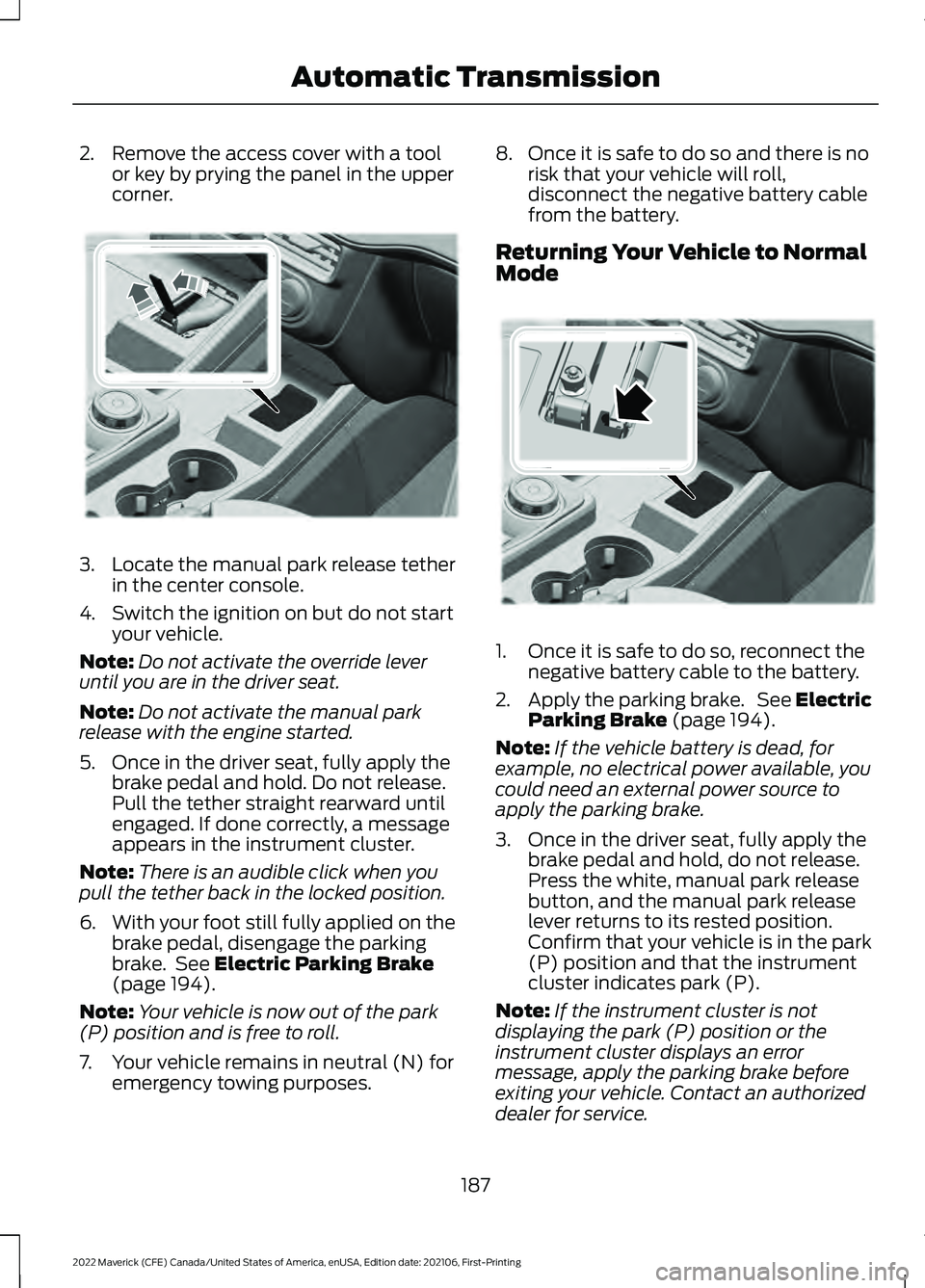
2. Remove the access cover with a tool
or key by prying the panel in the upper
corner. 3.
Locate the manual park release tether
in the center console.
4. Switch the ignition on but do not start your vehicle.
Note: Do not activate the override lever
until you are in the driver seat.
Note: Do not activate the manual park
release with the engine started.
5. Once in the driver seat, fully apply the brake pedal and hold. Do not release.
Pull the tether straight rearward until
engaged. If done correctly, a message
appears in the instrument cluster.
Note: There is an audible click when you
pull the tether back in the locked position.
6. With your foot still fully applied on the
brake pedal, disengage the parking
brake. See Electric Parking Brake
(page 194).
Note: Your vehicle is now out of the park
(P) position and is free to roll.
7. Your vehicle remains in neutral (N) for emergency towing purposes. 8. Once it is safe to do so and there is no
risk that your vehicle will roll,
disconnect the negative battery cable
from the battery.
Returning Your Vehicle to Normal
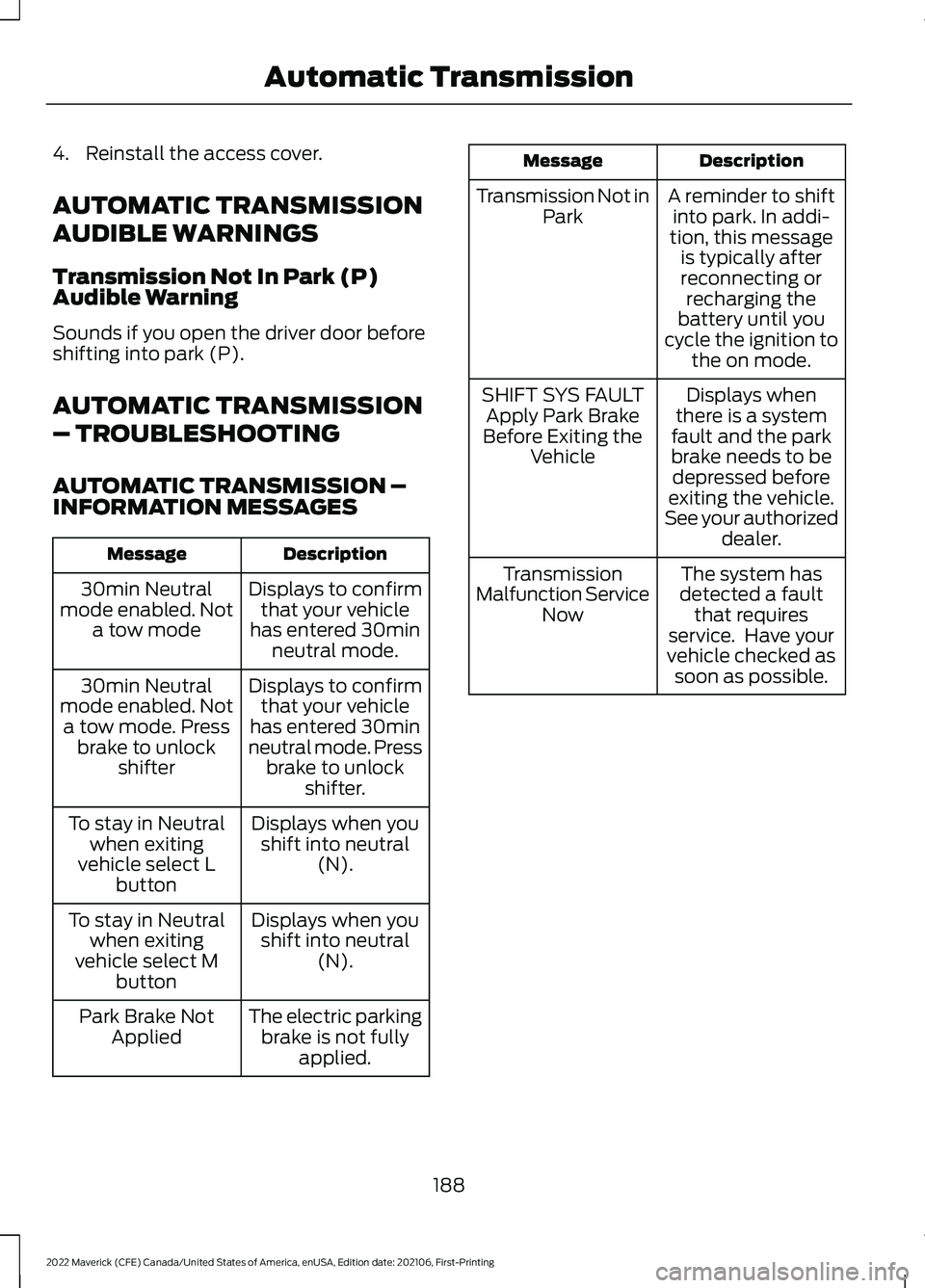
Mode 1. Once it is safe to do so, reconnect the
negative battery cable to the battery.
2. Apply the parking brake. See Electric
Parking Brake
(page 194).
Note: If the vehicle battery is dead, for
example, no electrical power available, you
could need an external power source to
apply the parking brake.
3. Once in the driver seat, fully apply the brake pedal and hold, do not release.
Press the white, manual park release
button, and the manual park release
lever returns to its rested position.
Confirm that your vehicle is in the park
(P) position and that the instrument
cluster indicates park (P).
Note: If the instrument cluster is not
displaying the park (P) position or the
instrument cluster displays an error
message, apply the parking brake before
exiting your vehicle. Contact an authorized
dealer for service.
187
2022 Maverick (CFE) Canada/United States of America, enUSA, Edition date: 202106, First-Printing Automatic TransmissionE356795 E356796
Page 191 of 533
4. Reinstall the access cover.
AUTOMATIC TRANSMISSION
AUDIBLE WARNINGS
Transmission Not In Park (P)
Audible Warning
Sounds if you open the driver door before
shifting into park (P).
AUTOMATIC TRANSMISSION
– TROUBLESHOOTING
AUTOMATIC TRANSMISSION –
INFORMATION MESSAGES
Description
Message
Displays to confirmthat your vehicle
has entered 30min neutral mode.
30min Neutral
mode enabled. Not a tow mode
Displays to confirmthat your vehicle
has entered 30min
neutral mode. Press brake to unlock shifter.
30min Neutral
mode enabled. Not a tow mode. Press brake to unlock shifter
Displays when youshift into neutral (N).
To stay in Neutral
when exiting
vehicle select L button
Displays when youshift into neutral (N).
To stay in Neutral
when exiting
vehicle select M button
The electric parkingbrake is not fully applied.
Park Brake Not
Applied Description
Message
A reminder to shiftinto park. In addi-
tion, this message is typically afterreconnecting or recharging the
battery until you
cycle the ignition to the on mode.
Transmission Not in
Park
Displays when
there is a system
fault and the park
brake needs to be depressed before
exiting the vehicle.
See your authorized dealer.
SHIFT SYS FAULT
Apply Park Brake
Before Exiting the Vehicle
The system has
detected a fault that requires
service. Have your
vehicle checked as soon as possible.
Transmission
Malfunction Service Now
188
2022 Maverick (CFE) Canada/United States of America, enUSA, Edition date: 202106, First-Printing Automatic Transmission
Page 194 of 533
BRAKE PRECAUTIONS
WARNING: Driving your vehicle
with the warning lamp on is dangerous.
A significant decrease in braking
performance may occur. It may take you
longer to stop your vehicle. Have your
vehicle checked as soon as possible.
Driving extended distances with the
parking brake engaged can cause brake
failure and the risk of personal injury.
Wet brakes result in reduced braking
efficiency. Gently press the brake pedal a
few times when driving from a car wash or
standing water to dry the brakes.
ANTI-LOCK BRAKING SYSTEM
ANTI-LOCK BRAKING SYSTEM
LIMITATIONS
The anti-lock braking system does not
eliminate the risk of crash when:
• You drive too closely to the vehicle in
front of you.
• Your vehicle is hydroplaning.
• You take corners too fast.
• The road surface is poor.
Note: If the system activates, the brake
pedal could pulse and travel further.
Maintain pressure on the brake pedal.
ANTI-LOCK BRAKING SYSTEM
INDICATORS
This system helps you maintain steering
control during emergency stops by keeping
the brakes from locking. If it illuminates when you are
driving, this indicates a
malfunction. Your vehicle
continues to have normal braking without
the anti-lock brake system function. Have
your vehicle checked as soon as possible.
It also momentarily illuminates when you
switch the ignition on to confirm the lamp
is functional. If it does not illuminate when
you switch the ignition on, or begins to
flash at any time, have the system checked
by an authorized dealer. It illuminates when you engage
the parking brake and the
ignition is on.
If it illuminates when your vehicle
is moving, make sure the parking
brake is disengaged. If the
parking brake is disengaged, this indicates
low brake fluid level or a brake system
fault. Have your vehicle checked as soon
as possible.
It also momentarily illuminates when you
switch the ignition on to confirm the lamp
is functional. If it does not illuminate when
you switch the ignition on, or begins to
flash at any time, have the system checked
by an authorized dealer.
BRAKE OVER ACCELERATOR
In the event the accelerator pedal
becomes stuck or entrapped, apply steady
and firm pressure to the brake pedal to
slow the vehicle and reduce engine power.
If you experience this condition, apply the
brakes and bring your vehicle to a safe
stop. Move the transmission to park (P),
switch the engine off and apply the parking
brake. Inspect the accelerator pedal for
any interference. If none are found and the
condition persists, have your vehicle towed
to the nearest authorized dealer.
191
2022 Maverick (CFE) Canada/United States of America, enUSA, Edition date: 202106, First-Printing Brakes E270480
Page 205 of 533
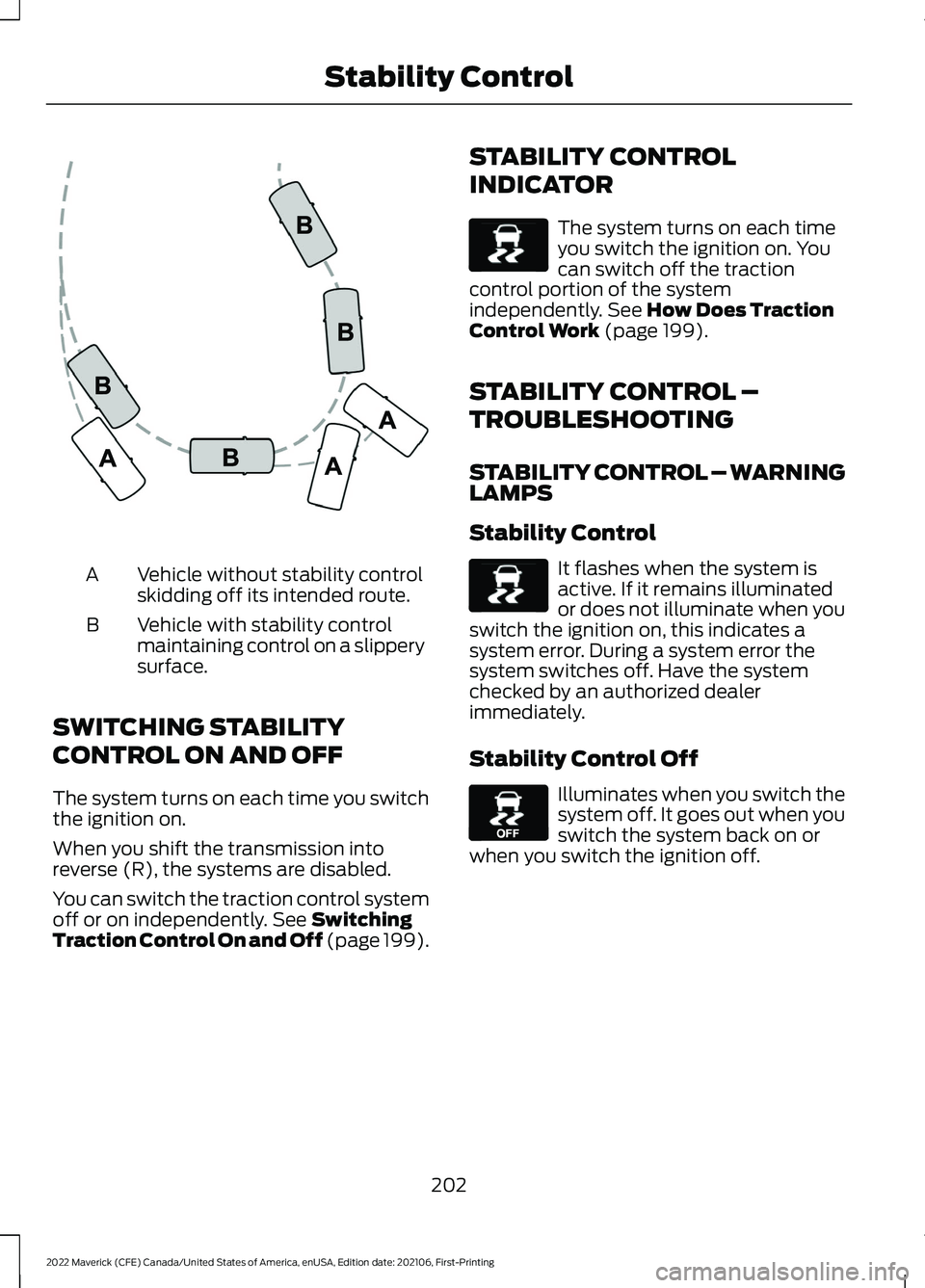
Vehicle without stability control
skidding off its intended route.
A
Vehicle with stability control
maintaining control on a slippery
surface.
B
SWITCHING STABILITY
CONTROL ON AND OFF
The system turns on each time you switch
the ignition on.
When you shift the transmission into
reverse (R), the systems are disabled.
You can switch the traction control system
off or on independently. See Switching
Traction Control On and Off (page 199). STABILITY CONTROL
INDICATOR The system turns on each time
you switch the ignition on. You
can switch off the traction
control portion of the system
independently.
See How Does Traction
Control Work (page 199).
STABILITY CONTROL –
TROUBLESHOOTING
STABILITY CONTROL – WARNING
LAMPS
Stability Control It flashes when the system is
active. If it remains illuminated
or does not illuminate when you
switch the ignition on, this indicates a
system error. During a system error the
system switches off. Have the system
checked by an authorized dealer
immediately.
Stability Control Off Illuminates when you switch the
system off. It goes out when you
switch the system back on or
when you switch the ignition off.
202
2022 Maverick (CFE) Canada/United States of America, enUSA, Edition date: 202106, First-Printing Stability ControlE72903 E138639 E138639 E130458
Page 206 of 533
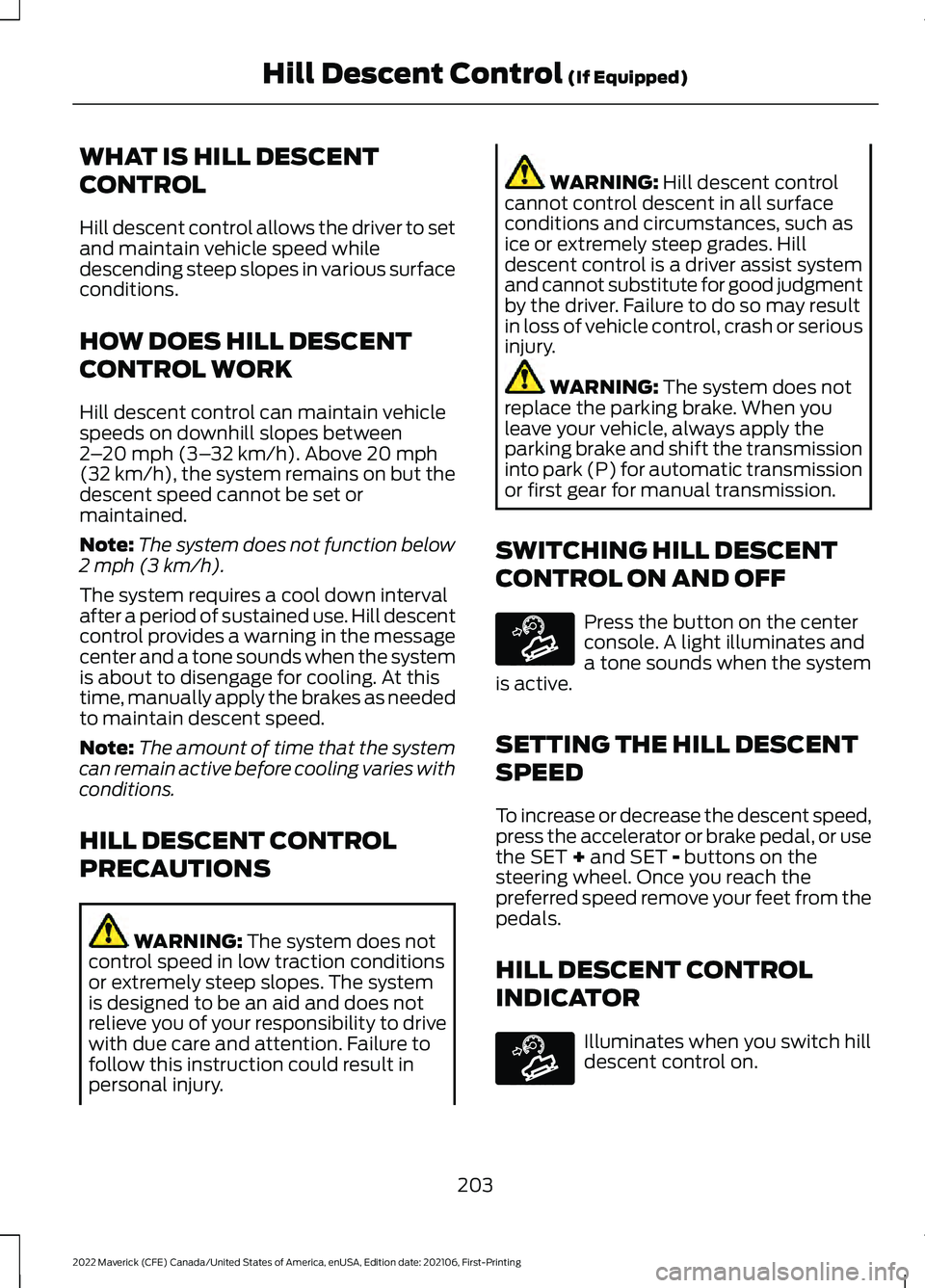
WHAT IS HILL DESCENT
CONTROL
Hill descent control allows the driver to set
and maintain vehicle speed while
descending steep slopes in various surface
conditions.
HOW DOES HILL DESCENT
CONTROL WORK
Hill descent control can maintain vehicle
speeds on downhill slopes between
2
– 20 mph (3– 32 km/h). Above 20 mph
(32 km/h), the system remains on but the
descent speed cannot be set or
maintained.
Note: The system does not function below
2 mph (3 km/h)
.
The system requires a cool down interval
after a period of sustained use. Hill descent
control provides a warning in the message
center and a tone sounds when the system
is about to disengage for cooling. At this
time, manually apply the brakes as needed
to maintain descent speed.
Note: The amount of time that the system
can remain active before cooling varies with
conditions.
HILL DESCENT CONTROL
PRECAUTIONS WARNING:
The system does not
control speed in low traction conditions
or extremely steep slopes. The system
is designed to be an aid and does not
relieve you of your responsibility to drive
with due care and attention. Failure to
follow this instruction could result in
personal injury. WARNING:
Hill descent control
cannot control descent in all surface
conditions and circumstances, such as
ice or extremely steep grades. Hill
descent control is a driver assist system
and cannot substitute for good judgment
by the driver. Failure to do so may result
in loss of vehicle control, crash or serious
injury. WARNING:
The system does not
replace the parking brake. When you
leave your vehicle, always apply the
parking brake and shift the transmission
into park (P) for automatic transmission
or first gear for manual transmission.
SWITCHING HILL DESCENT
CONTROL ON AND OFF Press the button on the center
console. A light illuminates and
a tone sounds when the system
is active.
SETTING THE HILL DESCENT
SPEED
To increase or decrease the descent speed,
press the accelerator or brake pedal, or use
the SET
+ and SET - buttons on the
steering wheel. Once you reach the
preferred speed remove your feet from the
pedals.
HILL DESCENT CONTROL
INDICATOR Illuminates when you switch hill
descent control on.
203
2022 Maverick (CFE) Canada/United States of America, enUSA, Edition date: 202106, First-Printing Hill Descent Control
(If Equipped)E163171 E163171
Page 207 of 533
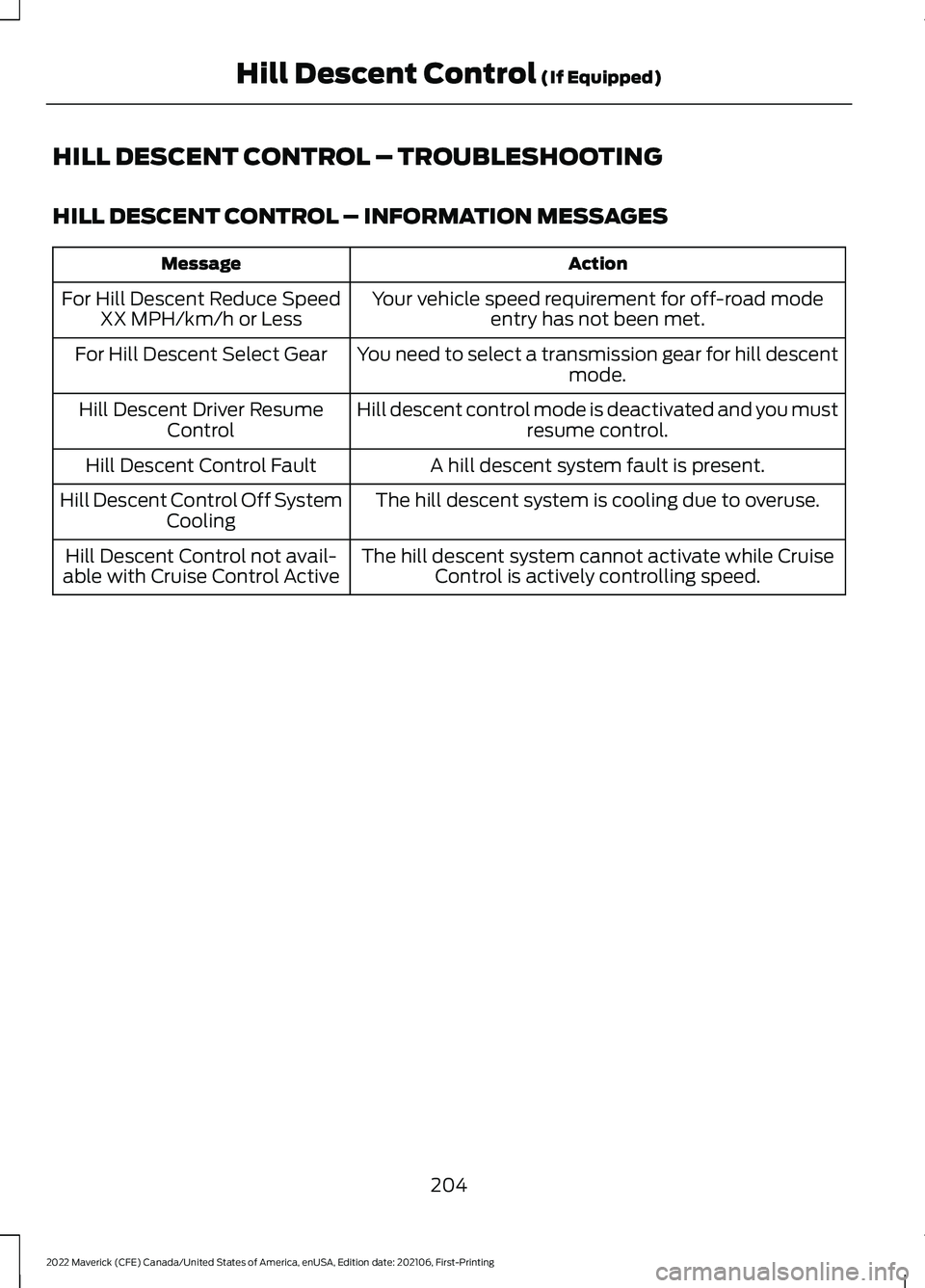
HILL DESCENT CONTROL – TROUBLESHOOTING
HILL DESCENT CONTROL – INFORMATION MESSAGES
Action
Message
Your vehicle speed requirement for off-road modeentry has not been met.
For Hill Descent Reduce Speed
XX MPH/km/h or Less
You need to select a transmission gear for hill descentmode.
For Hill Descent Select Gear
Hill descent control mode is deactivated and you mustresume control.
Hill Descent Driver Resume
Control
A hill descent system fault is present.
Hill Descent Control Fault
The hill descent system is cooling due to overuse.
Hill Descent Control Off System
Cooling
The hill descent system cannot activate while CruiseControl is actively controlling speed.
Hill Descent Control not avail-
able with Cruise Control Active
204
2022 Maverick (CFE) Canada/United States of America, enUSA, Edition date: 202106, First-Printing Hill Descent Control (If Equipped)
Page 213 of 533
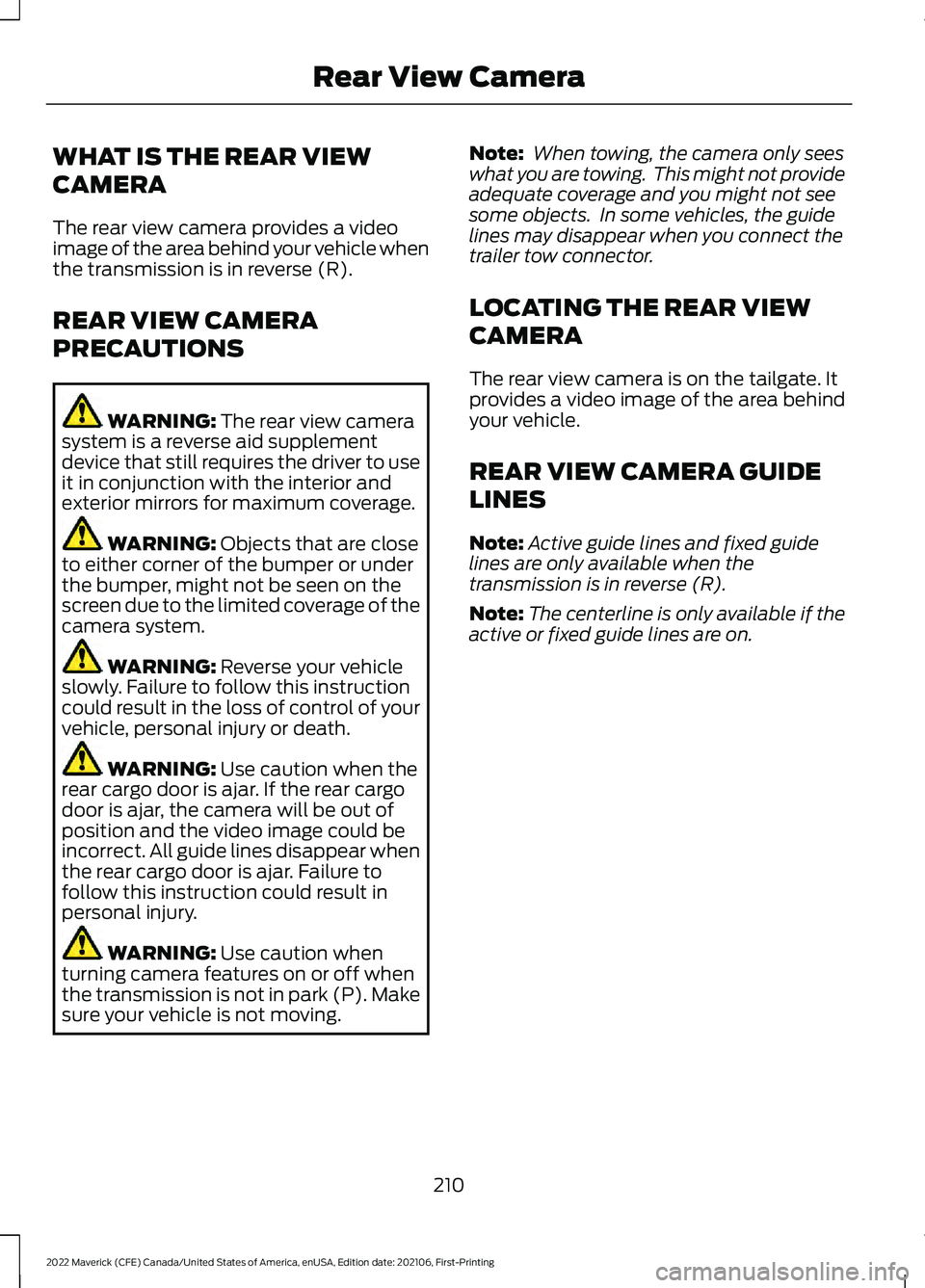
WHAT IS THE REAR VIEW
CAMERA
The rear view camera provides a video
image of the area behind your vehicle when
the transmission is in reverse (R).
REAR VIEW CAMERA
PRECAUTIONS
WARNING: The rear view camera
system is a reverse aid supplement
device that still requires the driver to use
it in conjunction with the interior and
exterior mirrors for maximum coverage. WARNING:
Objects that are close
to either corner of the bumper or under
the bumper, might not be seen on the
screen due to the limited coverage of the
camera system. WARNING:
Reverse your vehicle
slowly. Failure to follow this instruction
could result in the loss of control of your
vehicle, personal injury or death. WARNING:
Use caution when the
rear cargo door is ajar. If the rear cargo
door is ajar, the camera will be out of
position and the video image could be
incorrect. All guide lines disappear when
the rear cargo door is ajar. Failure to
follow this instruction could result in
personal injury. WARNING:
Use caution when
turning camera features on or off when
the transmission is not in park (P). Make
sure your vehicle is not moving. Note:
When towing, the camera only sees
what you are towing. This might not provide
adequate coverage and you might not see
some objects. In some vehicles, the guide
lines may disappear when you connect the
trailer tow connector.
LOCATING THE REAR VIEW
CAMERA
The rear view camera is on the tailgate. It
provides a video image of the area behind
your vehicle.
REAR VIEW CAMERA GUIDE
LINES
Note: Active guide lines and fixed guide
lines are only available when the
transmission is in reverse (R).
Note: The centerline is only available if the
active or fixed guide lines are on.
210
2022 Maverick (CFE) Canada/United States of America, enUSA, Edition date: 202106, First-Printing Rear View Camera
Page 214 of 533
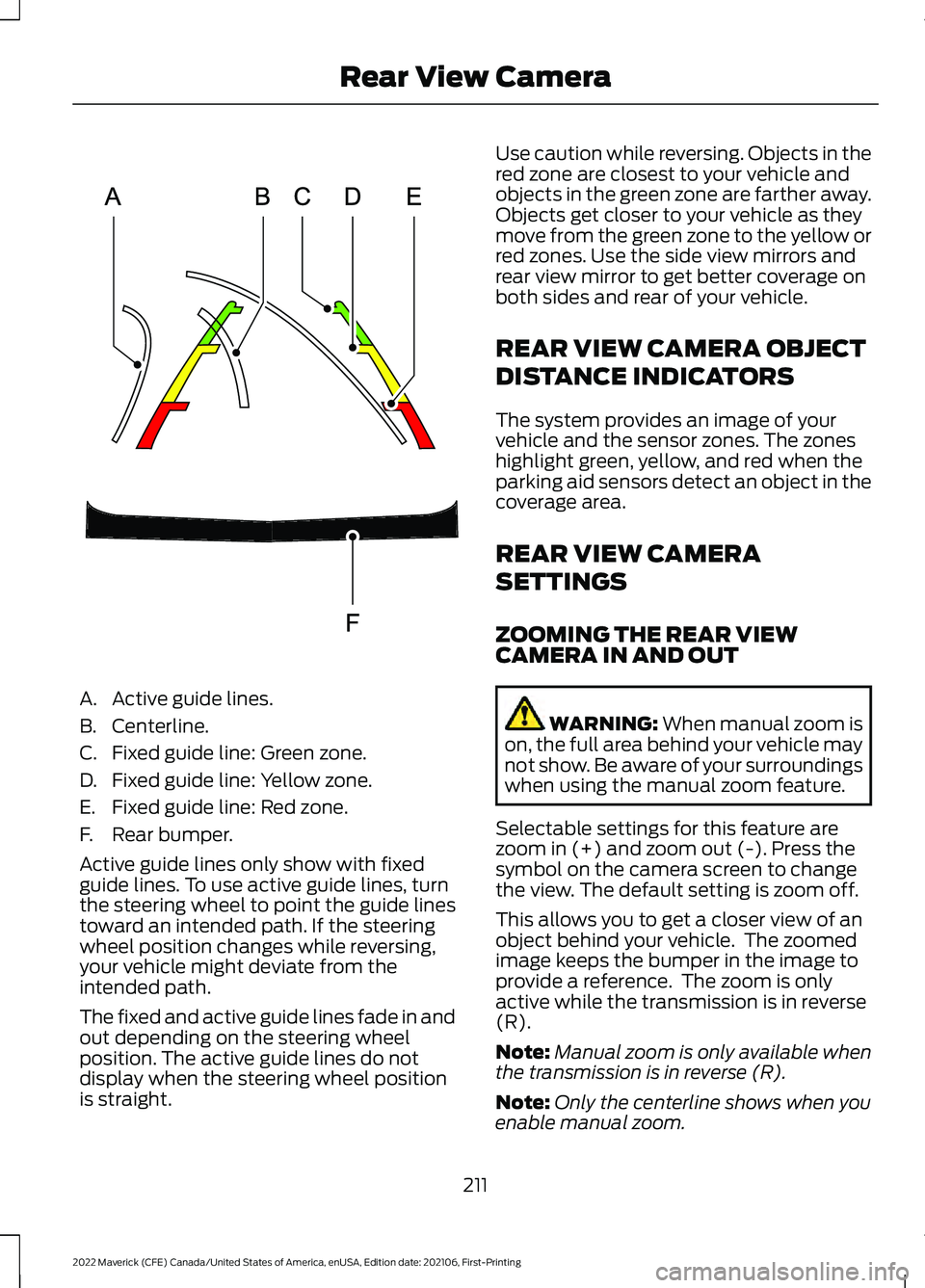
A. Active guide lines.
B. Centerline.
C. Fixed guide line: Green zone.
D. Fixed guide line: Yellow zone.
E. Fixed guide line: Red zone.
F. Rear bumper.
Active guide lines only show with fixed
guide lines. To use active guide lines, turn
the steering wheel to point the guide lines
toward an intended path. If the steering
wheel position changes while reversing,
your vehicle might deviate from the
intended path.
The fixed and active guide lines fade in and
out depending on the steering wheel
position. The active guide lines do not
display when the steering wheel position
is straight. Use caution while reversing. Objects in the
red zone are closest to your vehicle and
objects in the green zone are farther away.
Objects get closer to your vehicle as they
move from the green zone to the yellow or
red zones. Use the side view mirrors and
rear view mirror to get better coverage on
both sides and rear of your vehicle.
REAR VIEW CAMERA OBJECT
DISTANCE INDICATORS
The system provides an image of your
vehicle and the sensor zones. The zones
highlight green, yellow, and red when the
parking aid sensors detect an object in the
coverage area.
REAR VIEW CAMERA
SETTINGS
ZOOMING THE REAR VIEW
CAMERA IN AND OUT
WARNING: When manual zoom is
on, the full area behind your vehicle may
not show. Be aware of your surroundings
when using the manual zoom feature.
Selectable settings for this feature are
zoom in (+) and zoom out (-). Press the
symbol on the camera screen to change
the view. The default setting is zoom off.
This allows you to get a closer view of an
object behind your vehicle. The zoomed
image keeps the bumper in the image to
provide a reference. The zoom is only
active while the transmission is in reverse
(R).
Note: Manual zoom is only available when
the transmission is in reverse (R).
Note: Only the centerline shows when you
enable manual zoom.
211
2022 Maverick (CFE) Canada/United States of America, enUSA, Edition date: 202106, First-Printing Rear View CameraE306774