2022 FORD MAVERICK cruise control
[x] Cancel search: cruise controlPage 225 of 533
LANE CENTERING PRECAUTIONS
WARNING: Do not use the system
when towing a trailer. Failure to follow
this instruction could result in the loss of
control of your vehicle, personal injury or
death. WARNING:
Do not use the system
if any changes or modifications to the
steering wheel have been made. Any
changes or modifications to the steering
wheel could affect the functionality or
performance of the system. Failure to
follow this instruction could result in the
loss of control of your vehicle, personal
injury or death.
Adaptive cruise control precautions apply
to lane centering unless stated otherwise
or contradicted by a lane centering
precaution. See Adaptive Cruise Control
Precautions
(page 215).
LANE CENTERING
REQUIREMENTS
You must keep your hands on the steering
wheel at all times.
The system only activates when all of the
following occur:
• You have adaptive cruise control with
stop and go on.
• Lane centering assist is enabled in your
information and entertainment screen.
See
Switching Lane Centering On
and Off (page 222).
• You have your hands on the steering
wheel.
• The system detects both lane
markings.
Note: If it does not detect valid lane
markings, the system stays inactive until
valid markings are available. LANE CENTERING LIMITATIONS
Adaptive cruise control limitations apply
to lane centering unless stated otherwise
or contradicted by a lane centering
limitation. See Adaptive Cruise Control
Limitations
(page 216).
Lane Centering may not correctly operate
in any of the following conditions:
• Your vehicle is not centered in the lane.
• The lane is too narrow or wide.
• The system does not detect at least
one lane marking or when lanes merge
or split.
• Limited steering torque input is applied.
• Areas under construction or new
infrastructure.
• When modifications to the steering
system have been made.
• When using a spare tire.
• In high wind conditions.
Note: The driving assistance torque is
limited and may not be sufficient for all
driving situations such as driving through
tight curves or driving through curves at high
speeds.
Note: In exceptional conditions, the system
may deviate from the center line.
SWITCHING LANE CENTERING ON
AND OFF
You must keep your hands on the steering
wheel at all times.
The controls are on the steering wheel. Press the button.
The indicator appears in the information
display. When the system is on, the color
of the indicator changes to indicate the
system status.
222
2022 Maverick (CFE) Canada/United States of America, enUSA, Edition date: 202106, First-Printing Adaptive Cruise Control
(If Equipped)E262175
Page 226 of 533
You can override the system at any time
by steering your vehicle.
Note:
The correct requirements must be
met before you can switch the system on.
See Lane Centering Requirements (page
222).
LANE CENTERING ALERTS
You must keep your hands on the steering
wheel at all times.
When the system is active and detects no
steering activity for a period of time, the
system alerts you to put your hands on the
steering wheel. If you do not react to the
warnings the system cancels and slows
your vehicle down to idle speeds while
maintaining steering control.
The system also alerts you if your vehicle
crosses lane markings without detected
steering activity.
Note: The system may detect a light grip
or touch on the steering wheel as hands-off
driving.
LANE CENTERING AUTOMATIC
CANCELLATION
When an external condition cancels the
system, for example, no lane markings
available, a tone sounds and a message
appears in the instrument cluster display. If your vehicle starts to slow
down, you must provide steering
input to the wheel and press and
release the button to regain full system
performance. Automatic cancellation can also occur if:
•
The lane becomes too wide or too
narrow.
• The system cannot detect valid lane
markings.
• Lane markings cross over one another.
Note: The system disables until the next
key cycle if your vehicle slows down due to
driver inactivity twice within a key cycle.
LANE CENTERING INDICATORS Illuminates when you switch
lane centering on. The color of
the indicator changes to indicate
the system status.
Gray indicates the system is on but
inactive.
Green indicates the system is active and
applying steering torque assistance input
to keep your vehicle in the center of the
lane.
Amber with an audible tone and then gray
indicates a system automatic cancellation.
ADAPTIVE CRUISE CONTROL
– TROUBLESHOOTING
ADAPTIVE CRUISE CONTROL –
INFORMATION MESSAGES -
VEHICLES WITH: ADAPTIVE
CRUISE CONTROL WITH LANE
CENTERING
Note: Depending on your vehicle options
and instrument cluster type, not all
messages display or are available.
Note: The system could abbreviate or
shorten certain messages depending upon
which cluster type you have.
223
2022 Maverick (CFE) Canada/United States of America, enUSA, Edition date: 202106, First-Printing Adaptive Cruise Control
(If Equipped) E297977
Page 227 of 533
Action
Message
Make sure you return your hands to the steering wheel andprovide steering input.
Keep Hands on Steering
Wheel
Lane centering assist conditions exist preventing the system from being available.
Lane Centering Assist
Not Available
Adaptive cruise control must be on before lane centering can be switched on.
For Lane Centering
Assist to work Turn On Adaptive Cruise
224
2022 Maverick (CFE) Canada/United States of America, enUSA, Edition date: 202106, First-Printing Adaptive Cruise Control (If Equipped)
Page 228 of 533
ADAPTIVE CRUISE CONTROL –
INFORMATION MESSAGES -
VEHICLES WITH: STOP AND GO
Note:
Depending on your vehicle options
and instrument cluster type, not all
messages display or are available.
Note: The system could abbreviate or
shorten certain messages depending upon
which cluster type you have. Action
Message
A malfunction is preventing the adaptive cruise from engaging.
Adaptive Cruise
Malfunction
Front Sensor Not Aligned Contact an authorized dealer to have the radar checked for
proper coverage and operation.
Conditions exist preventing the system from being available.
Adaptive Cruise Not
Available
You have a blocked radar because of poor radar visibility due
to inclement weather or ice, mud, or water in front of the radar.You can typically clean the sensor to resolve this.
Adaptive Cruise Not
Available Sensor
Blocked See Manual Due to the nature of radar technology, it is possible to get ablockage warning with no actual block. This happens, for
example, when driving in sparse rural or desert environments.
A false blocked condition either self clears, or clears after you restart your vehicle.
You have selected normal cruise control. The system does not brake or react to traffic.
Normal Cruise Active
Adaptive Braking Off
Displays when the adaptive cruise control is going to canceland you must take control.
Adaptive Cruise - Driver
Resume Control
Displays when the vehicle speed is too slow to activate the
adaptive cruise control and there is no lead vehicle in range.
Adaptive Cruise Speed
Too Low to Activate
225
2022 Maverick (CFE) Canada/United States of America, enUSA, Edition date: 202106, First-Printing Adaptive Cruise Control (If Equipped)
Page 236 of 533
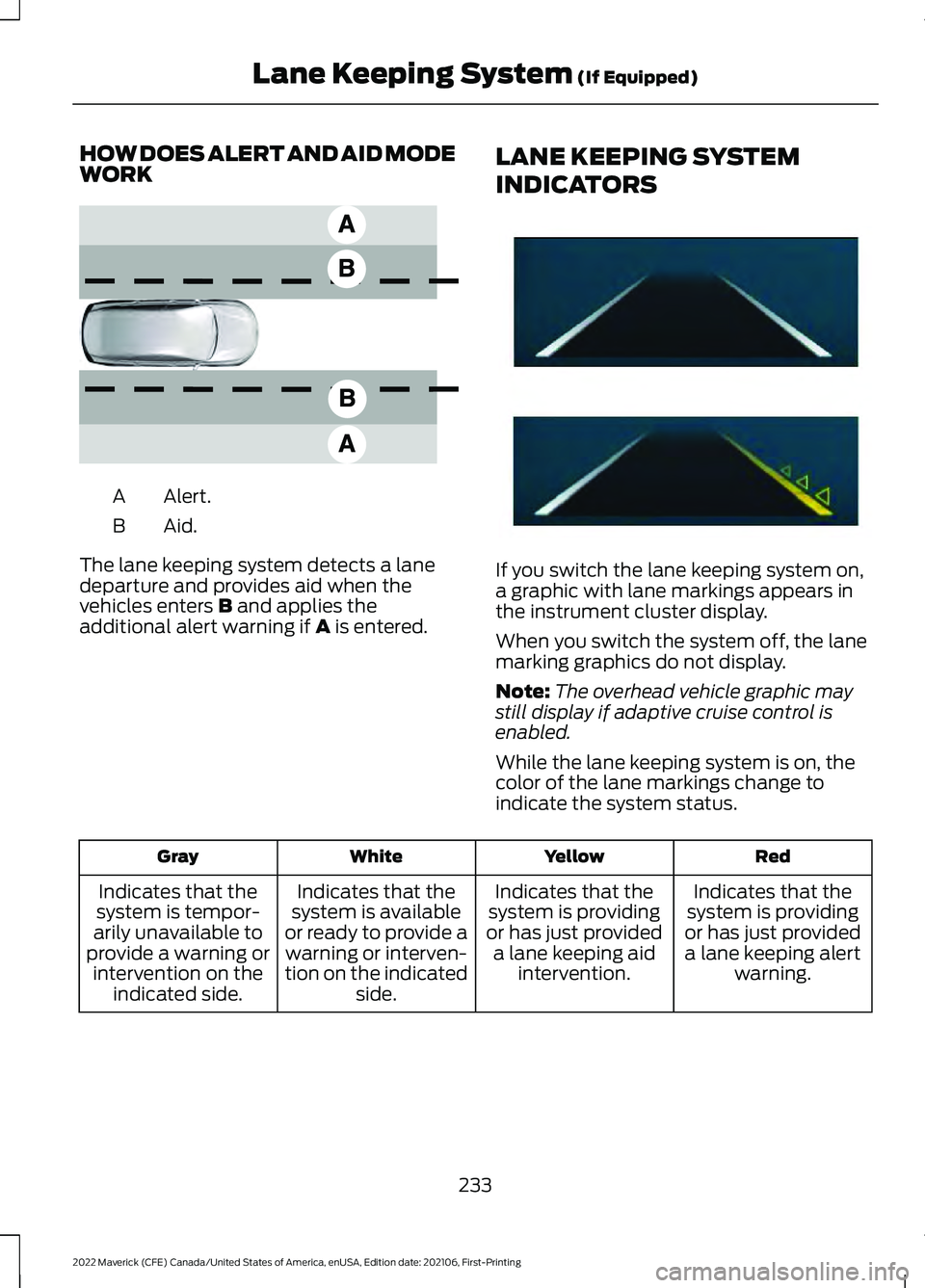
HOW DOES ALERT AND AID MODE
WORK
Alert.
A
Aid.B
The lane keeping system detects a lane
departure and provides aid when the
vehicles enters B and applies the
additional alert warning if A is entered. LANE KEEPING SYSTEM
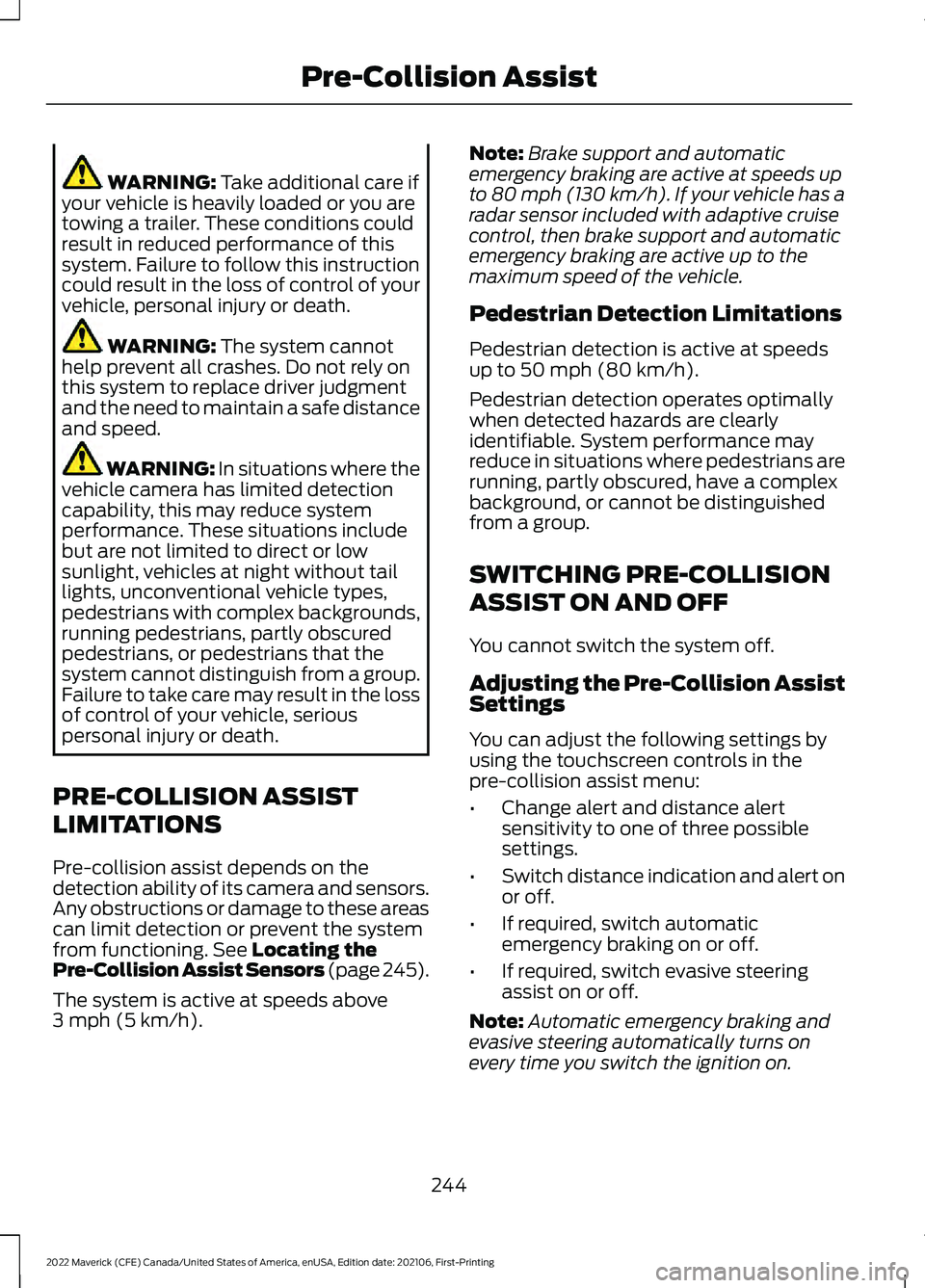
INDICATORS If you switch the lane keeping system on,
a graphic with lane markings appears in
the instrument cluster display.
When you switch the system off, the lane
marking graphics do not display.
Note:
The overhead vehicle graphic may
still display if adaptive cruise control is
enabled.
While the lane keeping system is on, the
color of the lane markings change to
indicate the system status. Red
Yellow
White
Gray
Indicates that the
system is providing
or has just provided a lane keeping alert warning.
Indicates that the
system is providing
or has just provided a lane keeping aid intervention.
Indicates that the
system is available
or ready to provide a warning or interven-
tion on the indicated side.
Indicates that the
system is tempor-
arily unavailable to
provide a warning or intervention on the indicated side.
233
2022 Maverick (CFE) Canada/United States of America, enUSA, Edition date: 202106, First-Printing Lane Keeping System
(If Equipped)E165517 E294544
Page 247 of 533
WARNING: Take additional care if
your vehicle is heavily loaded or you are
towing a trailer. These conditions could
result in reduced performance of this
system. Failure to follow this instruction
could result in the loss of control of your
vehicle, personal injury or death. WARNING:
The system cannot
help prevent all crashes. Do not rely on
this system to replace driver judgment
and the need to maintain a safe distance
and speed. WARNING:
In situations where the
vehicle camera has limited detection
capability, this may reduce system
performance. These situations include
but are not limited to direct or low
sunlight, vehicles at night without tail
lights, unconventional vehicle types,
pedestrians with complex backgrounds,
running pedestrians, partly obscured
pedestrians, or pedestrians that the
system cannot distinguish from a group.
Failure to take care may result in the loss
of control of your vehicle, serious
personal injury or death.
PRE-COLLISION ASSIST
LIMITATIONS
Pre-collision assist depends on the
detection ability of its camera and sensors.
Any obstructions or damage to these areas
can limit detection or prevent the system
from functioning.
See Locating the
Pre-Collision Assist Sensors (page 245).
The system is active at speeds above
3 mph (5 km/h)
. Note:
Brake support and automatic
emergency braking are active at speeds up
to 80 mph (130 km/h). If your vehicle has a
radar sensor included with adaptive cruise
control, then brake support and automatic
emergency braking are active up to the
maximum speed of the vehicle.
Pedestrian Detection Limitations
Pedestrian detection is active at speeds
up to
50 mph (80 km/h).
Pedestrian detection operates optimally
when detected hazards are clearly
identifiable. System performance may
reduce in situations where pedestrians are
running, partly obscured, have a complex
background, or cannot be distinguished
from a group.
SWITCHING PRE-COLLISION
ASSIST ON AND OFF
You cannot switch the system off.
Adjusting the Pre-Collision Assist
Settings
You can adjust the following settings by
using the touchscreen controls in the
pre-collision assist menu:
• Change alert and distance alert
sensitivity to one of three possible
settings.
• Switch distance indication and alert on
or off.
• If required, switch automatic
emergency braking on or off.
• If required, switch evasive steering
assist on or off.
Note: Automatic emergency braking and
evasive steering automatically turns on
every time you switch the ignition on.
244
2022 Maverick (CFE) Canada/United States of America, enUSA, Edition date: 202106, First-Printing Pre-Collision Assist
Page 248 of 533
Note:
If you switch automatic emergency
braking off, evasive steering assist switches
off.
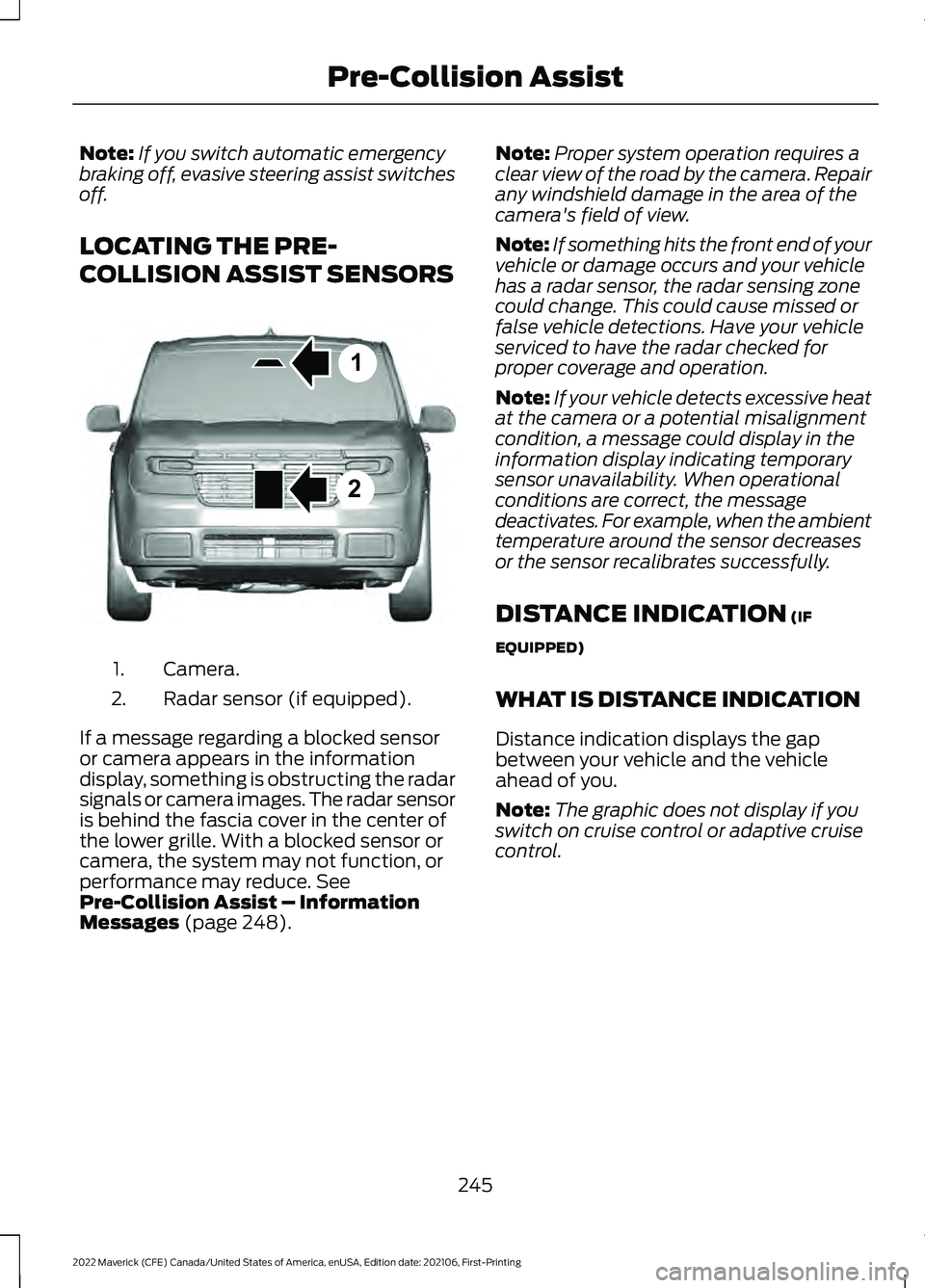
LOCATING THE PRE-
COLLISION ASSIST SENSORS Camera.
1.
Radar sensor (if equipped).
2.
If a message regarding a blocked sensor
or camera appears in the information
display, something is obstructing the radar
signals or camera images. The radar sensor
is behind the fascia cover in the center of
the lower grille. With a blocked sensor or
camera, the system may not function, or
performance may reduce. See
Pre-Collision Assist – Information
Messages
(page 248). Note:
Proper system operation requires a
clear view of the road by the camera. Repair
any windshield damage in the area of the
camera's field of view.
Note: If something hits the front end of your
vehicle or damage occurs and your vehicle
has a radar sensor, the radar sensing zone
could change. This could cause missed or
false vehicle detections. Have your vehicle
serviced to have the radar checked for
proper coverage and operation.
Note: If your vehicle detects excessive heat
at the camera or a potential misalignment
condition, a message could display in the
information display indicating temporary
sensor unavailability. When operational
conditions are correct, the message
deactivates. For example, when the ambient
temperature around the sensor decreases
or the sensor recalibrates successfully.
DISTANCE INDICATION
(IF
EQUIPPED)
WHAT IS DISTANCE INDICATION
Distance indication displays the gap
between your vehicle and the vehicle
ahead of you.
Note: The graphic does not display if you
switch on cruise control or adaptive cruise
control.
245
2022 Maverick (CFE) Canada/United States of America, enUSA, Edition date: 202106, First-Printing Pre-Collision Assist1
2E355015
Page 250 of 533
SWITCHING DISTANCE
INDICATION ON AND OFF
To switch the system on or off, use the
instrument cluster display:
1. Select Settings.
2. Select
Driver Assistance.
3. Select
Pre-Collision Assist.
4. Switch
Distance indication on or off.
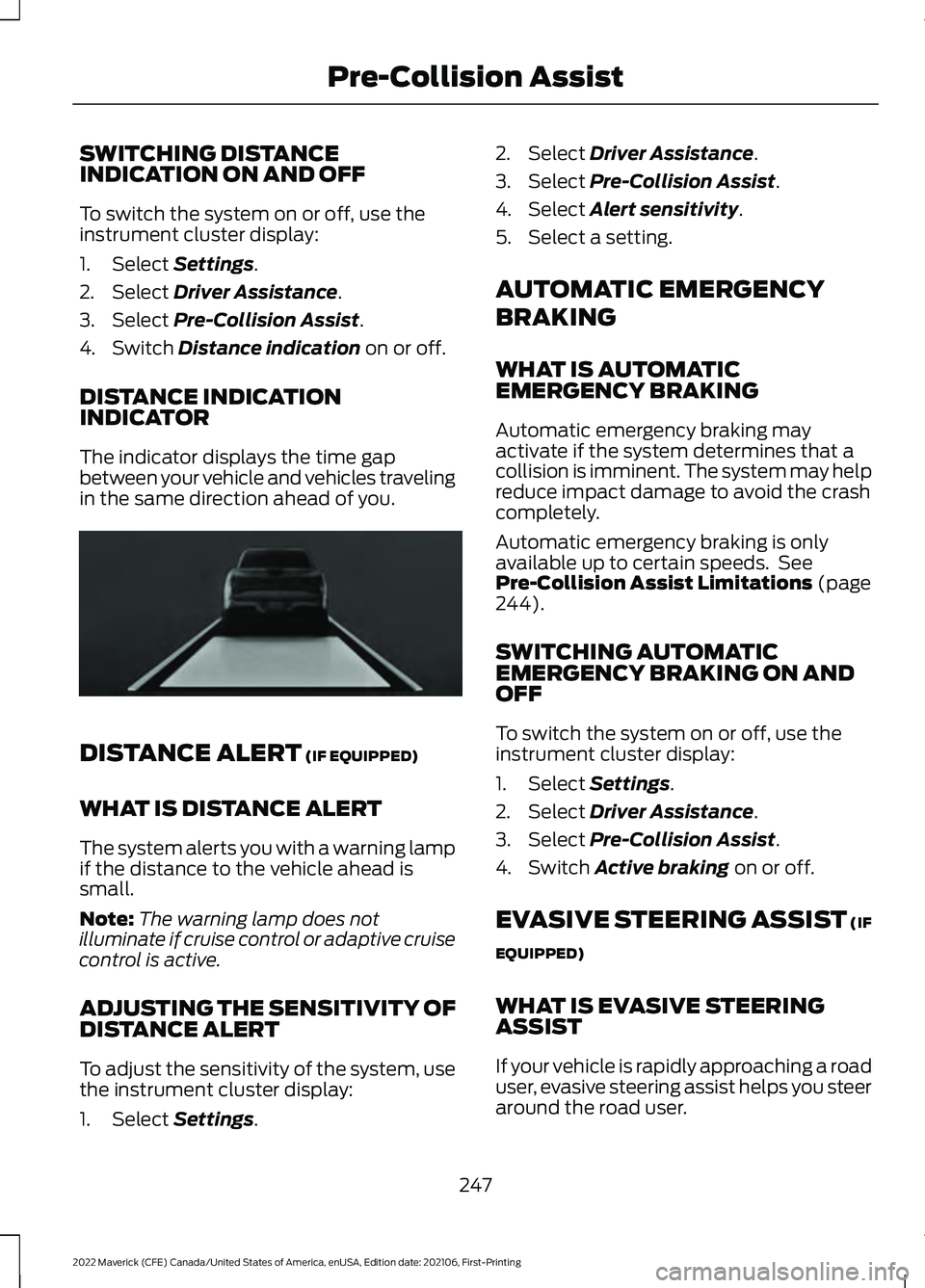
DISTANCE INDICATION
INDICATOR
The indicator displays the time gap
between your vehicle and vehicles traveling
in the same direction ahead of you. DISTANCE ALERT
(IF EQUIPPED)
WHAT IS DISTANCE ALERT
The system alerts you with a warning lamp
if the distance to the vehicle ahead is
small.
Note: The warning lamp does not
illuminate if cruise control or adaptive cruise
control is active.
ADJUSTING THE SENSITIVITY OF
DISTANCE ALERT
To adjust the sensitivity of the system, use
the instrument cluster display:
1. Select
Settings. 2. Select
Driver Assistance.
3. Select
Pre-Collision Assist.
4. Select
Alert sensitivity.
5. Select a setting.
AUTOMATIC EMERGENCY
BRAKING
WHAT IS AUTOMATIC
EMERGENCY BRAKING
Automatic emergency braking may
activate if the system determines that a
collision is imminent. The system may help
reduce impact damage to avoid the crash
completely.
Automatic emergency braking is only
available up to certain speeds. See
Pre-Collision Assist Limitations
(page
244).
SWITCHING AUTOMATIC
EMERGENCY BRAKING ON AND
OFF
To switch the system on or off, use the
instrument cluster display:
1. Select
Settings.
2. Select
Driver Assistance.
3. Select
Pre-Collision Assist.
4. Switch
Active braking on or off.
EVASIVE STEERING ASSIST
(IF
EQUIPPED)
WHAT IS EVASIVE STEERING
ASSIST
If your vehicle is rapidly approaching a road
user, evasive steering assist helps you steer
around the road user.
247
2022 Maverick (CFE) Canada/United States of America, enUSA, Edition date: 202106, First-Printing Pre-Collision AssistE356419