2022 FORD MAVERICK ESP
[x] Cancel search: ESPPage 63 of 533

REMOTE CONTROL
LIMITATIONS
WARNING: Changes or
modifications not expressively approved
by the party responsible for compliance
could void the user's authority to operate
the equipment. The term "IC:" before the
radio certification number only signifies
that Industry Canada technical
specifications were met.
This device complies with Part 15 of the
FCC Rules and with Industry Canada
license-exempt RSS standard(s).
Operation is subject to the following two
conditions: (1) This device may not cause
harmful interference, and (2) This device
must accept any interference received,
including interference that may cause
undesired operation.
Make sure a valid remote control is within
5 ft (1.5 m)
from the front door handles
and rear of vehicle.
The system may not function if:
• The remote control remains stationary
for about a minute.
• The vehicle battery has no charge.
• The remote control battery has no
charge.
• There is interference causing issues
with the remote control frequencies.
• The remote control is too close to
metal objects or electronic devices, for
example keys or a cell phone.
USING THE REMOTE CONTROL
Use your remote control to access various
vehicle systems.
Note: The buttons on your remote may vary
depending on the vehicle region or options. Unlock Press the button to unlock all
doors. See
Unlocking and
Locking the Doors Using the
Remote Control
(page 73).
Lock Press the button to lock all
doors. See
Unlocking and
Locking the Doors Using the
Remote Control
(page 73).
Remote Start
(If Equipped) Press the button to remote start.
See
What Is Remote Start
(page 123).
Tailgate
(If Equipped) Press the button to open the
tailgate. See
Locking and
Unlocking the Tailgate (page
83).
Panic Alarm
(If Equipped) Press the button to sound the
panic alarm. See Sounding the
Panic Alarm
(page 61).
OPENING AND CLOSING THE
FLIP KEY
Opening Your Flip Key
Press the round button on the remote
control to extend the flip key.
60
2022 Maverick (CFE) Canada/United States of America, enUSA, Edition date: 202106, First-Printing Keys and Remote ControlsE138629 E138623 E138625 E191530 E138624
Page 69 of 533

WHAT IS MYKEY
MyKey allows you to program keys with
restricted driving modes to promote good
driving habits.
MYKEY SETTINGS
NON-CONFIGURABLE MYKEY
SETTINGS
Seatbelt Reminder or Belt-
Minder™
MyKey mutes the audio system until the
front seat passengers buckle the front seat
belts.
Note:
If your vehicle includes an AM/FM
radio or a very basic audio system, then the
radio may not mute.
Satellite Radio (If Equipped)
Some Satellite radio channels have
restricted access to adult radio content.
Early Low Fuel
The low fuel level warning lamp turns on
earlier.
Driving and Parking Aids
You cannot configure settings for parking
aids, blind spot information system, and
cross traffic alert. These systems turn on
when the vehicle turns on, and you cannot
switch them off with a MyKey.
You cannot configure settings for
pre-collision assist and lane keeping. These
systems turn on when the vehicle turns on,
but you can switch them off with a MyKey.
A new destination in the navigation system
can only be set using voice commands
when using a MyKey, and with your vehicle
moving. Note:
MyKey drivers may be able to switch
the lane departure warning feature off, but
this feature turns back on automatically
with every new key cycle.
CONFIGURABLE MYKEY
SETTINGS
You can configure the following settings
after creating a MyKey. See
Creating a
MyKey (page 67).
Speed Limit WARNING:
Do not set MyKey
maximum speed limit to a limit that will
prevent the driver from maintaining a
safe speed considering posted speed
limits and prevailing road conditions. The
driver is always responsible to drive in
accordance with local laws and
prevailing conditions. Failure to do so
could result in accident or injury.
You can set a speed limit for your vehicle.
Warning messages appear in the
information display and a tone sounds if
your vehicle reaches the set speed. You
cannot override the set speed when using
a MyKey.
Speed Minder
You can set a speed reminder for your
vehicle. Warning messages appear in the
information display and a tone sounds if
your vehicle exceeds the set speed.
Audio System Volume Limit
The audio system maximum volume
reduces. A message appears in the
information display if you attempt to
exceed the volume limit. Automatic
volume control turns off.
66
2022 Maverick (CFE) Canada/United States of America, enUSA, Edition date: 202106, First-Printing MyKey
™
Page 97 of 533
HEADLAMPS –
TROUBLESHOOTING
HEADLAMPS – FREQUENTLY
ASKED QUESTIONS
Why is there condensation in the
headlamps?
Headlamps have vents to
accommodate normal changes in air
pressure. Condensation can be a
natural by-product of this design.
When moist air enters the lamp
assembly through the vents, there is a
possibility that condensation can
occur when the temperature is cold.
When normal condensation occurs, a
fine mist can form on the interior of the
lens. The fine mist eventually clears
and exits through the vents during
normal operation.
How much condensation is
acceptable? The presence of a fine mist, for
example no streaks, drip marks or
large droplets. A fine mist covers less
than 50% of the lens.
How long may it take for the
acceptable condensation to be
cleared? Clearing time may take as long as 48
hours under dry weather conditions.
How much condensation is
unacceptable? A water puddle inside the lamp.
Streaks, drip marks or large droplets
present on the interior of the lens.
What should I do if unacceptable
condensation is present? Have your vehicle checked as soon as
possible. Why do my headlamps turn off when I
have them switched on when I switch
my vehicle off?
The battery saver turns the headlamps
off after a short period of time after
you switch your vehicle off.
AUTOLAMPS
WHAT ARE AUTOLAMPS WARNING: The system does not
relieve you of your responsibility to drive
with due care and attention. You may
need to override the system if it does not
turn the headlamps on in low visibility
conditions, for example daytime fog.
Autolamps turn the headlamps on in low
light situations or when the windshield
wipers operate.
AUTOLAMP SETTINGS
1. Using the instrument cluster controls on the steering wheel, select Settings.
2. Select
Vehicle.
3. Select
Lighting.
4. Select
Autolamp Delay.
5. Select a setting and press the
OK
button.
94
2022 Maverick (CFE) Canada/United States of America, enUSA, Edition date: 202106, First-Printing Exterior Lighting
Page 99 of 533
EXTERIOR LAMP AUDIBLE
WARNING
Exterior Lamps On
Sounds when you open the driver door and
the exterior lamps are on.
AUTOMATIC HIGH BEAM
CONTROL
HOW DOES AUTOMATIC HIGH
BEAM CONTROL WORK
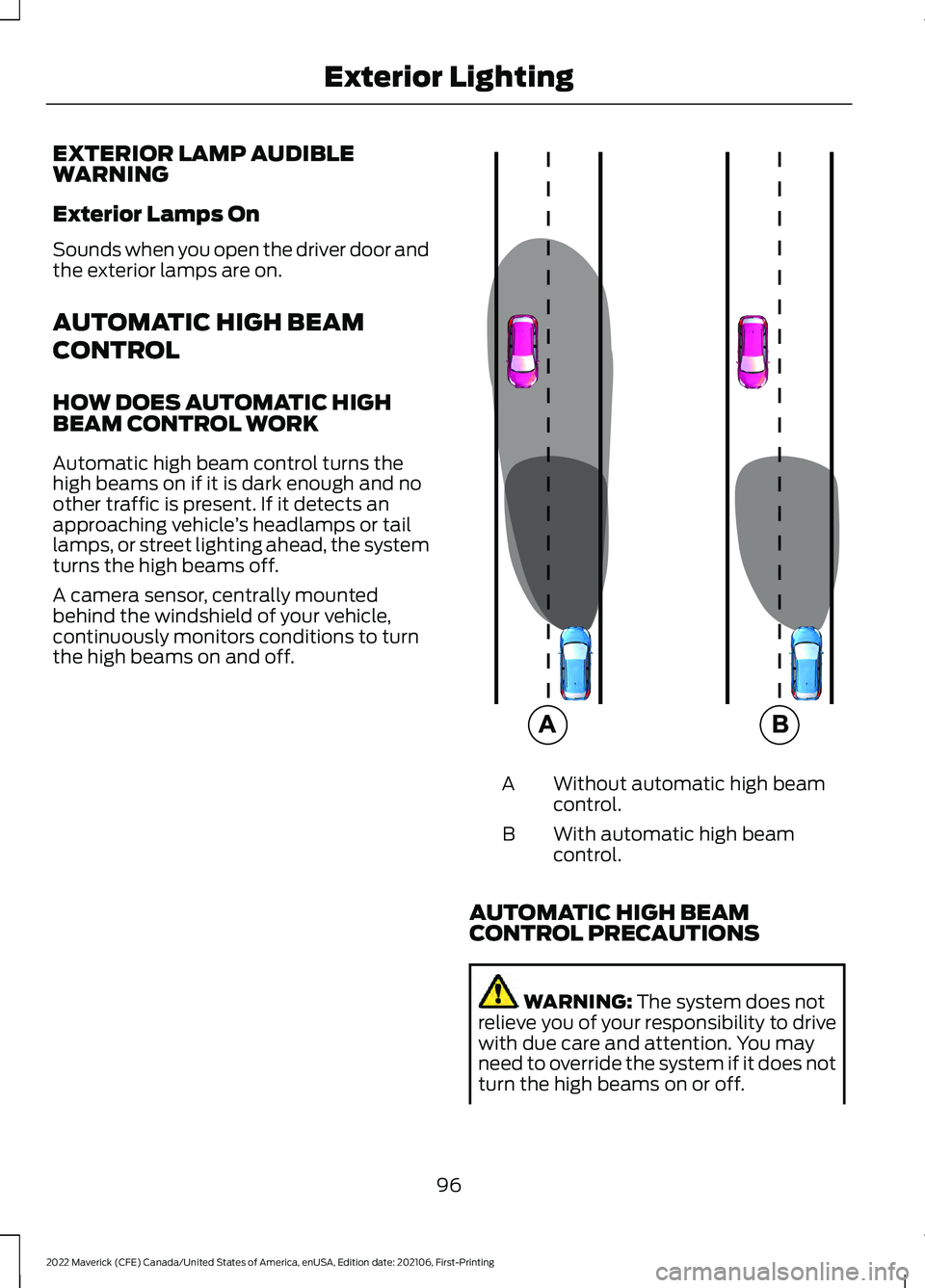
Automatic high beam control turns the
high beams on if it is dark enough and no
other traffic is present. If it detects an
approaching vehicle
’s headlamps or tail
lamps, or street lighting ahead, the system
turns the high beams off.
A camera sensor, centrally mounted
behind the windshield of your vehicle,
continuously monitors conditions to turn
the high beams on and off. Without automatic high beam
control.
A
With automatic high beam
control.
B
AUTOMATIC HIGH BEAM
CONTROL PRECAUTIONS WARNING: The system does not
relieve you of your responsibility to drive
with due care and attention. You may
need to override the system if it does not
turn the high beams on or off.
96
2022 Maverick (CFE) Canada/United States of America, enUSA, Edition date: 202106, First-Printing Exterior Lighting E327596
Page 116 of 533
WHAT ARE THE INSTRUMENT
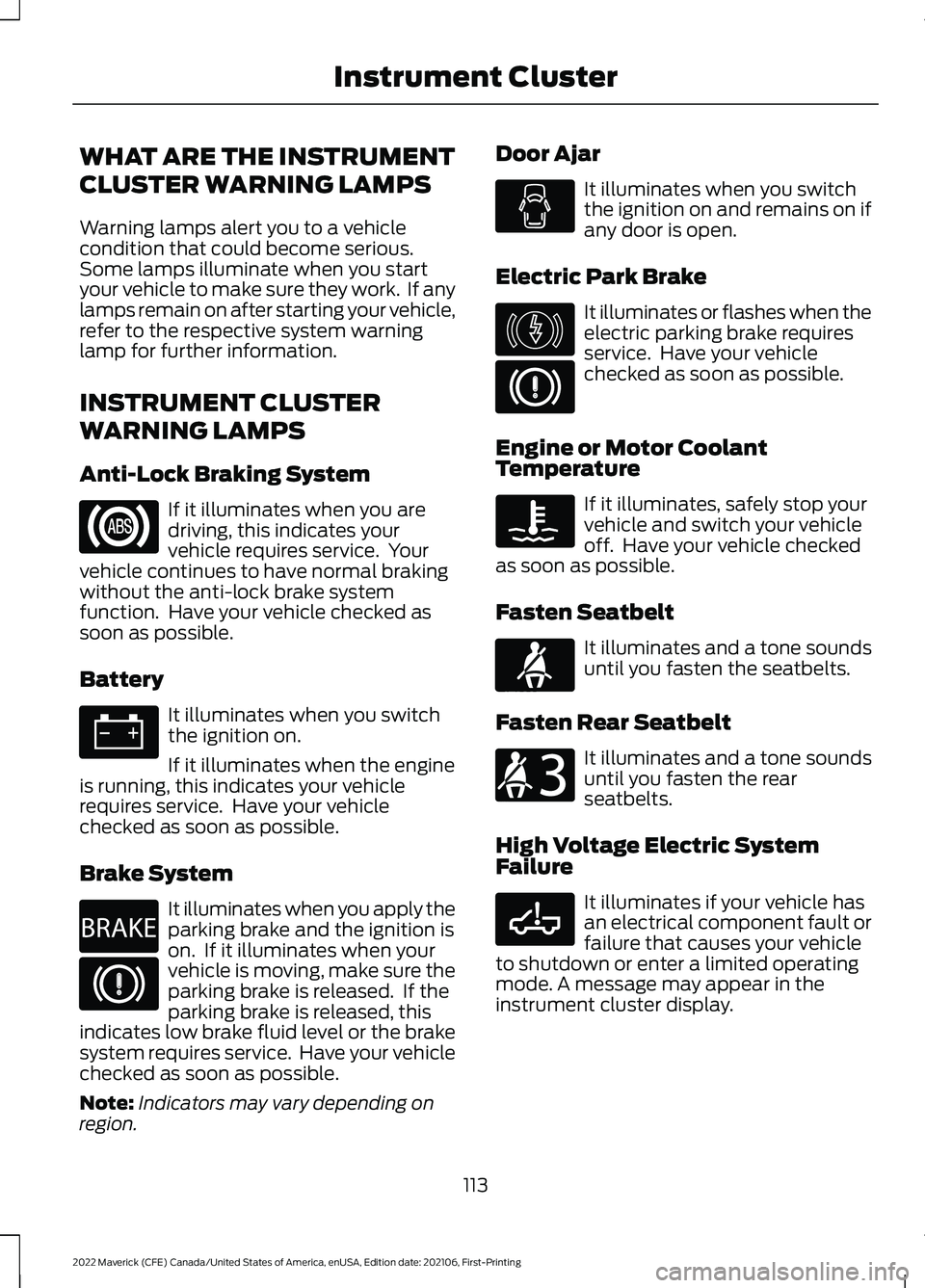
CLUSTER WARNING LAMPS
Warning lamps alert you to a vehicle
condition that could become serious.
Some lamps illuminate when you start
your vehicle to make sure they work. If any
lamps remain on after starting your vehicle,
refer to the respective system warning
lamp for further information.
INSTRUMENT CLUSTER
WARNING LAMPS
Anti-Lock Braking System
If it illuminates when you are
driving, this indicates your
vehicle requires service. Your
vehicle continues to have normal braking
without the anti-lock brake system
function. Have your vehicle checked as
soon as possible.
Battery It illuminates when you switch
the ignition on.
If it illuminates when the engine
is running, this indicates your vehicle
requires service. Have your vehicle
checked as soon as possible.
Brake System It illuminates when you apply the
parking brake and the ignition is
on. If it illuminates when your
vehicle is moving, make sure the
parking brake is released. If the
parking brake is released, this
indicates low brake fluid level or the brake
system requires service. Have your vehicle
checked as soon as possible.
Note: Indicators may vary depending on
region. Door Ajar It illuminates when you switch
the ignition on and remains on if
any door is open.
Electric Park Brake It illuminates or flashes when the
electric parking brake requires
service. Have your vehicle
checked as soon as possible.
Engine or Motor Coolant
Temperature If it illuminates, safely stop your
vehicle and switch your vehicle
off. Have your vehicle checked
as soon as possible.
Fasten Seatbelt It illuminates and a tone sounds
until you fasten the seatbelts.
Fasten Rear Seatbelt It illuminates and a tone sounds
until you fasten the rear
seatbelts.
High Voltage Electric System
Failure It illuminates if your vehicle has
an electrical component fault or
failure that causes your vehicle
to shutdown or enter a limited operating
mode. A message may appear in the
instrument cluster display.
113
2022 Maverick (CFE) Canada/United States of America, enUSA, Edition date: 202106, First-Printing Instrument Cluster E270480 E146190 E71880 E206718 E332963
Page 119 of 533
USING THE INSTRUMENT
CLUSTER DISPLAY CONTROLS
WARNING: Driving while distracted
can result in loss of vehicle control, crash
and injury. We strongly recommend that
you use extreme caution when using any
device that may take your focus off the
road. Your primary responsibility is the
safe operation of your vehicle. We
recommend against the use of any
hand-held device while driving and
encourage the use of voice-operated
systems when possible. Make sure you
are aware of all applicable local laws
that may affect the use of electronic
devices while driving.
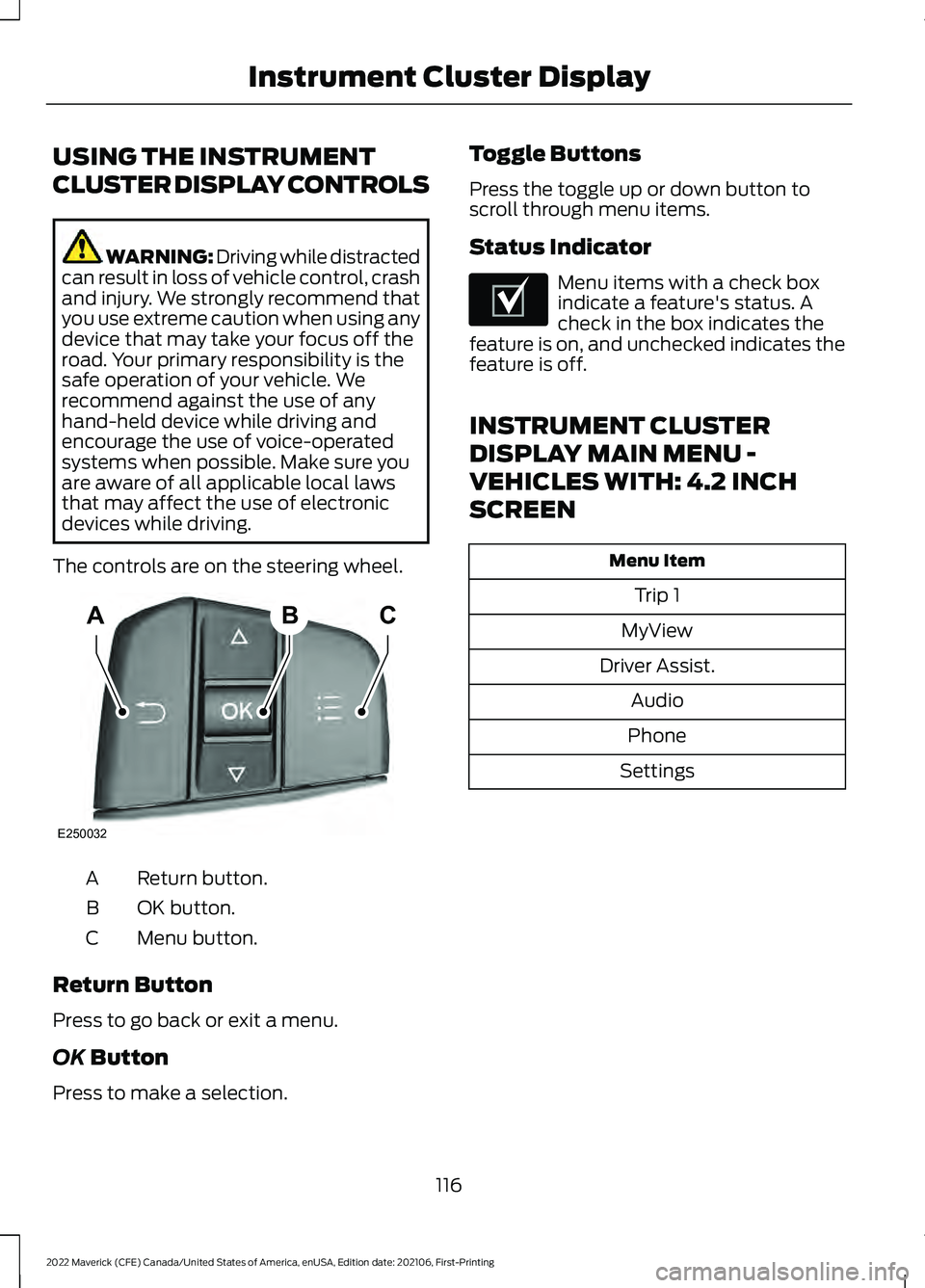
The controls are on the steering wheel. Return button.
A
OK button.
B
Menu button.
C
Return Button
Press to go back or exit a menu.
OK Button
Press to make a selection. Toggle Buttons
Press the toggle up or down button to
scroll through menu items.
Status Indicator Menu items with a check box
indicate a feature's status. A
check in the box indicates the
feature is on, and unchecked indicates the
feature is off.
INSTRUMENT CLUSTER
DISPLAY MAIN MENU -
VEHICLES WITH: 4.2 INCH
SCREEN Menu Item
Trip 1
MyView
Driver Assist. Audio
Phone
Settings
116
2022 Maverick (CFE) Canada/United States of America, enUSA, Edition date: 202106, First-Printing Instrument Cluster DisplayABC
E250032 E204495
Page 143 of 533
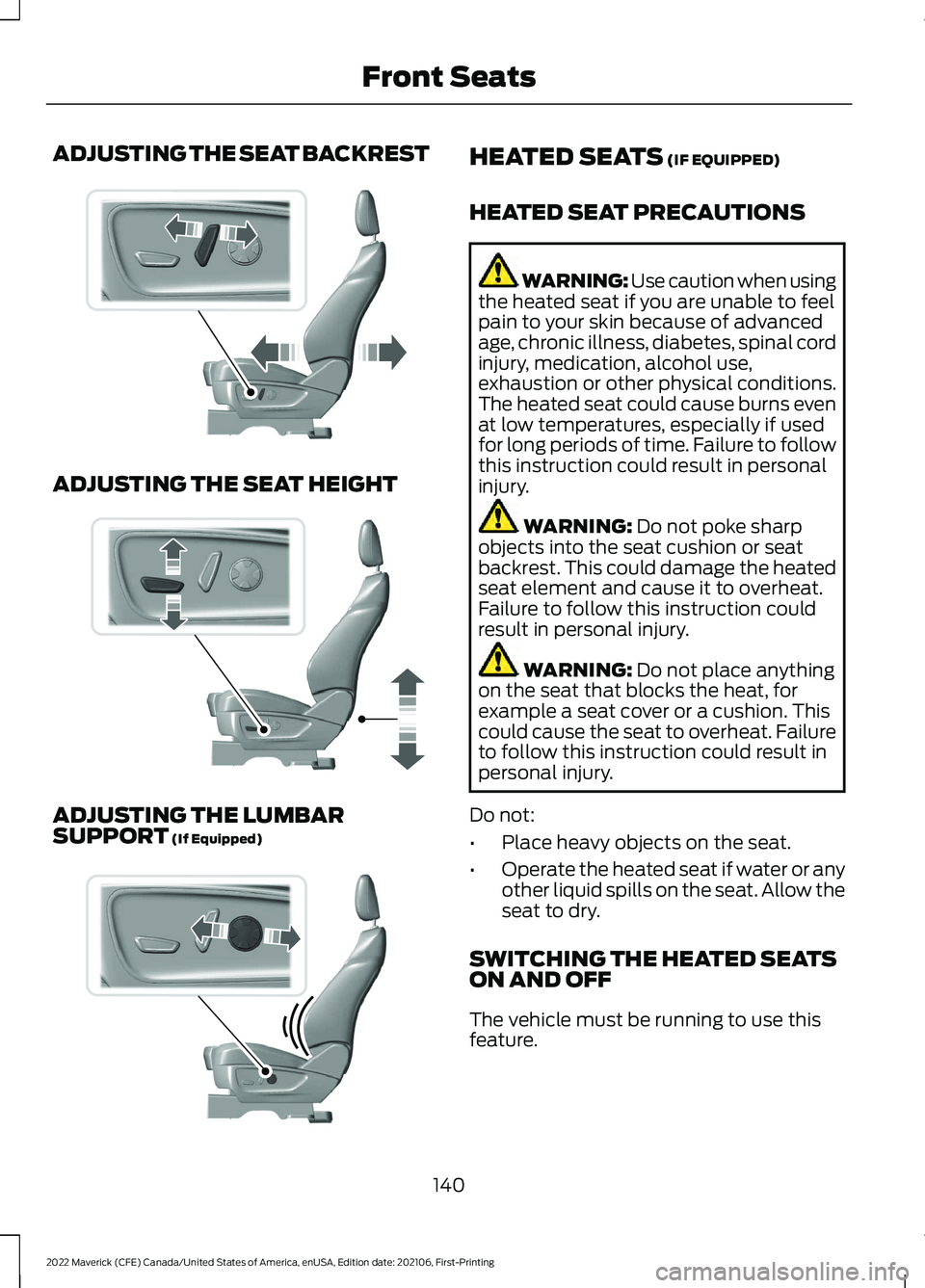
ADJUSTING THE SEAT BACKREST
ADJUSTING THE SEAT HEIGHT
ADJUSTING THE LUMBAR
SUPPORT (If Equipped) HEATED SEATS
(IF EQUIPPED)
HEATED SEAT PRECAUTIONS WARNING: Use caution when using
the heated seat if you are unable to feel
pain to your skin because of advanced
age, chronic illness, diabetes, spinal cord
injury, medication, alcohol use,
exhaustion or other physical conditions.
The heated seat could cause burns even
at low temperatures, especially if used
for long periods of time. Failure to follow
this instruction could result in personal
injury. WARNING:
Do not poke sharp
objects into the seat cushion or seat
backrest. This could damage the heated
seat element and cause it to overheat.
Failure to follow this instruction could
result in personal injury. WARNING:
Do not place anything
on the seat that blocks the heat, for
example a seat cover or a cushion. This
could cause the seat to overheat. Failure
to follow this instruction could result in
personal injury.
Do not:
• Place heavy objects on the seat.
• Operate the heated seat if water or any
other liquid spills on the seat. Allow the
seat to dry.
SWITCHING THE HEATED SEATS
ON AND OFF
The vehicle must be running to use this
feature.
140
2022 Maverick (CFE) Canada/United States of America, enUSA, Edition date: 202106, First-Printing Front SeatsE298773 E298772 E298774
Page 150 of 533
LOCATING THE USB PORTS
Data Transfer USB Ports
The USB Ports could be in the following
locations:
•
On the lower instrument panel.
• Inside the media bin.
• Inside the center console.
Note: These USB ports can also charge
devices.
Note: Not all USB ports in your vehicle have
data transfer capabilities.
Note: We recommend using only USB-IF
certified cables and adapters. Non-certified
cables and adapters may not work.
Charge Only USB Ports The USB ports could be in the following
locations:
•
On the lower instrument panel.
• On the upper instrument panel.
• Inside the media bin.
• Inside the center console.
• On the rear of the center console.
• In the cargo area. PLAYING MEDIA USING THE
USB PORT WARNING: Driving while distracted
can result in loss of vehicle control, crash
and injury. We strongly recommend that
you use extreme caution when using any
device that may take your focus off the
road. Your primary responsibility is the
safe operation of your vehicle. We
recommend against the use of any
hand-held device while driving and
encourage the use of voice-operated
systems when possible. Make sure you
are aware of all applicable local laws
that may affect the use of electronic
devices while driving.
Connect your device to the USB port. Press the audio button on the
feature bar.
Select Sources. Select the USB option.
Press the button to play a track.
Press the button again to pause
the track.
Press the button to skip to the
next track.
Press and hold the button to fast
forward through the track. Press the button once to return
to the beginning of a track.
Repeatedly press the button to
return to previous tracks.
Press and hold the button to fast rewind.
147
2022 Maverick (CFE) Canada/United States of America, enUSA, Edition date: 202106, First-Printing USB Ports E100027