2022 FORD F-150 power outlet
[x] Cancel search: power outletPage 10 of 750

Switching the Heated Rear Window On
and Off .........................................................187
Setting the Blower Motor Speed ...........
187
Switching the Heated Mirrors On and Off ........................................................................\
.
187
Setting the Temperature ...........................
187
Directing the Flow of Air ............................
187
Climate Control Hints ................................
188
Interior Air Quality
What Is the Cabin Air Filter ......................
189
Replacing the Cabin Air Filter .................
189
Front Seats
Front Seat Precautions .............................
190
Sitting in the Correct Position ................
190
Manual Seats .................................................
191
Power Seats ..................................................
193
Massage Seats .............................................
196
Heated Seats .................................................
197
Ventilated Seats ...........................................
197
Rear Seats
Manual Seats ................................................
199
Heated Seats ...............................................
200
Rear Occupant Alert System
What is the Rear Occupant Alert System ........................................................................\
202
How Does the Rear Occupant Alert System Work ............................................
202
Rear Occupant Alert System Precautions ........................................................................\
202
Rear Occupant Alert System Limitations ........................................................................\
202
Switching Rear Occupant Alert System On and Off ................................................
202
Rear Occupant Alert System Indicators ........................................................................\
203
Rear Occupant Alert System Audible Warnings ....................................................
203Memory Function
What Is the Memory Function
...............
204
Memory Function Precautions ..............
204
Locating the Memory Function Buttons ........................................................................\
204
Saving a Preset Position ..........................
204
Recalling a Preset Position .....................
204
Garage Door Opener
What Is the Garage Door Opener .........
205
How Does the Garage Door Opener Work ........................................................................\
205
Garage Door Opener Precautions ........
205
Garage Door Opener Limitations .........
205
Programming the Garage Door Opener to Your Hand-Held Transmitter ........
206
Programming the Garage Door Opener to Your Garage Door Opener Motor
.......................................................................
206
Programming the Garage Door Opener to Your Gate Opener Motor ................
207
Clearing the Garage Door Opener ........
207
Reprogramming the Garage Door Opener .......................................................................
208
Garage Door Opener Radio Frequencies .......................................................................
208
USB Ports
Locating the USB Ports ...........................
209
Locating the USB Ports - Raptor ..........
209
Playing Media Using the USB Port ......
209
Charging a Device ........................................
210
Power Outlet - Vehicles With: Pickup Bed Power Generator
Outlet
What Is the Power Outlet ..........................
211
Power Outlet Precautions - Vehicles With: 2kW ....................................................
211
Power Outlet Precautions - Vehicles With: 2.4kW/7.2kW ..................................
212
Locating the Power Outlets .....................
213
6
2022 F-150 (TFD) Canada/United States of America, enUSA, Edition date: 202109, First-Printing Table of Contents
Page 11 of 750

Power Outlet Indicators - Vehicles With:
2kW ...............................................................213
Power Outlet Indicators - Vehicles With: 2.4kW/7.2kW .............................................
214
What Is Utility Idle Mode - Vehicles With: Flip Key ........................................................
214
Switching Utility Idle On and Off - Vehicles With: Flip Key ...........................
214
What Is Generator Mode ...........................
215
Switching Generator Mode On and Off ........................................................................\
.
215
Resetting Ground Fault Detection .........
215
Resetting the Circuit Breaker - Vehicles With: 7.2kW ................................................
216
Power Outlet – Troubleshooting ............
217
Power Outlet - Vehicles With: 120V Power Outlet
What Is the Power Outlet ........................
220
Power Outlet Precautions .......................
220
Power Outlet Limitations ........................
220
Locating the Power Outlets ....................
220
Power Outlet Indicators .............................
221
Power Outlet - Vehicles With: 12V Power Outlet
What Is the Power Outlet ........................
222
Power Outlet Precautions .......................
222
Locating the Power Outlets ....................
222
Center Console Work Surface
Using the Center Console Work Surface - Vehicles With: Column Shift ............
223
Using the Center Console Work Surface - Vehicles With: Console Shift ...........
224
Center Console Work Surface – Troubleshooting ......................................
225
Wireless Accessory Charger
What Is the Wireless Accessory Charger ........................................................................\
226 Wireless Accessory Charger Precautions
........................................................................\
226
Locating the Wireless Accessory Charger ........................................................................\
226
Charging a Wireless Device .....................
226
Storage
Cup Holders ...................................................
227
Glove Compartment ..................................
227
Under Seat Storage ...................................
228
Glasses Holder ............................................
230
Starting and Stopping the Engine
Starting and Stopping the Engine – Precautions ................................................
231
Ignition Switch ..............................................
231
Push Button Ignition Switch ...................
232
Starting the Engine .....................................
232
Engine Block Heater ..................................
234
Stopping the Engine ..................................
235
Automatic Engine Stop - Vehicles With: Keyless Entry and Push Button Start
........................................................................\
236
Accessing the Passive Key Backup Position .......................................................
237
Starting and Stopping the Engine – Troubleshooting ......................................
238
Hybrid Electric Vehicle Information
What is a Hybrid Electric Vehicle ...........
241
How Does a Hybrid Electric Vehicle Work ........................................................................\
.
241
Hybrid Electric Vehicle Driving Characteristics ..........................................
241
Hybrid Electric Vehicle Indicators ..........
241
Hybrid Electric Vehicle Information – Troubleshooting ......................................
242
Eco Idle ...........................................................
242
Eco Idle – Troubleshooting .....................
243
7
2022 F-150 (TFD) Canada/United States of America, enUSA, Edition date: 202109, First-Printing Table of Contents
Page 39 of 750

INSTRUMENT PANEL
See Instrument Cluster Overview (page 168). See Instrument Cluster
Overview (page 167). See Instrument Cluster Overview (page 166).
A
See
Switching Traction Control On and Off (page 298).
B
See
Switching the 360 Degree Camera On and Off (page 323).
C
See
Switching Active Park Assist On and Off (page 325).
D
See
Switching the Hazard Flashers On and Off (page 464).
E
See
Switching Snowplow Mode On and Off (page 460).
F
See
Feature Bar (page 615).
G
See
Opening the Glove Compartment (page 227).
H
See
What Is the Power Outlet (page 222).
I
See
Identifying the Climate Control Unit (page 181). See Identifying the
Climate Control Unit (page 186).
J
See
Switching the Audio Unit On and Off (page 603).
K
35
2022 F-150 (TFD) Canada/United States of America, enUSA, Edition date: 202109, First-Printing Visual SearchA
BCEFD
G
IJKLMHE328453
Page 40 of 750

See Selecting a Four-Wheel Drive Mode (page 271).
L
See
Using the Integrated Trailer Brake Controller (page 410).
M
INSTRUMENT PANEL - RAPTOR See
Instrument Cluster Overview (page 168). See Instrument Cluster
Overview (page 167). See Instrument Cluster Overview (page 166).
A
See
Switching Active Park Assist On and Off (page 325).
B
See
Switching the Hazard Flashers On and Off (page 464).
C
See
Switching Trail Control On and Off (page 303).
D
See
Opening the Glove Compartment (page 227).
E
See
Feature Bar (page 615).
F
See
What Is the Power Outlet (page 222).
G
See
Identifying the Audio Unit (page 603).
H
36
2022 F-150 (TFD) Canada/United States of America, enUSA, Edition date: 202109, First-Printing Visual SearchA
D
F
IKHGL
BEC
JE343518
Page 42 of 750
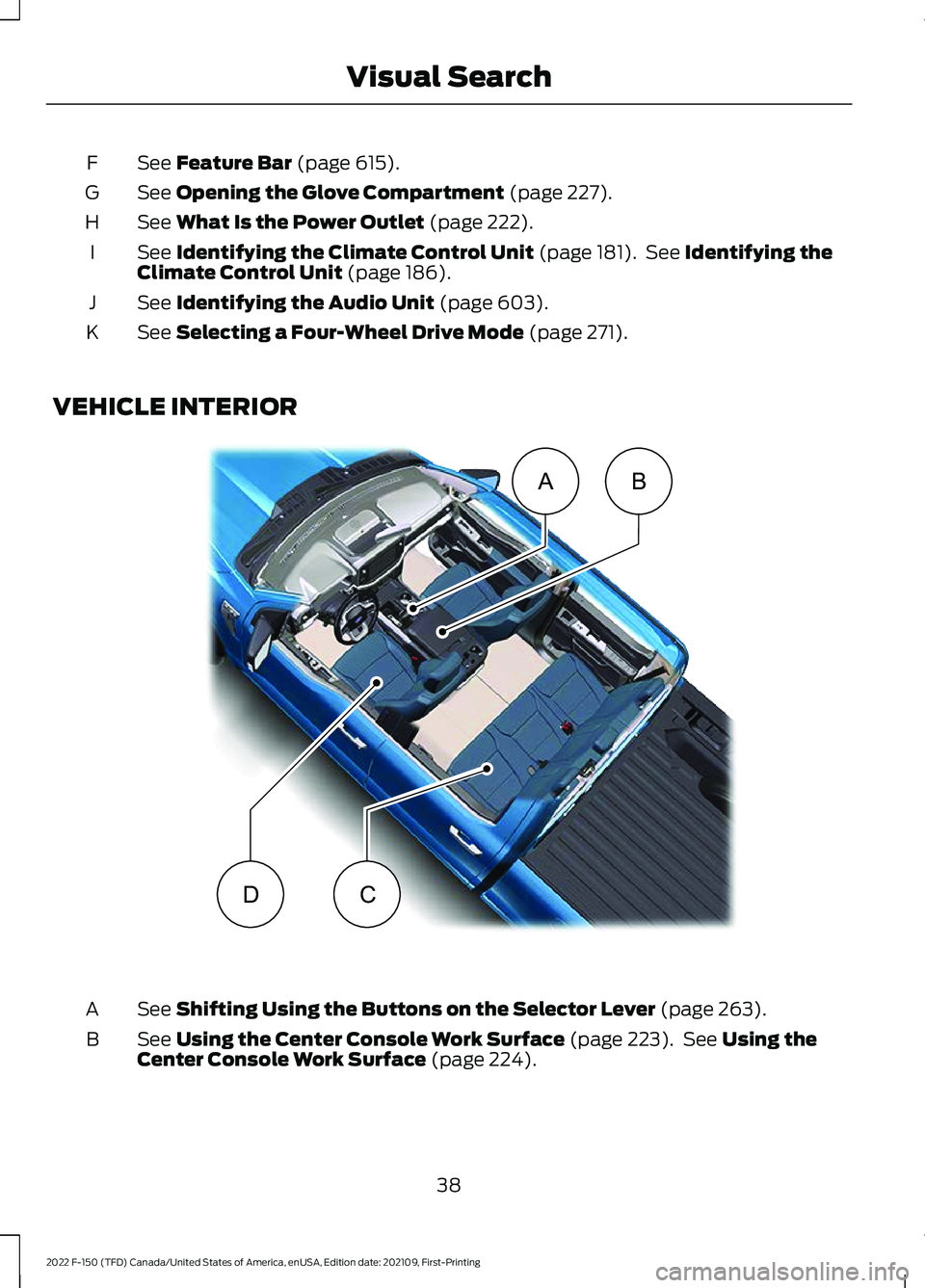
See Feature Bar (page 615).
F
See
Opening the Glove Compartment (page 227).
G
See
What Is the Power Outlet (page 222).
H
See
Identifying the Climate Control Unit (page 181). See Identifying the
Climate Control Unit (page 186).
I
See
Identifying the Audio Unit (page 603).
J
See
Selecting a Four-Wheel Drive Mode (page 271).
K
VEHICLE INTERIOR See
Shifting Using the Buttons on the Selector Lever (page 263).
A
See
Using the Center Console Work Surface (page 223). See Using the
Center Console Work Surface (page 224).
B
38
2022 F-150 (TFD) Canada/United States of America, enUSA, Edition date: 202109, First-Printing Visual SearchAB
CDE320265
Page 48 of 750

REAR EXTERIOR
See Locating the Power Outlets (page 213).
A
See
Tailgate Work Surface (page 122).
B
See
Accessing the Tailgate Step (page 119).
C
See
Locating the 360 Degree Cameras (page 321).
D
See
Locating the Blind Spot Information System Sensors (page 369).
E
See
Locating the Rear Parking Aid Sensors (page 314).
F
See
Connecting a Trailer (page 399).
G
44
2022 F-150 (TFD) Canada/United States of America, enUSA, Edition date: 202109, First-Printing Visual SearchABCD
EFGE320171
Page 49 of 750

REAR EXTERIOR - RAPTOR
See Locating the Power Outlets (page 213).
A
See
Locating the 360 Degree Cameras (page 322).
B
See
Locating the Blind Spot Information System Sensors (page 369).
C
See
Locating the Rear Parking Aid Sensors (page 314).
D
See
Connecting a Trailer (page 399).
E
45
2022 F-150 (TFD) Canada/United States of America, enUSA, Edition date: 202109, First-Printing Visual SearchA
CDE
BE343521
Page 182 of 750

WHAT IS REMOTE START
The system allows you to remotely start
your vehicle and to adjust the interior
temperature according to the settings that
you chose.
REMOTE START
PRECAUTIONS
WARNING: Do not start the engine
in a closed garage or in other enclosed
areas. Exhaust fumes are toxic. Always
open the garage door before you start
the engine. Failure to follow this
instruction could result in personal injury
or death. WARNING: Do not keep electrical
devices plugged in the power point
whenever the device is not in use. Power
points power up during remote start. WARNING:
Do not keep electrical
devices plugged into the power outlet
whenever the device is not in use. The
outlet provides power when the vehicle
is on. Failure to follow this instruction
could result in personal injury.
REMOTE START LIMITATIONS
Remote start does not work under the
following conditions:
• The alarm horn is sounding.
• The hood is open.
• The transmission is not in park (P).
• The ignition is on.
• The battery voltage is below the
minimum operating voltage.
• Remote start is not enabled. Note:
Do not use remote start if the fuel
level is low.
Note: You can use remote start with
FordPass.
See Connecting the Vehicle to
a Wi-Fi Network (page 597).
ENABLING REMOTE START
1. Press
Settings on the touchscreen.
2. Press
Vehicle Settings.
3. Press
Remote Start Setup.
4. Switch
Remote Start on or off.
Note: To remote start with FordPass, make
sure that the modem is enabled.
See
Connecting FordPass to the Modem
(page
597).
REMOTELY STARTING AND
STOPPING THE VEHICLE
Remotely Starting the Vehicle Press the button on the remote
control.
Within three seconds, press the
button on the remote control.
Within three seconds, press the
button again.
Note: You can also use FordPass to start
the vehicle.
Note: The turn signal lamps flash twice.
Note: The parking lamps turn on when the
vehicle is running.
Note: The horn sounds if the system fails
to start.
Note: All other vehicle systems remain off
when you have remotely started the vehicle.
178
2022 F-150 (TFD) Canada/United States of America, enUSA, Edition date: 202109, First-Printing Remote Start
(If Equipped)E138623 E138625