2022 FORD F-150 lane keeping mode
[x] Cancel search: lane keeping modePage 15 of 750

Adaptive Cruise Control
How Does Adaptive Cruise Control With
Stop and Go Work ...................................331
Adaptive Cruise Control Precautions ........................................................................\
.
331
Adaptive Cruise Control Limitations ........................................................................\
332
Switching Adaptive Cruise Control On and Off ........................................................
333
Adaptive Cruise Control Automatic Cancellation .............................................
334
Setting the Adaptive Cruise Control Speed ..........................................................
334
Setting the Adaptive Cruise Control Gap ........................................................................\
335
Canceling the Set Speed .........................
336
Resuming the Set Speed .........................
336
Overriding the Set Speed .........................
337
Adaptive Cruise Control Indicators .......
337
Switching From Adaptive Cruise Control to Cruise Control .....................................
337
Lane Centering ............................................
338
Intelligent Adaptive Cruise Control ......
340
Adaptive Cruise Control – Troubleshooting .......................................
341
BlueCruise
What Is BlueCruise .....................................
344
How Does BlueCruise Work ....................
344
BlueCruise Precautions ............................
344
BlueCruise Requirements ........................
345
BlueCruise Limitations .............................
345
BlueCruise Settings ...................................
346
Switching BlueCruise On and Off ........
346
BlueCruise Alerts .........................................
347
BlueCruise Automatic Cancellation .....
347
BlueCruise Indicators .................................
347
BlueCruise – Troubleshooting ...............
348
Drive Mode Control
What Is Drive Mode Control ...................
350How Does Drive Mode Control Work
........................................................................\
350
Selecting a Drive Mode ............................
350
Selecting a Drive Mode - Raptor ............
351
Drive Modes ..................................................
352
Drive Mode Control – Troubleshooting ........................................................................\
359
Lane Keeping System
What Is the Lane Keeping System ........
361
How Does the Lane Keeping System Work .............................................................
361
Lane Keeping System Precautions .......
361
Lane Keeping System Limitations ........
361
Switching the Lane Keeping System On and Off .......................................................
362
Switching the Lane Keeping System Mode ...........................................................
362
Alert Mode .....................................................
362
Aid Mode ........................................................
363
Alert and Aid Mode ....................................
363
Lane Keeping System Indicators ..........
364
Lane Keeping System – Troubleshooting ........................................................................\
365
Blind Spot Information System
What Is Blind Spot Information System .......................................................................
368
How Does Blind Spot Information System Work ...........................................
368
Blind Spot Information System Precautions ..............................................
368
Blind Spot Information System Limitations ................................................
368
Blind Spot Information System Requirements ..........................................
368
Switching Blind Spot Information System On and Off ................................
368
Locating the Blind Spot Information System Sensors ......................................
369
Blind Spot Information System With Trailer Coverage ......................................
369
11
2022 F-150 (TFD) Canada/United States of America, enUSA, Edition date: 202109, First-Printing Table of Contents
Page 100 of 750

WHAT IS MYKEY
MyKey allows you to program keys with
restricted driving modes to promote good
driving habits.
MYKEY SETTINGS
NON-CONFIGURABLE MYKEY
SETTINGS
Seatbelt Reminder or Belt-
Minder™
MyKey mutes the audio system until the
front seat passengers buckle the front seat
belts.
Note:
If your vehicle includes an AM/FM
radio or a very basic audio system, then the
radio may not mute.
Satellite Radio (If Equipped)
Some Satellite radio channels have
restricted access to adult radio content.
Early Low Fuel
The low fuel level warning lamp turns on
earlier.
Driving and Parking Aids
You cannot configure settings for parking
aids, blind spot information system, and
cross traffic alert. These systems turn on
when the vehicle turns on, and you cannot
switch them off with a MyKey.
You cannot configure settings for
pre-collision assist and lane keeping. These
systems turn on when the vehicle turns on,
but you can switch them off with a MyKey.
A new destination in the navigation system
can only be set using voice commands
when using a MyKey, and with your vehicle
moving. Note:
MyKey drivers may be able to switch
the lane departure warning feature off, but
this feature turns back on automatically
with every new key cycle.
CONFIGURABLE MYKEY
SETTINGS
You can configure the following settings
after creating a MyKey. See
Creating a
MyKey (page 98).
Speed Limit WARNING:
Do not set MyKey
maximum speed limit to a limit that will
prevent the driver from maintaining a
safe speed considering posted speed
limits and prevailing road conditions. The
driver is always responsible to drive in
accordance with local laws and
prevailing conditions. Failure to do so
could result in accident or injury.
You can set a speed limit for your vehicle.
Warning messages appear in the
information display and a tone sounds if
your vehicle reaches the set speed. You
cannot override the set speed when using
a MyKey.
Speed Minder
You can set a speed reminder for your
vehicle. Warning messages appear in the
information display and a tone sounds if
your vehicle exceeds the set speed.
Audio System Volume Limit
The audio system maximum volume
reduces. A message appears in the
information display if you attempt to
exceed the volume limit. Automatic
volume control turns off.
96
2022 F-150 (TFD) Canada/United States of America, enUSA, Edition date: 202109, First-Printing MyKey
™
(If Equipped)
Page 348 of 750
WHAT IS BLUECRUISE
BlueCruise keeps your vehicle centered in
the lane and offers a hands-free driving
mode in certain situations when using
adaptive cruise control.
HOW DOES BLUECRUISE
WORK
BlueCruise uses cameras to monitor your
vehicle position within a lane and applies
steering support to keep your vehicle
centered in the lane.
Using the cameras and location
information, BlueCruise allows you to
remove your hands from the steering wheel
and offers a hands-free driving mode in
certain areas.
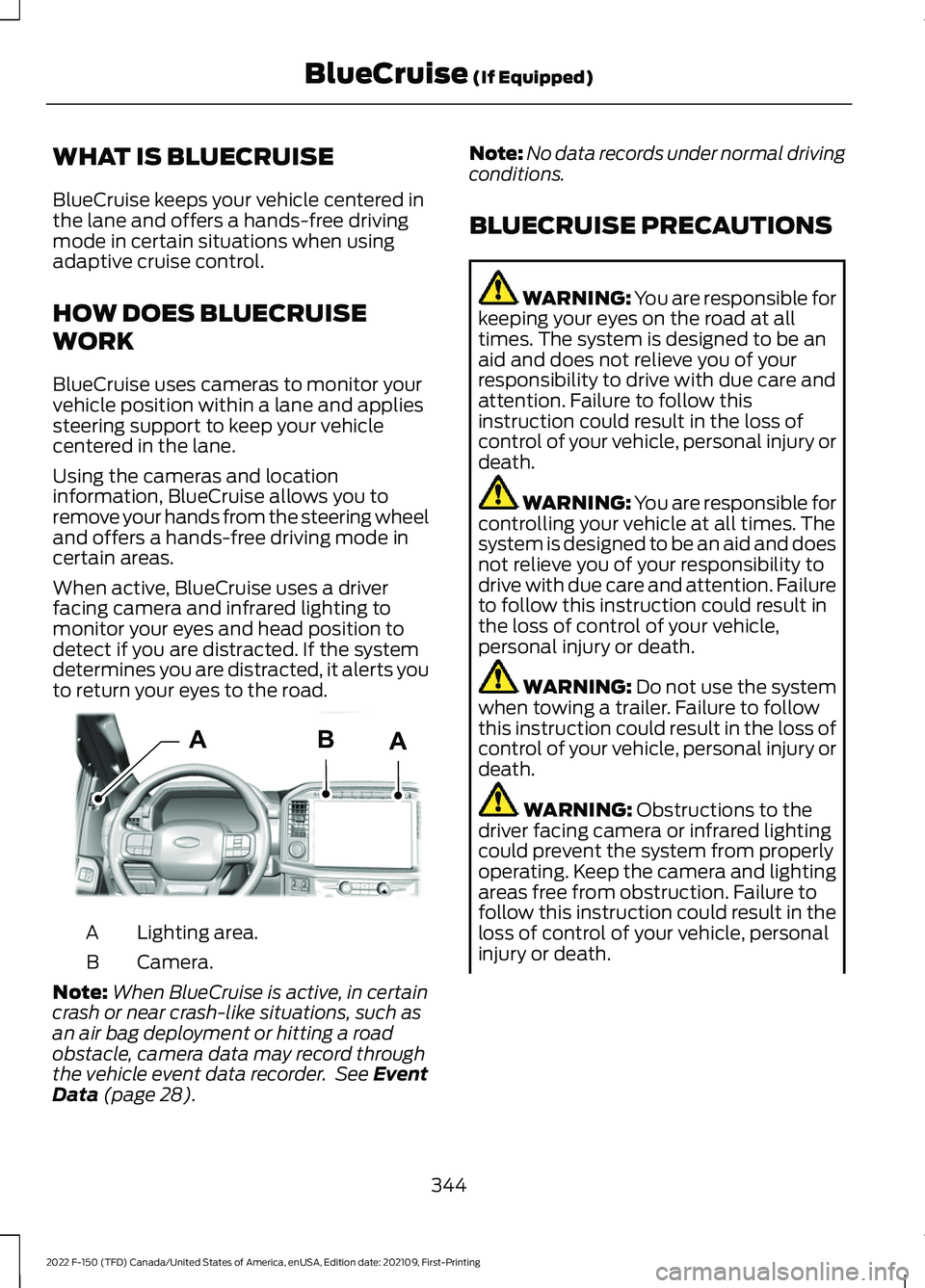
When active, BlueCruise uses a driver
facing camera and infrared lighting to
monitor your eyes and head position to
detect if you are distracted. If the system
determines you are distracted, it alerts you
to return your eyes to the road.
Lighting area.
A
Camera.
B
Note: When BlueCruise is active, in certain
crash or near crash-like situations, such as
an air bag deployment or hitting a road
obstacle, camera data may record through
the vehicle event data recorder. See Event
Data (page 28). Note:
No data records under normal driving
conditions.
BLUECRUISE PRECAUTIONS WARNING: You are responsible for
keeping your eyes on the road at all
times. The system is designed to be an
aid and does not relieve you of your
responsibility to drive with due care and
attention. Failure to follow this
instruction could result in the loss of
control of your vehicle, personal injury or
death. WARNING: You are responsible for
controlling your vehicle at all times. The
system is designed to be an aid and does
not relieve you of your responsibility to
drive with due care and attention. Failure
to follow this instruction could result in
the loss of control of your vehicle,
personal injury or death. WARNING:
Do not use the system
when towing a trailer. Failure to follow
this instruction could result in the loss of
control of your vehicle, personal injury or
death. WARNING:
Obstructions to the
driver facing camera or infrared lighting
could prevent the system from properly
operating. Keep the camera and lighting
areas free from obstruction. Failure to
follow this instruction could result in the
loss of control of your vehicle, personal
injury or death.
344
2022 F-150 (TFD) Canada/United States of America, enUSA, Edition date: 202109, First-Printing BlueCruise
(If Equipped)AABE319812
Page 365 of 750

WHAT IS THE LANE KEEPING
SYSTEM
The lane keeping system alerts you by
providing temporary steering assistance
or steering wheel vibration when it detects
an unintended lane departure.
HOW DOES THE LANE
KEEPING SYSTEM WORK
The lane keeping system uses a forward
looking camera mounted on the windshield
to monitor vehicle movement within the
travel lane.
When the camera detects a drift out of the
travel lane, the lane keeping system alerts
the driver by vibrating the steering wheel,
or aids the driver by providing a small
steering input to move the vehicle back
into the travel lane.
The driver can select one of three modes:
•
Alert (If Equipped)
• Aid
• Alert + Aid
LANE KEEPING SYSTEM
PRECAUTIONS WARNING: You are responsible for
controlling your vehicle at all times. The
system is designed to be an aid and does
not relieve you of your responsibility to
drive with due care and attention. Failure
to follow this instruction could result in
the loss of control of your vehicle,
personal injury or death. WARNING: The system will not
operate if the sensor cannot track the
road lane markings. WARNING:
The sensor may
incorrectly track lane markings as other
structures or objects. This can result in
a false or missed warning. WARNING:
In cold and severe
weather conditions the system may not
function. Rain, snow and spray can all
limit sensor performance. WARNING:
The system may not
operate properly if the sensor is blocked.
Keep the windshield free from
obstruction. WARNING:
If damage occurs in the
immediate area surrounding the sensor,
have your vehicle checked as soon as
possible. WARNING:
The system may not
correctly operate if your vehicle is fitted
with a suspension kit not approved by
us. WARNING:
Large contrasts in
outside lighting can limit sensor
performance.
LANE KEEPING SYSTEM
LIMITATIONS
The lane keeping system only operates
when the vehicle speed is greater than
40 mph (64 km/h)
.
The system works when the camera can
detect at least one lane marking.
Note: When you select Aid or Alert and Aid
mode and the system detects no steering
activity for a short period of time, the system
alerts you to put your hands on the steering
wheel. The system may detect a light grip
or touch on the steering wheel as hands-off
driving.
361
2022 F-150 (TFD) Canada/United States of America, enUSA, Edition date: 202109, First-Printing Lane Keeping System
(If Equipped)
Page 366 of 750

The lane keeping system may not correctly
operate in any of the following conditions:
•
The lane keeping system does not
detect at least one lane marking.
• You switch the turn signal on.
• You apply direct steering, accelerate
fast or brake hard.
• The vehicle speed is less than 40 mph
(64 km/h).
• The anti-lock brake, stability control or
traction control system activates.
• The lane is too narrow.
• Something is obscuring the camera or
it is unable to detect the lane markings
due to environment, traffic or vehicle
conditions.
• Entering or exiting a tight curve when
driving at high speeds.
The lane keeping system may not correct
lane positioning in any of the following
conditions:
• High winds.
• Uneven road surfaces.
• Heavy or uneven loads.
• Incorrect tire pressure.
SWITCHING THE LANE
KEEPING SYSTEM ON AND
OFF To activate the lane keeping
system, press the button on the
steering wheel.
To deactivate the lane keeping system,
press the button again.
Note: When switching the system on or off
a message appears in the information and
entertainment display to show the status. Note:
The system stores the on or off
setting until manually changed, unless it
detects a MyKey ™. If the system detects a
MyKey ™, it defaults to the last setting for
that MyKey ™.
Note: If the system detects a MyKey ™,
pressing the button does not affect the on
or off status of the system. You can only
change the mode and intensity settings.
SWITCHING THE LANE
KEEPING SYSTEM MODE
The lane keeping system has different
settings that you can view or adjust using
the information display.
The system stores the last known selection
for each of these settings. You do not need
to readjust your settings each time you
switch on the system.
To change the lane keeping system mode,
use the touchscreen:
1. Press
Features on the touchscreen.
2. Press
Driver Assistance.
3. Press
Lane-Keeping System.
4. Press
Lane-Keeping Mode.
5. Select a mode.
Note: The system remembers the last
setting when you start your vehicle. If the
system detects a MyKey ™, it defaults to the
last setting for that MyKey ™.
ALERT MODE
WHAT IS ALERT MODE
Alert mode vibrates the steering wheel
when it detects an unintended lane
departure.
362
2022 F-150 (TFD) Canada/United States of America, enUSA, Edition date: 202109, First-Printing Lane Keeping System
(If Equipped)E334922
Page 367 of 750
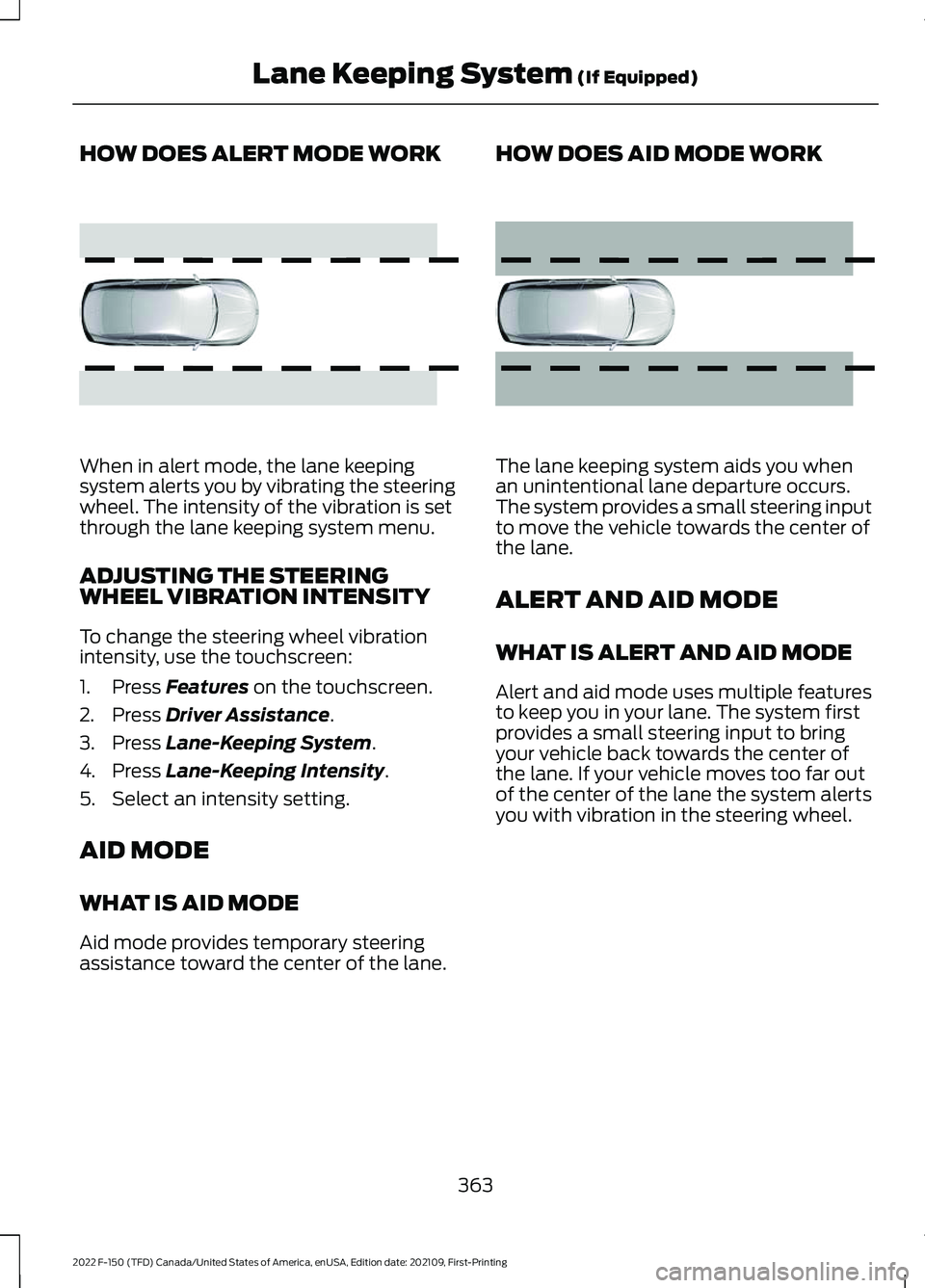
HOW DOES ALERT MODE WORK
When in alert mode, the lane keeping
system alerts you by vibrating the steering
wheel. The intensity of the vibration is set
through the lane keeping system menu.
ADJUSTING THE STEERING
WHEEL VIBRATION INTENSITY
To change the steering wheel vibration
intensity, use the touchscreen:
1. Press Features on the touchscreen.
2. Press
Driver Assistance.
3. Press
Lane-Keeping System.
4. Press
Lane-Keeping Intensity.
5. Select an intensity setting.
AID MODE
WHAT IS AID MODE
Aid mode provides temporary steering
assistance toward the center of the lane. HOW DOES AID MODE WORK
The lane keeping system aids you when
an unintentional lane departure occurs.
The system provides a small steering input
to move the vehicle towards the center of
the lane.
ALERT AND AID MODE
WHAT IS ALERT AND AID MODE
Alert and aid mode uses multiple features
to keep you in your lane. The system first
provides a small steering input to bring
your vehicle back towards the center of
the lane. If your vehicle moves too far out
of the center of the lane the system alerts
you with vibration in the steering wheel.
363
2022 F-150 (TFD) Canada/United States of America, enUSA, Edition date: 202109, First-Printing Lane Keeping System
(If Equipped)E165515 E165516
Page 368 of 750
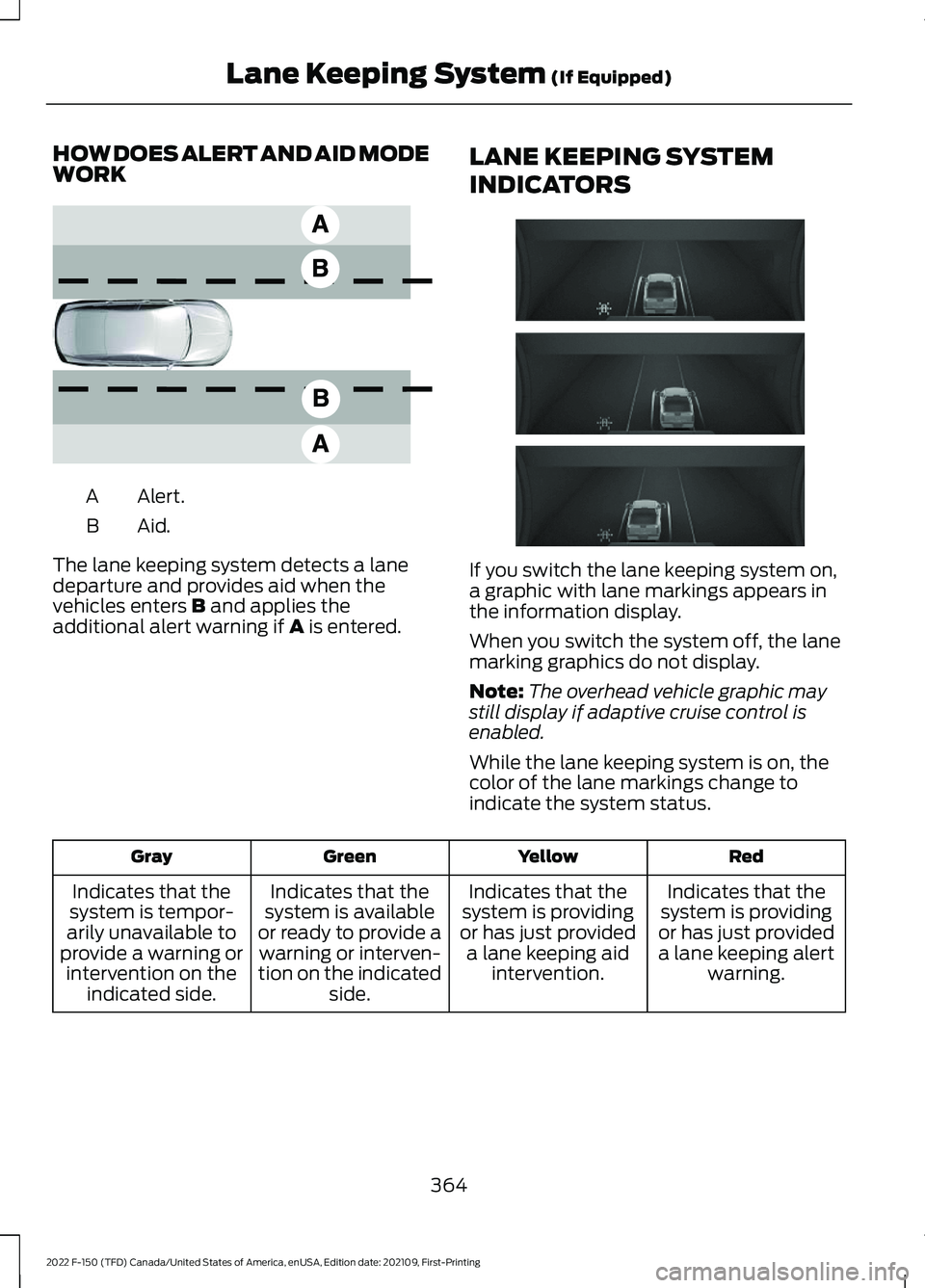
HOW DOES ALERT AND AID MODE
WORK
Alert.
A
Aid.B
The lane keeping system detects a lane
departure and provides aid when the
vehicles enters B and applies the
additional alert warning if A is entered. LANE KEEPING SYSTEM
INDICATORS If you switch the lane keeping system on,
a graphic with lane markings appears in
the information display.
When you switch the system off, the lane
marking graphics do not display.
Note:
The overhead vehicle graphic may
still display if adaptive cruise control is
enabled.
While the lane keeping system is on, the
color of the lane markings change to
indicate the system status. Red
Yellow
Green
Gray
Indicates that the
system is providing
or has just provided a lane keeping alert warning.
Indicates that the
system is providing
or has just provided a lane keeping aid intervention.
Indicates that the
system is available
or ready to provide a warning or interven-
tion on the indicated side.
Indicates that the
system is tempor-
arily unavailable to
provide a warning or intervention on the indicated side.
364
2022 F-150 (TFD) Canada/United States of America, enUSA, Edition date: 202109, First-Printing Lane Keeping System
(If Equipped)E165517 E335296
Page 371 of 750
Why does the vehicle not come back toward the middle of the lane, as expected, in the
Aid, or Aid + Alert mode?
High cross winds are present. There is a large road crown.
Rough roads, grooves or shoulder drop-offs.
Heavy, uneven loading of the vehicle or improper tire inflation pressure. You changed the tires or modified the suspension.
367
2022 F-150 (TFD) Canada/United States of America, enUSA, Edition date: 202109, First-Printing Lane Keeping System (If Equipped)