2022 FORD F-150 key
[x] Cancel search: keyPage 344 of 750

If your vehicle starts to slow
down, you must provide steering
input to the wheel and press and
release the button to regain full system
performance.
Automatic cancellation can also occur if:
• The lane becomes too wide or too
narrow.
• The system cannot detect valid lane
markings.
• Lane markings cross over one another.
Note: The system disables until the next
key cycle if your vehicle slows down due to
driver inactivity twice within a key cycle.
LANE CENTERING INDICATORS Illuminates when you switch
lane centering on. The color of
the indicator changes to indicate
the system status.
Gray indicates the system is on but
inactive.
Green indicates the system is active and
applying steering torque assistance input
to keep your vehicle in the center of the
lane.
Amber with an audible tone and then gray
indicates a system automatic cancellation. INTELLIGENT ADAPTIVE
CRUISE CONTROL
HOW DOES INTELLIGENT
ADAPTIVE CRUISE CONTROL
WORK
Intelligent adaptive cruise control
combines speed sign recognition and
navigation map data with adaptive cruise
control to adjust the cruise set speed to
the speed limit detected by the speed sign
recognition system. As the system detects
new speed signs, the set speed updates.
There are limitations that affect the
accuracy of the speed sign recognition
system and its ability to determine the
current speed limit. The intelligent
adaptive cruise control system and its
ability to determine the current speed limit
shares these limitations.
Note:
The adaptive cruise control gap
setting operates normally when the feature
is enabled.
INTELLIGENT ADAPTIVE CRUISE
CONTROL PRECAUTIONS WARNING: You are responsible for
controlling your vehicle at all times. The
system is designed to be an aid and does
not relieve you of your responsibility to
drive with due care and attention. Failure
to follow this instruction could result in
the loss of control of your vehicle,
personal injury or death.
INTELLIGENT ADAPTIVE CRUISE
CONTROL REQUIREMENTS
Traffic sign recognition must be enabled
for intelligent adaptive cruise control to be
active.
340
2022 F-150 (TFD) Canada/United States of America, enUSA, Edition date: 202109, First-Printing Adaptive Cruise Control (If Equipped)E308130 E297977
Page 351 of 750

BLUECRUISE ALERTS
When BlueCruise is providing hands-on
driving or transitioning to hands-on driving
from hands-free driving and detects no
steering activity for a certain period of time,
the system alerts you with a message in
the instrument cluster to put your hands
on the steering wheel. After the first alert,
the system alerts you with a message in
the instrument cluster and an audible
warning.
When BlueCruise is providing hands-on or
hands-free driving and detects you are not
looking at the road for a certain period of
time, the system alerts you to return your
eyes to the road. Depending on where you
are looking, the alert can be a message in
the instrument cluster and an audible
warning.
If you do not react to the warnings,
BlueCruise cancels, quickly activates and
releases the brakes, and slows your vehicle
down to low speeds while maintaining
steering control.
If your vehicle slows down and you resume
control, a message appears to prompt you
to press the accelerator pedal to allow the
system to resume.
Note:
If the system detects repeated
inactivity, it disables until the next key cycle.
BLUECRUISE AUTOMATIC
CANCELLATION
When an external condition cancels
BlueCruise, for example, no lane markings
available, a tone sounds and a message
appears in the instrument cluster. If your vehicle starts to slow
down, you must take control of
steering and press and release
the button to reactivate BlueCruise. System cancellation can also occur if:
•
The lane becomes too narrow.
• The system cannot detect valid lane
markings.
• Lane markings cross.
• Your eyes are not on the road or your
hands are not the steering wheel.
If you have your hands on the steering
wheel and your eyes are on the road when
the feature is active and a cancellation
occurs, the system sounds a tone and
displays a cancelled graphic in the
instrument cluster.
If you are not paying attention to the road
or your hands are not on the steering wheel
and a cancellation occurs, the system
displays a message and a tone sounds until
you resume control. If you do not resume
control in time, BlueCruise quickly activates
and releases the brakes, and slows your
vehicle down to low speeds while
maintaining steering control. If your vehicle
slows down and you resume control, a
message appears to prompt you to press
the accelerator pedal to allow the system
to resume.
Note: The system disables until the next
key cycle if it detects repeated inactivity.
BLUECRUISE INDICATORS When on, the color of the
indicator changes to indicate the
status.
Gray indicates BlueCruise is on but inactive.
Green indicates BlueCruise is active and
applying continuous steering support.
Blue indicates BlueCruise is active and
hands-free driving mode is available.
347
2022 F-150 (TFD) Canada/United States of America, enUSA, Edition date: 202109, First-Printing BlueCruise (If Equipped)E308130 E297977
Page 366 of 750

The lane keeping system may not correctly
operate in any of the following conditions:
•
The lane keeping system does not
detect at least one lane marking.
• You switch the turn signal on.
• You apply direct steering, accelerate
fast or brake hard.
• The vehicle speed is less than 40 mph
(64 km/h).
• The anti-lock brake, stability control or
traction control system activates.
• The lane is too narrow.
• Something is obscuring the camera or
it is unable to detect the lane markings
due to environment, traffic or vehicle
conditions.
• Entering or exiting a tight curve when
driving at high speeds.
The lane keeping system may not correct
lane positioning in any of the following
conditions:
• High winds.
• Uneven road surfaces.
• Heavy or uneven loads.
• Incorrect tire pressure.
SWITCHING THE LANE
KEEPING SYSTEM ON AND
OFF To activate the lane keeping
system, press the button on the
steering wheel.
To deactivate the lane keeping system,
press the button again.
Note: When switching the system on or off
a message appears in the information and
entertainment display to show the status. Note:
The system stores the on or off
setting until manually changed, unless it
detects a MyKey ™. If the system detects a
MyKey ™, it defaults to the last setting for
that MyKey ™.
Note: If the system detects a MyKey ™,
pressing the button does not affect the on
or off status of the system. You can only
change the mode and intensity settings.
SWITCHING THE LANE
KEEPING SYSTEM MODE
The lane keeping system has different
settings that you can view or adjust using
the information display.
The system stores the last known selection
for each of these settings. You do not need
to readjust your settings each time you
switch on the system.
To change the lane keeping system mode,
use the touchscreen:
1. Press
Features on the touchscreen.
2. Press
Driver Assistance.
3. Press
Lane-Keeping System.
4. Press
Lane-Keeping Mode.
5. Select a mode.
Note: The system remembers the last
setting when you start your vehicle. If the
system detects a MyKey ™, it defaults to the
last setting for that MyKey ™.
ALERT MODE
WHAT IS ALERT MODE
Alert mode vibrates the steering wheel
when it detects an unintended lane
departure.
362
2022 F-150 (TFD) Canada/United States of America, enUSA, Edition date: 202109, First-Printing Lane Keeping System
(If Equipped)E334922
Page 381 of 750

SWITCHING PRE-COLLISION
ASSIST ON AND OFF - POLICE
RESPONDER
To switch the system on or off, use the
touchscreen:
1. Press Features on the touchscreen.
2. Press
Driver Assistance.
3. Press
Pre-Collision Assist.
4. Switch the feature on or off. You can switch the entire system
off at any time by pressing the
button above the touchscreen.
Adjusting the Pre-Collision Assist
Settings
You can adjust the following settings by
using the touchscreen controls in the
pre-collision assist menu:
• Change alert sensitivity to one of three
possible settings.
• If required, switch automatic
emergency braking on or off.
• If required, switch the entire
pre-collision assist feature on or off.
Note: Automatic emergency braking turns
on every time you switch the ignition on. SWITCHING PRE-COLLISION
ASSIST ON AND OFF
To switch the system on or off, use the
touchscreen:
1. Press
Features on the touchscreen.
2. Press
Driver Assistance.
3. Press
Pre-Collision Assist.
4. Switch the feature on or off.
Adjusting the Pre-Collision Assist
Settings
You can adjust the following settings by
using the touchscreen controls in the
pre-collision assist menu:
• Change alert and distance alert
sensitivity to one of three possible
settings.
• Switch distance indication and alert on
or off.
• If required, switch automatic
emergency braking on or off.
• If required, switch the entire
pre-collision assist feature on or off.
• If required, switch evasive steering
assist on or off.
Note: Automatic emergency braking and
evasive steering turn on every time you
switch the ignition on.
Note: If your vehicle has a radar sensor, we
recommend that you switch the system off
if you install a snow plow or similar object
in such a way that it may block the radar
sensor. Your vehicle remembers the selected
setting across key cycles.
Note: If you switch automatic emergency
braking off, evasive steering assist switches
off.
377
2022 F-150 (TFD) Canada/United States of America, enUSA, Edition date: 202109, First-Printing Pre-Collision Assist
(If Equipped)E309750 E296163
Page 398 of 750

PICKUP BED PRECAUTIONS
WARNING: Do not allow people or
animals in truck beds that have
modifications, such as bed covers or
slide-in campers, when the engine is
running. Exhaust fumes are toxic. Failure
to follow this instruction could result in
personal injury or death. WARNING: It is extremely
dangerous to ride in a cargo area, inside
or outside of a vehicle. In a crash, people
riding in these areas are more likely to be
seriously injured or killed. Do not allow
people to ride in any area of your vehicle
that is not equipped with seats and
seatbelts. Make sure everyone in your
vehicle is in a seat and properly using a
seatbelt. Failure to follow this warning
could result in serious personal injury or
death.
PICKUP BED ANCHOR POINTS
PICKUP BED ANCHOR POINT
PRECAUTIONS WARNING: Always properly secure
cargo to prevent shifting cargo or cargo
falling from the vehicle. Failure to do so
could result in compromised vehicle
stability and serious personal injury to
vehicle occupants or others. WARNING:
The appropriate
loading capacity of your vehicle can be
limited either by volume capacity (how
much space is available) or by payload
capacity (how much weight the vehicle
should carry). Once you have reached the maximum payload of your vehicle,
do not add more cargo, even if there is
space available. Overloading or
improperly loading your vehicle can
contribute to loss of vehicle control and
vehicle rollover.
WARNING:
It is extremely
dangerous to ride in a cargo area, inside
or outside of a vehicle. In a crash, people
riding in these areas are more likely to be
seriously injured or killed. Do not allow
people to ride in any area of your vehicle
that is not equipped with seats and
seatbelts. Make sure everyone in your
vehicle is in a seat and properly using a
seatbelt. Failure to follow this warning
could result in serious personal injury or
death. WARNING:
Do not use the load
retaining fixtures for towing. Failure to
follow this instruction could result in
personal injury. WARNING:
Do not exceed the
maximum load rating of the load
retaining fixtures. Failure to follow this
instruction could result in personal injury. WARNING:
Check the load
retaining fixtures for damage before
using them. Failure to follow this
instruction could result in personal injury.
INSTALLING AND REMOVING THE
PICKUP BED TIE-DOWN CLEATS
(If Equipped)
Installing the Cleats
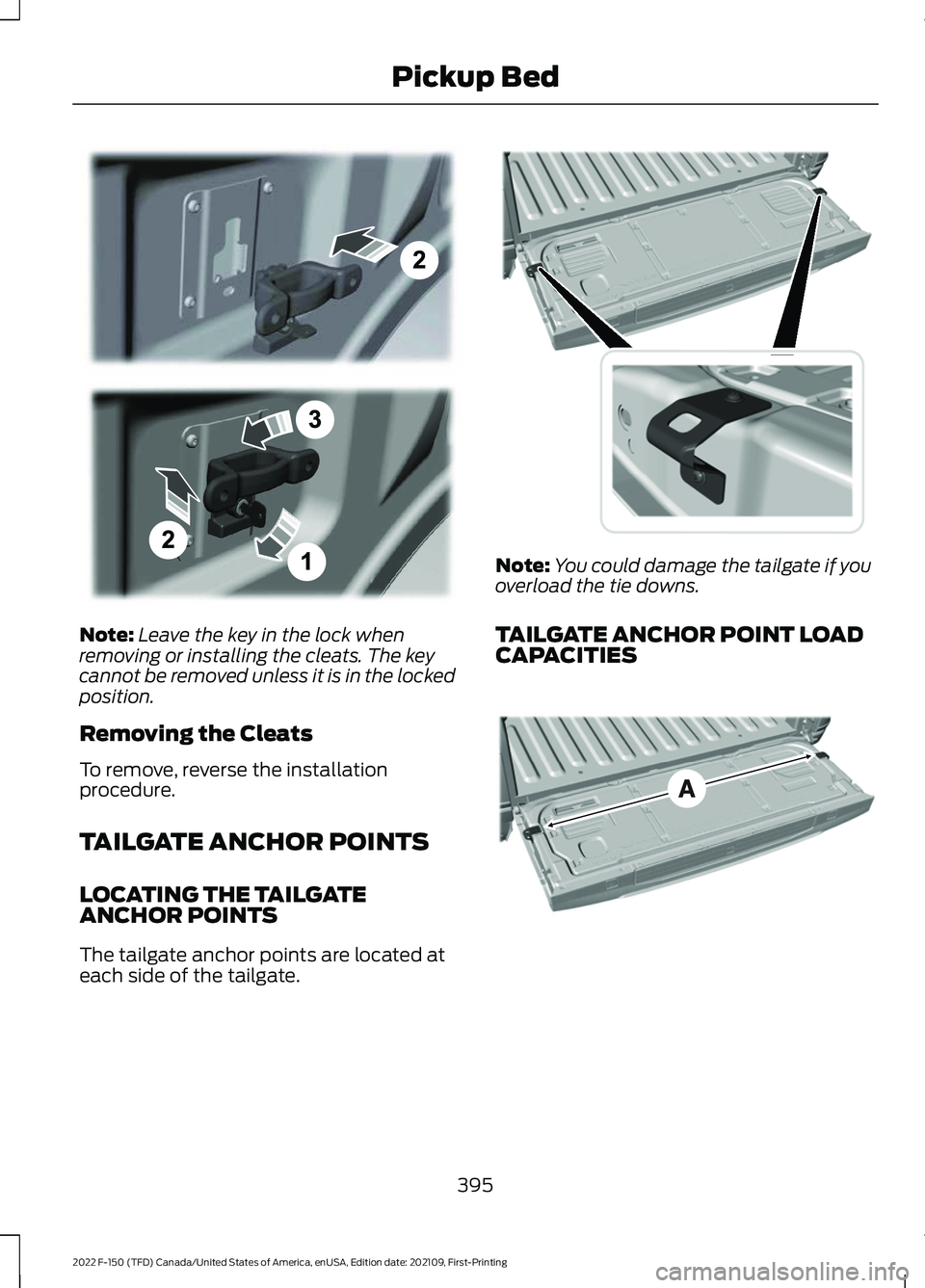
1. Insert the key into the lock and turn clockwise to unlock.
2. Insert the cleat into the pickup bed anchor point and slide upward.
3. Turn the key counterclockwise to lock.
394
2022 F-150 (TFD) Canada/United States of America, enUSA, Edition date: 202109, First-Printing Pickup Bed
Page 399 of 750
Note:
Leave the key in the lock when
removing or installing the cleats. The key
cannot be removed unless it is in the locked
position.
Removing the Cleats
To remove, reverse the installation
procedure.
TAILGATE ANCHOR POINTS
LOCATING THE TAILGATE
ANCHOR POINTS
The tailgate anchor points are located at
each side of the tailgate. Note:
You could damage the tailgate if you
overload the tie downs.
TAILGATE ANCHOR POINT LOAD
CAPACITIES 395
2022 F-150 (TFD) Canada/United States of America, enUSA, Edition date: 202109, First-Printing Pickup BedE327575 E327594 E327790
Page 404 of 750
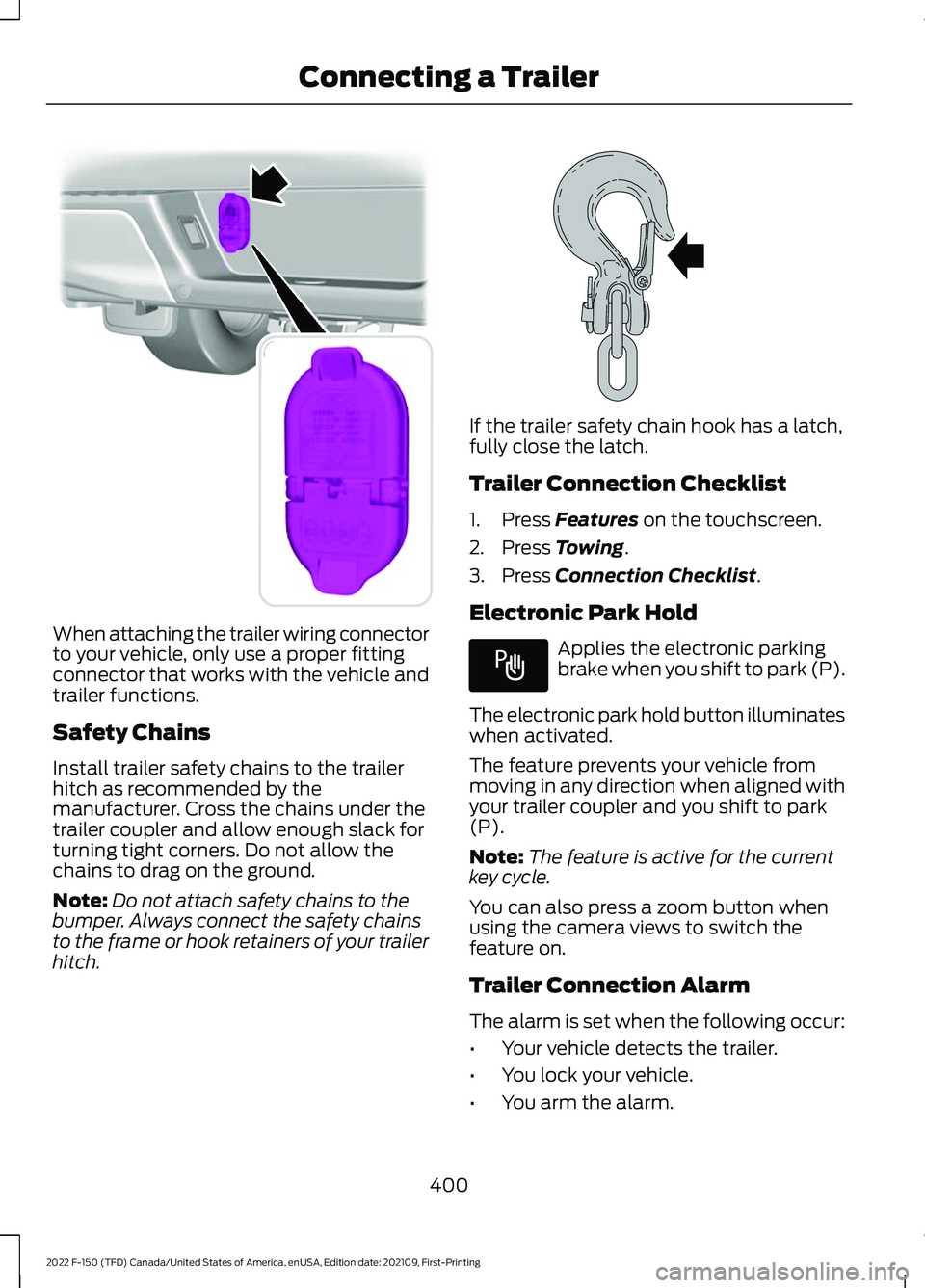
When attaching the trailer wiring connector
to your vehicle, only use a proper fitting
connector that works with the vehicle and
trailer functions.
Safety Chains
Install trailer safety chains to the trailer
hitch as recommended by the
manufacturer. Cross the chains under the
trailer coupler and allow enough slack for
turning tight corners. Do not allow the
chains to drag on the ground.
Note:
Do not attach safety chains to the
bumper. Always connect the safety chains
to the frame or hook retainers of your trailer
hitch. If the trailer safety chain hook has a latch,
fully close the latch.
Trailer Connection Checklist
1. Press Features on the touchscreen.
2. Press
Towing.
3. Press
Connection Checklist.
Electronic Park Hold Applies the electronic parking
brake when you shift to park (P).
The electronic park hold button illuminates
when activated.
The feature prevents your vehicle from
moving in any direction when aligned with
your trailer coupler and you shift to park
(P).
Note: The feature is active for the current
key cycle.
You can also press a zoom button when
using the camera views to switch the
feature on.
Trailer Connection Alarm
The alarm is set when the following occur:
• Your vehicle detects the trailer.
• You lock your vehicle.
• You arm the alarm.
400
2022 F-150 (TFD) Canada/United States of America, enUSA, Edition date: 202109, First-Printing Connecting a TrailerE193232 E265060 E337016
Page 424 of 750

WHAT IS ON-BOARD SCALE
On-board scale provides the estimated
payload of your vehicle and warns when
your vehicle is overloaded.
HOW DOES ON-BOARD SCALE
WORK
On-board scale uses sensors mounted to
the suspension to calculate the vehicle's
payload.
ON-BOARD SCALE
LIMITATIONS
You cannot use the system if any of the
following occur:
•
The wheels are not pointed straight
ahead.
• Your vehicle is not in park (P).
• Your vehicle is not on a level surface.
• The tire pressures are below the
recommended levels.
• Your vehicle is off.
USING ON-BOARD SCALE
1. Press Features on the touchscreen.
2. Press
Onboard Scales.
Note: You can also access on-board scale
using the FordPass app. Settings menu.
A
Estimated payload.
B
Taillights on and off.
C
Taillights
Press to see the vehicle's estimated
payload on the vehicle's tail lamp.
On-Board Scale Settings
Vehicle Mode
Press to return to the on-board scale
screen.
Scale Mode
Press to see a representation of the weight
added to the vehicle's current payload and
to reset the scale to zero.
Note: The scale settings remain between
key cycles.
Passenger and Cargo Load Reminder
Press to switch the load reminder on or off.
Set Passenger and Cargo Load Reminder
Press to set the estimated payload that is
not in the vehicle when you use on-board
scale.
The default and minimum value is
200 lb
(100 kg).
420
2022 F-150 (TFD) Canada/United States of America, enUSA, Edition date: 202109, First-Printing On-Board Scale
(If Equipped)A
B
CE361332