Page 91 of 750

REMOTE CONTROL
LIMITATIONS
WARNING: Changes or
modifications not expressively approved
by the party responsible for compliance
could void the user's authority to operate
the equipment. The term "IC:" before the
radio certification number only signifies
that Industry Canada technical
specifications were met.
This device complies with Part 15 of the
FCC Rules and with Industry Canada
license-exempt RSS standard(s).
Operation is subject to the following two
conditions: (1) This device may not cause
harmful interference, and (2) This device
must accept any interference received,
including interference that may cause
undesired operation.
Make sure a valid remote control is within
5 ft (1.5 m)
from the front door handles
and rear of vehicle.
The system may not function if:
• The remote control remains stationary
for about a minute.
• The vehicle battery has no charge.
• The remote control battery has no
charge.
• There is interference causing issues
with the remote control frequencies.
• The remote control is too close to
metal objects or electronic devices, for
example keys or a cell phone. USING THE REMOTE CONTROL
- POLICE RESPONDER
Note:
If there is a problem with the remote
entry system, make sure to take all remote
controls with you to an authorized dealer in
order to aid in troubleshooting the problem.
Unlock Press the button to unlock all
doors. See
Unlocking and
Locking the Doors Using the
Remote Control
(page 102).
Lock Press the button to lock all
doors. See
Unlocking and
Locking the Doors Using the
Remote Control
(page 102).
Sounding the Panic Alarm (If Equipped) Press the button to sound the
panic alarm. Press the button
again or switch the ignition on to
turn it off.
87
2022 F-150 (TFD) Canada/United States of America, enUSA, Edition date: 202109, First-Printing Keys and Remote ControlsE203600 E138629 E138623 E138624
Page 92 of 750

Note:
The panic alarm operates regardless
of the ignition position.
USING THE REMOTE CONTROL
Use your remote control to access various
vehicle systems.
Note: The buttons on your remote may vary
depending on the vehicle region or options.
Unlock Press the button to unlock all
doors. See Unlocking and
Locking the Doors Using the
Remote Control
(page 102).
Lock Press the button to lock all
doors. See
Unlocking and
Locking the Doors Using the
Remote Control
(page 102).
Remote Start
(If Equipped) Press the button to remote start.
See
Remotely Starting and
Stopping the Vehicle (page
178).
Tailgate
(If Equipped) Press the button to open the
tailgate. See
Opening the
Tailgate Using the Remote
Control
(page 125).
Panic Alarm
(If Equipped) Press the button to sound the
panic alarm. See Sounding the
Panic Alarm
(page 89).OPENING AND CLOSING THE
FLIP KEY
Opening Your Flip Key
Press the round button on the remote
control to extend the flip key.
Note:
Inspect the key blade for debris.
Periodically clean with a brush.
Closing Your Flip Key
Press and hold the round button on the
remote control to fold the key blade when
not in use. 88
2022 F-150 (TFD) Canada/United States of America, enUSA, Edition date: 202109, First-Printing Keys and Remote ControlsE138629 E138623 E138625 E191530 E138624 E191532 E191532
Page 93 of 750

REMOVING THE KEY BLADE
Push the release button on your passive
key and pull the key blade out.
SOUNDING THE PANIC ALARM
Press the button to sound the
panic alarm. Press the button
again, or switch the ignition on
to turn it off.
Note: The panic alarm only operates when
the ignition is off.
LOCATING YOUR VEHICLE Press the lock button twice
within three seconds. The turn
signal lamps flash.
Note: We recommend you use this method
to locate your vehicle. CHANGING THE REMOTE
CONTROL BATTERY - POLICE
RESPONDER WARNING: Keep batteries away
from children to prevent ingestion.
Failure to follow this instruction could
result in personal injury or death. If
ingested, immediately seek medical
attention. WARNING:
If the battery
compartment does not securely close,
stop using the remote control and
replace it as soon as possible. In the
meantime, keep the remote control away
from children. Failure to follow this
instruction could result in personal injury
or death.
The remote control uses one coin-type
three-volt lithium battery CR2032 or
equivalent. Make sure you dispose of old
batteries in an environmentally
friendly way. Seek advice from
local authorities about recycling old
batteries.
89
2022 F-150 (TFD) Canada/United States of America, enUSA, Edition date: 202109, First-Printing Keys and Remote ControlsE322866 E138624 E138623 E107998
Page 99 of 750

2.
Switch the ignition from off to on. Keep
the ignition on for at least three
seconds, but no more than 10 seconds.
3. Switch the ignition off and remove the
first coded key from the ignition.
4. After three seconds but within 10 seconds of switching the ignition off,
insert the second previously coded key
into the ignition.
5. Switch the ignition from off to on. Keep
the ignition on for at least three
seconds, but no more than 10 seconds.
6. Switch the ignition off and remove the
second previously programmed coded
key from the ignition.
7. After three seconds but within 10 seconds of switching the ignition off
and removing the previously
programmed coded key, insert the new
un–programmed key into the ignition. 8.
Switch the ignition from off to on. Keep
the ignition on for at least six seconds
until you hear the door locks cycle.
9. Remove the newly programmed coded
key from the ignition.
The key starts the engine if programming
is successful. You can operate the keyless
remote entry system with the new remote
control with integrated key.
If programming was not successful, wait
20 seconds and repeat Steps 1 through 8.
If you are still unsuccessful, take your
vehicle to an authorized dealer.
Note: You can program a maximum of six
coded remote controls to your vehicle.
KEYS AND REMOTE CONTROLS – TROUBLESHOOTING
KEYS AND REMOTE CONTROLS – INFORMATION MESSAGES Action
Message
Replace remote control battery.
Key Battery Low Replace
Soon
95
2022 F-150 (TFD) Canada/United States of America, enUSA, Edition date: 202109, First-Printing Keys and Remote Controls
Page 106 of 750
OPERATING THE DOORS
FROM OUTSIDE YOUR
VEHICLE
UNLOCKING AND LOCKING THE
DOORS USING THE REMOTE
CONTROL (If Equipped)
You can only use the remote control when
your vehicle is stationary.
Unlocking the Doors Press the button to unlock all
doors.
Locking the Doors Press the button to lock all
doors. One short flash of the
turn signal lamps confirms that
your vehicle has locked.
Note: For more information on operating
the doors from outside your vehicle
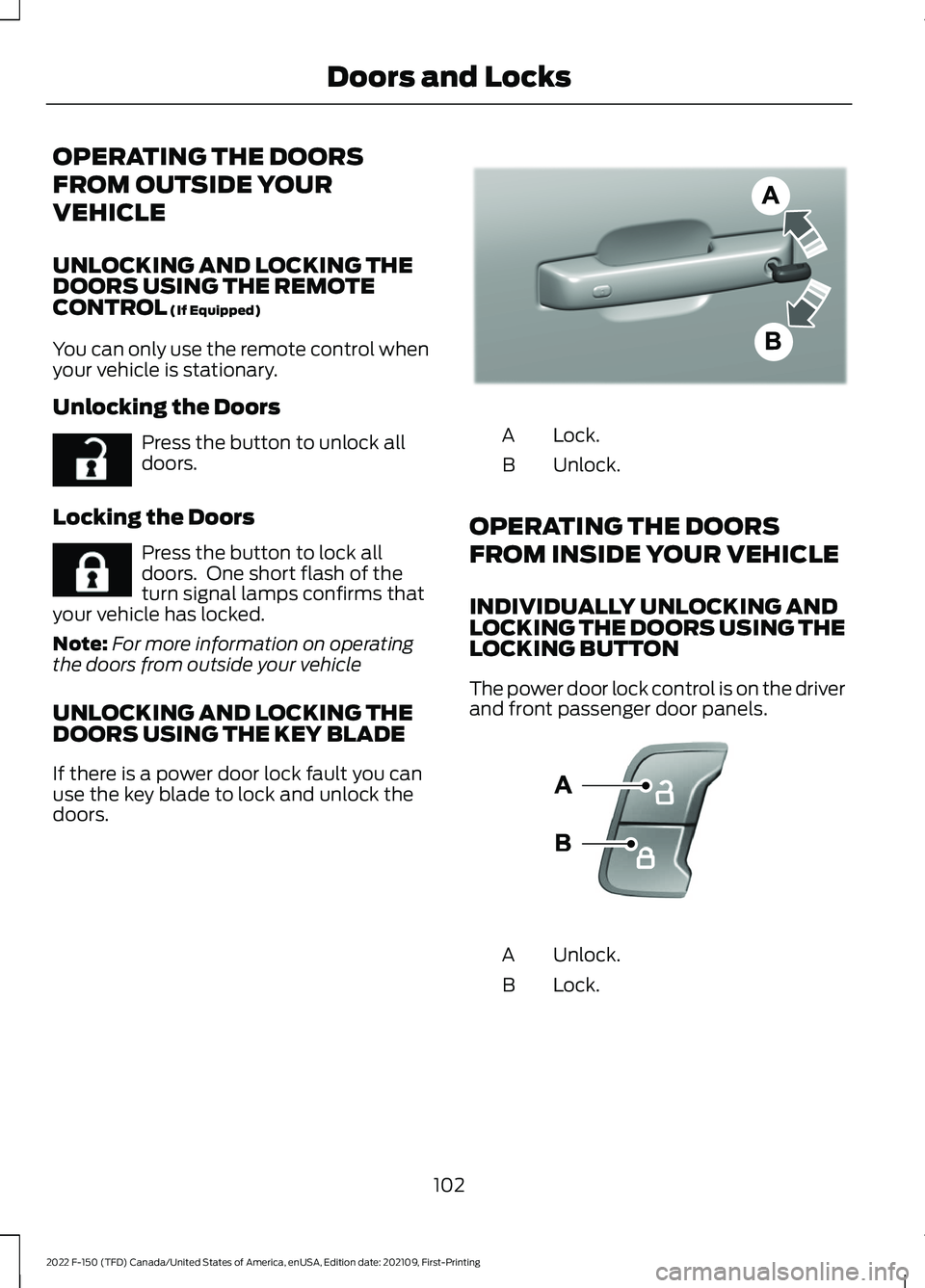
UNLOCKING AND LOCKING THE
DOORS USING THE KEY BLADE
If there is a power door lock fault you can
use the key blade to lock and unlock the
doors. Lock.
A
Unlock.
B
OPERATING THE DOORS
FROM INSIDE YOUR VEHICLE
INDIVIDUALLY UNLOCKING AND
LOCKING THE DOORS USING THE
LOCKING BUTTON
The power door lock control is on the driver
and front passenger door panels. Unlock.
A
Lock.
B
102
2022 F-150 (TFD) Canada/United States of America, enUSA, Edition date: 202109, First-Printing Doors and LocksE267112 E267111 E333745 E138628
Page 107 of 750

OPENING THE DOORS FROM
INSIDE YOUR VEHICLE - CREW
CAB
Pull the interior door handle twice to
unlock and open a rear door. The first pull
unlocks the door and the second pull
opens the door.
AUTOUNLOCK (IF EQUIPPED)
WHAT IS AUTOUNLOCK
Autounlock is an unlocking feature that
unlocks the vehicle doors when your
vehicle comes to a stop.
AUTOUNLOCK REQUIREMENTS
Autounlock unlocks all the doors when all
of the following occur:
• The ignition is on, all the doors are
closed and your vehicle is moving at a
speed greater than 12 mph (20 km/h).
• Your vehicle comes to a stop.
• You open the driver door within 10
minutes of switching the ignition off or
to the accessory position.
SWITCHING AUTOUNLOCK ON
AND OFF
1. Press
Settings on the touchscreen.
2. Press
Vehicle Settings.
3. Switch
Autounlock on or off.
AUTOLOCK
(IF EQUIPPED)
WHAT IS AUTOLOCK
Autolock is a locking feature that locks
your vehicle doors when you start driving. AUTOLOCK REQUIREMENTS
Autolock locks all the doors when all of the
following occur:
•
All doors are closed.
• The ignition is on.
• Your vehicle reaches a speed greater
than
12 mph (20 km/h).
MISLOCK
(IF EQUIPPED)
WHAT IS MISLOCK
Mislock is a locking feature that warns you
if your vehicle has not locked.
MISLOCK LIMITATIONS
When you press the lock button once, the
turn signals do not flash if:
• Any door or the tailgate is open.
• The hood is open.
If you switch mislock off, the horn does not
sound if you press the lock button on the
remote control when a door is open.
SWITCHING MISLOCK ON AND
OFF
1. Press
Settings on the touchscreen.
2. Press
Vehicle Settings.
3. Switch
Mislock Chirp on or off.
DOORS AND LOCKS AUDIBLE
WARNINGS
Door Ajar Audible Warning
Sounds when a door is not fully closed and
your vehicle is moving.
103
2022 F-150 (TFD) Canada/United States of America, enUSA, Edition date: 202109, First-Printing Doors and Locks
Page 108 of 750
DOORS AND LOCKS –
TROUBLESHOOTING
DOORS AND LOCKS – WARNING
LAMPS
Door Ajar Warning Lamp It illuminates when you switch
the ignition on and remains on if
any door or the hood is open.
DOORS AND LOCKS – INFORMATION MESSAGES Action
Message
Displays if a door is open. Fully close the door.
Driver Door Ajar
Passenger Door Ajar
Rear Left Door Ajar
Rear Right Door Ajar
104
2022 F-150 (TFD) Canada/United States of America, enUSA, Edition date: 202109, First-Printing Doors and LocksE249859
Page 109 of 750
DOORS AND LOCKS –
FREQUENTLY ASKED QUESTIONS
Can accessories such as steps or
handles be used with the latch
assembly?
Do not use the door latch assembly to
attach any accessory, such as handles
or steps, as this can cause damage to
your vehicle.
105
2022 F-150 (TFD) Canada/United States of America, enUSA, Edition date: 202109, First-Printing Doors and Locks