2022 FORD F-150 clock
[x] Cancel search: clockPage 555 of 750

WARNING: Do not get under a
vehicle that is supported by a jack. WARNING:
The jack supplied with
this vehicle is only intended for changing
a flat tire in an emergency. Do not
attempt to do any other work on your
vehicle when it is supported by the jack,
as your vehicle could slip off the jack.
Failure to follow this instruction could
result in personal injury or death. WARNING:
The jack should be
used on level firm ground wherever
possible. WARNING:
Never place anything
between the vehicle jack and the ground. WARNING:
Never place anything
between the vehicle jack and your
vehicle. WARNING: It is recommended that
the wheels of the vehicle be chocked,
and that no person should remain in a
vehicle that is being jacked. WARNING:
Switch off the running
boards before jacking or placing any
object under your vehicle. Never place
your hand between the extended running
board and your vehicle. A moving running
board may cause injury.
Park on a level surface, activate the hazard
flashers and set the parking brake. Then,
place the transmission in park (P) and turn
the engine off.
Note: Only use the spare tire carrier to stow
the tire and wheel combination provided
with your vehicle. Other tire and wheel
combinations can cause the tire carrier to
fail. Note:
Do not use impact tools or power
tools operating at over 200 RPM on the
spare tire carrier, this could cause a winch
malfunction and prevent a secure fit.
Note: Passengers should not remain in the
vehicle when the vehicle is being jacked.
Removing the Vehicle Jack and
Tool Bag
The vehicle jack and tool bag are on the
rear passenger side of your vehicle, behind
the passenger seat. 1. Turn the wing bolt on the jack bracket
counterclockwise to release the jack
and tool bag from the jack bracket. 2.
Remove the jack and tool bag from the
jack bracket.
551
2022 F-150 (TFD) Canada/United States of America, enUSA, Edition date: 202109, First-Printing Changing a Road WheelE323384 E327650
Page 556 of 750
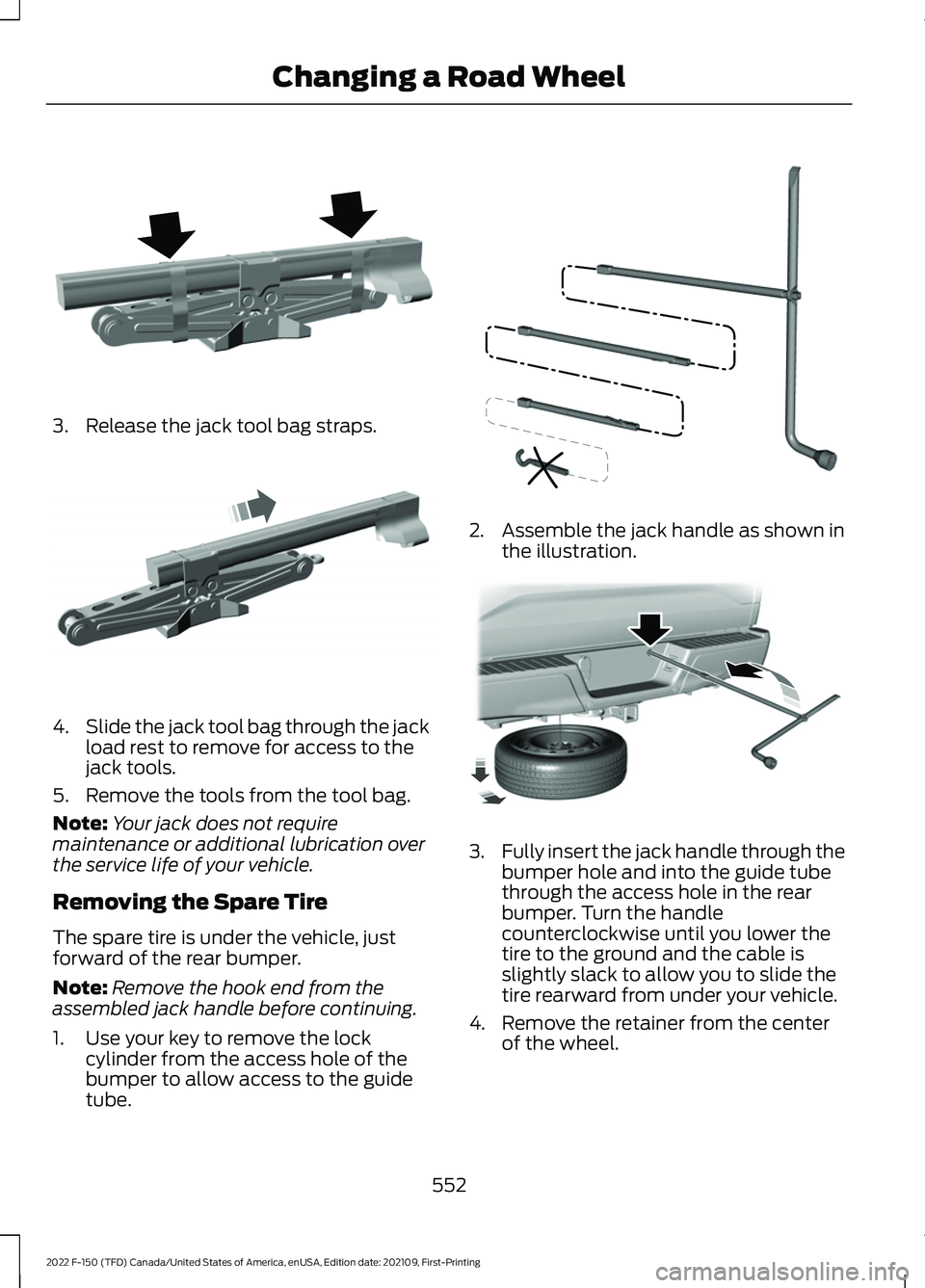
3. Release the jack tool bag straps.
4.
Slide the jack tool bag through the jack
load rest to remove for access to the
jack tools.
5. Remove the tools from the tool bag.
Note: Your jack does not require
maintenance or additional lubrication over
the service life of your vehicle.
Removing the Spare Tire
The spare tire is under the vehicle, just
forward of the rear bumper.
Note: Remove the hook end from the
assembled jack handle before continuing.
1. Use your key to remove the lock cylinder from the access hole of the
bumper to allow access to the guide
tube. 2. Assemble the jack handle as shown in
the illustration. 3.
Fully insert the jack handle through the
bumper hole and into the guide tube
through the access hole in the rear
bumper. Turn the handle
counterclockwise until you lower the
tire to the ground and the cable is
slightly slack to allow you to slide the
tire rearward from under your vehicle.
4. Remove the retainer from the center of the wheel.
552
2022 F-150 (TFD) Canada/United States of America, enUSA, Edition date: 202109, First-Printing Changing a Road WheelE323386 E327651 E188735 E184020
Page 557 of 750

5. Block both the front and rear of the
wheel diagonally opposite the flat tire.
For example, if the left front tire is flat,
block the right rear wheel.
6. Obtain the spare tire and vehicle jack from their storage locations.
7. Loosen each wheel nut on the affected
flat tire one-half turn counterclockwise,
but do not remove them.
Jacking the Vehicle Front Jacking Points
Note:
Use the frame rail as the front jacking
location point, not the control arm. There is
an arrow marked on the frame rail.
Rear Jacking Points Note:
Jack at the specified locations to
avoid damage to the vehicle.
553
2022 F-150 (TFD) Canada/United States of America, enUSA, Edition date: 202109, First-Printing Changing a Road WheelE175447 E166722 E363810 E363124 E323397
Page 558 of 750

Extension Block
1.
Wing bolt
2.
1. Place the vehicle jack at the jacking point next to the tire you are changing.
2. When jacking the vehicle to service a front wheel/tire, remove the wing bolt
holding the extension block to the jack
stowage bracket and reuse wing bolt
to attach extension block to jacking
surface.
Note: If servicing a rear tire position, the
extension block is not needed.
3. Reassemble the jack handle, including
the S-hook, to the lug wrench. Insert
the S-hook into the eyelet of the jack
and turn the jack handle clockwise until
the wheel is completely off the ground. 4. Remove the wheel nuts with the lug
wrench.
5. Replace the flat tire with the spare tire,
making sure the valve stem is facing
outward. Reinstall the wheel nuts until
the wheel is snug against the hub. Do
not fully tighten the wheel nuts until
you lower the wheel.
6. Lower the wheel by turning the jack handle counterclockwise.
7. Remove the vehicle jack and fully tighten the wheel nuts in the order
shown.
8. Stow the flat tire.
9. Stow the vehicle jack and lug wrench. Make sure the jack is securely fastened
before you drive.
10. Unblock the wheels. Stowing the Flat or Spare Tire
Note:
Failure to follow the spare tire
stowage instructions could result in failure
of the cable or loss of the spare tire.
1. Lay the tire on the ground with the valve stem facing up.
2. Slide the wheel partially under the vehicle and install the retainer through
the wheel center. Pull on the cable to
align the components at the end of the
cable.
554
2022 F-150 (TFD) Canada/United States of America, enUSA, Edition date: 202109, First-Printing Changing a Road Wheel1
2E363809 1
2E363808 E166719
Page 559 of 750
3. Turn the jack handle clockwise until
you raise the tire to its stowed position
underneath the vehicle. The effort to
turn the jack handle increases
significantly and the spare tire carrier
ratchets or slips when you raise the tire
to the maximum tightness. Tighten to
the point where the ratchet or slip
occurs a minimum of three times, as
indicated by an audible click each time.
The spare tire carrier does not allow
you to overtighten. If the spare tire
carrier ratchets or slips with little effort,
have your vehicle checked as soon as
possible.
4. Check that the tire lies flat against the frame and you properly tighten it. Try
to push or pull, then turn the tire to be
sure it does not move. Loosen and
retighten, if necessary. Failure to
properly stow the spare tire could
result in failure of the winch cable and
loss of the tire.
5. Repeat this tightness check procedure
when servicing the spare tire pressure,
every six months, as per your scheduled
maintenance information, or at any
time that the spare tire gets disturbed
through service of other components.
6. If removed, install the spare tire lock into the bumper drive tube with the
spare tire lock key and jack handle. Stowing the Vehicle Jack and Tool
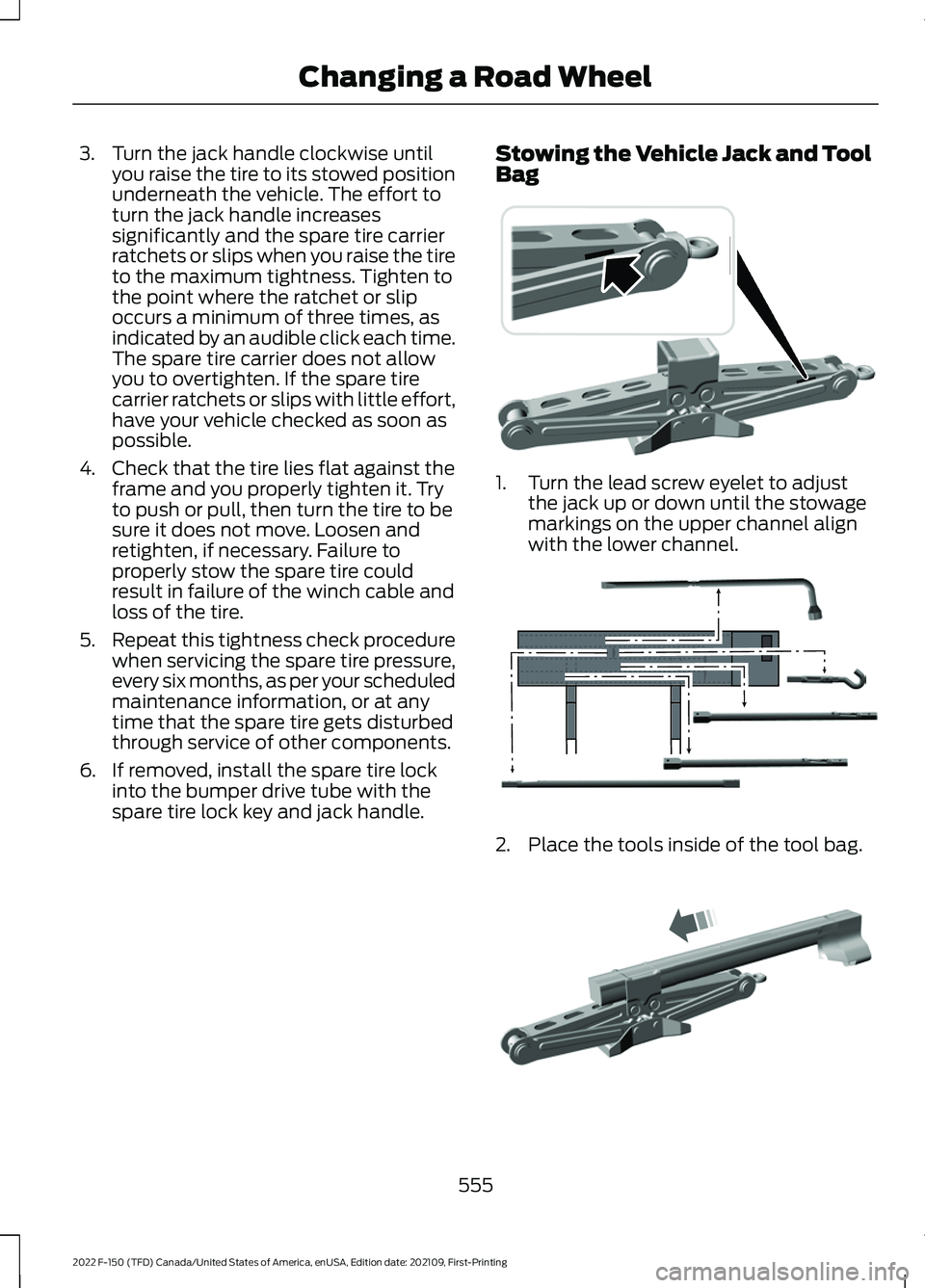
Bag 1. Turn the lead screw eyelet to adjust
the jack up or down until the stowage
markings on the upper channel align
with the lower channel. 2. Place the tools inside of the tool bag.
555
2022 F-150 (TFD) Canada/United States of America, enUSA, Edition date: 202109, First-Printing Changing a Road Wheel E323394 E323393 E327653
Page 560 of 750

3.
Install the tool bag through the vehicle
jack load rest.
4. Restow the extension block and wing bolt to the jack bracket. 5.
Secure the jack tool bag straps around
the vehicle jack. 6. Place the jack and tool bag back onto
the jack bracket. 7. Turn the wing bolt on the jack bracket
clockwise until you secure the jack and
tools to the jack bracket.
WHEEL NUTS WARNING: When you install a
wheel, always remove any corrosion, dirt
or foreign materials present on the
mounting surfaces of the wheel or the
surface of the wheel hub, brake drum or
brake disc that contacts the wheel. Make
sure to secure any fasteners that attach
the rotor to the hub so they do not
interfere with the mounting surfaces of
the wheel. Installing wheels without
correct metal-to-metal contact at the
wheel mounting surfaces can cause the
wheel nuts to loosen and the wheel to
come off while your vehicle is in motion,
resulting in loss of vehicle control,
personal injury or death. lb.ft (Nm)
1
Bolt Size
150 lb.ft (204 Nm)
M14 x 1.5
1 Torque specifications are for nut and bolt
threads free of dirt and rust. Use only our
recommended replacement wheel nuts
and or wheel bolts.
556
2022 F-150 (TFD) Canada/United States of America, enUSA, Edition date: 202109, First-Printing Changing a Road WheelE323386 E327654 E323384
Page 609 of 750
Occupancy Mode (If Equipped)
1. Press
Settings on the touchscreen.
2. Press
Sound Settings.
3. Press
Occupancy Mode.
4. Press a setting.
Sound Mode
(If Equipped)
1. Press
Settings on the touchscreen.
2. Press
Sound Settings.
3. Press
Sound Mode.
4. Press a setting.
SETTING THE CLOCK AND
DATE
1. Press
Settings on the touchscreen.
2. Press
Clock Settings.
3. Set the time.
Note: The
AM and PM options are not
available if 24-hour mode is on.
Switching Automatic Time
Updates On and Off
1. Press
Settings on the touchscreen.
2. Press
Clock Settings.
3. Switch
Automatic time zone update
on or off.
AM/FM RADIO
AM/FM RADIO LIMITATIONS
The further you travel from an AM or FM
station, the weaker the signal and the
weaker the reception. Hills, mountains, tall buildings, bridges,
tunnels, freeway overpasses, parking
garages, dense tree foliage and
thunderstorms can interfere with the
reception.
When you pass a ground-based broadcast
repeating tower, a stronger signal may
overtake a weaker one and result in the
audio system muting.
SELECTING A RADIO STATION
Manually Selecting a Radio
Station
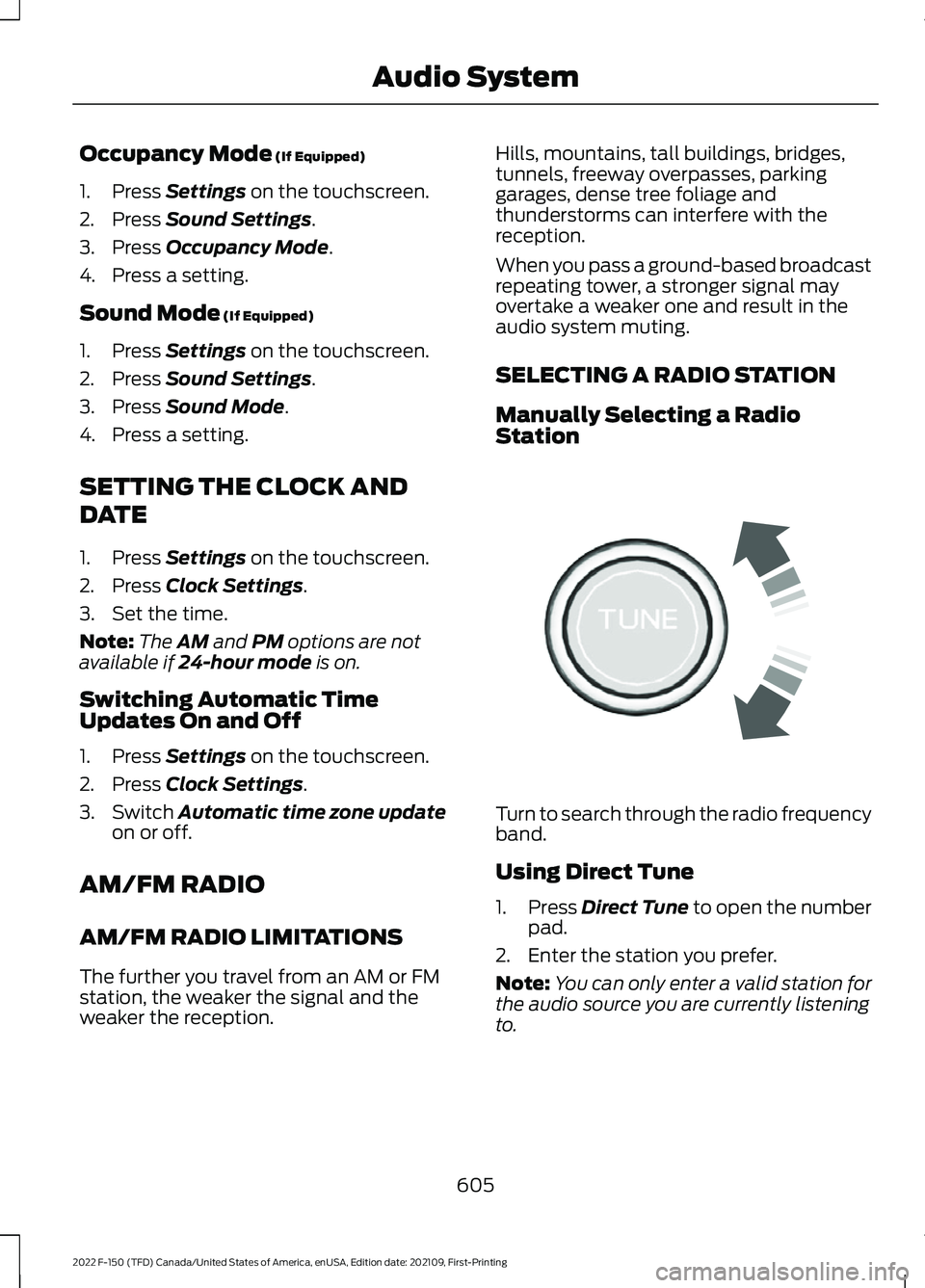
Turn to search through the radio frequency
band.
Using Direct Tune
1.
Press
Direct Tune to open the number
pad.
2. Enter the station you prefer.
Note: You can only enter a valid station for
the audio source you are currently listening
to.
605
2022 F-150 (TFD) Canada/United States of America, enUSA, Edition date: 202109, First-Printing Audio SystemE270235
Page 741 of 750

Setting a Destination Using the Text Entry
Screen............................................................... 630
Setting a Memory Preset.........................604
Settings Data...................................................29
Setting the Adaptive Cruise Control Gap.................................................................335
Setting the Adaptive Cruise Control Speed............................................................334
Setting the Blower Motor Speed............182
Setting the Clock and Date.....................605
Setting the Cruise Control Speed
..........329
Setting the Hill Descent Speed.............309
Setting the Temperature
...........................182
Setting the Trail Control Speed - Raptor...........................................................303
Setting the Wake Word..............................617
Setting Up the Trailer Backup Assistance for a Conventional Trailer......................422
Applying the Trailer Reversing Aid Sticker............................................................... 424
Calibrating the System.................................... 425
Configuring the Trailer...................................... 422
Trailer Sensor Installation.............................. 424
Setting Up Trailer Reverse Guidance for a Conventional Trailer.............................437
Applying the Trailer Reverse Aid Sticker............................................................... 438
Calibrating the System................................... 440
Configuring the Trailer...................................... 437
Trailer Sensor Installation.............................. 439
Shifting Your Vehicle Into Gear - Police Responder...................................................262
Shifting Your Vehicle Into Gear - Raptor
............................................................261
Shifting Your Vehicle Into Gear................261
Side Parking Aid
............................................315
Locating the Side Parking Aid
Sensors.............................................................. 316
Side Parking Aid Audible Warnings.............316
Side Parking Aid Limitations.......................... 315
What is the Side Parking Aid.......................... 315
Sitting in the Correct Position.................190
Smart Hitch Limitations............................418
Smart Hitch....................................................418
Snow Plowing Precautions.....................458
Snow Plowing...............................................458 Snowplow Mode............................................... 460Snowplow Mode
.........................................460
Switching Snowplow Mode On and
Off...................................................................... 460
What Is Snowplow Mode.............................. 460
Sounding the Panic Alarm
.........................89
Special Operating Conditions Scheduled Maintenance - Gasoline........................648
Special Operating Conditions Scheduled Maintenance - Raptor.............................651
Speed Control See: Cruise Control........................................... 329
Speedometer.................................................168
Stability Control Indicator........................302
Stability Control..........................................300
Starter Switch See: Ignition Switch............................................ 231
Starting and Stopping the Engine – Precautions..................................................231
Starting and Stopping the Engine..........231 Automatic Engine Stop - Vehicles With:
Keyless Entry and Push Button
Start................................................................... 236
Engine Block Heater......................................... 234
Starting and Stopping the Engine – Troubleshooting............................................ 238
Starting the Engine............................................ 232
Stopping the Engine......................................... 235
Starting and Stopping the Engine – Troubleshooting
........................................238
Starting and Stopping the Engine –
Frequently Asked Questions.................... 239
Starting and Stopping the Engine – Information Messages................................ 238
Starting and Stopping the Engine – Warning Lamps............................................. 238
Starting the Engine......................................232 Restarting the Engine After Stopping
it........................................................................\
... 234
Starting a Gasoline Engine............................. 232
Starting a Hybrid Electric Vehicle System.............................................................. 233
Status Bar
.......................................................614
Steering.............................................................311 Electric Power Steering..................................... 311
Steering – Troubleshooting............................ 312
Steering – Troubleshooting......................312 Steering – Information Messages.................312
Steering – Warning Indicators........................ 312
737
2022 F-150 (TFD) Canada/United States of America, enUSA, Edition date: 202109, First-Printing Index