2022 FORD F-150 phone
[x] Cancel search: phonePage 255 of 750
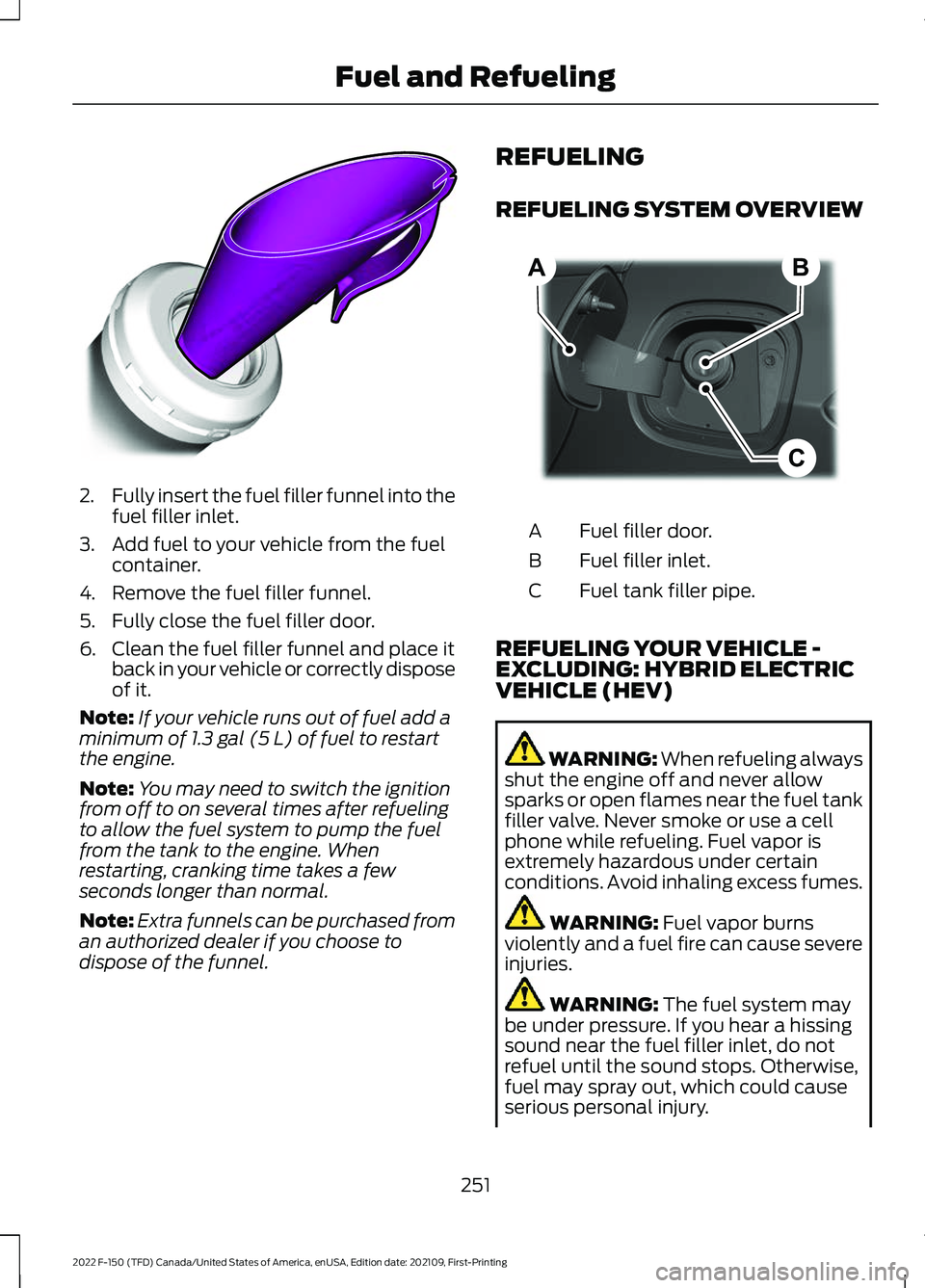
2.
Fully insert the fuel filler funnel into the
fuel filler inlet.
3. Add fuel to your vehicle from the fuel container.
4. Remove the fuel filler funnel.
5. Fully close the fuel filler door.
6. Clean the fuel filler funnel and place it back in your vehicle or correctly dispose
of it.
Note: If your vehicle runs out of fuel add a
minimum of 1.3 gal (5 L) of fuel to restart
the engine.
Note: You may need to switch the ignition
from off to on several times after refueling
to allow the fuel system to pump the fuel
from the tank to the engine. When
restarting, cranking time takes a few
seconds longer than normal.
Note: Extra funnels can be purchased from
an authorized dealer if you choose to
dispose of the funnel. REFUELING
REFUELING SYSTEM OVERVIEW
Fuel filler door.
A
Fuel filler inlet.
B
Fuel tank filler pipe.
C
REFUELING YOUR VEHICLE -
EXCLUDING: HYBRID ELECTRIC
VEHICLE (HEV) WARNING: When refueling always
shut the engine off and never allow
sparks or open flames near the fuel tank
filler valve. Never smoke or use a cell
phone while refueling. Fuel vapor is
extremely hazardous under certain
conditions. Avoid inhaling excess fumes. WARNING:
Fuel vapor burns
violently and a fuel fire can cause severe
injuries. WARNING:
The fuel system may
be under pressure. If you hear a hissing
sound near the fuel filler inlet, do not
refuel until the sound stops. Otherwise,
fuel may spray out, which could cause
serious personal injury.
251
2022 F-150 (TFD) Canada/United States of America, enUSA, Edition date: 202109, First-Printing Fuel and RefuelingE157452 B
C
A E267248
Page 257 of 750

5. Operate the fuel pump nozzle within
the area shown. 6. When the pump shuts off, wait five
seconds, then raise the fuel pump
nozzle and slowly remove it.
7. Fully close the fuel filler door.
Note: Do not attempt to start the engine
if you have filled the fuel tank with incorrect
fuel. Incorrect fuel use could cause damage
not covered by the vehicle Warranty. Have
your vehicle immediately checked.
REFUELING YOUR VEHICLE -
HYBRID ELECTRIC VEHICLE (HEV) WARNING: When refueling always
shut the engine off and never allow
sparks or open flames near the fuel tank
filler valve. Never smoke or use a cell
phone while refueling. Fuel vapor is
extremely hazardous under certain
conditions. Avoid inhaling excess fumes. WARNING: The fuel system may
be under pressure. If you hear a hissing
sound near the fuel filler inlet, do not
refuel until the sound stops. Otherwise,
fuel may spray out, which could cause
serious personal injury. WARNING:
Fuel vapor burns
violently and a fuel fire can cause severe
injuries. WARNING:
Keep children away
from the fuel pump. Never let children
pump fuel. WARNING:
Stay outside your
vehicle and do not leave the fuel pump
unattended when refueling your vehicle. WARNING:
Do not pry open the
fuel tank filler valve. This could damage
the fuel system. Failure to follow this
instruction could result in fire, personal
injury or death. WARNING: Do not remove the fuel
pump nozzle from its fully inserted
position when refueling. WARNING:
Stop refueling when
the fuel pump nozzle automatically
shuts off for the first time. Failure to
follow this will fill the expansion space
in the fuel tank and could lead to fuel
overflowing. WARNING:
Do not overfill the fuel
tank. The pressure in an overfilled tank
may cause leakage and lead to fuel spray
and fire. WARNING:
Wait at least five
seconds before removing the fuel pump
nozzle to allow any residual fuel to drain
into the fuel tank.
253
2022 F-150 (TFD) Canada/United States of America, enUSA, Edition date: 202109, First-Printing Fuel and RefuelingE358906 E119081
Page 453 of 750

OFF-ROAD DRIVING
WHAT IS OFF-ROAD DRIVING
Off-road driving is driving your vehicle on
unsurfaced roads or trails, made from dirt,
rocks, sand and mud.
OFF-ROAD DRIVING
PRECAUTIONS - RAPTOR
WARNING: If you continue to drive
your vehicle when the engine is
overheating, the engine could stop
without warning. Failure to follow this
instruction could result in the loss of
control of your vehicle.
Before going off-road driving, consult with
all the appropriate government entities to
determine where you are legally allowed
to operate your vehicle and what permits
or registrations are required to do so.
Inspect your vehicle before and after any
off-road driving.
Familiarize yourself with the dimensions
of your vehicle including approach angles,
breakover angles, and ground clearance.
Also familiarize yourself with the features
of your vehicle. Some of these features
such as drive modes and cameras can
improve your off-road driving experience.
Secure loose objects inside your vehicle
and in the cargo area. BASIC OFF-ROAD DRIVING
TECHNIQUES
Off-road Driving Hints
Before taking your vehicle off-roading, a
basic vehicle inspection should be done to
make sure that the vehicle is in top working
condition. It is always recommended that
at least two vehicles are used while
off-roading. The buddy system helps make
sure that help is close at hand should a
vehicle become stuck or damaged. It is also
wise to take supplies such as a first aid kit,
supply of water, tow strap, cell or satellite
phone with you any time an off-road
excursion is planned.
1. Grip the steering wheel with thumbs
on the outside of the rim. This will
reduce the risk of injury due to abrupt
steering wheel motions that occur
when negotiating rough terrain.
2. Throttle, brake and steering inputs should be made in a smooth and
controlled manner. Sudden inputs to
the controls can cause loss of traction
or upset the vehicle, especially while
on loose terrain or while crossing
obstacles such as rocks or logs.
3. Look ahead on your route noting upcoming obstacles, or any other
factors which may indicate a change
in available traction, and adjust the
vehicle speed and route accordingly.
4. When driving off-road, if the front or rear suspension is bottoming out
and/or excessive contact with the
skid-plates is encountered, reduce
vehicle speed to avoid potential
damage to the vehicle.
5. When with other vehicles, it is recommended that communication is
used, and the lead vehicle notify other
vehicles of obstacles that could cause
potential vehicle damage.
449
2022 F-150 (TFD) Canada/United States of America, enUSA, Edition date: 202109, First-Printing Driving Hints
Page 483 of 750

Protected Component
Fuse Rating
Fuse
Loca- tion
Not used.
—
1
Delayed accessory feed.
10 A
2
Wireless charger.
7.5 A
3
Not used.
20 A
4
Not used.
—
5
Driver power window switch.
10 A
6
Gear shift module.
10 A
7
Cell phone passport module.
5 A
8
Combined sensor module.
5 A
9
Not used.
—
10
Not used.
—
11
Enhanced central gateway.
7.5 A
12
Climate control.
Instrument cluster.
7.5 A
13
Steering column control module.
Not used (spare).
15 A
14
Integrated control panel.
15 A
15
SYNC.
Not used.
—
16
Headlamp control module.
7.5 A
17
Not used.
7.5 A
18
Headlamp switch.
5 A
19
Passive start.
5 A
20
Ignition switch.
Key inhibit solenoid.
Trailer brake switch.
5 A
21
Not used.
5 A
22
479
2022 F-150 (TFD) Canada/United States of America, enUSA, Edition date: 202109, First-Printing Fuses
Page 618 of 750

CENTER DISPLAY
PRECAUTIONS
WARNING: Driving while distracted
can result in loss of vehicle control, crash
and injury. We strongly recommend that
you use extreme caution when using any
device that may take your focus off the
road. Your primary responsibility is the
safe operation of your vehicle. We
recommend against the use of any
hand-held device while driving and
encourage the use of voice-operated
systems when possible. Make sure you
are aware of all applicable local laws
that may affect the use of electronic
devices while driving.
CENTER DISPLAY
LIMITATIONS
Speed-restricted Features
For your safety, some features are not
available while the vehicle is in motion at
or above 5 mph (8 km/h). Settings that
are not critical while driving your vehicle
are shown as restricted on your display.
Some of these settings include:
• System updates.
• Personal profiles setup.
• Valet mode setup.
• Driver assistance settings.
Vehicle Settings
• MyKey setup.
• Door keypad code setup.
• Backup start passcode setup.
These restricted features become
available when your vehicle is no longer in
motion. STATUS BAR
The bar is on top of the display and
indicates the status of your vehicle's
features.
Audio System
Audio system muted.
Connected Device Cell phone microphone muted.
Phone call in progress.
Media player connected.
Cell phone network signal
strength.
Cell phone roaming.
Text message received.
Unread email message.
Automatic crash notification
system off.
Cell phone battery status.
Vehicle Data Wi-Fi available.
614
2022 F-150 (TFD) Canada/United States of America, enUSA, Edition date: 202109, First-Printing Center Display OverviewE353221 E353213 E353208 E335295 E353216 E335293 E353219
Page 619 of 750

Wi-Fi connected.
Vehicle data sharing on.
Vehicle data sharing off.
Vehicle location sharing on.
Vehicle data and vehicle location
sharing on.
Vehicle System Update Vehicle system update available.
Vehicle system update requires
schedule.
Vehicle system update requires
consent.
Vehicle system update requires
Wi-Fi.
Vehicle system update schedule
reminder.
Vehicle system update not
successful.
Vehicle system update
successful.
Wireless Accessory Charger Wireless accessory charger
active. FEATURE BAR
The feature bar is located on the bottom
of the display and allows you to access
vehicle features. Press to use the radio, a USB, a
media player or a Bluetooth®
device. Press to make calls and access
the phonebook on your cell
phone.
Press to use the navigation
system.
Press to replace this button with
a shortcut to a feature or setting.
Press to search for and use
compatible apps on your iOS or
Android device.
Press to adjust system settings.
Press to view features.
Note:
The icon may be different depending
on your vehicle.
615
2022 F-150 (TFD) Canada/United States of America, enUSA, Edition date: 202109, First-Printing Center Display Overview E335292 E327789 E327785 E327786 E353217 E327787 E327788 E353218 E353214 E100027 E358432 E353220 E280315 E353210 E335299 E335300 E347104
Page 622 of 750
Climate Examples
Result
Command
The system sets
the temperature to the minimum.
Set the temper-
ature to low.
The system sets
the temperature to 72°F (22°C).
Set the temper-
ature to 72°F
(22°C).
Phone Examples Result
Command
The system callsHenry using your
connected device.
Call Henry.
The system dials
the selected phone number.
Dial (phone
number).
The system beginsa dictated text message.
Send a text
message to Henry.
The system reads
you the most recent message from Henry.
Read my message
from Henry. Apps Examples Result
Command
The system
prompts you to say
the name of an app to start it on the system.
Mobile Apps.
The system will listall of the currently available Mobile Apps.
List Mobile Apps.
The system will
search and connect to compatible app running on yourmobile device.
Find Mobile Apps
Navigation Examples Result
Command
The system beginsguided navigation to the address.
Drive to 125 Main
Street, New York.
The system
searches for the
requested point of interest.
Where is ___
The system showsdirections to the
selected intersec- tion.
Show me directions
to Oakwood
Boulevard and Pelham Road.
The system ends
guided navigation
to the destination.
Cancel route.
Ford Assistant Examples
Note: When you are not driving, additional
commands are available by using popular
chat applications. Use FordPass to setup a
conversation with your Ford assistant.
618
2022 F-150 (TFD) Canada/United States of America, enUSA, Edition date: 202109, First-Printing Voice Interaction
Page 623 of 750

Remote Vehicle Control Examples
Result
Command
The vehicle tells
you how much gas it has left.
How much gas is in
my tank?
Maintenance and Roadside Assistance
Examples Result
Command
Your vehicle calls
the roadside assist- ance phonenumber.
Call roadside
assistance.
Vehicle Information Examples Result
Command
Information about
the feature appears on the center
display or FordPass app.
How does cruise
control work?
Information aboutthe warning light appears on the
center display or FordPass app.
What does the
warning light mean?
Information aboutopen recalls
appears on the
center display or FordPass app.
Am I affected by
any recalls?
619
2022 F-150 (TFD) Canada/United States of America, enUSA, Edition date: 202109, First-Printing Voice Interaction