2022 FORD ESCAPE locks
[x] Cancel search: locksPage 165 of 585
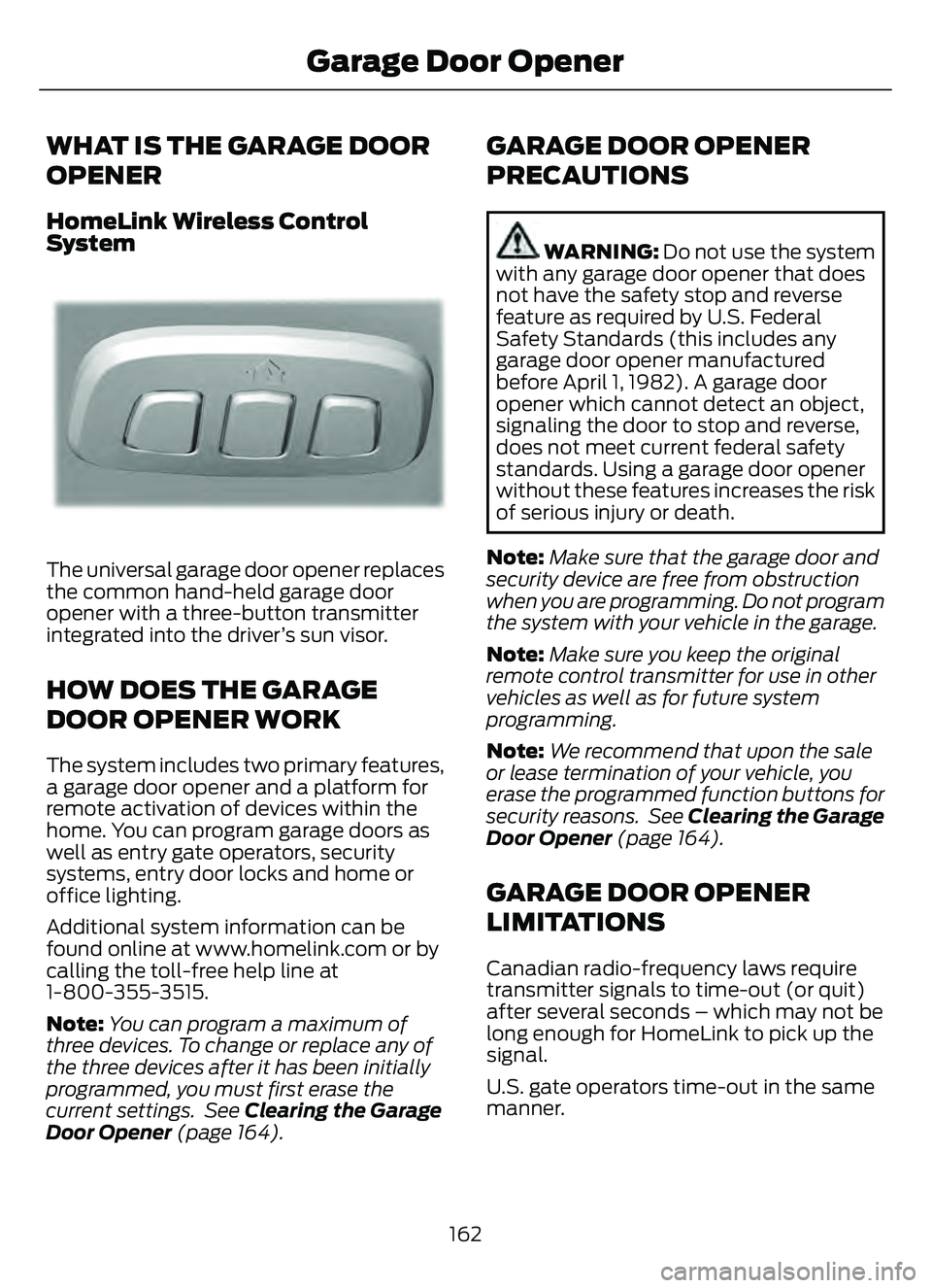
WHAT IS THE GARAGE DOOR
OPENER
HomeLink Wireless Control
System
E18821E1882111
The universal garage door opener replaces
the common hand-held garage door
opener with a three-button transmitter
integrated into the driver’s sun visor.
HOW DOES THE GARAGE
DOOR OPENER WORK
The system includes two primary features,
a garage door opener and a platform for
remote activation of devices within the
home. You can program garage doors as
well as entry gate operators, security
systems, entry door locks and home or
office lighting.
Additional system information can be
found online at www.homelink.com or by
calling the toll-free help line at
1-800-355-3515.
Note:You can program a maximum of
three devices. To change or replace any of
the three devices after it has been initially
programmed, you must first erase the
current settings. See Clearing the Garage
Door Opener (page 164).
GARAGE DOOR OPENER
PRECAUTIONS
WARNING: Do not use the system
with any garage door opener that does
not have the safety stop and reverse
feature as required by U.S. Federal
Safety Standards (this includes any
garage door opener manufactured
before April 1, 1982). A garage door
opener which cannot detect an object,
signaling the door to stop and reverse,
does not meet current federal safety
standards. Using a garage door opener
without these features increases the risk
of serious injury or death.
Note: Make sure that the garage door and
security device are free from obstruction
when you are programming. Do not program
the system with your vehicle in the garage.
Note: Make sure you keep the original
remote control transmitter for use in other
vehicles as well as for future system
programming.
Note: We recommend that upon the sale
or lease termination of your vehicle, you
erase the programmed function buttons for
security reasons. See Clearing the Garage
Door Opener (page 164).
GARAGE DOOR OPENER
LIMITATIONS
Canadian radio-frequency laws require
transmitter signals to time-out (or quit)
after several seconds – which may not be
long enough for HomeLink to pick up the
signal.
U.S. gate operators time-out in the same
manner.
162
Garage Door Opener
Page 212 of 585

AUTOMATIC TRANSMISSION
PRECAUTIONS
WARNING: When your vehicle is
stationary, keep the brake pedal fully
pressed when shifting gears. Failure to
follow this instruction could result in
personal injury, death or property
damage.
WARNING: Do not apply the brake
pedal and accelerator pedal
simultaneously. Applying both pedals
simultaneously for more than a few
seconds will limit power, which may
result in difficulty maintaining speed in
traffic and could lead to serious injury.
WARNING: Apply the parking
brake, shift into park (P), switch the
vehicle off and remove the key or remote
control before you leave your vehicle.
Failure to follow this instruction could
result in personal injury or death.
Note: You may not be able to shift out of
park (P) unless the intelligent access key is
inside your vehicle.
AUTOMATIC TRANSMISSION
POSITIONS
PARK (P)
WARNING: Move the transmission
selector lever to park (P) only when your
vehicle is stationary.
This position locks the driveline. Come to
a complete stop before shifting into and
out of park (P). The electric parking brake could apply
when you shift to park (P) without the
brake pedal fully pressed. The electric
parking brake applies when you shift to
park (P) on large slopes. The electric
parking brake releases with the drive away
release function. See Electric Parking
Brake (page 220).
Note:
A tone sounds if you attempt to exit
your vehicle without the transmission in park
(P).
Note: Your vehicle may not shift out of park
(P) if the vehicle battery has run out of
charge. See Jump Starting the Vehicle
(page 310).
Note: Your vehicle may not shift out of park
(P) if a fuse is blown. See Fuses (page 319).
Note: Your vehicle may not shift out of park
(P) unless the key or remote control is inside
your vehicle.
Note: Your vehicle shifts into park (P) if you
attempt to exit your vehicle without the
transmission in park (P). See How Does
Automatic Return to Park (P) Work (page
212).
Note: If you shift into park (P) without fully
pressing the brake, the parking brake could
apply. If you shift into park (P) on a slope,
the parking brake could apply. See
Automatically Releasing the Electric
Parking Brake (page 221).
Note: You can start your vehicle in this
position.
Note: A tone could sound when you select
park (P).REVERSE (R)
WARNING: Move the transmission
selector lever to reverse (R) only when
your vehicle is stationary and the engine
is at idle speed.
209
Automatic Transmission
Page 249 of 585

A message displays if something obstructs
the camera or the sensor. When something
blocks the sensor, the system cannot
detect a vehicle ahead and does not
function. See Adaptive Cruise Control
– Information Messages (page 254).
The radar sensor has a limited field of view.
It may not detect vehicles at all or detect
a vehicle later than expected in some
situations. The lead vehicle image does
not illuminate if the system does not
detect a vehicle in front of you.Detection issues can occur:
E71621
When driving on a different line
than the vehicle in front.
A
With vehicles that edge into your
lane. The system can only detect
these vehicles once they move
fully into your lane.
B
There may be issues with the
detection of vehicles in front
when driving into and coming out
of a bend or curve in the road.
C
In these cases, the system may brake late
or unexpectedly.
If something hits the front end of your
vehicle or damage occurs, the
radar-sensing zone may change. This could
cause missed or false vehicle detection.
246
Adaptive Cruise Control (If Equipped)
Page 305 of 585

WHAT IS THE MAXIMUM LOADED
TRAILER WEIGHT
The maximum loaded trailer
weight is the highest possible
weight of a fully loaded trailer the
vehicle can tow.
CALCULATING THE MAXIMUM
LOADED TRAILER WEIGHT FOR
YOUR VEHICLE
1. Start with the gross combinedweight rating for your vehicle
model and axle ratio.
2. Subtract all of the following that apply to your vehicle:
• Vehicle curb weight.
• Hitch hardware weight, for example a draw bar, ball, locks
or weight distributing hardware.
• Driver weight.
• Passenger weight.
• Payload, cargo and luggage weight.
• Aftermarket equipment weight.
This equals the maximum loaded
trailer weight for this combination.
Note: The trailer tongue load is
considered part of the payload for
your vehicle. Reduce the total
payload by the final trailer tongue
weight.
Note: Consult an authorized dealer
to determine the maximum trailer
weight allowed for your vehicle if
you are not sure.
302
Towing a Trailer
Page 487 of 585

Check Every Six Months
The door weatherstrips for wear. Lubricate if necessary.
The hinges, latches and outside locks for proper operation. Lubricate if necessary. The parking brake for proper operation.
The seatbelts and seat latches for wear and function.
Safety warning lamps, brake, ABS, airbag and seatbelt for operation.
The washer spray and wiper operation. Clean or replace blades as necessary.
Multi-Point Inspection
It is important to have the systems on your
vehicle regularly checked. This can help
identify potential issues and prevent major
problems. We recommend having the
following multi-point inspection performed
at every scheduled maintenance interval
to help make sure your vehicle keeps
running great.
Multi-Point Inspection
Hazard warning system operation
Accessory drive belt or belts
Horn operation
Battery performance
Radiator, cooler, heater and air conditioninghoses
Engine air filter
Suspension components for leaks ordamage
Exhaust system
Steering and linkage
Exterior lamps operation
Tires including the spare for wear andproper pressure
2Fluid levels1; fill if necessary
Windshield for cracks, chips or pits
For oil and fluid leaks
Washer spray and wiper operation
Half-shaft dust boots
1 Brake, coolant re covery reservoir, automatic transmission and window washer.2If your vehicle has a temporary mobility kit, check the tire sealant expiration Use By date
on the canister. Replace as needed.
484
Scheduled Maintenance
Page 569 of 585

Identifying the Fuses in the Body ControlModule Fuse Box...........................................325
Locating the Body Control Module Fuse Box......................................................................325
Body Styling Kit Precautions...................354
Body Styling Kits..........................................354
Bonnet Lock
See: Opening and Closing the Hood..........328Booster Seats..................................................36
Brake Fluid Specification...........................218
Brake Over Accelerator...............................217
Brake Precautions.........................................217
Brakes................................................................217
Anti-Lock Braking System...............................217
Brakes – Troubleshooting...............................219
Brakes – Troubleshooting.........................219Brakes – Frequently AskedQuestions.........................................................219
Brakes – Warning Lamps.................................219
Breaking-In....................................................304
C
Calculating Payload...................................290
Calculating the Load Limit......................290
Canceling the Set Speed..........................243
Capacities and Specifications................387
Catalytic Converter......................................198
Catalytic Converter – Troubleshooting.............................................198
Catalytic Converter Precautions............198
Catalytic Converter –Troubleshooting........................................198
Catalytic Converter – Warning
Lamps................................................................198
Changing a Flat Tire....................................382
Changing a Road Wheel...........................382
Changing the 12V Battery.........................343
Changing the Engine Air Filter - 1.5LEcoBoost™/2.0L EcoBoost™.............338
Changing the Engine Air Filter - 2.5L, Hybrid Electric Vehicle (HEV)/Plug-In
Hybrid Electric Vehicle (PHEV)...........339
Changing the Fuel Filter - Gasoline, Hybrid Electric Vehicle (HEV)..............340
Changing the Remote Control Battery - Vehicles With: Flip Key...............................61 Changing the Remote Control Battery -
Vehicles With: Push Button Start.........60
Changing the Vehicle Wi-Fi Hotspot Name or Password..................................409
Charge Port Indicators..............................204
Charging a Device.........................................167
Charging a Wireless Device......................169
Charging Equipment..................................200
Charging Your Vehicle...............................200
AC Charging.........................................................205
Charging Your Vehicle –
Troubleshooting............................................207
Charging Your VehiclePrecautions................................................200
Charging Your Vehicle – Troubleshooting........................................207
Charging Your Vehicle – Frequently Asked
Questions........................................................ 208
Charging Your Vehicle – Information Messages.........................................................207
Checking MyKey System Status..............66
Checking the Brake Fluid...........................218
Checking the Coolant................................334
Checking the Seatbelts...............................44
Checking the Tire Pressures....................368
Checking the Wiper Blades........................94
Children and Airbags....................................50
Child Restraint Anchor Points...................29
Locating the Child Restraint Lower AnchorPoints...................................................................29
Locating the Child Restraint Top Tether Anchor Points...................................................30
What Are the Child Restraint Anchor Points...................................................................29
Child Restraints..............................................30Child Restraint Position Information............30
Child Restraints Recommendation................31
Child Safety......................................................28Child Restraint Anchor Points.........................29
Child Restraints....................................................30
Installing Child Restraints..................................31
Child Safety Locks.........................................38
Child Safety Precautions.............................28
Cleaning Products.......................................349
Cleaning the Exterior..................................349
Cleaning Camera Lenses andSensors..............................................................351
566
Index
Page 571 of 585

Customizing the Instrument ClusterDisplay - Vehicles With: 4.2 Inch
Instrument Cluster Display
Screen............................................................124
Customizing the Instrument Cluster Display - Vehicles With: 6.5 Inch
Instrument Cluster Display Screen/ 12.3
Inch Instrument Cluster Display
Screen............................................................124
D
Data Privacy......................................................22
Declaration of Conformity........................561
Department of Transportation UniformTire Quality Grades...................................357
Digital Radio...................................................412
Digital Radio Indicators....................................413
Digital Radio Limitations.................................413
How Does Digital Radio Work........................412
Switching Digital Radio Reception On and
Off.....................................................................\
...413
What Is Digital Radio.........................................412
Disposing of Airbags.....................................55
Distance Alert................................................278
Adjusting the Sensitivity of Distance Alert....................................................................278
What Is Distance Alert.....................................278
Distance Indication......................................276Distance Indication Indicator.........................278
Switching Distance Indication On and Off.......................................................................2\
78
What Is Distance Indication...........................276
Doors and Locks Audible Warnings..........71
Doors and Locks.............................................69
Autolock...................................................................70\
Autounlock.............................................................70
Doors and Locks – Troubleshooting...............71
Mislock.....................................................................70
Operating the Doors From Inside Your Vehicle.................................................................69
Operating the Doors From Outside Your Vehicle.................................................................69
Doors and Locks – Troubleshooting........71Doors and Locks – Frequently AskedQuestions............................................................72
Doors and Locks – Information Messages.............................................................71 Doors and Locks – Warning Lamps................71
Drive Belt Routing Overview - 1.5L
EcoBoost™................................................340
Drive Belt Routing Overview - 2.0L EcoBoost™..................................................341
Drive Mode Control......................................257
Drive Modes.........................................................258
Plug-In Hybrid Electric Vehicle Drive
Modes...............................................................259
Drive Modes...................................................258Deep Snow/Sand..............................................258
Eco........................................................................\
..258
Normal...................................................................258
Slippery.................................................................258
Sport....................................................................\
...258
Driver Alert......................................................282Driver Alert – Troubleshooting.....................283Driver Alert Indicators................................283
Driver Alert Limitations..............................282
Driver Alert Precautions............................282
Driver Alert – Troubleshooting...............283
Driver Alert – Information Messages..........283Driving Economically.................................304
Driving Hints..................................................304
Driving in Special Conditions........................304Driving in Special Conditions..................304Driving In Sand...................................................306
Driving on Hilly or Sloping Terrain...............305
Driving Through Mud and Water.................304
Emergency Maneuvers....................................304
Driving Through Shallow Water............306
E
Easy Entry and Exit.........................................77
Electric Parking Brake AudibleWarning..........................................................221
Electric Parking Brake................................220
Electric Parking Brake –
Troubleshooting .............................................221
Electric Parking Brake –
Troubleshooting.........................................221
Electric Parking Brake – Information
Messages..........................................................222
Electric Parking Brake – Warning Lamps.................................................................22\
1
Electric Power Steering.............................229Electric Power Steering Precautions..........229
568
Index