2022 FORD ESCAPE towing
[x] Cancel search: towingPage 223 of 585

WHAT IS THE ELECTRIC
PARKING BRAKE
The electric parking brake is used to hold
your vehicle on slopes and flat roads.
APPLYING THE ELECTRIC
PARKING BRAKE
WARNING: Always fully apply the
parking brake and make sure you shift
into park (P). Failure to follow this
instruction could result in personal injury
or death.
WARNING: If you drive extended
distances with the parking brake applied,
you could cause damage to the brake
system.
WARNING: The electric parking
brake does not operate if the vehicle
battery has run out of charge.
E267156The electronic parking brake
switch is on the center console.
1. Pull the switch up.
The red warning lamp flashes during
operation and illuminates when the parking
brake is applied.
Note: You can apply the electric parking
brake when the power is off.
Note: The electric parking brake could
apply when you shift into park (P). See Park
(P) (page 209).
APPLYING THE ELECTRIC
PARKING BRAKE IN AN
EMERGENCY
You can use the electric parking brake to
slow or stop your vehicle in an emergency.
1. Pull the switch up and hold it.
The electric parking brake continues to
slow your vehicle down unless you release
the switch.
The red warning lamp illuminates, a tone
sounds and the stoplamps turn on when
you use the electric parking brake in an
emergency.
Note: Do not apply the electric parking
brake when your vehicle is moving, except
in an emergency. If you repeatedly use the
electric parking brake to slow or stop your
vehicle, you could cause damage to the
brake system.
MANUALLY RELEASING THE
ELECTRIC PARKING BRAKE
1. Switch the ignition on.
2. Press and hold the brake pedal.
3. Push the switch down.
The red warning lamp turns off.
Pulling Away on a Hill When Towing a
Trailer
1. Press and hold the brake pedal.
2. Pull the switch upward and hold it.
3. Shift into gear.
4. Press the accelerator pedal until engine has developed sufficient torque to
prevent your vehicle from rolling down
the hill.
5. Release the switch and pull away in a normal manner.
220
Electric Parking Brake
Page 238 of 585

WHAT IS THE REAR VIEW
CAMERA
The rear view camera provides a video
image of the area behind your vehicle when
the transmission is in reverse (R).
REAR VIEW CAMERA
PRECAUTIONS
WARNING: The rear view camera
system is a reverse aid supplement
device that still requires the driver to use
it in conjunction with the interior and
exterior mirrors for maximum coverage.
WARNING: Objects that are close
to either corner of the bumper or under
the bumper, might not be seen on the
screen due to the limited coverage of the
camera system.
WARNING: Reverse your vehicle
slowly. Failure to follow this instruction
could result in the loss of control of your
vehicle, personal injury or death.
WARNING: Use caution when the
rear cargo door is ajar. If the rear cargo
door is ajar, the camera will be out of
position and the video image could be
incorrect. All guide lines disappear when
the rear cargo door is ajar. Failure to
follow this instruction could result in
personal injury.
WARNING: Use caution when
turning camera features on or off when
the transmission is not in park (P). Make
sure your vehicle is not moving. Note:
When towing, the camera only sees
what you are towing. This might not provide
adequate coverage and you might not see
some objects. In some vehicles, the guide
lines may disappear when you connect the
trailer tow connector.
LOCATING THE REAR VIEW
CAMERA
The rear view camera is located on the
cargo door. It provides a video image of the
area behind your vehicle.
REAR VIEW CAMERA GUIDE
LINES
Note: Active guide lines and fixed guide
lines are only available when the
transmission is in reverse (R).
Note: The centerline is only available if the
active or fixed guide lines are on.
235
Rear View Camera
Page 247 of 585

HOW DOES ADAPTIVE CRUISE
CONTROL WITH STOP AND GO
WORK
Adaptive cruise control with stop and go
uses radar and camera sensors to maintain
a set gap between your vehicle and the
vehicle in front of you while following it to
a complete stop. Stop and go can also be
set to follow a vehicle directly in front of
you and adjust the set speed, while you are
at a complete stop.
ADAPTIVE CRUISE CONTROL
PRECAUTIONS
WARNING: You are responsible for
controlling your vehicle at all times. The
system is designed to be an aid and does
not relieve you of your responsibility to
drive with due care and attention. Failure
to follow this instruction could result in
the loss of control of your vehicle,
personal injury or death.
WARNING: Do not use adaptive
cruise control on winding roads, in heavy
traffic or when the road surface is
slippery. This could result in loss of
vehicle control, serious injury or death.
WARNING: Pay close attention to
changing road conditions such as
entering or leaving a highway, on roads
with intersections or roundabouts, roads
without visible lanes of travel, roads that
are unpaved, or steep slopes. Failure to
follow this instruction could result in the
loss of control of your vehicle, personal
injury or death.
WARNING: The system is not a
crash warning or avoidance system.
WARNING: Do not use the system
when towing a trailer that has
aftermarket electronic trailer brake
controls. Failure to follow this instruction
could result in the loss of control of your
vehicle, personal injury or death.
WARNING: Do not use tire sizes
other than those recommended because
this can affect the normal operation of
the system. Failure to do so may result
in a loss of vehicle control, which could
result in serious injury.
WARNING: Do not use the system
with a snow plow blade installed.
WARNING: Do not use the system
in poor visibility, for example fog, heavy
rain, spray or snow.
When Following a Vehicle
WARNING: When following a
vehicle that is braking, your vehicle does
not always decelerate quickly enough to
avoid a crash without driver intervention.
Apply the brakes when necessary. Failure
to follow this instruction could result in
personal injury or death.
Hilly Condition Usage
Select a lower gear when the system is
active in situations such as prolonged
downhill driving on steep slopes, for
example in mountainous areas.
244
Adaptive Cruise Control (If Equipped)
Page 253 of 585

When you override the system, the green
indicator illuminates and the vehicle icon
does not appear in the instrument cluster
display.
The system resumes operation when you
release the accelerator pedal. The vehicle
speed decreases to the set speed, or a
lower speed if following a slower vehicle.
ADAPTIVE CRUISE CONTROL
INDICATORS
E144529
Illuminates when you switch
adaptive cruise control on. The
color of the indicator changes to
indicate the system status.
White indicates the system is on but
inactive.
Green indicates that you set the speed and
the system is active.
SWITCHING FROM ADAPTIVE
CRUISE CONTROL TO CRUISE
CONTROL
WARNING: Normal cruise control
will not brake when your vehicle is
approaching slower vehicles. Always be
aware of which mode you have selected
and apply the brakes when necessary.
Use the touchscreen to select the
following:
1. Select Settings .
2. Select Driver Assist.
3. Select Cruise Control .
4. Select Normal.
E71340
The cruise control indicator
replaces the adaptive cruise
control indicator if you select
normal cruise control. The gap setting
does not display, and the system does not
respond to lead vehicles. Automatic
braking remains active to maintain set
speed. The system remembers the last
setting when you start your vehicle.
LANE CENTERING
HOW DOES LANE CENTERING
WORK
Adaptive cruise control with lane centering
uses radar and camera sensors to help
keep your vehicle in the middle of the lane
by applying continuous assistance steering
torque input toward the lane center on
highways.
Note: The adaptive cruise control gap
setting operates normally.
If you drive off-center within the lane, the
system sets and maintains that preferred
lane position. The system provides
continuous assistance steering torque
input toward the preferred position.
Note: The system can only set preferred
lane positions within the lane.
Note: If the system cancels, the preferred
position erases. On the next activation, the
system provides continuous assistance
steering torque input toward the lane center.
LANE CENTERING PRECAUTIONS
WARNING: Do not use the system
when towing a trailer. Failure to follow
this instruction could result in the loss of
control of your vehicle, personal injury or
death.
250
Adaptive Cruise Control (If Equipped)
Page 263 of 585

When you select EV Later with the vehicle
fully charged or near fully charged, some
electric-only driving range is used to
discharge the battery. This is to allow for
full operation of the regenerative braking
system.
EV NOW
E287826
This mode provides an electric
only driving experience. Do not
use EV Now when towing a
trailer. The electric drive system is not
designed for towing. An EV Now
information on demand screen appears.
This screen allows you to enable your
engine while in EV Now mode.
Your vehicle could accelerate slower and
the top speed could be lower than when
in Auto EV mode.
You can enable your engine at any time by
using one of the following methods:
• Press the OK button on the steering wheel when viewing the EV Now
information on demand screen. Your
vehicle enables the engine as needed
and returns to EV Now mode when no
longer needed.
• Fully press the accelerator pedal. A pop-up message appears. Press the
OK button on the steering wheel to
enable the engine. When the engine is
no longer needed, your vehicle returns
to EV Now. The message disappears if
you release the accelerator pedal.
• Press the EV button. This exits EV Now mode and permits engine operation.
To return to EV Now mode, select it
again using the EV button. Your vehicle could enter Engine Enabled
mode if system conditions require it. A
message displays if this occurs. This is a
normal function of the system and your
vehicle returns to EV Now mode when
possible.
When you enable EV Now mode, a blue EV
Now icon appears in the information
display. If your vehicle is in Engine Enabled
mode, the EV Now icon is amber. EV Now
exits when your available electric range
reaches zero.
260
Drive Mode Control
Page 278 of 585

WARNING: The system does not
operate during hard acceleration or
steering. Failure to take care may lead
to a crash or personal injury.
WARNING: The system may fail or
operate with reduced function during
cold and severe weather conditions.
Snow, ice, rain, spray and fog can
adversely affect the system. Keep the
front camera and radar free of snow and
ice. Failure to take care may result in the
loss of control of your vehicle, serious
personal injury or death.
WARNING: Take additional care if
your vehicle is heavily loaded or you are
towing a trailer. These conditions could
result in reduced performance of this
system. Failure to follow this instruction
could result in the loss of control of your
vehicle, personal injury or death.
WARNING: The system cannot
help prevent all crashes. Do not rely on
this system to replace driver judgment
and the need to maintain a safe distance
and speed.
WARNING: In situations where the
vehicle camera has limited detection
capability, this may reduce system
performance. These situations include
but are not limited to direct or low
sunlight, vehicles at night without tail
lights, unconventional vehicle types,
pedestrians with complex backgrounds,
running pedestrians, partly obscured
pedestrians, or pedestrians that the
system cannot distinguish from a group.
Failure to take care may result in the loss
of control of your vehicle, serious
personal injury or death.
PRE-COLLISION ASSIST
LIMITATIONS
Pre-collision assist depends on the
detection ability of its camera and sensors.
Any obstructions or damage to these areas
can limit detection or prevent the system
from functioning. See Locating the
Pre-Collision Assist Sensors (page 276).
The system is active at speeds above
3 mph (5 km/h)
Note: The pre-collision assist system
disables when you select four-wheel drive
low or manually disable AdvanceTrac™.
Note: Brake support and automatic
emergency braking are active at speeds up
to 80 mph (130 km/h). If the vehicle has a
radar sensor included with adaptive cruise
control, then brake support and automatic
emergency braking are active up to the
maximum speed of the vehicle.
Pedestrian Detection Limitations
Pedestrian detection is active at speeds
up to 50 mph (80 km/h).
Pedestrian detection functions optimally
when detected hazards are clearly
identifiable. System performance may
reduce in situations where pedestrians are
running, partly obscured, have a complex
background, or cannot be distinguished
from a group.
SWITCHING PRE-COLLISION
ASSIST ON AND OFF
You cannot switch the system off.
275
Pre-Collision Assist
Page 291 of 585
handle differently than unloaded
vehicles. Take extra precautions,
such as slower speeds and
increased stopping distance,
when driving a heavily loaded
vehicle.
The gross combined weight must
never exceed the Gross Combined
Weight Rating.
LOCATING THE SAFETY
COMPLIANCE CERTIFICATION
LABELS
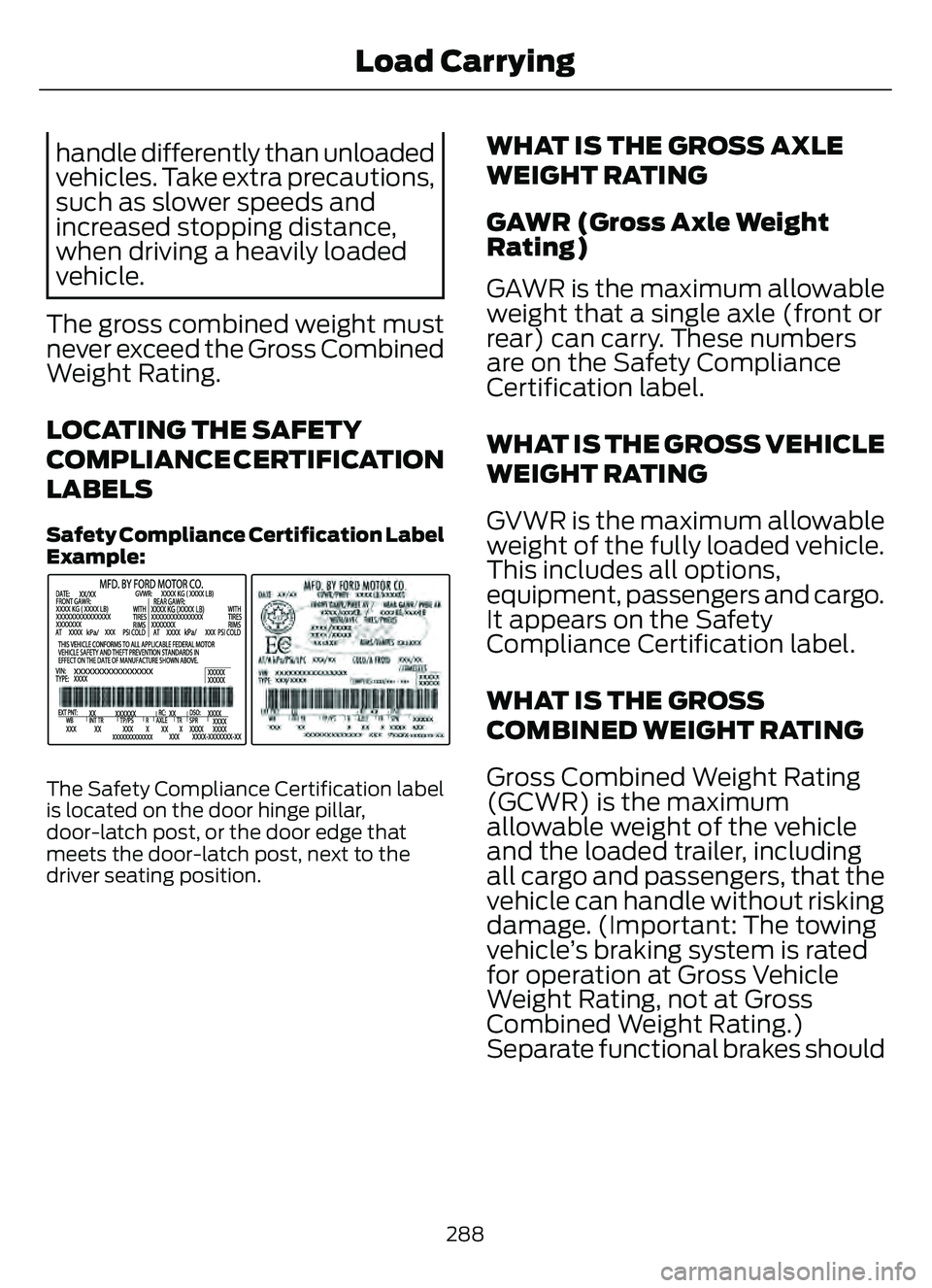
Safety C ompliance Certification Label
Example:
E198828
The Safety Compliance Certification label
is located on the door hinge pillar,
door-latch post, or the door edge that
meets the door-latch post, next to the
driver seating position.
WHAT IS THE GROSS AXLE
WEIGHT RATING
GAWR (Gross Axle Weight
Rating)
GAWR is the maximum allowable
weight that a single axle (front or
rear) can carry. These numbers
are on the Safety Compliance
Certification label.
WHAT IS THE GROSS VEHICLE
WEIGHT RATING
GVWR is the maximum allowable
weight of the fully loaded vehicle.
This includes all options,
equipment, passengers and ca rgo.
It appears on the Safety
Compliance Certification label.
WHAT IS THE GROSS
COMBINED WEIGHT RATING
Gross Combined Weight Rating
(GCWR) is the maximum
allowable weight of the vehicle
and the loaded trailer, including
all cargo and passengers, that the
vehicle can handle without risking
damage. (Important: The towing
vehicle’s braking system is rated
for operation at Gross Vehicle
Weight Rating, not at Gross
Combined Weight Rating.)
Separate functional brakes should
288
Load Carrying
Page 292 of 585
be used for safe control of towed
vehicles and for trailers where the
Gross Combined Weight of the
towing vehicle plus the trailer
exceed the Gross Vehicle Weight
Rating of the towing vehicle.Note:
For trailer towing
information refer to the RV and
Trailer Towing Guide available at
an authorized dealer, or online at
the website that follows.
RV & Trailer Towing Guide Online
www
.fleet.ford.com/towing-guidesWebsite
289
Load Carrying