2022 FORD BRONCO change time
[x] Cancel search: change timePage 183 of 562

Note:We recommend using this mode fordriving on hilly or mountainous roads orwhen towing a trailer. See Towing a Trailer(page 283).
SPORT (S)
In sport (S) your vehicle holds gears longer.
Note:We recommend using this mode fora sportier feel or when driving on hilly ormountainous roads.
SHIFTING YOUR VEHICLE INTO
GEAR
1.Fully press down on the brake pedal.
2.Press the front button on the shifterand move the gearshift lever into thedesired gear.
3.When you finish driving, come to acomplete stop.
4.Press the front button on the shifter,move the gearshift lever and securelylatch it in park (P).
AUTOMATIC TRANSMISSION
POSITION INDICATORS
MANUALLY SHIFTING GEARS
SHIFTING USING THE BUTTONSON THE SELECTOR LEVER
Your vehicle has a SelectShift Automatictransmission gearshift lever. This gives youthe ability to change gears up or down,without a clutch, as preferred.
To prevent the engine from running at toolow an RPM, which could cause it to stall,SelectShift still makes some downshiftsif it determines that you have notdownshifted in time. Although SelectShiftmakes some downshifts for you, it stillallows you to downshift at any time if itdetermines that damage to the enginefrom over-revving does not occur.
Note:SelectShift does not automaticallyupshift, even if the engine is approachingthe RPM limit. Shift manually by pressingthe + button.
Note:Engine damage could occur if youmaintain excessive engine revving withoutshifting.
179
2022 Bronco (TG1) Canada/United States of America, enUSA, Edition date: 202109, First-PrintingAutomatic Transmission (If Equipped)E324063 E324267
Page 208 of 562

HOW DOES STABILITY
CONTROL WORK
WARNING: Vehicle modificationsinvolving braking system, aftermarketroof racks, suspension, steering system,tire construction and wheel and tire sizemay change the handling characteristicsof your vehicle and may adversely affectthe performance of the electronicstability control system. In addition,installing any stereo speakers mayinterfere with and adversely affect theelectronic stability control system.Reducing the effectiveness of theelectronic stability control system couldlead to an increased risk of loss of vehiclecontrol, vehicle rollover, personal injuryand death.
WARNING: Remember that evenadvanced technology cannot defy thelaws of physics. It's always possible tolose control of a vehicle due toinappropriate driver input for theconditions. Aggressive driving on anyroad condition can cause you to losecontrol of your vehicle increasing the riskof personal injury or property damage.Activation of the electronic stabilitycontrol system is an indication that atleast some of the tires have exceededtheir ability to grip the road; this couldreduce the operator's ability to controlthe vehicle potentially resulting in a lossof vehicle control, vehicle rollover,personal injury and death.
WARNING: You are responsible forcontrolling your vehicle at all times. Thesystem is designed to be an aid and doesnot relieve you of your responsibility todrive with due care and attention. Failureto follow this instruction could result inthe loss of control of your vehicle,personal injury or death.
If a driving condition activates either thestability control or the traction controlsystem you may experience the followingconditions:
•The stability and traction control lightflashes.
•Your vehicle slows down.
•Reduced engine power.
The stability control system has severalfeatures built into it to help you maintaincontrol of your vehicle:
Electronic Stability Control
Electronic stability control enhances yourvehicle’s ability to prevent skids or lateralslides by applying brakes to one or moreof the wheels individually and, if necessary,reducing engine power.
Roll Stability Control
Roll stability control enhances yourvehicle’s ability to prevent rollovers bydetecting your vehicle’s roll motion andthe rate at which it changes by applyingthe brakes to one or more wheelsindividually.
Curve Control
Curve control enhances your vehicle’sability to follow the road when corneringseverely or avoiding objects in the roadway.Curve control operates by reducing enginepower and, if necessary, applying brakesto one or more of the wheels individually.
204
2022 Bronco (TG1) Canada/United States of America, enUSA, Edition date: 202109, First-PrintingStability Control
Page 219 of 562

Note:The gray indicator stays on untileither the vehicle speed reduces and thestabilizer bar disconnects, or the systemturns off.
The stabilizer bar system also turns on anddisconnects when you select the RockCrawl drive mode. See Selecting aG.O.A.T. Mode (page 242).
Note:The stabilizer bar disconnect is notavailable in certain drive modes. SeeSelecting a G.O.A.T. Mode (page 242).
Note:The stabilizer bar disconnect couldbe delayed during wheel slippage, dynamicmaneuvers, dynamic cornering or whenthere is an anti-lock brake system orelectronic stability control event in progress.
Switching the Stabilizer BarDisconnect Off
Switch the system off by pressing thestabilizer bar disconnect button, whichreconnects the stabilizer bar if currentlydisconnected.
The stabilizer bar disconnect system alsoturns off when any of the following occur:
•The engine is switched off.
•You switch out of four-wheel drive low(4L) or four-wheel drive high (4H).
•You select a drive mode that does notallow the stabilizer bar to disconnect.
Note:The stabilizer bar can be reconnectedat any time. It is not necessary for thevehicle to be on a level surface as thestabilizer bar self-aligns.
STABILIZER BAR DISCONNECT
INDICATORS
An indicator illuminates whenyou switch the stabilizer bardisconnect system on. The colorof the indicator changes to indicate thesystem status.
Amber indicates that the stabilizer bar isdisconnected.
Grey indicates that the stabilizer bar isconnected and in standby.
Red indicates that there is a fault with thesystem, have the system checked as soonas possible.
STABILIZER BAR DISCONNECT
– TROUBLESHOOTING
STABILIZER BAR DISCONNECT –INFORMATION MESSAGES
ActionMessage
The selected drivemode does notallow you to turn onthe stabilizer bardisconnect feature.See G.O.A.T.Mode Control(page 242).
Sta-Bar DisconnectNot Available InSelected DriveMode
The stabilizer barhas been discon-nected.
Sta-Bar Discon-nected Sta-BarReconnects over 20MPH
Sta-Bar Discon-nected Sta-BarReconnects over 32km/h
The stabilizer bardisconnect is avail-able below 20 mph(32 km/h).
Sta-Bar DisconnectAvailable Below 20MPH
Sta-Bar DisconnectAvailable Below 32km/h
215
2022 Bronco (TG1) Canada/United States of America, enUSA, Edition date: 202109, First-PrintingStabilizer Bar Disconnect (If Equipped)E329476
Page 246 of 562

WHAT IS G.O.A.T. MODE
CONTROL
Your vehicle has several goes overany-type of terrain (G.O.A.T.) modes thatyou can select for different drivingconditions. Depending on the mode thatyou select, the system adjusts variousvehicle settings.
HOW DOES G.O.A.T. MODE
CONTROL WORK
Each selectable mode changes variouselectronic and mechanical settings withinyour vehicle to tailor its performance anddriving characteristics to on-road oroff-road driving conditions. The systemmay alter steering feel and effort, tractioncontrol, stability control, chassis controls,powertrain response, transmission shiftpoints, four-wheel driveline setting,exhaust noise level and suspensiondampening to predetermined settings,depending upon the mode that you select.
The system reverts to the normal modeeach time you start your vehicle. At startupthe system also displays a prompt on theinstrument cluster display that gives youthe option to return to the previouslyselected drive mode during the last ignitioncycle. If you select yes, the system returnsto the last selected drive mode and thedefault driveline settings associated withthat mode. If you select no or do not makea selection within a short time, the systemremains in normal mode and the drivelinesettings remain the same as selected inthe prior ignition cycle.
Note:Your vehicle has diagnostic checksthat continuously monitor all systems forproper operation. If a mode is unavailabledue to a system fault, your vehicle defaultsto normal mode and the driveline remainsin the four-wheel drive setting that you lastselected prior to the system fault.
SELECTING A G.O.A.T. MODE
To select a mode, use the consolemounted controller.
Note:Mode changes will not be availablewhen the ignition is off or when the engineis not running.
Note:Button icons may vary.
242
2022 Bronco (TG1) Canada/United States of America, enUSA, Edition date: 202109, First-PrintingG.O.A.T. Mode ControlE324543
Page 254 of 562

•You apply direct steering, acceleratefast or brake hard.
•The vehicle speed is less than 40 mph(64 km/h).
•The anti-lock brake, stability control ortraction control system activates.
•The lane is too narrow.
•Something is obscuring the camera orit is unable to detect the lane markingsdue to environment, traffic or vehicleconditions.
The lane keeping system may not correctlane positioning in any of the followingconditions:
•High winds.
•Uneven road surfaces.
•Heavy or uneven loads.
•Incorrect tire pressure.
SWITCHING THE LANE
KEEPING SYSTEM ON AND
OFF
To activate the lane keepingsystem, press the button on thesteering wheel.
To deactivate the lane keeping system,press the button again.
Note:When switching the system on or offa message appears in the information andentertainment display to show the status.
Note:The system stores the on or offsetting until manually changed, unless itdetects a MyKey™. If the system detects aMyKey™, it defaults to the last setting forthat MyKey™.
Note: If the system detects a MyKey™,pressing the button does not affect the onor off status of the system. You can onlychange the mode and intensity settings.
SWITCHING THE LANE
KEEPING SYSTEM MODE
The lane keeping system has differentsettings that you can view or adjust usingthe information display.
The system stores the last known selectionfor each of these settings. You do not needto readjust your settings each time youswitch on the system.
To change the lane keeping system mode,use the touchscreen:
1.Select Driver Assistance.
2.Select Lane Keeping System.
3.Select Mode.
4.Select a setting.
Note:The system remembers the lastsetting when you start your vehicle. If thesystem detects a MyKey™, the mode is setto alert.
ALERT MODE
WHAT IS ALERT MODE
Alert mode vibrates the steering wheelwhen it detects an unintended lanedeparture.
250
2022 Bronco (TG1) Canada/United States of America, enUSA, Edition date: 202109, First-PrintingLane Keeping System (If Equipped)E308131
Page 258 of 562

LANE KEEPING SYSTEM – FREQUENTLY ASKED QUESTIONS
Why is the feature not available (lane markings are gray) when I can see the lane markingson the road?
Your vehicle speed is less than 40 mph (65 km/h).
The sun is shining directly into the camera lens.
A quick intentional lane change has occurred.
Your vehicle stays too close to the lane markings for an extended interval of time.
Driving at high speeds in curves.
The last alert warning or aid intervention occurred a short time ago.
Ambiguous lane markings, for example, in construction zones.
Rapid transition from light to dark, or from dark to light.
Sudden offset in lane markings.
ABS or AdvanceTrac™ is active.
There is a camera blockage due to dirt, grime, fog, frost or water on the windshield.
You are driving too close to the vehicle in front of you.
Transitioning between no lane markings to lane markings, or vice versa.
There is standing water on the road.
Faint lane markings, for example, partial yellow lane markings on concrete roads.
Lane width is too narrow or too wide.
You have not calibrated the camera after a windshield replacement.
Driving on tight or on uneven roads.
254
2022 Bronco (TG1) Canada/United States of America, enUSA, Edition date: 202109, First-PrintingLane Keeping System (If Equipped)
Page 268 of 562
SWITCHING PRE-COLLISION
ASSIST ON AND OFF
To switch the system on or off, use thetouchscreen:
1.Press Features on the touchscreen.
2.Press Driver Assistance.
3.Press Pre-Collision Assist.
4.Switch the feature on or off.
Adjusting the Pre-Collision AssistSettings
You can adjust the following settings byusing the touchscreen controls in thepre-collision assist menu:
•Change alert and distance alertsensitivity to one of three possiblesettings.
•Switch distance indication and alert onor off.
•If required, switch automaticemergency braking on or off.
•If required, switch the entirepre-collision assist feature on or off.
•If required, switch evasive steeringassist on or off.
Note:Automatic emergency braking andevasive steering turn on every time youswitch the ignition on.
Note:If your vehicle has a radar sensor, werecommend that you switch the system offif you install a snow plow or similar objectin such a way that it may block the radarsensor. Your vehicle remembers the selectedsetting across key cycles.
Note:If you switch automatic emergencybraking off, evasive steering assist switchesoff.
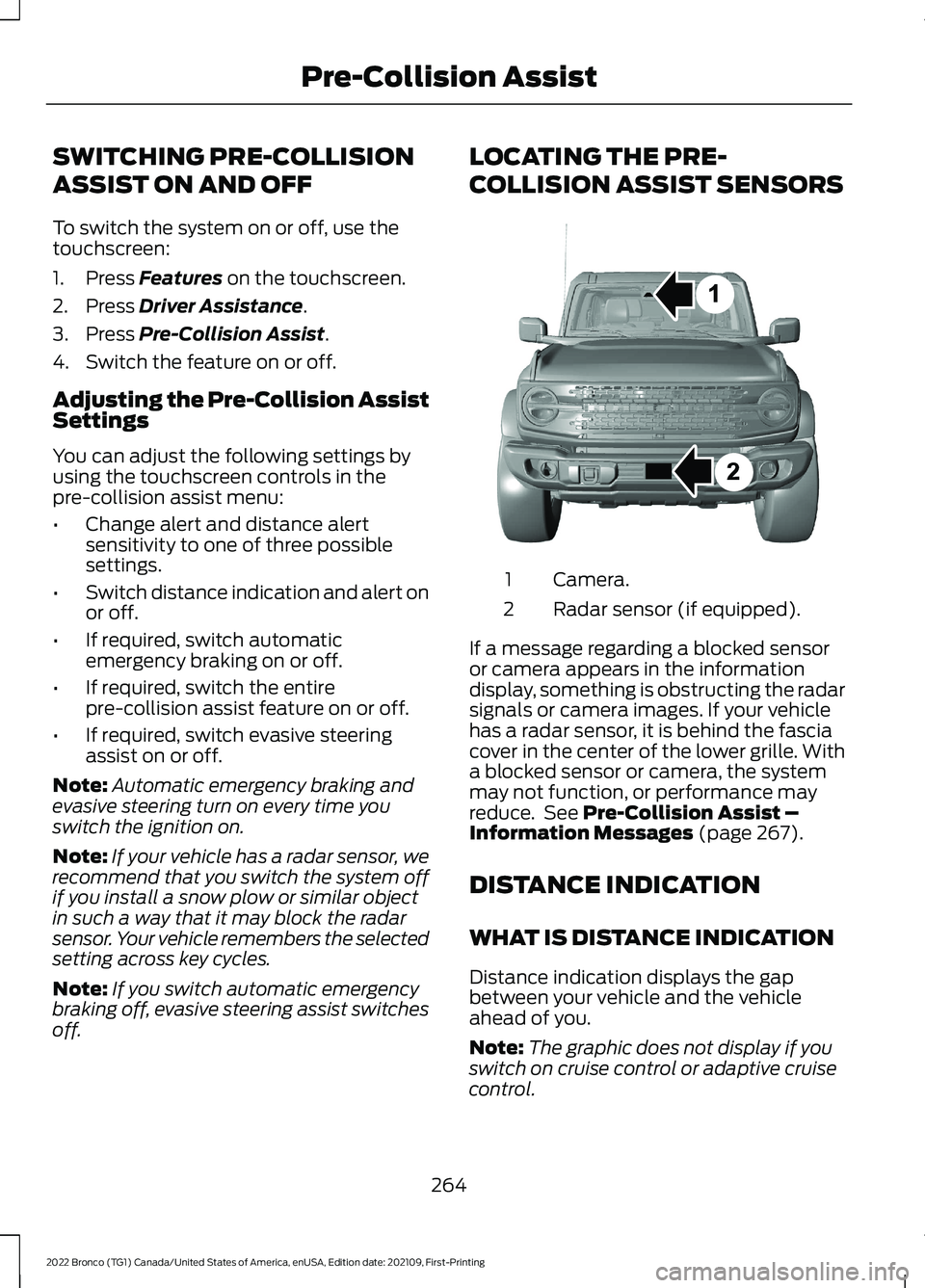
LOCATING THE PRE-
COLLISION ASSIST SENSORS
Camera.1
Radar sensor (if equipped).2
If a message regarding a blocked sensoror camera appears in the informationdisplay, something is obstructing the radarsignals or camera images. If your vehiclehas a radar sensor, it is behind the fasciacover in the center of the lower grille. Witha blocked sensor or camera, the systemmay not function, or performance mayreduce. See Pre-Collision Assist –Information Messages (page 267).
DISTANCE INDICATION
WHAT IS DISTANCE INDICATION
Distance indication displays the gapbetween your vehicle and the vehicleahead of you.
Note:The graphic does not display if youswitch on cruise control or adaptive cruisecontrol.
264
2022 Bronco (TG1) Canada/United States of America, enUSA, Edition date: 202109, First-PrintingPre-Collision AssistE327933
Page 296 of 562

Driving In Sand
When driving over sand, try to keep all fourwheels on the most solid area of the trail.Drive through the terrain without varyingvehicle speed. Apply the accelerator andavoid excessive wheel slip.
Use the vehicle's momentum to maintainforward motion in sand. Avoid coming toa stop on steep sand slopes as the vehiclemay not be able to continue forward afterit has stopped.
Driving In Mud
Be cautious of sudden changes in vehiclespeed or direction when you are driving inmud.
Even four-wheel drive vehicles can losetraction in slick mud. If your vehicle doesslide, steer in the direction of the slide untilyou regain control of your vehicle.
After driving through mud, clean off residuestuck to the wheels and tires and rotatingdriveshafts. Excess mud stuck on thewheels and tires and rotating driveshaftscan cause an imbalance that coulddamage drive components.
Note:The vehicle brakes are less effectivewhen wet or muddy.
Driving Over Rocks and Gravel
Gravel is a constantly changing, low-gripsurface. Driving at slow speeds on gravelreduces the risk of losing traction when youstop, accelerate or turn a corner.
When approaching large rocks, positionthe vehicle so that the tires pass over thelargest obstacle.
Note:Never attempt to straddle a rock thatis large enough to strike your axles orundercarriage.
Note:Never attempt to drive over a rockwhich is large enough to contact the doorsills if your vehicle does not have rock rails.
If you lose traction on your wheels facinguphill, stop and choose a more suitableroute.
Leave a generous gap between yourvehicle and other vehicles to minimize therisk of damage from flying gravel. Avoiddust clouds as they reduce visibility.
Before navigating on uneven ground,secure anything inside the vehicle. Ifpossible, remove any roof-rack items. Usethe lowest gear possible and approach theobstacle at a slow speed.
If your vehicle begins to slide down a slope,steer downhill and gently apply thethrottle. If you lose traction on your uphillwheels, stop immediately and choose amore suitable route.
Approach logs, rocky steps or ditchesdiagonally. Keep at least three wheels onthe ground at all times.
Climbing A Hill
WARNING: Extreme care shouldbe used when steering the vehicle inreverse down a slope so as not to causethe vehicle to swerve out of control.
Although natural obstacles can make itnecessary to travel diagonally up or downa hill or steep incline, try to drive straightup or straight down.
Note: Avoid turning on steep slopes orhills. A danger lies in losing traction, slippingsideways and possible vehicle roll over.
Whenever driving on a hill, you must firstdetermine the route you can use.
When climbing a steep slope or hill, startin a lower gear rather than downshifting toa lower gear from a higher gear. Thisreduces strain on the engine and thepossibility of stalling.
292
2022 Bronco (TG1) Canada/United States of America, enUSA, Edition date: 202109, First-PrintingDriving Hints