2022 DODGE DURANGO interior
[x] Cancel search: interiorPage 5 of 332

3
MIRRORS ............................................................... 41 Inside Rearview Mirror .....................................41
Illuminated Vanity Mirrors ...............................41
Outside Mirrors ................................................42
Outside Automatic Dimming Mirror—
If Equipped........................................................42
Power Mirrors ..................................................42
Heated Mirrors — If Equipped..........................42
Tilt Side Mirrors In Reverse — If Equipped......42
UNIVERSAL GARAGE DOOR OPENER
(HOMELINK®)
b
.................................................. 43
Before You Begin Programming
HomeLink®.......................................................43
Erasing All The HomeLink® Channels ............43
Identifying Whether You Have A Rolling
Code Or Non-Rolling Code Device ...................43
Programming HomeLink® To A Garage
Door Opener .....................................................44
Programming HomeLink® To A
Miscellaneous Device ......................................45
Reprogramming A Single HomeLink®
Button ...............................................................45
Canadian/Gate Operator Programming .........45
Security .............................................................46
Troubleshooting Tips ........................................46 EXTERIOR LIGHTS ................................................47
Multifunction Lever ..........................................47
Headlight Switch .............................................47
Daytime Running Lights (DRLs) .....................48
High/Low Beam Switch....................................48
Automatic High Beam — If Equipped ..............48
Flash-To-Pass .................................................49
Automatic Headlights ......................................49
Parking Lights And Panel Lights ......................49
Automatic Headlights With Wipers .................49
Headlight Delay ................................................49
Lights-On Reminder .........................................49
Fog Lights — If Equipped..................................49
Turn Signals ......................................................50
Lane Change Assist — If Equipped ..................50
Automatic Headlight Leveling —
If Equipped........................................................50
Battery Saver ....................................................50
INTERIOR LIGHTS ................................................... 50
Courtesy Lights .................................................51
WINDSHIELD WIPERS AND WASHERS............... 52
Windshield Wiper Operation ...........................52
Rain Sensing Wipers — If Equipped ...............53
Rear Window Wiper/Washer ..........................54 CLIMATE CONTROLS ............................................. 54
Automatic Climate Control Descriptions
And Functions................................................... 54
Automatic Temperature Control (ATC) ............ 60
Climate Voice Recognition............................... 60
Operating Tips .................................................61
INTERIOR STORAGE AND EQUIPMENT ............... 62
Storage ............................................................. 62
USB/AUX Control ............................................. 64
Lighted Cupholders — If Equipped .................. 66
Electrical Power Outlets .................................. 66
Power Inverter — If Equipped .......................... 68
Wireless Charging Pad — If Equipped ............. 69
WINDOWS ............................................................. 69
Power Windows ................................................ 69
Wind Buffeting .................................................71
POWER SUNROOF — IF EQUIPPED ..................... 71
Opening And Closing The Sunroof .................. 72
Sunshade Operation ........................................ 72
Pinch Protect Feature ...................................... 72
Sunroof Maintenance ...................................... 72
Ignition Off Operation....................................... 72
HOOD....................................................................... 73
Opening The Hood ........................................... 73
Closing The Hood ............................................. 73
22_WD_OM_EN_USC_t.book Page 3
Page 9 of 332
7
DEPARTMENT OF TRANSPORTATION
UNIFORM TIRE QUALITY GRADES .................... 303 Treadwear ...................................................... 303Traction Grades ............................................. 303
Temperature Grades ..................................... 303
STORING THE VEHICLE ....................................... 304
BODYWORK .......................................................... 304
Protection From Atmospheric Agents ........ 304
Body And Underbody Maintenance.............. 304
Preserving The Bodywork ............................. 304
INTERIORS ........................................................... 305
Seats And Fabric Parts.................................. 305
Plastic And Coated Parts .............................. 306Leather Surfaces ........................................... 306Glass Surfaces .............................................. 306
TECHNICAL SPECIFICATIONS
VEHICLE IDENTIFICATION NUMBER (VIN) ........ 307
BRAKE SYSTEM ................................................... 307
WHEEL AND TIRE TORQUE
SPECIFICATIONS ................................................ 307
Torque Specifications ................................... 307
FUEL REQUIREMENTS ....................................... 308
3.6L Engine ................................................ 3085.7L Engine ................................................... 309
Reformulated Gasoline ............................ 309
Materials Added To Fuel ............................. 309
Gasoline/Oxygenate Blends ....................... 309
Do Not Use E-85 In Non-Flex
Fuel Vehicles ................................................. 310
CNG And LP Fuel System Modifications ...... 310Methylcyclopentadienyl Manganese
Tricarbonyl (MMT) In Gasoline...................... 310Fuel System Cautions ................................... 310
FLUID CAPACITIES .............................................. 311
ENGINE FLUIDS AND LUBRICANTS .................. 312
CHASSIS FLUIDS AND LUBRICANTS ................ 312
CUSTOMER ASSISTANCE
SUGGESTIONS FOR OBTAINING SERVICE
FOR YOUR VEHICLE ............................................ 313
Prepare For The Appointment ...................... 313
Prepare A List ................................................ 313
Be Reasonable With Requests..................... 313
IF YOU NEED ASSISTANCE ................................ 313
FCA US LLC Customer Center....................... 313
FCA Canada Inc. Customer Center .............. 313
Mexico............................................................ 314
Puerto Rico And US Virgin Islands ............... 314
Customer Assistance For The Hearing
Or Speech Impaired (TDD/TTY) .................... 314
Service Contract ........................................... 314
WARRANTY INFORMATION ................................ 315
MOPAR® PARTS ................................................. 315
REPORTING SAFETY DEFECTS .......................... 315
In The 50 United States And
Washington, D.C............................................ 315
In Canada ...................................................... 315
PUBLICATION ORDER FORMS ........................... 315
GENERAL INFORMATION.................................... 316
22_WD_OM_EN_USC_t.book Page 7
Page 17 of 332

GETTING TO KNOW YOUR VEHICLE15
Key Left Vehicle Feature
If a valid key fob is no longer detected inside the
vehicle while the vehicle’s ignition system is in the
ON/RUN or START position, the message “Key Fob
Has Left The Vehicle” will be shown in the
instrument cluster display along with an interior
chime. An exterior audible and visual alert will also
be activated to warn the driver.
The vehicle’s horn will rapidly chirp three times
along with a single flash of the vehicle’s exterior
lights.
NOTE:
The doors have to be open and then closed in
order for the vehicle to check for the presence of
a key fob; the Key Left Vehicle feature will not
activate until all of the doors are closed.
These alerts will not be activated in situations
where the vehicle’s engine is left running with
the key fob inside.
Replacing The Battery In The Key Fob
The recommended replacement battery is one
CR2032 battery.
NOTE:
Customers are recommended to use a battery
obtained from Mopar®. Aftermarket coin
battery dimensions may not meet the original
OEM coin battery dimensions.
Perchlorate Material — special handling may
apply. See www.dtsc.ca.gov/hazard-
ouswaste/perchlorate for further information.
Do not touch the battery terminals that are on
the back housing or the printed circuit board.
1. Remove the emergency key (2) by sliding the emergency key release (1) on the back of the
key fob and pulling the emergency key out
with your other hand.
Emergency Key Removal
2. Separate the key fob halves using a #2 flat
blade screwdriver or a coin, and gently pry the
two halves of the key fob apart. Make sure not
to damage the seal during removal.
Emergency Key Removal
Separating Case With A Coin
1 — Emergency Key Release
2 — Emergency Key
2
22_WD_OM_EN_USC_t.book Page 15
Page 20 of 332

18GETTING TO KNOW YOUR VEHICLE
ON/RUN
Driving position
All electrical devices are available (e.g. climate
controls, etc.)
START
The engine will start (when foot is on the brake
pedal)
NOTE:If the ignition position does not change with a push
of the ignition button, and the instrument cluster
display message “Key Fob Not Detected” is being
displayed, the key fob may have a low or depleted
battery. In this situation, a backup method can be
used to operate the ignition switch. Put the nose
side of the key fob (side opposite of the emergency
key) against the START/STOP ignition button and
push to operate the ignition switch.
Depleted Key Fob Battery Procedure
NOTE:
For more information on normal starting proce -
dures, see Ú page 99.
When opening the driver's door with the ignition
in ON/RUN (engine not running), a chime will
sound to remind you to place the ignition in the
OFF position. In addition to the chime, the
message will display “Ignition Or Accessory On”
in the cluster.
REMOTE START — IF EQUIPPED
This system uses the key fob to start
the engine conveniently from outside
the vehicle while still maintaining
security. The system has a range of
328 ft (100 m).
Remote Start is used to defrost windows in cold
weather, and to reach a comfortable climate in all
ambient conditions before the driver enters the
vehicle.
WARNING!
Before exiting a vehicle, always shift the auto -
matic transmission into PARK and apply the
parking brake. Always make sure the keyless
ignition is in the OFF position, remove the key
fob from the vehicle and lock the vehicle.
Never leave children alone in a vehicle, or with
access to an unlocked vehicle.
Allowing children to be in a vehicle unattended
is dangerous for a number of reasons. A child
or others could be seriously or fatally injured.
Children should be warned not to touch the
parking brake, brake pedal or the gear
selector.
Do not leave the key fob in or near the vehicle,
or in a location accessible to children, and do
not leave the ignition of a vehicle equipped
with Keyless Enter ‘n Go™ in the ACC or ON/
RUN position. A child could operate power
windows, other controls, or move the vehicle.
Do not leave children or animals inside parked
vehicles in hot weather. Interior heat buildup
may cause serious injury or death.
CAUTION!
An unlocked vehicle is an invitation. Always
remove the key fobs from vehicle, place the
ignition in the OFF position and lock all doors
when leaving the vehicle unattended.
22_WD_OM_EN_USC_t.book Page 18
Page 23 of 332

GETTING TO KNOW YOUR VEHICLE21
REMOTE START CANCEL MESSAGE —
I
F EQUIPPED
The following messages will display in the
instrument cluster display if the vehicle fails to
remote start or exits Remote Start prematurely:
Remote Start Cancelled — Door Open
Remote Start Cancelled — Hood Open
Remote Start Cancelled — Fuel Low
Remote Start Cancelled — Liftgate Open
Remote Start Cancelled — Timer Expired
Remote Start Disabled — Start Vehicle To Reset
The instrument cluster display message stays
active until the ignition is placed in the ON/RUN
position.
VEHICLE SECURITY SYSTEM — IF EQUIPPED
The Vehicle Security system monitors the vehicle
doors for unauthorized entry and the Keyless
Enter ‘n Go™ Ignition for unauthorized operation.
While the Vehicle Security system is armed, interior
switches for door locks and liftgate release are
disabled. If something triggers the alarm, the
Vehicle Security system will provide the following
audible and visible signals:
The horn will pulse
The parking lights and/or turn signals will flash
The Vehicle Security Light in the instrument
cluster will flash
TO ARM THE SYSTEM
Follow these steps to arm the Vehicle Security
system:
1. Make sure the vehicle’s ignition is placed in the OFF position.
For vehicles equipped with Keyless Entry,
make sure the vehicle’s keyless ignition
system is OFF.
2. Perform one of the following methods to lock the vehicle:
Push lock on the interior power door lock
switch with the driver and/or passenger
door open.
Push the lock button on the exterior Passive
Entry door handle with a valid key fob avail -
able in the same exterior zone Ú page 23.
Push the lock button on the key fob.
3. If any doors are open, close them.
TO DISARM THE SYSTEM
The Vehicle Security system can be disarmed using
any of the following methods:
Push the unlock button on the key fob.
Grab the Passive Entry unlock door handle
(if equipped) Ú page 23.
Cycle the vehicle ignition system out of the
OFF position.
NOTE:
The driver's door key cylinder cannot arm or
disarm the Vehicle Security system. Use of the
door key cylinder when the alarm is armed will
sound the alarm when the door is opened.
The Vehicle Security system remains armed
when the power liftgate is opened using the
liftgate button on the key fob. If someone enters
the vehicle through the opened liftgate, then
opens any door from the inside, the alarm will
sound.
If Passive Entry (if equipped) is used to unlock
the liftgate, the Vehicle Security system is
disarmed and the rest of the vehicle doors will
remain locked unless all doors are set to unlock
on first press within Uconnect Settings.
When the Vehicle Security system is armed, the
interior power door lock switches will not unlock
the doors.
2
22_WD_OM_EN_USC_t.book Page 21
Page 25 of 332

GETTING TO KNOW YOUR VEHICLE23
POWER DOOR LOCKS
The power door lock switches are located on each
front door panel. Push the switch to lock or unlock
the doors and liftgate.
Power Door Lock Switches
If the lock knob is down when the door is closed,
the door will lock. Make sure the key fob is not
inside the vehicle before closing the door.
NOTE:If the key fob is located next to a mobile phone,
laptop, or other electronic device, the wireless
signal may get blocked, and the driver’s door may
not unlock automatically. If the door lock switch is pushed while the ignition
is in the ACC or ON/RUN position, and the driver's
door is open, the doors will not lock.
If a rear door is locked, it cannot be opened from
inside the vehicle without first unlocking the door.
The door may be unlocked manually by raising the
lock knob.
KEYLESS ENTER ‘N GO™ —
P
ASSIVE ENTRY
The Passive Entry system is an enhancement to
the vehicle’s Remote Keyless Entry (RKE) system
and a feature of Keyless Enter ‘n Go™ — Passive
Entry. This feature allows you to lock and unlock
the vehicle’s door(s) without having to push the key
fob lock or unlock buttons.
NOTE:
Passive Entry may be programmed on/off within
Uconnect Settings Ú page 156.
The key fob may not be detected by the vehicle
Passive Entry system if it is located next to a
mobile phone, laptop or other electronic device;
these devices may block the key fob's wireless
signal and prevent the passive entry handle
from locking/unlocking the vehicle.
Passive Entry Unlock initiates illuminated
approach (low beams, license plate lamp, posi -
tion lamps) for whichever time duration is set
between 0, 30, 60 or 90 seconds. Passive Entry
Unlock also initiates two flashes of the turn
signal lamps.
If wearing gloves, or if it has been raining/
snowing on the Passive Entry door handle, the
unlock sensitivity can be affected, resulting in a
slower response time.
If the vehicle is unlocked by Passive Entry and
no door is opened within 60 seconds, the
vehicle will relock and will arm the Vehicle
Security system (if equipped).
To Unlock From The Driver Or Passenger Side:
With a valid Passive Entry key fob within 5 ft
(1.5 m) of the door handle, grab the handle to
unlock the vehicle. Grabbing the driver’s door
handle will unlock the driver door automatically.
Grabbing the passenger door handle will unlock all
doors and the liftgate automatically. The interior
door panel lock knob will raise when the door is
unlocked.
2
22_WD_OM_EN_USC_t.book Page 23
Page 26 of 332
24GETTING TO KNOW YOUR VEHICLE
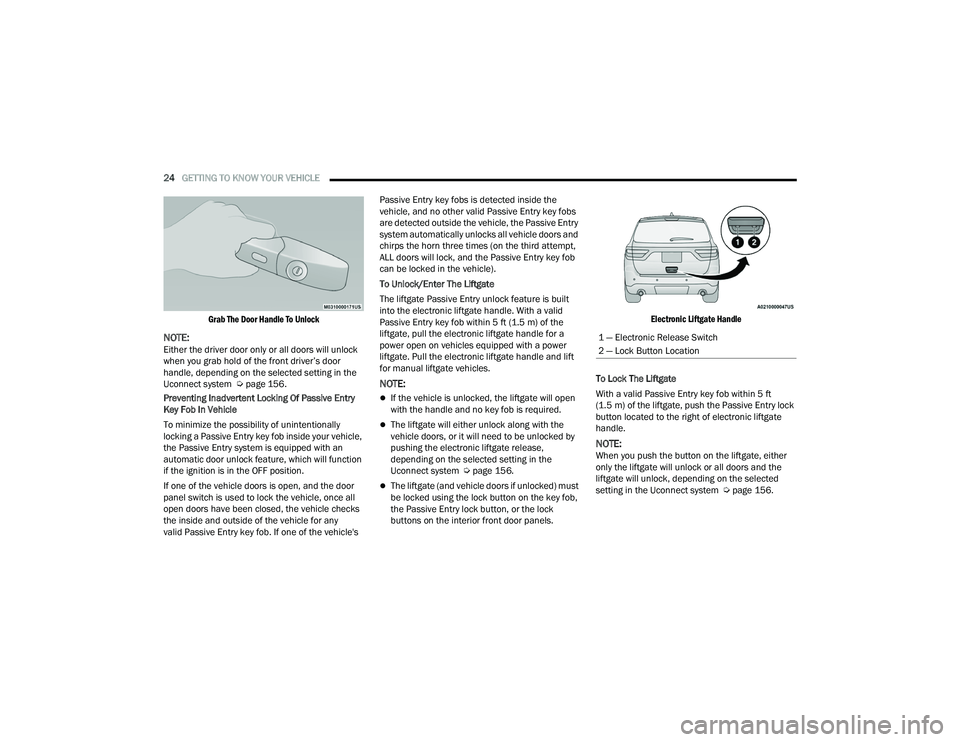
Grab The Door Handle To Unlock
NOTE:Either the driver door only or all doors will unlock
when you grab hold of the front driver’s door
handle, depending on the selected setting in the
Uconnect system Ú page 156.
Preventing Inadvertent Locking Of Passive Entry
Key Fob In Vehicle
To minimize the possibility of unintentionally
locking a Passive Entry key fob inside your vehicle,
the Passive Entry system is equipped with an
automatic door unlock feature, which will function
if the ignition is in the OFF position.
If one of the vehicle doors is open, and the door
panel switch is used to lock the vehicle, once all
open doors have been closed, the vehicle checks
the inside and outside of the vehicle for any
valid Passive Entry key fob. If one of the vehicle's Passive Entry key fobs is detected inside the
vehicle, and no other valid Passive Entry key fobs
are detected outside the vehicle, the Passive Entry
system automatically unlocks all vehicle doors and
chirps the horn three times (on the third attempt,
ALL doors will lock, and the Passive Entry key fob
can be locked in the vehicle).
To Unlock/Enter The Liftgate
The liftgate Passive Entry unlock feature is built
into the electronic liftgate handle. With a valid
Passive Entry key fob within 5 ft (1.5 m) of the
liftgate, pull the electronic liftgate handle for a
power open on vehicles equipped with a power
liftgate. Pull the electronic liftgate handle and lift
for manual liftgate vehicles.
NOTE:
If the vehicle is unlocked, the liftgate will open
with the handle and no key fob is required.
The liftgate will either unlock along with the
vehicle doors, or it will need to be unlocked by
pushing the electronic liftgate release,
depending on the selected setting in the
Uconnect system Ú page 156.
The liftgate (and vehicle doors if unlocked) must
be locked using the lock button on the key fob,
the Passive Entry lock button, or the lock
buttons on the interior front door panels.
Electronic Liftgate Handle
To Lock The Liftgate
With a valid Passive Entry key fob within 5 ft
(1.5 m) of the liftgate, push the Passive Entry lock
button located to the right of electronic liftgate
handle.
NOTE:When you push the button on the liftgate, either
only the liftgate will unlock or all doors and the
liftgate will unlock, depending on the selected
setting in the Uconnect system Ú page 156.
1 — Electronic Release Switch
2 — Lock Button Location
22_WD_OM_EN_USC_t.book Page 24
Page 27 of 332

GETTING TO KNOW YOUR VEHICLE25
To Lock The Vehicle’s Doors And Liftgate
With one of the vehicle’s Passive Entry key fobs
within 5 ft (1.5 m) of the driver or passenger front
door handle, push the door handle lock button to
lock all four doors and liftgate.
NOTE:This feature will cause the horn to chirp when the
doors are locked with the door handle lock button.
This feature can be turned on or off within
Uconnect Settings Ú page 156.
Push The Door Handle Button To Lock
NOTE:Do NOT grab the door handle when pushing the
door handle button. This could unlock the door(s).
Do NOT Grab The Door Handle When Locking
NOTE:
After pushing the door handle button, you must
wait two seconds before you can lock or unlock
the doors, using either Passive Entry door
handle or door handle button. This is done to
allow you to check if the vehicle is locked by
pulling the door handle without the vehicle
unlocking.
The Passive Entry system will not operate if the
key fob battery is depleted.
Close proximity to mobile devices can affect the
Passive Entry system.
The vehicle doors can also be locked by using the
key fob lock button or the lock button located on
the vehicle’s interior door panel Ú page 316.
AUTOMATIC UNLOCK ON EXIT
F
EATURE — IF EQUIPPED
If Auto Unlock is enabled within Uconnect Settings
Ú page 156, this feature will unlock all the doors
when any door is opened if the vehicle is in PARK.
AUTOMATIC DOOR LOCKS —
I
F EQUIPPED
When enabled, the door locks will lock
automatically when the vehicle’s speed exceeds
15 mph (24 km/h). Auto door lock feature is
enabled/disabled within Uconnect Settings
Ú page 156.
CHILD-PROTECTION DOOR LOCK
S
YSTEM — REAR DOORS
To provide a safer environment for small children
riding in the rear seats, the rear doors are
equipped with Child-Protection Door Lock system.
To Engage Or Disengage The Child Protection Door
Lock System
1. Open the rear door.
2. Insert the tip of the emergency key into the
lock and rotate to the lock or unlock position.
3. Repeat steps 1 and 2 for the opposite rear door.
2
22_WD_OM_EN_USC_t.book Page 25