2022 CHEVROLET EQUINOX roof
[x] Cancel search: roofPage 144 of 360
Chevrolet Equinox Owner Manual (GMNA-Localizing-U.S./Canada-
16540728) - 2023 - crc - 6/16/22
Infotainment System 143
Auto Complete
Enter a partial location in the field entry box
on the search display. Auto complete will
attempt to complete the destination based
on what is being entered. Touch the
suggested item to search.
Search While in Motion with No Front Seat
Passenger Present
The search display will not allow changes or
text input with the keyboard when the
vehicle is in motion. As a result, a display
showing three rows of the most commonly
used categories appears. Touching the search
box will activate speech recognition.
Search While in Motion with Front Seat
Passenger Present
If the system detects that the front seat
passenger is present with both driver and
passenger seat belts buckled, touching the
search icon will display an alert message
that allows the passenger to search for a
destination as if the vehicle were stopped.
Connected Navigation
Connected Navigation is a subscription
service that enables certain capabilities
within the navigation system, such as
Traffic, Smart Search/Routing, and PredictiveNavigation capabilities. The system will
show an alert when the subscription is
expiring and will ask to renew the plan.
Global Positioning System (GPS)
If equipped, the position of the vehicle is
determined by using satellite signals, various
vehicle signals, and map data.
At times, other interference such as the
satellite condition, road configuration,
condition of the vehicle, and/or other
circumstances can affect the navigation
system's ability to determine the accurate
position of the vehicle.
The GPS shows the current position of the
vehicle using signals sent by GPS satellites.
When the vehicle is not receiving signals
from the satellites, a symbol appears in the
status bar.
This system might not be available or
interference can occur if any of the
following are true:
.Signals are obstructed by tall buildings,
trees, large trucks, or a tunnel.
.Satellites are being repaired or improved.
For more information if the GPS is not
functioning properly, see
Problems with
Route Guidance 0144 and
If the System Needs Service 0144.
Vehicle Positioning
At times, the position of the vehicle on the
map could be inaccurate due to one or more
of the following reasons:
.The road system has changed.
.The vehicle is driving on slippery road
surfaces such as sand, gravel, or snow.
.The vehicle is traveling on winding roads
or long, straight roads.
.The vehicle is approaching a tall building
or a large vehicle.
.The surface streets run parallel to a
freeway.
.The vehicle has been transferred by a
vehicle carrier or a ferry.
.The current position calibration is set
incorrectly.
.The vehicle is traveling at high speed.
.The vehicle changes directions more than
once, or the vehicle is turning on a turn
table in a parking lot.
.The vehicle is entering and/or exiting a
parking lot, garage, or a lot with a roof.
Page 145 of 360
Chevrolet Equinox Owner Manual (GMNA-Localizing-U.S./Canada-
16540728) - 2023 - crc - 6/16/22
144 Infotainment System
.The GPS signal is not received.
.A roof carrier is installed on the vehicle.
.Tire chains are installed on the vehicle.
.The tires are replaced or worn.
.The tire pressure for the tires is incorrect.
.This is the first navigation use after the
map data is updated.
.The 12-volt battery has been disconnected
for several days.
.The vehicle is driving in heavy traffic
where driving is at low speeds, and the
vehicle is stopped and started repeatedly.
Problems with Route Guidance
Inappropriate route guidance can occur
under one or more of the following
conditions:
.The turn was not made on the road
indicated.
.Route guidance might not be available
when using automatic rerouting for the
next right or left turn.
.The route might not be changed when
using automatic rerouting.
.There is no route guidance when turning
at an intersection.
.Plural names of places might be
announced occasionally.
.It could take a long time to operate
automatic rerouting during high-speed
driving.
.Automatic rerouting might display a route
returning to the set waypoint if heading
for a destination without passing through
a set waypoint.
.The route prohibits the entry of a vehicle
due to a regulation by time or season or
any other regulation which may be given.
.Some routes might not be searched.
.The route to the destination might not be
shown if there are new roads, if roads
have recently changed, or if certain roads
are not listed in the map data. SeeMaps
0 136.
To recalibrate the vehicle's position on the
map, park with the vehicle running for two
to five minutes, until the vehicle position
updates. Make sure the vehicle is parked in
a location that is safe and has a clear view
of the sky and away from large
obstructions.
If the System Needs Service
If the navigation system needs service, see
your dealer.
Map Data Updates
The map data in the vehicle is the most
up-to-date information available when the
vehicle was produced. The map data is
updated periodically, provided that the map
information has changed and the vehicle has
a relevant service plan.
See www.gmnavdisc.com for details on
ordering, purchasing, and installing a new or
replacement SD card. Features are subject to
change. For more information on this
feature, visit your brand website. See Online
Account 0329 for details.
If the vehicle is equipped with Connected
Navigation, which is a subscription service
that enables certain features of the
navigation system, such as Traffic, Smart
Search/Routing, and Predictive Navigation,
then the system will download the latest
map data from the cloud.
Database Coverage Explanations
Coverage areas vary with respect to the
level of map detail available for any given
area. Some areas feature greater levels of
detail than others. If this happens, it does
not mean there is a problem with the
system. As the map data is updated, more
Page 182 of 360
Chevrolet Equinox Owner Manual (GMNA-Localizing-U.S./Canada-
16540728) - 2023 - crc - 6/16/22
Driving and Operating 181
.Slow down and adjust your driving
according to weather conditions. Stopping
distance can be longer and vehicle control
can be affected when traction is reduced
by water, snow, ice, gravel, or other
material on the road. Learn to recognize
warning clues—such as enough water,
ice, or packed snow on the road to make
a mirrored surface —and slow down
when you have any doubt.
.Try to avoid sudden steering, acceleration,
or braking, including reducing vehicle
speed by shifting to a lower gear. Any
sudden changes could cause the tires to
slide.
Remember: Antilock brakes help avoid only
the braking skid.
Off-Road Driving
All-wheel-drive vehicles can be used for
off-road driving. Vehicles without all-wheel
drive and vehicles not equipped with All
Terrain (AT) or On-Off Road (OOR) tires must
not be driven off-road except on a level,
solid surface. To contact the tire
manufacturer for more information about
the original equipment tires, see the
warranty manual. Controlling the vehicle is the key to
successful off-road driving. One of the best
ways to control the vehicle is to control the
speed.
{Warning
When driving off-road, bouncing and
quick changes in direction can easily
throw you out of position. This could
cause you to lose control and crash. You
and your passengers should always wear
seat belts.
Before Driving Off-Road
.Have all necessary maintenance and
service work completed.
.Fuel the vehicle, fill fluid levels, and check
inflation pressure in all tires, including the
spare, if equipped.
.Read all the information about
all-wheel-drive vehicles in this manual.
.Make sure all underbody shields,
if equipped, are properly attached.
.Know the local laws that apply to off-road
driving.
Loading the Vehicle for Off-Road Driving
{Warning
.Unsecured cargo on the load floor can
be tossed about when driving over
rough terrain. You or your passengers
can be struck by flying objects. Secure
the cargo properly.
.Keep cargo in the cargo area as far
forward and as low as possible. The
heaviest things should be on the floor,
forward of the rear axle.
.Heavy loads on the roof raise the
vehicle's center of gravity, making it
more likely to roll over. You can be
seriously or fatally injured if the
vehicle rolls over. Put heavy loads
inside the cargo area, not on the roof.
For more information about loading the
vehicle, see Vehicle Load Limits 0187.
Environmental Concerns
.Always use established trails, roads, and
areas that have been set aside for public
off-road recreational driving and obey all
posted regulations.
.Do not damage shrubs, flowers, trees,
or grasses or disturb wildlife.
Page 196 of 360
Chevrolet Equinox Owner Manual (GMNA-Localizing-U.S./Canada-
16540728) - 2023 - crc - 6/16/22
Driving and Operating 195
Engine Heater
{Warning
Do not plug in the engine block heater
while the vehicle is parked in a garage or
under a carport. Property damage or
personal injury may result. Always park
the vehicle in a clear open area away
from buildings or structures.
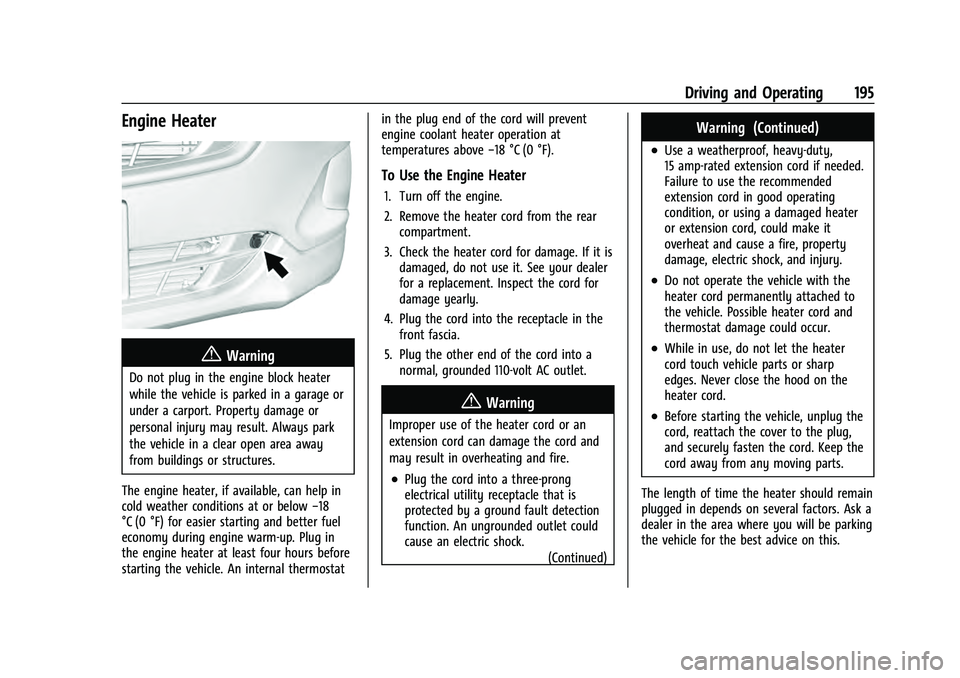
The engine heater, if available, can help in
cold weather conditions at or below −18
°C (0 °F) for easier starting and better fuel
economy during engine warm-up. Plug in
the engine heater at least four hours before
starting the vehicle. An internal thermostat in the plug end of the cord will prevent
engine coolant heater operation at
temperatures above
−18 °C (0 °F).
To Use the Engine Heater
1. Turn off the engine.
2. Remove the heater cord from the rear
compartment.
3. Check the heater cord for damage. If it is damaged, do not use it. See your dealer
for a replacement. Inspect the cord for
damage yearly.
4. Plug the cord into the receptacle in the front fascia.
5. Plug the other end of the cord into a normal, grounded 110-volt AC outlet.
{Warning
Improper use of the heater cord or an
extension cord can damage the cord and
may result in overheating and fire.
.Plug the cord into a three-prong
electrical utility receptacle that is
protected by a ground fault detection
function. An ungrounded outlet could
cause an electric shock.
(Continued)
Warning (Continued)
.Use a weatherproof, heavy-duty,
15 amp-rated extension cord if needed.
Failure to use the recommended
extension cord in good operating
condition, or using a damaged heater
or extension cord, could make it
overheat and cause a fire, property
damage, electric shock, and injury.
.Do not operate the vehicle with the
heater cord permanently attached to
the vehicle. Possible heater cord and
thermostat damage could occur.
.While in use, do not let the heater
cord touch vehicle parts or sharp
edges. Never close the hood on the
heater cord.
.Before starting the vehicle, unplug the
cord, reattach the cover to the plug,
and securely fasten the cord. Keep the
cord away from any moving parts.
The length of time the heater should remain
plugged in depends on several factors. Ask a
dealer in the area where you will be parking
the vehicle for the best advice on this.
Page 197 of 360
Chevrolet Equinox Owner Manual (GMNA-Localizing-U.S./Canada-
16540728) - 2023 - crc - 6/16/22
196 Driving and Operating
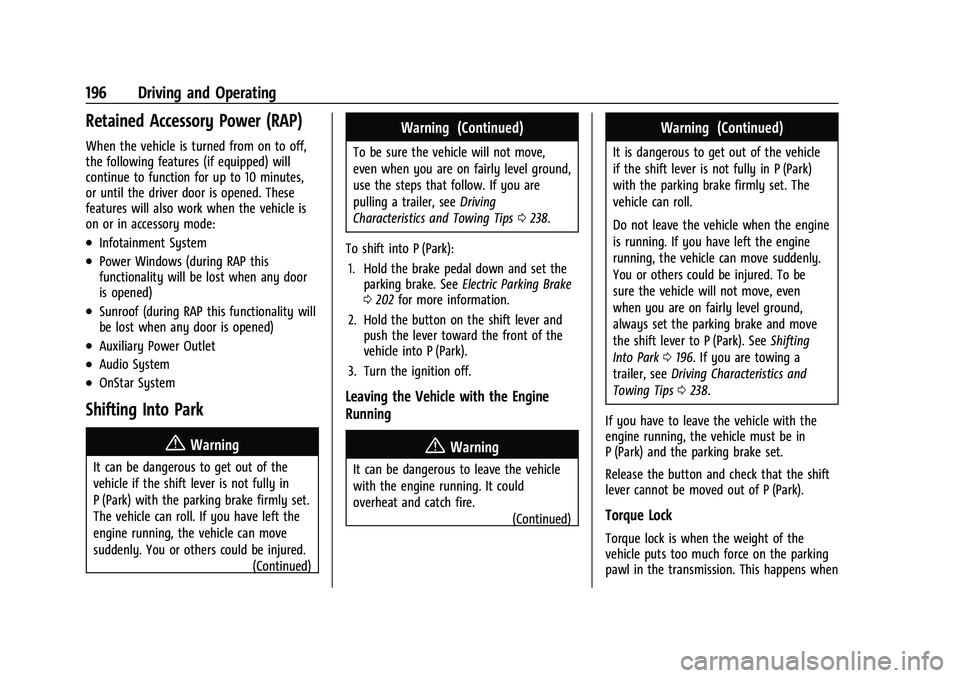
Retained Accessory Power (RAP)
When the vehicle is turned from on to off,
the following features (if equipped) will
continue to function for up to 10 minutes,
or until the driver door is opened. These
features will also work when the vehicle is
on or in accessory mode:
.Infotainment System
.Power Windows (during RAP this
functionality will be lost when any door
is opened)
.Sunroof (during RAP this functionality will
be lost when any door is opened)
.Auxiliary Power Outlet
.Audio System
.OnStar System
Shifting Into Park
{Warning
It can be dangerous to get out of the
vehicle if the shift lever is not fully in
P (Park) with the parking brake firmly set.
The vehicle can roll. If you have left the
engine running, the vehicle can move
suddenly. You or others could be injured.(Continued)
Warning (Continued)
To be sure the vehicle will not move,
even when you are on fairly level ground,
use the steps that follow. If you are
pulling a trailer, seeDriving
Characteristics and Towing Tips 0238.
To shift into P (Park): 1. Hold the brake pedal down and set the parking brake. See Electric Parking Brake
0 202 for more information.
2. Hold the button on the shift lever and push the lever toward the front of the
vehicle into P (Park).
3. Turn the ignition off.
Leaving the Vehicle with the Engine
Running
{Warning
It can be dangerous to leave the vehicle
with the engine running. It could
overheat and catch fire. (Continued)
Warning (Continued)
It is dangerous to get out of the vehicle
if the shift lever is not fully in P (Park)
with the parking brake firmly set. The
vehicle can roll.
Do not leave the vehicle when the engine
is running. If you have left the engine
running, the vehicle can move suddenly.
You or others could be injured. To be
sure the vehicle will not move, even
when you are on fairly level ground,
always set the parking brake and move
the shift lever to P (Park). SeeShifting
Into Park 0196. If you are towing a
trailer, see Driving Characteristics and
Towing Tips 0238.
If you have to leave the vehicle with the
engine running, the vehicle must be in
P (Park) and the parking brake set.
Release the button and check that the shift
lever cannot be moved out of P (Park).
Torque Lock
Torque lock is when the weight of the
vehicle puts too much force on the parking
pawl in the transmission. This happens when
Page 219 of 360

Chevrolet Equinox Owner Manual (GMNA-Localizing-U.S./Canada-
16540728) - 2023 - crc - 6/16/22
218 Driving and Operating
droplets from rain or snow that remain on
the windshield may also limit ACC’s ability
to detect objects.
{Warning
Camera visibility may be limited and the
ACC system may not work properly if the
windshield is not clear. Do not use ACC if
moisture is present on the inside of the
windshield or the windshield washer is
used in cold weather. Turn on the front
defroster and make sure the windshield is
clear before using ACC. Before driving,
check that the windshield wipers are in
good condition and replace them if worn.
Lighting Conditions Affecting ACC
The ACC front camera can be affected by
poor lighting conditions, and ACC may have
limited performance when:
.There are changes in brightness, such as
entering and exiting tunnels, bridges, and
overpasses.
.Low sun angles cause the camera to not
detect objects, or it is more difficult to
detect objects in the same traffic lane.
.Lighting is poor in the evening or early
morning
.There are multiple changes in brightness
or shadows along the vehicle roadway.
.In a tunnel without the headlamps on,
or in a tunnel when there is a vehicle in
front that does not have its taillamps on.
.Subjected to strong light from opposing
lane traffic in the front of the vehicle,
such as high-beam headlamps from
oncoming traffic.
Accessory Installations and Vehicle
Modifications
Do not install or place any object around
the front camera windshield area that would
obstruct the front camera view.
Do not install objects on top of the vehicle
that overhang and obstruct the front
camera, such as a canoe, kayak, or other
items that can be transported on a roof rack
system. See Roof Rack System 077.
Do not modify the hood, headlamps, or fog
lamps, as this may limit the camera’s ability
to detect an object. Cleaning the Sensing System
The camera sensor on the windshield behind
the rearview mirror can become blocked by
snow, ice, dirt, mud, or debris. This area
needs to be cleaned for ACC to operate
properly.
The vehicle headlamps may need to be
cleaned due to dirt, snow, or ice. Objects
that are not illuminated correctly may be
difficult to detect.
If ACC will not operate, regular cruise control
may be available. See
“Switching Between
ACC and Regular Cruise Control” in this
section. Always consider driving conditions
before using either cruise control system.
For cleaning instructions, see “Washing the
Vehicle” underExterior Care 0306.
Driver Assistance Systems
This vehicle may have features that work
together to help avoid crashes or reduce
crash damage while driving, backing, and
parking. Read this entire section before
using these systems.
Page 277 of 360
Chevrolet Equinox Owner Manual (GMNA-Localizing-U.S./Canada-
16540728) - 2023 - crc - 6/16/22
276 Vehicle Care
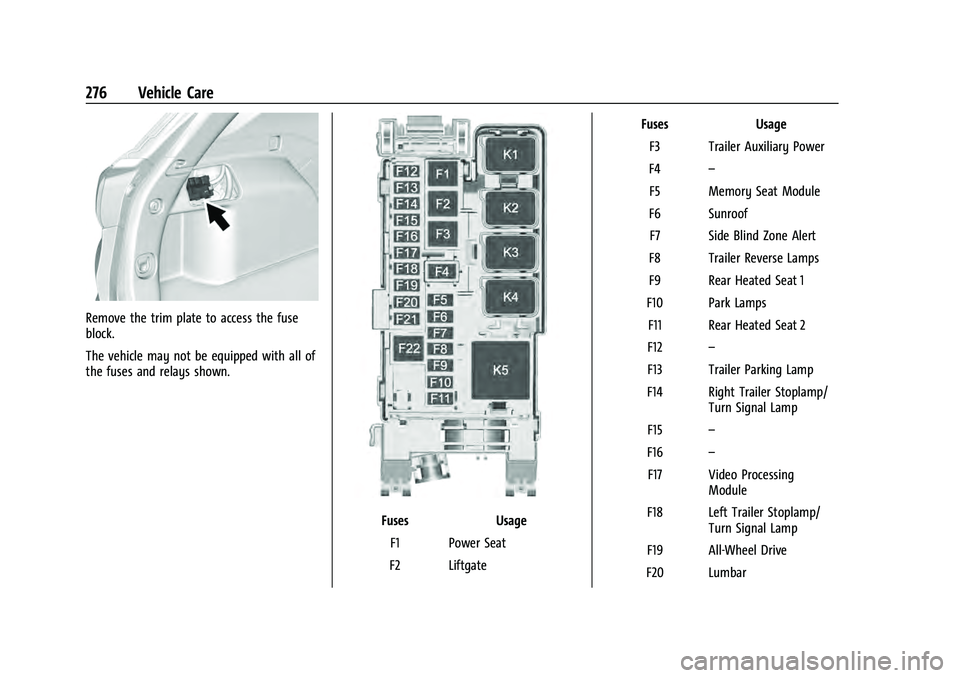
Remove the trim plate to access the fuse
block.
The vehicle may not be equipped with all of
the fuses and relays shown.
FusesUsage
F1 Power Seat
F2 Liftgate Fuses
Usage
F3 Trailer Auxiliary Power
F4 –
F5 Memory Seat Module
F6 Sunroof F7 Side Blind Zone Alert
F8 Trailer Reverse Lamps
F9 Rear Heated Seat 1
F10 Park Lamps F11 Rear Heated Seat 2
F12 –
F13 Trailer Parking Lamp
F14 Right Trailer Stoplamp/ Turn Signal Lamp
F15 –
F16 –
F17 Video Processing Module
F18 Left Trailer Stoplamp/ Turn Signal Lamp
F19 All-Wheel Drive
F20 Lumbar
Page 356 of 360
Chevrolet Equinox Owner Manual (GMNA-Localizing-U.S./Canada-
16540728) - 2023 - crc - 6/16/22
Index 355
RemoteKey . . . . . . . . . . . . . . . . . . . . . . . . . . . . . . . . . . . . . . 8
Key Operation . . . . . . . . . . . . . . . . . . . . . . . . . . . 8
Vehicle Start . . . . . . . . . . . . . . . . . . . . . . . . . . . . 14
Replacement Parts Airbags . . . . . . . . . . . . . . . . . . . . . . . . . . . . . . . . . 57
Maintenance . . . . . . . . . . . . . . . . . . . . . . . . . . . 321
Replacing Airbag System . . . . . . . . . . . . . . . . . . . . . . . . . . 57
LATCH System Parts After a Crash . . . . . . 69
Seat Belt System Parts after a Crash . . . . 47
Reporting Safety Defects Canadian Government . . . . . . . . . . . . . . . . . 336
General Motors . . . . . . . . . . . . . . . . . . . . . . . . 336
U.S. Government . . . . . . . . . . . . . . . . . . . . . . . 335
Restraints
Where to Put . . . . . . . . . . . . . . . . . . . . . . . . . . . 63
Retained Accessory Power (RAP) . . . . . . . . . 196
Reverse Tilt Mirrors . . . . . . . . . . . . . . . . . . . . . . . 26
Roads Driving, Wet . . . . . . . . . . . . . . . . . . . . . . . . . . . 184
Roadside Assistance Program . . . . . . . . . . . . 330
Roof Rack System . . . . . . . . . . . . . . . . . . . . . . . . . . . . 77
Sunroof . . . . . . . . . . . . . . . . . . . . . . . . . . . . . . . . . 28
Rotation, Tires . . . . . . . . . . . . . . . . . . . . . . . . . . . 287
Routing, Engine Drive Belt . . . . . . . . . . . . . . . 326
Running the Vehicle While Parked . . . . . . . 198S
Safety Locks . . . . . . . . . . . . . . . . . . . . . . . . . . . . . . . . . . . 18
Safety Defects Reporting Canadian Government . . . . . . . . . . . . . . . . . 336
General Motors . . . . . . . . . . . . . . . . . . . . . . . . 336
U.S. Government . . . . . . . . . . . . . . . . . . . . . . . 335
Safety System Check . . . . . . . . . . . . . . . . . . . . . 47
Satellite Radio . . . . . . . . . . . . . . . . . . . . . . . . . . . 129
Scheduling Appointments . . . . . . . . . . . . . . . . 332
Seat Belts . . . . . . . . . . . . . . . . . . . . . . . . . . . . . . . . . .41 Buckle To Drive . . . . . . . . . . . . . . . . . . . . . . . . . 41
Care . . . . . . . . . . . . . . . . . . . . . . . . . . . . . . . . . . . . 47
Extender . . . . . . . . . . . . . . . . . . . . . . . . . . . . . . . . 46
How to Wear Seat Belts Properly . . . . . . . 42
Lap-Shoulder Belt . . . . . . . . . . . . . . . . . . . . . . . 44
Reminders . . . . . . . . . . . . . . . . . . . . . . . . . . . . . . 94
Replacing after a Crash . . . . . . . . . . . . . . . . . 47
Use During Pregnancy . . . . . . . . . . . . . . . . . . 46
Seats Adjustment, Front . . . . . . . . . . . . . . . . . . . . . . . 31
Head Restraints . . . . . . . . . . . . . . . . . . . . . . . . . 30
Heated and Ventilated, Front . . . . . . . . . . . 37
Heated, Rear . . . . . . . . . . . . . . . . . . . . . . . . . . . . 40
Lumbar Adjustment, Front . . . . . . . . . . . . . . 34
Memory . . . . . . . . . . . . . . . . . . . . . . . . . . . . . . . . 34
Power Adjustment, Front . . . . . . . . . . . . . . . 32
Rear . . . . . . . . . . . . . . . . . . . . . . . . . . . . . . . . . . . . 38 Seats (cont'd)
Reclining Seatbacks . . . . . . . . . . . . . . . . . . . . . 33
Securing Child Restraints . . . . . . . . . . . . . . . 70, 71
Security Light . . . . . . . . . . . . . . . . . . . . . . . . . . . . . . . . . . . 102
OnStar . . . . . . . . . . . . . . . . . . . . . . . . . . . . . . . . . 340
Vehicle . . . . . . . . . . . . . . . . . . . . . . . . . . . . . . . . . 23
Vehicle Alarm . . . . . . . . . . . . . . . . . . . . . . . . . . . 23
Service . . . . . . . . . . . . . . . . . . . . . . . . . . . . . . . . . . . . 175 Accessories and Modifications . . . . . . . . . 248
Climate Control System . . . . . . . . . . . . . . . . 169
Doing Your Own Work . . . . . . . . . . . . . . . . . 248
Electric Parking Brake Light . . . . . . . . . . . . . 98
Maintenance Records . . . . . . . . . . . . . . . . . . 322
Maintenance, General Information . . . . . 315
Parts Identification . . . . . . . . . . . . . . . . . . . . . 323
Scheduling Appointments . . . . . . . . . . . . . . 332
Services Special Application . . . . . . . . . . . . . . . . . . . . . 319
Servicing System . . . . . . . . . . . . . . . . . . . . . . . . 144
Servicing the Airbag . . . . . . . . . . . . . . . . . . . . . . 56
Settings . . . . . . . . . . . . . . . . . . . . . . . . . . . . . . . . . . . 155
Shifting Into Park . . . . . . . . . . . . . . . . . . . . . . . . . . . . . . 196
Out of Park . . . . . . . . . . . . . . . . . . . . . . . . . . . . 197
Side Blind Zone Alert (SBZA) . . . . . . . . . . . . . 232
Signals, Turn and Lane-Change . . . . . . . . . . . . 117
Software Updates . . . . . . . . . . . . . . . . . . . . . . . . . 127