2022 CHEVROLET BOLT EV key
[x] Cancel search: keyPage 141 of 316
Chevrolet BOLT EV Owner Manual (GMNA-Localizing-U.S./Canada-
15082216) - 2022 - CRC - 6/25/21
140 Infotainment System
Security
Touch to have your profile secured with a
Personal Identification Number (PIN).
Touch No or Yes.
Vehicle Name
Touch to edit your vehicle name.
Vehicle Account
Touch to view the vehicle account
information and to change the account
password.
Delete Profile
Touch to remove the profile from the
vehicle.
Touch Remove or Cancel.
Teen Driver
If equipped, this allows multiple keys to be
registered for beginner drivers to encourage
safe driving habits. When the vehicle is
started with a Teen Driver key, it will
automatically activate certain safety
systems, allow setting of some features, and
limit the use of others. The Report Card will
record vehicle data about driving behavior
that can be viewed later. When the vehicleis started with a registered key, the Driver
Information Center (DIC) displays a message
that Teen Driver is active.
To access:
1. Touch Settings on the Home Page, then touch Vehicle, and then Teen Driver.
2. Create a Personal Identification Number (PIN) by choosing a four-digit PIN.
Re-enter the PIN to confirm. To change
the PIN, touch Change PIN.
The PIN is required to:
.Register or unregister keys.
.Change Teen Driver settings.
.Change or clear the Teen Driver PIN.
.Access or delete Report Card data.
Register keys to activate Teen Driver and
assign restrictions to the key:
Any vehicle key can be registered, up to a
maximum of eight keys. Label the key to
tell it apart from the other keys.
For a pushbutton start system: 1. Start the vehicle.
2. The vehicle must be in P (Park).
3. From the Settings menu, touch Vehicle and then Teen Driver.
4. Enter the PIN. 5. Place the Remote Keyless Entry (RKE)
transmitter key you wish to register in
the transmitter pocket. The key does not
need to be the one that started the
vehicle. See Remote Keyless Entry (RKE)
System Operation 07for transmitter
pocket location.
6. From the Teen Driver menu, touch Setup Keys.
.If the transmitter key has not
previously been registered, the option
to add the key displays. Touch Setup
and a confirmation message displays.
Teen Driver restrictions will be
applied whenever this key is used to
operate the vehicle.
.If the transmitter key has already
been registered, the option to
remove the key displays. If Remove is
touched, the transmitter key is no
longer registered. A confirmation
message displays, and Teen Driver
restrictions will not be applied if this
transmitter key is used to operate
the vehicle.
Page 142 of 316

Chevrolet BOLT EV Owner Manual (GMNA-Localizing-U.S./Canada-
15082216) - 2022 - CRC - 6/25/21
Infotainment System 141
If a Teen Driver and a non-Teen Driver key
are both present at start up, the vehicle will
recognize the non-Teen Driver key to start
the vehicle. The Teen Driver settings will not
be active.
Manage Settings
Audio Volume Limit :Allows the audio
volume limit to be turned on or off. Touch
Set Audio Volume Limit to choose the
maximum allowable audio volume level.
Set Audio Volume Limit : Allows a
maximum radio volume to be set. Use the
arrows to choose the maximum allowable
level for the audio volume.
Teen Driver Speed Limiter : Limits the
maximum speed of the vehicle. When the
speed limiter is turned on and the vehicle is
started with a Teen Driver key, the DIC
displays a message that the top speed is
limited.
On certain vehicles, when the Speed Limiter
is turned ON, the vehicle’s maximum
acceleration will be limited. The DIC will
display a message that the acceleration is
limited. Teen Driver Speed Warning :
Allows the
speed warning to be turned on or off. Touch
Set Teen Driver Speed Warning to set the
warning speed.
Set Teen Driver Speed Warning : Displays a
warning in the DIC when exceeding a
selectable speed. Choose the desired speed
warning level. The speed warning does not
limit the speed of the vehicle.
SiriusXM Explicit Content Filter (if
equipped) : Allows the SiriusXM Explicit
Content Filter to be turned ON or OFF.
When ON, the teen driver will not be able
to listen to SiriusXM stations that contain
explicit content, and the Explicit Content
Filter selection in the Audio Settings will be
unavailable for change.
When Teen Driver is Active:
.If equipped with Buckle to Drive, shifting
out of P (Park) will be prevented if the
driver seat belt, and in some vehicles the
front passenger seat belt, is not buckled.
.The radio will mute when the driver seat
belt, and in some vehicles the front
passenger seat belt, is not buckled. The
audio from any device paired to the
vehicle will also be muted.
.If an object, such as a briefcase, handbag,
grocery bag, laptop, or other electronic
device, is on the front passenger seat, it
could cause the radio to mute. If this
happens, remove the object from the
seat. See Passenger Sensing System 044.
.Some safety systems, such as Forward
Collision Alert, if equipped, cannot be
turned off.
.The gap setting for the Forward Collision
Alert and Adaptive Cruise Control,
if equipped, cannot be changed.
.When trying to change a safety feature
that is not configurable in Teen Driver,
the DIC displays a message indicating
that Teen Driver is active and the action
is not available.
.Super Cruise, if equipped, is not available.
.Do not tow a trailer.
Report Card
The vehicle owner must secure the driver’s
consent to record certain vehicle data when
the vehicle is driven with a registered Teen
Driver key. There is one Report Card per
vehicle. Data is only recorded when a
registered Teen Driver key is used to
operate the vehicle.
Page 143 of 316

Chevrolet BOLT EV Owner Manual (GMNA-Localizing-U.S./Canada-
15082216) - 2022 - CRC - 6/25/21
142 Infotainment System
The Report Card data is collected from the
time Teen Driver is activated or the last
time the Report Card was reset. The
following items may be recorded:
.Distance Driven–the total distance
driven.
.Maximum Speed –the maximum vehicle
speed detected.
.Overspeed Warnings –the number of
times the speed warning setting was
exceeded.
.Wide Open Throttle –the number of
times the accelerator pedal was pressed
nearly all the way down.
.Forward Collision Alerts –the number of
times the driver was notified when
approaching a vehicle ahead too quickly
and at potential risk for a crash.
.Forward Automatic Braking, also called
Automatic Emergency Braking –the
number of times the vehicle detected that
a forward collision was imminent and
applied the brakes.
.Traction Control –the number of times
the Traction Control System activated to
reduce wheel spin or loss of traction.
.Stability Control –the number of events
which required the use of electronic
stability control.
.Antilock Braking System Active –The
number of Antilock Brake System
activations.
.Tailgating Alerts –the number of times
the driver was alerted for following a
vehicle ahead too closely.
Report Card Data
Cumulative Data is saved for all trips until
the Report Card is reset or until the
maximum count is exceeded. If the
maximum count is exceeded for a Report
Card line item, that item will no longer be
updated in the Report Card until it is reset.
Each item will report a maximum of
1,000 counts. The distance driven will report
a maximum of 64 374 km (40,000 mi).
To delete Report Card data, do one of the
following:
.From the Report Card display, touch
Reset.
.Touch Clear All Teen Keys and PIN from
the Teen Driver menu. This will also
unregister any Teen Driver keys and
delete the PIN.
Forgotten PIN
See your dealer to reset the PIN.
Trademarks and License
Agreements
FCC Information
See Radio Frequency Statement 0294.
"Made for iPod," and "Made for iPhone,"
mean that an electronic accessory has been
designed to connect specifically to iPod or
iPhone, respectively, and has been certified
by the developer to meet Apple
performance standards. Apple is not
responsible for the operation of this device
or its compliance with safety and regulatory
standards. Please note that the use of this
accessory with iPod or iPhone may affect
wireless performance. iPhone, iPod, iPod
classic, iPod nano, iPod shuffle, and iPod
touch are trademarks of Apple Inc.,
registered in the U.S. and other countries.
Page 152 of 316

Chevrolet BOLT EV Owner Manual (GMNA-Localizing-U.S./Canada-
15082216) - 2022 - CRC - 6/25/21
Climate Controls 151
The defogger only works when the vehicle is
on. The defogger will turn off if the vehicle
is turned off.
Caution
Do not try to clear frost or other material
from the inside of the front windshield
and rear window with a razor blade or
anything else that is sharp. This may
damage the rear window defogger grid
and affect the radio's ability to pick up
stations clearly. The repairs would not be
covered by the vehicle warranty.
Heated Seats (If Equipped)
Liftxoryto heat the driver or
passenger seat cushion. See Heated Front
Seats 029.
Auto Heated Seats
When the vehicle is on, this feature will
automatically activate the heated seats at
the level required by the vehicle's interior
temperature. The active high, medium, low,
or off heated eat level will be indicated by
the manual heated seat buttons on the
center stack. Use the manual heated seat
buttons on the center stack to turn auto
heated seats off. If the passenger seat is unoccupied, the auto heated seats feature
will not activate that seat. The auto heated
seats feature can be programmed to always
be enabled when the vehicle is on. See
Heated Front Seats
029 and
Vehicle Personalization 0102.
Remote Start Climate Control Operation
If equipped with the remote start feature,
the climate control system may run when
the vehicle is started remotely. The system
uses the driver’s previous settings to heat or
cool the inside of the vehicle. The rear defog
may come on during remote start based on
cold ambient conditions. The rear defog
indicator light does not come on during a
remote start.
If equipped, the heated seats will turn on if
it is cold outside. The heated seat indicator
lights may not come on during a remote
start. See Heated Front Seats 029 and
Vehicle Personalization 0102.
Remote Start : The climate control system
may be started by using the Remote Keyless
Entry (RKE) transmitter. The climate control
system will default to an appropriate
heating or cooling mode. See Remote Start
0 13. The rear window defogger turns on if it is
cold outside.
Sensors
Indicator Light and Solar Sensor (ILSS)
The ILSS is on top of the instrument panel,
near the windshield, where it monitors solar
intensity.
The climate control system uses the sensor
information to adjust the temperature, fan
speed, recirculation, and air delivery mode
for best comfort.
Do not cover the sensor; otherwise the
automatic climate control system may not
work properly.
Humidity Sensor
The humidity sensor is near the base of the
inside rearview mirror. The climate control
system uses the sensor information to
adjust the temperature and recirculation for
best comfort.
Outside Air Temperature Sensor
The outside air temperature sensor is behind
the front grille of the vehicle. The vehicle
uses the sensor information to display
Page 166 of 316
Chevrolet BOLT EV Owner Manual (GMNA-Localizing-U.S./Canada-
15082216) - 2022 - CRC - 6/25/21
Driving and Operating 165
{Warning
Things inside the vehicle can strike
and injure people in a sudden stop or
turn, or in a crash.
.Put things in the cargo area of the
vehicle. In the cargo area, put
them as far forward as possible.
Try to spread the weight evenly.
.Never stack heavier things, like
suitcases, inside the vehicle so
that some of them are above the
tops of the seats.
.Do not leave an unsecured child
restraint in the vehicle.
.Secure loose items in the vehicle.
.Do not leave a seat folded down
unless needed.
Starting and Operating
New Vehicle Break-In
Caution
Avoid making hard stops for the first
322 km (200 mi). During this time the
new brake linings are not yet broken in.
Hard stops with new linings can mean
premature wear and earlier replacement.
Follow this breaking-in guideline every
time you get new brake linings.
Following break-in, vehicle speed and load
can be gradually increased.
Power Button
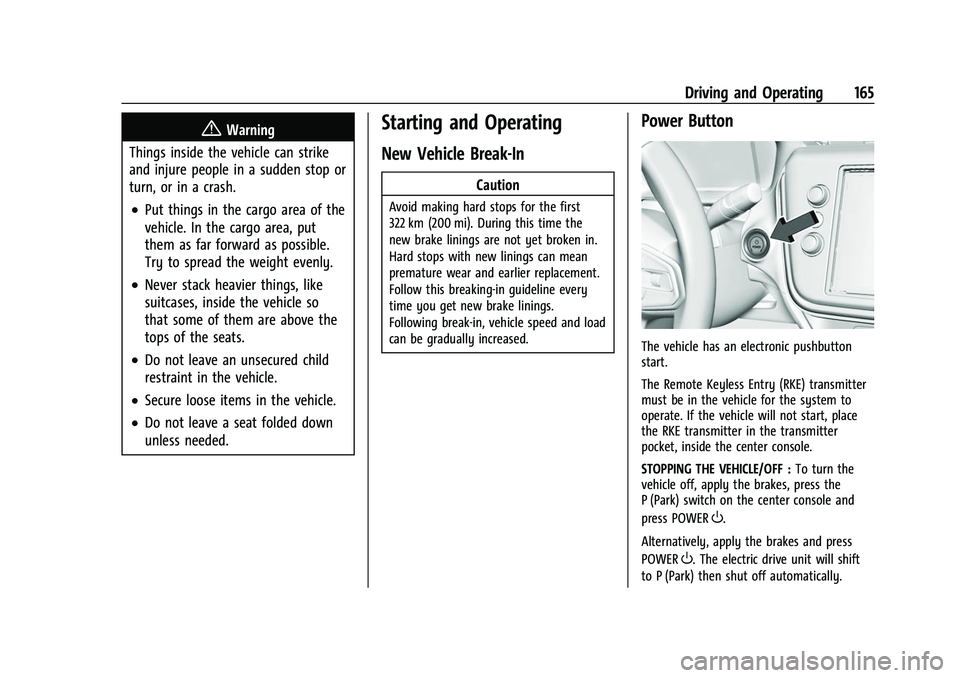
The vehicle has an electronic pushbutton
start.
The Remote Keyless Entry (RKE) transmitter
must be in the vehicle for the system to
operate. If the vehicle will not start, place
the RKE transmitter in the transmitter
pocket, inside the center console.
STOPPING THE VEHICLE/OFF : To turn the
vehicle off, apply the brakes, press the
P (Park) switch on the center console and
press POWER
O.
Alternatively, apply the brakes and press
POWER
O. The electric drive unit will shift
to P (Park) then shut off automatically.
Page 168 of 316
Chevrolet BOLT EV Owner Manual (GMNA-Localizing-U.S./Canada-
15082216) - 2022 - CRC - 6/25/21
Driving and Operating 167
The Remote Keyless Entry (RKE) transmitter
must be in the vehicle. Press the brake
pedal, then press and release POWER
O.
If the RKE transmitter is not in the vehicle
or something is interfering with the
transmitter, a message displays in the Driver
Information Center (DIC).
If the vehicle will not start due to a low RKE
transmitter battery, the vehicle can still be
driven. See Remote Keyless Entry (RKE)
System Operation 07.
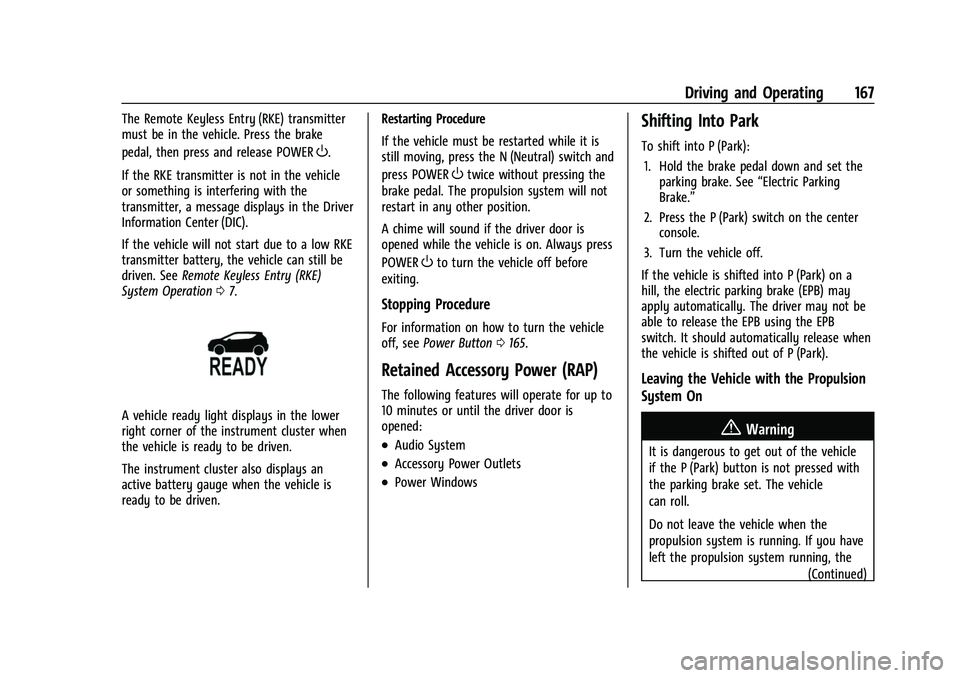
A vehicle ready light displays in the lower
right corner of the instrument cluster when
the vehicle is ready to be driven.
The instrument cluster also displays an
active battery gauge when the vehicle is
ready to be driven. Restarting Procedure
If the vehicle must be restarted while it is
still moving, press the N (Neutral) switch and
press POWER
Otwice without pressing the
brake pedal. The propulsion system will not
restart in any other position.
A chime will sound if the driver door is
opened while the vehicle is on. Always press
POWER
Oto turn the vehicle off before
exiting.
Stopping Procedure
For information on how to turn the vehicle
off, see Power Button 0165.
Retained Accessory Power (RAP)
The following features will operate for up to
10 minutes or until the driver door is
opened:
.Audio System
.Accessory Power Outlets
.Power Windows
Shifting Into Park
To shift into P (Park):
1. Hold the brake pedal down and set the parking brake. See “Electric Parking
Brake.”
2. Press the P (Park) switch on the center console.
3. Turn the vehicle off.
If the vehicle is shifted into P (Park) on a
hill, the electric parking brake (EPB) may
apply automatically. The driver may not be
able to release the EPB using the EPB
switch. It should automatically release when
the vehicle is shifted out of P (Park).
Leaving the Vehicle with the Propulsion
System On
{Warning
It is dangerous to get out of the vehicle
if the P (Park) button is not pressed with
the parking brake set. The vehicle
can roll.
Do not leave the vehicle when the
propulsion system is running. If you have
left the propulsion system running, the (Continued)
Page 218 of 316
Chevrolet BOLT EV Owner Manual (GMNA-Localizing-U.S./Canada-
15082216) - 2022 - CRC - 6/25/21
Vehicle Care 217
General Information
For service and parts needs, visit your
dealer. You will receive genuine GM parts
and GM-trained and supported service
people.
Genuine GM parts have one of these marks:
California Perchlorate Materials
Requirements
Certain types of automotive applications,
such as airbag initiators, seat belt
pretensioners, and lithium batteries
contained in electronic keys, may contain
perchlorate materials. Perchlorate Material–special handling may apply. See
www.dtsc.ca.gov/hazardouswaste/
perchlorate.
Accessories and Modifications
Adding non-dealer accessories or making
modifications to the vehicle can affect
vehicle performance and safety, including
such things as airbags, braking, stability,
ride and handling, emissions systems,
aerodynamics, durability, and electronic
systems like antilock brakes, traction control,
and stability control. These accessories or
modifications could even cause malfunction
or damage not covered by the vehicle
warranty.
Damage to suspension components caused
by modifying vehicle height outside of
factory settings will not be covered by the
vehicle warranty.
Damage to vehicle components resulting
from modifications or the installation or use
of non-GM certified parts, including control
module or software modifications, is not
covered under the terms of the vehicle
warranty and may affect remaining
warranty coverage for affected parts.
GM Accessories are designed to complement
and function with other systems on the
vehicle. See your dealer to accessorize the
vehicle using genuine GM Accessories
installed by a dealer technician.
Also, see
Adding Equipment to the
Airbag-Equipped Vehicle 047.
Vehicle Checks
Doing Your Own Service Work
{Warning
Never try to do your own service on high
voltage battery components. You can be
injured and the vehicle can be damaged if
you try to do your own service work.
Service and repair of these high voltage
battery components should only be
performed by a trained dealer technician
with the proper knowledge and tools.
Exposure to high voltage can cause shock,
burns, and even death. The high voltage
components in the vehicle can only be
serviced by technicians with special
training.
(Continued)
Page 271 of 316
Chevrolet BOLT EV Owner Manual (GMNA-Localizing-U.S./Canada-
15082216) - 2022 - CRC - 6/25/21
270 Vehicle Care
Visually check constant velocity joint boots
and axle seals for leaks.
Body Component Lubrication
Lubricate all key lock cylinders, hood hinges,
liftgate hinges, steel charge port door, and
power assist step hinges, unless the
components are plastic. Applying silicone
grease on weatherstrips with a clean cloth
will make them last longer, seal better, and
not stick or squeak.
Underbody Maintenance
At least twice a year, spring and fall, use
plain water to flush any corrosive materials
from the underbody. Take care to
thoroughly clean any areas where mud and
other debris can collect.
Sheet Metal Damage
If the vehicle is damaged and requires sheet
metal repair or replacement, make sure the
body repair shop applies anti-corrosion
material to parts repaired or replaced to
restore corrosion protection.
Original manufacturer replacement parts will
provide the corrosion protection while
maintaining the vehicle warranty.
Finish Damage
Quickly repair minor chips and scratches
with touch-up materials available from your
dealer to avoid corrosion. Larger areas of
finish damage can be corrected in your
dealer's body and paint shop.
Chemical Paint Spotting
Airborne pollutants can fall upon and attack
painted vehicle surfaces causing blotchy,
ring-shaped discolorations, and small,
irregular dark spots etched into the paint
surface. See“Finish Care” previously in this
section.
Interior Care
To prevent dirt particle abrasions, regularly
clean the vehicle's interior. Before using
cleaners, read and follow all safety
instructions on the label. While cleaning the
interior, open the doors and windows to get
proper ventilation. Newspapers or dark
garments can transfer color to the vehicle’s
interior.
Caution
Immediately remove cleaners, hand
lotions, sunscreen, and insect repellent
from all interior surfaces or permanent
damage may result.
Caution
Use cleaners specifically designed for the
surfaces being cleaned to prevent
permanent damage to the vehicle. Apply
all cleaners directly to a cleaning cloth.
Do not spray cleaners on any switches or
controls.
When using liquid soap cleaners, follow the
directions on the specific cleaner or soap
solution for dilution instructions.
Caution
To prevent damage:
.Never use a razor or any other sharp
object to remove soil from any interior
surface
.Never use a brush with stiff bristles.(Continued)