2022 CADILLAC XT5 electric
[x] Cancel search: electricPage 101 of 432
Cadillac XT5 Owner Manual (GMNA-Localizing-U.S./Canada/Mexico-
15227431) - 2022 - CRC - 8/11/21
100 INSTRUMENTS AND CONTROLS
Rear Wiper Arm Assembly
Protection
When using an automatic car wash,
move the rear wiper control to OFF to
disable the rear wiper. In some
vehicles, if the shift lever is in
N (Neutral) and the vehicle speed is
very slow, the rear wiper will
automatically park under the rear
spoiler.
The wiper operations return to normal
when the shift lever is no longer in
N (Neutral) or the vehicle speed has
increased.
Auto Wipe in Reverse Gear
If the rear wiper control is off, the rear
wiper will automatically operate
continuously when the shift lever is in
R (Reverse), and the front windshield
wiper is performing low or high speed
wipes. If the rear wiper control is off,
the shift lever is in R (Reverse), and
the front windshield wiper is
performing INT wipes, then the rear
wiper automatically performs INT
wipes.
This feature can be turned on or off.
SeeVehicle Personalization 0126. The windshield washer reservoir is
used for the windshield, rear window,
and rear mirror camera, if equipped.
See
Rear Camera Mirror 032. Check
the fluid level in the reservoir if either
washer is not working. See Washer
Fluid 0313.
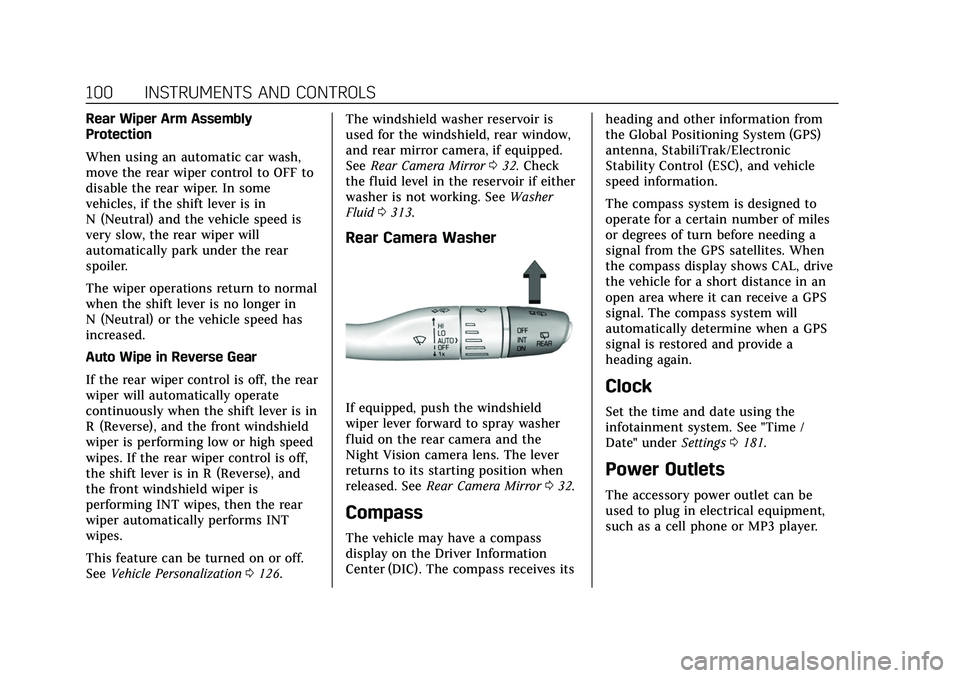
Rear Camera Washer
If equipped, push the windshield
wiper lever forward to spray washer
fluid on the rear camera and the
Night Vision camera lens. The lever
returns to its starting position when
released. See Rear Camera Mirror 032.
Compass
The vehicle may have a compass
display on the Driver Information
Center (DIC). The compass receives its heading and other information from
the Global Positioning System (GPS)
antenna, StabiliTrak/Electronic
Stability Control (ESC), and vehicle
speed information.
The compass system is designed to
operate for a certain number of miles
or degrees of turn before needing a
signal from the GPS satellites. When
the compass display shows CAL, drive
the vehicle for a short distance in an
open area where it can receive a GPS
signal. The compass system will
automatically determine when a GPS
signal is restored and provide a
heading again.
Clock
Set the time and date using the
infotainment system. See "Time /
Date" under
Settings0181.
Power Outlets
The accessory power outlet can be
used to plug in electrical equipment,
such as a cell phone or MP3 player.
Page 102 of 432

Cadillac XT5 Owner Manual (GMNA-Localizing-U.S./Canada/Mexico-
15227431) - 2022 - CRC - 8/11/21
INSTRUMENTS AND CONTROLS 101
The vehicle has two accessory power
outlets: one on the lower center floor
console and one in the rear
cargo area.
Lift the cover to access the accessory
power outlet.
Certain accessory power plugs may
not be compatible with the accessory
power outlet and could overload
vehicle or adapter fuses. If a problem
is experienced, see your dealer.
When adding electrical equipment, be
sure to follow the proper installation
instructions included with the
equipment. SeeAdd-On Electrical
Equipment 0294.
Caution
Hanging heavy equipment from the
power outlet can cause damage not
covered by the vehicle warranty.
The power outlets are designed for
accessory power plugs only, such as
cell phone charge cords.
Always unplug electrical equipment
when not in use and do not plug in
equipment that exceeds the maximum
15 amps rating.
Wireless Charging
If equipped and enabled, the vehicle
has wireless charging in the storage
under the armrest. The system
operates at 145 kHz and wirelessly
charges one Qi compatible
smartphone. The power output of the
system is capable of charging at a rate
up to 3 amp (15 W), as requested by
the compatible smartphone. See Radio
Frequency Statement 0406.
{Warning
Wireless charging may affect the
operation of an implanted
pacemaker or other medical devices.
If you have one, it is recommended
to consult with your doctor before
using the wireless charging system.
The vehicle must be on, in ACC/
ACCESSORY, or Retained Accessory
Power (RAP) must be active. The
wireless charging feature may not
correctly indicate charging when the
vehicle is in RAP, during a Bluetooth
phone call, or when phone projection
(e.g. Apple CarPlay / Android Auto) is
active. See Retained Accessory Power
(RAP) 0230.
The operating temperature is −40 °C
(−40 °F) to 85 °C (185 °F) for the
charging system and 0 °C (32 °F) to
35 °C (95 °F) for the phone. A charging
stopped alert may be displayed on the
infotainment screen, if the wireless
charger or smartphone are outside of
normal operating temperature.
Page 110 of 432

Cadillac XT5 Owner Manual (GMNA-Localizing-U.S./Canada/Mexico-
15227431) - 2022 - CRC - 8/11/21
INSTRUMENTS AND CONTROLS 109
If the front passenger seat belt is
buckled, neither the chime nor the
light comes on.
The front passenger seat belt reminder
light and chime may come on if an
object is put on the seat such as a
briefcase, handbag, grocery bag,
laptop, or other electronic device. To
turn off the reminder light and/or
chime, remove the object from the
seat or buckle the seat belt.
Airbag Readiness Light
This light shows if there is an
electrical problem with the airbag
system. It is located in the instrument
cluster. The system check includes the
airbag sensor(s), the passenger
sensing system, the pretensioners, the
airbag modules, the wiring, and the
crash sensing and diagnostic module.
For more information on the airbag
system, seeAirbag System 058.
The airbag readiness light comes on
for several seconds when the vehicle is
started. If the light does not come on
then, have it fixed immediately.
{Warning
If the airbag readiness light stays
on after the vehicle is started or
comes on while driving, it means
the airbag system might not be
working properly. The airbags in the
vehicle might not inflate in a crash,
or they could even inflate without a
crash. To help avoid injury, have
the vehicle serviced right away.
If there is a problem with the airbag
system, a Driver Information Center
(DIC) message may also come on.
Passenger Airbag Status
Indicator
The vehicle has a passenger sensing
system. See Passenger Sensing System
0 63 for important safety information.
The overhead console has a passenger
airbag status indicator.
When the vehicle is started, the
passenger airbag status indicator will
light ON and OFF, or the symbol for
on and off, for several seconds as a
system check. Then, after several more
seconds, the status indicator will light
either ON or OFF, or either the on or
off symbol, to let you know the status
of the front outboard passenger
frontal airbag.
If the word ON, or the on symbol, is
lit on the passenger airbag status
indicator, it means that the front
outboard passenger frontal airbag is
allowed to inflate.
Page 111 of 432

Cadillac XT5 Owner Manual (GMNA-Localizing-U.S./Canada/Mexico-
15227431) - 2022 - CRC - 8/11/21
110 INSTRUMENTS AND CONTROLS
If the word OFF, or the off symbol, is
lit on the passenger airbag status
indicator, it means that the passenger
sensing system has turned off the
front outboard passenger frontal
airbag.
If, after several seconds, both status
indicator lights remain on, or if there
are no lights at all, there may be a
problem with the lights or the
passenger sensing system. See your
dealer for service.
{Warning
If the airbag readiness light ever
comes on and stays on, it means
that something may be wrong with
the airbag system. To help avoid
injury to yourself or others, have
the vehicle serviced right away. See
Airbag Readiness Light0109 for
more information, including
important safety information.
Charging System Light
The charging system light comes on
briefly when the ignition is turned on,
but the engine is not running, as a
check to show the light is working.
It should go out when the engine is
started.
If the light stays on, or comes on
while driving, there may be a problem
with the electrical charging system.
Have it checked by your dealer.
Driving while this light is on could
drain the battery.
When this light comes on, or is
flashing, the Driver Information
Center (DIC) also displays a message.
If a short distance must be driven
with the light on, be sure to turn off
all accessories, such as the radio and
air conditioner. Find a safe place to
stop the vehicle.
Malfunction Indicator Lamp
(Check Engine Light)
This light is part of the vehicle’s
emission control on-board diagnostic
system. If this light is on while the
engine is running, a malfunction has
been detected and the vehicle may
require service. The light should come
on to show that it is working when
the ignition is in Service Mode. See
Ignition Positions 0225.
Malfunctions are often indicated by
the system before any problem is
noticeable. Being aware of the light
and seeking service promptly when it
comes on may prevent damage.
Caution
If the vehicle is driven continually
with this light on, the emission
control system may not work as
(Continued)
Page 113 of 432

Cadillac XT5 Owner Manual (GMNA-Localizing-U.S./Canada/Mexico-
15227431) - 2022 - CRC - 8/11/21
112 INSTRUMENTS AND CONTROLS
The DLC is under the instrument
panel to the left of the steering wheel.
Connecting devices that are not used
to perform an Emissions Inspection/
Maintenance test or to service the
vehicle may affect vehicle operation.
SeeAdd-On Electrical Equipment 0294.
See your dealer if assistance is needed.
The vehicle may not pass
inspection if:
.The light is on when the engine is
running.
.The light does not come on when
the ignition is in Service Mode.
.Critical emission control systems
have not been completely
diagnosed. If this happens, the
vehicle would not be ready for
inspection and might require
several days of routine driving
before the system is ready for
inspection. This can happen if the 12-volt battery has recently been
replaced or run down, or if the
vehicle has been recently serviced.
See your dealer if the vehicle will not
pass or cannot be made ready for
the test.
Brake System Warning
Light
MetricEnglish
This light should come on briefly
when the vehicle is turned on. If it
does not come on then, have it fixed
so it will be ready to warn you if there
is a problem.
If the light comes on and stays on at
start up, there is a brake problem.
Have the brake system inspected
right away. If the light comes on while driving,
pull off the road and stop carefully.
If equipped with electric brake boost,
vehicle speed may be limited when
the brake system warning light comes
on. The brake pedal might be harder
to push, or the brake pedal may go
closer to the floor. It could take longer
to stop. If the light is still on, have the
vehicle towed for service. See
Towing
the Vehicle 0366.
{Warning
The brake system might not be
working properly if the brake
system warning light is on. Driving
with the brake system warning light
on can lead to a crash. If the light is
still on after the vehicle has been
pulled off the road and carefully
stopped, have the vehicle towed for
service.
Page 114 of 432

Cadillac XT5 Owner Manual (GMNA-Localizing-U.S./Canada/Mexico-
15227431) - 2022 - CRC - 8/11/21
INSTRUMENTS AND CONTROLS 113
Electric Parking Brake
Light
MetricEnglish Base Level
English Uplevel
This light comes on when the parking
brake is applied. If the light continues
flashing after the parking brake is
released, or while driving, there is a
problem with the Electric Parking
Brake system. A message may also
display in the Driver Information
Center (DIC).
If the light does not come on,
or remains flashing, see your dealer.
Service Electric Parking
Brake Light
This light should come on briefly
when the vehicle is turned on. If it
does not come on, have it fixed so it
will be ready to warn if there is a
problem. For vehicles with the
reconfigurable cluster, this light may
not come on when the vehicle is
started.
If this light stays on or comes on
while driving, there is a problem with
the Electric Parking Brake (EPB). Take
the vehicle to a dealer as soon as
possible. In addition to the parking
brake, other safety functions that
utilize the EPB may also be degraded.
A message may also display in the
Driver Information Center (DIC). See
Electric Parking Brake 0239.
Antilock Brake System
(ABS) Warning Light
This warning light should come on
briefly when the vehicle is turned on.
If the light does not come on, have it
fixed so it will be ready to warn if
there is a problem.
If the light comes on while driving,
safely stop as soon as it is possible
and turn off the vehicle. Then turn on
the vehicle again to reset the system.
If the ABS warning light stays on,
or comes on again while driving, the
vehicle needs service. A chime may
also sound when the light stays on.
If the ABS warning light is the only
light on, the vehicle has regular
brakes, but ABS is not functioning.
Page 152 of 432

Cadillac XT5 Owner Manual (GMNA-Localizing-U.S./Canada/Mexico-
15227431) - 2022 - CRC - 8/11/21
INFOTAINMENT SYSTEM 151
1-888-601-6296. In Canada, see
www.siriusxm.ca or call
1-877-438-9677.
When SiriusXM is active, the channel
name, number, song title, and artist
appear on the display.
SiriusXM with 360L
SiriusXM with 360L interface has
enhanced in-vehicle listening
experience for subscribers. The
experience now offers more categories
and system learned recommendations
toward discovering more personalized
content.
To use the full SiriusXM 360L
program, including streaming content
and listening recommendations,
OnStar Connected Access is required.
Connected vehicle services vary by
model and require a complete working
electrical system, cell reception, and
GPS signal. An active connected plan
is required.
Reference the SiriusXM user guide for
use and subscription information.
Radio Reception
Unplug electronic devices from the
accessory power outlets if there is
interference or static in the radio.
FM
FM signals only reach about 16 to
65 km (10 to 40 mi). Although the
radio has a built-in electronic circuit
that automatically works to reduce
interference, some static can occur,
especially around tall buildings or
hills, causing the sound to fade in
and out.
AM
The range for most AM stations is
greater than for FM, especially at
night. The longer range can cause
station frequencies to interfere with
each other. Static can also occur when
things like storms and power lines
interfere with radio reception. When
this happens, try reducing the treble
on the radio.
SiriusXM Satellite Radio Service
If equipped, SiriusXM Satellite Radio
Service provides digital radio
reception. Tall buildings or hills can
interfere with satellite radio signals,
causing the sound to fade in and out.
In addition, traveling or standing
under heavy foliage, bridges, garages,
or tunnels may cause loss of the
SiriusXM signal for a period of time.
Some cellular services may interfere
with SXM reception causing loss of
signal.
Mobile Device Usage
Mobile device usage, such as making
or receiving calls, charging, or just
having the mobile device on may
cause static interference in the radio.
Unplug the mobile device or turn it
off if this happens.
Multi-Band Antenna
The roof antenna is for AM, FM,
SiriusXM Satellite Radio, OnStar, and
GPS (Global Positioning System). Keep
clear of obstructions for clear
Page 153 of 432

Cadillac XT5 Owner Manual (GMNA-Localizing-U.S./Canada/Mexico-
15227431) - 2022 - CRC - 8/11/21
152 INFOTAINMENT SYSTEM
reception. If the vehicle has a sunroof,
and it is open, reception can also be
affected.
Audio Players
Avoiding Untrusted Media
Devices
When using media devices such as SD
cards, USB devices, and mobile
devices, consider the source.
Untrusted media devices could
contain files that affect system
operation or performance. Avoid use if
the content or origin cannot be
trusted.
USB Port
Audio stored on a USB device may be
listened to.
The vehicle may be equipped with two
USB ports in the center console under
the armrest. These ports are for data
and charging. There may also be two
USB ports for charging only at the rear
of the center console.
Caution
To avoid vehicle damage, unplug all
accessories and disconnect all
accessory cables from the vehicle
when not in use. Accessory cables
left plugged into the vehicle,
unconnected to a device, could be
damaged or cause an electrical
short if the unconnected end comes
in contact with liquids or another
power source such as the accessory
power outlet.
Playing from a USB
A USB mass storage device can be
connected to the USB port.
Audio extensions supported by the
USB may include:
.MP3
.AAC
.OGG
.3GP
Gracenote
When plugging in a USB device,
Gracenote service builds voice tags for
music. Voice tags allow artists, albums with hard to pronounce names, and
nicknames to be used to play music
through voice recognition, if equipped.
While indexing, infotainment features
may be available.
My Media Library
MyMedia is only available when more
than one indexed device is connected.
It allows access to content from all
indexed media sources. MyMedia will
show as an available source in the
Source page.
USB MP3 Player and USB Devices
The USB MP3 players and USB devices
connected must comply with the USB
Mass Storage Class specification
(USB MSC).
To play a USB device:
1. Connect the USB.
2. Touch Audio from the Home Page.
3. Touch the More option and then touch the USB device.
Use the following when playing an
active USB source:
p: Touch to play the current media
source.