2022 CADILLAC ESCALADE infotainment
[x] Cancel search: infotainmentPage 113 of 508

Cadillac Escalade Owner Manual (GMNA-Localizing-U.S./Canada/Mexico-
15567102) - 2022 - CRC - 11/18/21
112 INSTRUMENTS AND CONTROLS
Wireless Charging
If equipped and enabled, the vehicle
has wireless charging in the center
console in front of the storage bin.
The system operates at 145 kHz and
wirelessly charges one Qi compatible
smartphone. The power output of the
system is capable of charging at a rate
up to 3 amp (15 W), as requested by
the compatible smartphone. SeeRadio
Frequency Statement 0481.
{Warning
Wireless charging may affect the
operation of an implanted
pacemaker or other medical devices.
If you have one, it is recommended
to consult with your doctor before
using the wireless charging system.
The vehicle must be on, in ACC/
ACCESSORY, or Retained Accessory
Power (RAP) must be active. The
wireless charging feature may not
correctly indicate charging when the
vehicle is in RAP, during a Bluetooth
phone call, or when phone projection (e.g. Apple CarPlay / Android Auto) is
active. See
Retained Accessory Power
(RAP) 0250.
The operating temperature is −40 °C
(−40 °F) to 85 °C (185 °F) for the
charging system and 0 °C (32 °F) to
35 °C (95 °F) for the phone. A charging
stopped alert may be displayed on the
infotainment screen, if the wireless
charger or smartphone are outside of
normal operating temperature.
Charging will automatically resume
when a normal operating temperature
is reached.
{Warning
Remove all objects from the charger
before charging your compatible
smartphone. Objects, such as coins,
keys, rings, paper clips, or cards,
between the smartphone and
charger may become very hot.
On the rare occasion that the
charging system does not detect an
object, and the object gets wedged
between the smartphone and
charger, remove the smartphone
(Continued)
Warning (Continued)
and allow the object to cool before
removing it from the charger, to
prevent burns.
To charge a compatible smartphone:
1. Confirm the smartphone is capable of wireless charging.
2. Remove all objects from the charging pocket. The system may
not charge if there are any objects
between the smartphone and
charger.
Page 114 of 508

Cadillac Escalade Owner Manual (GMNA-Localizing-U.S./Canada/Mexico-
15567102) - 2022 - CRC - 11/18/21
INSTRUMENTS AND CONTROLS 113
3. Place the smartphone face upagainst the rear of the charger.
To maximize the charge rate,
ensure the smartphone is fully
seated and centered in the holder
with nothing under it.
A thick smartphone case may
prevent the charger from working,
or reduce the charging
performance. See your dealer for
additional information.
4. A green
]will appear on the
infotainment display, next to the
phone icon. This indicates that the
smartphone is detected.
5. If a smartphone is placed on the charger and
]turns off or turns
yellow, remove the smartphone and
any objects from the pocket. Turn
the smartphone 180 degrees and
wait a few seconds before placing/
aligning it on the pocket again. 6. If a smartphone is placed on the
charger and
]turns red, the
charger and/or the smartphone is
overheated. Remove the
smartphone and any objects from
the charger in order to cool the
system.
The smartphone may become warm
during charging. This is normal. In
warmer temperatures, the speed of
charging may be reduced.
For vehicles with wireless phone
projection, the smartphone may
overheat during wireless charging. The
smartphone may slow down, stop
charging, or shut down to protect the
battery. The phone may need to be
removed from its case to prevent
overheating. The
]may flash while
the phone is cooling down enough for
wireless charging to automatically
resume. This is normal. Individual
phone performance may vary. Software Acknowledgements
Certain Wireless Charging Module
product from LG Electronics, Inc.
("LGE") contains the open source
software detailed below. Refer to the
indicated open source licenses (as are
included following this notice) for the
terms and conditions of their use.
OSS Notice Information
To obtain the source code that is
contained in this product, please visit
https://opensource.lge.com. In addition
to the source code, all referred license
terms, warranty disclaimers and
copyright notices are available for
download. LG Electronics will also
provide open source code to you on
CD-ROM for a charge covering the
cost of performing such distribution
(such as the cost of media, shipping,
and handling) upon email request to
[email protected]. This offer is
valid for three (3) years from the date
on which you purchased the product.
Page 116 of 508

Cadillac Escalade Owner Manual (GMNA-Localizing-U.S./Canada/Mexico-
15567102) - 2022 - CRC - 11/18/21
INSTRUMENTS AND CONTROLS 115
Instrument Cluster
English Gauge Cluster Shown, Navigation, Augmented Reality, Night Vision, andMetric Similar
1.Driver Information Center (DIC)
0133
2. Fuel Gauge 0117 3.
Speedometer 0116
4. Tachometer 0117
Reconfigurable Instrument
Cluster
If equipped with a diesel engine, refer
to the Duramax Diesel Supplement.
The cluster display layout can be
changed.
There are three selectable views:
Gauge : Displays information zones to
the left and right of the speedometer.
Map : Displays a navigation map.
AR Camera : Displays a camera view
in front of the vehicle.
Night Vision : Displays the Night
Vision camera onto the instrument
cluster. See Night Vision System 0325.
To change the cluster configuration,
touch
bon the touchscreen to the
left of the instrument cluster. Select
the desired option from the list.
The cluster layout can also be selected
using the infotainment display. See
Settings 0205.
Page 117 of 508

Cadillac Escalade Owner Manual (GMNA-Localizing-U.S./Canada/Mexico-
15567102) - 2022 - CRC - 11/18/21
116 INSTRUMENTS AND CONTROLS
Touchscreen Display
There is a touchscreen to the left of
the instrument cluster. Use it for the
following:
Trip Information
Touch
ato view distance and
average fuel economy for the current
trip. View other trip information by
swiping right or left on the
touchscreen.
Touch and hold
ato reset the
current trip. Instrument Cluster Layout
Touch
bto view and select the
available instrument cluster layouts.
Head-Up Display (HUD)
Touch HUD to select the height and
brightness of the head-up display.
Augmented Reality Camera (AR)
While navigating touch
ito start
Augmented Reality. This displays
route guidance and upcoming turns as
graphics on top of the front camera
image that appears on the cluster
display. If there is no active
navigation, then the camera image
will display without navigation
overlays.
Night Vision
Touch
cto select the sharpness and
brightness of then night vision
system.
Speed Information
The following options can be turned
on or off using the infotainment
display. See Settings0205. Digital Speedometer
The speedometer shows how fast the
vehicle is moving in either kilometers
per hour (km/h) or miles per
hour (mph). The speedometer cannot
be reset.
Speed Sign
Shows sign information, which comes
from a roadway database in the
onboard navigation, if equipped. The
sign will show
“− −”when there is no
detected speed limit or the system is
unavailable.
Speed Warning
The overspeeding area within the
analog gauge is shown red. In digital
speedometer, the digital number is
shown red.
Speedometer
The speedometer shows the vehicle
speed in either kilometers per hour
(km/h) or miles per hour (mph).
Page 119 of 508

Cadillac Escalade Owner Manual (GMNA-Localizing-U.S./Canada/Mexico-
15567102) - 2022 - CRC - 11/18/21
118 INSTRUMENTS AND CONTROLS
The engine oil pressure gauge shows
the engine oil pressure
in kPa (kilopascals) or psi (pounds per
square inch) when the engine is
running.
This gauge displays on the
infotainment display. If show in
cluster is selected a digital value is
shown on the instrument cluster in
the left zone.
Oil pressure can vary with engine
speed, outside temperature, coolant
temperature, and oil viscosity.
On some models, the oil pump will
vary engine oil pressure according to
engine needs. Oil pressure may change
quickly as the engine speed or load
varies. This is normal. If the oil
pressure warning light or Driver
Information Center (DIC) message
indicates oil pressure outside the
normal operating range, check the
vehicle's oil as soon as possible.
SeeEngine Oil 0373.Caution
Lack of proper engine oil
maintenance can damage the
engine. Driving with the engine oil
low can also damage the engine.
The repairs would not be covered
by the vehicle warranty. Check the
oil level as soon as possible. Add oil
if required, but if the oil level is
within the operating range and the
oil pressure is still low, have the
vehicle serviced. Always follow the
maintenance schedule for changing
engine oil.
Engine Coolant
Temperature Gauge
Metric
English
Page 120 of 508
Cadillac Escalade Owner Manual (GMNA-Localizing-U.S./Canada/Mexico-
15567102) - 2022 - CRC - 11/18/21
INSTRUMENTS AND CONTROLS 119
The engine coolant temperature gauge
measures the temperature of the
vehicle's engine.
This gauge displays on the
infotainment display. If show in
cluster is selected a digital value is
shown on the instrument cluster in
the left zone.
While driving under normal operating
conditions, if the needle moves into
the red area, the engine is too hot.
Pull off the road, stop the vehicle, and
turn off the engine as soon as
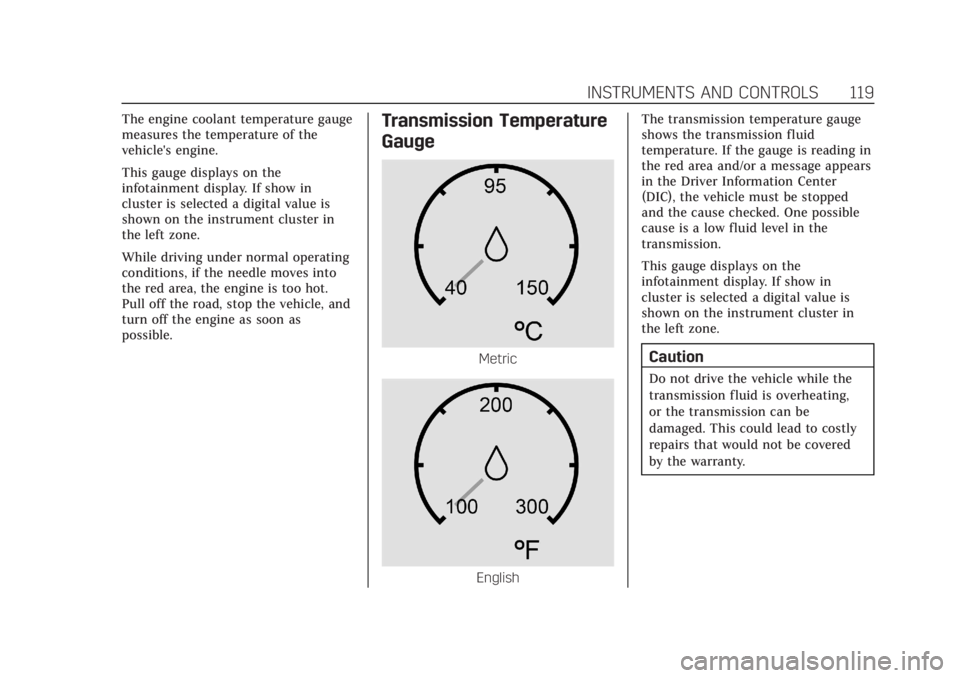
possible.Transmission Temperature
Gauge
Metric
EnglishThe transmission temperature gauge
shows the transmission fluid
temperature. If the gauge is reading in
the red area and/or a message appears
in the Driver Information Center
(DIC), the vehicle must be stopped
and the cause checked. One possible
cause is a low fluid level in the
transmission.
This gauge displays on the
infotainment display. If show in
cluster is selected a digital value is
shown on the instrument cluster in
the left zone.
Caution
Do not drive the vehicle while the
transmission fluid is overheating,
or the transmission can be
damaged. This could lead to costly
repairs that would not be covered
by the warranty.
Page 121 of 508

Cadillac Escalade Owner Manual (GMNA-Localizing-U.S./Canada/Mexico-
15567102) - 2022 - CRC - 11/18/21
120 INSTRUMENTS AND CONTROLS
Voltmeter Gauge
When the ignition is on, the voltmeter
gauge indicates the battery voltage.
This gauge displays on the
infotainment display. If show in
cluster is selected a digital value is
shown on the instrument cluster in
the left zone.
When the engine is running, this
gauge shows the condition of the
charging system. The gauge can
transition from a higher to lower or a
lower to higher reading. This is
normal. If the vehicle is operating
outside the normal operating range,
the charging system light comes on.See
Charging System Light 0123. The
voltmeter gauge may also read lower
when in fuel economy mode. This is
normal.
Readings outside the normal operating
range can also occur when a large
number of electrical accessories are
operating in the vehicle and the
engine is left idling for an extended
period. This condition is normal since
the charging system is not able to
provide full power at engine idle. As
engine speeds are increased, this
condition should correct itself as
higher engine speeds allow the
charging system to create maximum
power.
The vehicle can only be driven for a
short time with the readings outside
the normal operating range. If the
vehicle must be driven, turn off all
accessories, such as the radio and air
conditioner.
Readings outside the normal operating
range indicate a possible problem in
the electrical system. Have the vehicle
serviced as soon as possible.
Seat Belt Reminders
Driver Seat Belt Reminder Light
There is a driver seat belt reminder
light on the center stack, below the
infotainment screen.
When the vehicle is started, this light
flashes and a chime may come on to
remind the driver to fasten their
seat belt.
Then the light stays on solid until the
belt is buckled. This cycle may
continue several times if the driver
remains or becomes unbuckled while
the vehicle is moving.
If the driver seat belt is buckled,
neither the light nor the chime
comes on.
Page 122 of 508

Cadillac Escalade Owner Manual (GMNA-Localizing-U.S./Canada/Mexico-
15567102) - 2022 - CRC - 11/18/21
INSTRUMENTS AND CONTROLS 121
Front Passenger Seat Belt
Reminder Light
The vehicle may have a front
passenger seat belt reminder light
near the passenger airbag status
indicator. SeePassenger Sensing
System 072.
When the vehicle is started, this light
flashes and a chime may come on to
remind passengers to fasten their
seat belt.
Then the light stays on solid until the
belt is buckled. This cycle continues
several times if the front passenger
remains or becomes unbuckled while
the vehicle is moving.
If the front passenger seat belt is
buckled, neither the chime nor the
light comes on. The front passenger seat belt reminder
light and chime may come on if an
object is put on the seat such as a
briefcase, handbag, grocery bag,
laptop, or other electronic device. To
turn off the reminder light and/or
chime, remove the object from the
seat or buckle the seat belt.
Second and Third Row
Passenger Seat Belt Reminder
Light
The vehicle may have second and
third row passenger seat belt reminder
lights.
When the vehicle is started, these
lights come on solid to remind rear
passengers to fasten their seat belt.
Then each light may stay on solid or
flash, and a chime may come on if the
rear passenger remains unbuckled,
or becomes unbuckled, when thevehicle is moving. An X indicates the
seat belt is not buckled. A check mark
indicates the seat belt is buckled.
If the all rear passenger seat belts are
buckled, neither the chime nor the
lights come on.
For information on the front seat belt
reminder lights, see "Driver Seat Belt
Reminder Light" and "Front Passenger
Seat Belt Reminder Light" listed
previously.
The rear passenger seat belt reminder
light and chime may come on if an
object is put on the seat such as a
briefcase, handbag, grocery bag,
laptop, or other electronic device. To
turn off the reminder light and/or
chime, remove the object from the
seat or buckle the seat belt.
Airbag Readiness Light
This light shows if there is an
electrical problem with the airbag
system. It is located on the center
stack, below the infotainment screen.
The system check includes the airbag
sensor(s), the passenger sensing
system, the pretensioners, the airbag
modules, the wiring, and the crash