2022 ACURA TLX radio
[x] Cancel search: radioPage 281 of 656

279
Features
General Information on the Audio System
SiriusXM® Radio Service
1.You need your radio ID ready before regist ering for subscription. To see the ID in
the screen, select channel up/down icons to Ch.0.
2. Have your radio ID ready, and either call or visit the SiriusXM® website to
subscribe.
Switch to the SiriusXM ® mode by using the audio remote controls on the steering
wheel, or through the audio/information screen, and stay in this mode for about 30
minutes until the service is activated. Make sure your vehicle is in an open area with
good reception.
Channel **** not subscribed. Call SiriusXM to subscribe.
*1
You are not subscribed to the channel selected.
Subscription updated:
SiriusXM ® radio is receiving informati on update from the network.
Channel Not Available:
No such channel exits, or the artist or title information is unavailable.
No Signal:
The signal is too weak in the current location.
Check Tuner:
There is a problem with the SiriusXM ® tuner. Contact a dealer.
Check Antenna:
There is a problem with the SiriusXM ® antenna. Contact a dealer.
*1 : ****part is variable characters, and w ill change depending upon where an subscribe.
■Subscribing to SiriusXM® Radio
■Receiving SiriusXM ® Radio
■SiriusXM ® Radio Display Messages
1 Subscribing to SiriusXM ® Radio
Contact Information for SiriusXM ® Radio:
•US: SiriusXM ® Radio at
www.siriusxm.com/subscribenow , or 1-866-635-
2349
•Canada: SiriusXM ® Canada at
www.siriusxm.ca/subscribe-now , or 1-877-209-
0079
1 Receiving SiriusXM ® Radio
The SiriusXM ® satellites are in orbit over the equator;
therefore, objects south of the vehicle may cause
satellite reception interruptions. Sa tellite signals are
more likely to be blocked by tall buildings and
mountains the farther north you travel from the
equator.
You may experience rece ption problems under the
following circumstances:
•In a location with an obstruction to the south of
your vehicle.
•In tunnels•On the lower level of a multi-tiered road
•Large items carried on the roof rack
22 ACURA TLX-31TGV6100.book 279 \b
Page 376 of 656

374
Driving
When Driving
Starting the Engine
1.Make sure the parking brake is applied.
u The parking brake and brake system
indicator comes on for 30 seconds when
you press the electric parking brake
switch.
2. Check that the tr ansmission is in
(P, then
depress the brake pedal.
u Although it is possible to start the vehicle
in
(N, it is safer to start it in (P.
3. Press the ENGINE START/STOP button
without depressing the accelerator pedal.
1Starting the Engine
Keep your foot firmly on the brake pedal when
starting the engine.
The engine is harder to st art in cold weather and in
thinner air found at altit udes above 8,000 feet (2,400
meters).
When starting the engine in cold weather, turn off all
electrical accessories such as the lights, climate
control system, and rear de fogger in order to reduce
battery drain.
If you live in a region where winter is extremely cold,
an engine block heater will improve starting and
warming of the engine. Consult a dealer for details.
If the exhaust system sounds abnormal or you can
smell exhaust gas inside the vehicle, have your vehicle
checked by a dealer. There may be a problem with
the engine or exhaust system.
Bring the keyless remote close to the ENGINE
START/STOP button if the batte ry in the keyless
remote is weak. 2 If the Keyless Remote Battery is Weak
P. 604
The engine may not start if the keyless remote is
subjected to strong radio waves.
Electric Parking
Brake Switch
Brake Pedal
22 ACURA TLX-31TGV6100.book 374 \b
Page 417 of 656

415
uuWhen Driving uBlind spot information System*
Driving
■Blind spot information System On and Off
When you turn the blind spot information
system on and off, do the following.
1.Press the safety support switch.
2. Roll the right selector wheel to the
symbol and push it.
u The message appears on the multi-
information display when the system
turns on or off.
u A check mark appears in the box and the
color of the symbol changes green
when the system is on. The check mark
disappears and the color of the
symbol changes gray when the system is
off.
The blind spot information system is in the
previously selected on (checked) or off
(unchecked) setting eac h time you start the
engine.1 Blind spot information System*
Blind spot information sy stem may be adversely
affected when:
•Objects (guard rails, poles, trees, etc.) are detected.
•An object that does not re flect radio waves well,
such as a motorcycle, is in the alert zone.
•Driving on a curved road.
•A vehicle is moving from a far lane to the adjacent
lane.
•The system picks up external electrical interference.
•The rear bumper or the sensors have been
improperly repaired or the rear bumper has been
deformed.
•The orientation of the sensors has been changed.•In bad weather (Heavy rain, snow, and fog).
•Making a turn at an intersection.
•Driving on a bumpy road.•Making a short turn that slightly tilts the vehicle.
For a proper blind spot in formation system operation:
•Always keep the rear bumper corner area clean.•Do not cover the rear bumper corner area with
labels or stickers of any kind.
•Take your vehicle to a dealer if you need the rear
bumper corner area or the radar sensors to be
repaired, or the re ar bumper corner area is strongly
impacted.
Right Selector Wheel
Safety Support Switch
* Not available on all models
22 ACURA TLX-31TGV6100.book 415 \b
Page 503 of 656
Continued501
uuParking Your Vehicle uCross Traffic Monitor*
Driving
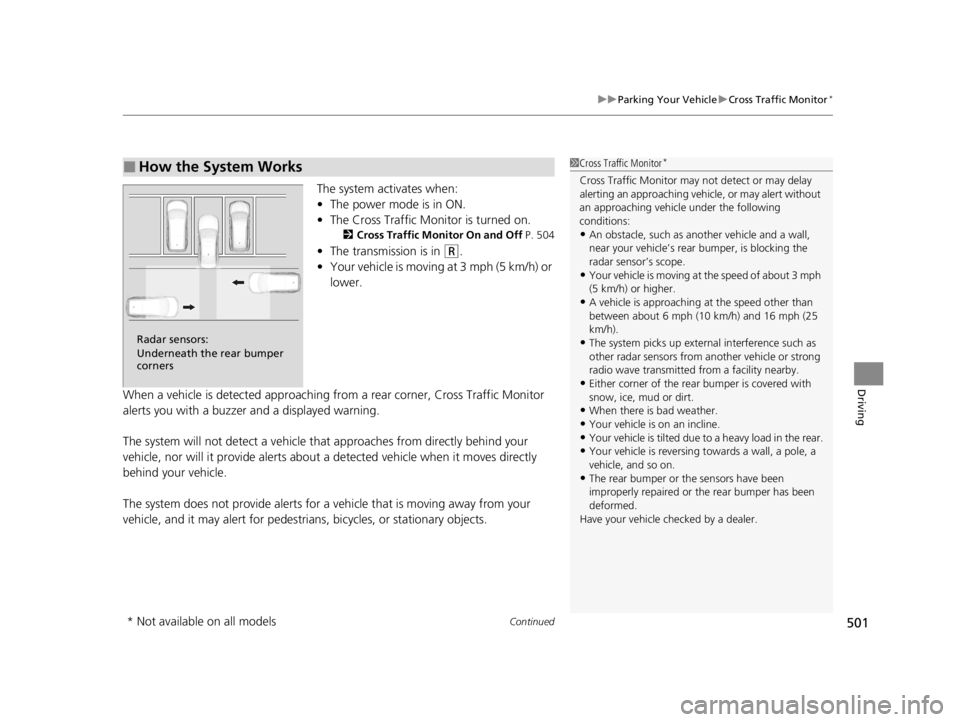
The system activates when:
• The power mode is in ON.
• The Cross Traffic Monitor is turned on.
2 Cross Traffic Monitor On and Off P. 504
•The transmission is in (R.
• Your vehicle is moving at 3 mph (5 km/h) or
lower.
When a vehicle is detected approaching from a rear corner, Cross Traffic Monitor
alerts you with a buzzer and a displayed warning.
The system will not detect a vehicle that approaches from directly behind your
vehicle, nor will it provide alerts about a detected vehicle when it moves directly
behind your vehicle.
The system does not provide alerts for a vehicle that is moving away from your
vehicle, and it may alert for pedestrians, bicycles, or stationary objects.
■How the System Works1 Cross Traffic Monitor*
Cross Traffic Monitor may not detect or may delay
alerting an approach ing vehicle, or may alert without
an approaching vehicle under the following
conditions:
•An obstacle, such as a nother vehicle and a wall,
near your vehicle’s rear bumper, is blocking the
radar sensor’s scope.
•Your vehicle is moving at the speed of about 3 mph
(5 km/h) or higher.
•A vehicle is approaching at the speed other than
between about 6 mph (10 km/h) and 16 mph (25
km/h).
•The system picks up external interference such as
other radar sensors from an other vehicle or strong
radio wave transmitted fr om a facility nearby.
•Either corner of the rear bumper is covered with
snow, ice, mud or dirt.
•When there is bad weather.
•Your vehicle is on an incline.
•Your vehicle is tilted due to a heavy load in the rear.•Your vehicle is reversing towards a wall, a pole, a
vehicle, and so on.
•The rear bumper or the sensors have been
improperly repaired or the rear bumper has been
deformed.
Have your vehicle checked by a dealer.
Radar sensors:
Underneath the rear bumper
corners
* Not available on all models
22 ACURA TLX-31TGV6100.book 501 \b
Page 625 of 656

623
uuFuses uFuse Locations
Continued
Handling the Unexpected
Located under the dashboard.
Fuse locations are shown on the label on
the under panel.
Locate the fuse in question by the fuse
number and label number.
■Circuit protected and fuse rating
■Driver’s Side Interior Fuse Box
Fuse Label
Fuse Box
Circuit ProtectedAmps
1−−
2L SIDE DOOR UNLOCK10 A
3R SIDE DOOR UNLOCK10 A
4ACC10 A
5−−
6SRS10 A
7−−
8R H/L HI10 A
9SMART10 A
10POWER DISTRIBUTION
MODULE10 A
11L SIDE DOOR LOCK10 A
12DR DOOR LOCK(10 A)
13R SIDE DOOR LOCK10 A
14A/C10 A
15DRL10 A
16CTR ACC SOCKET20 A
17HAZARD10 A
18L H/L HI10 A
19HORN15 A
20IMG10 A
21DR DOOR UNLOCK(10 A)
22−−
23−−
24−−
25−−
26−−
27−−
28−−
29FUSE BOX ENGINE COMPARTMENT20 A
30−−
Circuit ProtectedAmps
31−−
32RADIO15 A
33−−
34−−
35ACG10 A
36METER10 A
37OPTION10 A
38MOONROOF20 A
39−−
40−−
41−−
42HEATED STEERING WHEEL*(10 A)
43−−
44−−
45TCU10 A
46SRS10 A
47−−
48SBW10 A
49DOOR LOCK20 A
50FRONT ACC SOCKET20 A
51REAR R P/W20 A
52RR L P/W20 A
53AS P/W20 A
54DRIVER P/W20 A
55−−
Circuit ProtectedAmps
* Not available on all models
22 ACURA TLX-31TGV6100.book 623 \b
Page 633 of 656

631
Information
This chapter includes your vehicle’s specifications, locations of identification numbers, and other
information required by regulation.
Specifications .................................... 632
Identification Numbers Vehicle Identification Number (VIN), Engine Number, and Transmission
Number ......................................... 634
Devices that Emit Radio Waves ....... 635
Reporting Safety Defects ................. 636Emissions Testing
Testing of Readiness Codes.............. 637
Warranty Coverages ........................ 640
Authorized Manuals ......................... 643
Client Service Information ............... 644
22 ACURA TLX-31TGV6100.book 631 \b
Page 637 of 656

635
Information
Devices that Emit Radio Waves
Each radio frequency device installed in the vehicle conforms to the requirements
and standards of the regulation listed below:
As required by the FCC:
This device complies with Part 15 of the FCC rules. Operation is
subject to the following two cond itions: (1) This device may not
cause harmful interferenc e, and (2) this device must accept any
interference received, including interference that may cause
undesired operation.
Changes or modifications not ex pressly approved by the party
responsible for compliance could void the user’s authority to
operate the equipment.
This device complies with Industry Canada licence-exempt RSS standard(s).
Operation is subject to the following two conditions: (1) this device may not cause
interference, and (2) this device must acce pt any interference, including interference
that may cause undesired operation of the device.
22 ACURA TLX-31TGV6100.book 635 \b
Page 647 of 656

Index
645
Index
Index
A
ABS (Anti-lock Brake System).................. 492
Accessories and Modifications ................ 576
Accessory Power Sockets ......................... 189
AcuraLink® .............................................. 358
AcuraWatch
TM.................................... 23, 416
Adaptive Cruise Control (ACC) with Low Speed Follow ............................ 93, 431
Adding the Coolant ................................. 547
Additives Coolant .......................................... 544, 546
Engine Oil ............................................... 536
Washer ................................................... 549
Additives, Engine Oil ............................... 536
Adjusting Armrest .................................................. 179
Front Seats.............................................. 168
Head Restraints ....................................... 174
Mirrors.................................................... 165
Steering Wheel ....................................... 164
Agile Handling Assist ............................... 407
Air Conditioning System (Climate Control
System) .................................................... 197
Defrosting the Windshield and Windows .............................................. 199
Dust and Pollen Filter .............................. 570
Sensors ................................................... 201
Synchronized Mode ................................ 200
Air Pressure ...................................... 556, 633
Airbags ....................................................... 43
Advanced Airbags ..................................... 49 Airbag Care ............................................... 60
Driver’s Knee Airbag .................................. 51
Event Data Recorder .................................... 0
Front Airbags (SRS) .................................... 46
Indicator .............................................. 57, 88
Passenger Airbag Off Indicator .................. 58
Sensors ...................................................... 43
Side Airbags .............................................. 54
Side Curtain Airbags .................................. 56
AM/FM Radio ............................................ 238
Android Auto ............................................ 272
Anti-lock Brake System (ABS) .................. 492
Indicator .................................................... 88
Apple CarPlay ........................................... 268
Armrest ..................................................... 179
AT&T Hotspot ........................................... 266
Audio Remote Controls ............................ 208
Audio System ............................................ 204
Adjusting the Sound ................................ 233
Audio/Information Screen ........................ 214
Auxiliary Input Jack .................................. 206
Display Setup ........................................... 234
Error Messages ........................................ 276
General Information ................................ 279
Home Screen ........................................... 218
How to Update Wirelessly ........................ 227
How to Update with a USB Device ........... 231
How to use Siri Eyes Free ......................... 267
iPod ......................................................... 255
Limitations for Manua l Operation ............ 234
MP3/WMA/AAC ...................................... 258 Reactivating ............................................ 207
Remote Controls ..................................... 208
Security Code .......................................... 207
Status Area ............................................. 223
System Updates....................................... 227
Theft Protection ...................................... 207
True Touchpad Interface.......................... 211
USB Flash Drives .............................. 258, 281
USB Ports ................................................ 205
Audio/Information Screen ....................... 214
Authorized Manuals ................................ 643
Auto Door Locking/Unlocking ................. 135
Auto High-Beam ....................................... 154
Indicator.................................................... 90
Auto Idle Stop .......................................... 398
OFF Button .............................................. 400
Automatic Brake Hold ............................. 490
Indicator............................................ 82, 490
Automatic Folding Door Mirror .............. 167
Automatic Lighting .................................. 151
Automatic Transmission ........................... 381
Creeping ................................................. 381
Kickdown ................................................ 381
Operating the Shift Button ................ 20, 384
Shifting ................................................... 382
Auxiliary Input Jack .................................. 206
Average Fuel Economy ............................ 103
22 ACURA TLX-31TGV6100.book 645 \b