Page 223 of 656
Continued221
uuAudio System Basic Operation uAudio/Information Screen
Features
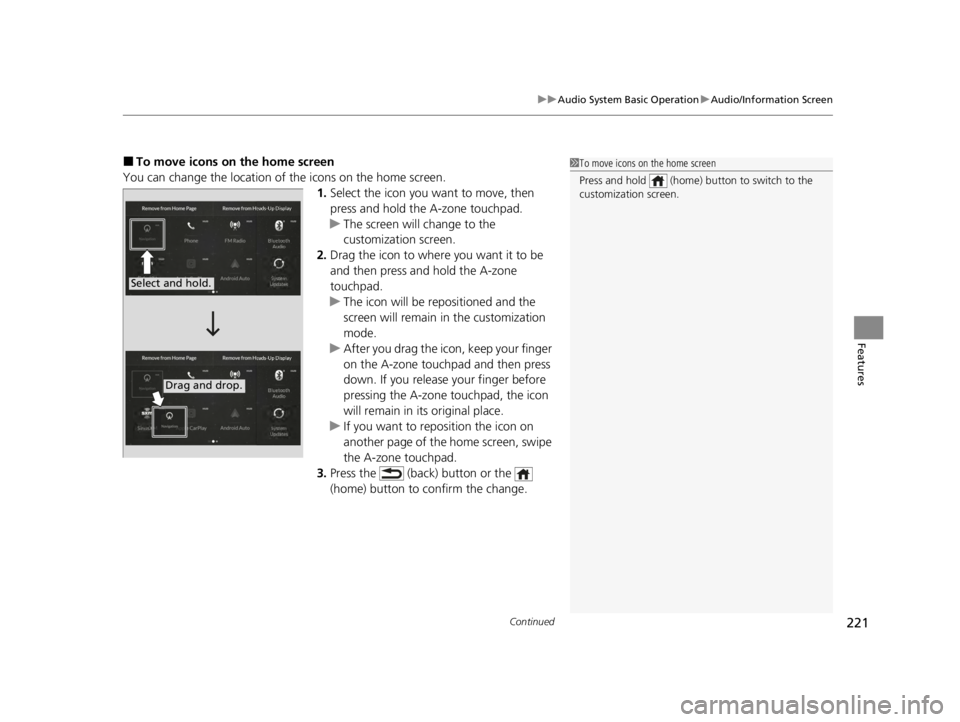
■To move icons on the home screen
You can change the location of the icons on the home screen. 1.Select the icon you wa nt to move, then
press and hold the A-zone touchpad.
u The screen will change to the
customization screen.
2. Drag the icon to where you want it to be
and then press and hold the A-zone
touchpad.
u The icon will be repositioned and the
screen will remain in the customization
mode.
u After you drag the icon, keep your finger
on the A-zone touchpad and then press
down. If you release your finger before
pressing the A-zone touchpad, the icon
will remain in its original place.
u If you want to reposition the icon on
another page of the home screen, swipe
the A-zone touchpad.
3. Press the (back) button or the
(home) button to confirm the change.1To move icons on the home screen
Press and hold (home) button to switch to the
customization screen.
Select and hold.
Drag and drop.
22 ACURA TLX-31TGV6100.book 221 \b
Page 224 of 656

uuAudio System Basic Operation uAudio/Information Screen
222
Features
■To remove icons from the home screen and the head-up display*
You can remove icons from the home screen and the head-up display.
1.From the home screen, select the icon that
you want to remove, then press and hold
the A-zone touchpad.
u The screen will switch to the
customization screen.
2. Go to Remove from Home Page or
Remove from Heads-Up Display
* and
press the A-zone touchpad.
u The icon will be removed from the home
screen or the head-up display and the
screen will remain in the customization
mode.
3. Press the (back) button or the
(home) button to confirm the change.
You can also remove an icon from the home
screen or head-up disp lay directly from the All
Apps list.
1. Go to an item you want to remove, then
press and hold the A-zone touchpad.
2. Go to Remove from Home Page or
Remove from Heads-Up Display
* and
press the A-zone touchpad.
u The icon will be removed from the home
screen or the head-up display.
3. Press the (back) button or the
(home) button to confirm the change.
1To remove icons from the home screen and the head-up display*
Removing an icon from the home screen does not
result in the deletion of the corresponding app.
Press and hold (home) button to switch to the
customization screen.
If you remove a shortcut icon from the home screen,
the function of selected ic o n i s a l s o r emoved from the
head-up display.
Models with head-up displaySelect and hold.
* Not available on all models
22 ACURA TLX-31TGV6100.book 222 \b
Page 225 of 656
223
uuAudio System Basic Operation uAudio/Information Screen
Continued
Features
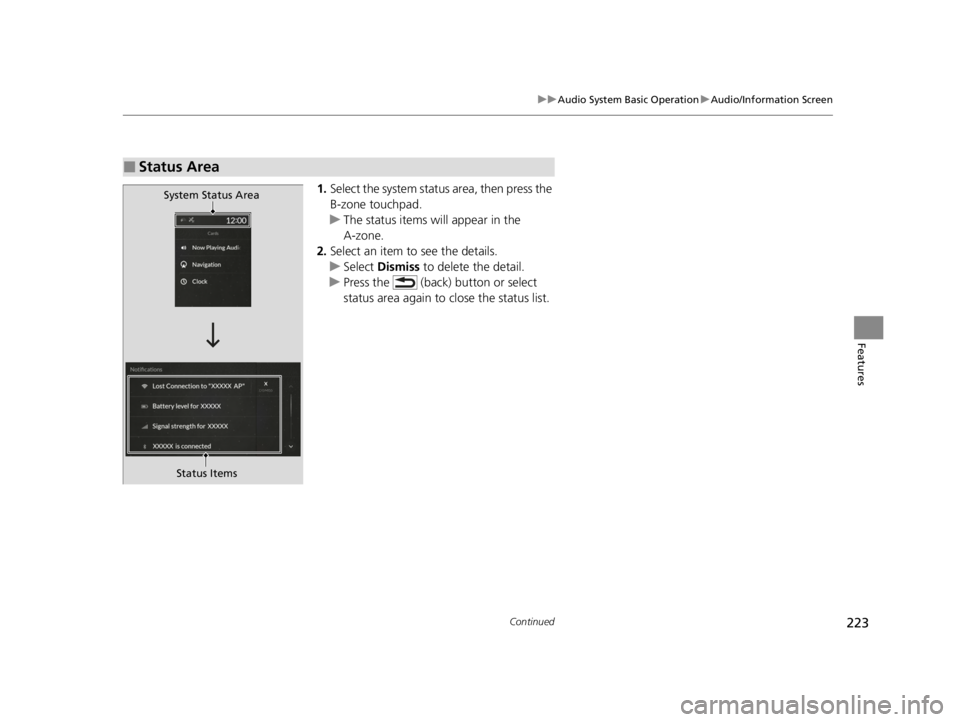
1. Select the system status area, then press the
B-zone touchpad.
u The status items will appear in the
A-zone.
2. Select an item to see the details.
u Select Dismiss to delete the detail.
u Press the (back) button or select
status area again to close the status list.
■Status Area
System Status Area
Status Items
22 ACURA TLX-31TGV6100.book 223 \b
Page 226 of 656

uuAudio System Basic Operation uAudio/Information Screen
224
Features
You can use the handwriting input feature by using the A-zone touchpad when
searching for various audio system items (e.g., music, navigation route, phonebook
contact).
1.Write letters or numbers using the A-zone
touchpad.
u Search results appear on the screen.
2. Press the A-zone touchpad.
u If you re-enter letters or numbers, select
the input area on the upper side of the
screen.
3. Select a desired item, and then press the
A-zone touchpad.
■Searching Screen1Searching Screen
Delete a letter or number
Swipe left on the A-zone t ouchpad to delete a letter
or a number.
Input a space
Swipe right on the A-zone touchpad to input a space.
You can input lett ers or numbers by using the on-
screen keyboard. Select KEYBOARD on the upper
right of the screen.
When you return to the handwriting i nput screen,
select HANDWRITING .
You can input lett ers or numbers by using voice
control operation. Select the icon on the upper
left of the screen.
Input Area
22 ACURA TLX-31TGV6100.book 224 \b
Page 227 of 656
225
uuAudio System Basic Operation uAudio/Information Screen
Continued
Features
You can edit, show, or hide the audio, phone and navigation* contents on the multi-
information display or the head-up display*.
■To add or remove an items 1.Press the APPS button on the steering
wheel.
2. Roll down the left selector wheel to select
Customize Apps .
3. Move the left selector wheel left to select
Add/Remove.
4. Select an item then press the left selector
wheel.
u The checked items are displayed on the
multi-information display or the head-up
display
*.
■Customizing the Meter or Head-Up Display*
On Multi-Information Display
On Head-Up Display
*
* Not available on all models
22 ACURA TLX-31TGV6100.book 225 \b
Page 228 of 656
226
uuAudio System Basic Operation uAudio/Information Screen
Features
■Editing order
1.Press the APPS button on the steering
wheel.
2. Using the left selector wheel, scroll to
Customize Apps and then press the
selector wheel.
3. Move the selector wheel to the right to go
to the Reorder screen.
4. Scroll to an item you want to move, then
press the left selector wheel.
5. Scroll to where you want to move the
contents, then press the left selector wheel.
On Multi-Information Display
On Head-Up Display
*
* Not available on all models
22 ACURA TLX-31TGV6100.book 226 \b
Page 229 of 656
227
uuAudio System Basic Operation uSystem Updates
Continued
Features
System Updates
The audio system’s firmware can be updated with the telematics control unit (TCU)
through the subscrip tion-based service.
■Wireless connection mode setup
1.Press the (home) button.
2. Select System Updates .
3. Select MENU .
4. Select Connection Setup.
5. Select Change Mode .
6. Select Network .
u The display will return to the network list.
7. Select an access point from the network list,
then select OK.
u If the access point requires a password,
enter a password.
■How to Update Wirelessly
22 ACURA TLX-31TGV6100.book 227 \b
Page 230 of 656
228
uuAudio System Basic Operation uSystem Updates
Features
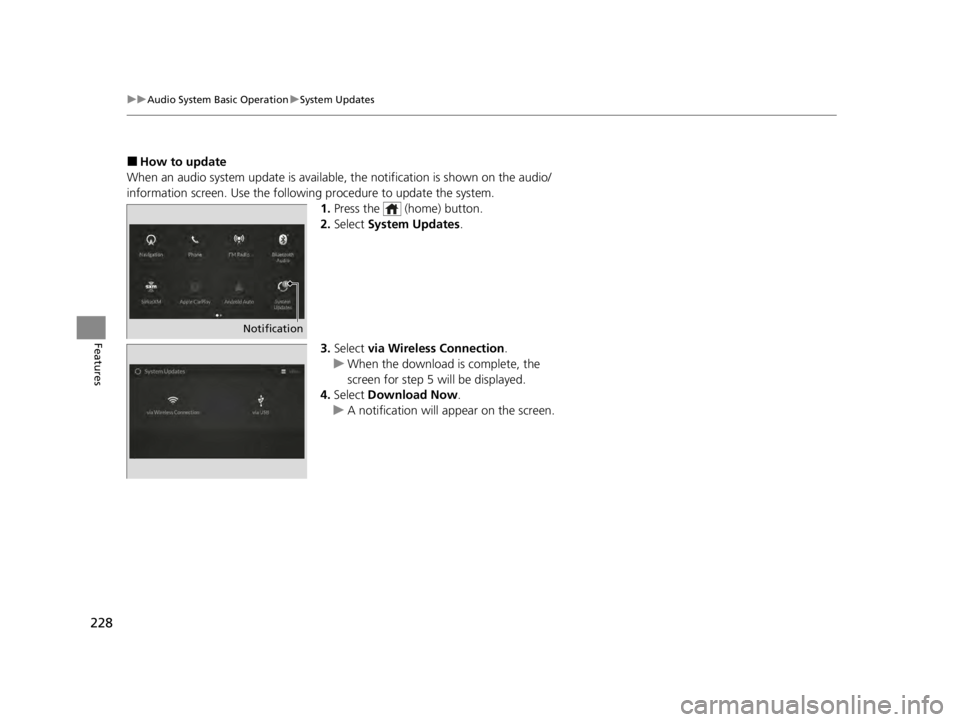
■How to update
When an audio system update is available, the notification is shown on the audio/
information screen. Use the following procedure to update the system.
1.Press the (home) button.
2. Select System Updates .
3. Select via Wireless Connection .
u When the download is complete, the
screen for step 5 will be displayed.
4. Select Download Now .
u A notification will appear on the screen.
Notification
22 ACURA TLX-31TGV6100.book 228 \b